
Squarespace Templates for Local Service Businesses
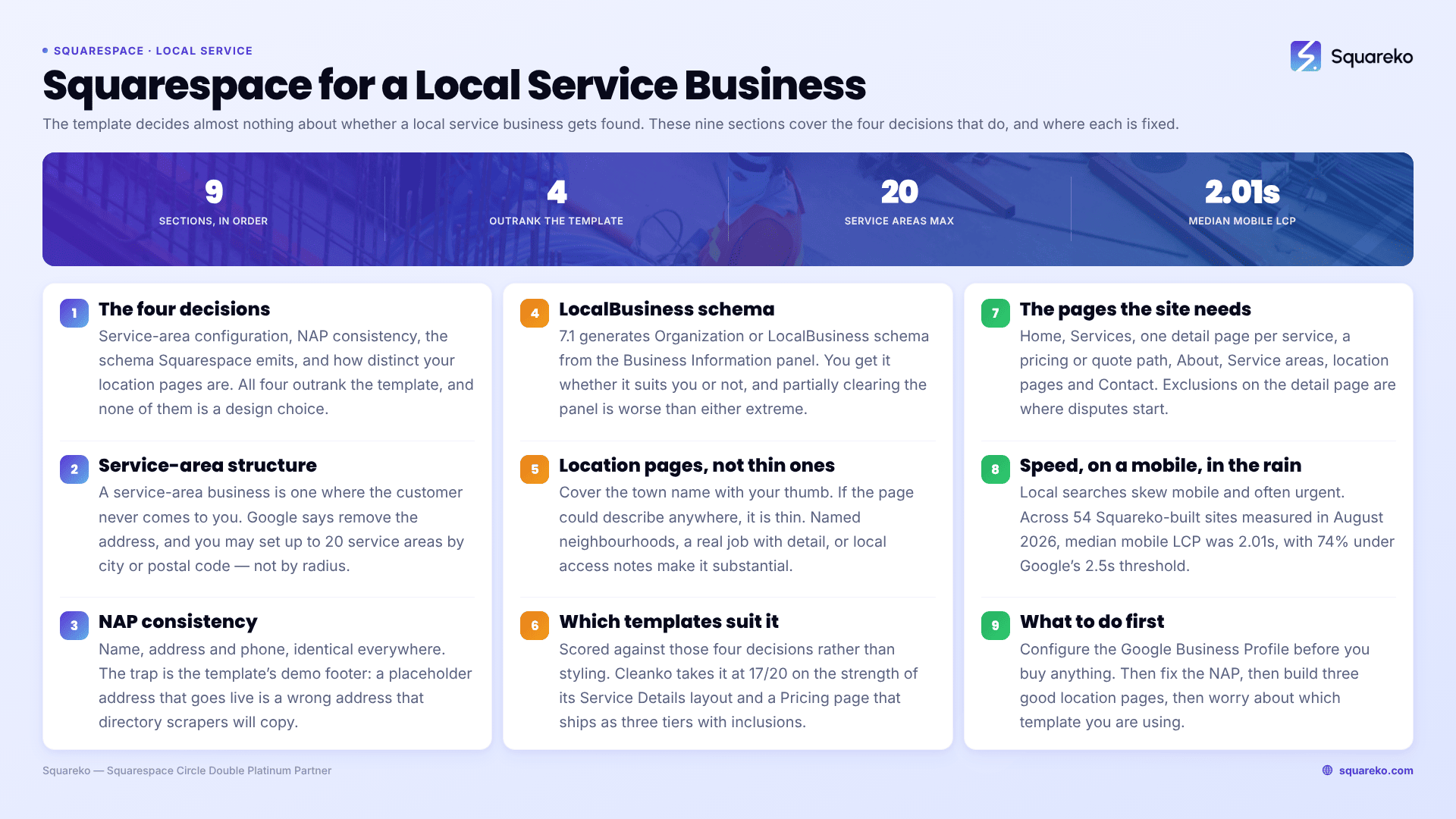
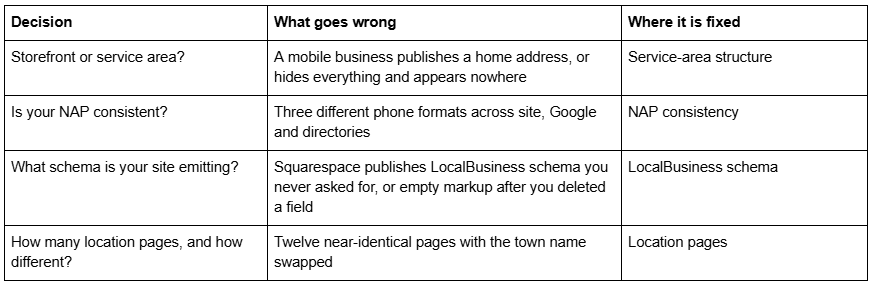
The short answer: For a local service business, the template decides almost nothing about whether you get found. Four structural things do — how you configure your service area, whether your name, address and phone are consistent everywhere, whether Squarespace is emitting LocalBusiness schema you actually want, and whether your location pages say anything distinct. Pick a template that gives you room for those, then spend your time on them rather than on the design.
This applies to any trade sold by geography — cleaning, plumbing, electrical, landscaping, pest control, mobile grooming, van-based repair. The examples lean on cleaning because that is the cluster this guide sits in, but the structure is the same across all of them.
The four decisions that outrank the template
Service-area business structure on Squarespace
A service-area business is one where the customer never comes to you. Google's rules on this are explicit and worth reading directly rather than second-hand: "If you don't serve customers at your business address, remove your address from your Business Profile." You may set up to 20 service areas, defined by city, postal code or another named area — not by radius — and Google states the boundaries of your overall area "shouldn't be more than about 2 hours of driving time from where your business is based."
That last constraint catches out ambitious local service businesses constantly. A cleaning company listing forty towns across three counties is not covering more ground in search; it is diluting a profile Google will trim anyway.
The Squarespace side is simpler than most people expect, and slightly counter-intuitive. Squarespace's Business Information panel (Settings → Selling → Business Information) holds a contact phone number, contact email, physical location and business hours. Squarespace's own documentation frames the address as being for credibility, avoiding spam filters on transactional email and meeting legal requirements such as the CAN-SPAM Act — it says nothing about local search.
For a service-area business the practical rule is this: put a city and region in your site's visible contact block, put your phone number everywhere, and keep your street address off the public site if it is your home. Then handle geography in text — "serving Bristol, Bath and the surrounding villages" — because Google reads text and cannot read a map pin.
NAP consistency for a local service business
NAP is name, address and phone. The requirement is boring and the failure mode is common: the same business appears as "Bright & Co Cleaning" on Google, "Bright and Co. Cleaning Ltd" in the site footer, and "Bright Co Cleaning" on three directories, with the phone number formatted differently on each.
Two Squarespace-specific traps make this worse than it needs to be.
The template's demo footer is a fake NAP. Every premium template ships with placeholder contact details in the footer and on the contact page, and they look plausible enough to survive launch. Cleanko's demo footer carries a fictional California address and a misspelled example email; other templates in the range carry similar placeholders. If a placeholder address goes live, you have published a wrong address that directory scrapers will happily copy. Search the whole site for the demo phone number and email before launch, not just the pages you edited.
Squarespace's footer is a single reusable block across the site, which is an advantage here — set the NAP once, correctly, and it is consistent by construction on every page. The exception is any contact detail hard-typed into a page body, which is where inconsistencies breed.
Write the name, address format and phone format down once, then use exactly that string everywhere: the site footer, Google Business Profile, Companies House or your equivalent registry, invoices, and every directory. There is more depth on this in our Squarespace local SEO guide.
LocalBusiness schema on Squarespace 7.1
Squarespace 7.1 emits several types of structured data automatically — WebSite, Article on blog posts, Product on commerce items, Event on event items, and Organization or LocalBusiness generated from the Business Information panel. You do not add it, and you cannot easily switch it off.
Two consequences matter for a local service business.
First, if you fill in Business Information, you get LocalBusiness schema whether it suits you or not. For a genuine service-area business with a real premises that is fine. For a sole trader working from home it publishes a residential address in machine-readable form, which is a different thing from mentioning a town on your contact page.
Second, partially clearing the panel is worse than either extreme. Deleting location fields after they have been saved can leave empty structured-data properties behind, which Google Search Console will flag as critical issues on a LocalBusiness item. If you decide to remove the address, remove it properly and then re-test — do not leave half a record.
If you want richer LocalBusiness markup than Squarespace generates — service area, opening hours specification, price range, areas served — it goes in a Code Block in the page body, HTML mode, because Squarespace 7.1 has no per-page header injection on blog posts. Our Squarespace Local Business schema guide covers the property set and the duplicate-node problem in full.
Location pages that are not thin content
This is where most local service business sites fail, and no template prevents it.
A location page earns its place only if it contains something that is true of that location and not of the others. The test is simple: cover the town name with your thumb. If the page could describe anywhere, it is thin content and Google will treat it that way.
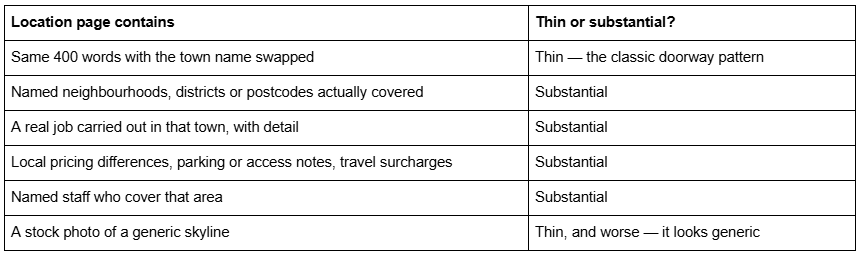
The practical rule for a small local service business is fewer, better pages. Three location pages with genuine local content outperform fifteen templated ones. Build the fourth when you have a fourth town's worth of real material.
Structurally, this argues for a template with a repeatable detail-page pattern already built, because duplicating an existing well-designed page in Squarespace 7.1 is one click, while building the pattern from scratch in Fluid Engine and then repeating it is most of a day.
Which Squarespace templates suit a local service business
Scored against the four decisions above rather than on styling. Each criterion is 1–5, maximum 20.
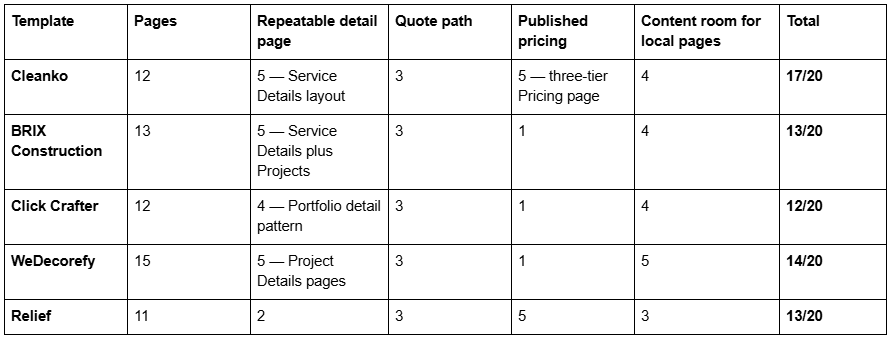
Cleanko takes it for most local service businesses on the strength of two pages. Its Service Details page is a complete single-service layout with a scope breakdown and an add-ons section, which duplicates cleanly into either a per-service page or a per-location page. Its Pricing page ships as three tiers with inclusions — the thing almost no local service business publishes and the one that most reliably wins a comparison. Twelve pages: Home, Home 2, About, Services, Blog, Portfolio, Contact Us, FAQs, Pricing, Service Details, 404 and a Style Guide. The Cleanko demo is worth walking before you decide.
Worst for: businesses with no visual output. Cleanko's Portfolio page is organised around before-and-after job types, which is powerful for cleaning, landscaping and renovation and dead weight for something like mobile IT repair.
WeDecorefy is the pick if you genuinely run many locations, because at fifteen pages with individual Project Details pages it has the most room to expand. BRIX Construction suits trades selling on specification. Relief suits appointment-based local services that publish package prices. Note that the published Live Demo links for BRIX Construction and WeDecorefy currently return HTTP 401 because the password parameter is missing from the URL — ask before buying rather than assuming the demo is down.
Squarespace's own free templates remain a legitimate option, and independent reviewers most often name Clove, Oranssi, Cedar, Ortiz, Reseda and Myhra for service businesses. They give you a design and a small page count. What they do not give you is a pre-built pricing layout or a repeatable service-detail page, which is most of the work.
The pages a local service business site actually needs
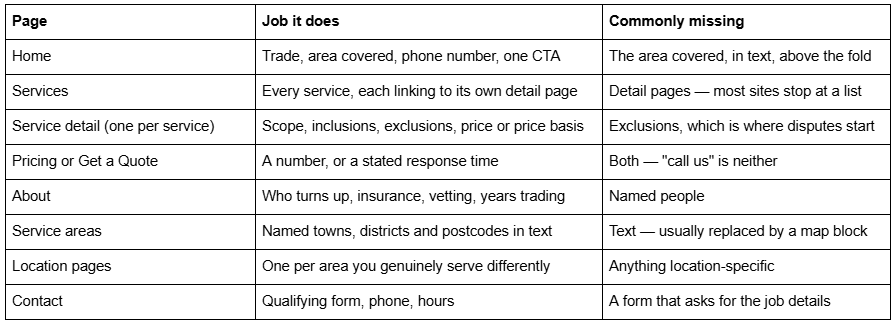
Two Squarespace mechanics to get right on that list. Contact forms need a storage destination or they simply do not work — Squarespace's documentation states that "at least one storage option is required per form. If you don't select a storage option, the form won't have a place to send submissions, and visitors won't be able to submit the form." And if you are building on a Squarespace trial site, form submission emails are not sent unless the site owner is a Circle member, so connect the form to Google Drive during the build or you will think it is broken.
Speed, on a mobile, in the rain
Local service searches skew heavily mobile and often urgent. A blocked drain, a cancelled cleaner, a broken boiler. The site does not need to be fast in the abstract; it needs to render a phone number quickly on a poor connection.
Across 54 Squareko-built client sites measured in August 2026 (Playwright/Chromium lab test, cloud datacentre, unthrottled, single run per site, load-only CLS — lab data, not field data), median mobile LCP was 2.01s, with 74% under Google's 2.5s "good" threshold, and median page weight was 3.0 MB across 93 requests. That page weight is driven overwhelmingly by images. Squarespace's CDN serves WebP unconditionally, so format is handled — dimensions are not. Upload at 1500–2500px wide, and name files properly before upload, because Squarespace filenames cannot be changed afterwards.
What to do first
Configure the Google Business Profile before you buy anything. It is free, it is the largest single source of local service enquiries, and it will tell you within a fortnight whether your positioning is right. Then fix the NAP, then build three good location pages, then worry about the template.
If you get to the template stage and want the service-detail and pricing pages already built rather than assembled section by section, Cleanko and the rest of our premium Squarespace templates are $249, installed for you rather than delivered as files — including onto an existing live site, which takes around 48 hours as a manual process. That is worth most when you are moving an established local business onto a new site and cannot afford downtime on a phone number that is already ranking.
If your Google Business Profile is thin and your site already converts, spend the money on photography of real jobs instead. It moves more.
FAQ
-
Yes. Squarespace 7.1 generates Organization or LocalBusiness structured data from the Business Information panel, alongside automatic WebSite, Article, Product and Event markup. You do not add it. Clearing location fields after saving can leave empty properties that Google Search Console flags, so remove the record properly or leave it complete.
-
Not if it is your home. Google's guidance for service-area businesses is to remove the address from the Business Profile if you do not serve customers there, and the same logic applies to the site. Publish a city, a region and a phone number, and describe your coverage in text rather than only with a map block.
-
Up to 20, defined by city, postal code or another named area rather than by radius. Google also states the overall boundary should not exceed roughly two hours of driving time from your base. Listing forty towns does not extend reach; it dilutes a profile Google will trim anyway.
-
Fewer than you think. Three pages with named neighbourhoods, real jobs and local pricing detail outperform fifteen pages that differ only by town name. The test: cover the town name with your thumb — if the page could describe anywhere, it is thin content.
-
Settings → Selling → Business Information. It holds contact phone number, contact email, physical location and business hours. Squarespace's own documentation frames the address as serving credibility, email deliverability and legal compliance rather than local search, but the panel is what feeds the automatic LocalBusiness schema.
-
No. Free Squarespace templates such as Clove, Oranssi, Cedar and Ortiz will rank identically. What a premium template buys is a page set already built — repeatable service-detail pages and a pricing layout — which saves build time rather than earning rankings.

Author Bio
I'm Walid Hasan, a Certified Squarespace Expert and Squarespace Circle Platinum Partner with over 12 years of hands-on experience designing and optimizing high-performing websites. Over the years, I've had the privilege of building more than 2,000 Squarespace websites for clients around the world, always focusing on clean design, strong user experience, and conversion-driven results.
