
Why Can't I Change My Squarespace Template?
Almost always because you are on Squarespace 7.1, where the feature does not exist. Squarespace's own documentation says it plainly: "it's not possible to change templates on a version 7.1 site." There is no Template panel to find, nothing has been moved, and no setting will bring it back. Every 7.1 site belongs to one shared template family. Four other causes exist, and they account for the remaining minority of cases.
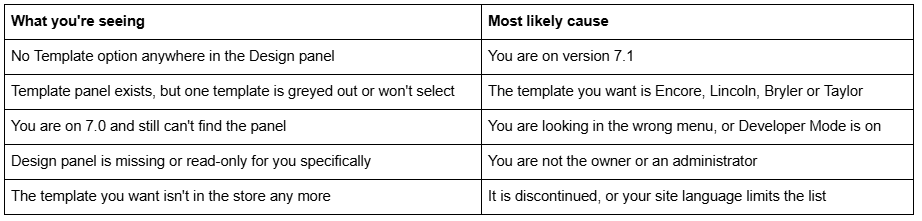
Check the diagnostic table first — most people are done in thirty seconds.
Diagnostic table
Cause 1 — You are on Squarespace 7.1
This is the answer for the overwhelming majority of people searching this question, and it is worth stating without hedging: Squarespace 7.1 has no template switching, and never did.
Confirm it in ten seconds. Open the Pages panel and scroll to the very bottom. If it shows a version 7.1 label and no template name at all, you are on 7.1. Version 7.0 sites print the version and the template name — Brine, Bedford, Pacific, York.
Squarespace's reasoning is stated in the documentation: "We designed version 7.1 to remove the need to switch templates, so the template you choose when creating a 7.1 site is only meant as a starting point. All version 7.1 sites are part of the same template family, with the same features and style options."
The practical consequence is better news than it sounds. A 7.1 "template" is a set of demo pages, section layouts, a colour palette and a font pack — all of which every other 7.1 site already has. Anything you saw in the 7.1 template store, your site can already do. You change the look through Site styles, themes and pre-built section layouts, not through a template swap. The routes are laid out in can you change templates in Squarespace 7.1?.
For context on how common this is: across 54 Squareko-built client sites we measured in August 2026 (Playwright/Chromium lab test, cloud datacenter, unthrottled, single run per site), 53 of 54 run Squarespace 7.1. If your site was built in the last four or five years, this is almost certainly your answer.
Cause 2 — Your Squarespace 7.0 template is one of the four you cannot leave
Four version 7.0 templates are excluded from switching entirely. If your site runs one of them, the Template panel exists but the switch does not complete.
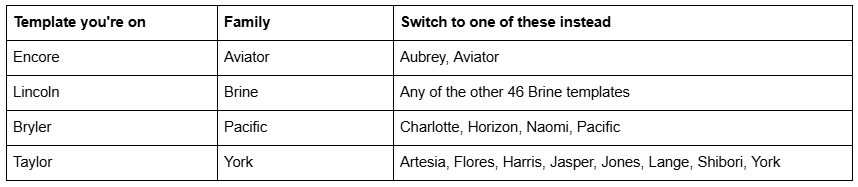
There is no setting that unlocks this. The workaround is the same in every case and it costs you nothing: switch to a sibling template in the same family. Templates in a family share one codebase and identical features, so a Lincoln site moving to another Brine template keeps every structural feature it had. From there you can switch onward to any template you like.
The family system in full — all 22 families and what each supports — is in how to change a Squarespace 7.0 template.
Cause 3 — You are looking in the wrong menu, or Developer Mode is on
On Squarespace 7.0 the panel is at Design → Template. It lists every template you have installed, with the live one at the top. It is not under Website Tools, not under Settings, and not under Pages. If you have only ever used 7.1, the Design panel looks different enough that it is easy to miss.
If you are definitely on 7.0 and the Template option still is not there, check Developer Mode. Squarespace states that "in Developer Mode, you can't switch templates or receive updates." Turn it off at Settings → Developer Tools → Developer Mode — but read the warning first. Disabling Developer Mode discards any changes made through the Developer Platform, so pull your site's template files down to your machine via Git or SFTP before you touch it.
Developer Mode is rare on sites owned by non-developers, but it is very common on sites inherited from an agency. If you took over a 7.0 site and the Template panel is missing, this is the second thing to check after your version.
Cause 4 — You do not have owner or administrator permission
Squarespace restricts design changes by contributor role. The documentation is explicit: "only the owner and administrators can make design changes to a site." Website editors, store managers, comment moderators, analytics and billing contributors cannot open the Design panel at all, let alone switch a template.
Confirm it in one place: open the Permissions & Ownership panel at account.squarespace.com and find your own account in the Contributors list. If your role is anything other than Owner or Administrator, that is your answer.
The fix is not something you can do yourself — only the owner and existing administrators can edit contributor permissions, so the site owner has to raise your level in the same panel or make the change on your behalf. This one turns up constantly on client sites where a designer was invited as a website editor for content updates and later asked to do design work.
Cause 5 — The template is discontinued, or your site language is limiting the list
Two things narrow the template store without any error message.
Discontinued templates. Squarespace has retired more than 35 version 7.0 templates, including the entire Marquee family and names like Amelie, Atelier, Devlin, Hudson, Jensen, Metro and Peak. A discontinued template keeps working — "your site will stay online, and you can continue to use and edit the template as you've always been able to" — but it "is no longer available for installation." If you uninstalled it, it is gone. If you never uninstalled it, it is still sitting in your Template panel and you can set it live again at any time.
Site language. The template list you see depends on your site's language setting. Only Julia, Kent and Om (Montauk family), Charlotte, Naomi and Pacific (Pacific family), and all Bedford, Brine and York templates support non-English languages. To reach the full store you change the site language to English first — which also changes built-in visitor-facing text like date formats and form labels, so weigh that before you do it.
What to do once you know which one it is
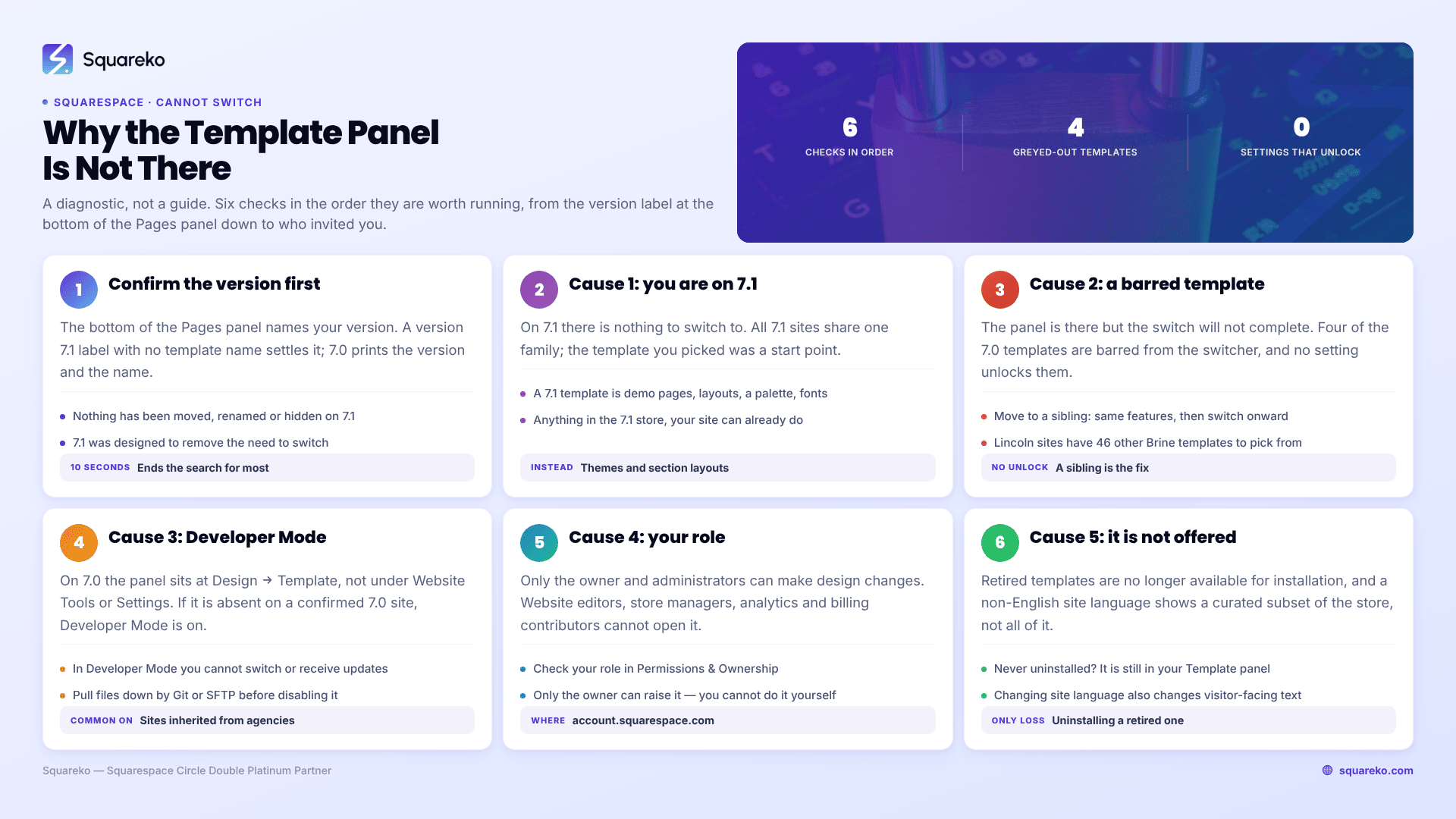
Work down the list: version, excluded template, wrong menu or Developer Mode, permissions, availability. In practice the first check ends the search for most people.
On 7.1 — stop looking for a template and start restyling. Site styles, themes, font packs and pre-built section layouts get you the design you saw, and none of it risks your content.
On 7.0 with an excluded template — move to a sibling in the same family, then onward.
On 7.0 with Developer Mode on — save your files locally, then disable it.
Without admin rights — ask the site owner to raise your role in the Permissions & Ownership panel.
Chasing a discontinued template — check the Template panel before assuming it is gone. Uninstalling was the only thing that could have removed it permanently.
Once you can switch, the safe procedure and the things that break are covered in how to switch templates on Squarespace safely and the wider decision in how to change your Squarespace template.
The case where this stops being self-serve is a 7.1 site whose owner has been told for two years that they need a different template, when what they need is a rebuild of six sections and a new palette. If you would rather start from a 7.1 build that already has the structure you were looking for, that is what our premium Squarespace templates are for. For everything above, the five checks are the whole job.
FAQ
-
Because you are on Squarespace 7.1, which has no Template panel and never had one. Squarespace states it is not possible to change templates on a 7.1 site — all 7.1 sites share one template family with identical features. Check the bottom of the Pages panel to confirm your version.
-
You cannot. Squarespace states template switching is not possible on version 7.1, because every 7.1 site belongs to the same template family. Restyle instead: apply a theme in Site styles, rebuild your palette and font pack, and replace sections with pre-built layouts from the + menu.
-
The template you are trying to select is probably one of the four excluded from the switcher — Encore, Lincoln, Bryler or Taylor. There is no unlock. Choose another template in the same family instead, which has identical features, then switch onward from there if you want to.
-
No. Version 7.0 and version 7.1 templates are not interchangeable, and on version 7.0 you cannot mix features from two templates either. To reach 7.1 designs you use the version update tool at Design → Update to Version 7.1, which moves the whole site to version 7.1 permanently and cannot be reversed afterwards.
-
Yes. Squarespace states that in Developer Mode you cannot switch templates or receive template updates. Disabling it discards Developer Platform changes, so download your template files via Git or SFTP before switching it off at Settings → Developer Tools.
-
The previewed template has no homepage assigned. Open the Pages panel and set a homepage. This happens most often when the old homepage was an info page, which only exists in the Aviator family and will not display in any other template.

Author Bio
I'm Walid Hasan, a Certified Squarespace Expert and Squarespace Circle Platinum Partner with over 12 years of hands-on experience designing and optimizing high-performing websites. Over the years, I've had the privilege of building more than 2,000 Squarespace websites for clients around the world, always focusing on clean design, strong user experience, and conversion-driven results.
