
Squarespace Template Detector: What Works in 2026
Squarespace template detectors work, but they return a template family, not a template name — and on Squarespace 7.1 they return nothing useful, because every 7.1 site shares one template. The detection itself is a single string in the page source: templateId. Every tool that works is reading that value and looking it up in a table. You can do the same in about thirty seconds without a tool.
We tested the available detectors in August 2026 against all 22 official Squarespace 7.0 template demo sites, several live 7.1 sites and a non-Squarespace control. The results, the manual method, and the full verified ID-to-family lookup table are below.
Which detection method to use
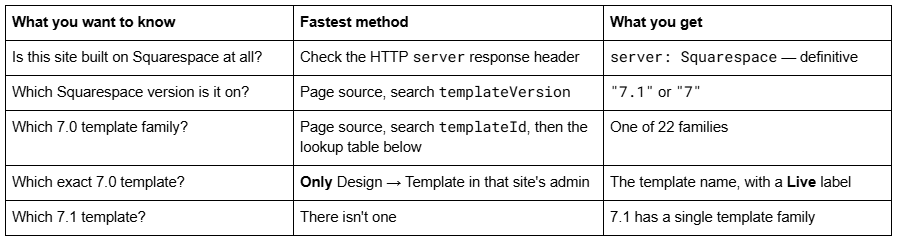
The key limitation to internalise before you start: templates inside a version 7.0 family share one template ID. Bedford and Hayden both report 52a74dafe4b073a80cd253c5. Encore and Aviator both report 507c1fdf84ae362b5e7be44e. No external tool can distinguish them, because the information is not in the page.
The Squarespace template detectors, tested
Tested in August 2026. Each tool was given the same four inputs: brine-demo.squarespace.com (7.0, a 40-member family), bedford-demo.squarespace.com (7.0, a 4-member family), a live Squarespace 7.1 site, and bbc.co.uk as a non-Squarespace control.
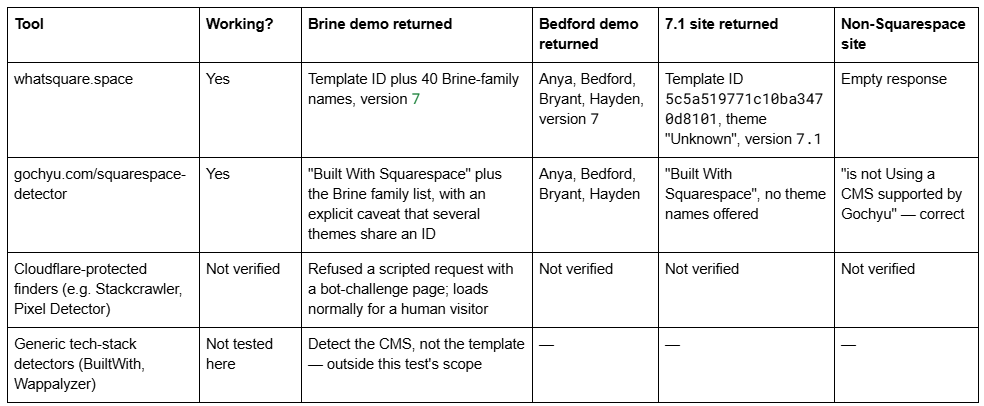
What the test actually shows.
Both working detectors do exactly one useful thing: read templateId and look it up. Gochyu is the more honest of the two — it states on the results page that several Squarespace themes share the same ID, so it cannot always name the theme for certain. That caveat is correct and it applies to every tool in this category.
Both fall over on 7.1 in the same way. whatsquare.space returns a theme literally named "Unknown" for a 7.1 site; Gochyu returns the platform and no theme list. Neither is broken — there is genuinely no answer to give.
One tool's family database is incomplete. whatsquare.space returned 40 members of the Brine family. Squarespace's own documentation describes the Brine family as containing over 50 templates, and Lincoln — a Brine-family template Squarespace names explicitly in its switching documentation — was absent from the tool's list. Treat a detector's family roster as indicative, not exhaustive.
Verdict: use a detector for speed, but know that it is doing one lookup you can do yourself, and that its answer is a family. If the specific template name matters, only the site's own admin can give it.
The manual method: reading templateId from the page source
This is the method every tool is wrapping, it takes about thirty seconds, and it will not go offline.
Open the site in a desktop browser.
Press Ctrl + U (Windows) or Cmd + Option + U (Mac) to view source.
Press Ctrl/Cmd + F and search for templateId.
You will land inside a script block that opens Static = window.Static || {}; Static.SQUARESPACE_CONTEXT = {…}. Two values matter, and they sit near each other:
"templateId":"55f0aac0e4b0f0a5b7e0b22e"
"templateVersion":"7"
Read the version first.
"templateVersion":"7.1" — Squarespace 7.1. The template ID will be 5c5a519771c10ba3470d8101 on every such site. Stop here; there is no template to name.
"templateVersion":"7" — Squarespace 7.0. Note that 7.0 reports itself as "7", not "7.0". Searching the source for 7.0 finds nothing, which is why people conclude the method is broken. Take the templateId value to the lookup table in the next section.
The browser console does the same job in one line, on either version:
Static.SQUARESPACE_CONTEXT.templateId
If the console answers Uncaught ReferenceError: Static is not defined, the site is not on Squarespace.
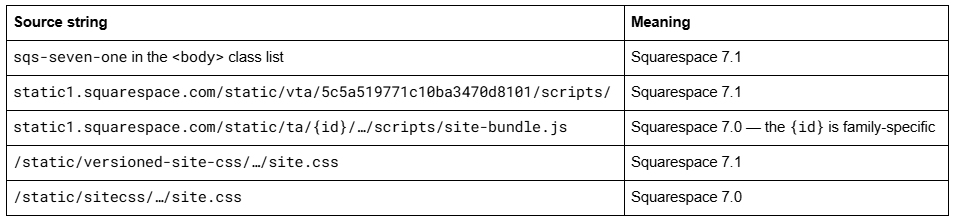
Two supporting tells in the same source, useful when you want a second confirmation:
Squarespace template ID to family lookup
Every value below was read directly from the official Squarespace template demo site for that family in August 2026. The "confirmed members" column lists template names we could verify as sharing that ID; families marked as single-template are ones where the family name is also the template name.
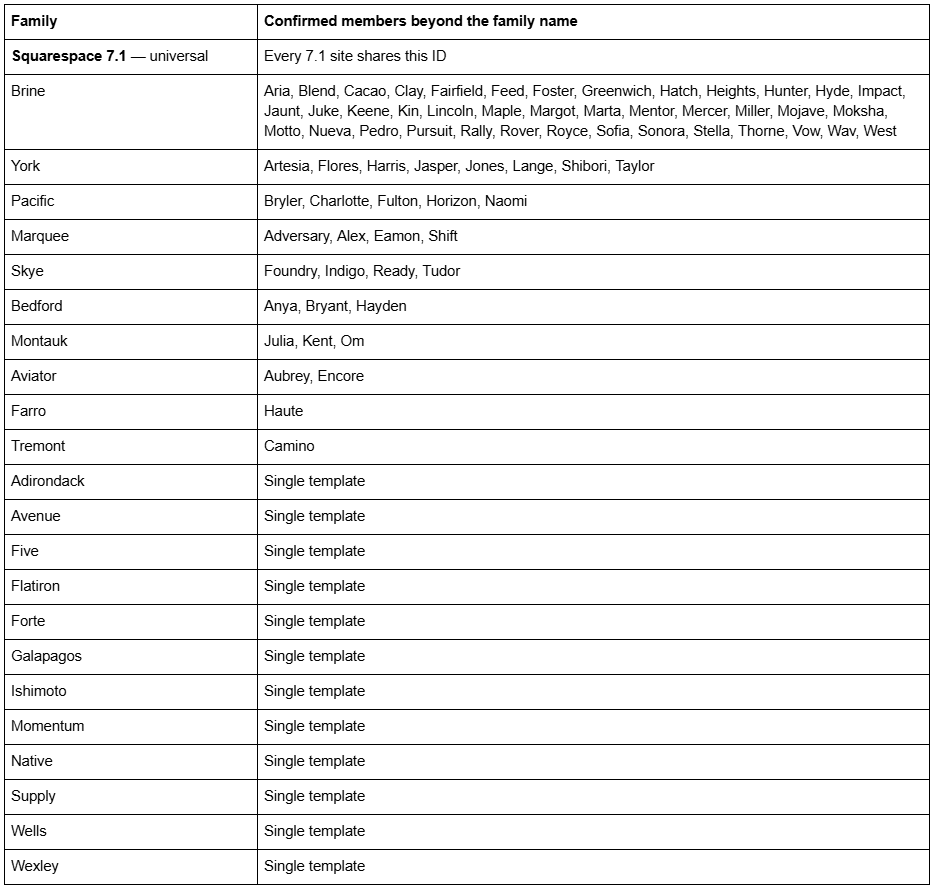
Twelve of the 22 version 7.0 families contain a single template, so for those the lookup gives a complete answer. For Brine, York, Pacific, Marquee, Skye, Bedford, Montauk and Aviator it narrows the field but does not close it.
How to tell whether a site is on Squarespace at all
Half the people searching for a Squarespace template detector are really asking a prior question. Four checks, in order of reliability.
1. The HTTP response header. Squarespace returns server: Squarespace on every request, plus an x-contextid header that no other platform emits. This is the most reliable check available, it works logged out, and no tool is needed:
curl -sI https://example.com/ | grep -i "server\|x-contextid"
We confirmed both headers on every Squarespace site tested in August 2026, and their absence on a non-Squarespace control.
2. The DNS records. Squarespace's documented A records are 198.185.159.144, 198.185.159.145, 198.49.23.144 and 198.49.23.145, and custom domains usually resolve through the CNAME target ext-sq.squarespace.com. Seeing those addresses in a DNS lookup is close to conclusive.
3. The asset domains in the page source. Squarespace sites load images from images.squarespace-cdn.com, scripts from assets.squarespace.com/universal/scripts-compressed/, and site CSS from static1.squarespace.com. Any one of those in the source is a strong signal.
4. The Static.SQUARESPACE_CONTEXT object. If it exists, the site is Squarespace. If the browser console throws Static is not defined, it is not.
What does not work: looking for a <meta name="generator"> tag. WordPress emits one; Squarespace does not, on either version. Its absence tells you nothing on its own.
Checking a list of sites at once
If you are auditing a prospect list, a portfolio of client sites, or your own agency's back catalogue, doing this one browser tab at a time is the slow way. Every value used above is in the initial HTML response, so a single request per site is enough — no JavaScript execution, no headless browser.
# Prints: domain | version | template ID
while read -r d; do
html=$(curl -sL --max-time 15 -A "Mozilla/5.0" "https://$d/")
v=$(printf '%s' "$html" | grep -o '"templateVersion":"[0-9.]*"' | head -1)
t=$(printf '%s' "$html" | grep -o '"templateId":"[^"]*"' | head -1)
echo "$d | ${v:-not Squarespace} | $t"
done < domains.txt
Two things to expect when you run this over a real list.
Some sites will return nothing. Either they are not on Squarespace, or a reverse proxy sits in front. A site served through Cloudflare or a similar proxy can mask the server header, and some will block a scripted request outright with a challenge page. The templateVersion string still appears in the HTML if you can get the HTML — the block is at the request layer, not the markup layer. When a scripted fetch is refused, open the site in a browser and use view-source.
Rate-limit yourself. A polite delay between requests avoids tripping bot protection and is the correct behaviour when reading other people's sites. Read the public homepage, once; nothing here requires crawling a site or touching anything behind a login.
This was the method used for the tests in this article: one request per site, across all 22 official template demo sites plus a set of live sites and a non-Squarespace control, in August 2026.
Why you cannot get the exact template, and what to do instead
The limitation is structural, not a gap in the tooling.
Version 7.0 organises templates into 22 families. Squarespace's own documentation puts it plainly: "all templates in a family share the same features and style options." They share features because they share code — and because they share code, they share a template ID. The individual template is only a set of default style values applied on top of that shared code, and those defaults are gone the moment the site owner changes a font.
So when a detector tells you a site is "Bedford, Anya, Bryant or Hayden", it is not hedging. That is genuinely all the information present in the page. The only place the exact answer exists is Design → Template inside that site's own admin, where the live template carries a Live label — covered in how to tell what Squarespace template I'm using.
For competitor research, the family is usually the more useful answer anyway. What you generally want to know is what the site can do — whether it supports a sidebar, secondary navigation, a particular index layout — and those are family-level capabilities. Knowing that a competitor is on Brine tells you more about their constraints than knowing they specifically chose Mojave.
Detecting a Squarespace 7.1 site's design, when there is no template
On 7.1, template detection has nothing to detect — but the questions behind it still have answers.
Every Squarespace 7.1 site reports 5c5a519771c10ba3470d8101, so the ID tells you the version and nothing more. What you can read from a 7.1 site's page source and rendered markup:
The section types in use. Section wrappers carry class names describing the section and its layout, so you can see how a page is assembled.
Whether Fluid Engine is in use on a given section, versus the classic editor — visible in the section's grid markup.
The colour theme applied to each section, which appears as a theme class on the section element.
The fonts, from the loaded font files and the computed styles in the inspector.
Whether custom code is doing the heavy lifting, from the size and content of the site's Custom CSS.
That is a design audit rather than a template lookup, and on 7.1 it is the more useful exercise, because anything one 7.1 site does, any 7.1 site can do. There is no template ceiling to discover. If a competitor's 7.1 site looks better than yours, the difference is styling, sections and imagery — which is exactly what a well-built 7.1 template packages.
Quick reference
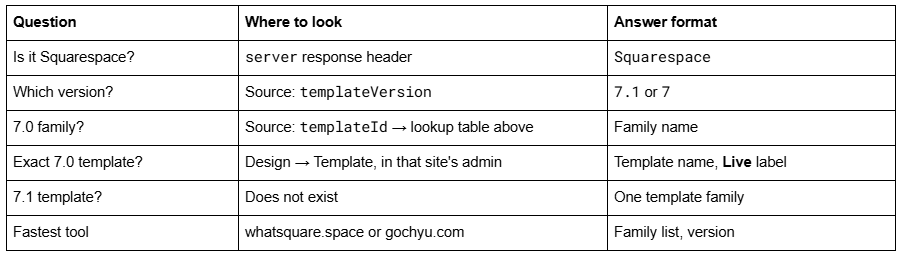
Most of what a Squarespace template detector does, you can do faster with Ctrl+U and one search. The tools are convenient wrappers around a single value, and the two we tested still work — but neither can tell you something the page does not contain.
If what you actually need is not the name of a competitor's template but a 7.1 site that matches the standard they have set, that is a design problem rather than a detection one, and it is what our premium Squarespace templates are built for. For the detection question itself, the lookup table above is the whole answer and costs nothing.
FAQ
-
Yes. Tested in August 2026, whatsquare.space and gochyu.com both correctly identified 7.0 template families and correctly rejected a non-Squarespace site. Both read the same templateId value from the page source, so neither can do more than a manual source check.
-
Because version 7.0 templates are grouped into 22 families that share code, features and a single template ID. Bedford, Anya, Bryant and Hayden all report 52a74dafe4b073a80cd253c5. The individual template name is not present in the page, so no external tool can return it.
-
Custom CSS is commented out after the update and 7.0 selectors no longer match, so it usually needs rewriting. Index pages, sidebars, secondary navigation, cover pages and album pages have no direct 7.1 equivalent. And the change is permanent.
-
Keep every URL identical where you can, and write a manual 301 in Settings → Developer Tools → URL Mappings for every URL that changes. Squarespace never creates redirects automatically. Old index sub-page URLs need particular attention, because index pages have no version 7.1 equivalent.
-
Page titles, SEO titles, meta descriptions, URL slugs and existing URL mappings carry over, so the usual cause of ranking loss is absent. Risk comes from structural changes you make afterwards — changing a slug creates no automatic 301 on Squarespace, ever.
-
The site must be 150 pages or fewer, no store page may hold more than 200 products, Developer Mode must be switched off, and the template must not be discontinued. Over either limit, build a new 7.1 site and migrate manually instead.

Author Bio
I'm Walid Hasan, a Certified Squarespace Expert and Squarespace Circle Platinum Partner with over 12 years of hands-on experience designing and optimizing high-performing websites. Over the years, I've had the privilege of building more than 2,000 Squarespace websites for clients around the world, always focusing on clean design, strong user experience, and conversion-driven results.
