
Is Squarespace 7.1 Better Than 7.0? The Honest Verdict
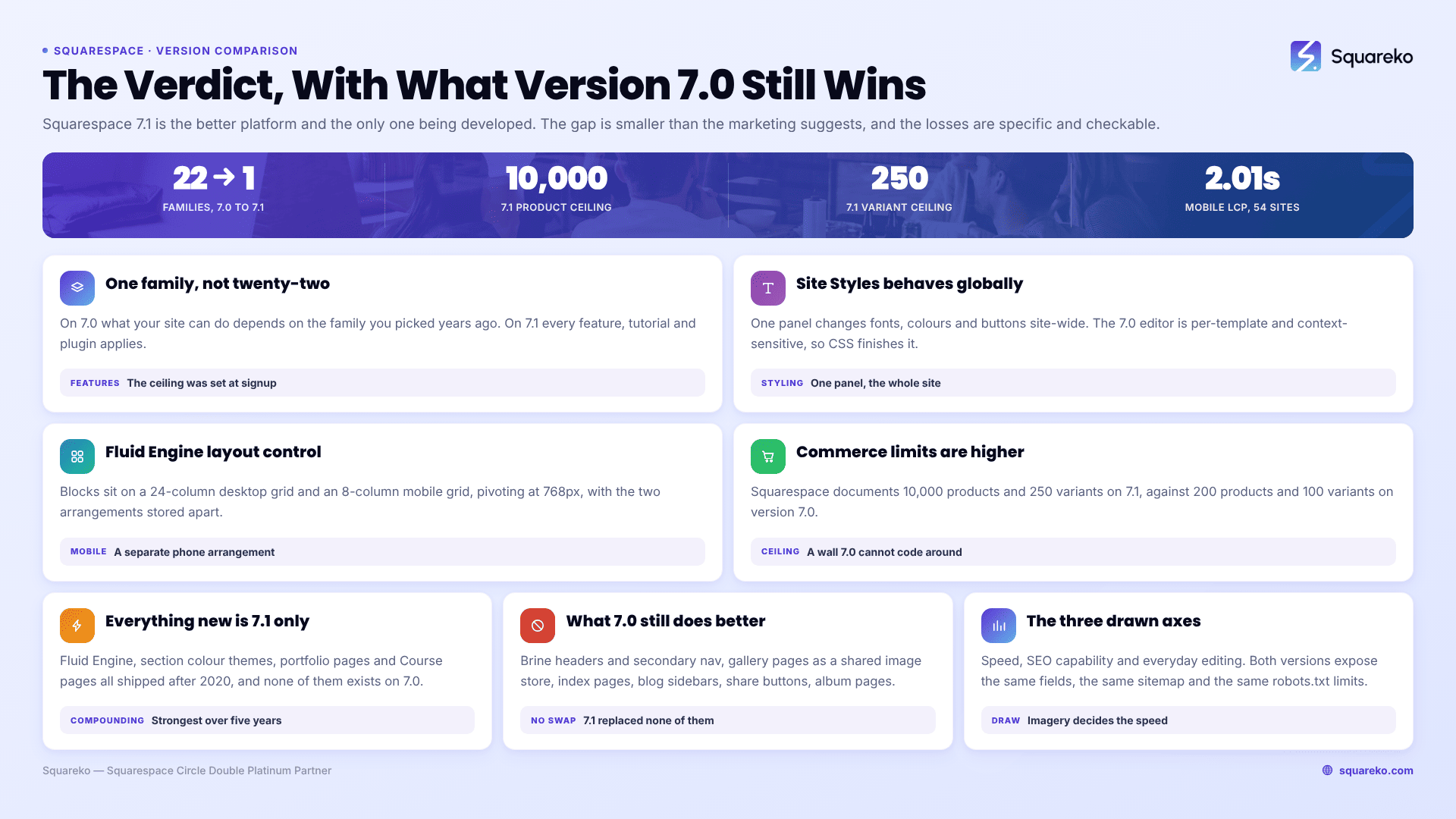
Yes — Squarespace 7.1 is the better platform on most axes that matter, and it is the only one being developed. It wins on styling, layout control, mobile editing, commerce limits and the size of the ecosystem around it. But version 7.0 is genuinely better at a handful of specific things, and the gap is smaller than the marketing suggests. The important qualifier is different: a Squarespace 7.0 site that works, converts and ranks is not a problem needing solving.
Here is where each version actually wins, axis by axis.
Squarespace 7.0 vs 7.1, scored by axis
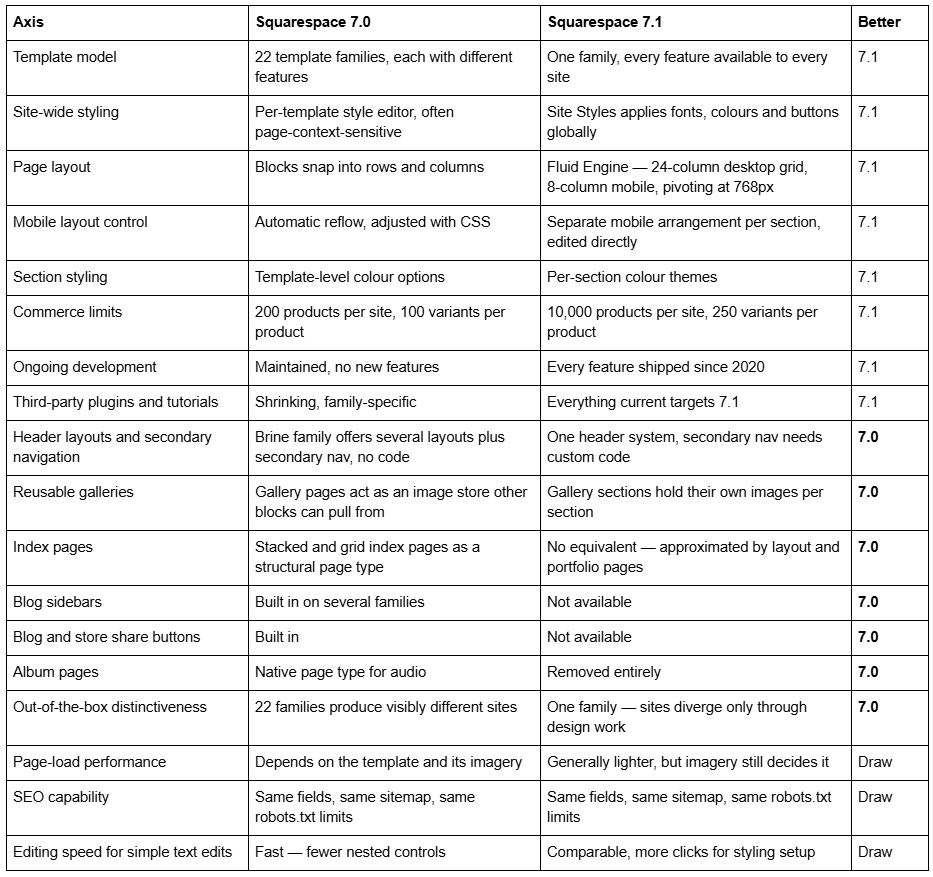
Nine axes to version 7.1, six to version 7.0, three drawn. That ratio is the honest answer, and the six matter more to some sites than the nine.
Where Squarespace 7.1 is genuinely better than 7.0
One template family instead of twenty-two. This is the largest structural improvement and the easiest to underrate. On Squarespace 7.0, whether your site can have a particular header layout, a sidebar, or a specific gallery behaviour depends on which template family you happened to pick years ago — Brine, Bedford, Pacific, York and the rest each have different capabilities. On Squarespace 7.1 there is one family, so every feature, tutorial, plugin and section library applies to your site. The ceiling that used to be set at signup is gone.
Site Styles behaves globally. Version 7.1's Site Styles panel changes fonts, colours and button styles across the whole site from one place. Version 7.0's style editor is per-template and frequently context-sensitive — the options visible depend on which page you are looking at — which is why so many Squarespace 7.0 sites need Custom CSS to finish a style change that should have been a setting.
Fluid Engine is real layout control. Squarespace 7.1's Fluid Engine places blocks on a 24-column desktop grid and an 8-column mobile grid, pivoting at 768px, with the desktop and mobile arrangements stored separately. On version 7.0 the mobile layout is whatever the automatic reflow produces, and adjusting it means CSS. Blog posts stay on the classic editor in both versions, so this applies to pages and sections rather than post bodies.
Commerce limits are much higher. Squarespace documents version 7.1 as supporting up to 10,000 products per site and 250 variants per product, against 200 products and 100 variants on version 7.0. For a store of any size this is not a preference — it is a hard ceiling that version 7.0 hits.
Everything new is 7.1-only. Every feature Squarespace has shipped since 2020 — Fluid Engine, section colour themes, portfolio pages, Course pages, the newer commerce and Marketing tools — exists on version 7.1 and not on 7.0. This is the compounding argument, and over a five-year horizon it is the strongest one on the page.
What Squarespace 7.0 genuinely does better than 7.1
Most comparisons skip this section. These are real, and if one of them is load-bearing on your site, the verdict flips.
Header layouts and secondary navigation. The Brine family on Squarespace 7.0 offers several header arrangements out of the box, including a secondary navigation row. Squarespace 7.1 has one header system with a fixed set of layout options; a genuine secondary navigation bar requires custom code or a third-party plugin. Sites with large navigation structures — schools, membership organisations, multi-service firms — feel this immediately.
Gallery pages as a reusable image store. On Squarespace 7.0, a gallery page holds a set of images that gallery blocks elsewhere on the site can point at. Update the gallery page and every block referencing it updates. Squarespace 7.1's gallery sections hold their own images, so the same set of photographs has to be uploaded or re-added in each place it appears. For photographers running the same portfolio set across several pages, this is more work, not less.
Index pages as a structural page type. Stacked and grid index pages on Squarespace 7.0 are a way of assembling multiple sub-pages into one scrolling page while each sub-page keeps its own URL and SEO fields. Squarespace 7.1 has no equivalent. The update tool converts stacked indexes into layout pages and grid indexes into portfolio pages, and the sub-pages' SEO titles and descriptions do not survive that conversion. If a version 7.0 site earns rankings on index sub-page URLs, version 7.1 has nowhere to put them.
Blog sidebars. Several Squarespace 7.0 families offer a blog sidebar with categories, archives and promotional blocks. Squarespace 7.1 does not have blog sidebars at all. Replacing one means rebuilding it as page content or living without it.
Built-in share buttons. Blog and store share buttons are a template setting on Squarespace 7.0. They are not present on version 7.1, and the update tool removes them.
Album pages. Squarespace 7.0's album page is a native page type for hosting audio tracks. Squarespace 7.1 removed it. Squarespace's own documentation states that album pages and their content "will disappear after the update", which is why anyone with one needs to download the audio files first.
Sites that look different without design work. Twenty-two template families produced visibly different sites out of the box. One family does not. Squarespace 7.1 sites are far more capable but converge on a recognisable look unless someone does real design work — which is a fair trade, but it is a trade.
You can check which of these apply to you before deciding anything. Squarespace publishes template comparison charts listing exactly which version 7.0 families support sidebars, index pages, gallery pages and each header arrangement. Find your family in those charts and the losses stop being abstract.
How the comparison lands for three common site types
The verdict changes depending on what the site is made of. These three profiles cover most of what we see.
A photographer on a version 7.0 portfolio template. Squarespace 7.1 wins on layout control and loses on gallery reuse. Grid index pages become portfolio pages, which is a reasonable conversion, but every gallery that other pages referenced now has to be maintained per section. Fluid Engine makes individual project pages considerably better. Net: 7.1 is better, with a day of gallery housekeeping to pay for it.
A shop with more than 200 products. No comparison to make. Version 7.0 caps at 200 products per site and 100 variants per product; Squarespace 7.1 documents 10,000 and 250. A growing store on version 7.0 will hit a wall it cannot code around. Net: 7.1, and the sooner the better, because the update tool itself refuses to run once a single store page holds more than 200 products.
A service business on a Brine-family site with a large navigation. This is where version 7.0 holds up best. Brine's secondary navigation and header layouts have no direct 7.1 equivalent, and rebuilding them means custom code. If the site also uses index pages to assemble service sections, the conversion loses those sub-pages' SEO fields. Net: 7.1 is still the better platform, but this is a rebuild rather than an update, and it is reasonable to wait until a redesign is due anyway.
The three axes where neither version is better
Speed. Version 7.1 is generally lighter than a heavily tweaked version 7.0 template, but imagery decides the outcome far more often than platform version does. Across 54 Squareko-built client sites measured in August 2026 (Playwright/Chromium lab test, cloud datacenter, unthrottled, single run per site, load-only CLS), median mobile LCP was 2.01s, median CLS 0.000, and median page weight 3.0 MB across 93 requests — with 53 of the 54 on version 7.1. Those are good numbers, but the sites that sit at the slow end of that distribution are slow because of hero video and uncompressed imagery, not because of the platform. Moving to Squarespace 7.1 for speed alone is not a case.
SEO capability. Both versions expose the same SEO title and description fields, generate the same automatic /sitemap.xml, use the same uneditable robots.txt, and share the same limitation that changing a URL slug creates no automatic 301 redirect. Neither version ranks better than the other. Anyone telling you Squarespace 7.1 is "better for SEO" is describing a site that got rebuilt with better content and structure at the same time.
Basic editing. Changing a paragraph of text takes about the same effort on both. Squarespace 7.1 asks for more clicks to set up styling, and gives more control once set up. Neither is meaningfully faster for the everyday task of editing copy.
The question that actually decides it
"Which version is better" is not the same question as "should I move". Version 7.1 being better does not make version 7.0 a liability.
Squarespace has announced no end-of-life date for version 7.0, and its documentation describes updating as optional. You cannot start a new 7.0 site, but the existing ones stay live, stay editable and stay supported. A version 7.0 site that converts visitors, holds its rankings and needs no new features is not a problem. "It's the old version" is a description, not a business case.
The move also is not free. The update tool is permanent and irreversible, caps out at 150 pages and 200 products per store page, and leaves your Custom CSS commented out — and uncommenting it does not fix it, because 7.0 selectors such as .Index-page and .Header-nav-item target markup that Squarespace 7.1 does not have. Weigh that against the nine axes above rather than against the marketing.
Who should be on Squarespace 7.1, and who can stay on 7.0
Move to Squarespace 7.1 if: you are building a new site, you need more than 200 products, you want real control over mobile layouts, your site is under 150 pages with light custom code, or you want access to features Squarespace ships from here on.
Stay on Squarespace 7.0, for now, if: your site is built around index pages or a Brine-family header, you rely on a blog sidebar or gallery pages as a shared image store, your Custom CSS runs to many hundreds of lines and its author is unavailable, or the site is doing its job and you have no second reason to touch it.
Rebuild rather than update if: you are over the tool's limits, a redesign is due anyway, or the version 7.0 site is a heavily customised build where conversion plus repair costs more than starting clean on Squarespace 7.1.
The decision framework, with hard disqualifiers, is in should I upgrade to Squarespace 7.1. The route comparison sits in the Squarespace 7.0 to 7.1 complete upgrade guide.
The verdict, stated plainly
Squarespace 7.1 is better. It is not better at everything, and six of the things version 7.0 does better are the exact things that make some 7.0 sites hard to move — index pages, Brine headers, sidebars, shared galleries. That is not a coincidence. The sites with the most to gain from Squarespace 7.1 are usually the simplest ones, and the sites that most resist the move are usually the ones that used version 7.0's best features hardest.
If your site falls into that second group, the realistic route is a rebuild on Squarespace 7.1 rather than a conversion, and starting from a premium Squarespace 7.1 template rather than a blank site removes most of the layout work. If it falls into the first, the built-in update tool handles it in an afternoon and you will not need anyone.
FAQ
-
On most axes, yes — one template family with every feature available, global Site Styles, Fluid Engine layout control, far higher commerce limits and all ongoing development. Version 7.0 still wins on header layouts, blog sidebars, reusable gallery pages, index pages, share buttons and album pages.
-
Brine-family header layouts with secondary navigation, gallery pages that other blocks can reference, stacked and grid index pages, blog sidebars, built-in share buttons and album pages for audio. Squarespace 7.1 has no equivalent for any of them, and the update tool removes several outright.
-
A family is a group of version 7.0 templates that share the same code, features and style options, differing only in default styling. Squarespace has 22 families. Because family members share a template ID, the page source can identify the family but never the individual template.
-
No. Both versions expose the same SEO title and description fields, generate the same automatic sitemap, share the same uneditable robots.txt, and neither creates an automatic 301 when a URL slug changes. Ranking differences after a move come from content and structure changes, not the version.
-
Usually yes — you can switch templates and switch back as long as you do not uninstall the original. The exceptions are the 32 discontinued templates, which Squarespace does not offer in the switcher, so they cannot be reinstalled once removed.
-
They start from the same single template family, so an unedited 7.1 site is recognisable. Fluid Engine, per-section colour themes and Site Styles give more design range than version 7.0 ever had — the difference is that the distinctiveness now comes from design work rather than from template choice.

Author Bio
I'm Walid Hasan, a Certified Squarespace Expert and Squarespace Circle Platinum Partner with over 12 years of hands-on experience designing and optimizing high-performing websites. Over the years, I've had the privilege of building more than 2,000 Squarespace websites for clients around the world, always focusing on clean design, strong user experience, and conversion-driven results.
