Does Changing a Squarespace Template Affect SEO?
Yes, but less than most people fear, and not in the way they expect. A Squarespace 7.0 template switch does not touch your URLs, page titles, SEO titles, meta descriptions or content — all of which are site-level and carry over untouched. Rankings therefore hold in the great majority of cases. What genuinely shifts is heading structure, page load time and mobile layout, because Squarespace's own position is that different templates have different code bases.
Here is exactly what moves and what does not.
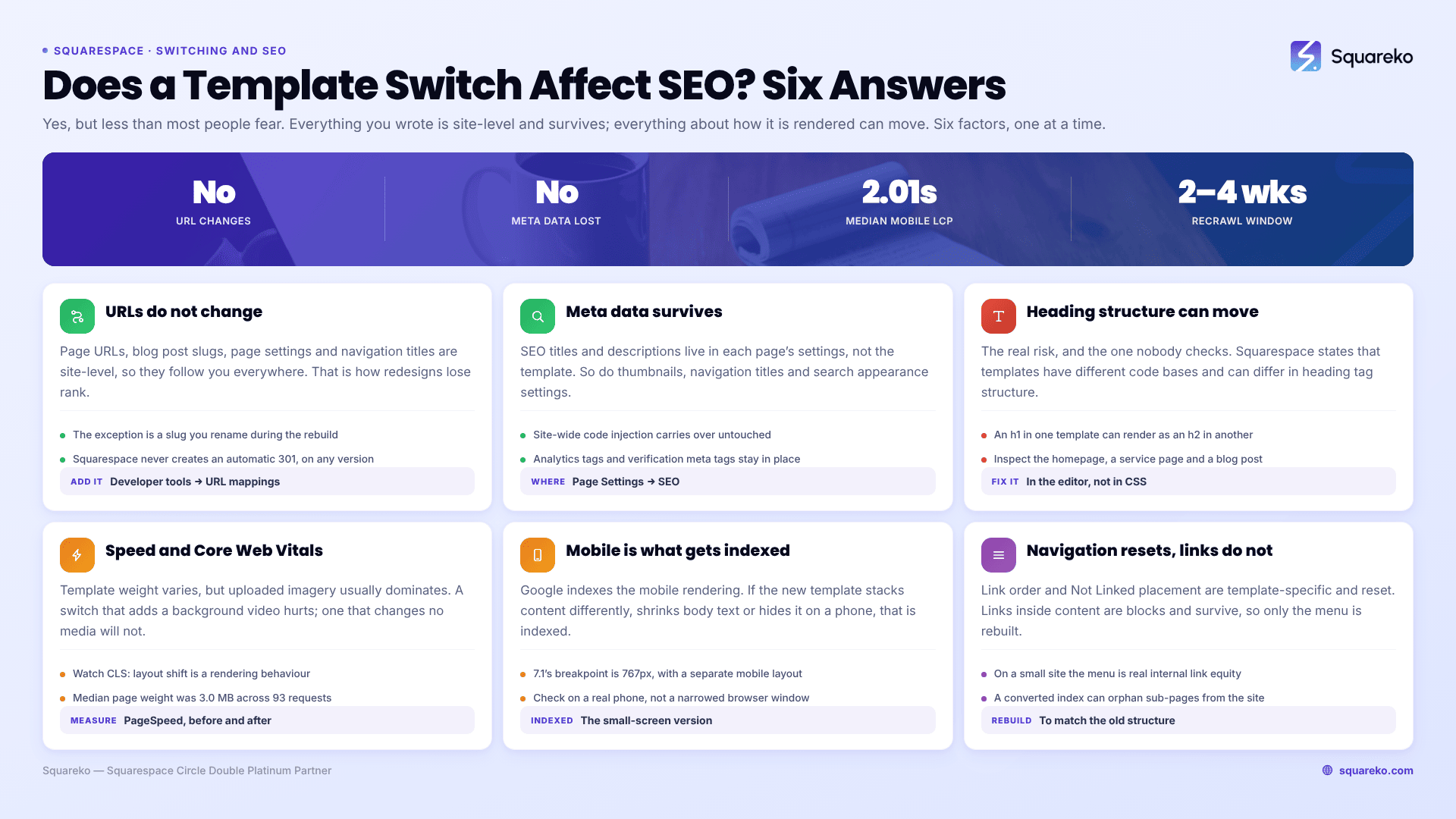
What a Squarespace template switch changes, and what it doesn't
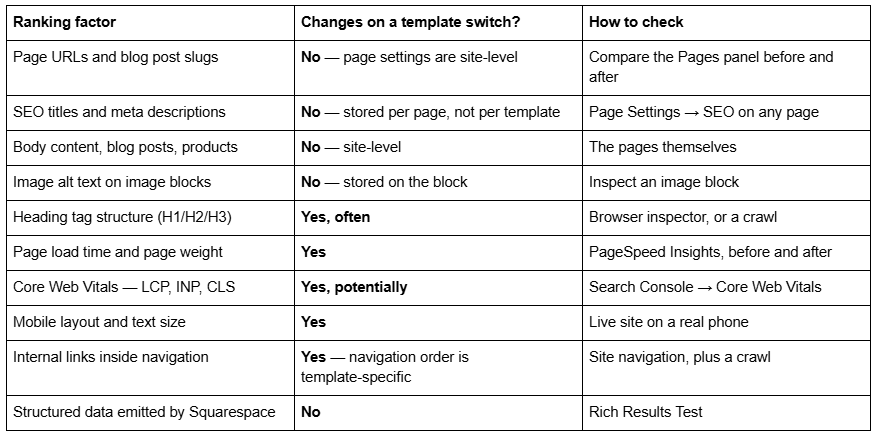
The pattern is clear: everything you wrote survives, everything about how it is rendered can move.
Do Squarespace URLs change when you switch templates?
No. Page URLs, blog post slugs, page settings and navigation titles are all not template-specific, which means they belong to the site and follow you to every template you install.
This matters more than any other single fact on this page, because URL change is the mechanism by which redesigns normally destroy rankings. Since Squarespace does not change your URLs, a template switch does not trigger it.
The exception is a URL you change during the rebuild. Squarespace never creates an automatic 301 redirect when a page slug changes — not on 7.0, not on 7.1, not ever. If you rename a page while restyling, you have created a broken URL and lost whatever links pointed at it, until you add the mapping yourself in Developer tools → URL mappings using the format /old-url -> /new-url 301.
Do SEO titles and meta descriptions survive a Squarespace template switch?
Yes. SEO titles and SEO descriptions are stored in each page's settings, not in the template. So are page thumbnails, navigation titles and the site-wide search-appearance settings in Settings → Marketing → SEO.
Site-wide code injection also survives, which means any analytics tag, verification meta tag or hand-written structured data you added there is still in place after the switch.
Does changing a Squarespace template change my heading structure?
This is the real risk, and it is the one nobody checks. Squarespace's own guidance is that all templates support the same built-in SEO features, but that templates have different code bases and can differ in heading tag structure, JavaScript weight and page load time.
In practice: a page title rendered as an h1 in one template may render as an h2 in another, and section titles that were h2 may come through as h3 or as styled paragraph text. Nothing about your writing changed — but the document outline Google reads did.
How to check in two minutes: open a page, right-click the main heading, choose Inspect, and confirm it is still an h1. Do it on your homepage, one service page and one blog post. If a page has lost its h1 entirely, fix it in the editor by setting the correct heading level on that text block.
Does a new Squarespace template affect page speed and Core Web Vitals?
It can, because template weight varies. But template choice is rarely the bottleneck on a real site.
Across 54 Squareko-built client sites measured in August 2026 (Playwright/Chromium lab test, cloud datacenter, unthrottled, single run per site, load-only CLS), the median mobile LCP was 2.01s with 74% under Google's 2.5s "good" threshold, and the median page weight was 3.0 MB across 93 requests. Those numbers are dominated by uploaded imagery, not by template code. A template switch that adds a full-width background video to every page will hurt; a template switch that does not change your media will barely register.
The one to watch is Cumulative Layout Shift, because layout shift is a template rendering behaviour rather than a content one. In the same lab test, median mobile CLS was 0.000 and 31 of the 54 sites recorded exactly zero shift — but desktop was weaker at a median of 0.029 with only 80% in the "good" band. Measure both, before and after.
Does mobile layout affect SEO after a template change?
Yes, indirectly but reliably. Google indexes the mobile rendering of your pages, so if the new template stacks your content differently, shrinks your body text or hides something on small screens, that is what gets indexed.
Squarespace 7.1's mobile breakpoint is 767px, and Fluid Engine maintains a separate mobile layout for each section. Check the live site on an actual phone after the switch, not just a narrowed browser window.
Do internal links change when you switch Squarespace templates?
Navigation link order and Not Linked placement are template-specific, so your menu structure resets on a switch. Links inside page content are blocks and survive untouched.
That means your internal linking within content is fine, but the sitewide navigation — which is a meaningful share of internal link equity on a small site — has to be rebuilt. Rebuild it to match the old structure unless you have a reason to change it.
Watch for one specific case: if an index page converts to a navigation dropdown because the new template family has no index pages, sub-pages that the new template does not support stay in the Pages panel but stop appearing on the published site. They are effectively orphaned. The family rules behind that conversion are in how to change a Squarespace 7.0 template.
Does any of this apply on Squarespace 7.1?
Not as a template switch, because there isn't one — Squarespace states that "it's not possible to change templates on a version 7.1 site." Every 7.1 site shares one template family.
But the SEO consequences of restyling a 7.1 site are identical in kind. Swapping section layouts changes heading levels. Applying a theme changes contrast and text size. Adding image-heavy sections changes LCP. Renaming a page changes its URL with no automatic redirect. Run the same checks.
How long before you'd see a ranking change?
Google has to recrawl before anything you changed can matter, and Squarespace's sitemap update is documented at days to weeks. Expect a two-to-four week window before post-switch performance means anything, and do not read the first few days as signal.
Request indexing for your most important pages in Google Search Console immediately after the switch rather than waiting.
The short answer, and where to go next
Changing a Squarespace template is one of the safer redesign actions available, because the platform holds URLs and metadata at site level rather than template level. The failure modes are heading structure, speed, mobile rendering, navigation, and any slug you change by hand.
If you want the procedure — the baseline to capture before you switch, the checks to run after, the redirect mapping, and the Search Console monitoring window — that is how to change a Squarespace template without hurting your SEO. The wider decision sits in how to change your Squarespace template.
The case where this genuinely needs a professional is a site with rankings that pay the bills and a template switch that can't be rehearsed on a duplicate. If you'd rather start from a 7.1 build with the heading structure and page weight already right, that is what our premium Squarespace templates are for. For most sites, the checks above take an afternoon and catch everything.
FAQ
-
No. Pages, blog posts, products, events, gallery images, blocks, page settings, URL slugs, SEO titles and code injection are stored against your site rather than your template, so they survive every switch. Only presentation resets — site styles, Custom CSS, sidebars, footers and per-page headers.
-
No. Every post, its body content, categories, tags, author, publish date and URL slug carries over untouched. The blog layout changes because layout is a template-specific style option, so the posts will look different. Nothing is deleted and no URL changes.
-
Click Cancel preview in the bottom bar. Your site returns to the live template and every change you made to the previewed template is saved against it, so you can pick the preview up again later without redoing the work.
-
Open Design → Template, hover the old template and set it live. Its site styles, Custom CSS, sidebars, footers and navigation order return exactly as you left them. This only works if you never uninstalled it — uninstalling deletes those settings permanently.
-
Set a different template live first, since the live template cannot be uninstalled. Then hover the template in Design → Template and click Uninstall, then Confirm. Check whether the template is discontinued first — discontinued templates cannot be reinstalled once removed.
-
Allow two to four weeks. Google has to recrawl before any change registers, and Squarespace's sitemap update lag is documented at days to weeks. Request indexing for your most important pages in Google Search Console straight after the switch rather than waiting.

Author Bio
I'm Walid Hasan, a Certified Squarespace Expert and Squarespace Circle Platinum Partner with over 12 years of hands-on experience designing and optimizing high-performing websites. Over the years, I've had the privilege of building more than 2,000 Squarespace websites for clients around the world, always focusing on clean design, strong user experience, and conversion-driven results.