
Squarespace Website Update Service: Turnaround and What's Included
The short answer: A Squarespace website update service is a queue. You send text, images or content changes; someone with contributor access makes them on your live site and confirms when they are done. Standard turnaround across the market is one to three business days for small changes. What varies — and what you should pin down before buying — is how requests are submitted, what counts as one update, and where an update stops being a project.
Squarespace has no staging environment, so every change lands on the live site the moment it is saved. That shapes how a good update service works.
What you're sending vs how it's handled
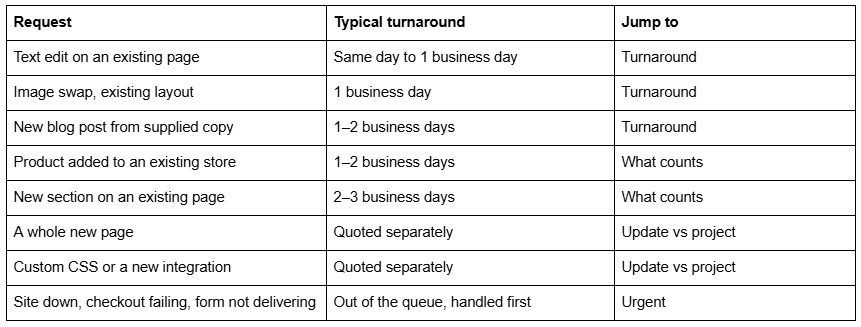
Turnaround times for Squarespace website updates
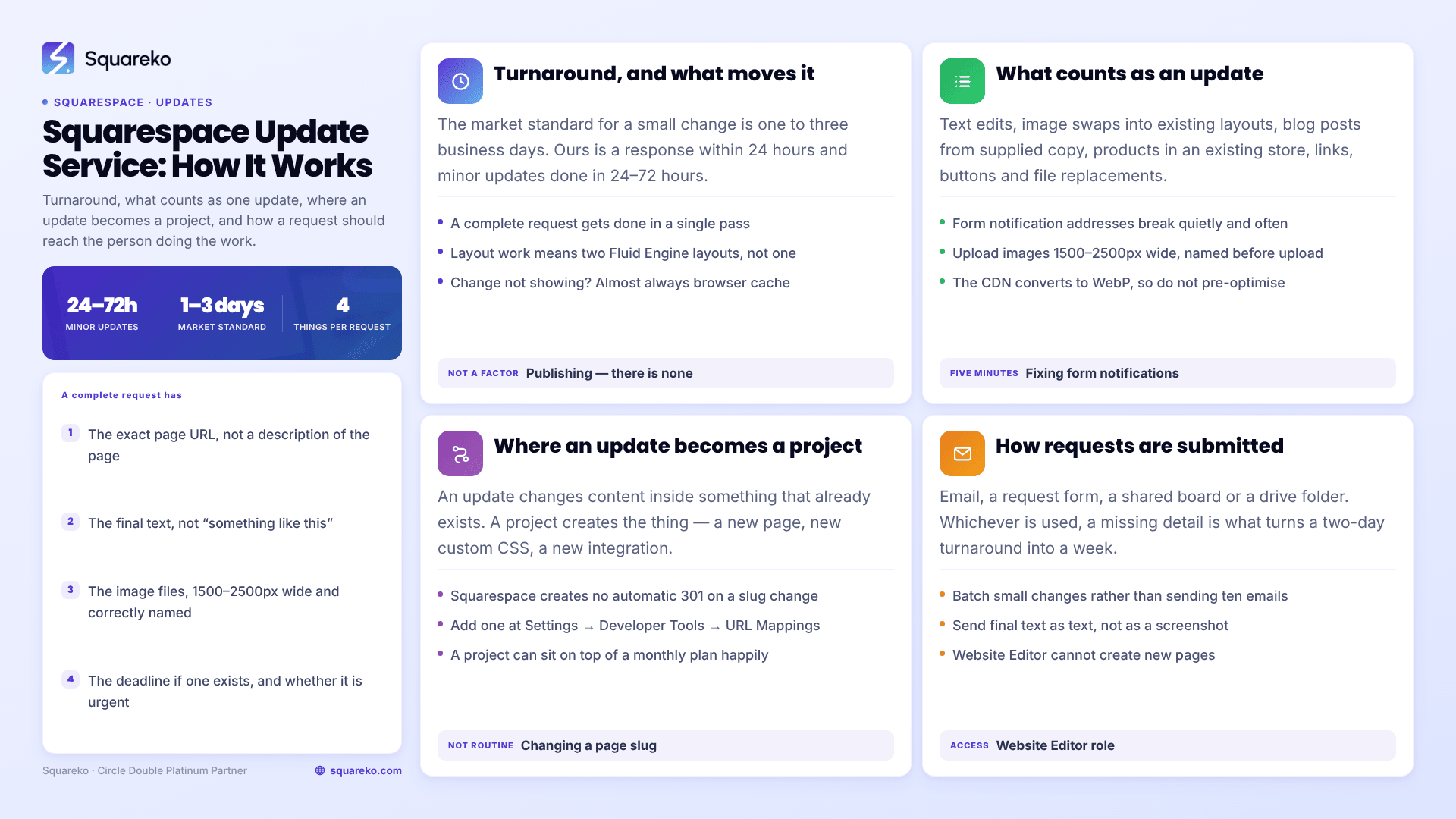
The market standard for a small Squarespace change is one to three business days. Some suppliers commit to two business days; our published figure is a response within 24 hours and minor updates completed within 24–72 hours.
Three things genuinely affect where in that band your request lands:
How complete the request is. A request with the final text, the final images and the exact page URL gets done in one pass. A request that says "can you update the about page" starts a conversation, and the clock effectively restarts when you reply.
Whether the change is content or layout. Editing text in an existing block is minutes. Adding a section means working in Fluid Engine, where Squarespace 7.1 keeps separate desktop and mobile layouts for the same section — so a new section is genuinely two layouts to build and check, not one.
Where it sits in the queue. Retained clients go ahead of ad-hoc requests. That is what a monthly plan buys, and it is the honest reason turnaround differs between two suppliers quoting the same number.
Note what turnaround does not depend on: publishing. There is no build step, no cache to purge and no deploy pipeline on Squarespace. Once a change is saved it is live. If a change appears not to have taken effect, that is almost always a browser cache issue rather than a delay in publishing.
What counts as a website update
Usually included in a standard update allowance:
Text edits anywhere on existing pages — copy, headings, prices, opening hours, staff names
Image swaps into existing layouts, including resizing and cropping
New blog posts published from supplied copy and images
Products added, edited or reordered in an existing store
Menu, PDF and downloadable file replacement
Adding or editing links, buttons and calls to action
Small layout adjustments within an existing section
Publishing an event, updating a portfolio item, adding a testimonial
Form field changes and updating where form notifications are sent
That last one is worth calling out. Form notification addresses break quietly — a staff member leaves, an inbox is closed, and submissions carry on succeeding while nobody reads them. It is one of the most common problems we are sent, and it is a five-minute update.
On images: upload files 1500–2500px wide — 2500px is the maximum Squarespace serves, and anything under 1500px can look soft on large screens. Name the files properly before you send them: the image file itself cannot be replaced after upload, only re-uploaded. Squarespace's CDN converts everything to WebP unconditionally regardless of the format you supply, so you do not need to optimise or convert anything yourself — across 54 Squareko-built sites measured in August 2026 (Playwright/Chromium lab test, cloud datacenter, unthrottled, single run per site), a median of 86% of images were already being served as WebP with no manual work. Send the largest clean version you have and let the platform do the rest.
Where an update stops and a project begins
This is the boundary that causes friction, so it is worth stating precisely.
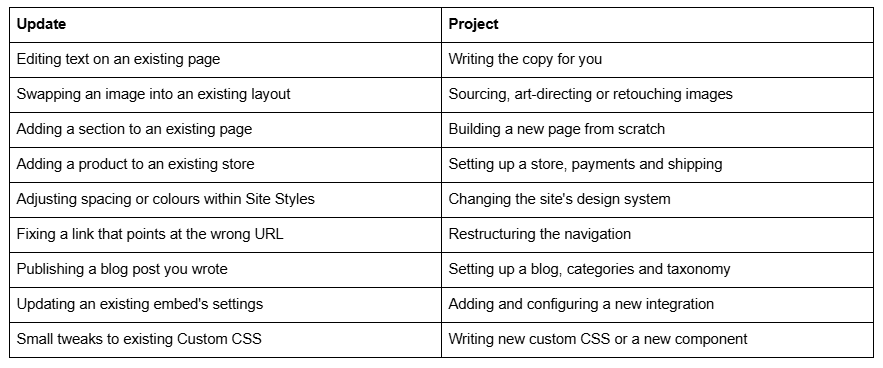
The pattern: an update changes content inside something that already exists; a project creates the thing. Anything requiring design decisions, new custom code, or a URL structure change is a project — it is quoted separately, on either an hourly or fixed basis, and it can sit on top of a monthly plan perfectly happily.
One item deserves its own note. Changing a page or post slug creates no automatic 301 redirect on Squarespace — ever. Any URL change is therefore never a routine update: it requires a redirect adding at Settings → Developer Tools → URL Mappings, or the old URL becomes a 404 and loses whatever links and rankings it had.
How update requests are submitted
Four channels are in common use. The differences matter more than they look.
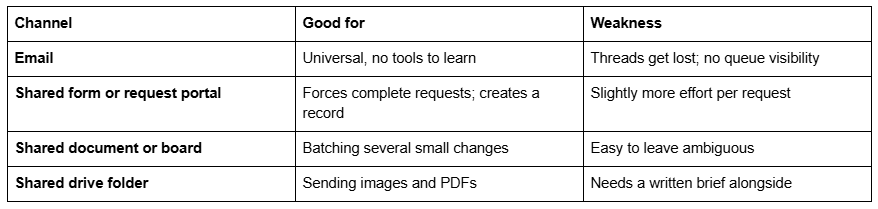
Whichever is used, a complete request contains four things: the exact page URL, the final text (not "something like…"), the image files where relevant, and the deadline if one exists. Requests with all four get done in a single pass; requests missing any one of them cost a round trip, and round trips are the main reason a "two-day turnaround" becomes a week.
Two practical points. Batch small changes. Ten separate emails through the week consume more time than one list of ten items, and on an hours-based plan that difference comes out of your allowance. Send final text as text, not as a screenshot or a description of what you want it to say.
Access is handled through contributor permissions rather than a shared login. Content-only update work needs the Website Editor role, which allows adding blocks, products and content to existing pages. Note that Website Editor cannot create new pages — another practical reason new pages fall on the project side of the line. What each Squarespace permission level allows is worth reading before you grant anything.
Urgent requests
A genuine outage is not an update, and it should not sit in an update queue. A site that is down, a checkout that fails, a form that has stopped delivering, or a payment processor that has disconnected — these should have a separate path with a faster response.
Ask any supplier what qualifies as urgent and what changes when something does. If everything enters the same queue, the answer is nothing.
What it costs
Update services are priced as a monthly block of hours. The market runs from roughly $99 a month for about an hour of task time up to $500 for five hours at the mid-range. Our published tiers are $350 a month for two hours, $750 for six hours and $1,250 for ten hours, with response within 24 hours and minor updates completed in 24–72 hours.
Two hours a month covers a typical small business comfortably: a few text changes, a couple of image swaps, a blog post, a product or two. If you send more than that regularly, the higher tiers work out cheaper per hour rather than more expensive.
If your updates are genuinely occasional — twice a year, no urgency — buy hourly instead and skip the monthly commitment. If they are regular and something on the site takes money or captures leads, our Squarespace website support plans are built around the queue described above: a submission channel, a stated turnaround, and a monthly summary of what the hours went on.
FAQ
-
The market standard for a small change is one to three business days. Squareko's published figures are a response within 24 hours and minor updates completed within 24–72 hours. Requests containing the exact page URL, final text and final images are completed in one pass; incomplete requests cost a round trip each.
-
An update changes content inside something that already exists — text edits, image swaps, blog posts, products in an existing store, small layout adjustments. A project creates the thing: new pages, new custom CSS, new integrations, store setup, navigation restructuring. Projects are quoted separately and can sit alongside a monthly plan.
-
Most services use email, a request form, a shared document or a shared drive folder. Whichever channel, include the exact page URL, the final text as text rather than a screenshot, any image files, and a deadline if one exists. Batching several small changes into one request uses fewer hours than sending them separately.
-
Upload images 1500–2500px wide; 2500px is the maximum Squarespace serves and anything under 1500px can look soft. Name files correctly first, since the uploaded file itself can't be replaced without re-uploading. No format conversion is needed — the Squarespace CDN serves WebP unconditionally regardless of what you supply.
-
No. Changing a page or blog post slug on Squarespace creates no automatic 301 redirect, ever. A redirect has to be added manually at Settings → Developer Tools → URL Mappings, or the old URL returns a 404 and loses its links and rankings. Treat URL changes as planned work.
-
Website Editor is sufficient for content-only work — it allows adding blocks, products and content to existing pages. It cannot create new pages or change Site Styles, which is one reason new pages are quoted as projects. Never share your own login; use Settings → Permissions & Ownership to invite a contributor.

Author Bio
I'm Walid Hasan, a Certified Squarespace Expert and Squarespace Circle Platinum Partner with over 12 years of hands-on experience designing and optimizing high-performing websites. Over the years, I've had the privilege of building more than 2,000 Squarespace websites for clients around the world, always focusing on clean design, strong user experience, and conversion-driven results.
