
Squarespace vs Shopify vs WooCommerce: The Definitive 2026 Comparison for Small Businesses
Introduction
Choosing the right ecommerce platform is one of the most critical decisions you'll make as a small business owner. Squarespace, Shopify, and WooCommerce represent three fundamentally different philosophies: all-in-one design elegance, specialised ecommerce infrastructure, and open-source flexibility. Whether you're launching your first online store or migrating from an existing platform, understanding how these solutions stack up in 2026 is essential. This guide examines squarespace vs shopify vs woocommerce for 2026 small business needs, comparing design capabilities, ecommerce functionality, SEO performance, pricing, and ease of use to help you select the platform that genuinely fits your business model.
Key Takeaways
Squarespace excels at design-first businesses requiring minimal technical overhead and integrated hosting
Shopify dominates multi-channel selling, advanced inventory management, and scaling to enterprise requirements
WooCommerce offers maximum flexibility and cost control for businesses willing to manage hosting and technical details
Design quality matters: Squarespace templates outperform competitors; Shopify and WooCommerce require investment in custom design
Migration between platforms is possible but requires careful data mapping; Squarespace migration is most straightforward
SEO capability varies: All three are SEO-capable when properly configured, though WooCommerce requires more manual optimisation
Pricing scales differently: Squarespace is predictable (flat monthly); Shopify uses tiered pricing; WooCommerce costs depend on hosting and extensions
Platform Overview
Squarespace
Squarespace operates as a fully managed platform-as-a-service (PaaS). You don't manage servers, security patches, or hosting infrastructure—Squarespace handles everything. This approach prioritises simplicity and design consistency. The platform is particularly strong for small to mid-sized businesses with up to a few hundred products and annual revenues under £1 million.
Core Philosophy: All-in-one solution with visual design excellence and built-in services.
Shopify
Shopify is a software-as-a-service (SaaS) platform engineered explicitly for ecommerce. It offers more sophisticated selling tools than Squarespace but maintains relative simplicity compared to self-hosted solutions. Shopify is platform-agnostic regarding design—you choose from thousands of themes or hire developers to build custom ones. The platform suits businesses scaling from launch to enterprise.
Core Philosophy: Ecommerce-focused infrastructure with unlimited scalability and multi-channel selling.
WooCommerce
WooCommerce is an open-source plugin for WordPress that transforms the CMS into an ecommerce solution. You control hosting, plugins, and customisations entirely. This flexibility comes with responsibility—you manage security, backups, and performance optimisation. WooCommerce is ideal for businesses already invested in WordPress or requiring deep technical customisation.
Core Philosophy: Open-source flexibility with full control and technical responsibility.
Design and Visual Experience
Squarespace: Premium, Cohesive Design Out of the Box
Squarespace's greatest competitive advantage is design quality. Each template is professionally crafted, responsive across devices, and leverages modern design principles. The platform's visual builder allows drag-and-drop customisation without requiring code knowledge.
Design Strengths:
150+ professionally designed templates spanning industries
Responsive design standard; no additional investment required
Visual editor enables real-time customisation and preview
Built-in brand consistency tools (colours, typography, spacing)
Mobile-first design approach ensures excellent user experience on all devices
Limitations:
Templates can feel recognisable if not heavily customised
Advanced CSS customisation requires additional Skills or third-party code injection
Limited to Squarespace's design system
Best For: Fashion, beauty, photography, art, and design-focused businesses where visual presentation directly impacts conversions.
Shopify: Flexible, Theme-Dependent Design
Shopify provides design flexibility through themes. Free themes are functional but generic. Premium themes (£150–400 per year) offer better aesthetics, though many stores using identical themes appear similar. Custom design requires hiring developers, significantly increasing costs.
Design Strengths:
Thousands of premium themes available through marketplaces
Customisation through Liquid templating language (developer-friendly)
Design system flexibility; no brand constraints
High-quality premium themes for specific industries
Design upgrades don't require platform migration
Limitations:
Free themes lack polish and differentiation
Premium themes can be expensive and limited in exclusivity
Custom design requires developer expertise (£3,000–15,000+)
Theme switching can disrupt customisation work
Best For: Businesses willing to invest in custom or premium design, or those for whom design is secondary to functionality.
WooCommerce: Design Flexibility, Technical Requirement
WooCommerce inherits WordPress themes, offering enormous design flexibility. However, excellent design requires either premium themes (£50–500) or custom development. Many WooCommerce stores appear dated because business owners underinvest in design.
Design Strengths:
Access to thousands of WordPress themes
Complete design control through code
Integration with WordPress design ecosystem
No design system constraints
Premium themes often affordable
Limitations:
Quality varies widely; finding cohesive design requires expertise
Requires technical knowledge to modify themes effectively
Design performance depends on theme optimisation
Business owners often neglect design investment
Best For: WordPress developers or businesses with technical staff who can manage design implementation and maintenance.
Ecommerce Features and Functionality
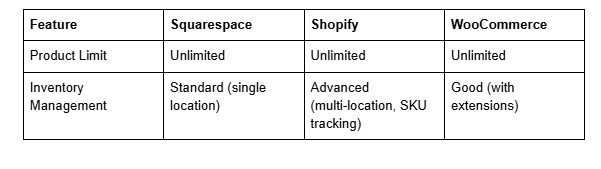
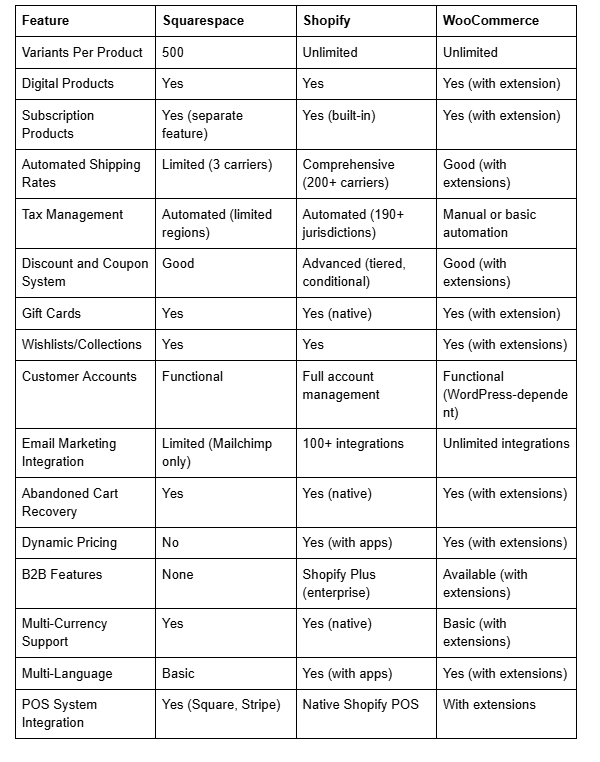
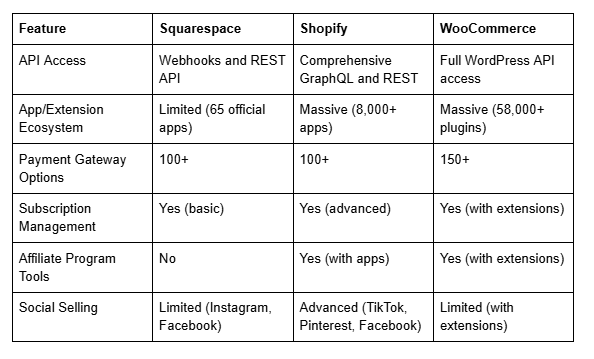
Detailed Functionality Comparison
Inventory Management: Shopify leads with multi-location inventory tracking, barcode scanning, and sophisticated SKU management. Squarespace covers basic inventory needs effectively. WooCommerce requires extensions for advanced features, adding complexity and potential performance impact.
Shipping Integration: Shopify integrates with 200+ carriers and provides live rate calculation. Squarespace supports three major UK carriers and basic US shipping. WooCommerce's capability depends entirely on selected extensions.
Payments and Gateway Support: All three support 100+ payment gateways. Shopify Payments offers competitive rates for UK businesses. Squarespace integrates with Stripe and Square seamlessly. WooCommerce requires separate gateway configuration.
Multi-Channel Selling: Shopify excels with native integrations for Facebook, Instagram, TikTok, Amazon, eBay, and Walmart. Squarespace offers Facebook and Instagram selling. WooCommerce requires manual setup and extensions, making multi-channel selling labour-intensive.
App and Extension Ecosystem: Shopify's App Store contains 8,000+ applications (quality varies). Squarespace offers 65 official apps and limited third-party integrations. WooCommerce's plugin ecosystem is massive but requires technical evaluation to avoid conflicts.
SEO Capabilities and Performance
Squarespace SEO
Squarespace provides solid, automated SEO foundations without requiring technical configuration. The platform handles meta tags, sitemaps, structured data, and mobile optimisation automatically.
SEO Strengths:
Automatic XML sitemaps and robots.txt management
Built-in schema markup for products and organisations
Customisable meta titles, descriptions, and URLs
Image optimisation and lazy loading
SSL certificates standard on all sites
Fast Core Web Vitals performance (generally excellent)
Automatic redirects when renaming pages
Mobile-first indexing optimisation
SEO Limitations:
Limited control over heading hierarchy and semantic HTML
No native breadcrumb schema options
Structured data customisation requires code injection
Limited internal linking visualisation tools
URL structure not fully customisable for taxonomies
Best For: Businesses prioritising off-page SEO (content, links, E-E-A-T) where technical SEO is adequately handled by the platform.
Shopify SEO
Shopify provides essential SEO functionality with reasonable defaults. However, achieving advanced SEO requires manual configuration and often app purchases.
SEO Strengths:
Customisable meta tags and URLs
Product schema markup (native)
Automatic canonical tags
XML sitemap management
SSL certificates standard
Decent Core Web Vitals performance
URL structure flexibility
SEO Limitations:
Heading hierarchy not fully customisable
Rich snippet implementation requires manual setup
Image alt text relies on user input
No advanced internal linking analysis
Category and collection page optimisation requires manual effort
Best For: Ecommerce businesses willing to invest in SEO apps (Yoast SEO for Shopify, etc.) to achieve best-practice optimisation.
WooCommerce SEO
WooCommerce offers the most granular SEO control but requires significant technical expertise and ongoing optimisation. The platform is SEO-capable when properly configured.
SEO Strengths:
Complete control over HTML structure and semantic markup
Full heading hierarchy customisation
Extensive schema markup options (Yoast SEO plugin)
Unlimited internal linking structure
Advanced canonical tag management
Full breadcrumb customisation
Plugin ecosystem provides advanced SEO tools
SEO Limitations:
Requires active management and plugin selection
Performance depends on hosting quality and caching configuration
Image optimisation requires manual effort or extensions
Security vulnerabilities require monitoring
Core Web Vitals often require technical optimisation
Plugin conflicts can create SEO issues
Best For: WordPress-proficient businesses with in-house technical expertise or dedicated developers managing ongoing optimisation.
Pricing and Hidden Costs
Squarespace Pricing (2026)
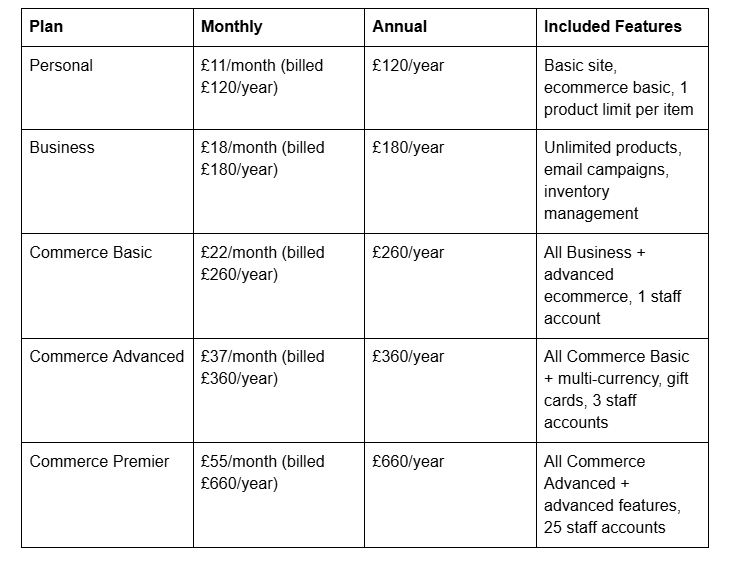
Hidden Costs:
Custom domain: £10–20/year (first year free with annual plan)
Email: Included (unlimited)
SSL certificate: Included
24/7 support: Included
Extensions: Rare (most features included)
Total Annual Cost for Small Business: £260–360/year. Transparent, predictable, no surprises.
Shopify Pricing (2026)
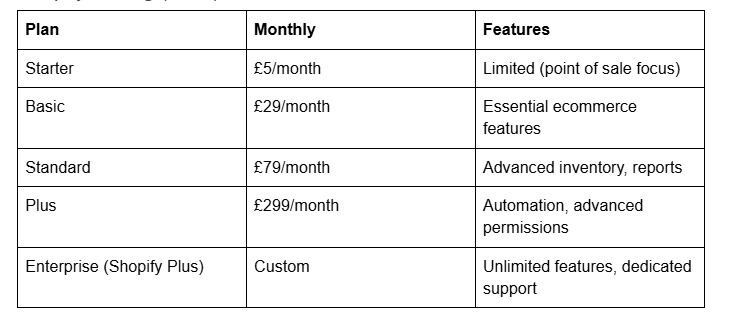
Hidden Costs:
Custom domain: ~£10/year
Email: £3–5/month per staff account (or free with built-in Shopify Email)
SSL certificate: Included
Payment gateway fees: Shopify Payments 2.2% (or 2.7% + £0.30 with external gateways)
Apps and extensions: £0–1,000+/month (significant for advanced features)
Shipping: Integrated, though rates vary by carrier
Stocksy (design) marketplace: £5–15/month
Total Annual Cost for Small Business: £348 (basic plan) + £100–500 (apps) = £448–848/year minimum. Costs scale with app usage.
WooCommerce Pricing (2026)
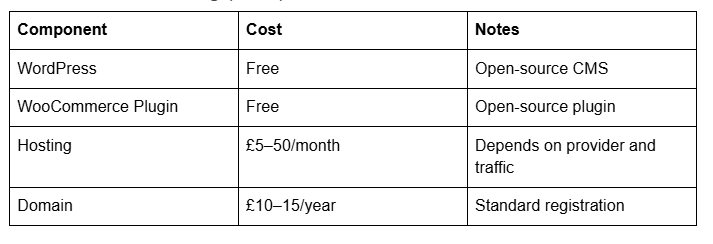
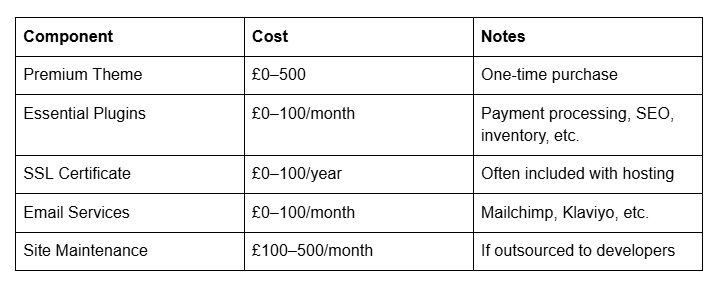
Total Annual Cost for Small Business: £60–200 (self-managed hosting + free theme) or £2,000–8,000/year (professional hosting + extensions + developer support).
Cost Summary:
Squarespace: Predictable, flat-rate pricing; no surprises
Shopify: Scalable pricing; app costs add up quickly
WooCommerce: Lowest entry cost; highest management burden and highest scaling costs
Ease of Use and Learning Curve
Squarespace: Beginner-Friendly
Squarespace prioritises simplicity and requires minimal technical knowledge. The visual builder, inline editing, and consistent interface make setup accessible for non-technical users.
Ease Factors:
Visual drag-and-drop builder
No coding required for basic operations
Extensive built-in help and tutorials
Consistent interface across all features
24/7 customer support (included)
Setup typically takes 2–4 hours
Learning curve: Minimal (1–2 weeks to proficiency)
Considerations:
Advanced customisation requires CSS knowledge or hiring developers
Limitation frustration for power users
Template switching requires restructuring
Integrations limited compared to alternatives
Best For: Non-technical founders, small teams, and businesses prioritising speed to market.
Shopify: Moderate Difficulty
Shopify balances functionality with usability. The interface is logical, and basic store setup is straightforward. Advanced features and customisation require development knowledge.
Ease Factors:
Intuitive admin dashboard
Extensive app marketplace for extending functionality
Substantial documentation and community support
Setup typically takes 4–8 hours
Learning curve: Moderate (2–4 weeks for proficiency)
Developer-friendly API for custom functionality
Considerations:
App ecosystem requires evaluation and testing
Theme customisation requires Liquid coding
Multi-channel selling setup is complex
Support quality varies by plan
Best For: E-commerce-focused founders, growing teams, and businesses comfortable with learning platforms.
WooCommerce: Steep Learning Curve
WooCommerce requires WordPress proficiency or outsourced expertise. Setup and ongoing management demand technical knowledge.
Ease Factors:
WordPress admin interface (familiar to WordPress users)
Massive plugin ecosystem but requires evaluation
Community support substantial but fragmented
Setup typically takes 8–40 hours (depending on customisation)
Learning curve: Steep (1–3 months for proficiency)
Ongoing technical maintenance required
Considerations:
Hosting selection critical to performance
Plugin conflicts possible; careful testing required
Security management responsibility falls on user
Regular updates and maintenance non-negotiable
Developer expertise highly recommended
Best For: WordPress developers, technical co-founders, and businesses with dedicated development resources.
Which Platform Should You Choose?
Your optimal choice depends on specific business factors. Consider this framework:
For Design-Led Businesses (Fashion, Beauty, Art, Photography)
Recommendation: Squarespace
Rationale:
Premium, cohesive template design is immediate competitive advantage
Time to beautiful, functional store is measured in hours, not weeks
Limited inventory needs (under 500 products) align with platform capability
Integrated email, analytics, and basic ecommerce cover core requirements
Transparent pricing predictable for budgeting
Example: A beauty brand launching with 50 handmade skincare products benefits from Squarespace's visual polish. The professional product galleries, collection pages, and checkout experience compete with stores built on more complex platforms.
For Scaling Ecommerce Operations (Fashion, Electronics, General Retail)
Recommendation: Shopify
Rationale:
Unlimited product capacity and advanced inventory management support growth
Multi-channel selling (Amazon, eBay, TikTok, Facebook) extends reach
Sophisticated automation and workflow tools reduce manual work
App ecosystem provides specialised solutions as needs evolve
Proven infrastructure supports millions in annual revenue
Example: A fashion brand scaling from 300 products to 2,000+ products benefits from Shopify's inventory management, multi-warehouse tracking, and third-party marketplace integrations. Wholesale and B2B expansion become feasible with Shopify Plus.
For WordPress Developers and Technical Businesses
Recommendation: WooCommerce
Rationale:
Complete control over infrastructure and code
Unlimited customisation and plugin integration
Cost-effective for businesses with technical expertise
Seamless WordPress ecosystem integration
Ownership of entire technology stack
Example: A digital agency managing client ecommerce sites benefits from WooCommerce's flexibility. Custom plugin development, client-specific functionality, and integrated content management systems justify the technical overhead.
Audience Segmentation Verdict
For a beauty brand under 50 products → Squarespace. The platform's design excellence, integrated tools, and simplicity allow founders to focus on product and marketing, not technical infrastructure. Launch in 2–3 days.
For a fashion brand scaling to wholesale → Shopify. Multi-location inventory, wholesale channels (B2B with Shopify Plus), and production-ready automation support growth. Transition to Shopify Plus for enterprise features.
For WordPress developers and custom integrations → WooCommerce. Full control over technology, seamless WordPress integration, and unlimited customisation justify the technical complexity.
Migrate to Squarespace
If you're currently on Shopify or WooCommerce and considering Squarespace, migration is achievable with careful planning.
Migration Overview
Squarespace supports importing data from Shopify and WooCommerce, though the process has limitations. Products, customers, and orders require mapping and verification.
Step-by-Step Migration Process
1. Audit Existing Store
Document all products, variants, pricing, and inventory
Export customer lists and order history
Identify custom fields, integrations, and automations
List all active extensions or plugins
Note tracking setup (Google Analytics, conversion pixels)
2. Export Data from Source Platform
From Shopify:
Products, collections, customers, orders export via CSV in admin
Use third-party apps (Houdini, Infinit) for more comprehensive exports
Squarespace has native Shopify import capability
From WooCommerce:
Export products via WooCommerce > Products > Export
Customer data via Users export
Order history via order export tools
Plugin data requires manual migration (custom fields, subscriptions)
3. Prepare Data for Squarespace Import
Map product variants to Squarespace variant format
Consolidate product descriptions and images
Remove unsupported custom fields
Simplify product taxonomy to Squarespace collections
Verify all image URLs are accessible
4. Import into Squarespace
Create Squarespace ecommerce site
Use the platform's import tool (if available from your source)
Manually add products if automated import is incomplete
Import in batches to verify data integrity
Test all product pages, variants, and checkout
5. Verify Data Completeness
Audit all products for accuracy
Confirm pricing and inventory levels
Check collection categorisation
Review customer migrated data (if applicable)
Test payment processing
6. Reconfigure Integrations and Automation
Set up email marketing (Mailchimp, Klaviyo)
Install conversion tracking (Google Analytics 4, Facebook Pixel)
Configure abandoned cart recovery
Re-establish customer communication flows
Update third-party integrations
7. Domain Transfer and Launch
Update DNS records to point to Squarespace
Set up redirects from old URLs (maintain SEO value)
Test all links and functionality
Plan go-live with minimal downtime
Communicate changes to existing customers
Migration Limitations
Custom order workflows require manual setup
Subscription data may not migrate completely
Customer order history may not be visible to customers
Some extensions have no direct Squarespace equivalent
High-volume migrations (10,000+ products) require careful planning
Expected Migration Timeline
Small store (under 500 products): 3–7 days
Medium store (500–2,000 products): 1–2 weeks
Large store (2,000+ products): 2–4 weeks
Post-Migration Considerations
Train team on Squarespace admin interface
Update internal documentation and processes
Plan SEO monitoring for ranking stability
Monitor customer support channels for migration issues
Consider running both platforms in parallel briefly for safety
Frequently Asked Questions
-
Yes, but migration requires careful planning. All three platforms support data export (products, orders, customers). The complexity depends on custom fields, integrations, and volume. Shopify to Squarespace is most straightforward; WooCommerce migrations require more manual work due to plugin customisation.
-
Squarespace and Shopify both provide excellent mobile experiences out of the box. Shopify's mobile checkout is particularly polished. WooCommerce's mobile experience depends on chosen theme and extensions. All three can achieve strong mobile performance with proper optimisation.
-
Squarespace requires minimal technical knowledge—most users manage stores without coding. Shopify requires moderate technical understanding (API basics, app configuration). WooCommerce requires strong technical proficiency or outsourced expertise. Non-technical founders should choose Squarespace or Shopify.
-
Squarespace charges no transaction fees; you pay the subscription. Shopify charges transaction fees (2.2% for Shopify Payments or 2.7% + £0.30 for external gateways). WooCommerce charges vary by payment gateway (typically 2.5–3% + £0.30). Calculate total processing costs before choosing.
-
Yes. Many businesses launch on Squarespace, then migrate to Shopify as complexity and volume increase. This progression is common and supported by migration tools. Plan for potential migration when choosing initial platform.
-
All three can achieve excellent SEO results when properly optimised. Squarespace provides good automatic SEO. Shopify requires manual optimisation. WooCommerce offers the most control but demands technical expertise. Content quality, backlinks, and E-E-A-T matter more than platform choice.
-
Squarespace prioritises design and simplicity; you trade customisation for elegance. Shopify prioritises ecommerce functionality; you pay for features. WooCommerce prioritises flexibility; you pay with complexity. Choose based on what you prioritise.
-
Yes, some businesses maintain separate stores on different platforms. For example, a brand might use Shopify for B2B wholesale and Squarespace for direct-to-consumer. However, managing multiple platforms increases operational complexity.
Call to Action
Choosing between Squarespace, Shopify, and WooCommerce shapes your business's online foundation. The right choice depends on your design priorities, growth trajectory, and technical resources.
If you're leaning towards Squarespace for its design elegance and simplicity, our team at Squareko specialises in helping small businesses launch beautiful, conversion-focused ecommerce stores. We provide Squarespace setup, design optimisation, SEO configuration, and ongoing support tailored to your brand. Whether you're starting from scratch or migrating from another platform, we'll guide you through every step.
Ready to build your Squarespace store? Visit Squareko.com to explore our ecommerce services or schedule a consultation with our team. We'll help you determine if Squarespace is right for your business and ensure your launch exceeds expectations.

From custom website design to SEO strategy, we help businesses launch a site that looks professional and performs better.

About the Author
Walid | Founder, Squareko
I'm Walid Hasan, a Certified Squarespace Expert and Squarespace Circle Platinum Partner with over 12 years of hands-on experience designing and optimizing high-performing websites. Over the years, I've had the privilege of building more than 2,000 Squarespace websites for clients around the world, always focusing on clean design, strong user experience, and conversion-driven results.
