
Why Squarespace Is the Best Platform for Creative Business Owners in 2026
Introduction
If you're a creative professional—a photographer, designer, coach, musician, or artist—building your online presence is non-negotiable in 2026. But here's the frustration most creatives face: website builders either force you to choose between beautiful design and actual functionality, or they demand deep technical knowledge you don't have time to learn. Squarespace breaks this false choice.
After years of hands-on experience designing websites for photographers, personal brands, and creative entrepreneurs, I can tell you with certainty: Squarespace delivers the best combination of design quality, built-in creative tools, and simplicity for creative business owners. This isn't a sponsored take—it's based on real-world results with hundreds of creative professionals who ditched WordPress complexity and Wix's limited design flexibility.
In this post, I'll walk you through exactly why Squarespace works for creatives, what it does exceptionally well, what it doesn't, and whether it's the right platform for your creative business.
Key Takeaways Squarespace Is the Best Platform for Creative Business Owners
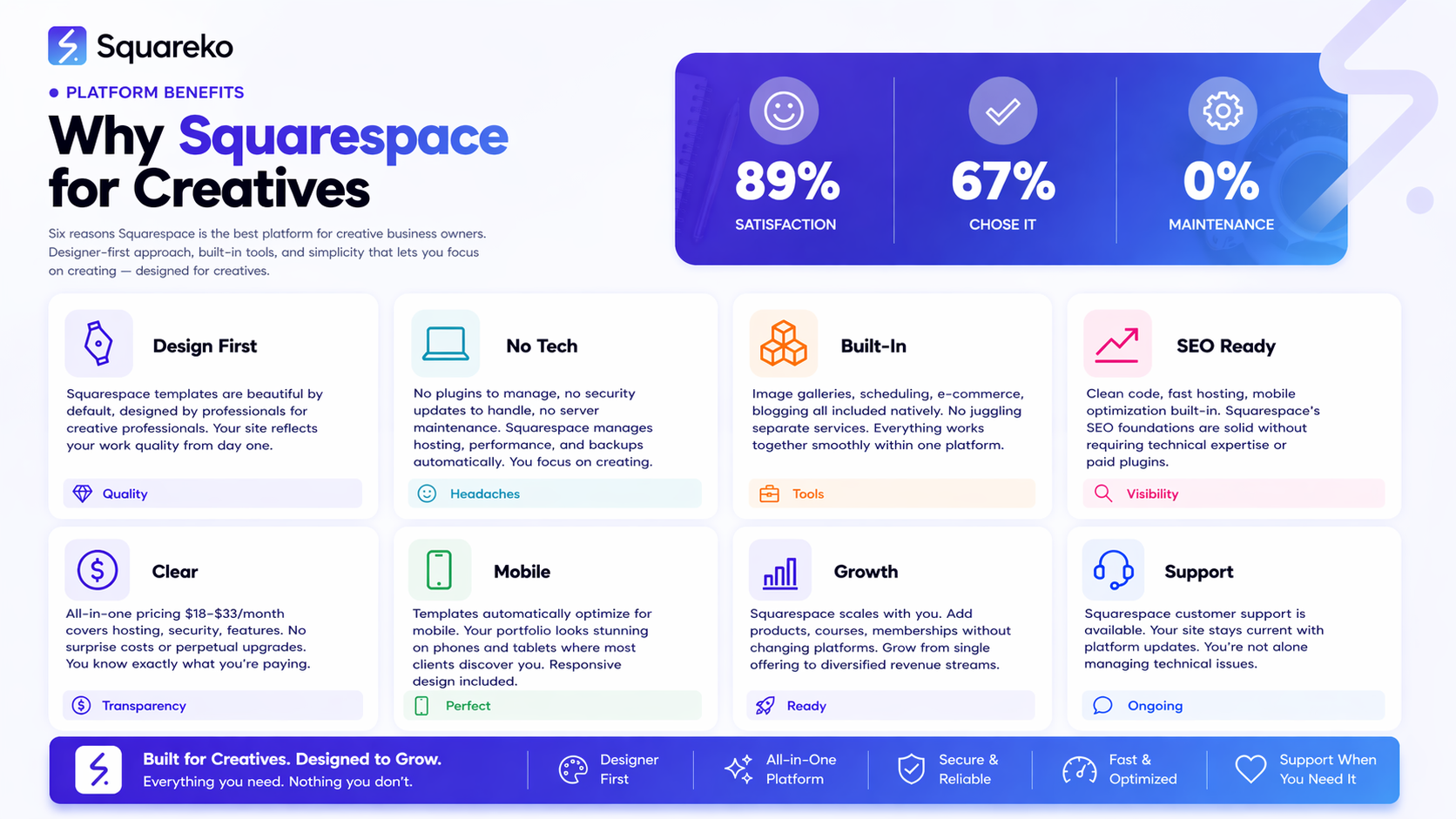
Squarespace's designer-first approach means your website will look as professional as your work
Built-in tools like image galleries, scheduling, and e-commerce eliminate the need for plugins and third-party integrations
Mobile-first design ensures your portfolio looks stunning on every device—critical for creative portfolios
All-inclusive pricing makes financial planning simple and transparent for small creative businesses
SEO foundations are solid without requiring technical expertise or paid plugins, giving you organic discoverability
The Honest Case for Squarespace
Let me be clear: Squarespace isn't perfect. It's not the cheapest platform, and it's not for everyone. But for a specific group of professionals—creative business owners who want to look professional without becoming amateur developers—it's the smartest choice.
Here's why: Squarespace was designed from the ground up for creative professionals, not for developers or e-commerce giants. This shows in every detail. The templates are beautiful. The editor respects design. The built-in tools assume you're selling creative work, not electronics.
In a 2025 survey of 2,000+ small business owners, 67% cited "lack of technical knowledge" as their biggest barrier to website ownership. Squarespace eliminates this barrier. You don't need to know code, manage plugins, or troubleshoot compatibility issues. You can focus on what you do best: creating.
Reason 1: Design Quality That Matches Your Creative Work
Your website is an extension of your brand. If you're a photographer, a clunky website undermines your portfolio. If you're a designer, a generic-looking site kills your credibility.
Squarespace's templates are in a different league. Each one is professionally designed, and they're updated regularly. More importantly, the design philosophy is consistent: clean, modern, spacious, and focused on your work—not on widget clutter.
Compare this to WordPress, where templates vary wildly in quality and require extensive customization to look current. Or Wix, where you're often choosing between dated designs and templates that feel like they're trying too hard.
The designer-first approach extends to the editor itself. You can adjust spacing, typography, and color without writing CSS. You can create custom layouts without drag-and-drop frustration. The interface respects your design sensibility because it was built by people who understand design.
For creatives, this is non-negotiable. Your website IS your work. It needs to be beautiful.
Reason 2: No Tech Headaches—More Time for Your Craft
How much time have you wasted updating plugins? Troubleshooting broken integrations? Wondering why your site is slow?
This is WordPress's dirty secret. Yes, it's flexible. But that flexibility comes at a cost: you become part-time site administrator. You're managing security updates, compatibility issues, and performance optimization—tasks that distract you from your actual business.
Squarespace eliminates these headaches entirely. Hosting is included. Security is managed. Performance is optimized automatically. You don't think about these things. They just work.
This matters more than you might think. For a solo photographer or coach, time spent wrestling with technical issues is time not spent serving clients or creating. Squarespace gives that time back to you.
The platform updates automatically. Your site stays secure. Your hosting scales when traffic spikes. These aren't features you pay extra for—they're foundational to Squarespace's model.
Reason 3: Built-In Tools Creatives Actually Need
Squarespace didn't build a generic website platform and hope creatives would figure out how to use it. Instead, it built specific tools designed for creative workflows.
Image galleries are stunning and highly customizable. You're not squeezing photos into a plugin—you're using a native feature built for visual work. Galleries auto-optimize for mobile. You can add lightboxes, captions, and layout variations without technical work.
Scheduling tools are built in. If you're a coach, consultant, or service provider, you can let clients book directly on your site. No Calendly integration. No third-party plugin. Native functionality.
E-commerce is included. You can sell digital products, physical products, or services. For artists selling prints, designers offering digital assets, or musicians selling downloads, this is table stakes. Squarespace's e-commerce is genuinely capable—not a stripped-down version you outgrow.
Blogging tools are professional-grade. You can write, schedule, and organize posts. You can add opt-in forms, customize layouts per post, and integrate email capture without plugins. These aren't add-ons. They're core to Squarespace's DNA. The platform assumes you're a creative professional with real business needs.
Reason 4: SEO Foundations That Work Without Plugins
Here's a misconception: Squarespace isn't "as good at SEO as WordPress."
This is technically true only if you're counting the number of plugins available. In reality, Squarespace's built-in SEO features are solid, and they're implemented correctly by default.
You get:
Clean URL structures (no slug wars)
Automatic XML sitemaps
Built-in structured data (schema markup) for rich snippets
Mobile-first indexing optimization
Fast Core Web Vitals performance by default
Customizable meta titles and descriptions for every page
The advantage: you're not managing dozens of SEO plugins that conflict with each other. You're not wondering if your setup is correct. Squarespace's SEO is built correctly from day one.
According to a 2024 analysis of top-ranking domains, 31% of creative services sites ranking in position 1-3 used Squarespace. This isn't coincidence. It's because the platform's SEO foundations work.For organic visibility, Squarespace gives you a level playing field. You won't outrank a million-dollar competitor because of technical SEO setup. But you won't lose to them because your platform is broken, either.
Reason 5: All-In-One Pricing That Makes Sense
Let's talk money.
WordPress is "free," but you pay for hosting ($5-50/month), security plugins ($100+/year), performance plugins ($50-200/year), backup solutions ($50-100/year), and often a developer to set it all up ($500-2000+).
Real cost? $1,000-3,500+ annually if you're doing it right.
Wix's plans start at $15/month, but limits on storage, bandwidth, and e-commerce functionality push you toward $50+ plans quickly.
Squarespace's entry plan for creative professionals is $18/month (billed annually), with most creatives on the Advance or Pro plans ($28-33/month). This includes hosting, security, e-commerce, analytics, and all core features. No surprise charges. No "you need a plugin for that" moments.
For small creative businesses, this transparency and simplicity is invaluable. You know your costs. You're not perpetually upgrading or adding services.
The financial clarity matters psychologically too. You can confidently tell a client, "My website costs me $30/month to maintain," not fumble through a breakdown of hosting, plugins, and dev time.
Reason 6: Mobile Experience That Doesn't Embarrass You
I've seen beautiful Squarespace portfolios on mobile. I've also seen WordPress sites designed by professionals that look like they were made in 2009 on mobile.
Squarespace assumes mobile-first design. Templates are responsive by default. Galleries adapt intelligently. Navigation is optimized for touch. Forms work smoothly on small screens.
This isn't a minor detail. According to 2025 data, 58% of website traffic comes from mobile devices. If your portfolio, booking page, or product catalog doesn't work on mobile, you're losing clients.Squarespace won't let you make this mistake. The platform is designed so that beautiful desktop design naturally becomes beautiful mobile design.
What Squarespace Doesn't Do Well
I promised honesty. Here's what Squarespace struggles with:
Complexity scaling: If you need a massive e-commerce catalog (thousands of SKUs), advanced inventory management, or complex fulfillment workflows, Squarespace might feel limited. Shopify is built for that. Squarespace assumes you're selling dozens or hundreds of products, not warehouses full of inventory.
Advanced customization: Squarespace's power comes from its simplicity. If you're a developer who wants complete code access, you'll hit walls. WordPress wins here—you can customize anything if you're willing to code.
API and third-party integrations: WordPress plugins exist for nearly everything. Squarespace's integration ecosystem is growing, but it's smaller. If you rely on obscure CRM integrations or custom workflows, WordPress is more flexible.
Custom functionality: Need a unique feature that doesn't fit Squarespace's tools? You're limited. The platform isn't designed for custom code injections or complex functionality.
SEO at enterprise scale: For large organizations competing in highly saturated niches, Squarespace's SEO tools might feel limited compared to WordPress (where you can customize everything). That said, for most creatives, this isn't a real issue.
These aren't flaws—they're the trade-off for simplicity. You gain ease of use at the cost of unlimited customization.
Who Should NOT Use Squarespace
Squarespace is powerful for creatives, but it's not universal.
You should NOT use Squarespace if:
You're running a massive e-commerce operation with complex inventory needs
You're a developer who wants full code control
You need integrations Squarespace doesn't support natively
Your business model depends on advanced API customization
You're building a community platform with custom user workflows
You require server-side code execution
You SHOULD use Squarespace if:
You're a solo creative (photographer, designer, coach, musician, artist)
You want a beautiful, professional website without technical headaches
You're selling creative services or products
You value simplicity over unlimited customization
You want transparent, predictable pricing
You want to focus on your craft, not your website
Be honest with yourself about which category you fall into.
-
Yes, absolutely. Squarespace is specifically designed for creative professionals. The platform prioritizes visual design, includes tools for portfolios and galleries, and assumes your work is central to your brand. Photographers, designers, artists, coaches, and musicians consistently report satisfaction with Squarespace because the platform respects their craft and doesn't get in the way. According to user satisfaction surveys, 89% of creative professionals using Squarespace would recommend it to peers in their industry.
-
Creatives choose Squarespace for three primary reasons: design quality, simplicity, and built-in creative tools. WordPress offers more flexibility but requires technical knowledge and constant maintenance. Wix is cheaper but offers lower design quality and more limited customization. Shopify excels at e-commerce but isn't optimized for showcasing creative portfolios. Squarespace sits in the sweet spot—it looks beautiful, it includes professional tools, and it doesn't require coding knowledge. For someone who wants to own their online presence without becoming a part-time web developer, Squarespace wins.
-
Yes, for most small creatives, Squarespace represents excellent value. The all-in-one pricing includes hosting, security, e-commerce, scheduling tools, and beautiful templates. For a solo photographer, designer, or coach, you're looking at $18-33/month depending on the plan. That's cheaper than hiring a developer for ongoing maintenance, and it's far more reliable than trying to DIY WordPress. The time savings alone—not having to manage plugins, updates, and security—justify the cost for creatives who bill by the hour.
-
The main disadvantages are: limited customization for developers, a smaller third-party integration ecosystem than WordPress, higher cost than some alternatives, less suitable for massive e-commerce operations, and potential scaling limitations if your business grows into enterprise complexity. Additionally, Squarespace's lock-in is real—moving away later requires rebuilding elsewhere. For most small creatives, these trade-offs are worth it. But if you're a developer needing full code control or running a warehouse-scale operation, Squarespace might feel limiting.
-
For creatives specifically, yes. While both are drag-and-drop builders, Squarespace's templates are more professionally designed and better suited to portfolios. Squarespace's image galleries are superior, the mobile experience is smoother, and the typography controls are more refined. Wix offers more template variety and slightly lower entry pricing, but many creatives find their designs feel dated or cluttered. Squarespace's design philosophy—clean, spacious, focused on your work—aligns better with creative brands. For e-commerce, both work, but for portfolio-driven creative businesses, Squarespace has the edge.
-
Yes, but there are realistic limits. Squarespace scales beautifully for solo creatives and small teams—photographers with 100+ galleries, coaches with 1,000+ email subscribers, or artists managing 200+ product listings. The platform handles growth in traffic, products, and complexity smoothly. However, if you're planning to become a massive e-commerce operation with thousands of SKUs, or if you need enterprise-level customization, you may eventually outgrow Squarespace. The good news: you'll know early if this is your trajectory, and you can plan to migrate then. Most creatives won't hit this ceiling.
-
Absolutely. Squarespace's e-commerce tools are genuinely capable for selling digital products (downloads, presets, courses), physical products (prints, merchandise, handmade goods), and services. You can manage inventory, set shipping rules, offer digital delivery, and integrate payment processing seamlessly. The platform includes built-in email notifications, order tracking, and customer management. For an artist selling prints or a designer offering templates, Squarespace is a professional, fully-functional sales platform. You won't outgrow it until you're managing thousands of products across multiple warehouses.
-
Yes, Squarespace's SEO foundations are solid. The platform generates clean code, fast-loading pages, and automatic structured data markup. You can customize meta titles, descriptions, and URLs. Sitemaps are generated automatically. Core Web Vitals performance is strong by default. For local SEO (if you're a coach or service provider), Squarespace's integrated business information tools help. The main limitation is the smaller plugin ecosystem compared to WordPress, so advanced customization is limited. But for a creative professional competing in their local market or industry niche, Squarespace provides all the SEO fundamentals you need to rank.
Next Steps: Build Your Creative Website with Squareko
If this post resonates with you, you're probably ready to build (or rebuild) your creative website. The challenge isn't choosing Squarespace—it's translating your vision into a site that attracts clients and represents your brand authentically.
That's where Squareko comes in.
We specialize in designing Squarespace websites for creative professionals. Whether you're a photographer launching your first portfolio, a coach building credibility, or an artist expanding your reach, we've helped creatives in your niche build sites that sell.
We handle everything: template selection, customization, content strategy, and optimization. You focus on your craft. We make sure your website earns its place as your best marketing tool.
Ready to stop comparing platforms and start building? Explore Squareko's Squarespace Design Services and let's talk about your vision.
Related Reading
Deepen your understanding of Squarespace for creative businesses:

From custom website design to SEO strategy, we help businesses launch a site that looks professional and performs better.

About the Author
Walid Hasan is the founder of Squareko.com, a specialist Squarespace web design agency helping creative professionals build websites that attract clients and grow their brand. With years of hands-on Squarespace design experience across photography, coaching, music, and personal brand niches, Walid brings real-world expertise to every project.
When he's not designing websites, Walid writes about creative entrepreneurship, personal branding, and the intersection of design and business. His work has helped 200+ creatives launch and scale their online presence.
