
10 Must-Have Pages for Your Creative Squarespace Website
Introduction
Most creative professionals launch their Squarespace websites with enthusiasm, only to see them underperform for one critical reason: they're missing the pages that actually convert visitors into clients. A beautiful portfolio means nothing if your potential clients can't easily understand what you do, how to hire you, or why they should trust you over competitors. Your website structure isn't just about looking good—it's about guiding visitors through a clear journey from interest to action. Many creatives either include too many unnecessary pages (confusing visitors) or too few (leaving money on the table). The problem isn't your design skills or your work quality; it's that your website isn't doing the foundational job of building trust, demonstrating value, and making it effortless to hire you. In this guide, we'll walk through the 10 essential pages that separate websites that convert from websites that just exist online.
Key Takeaways 10 Must-Have Pages for Your Creative Squarespace Website
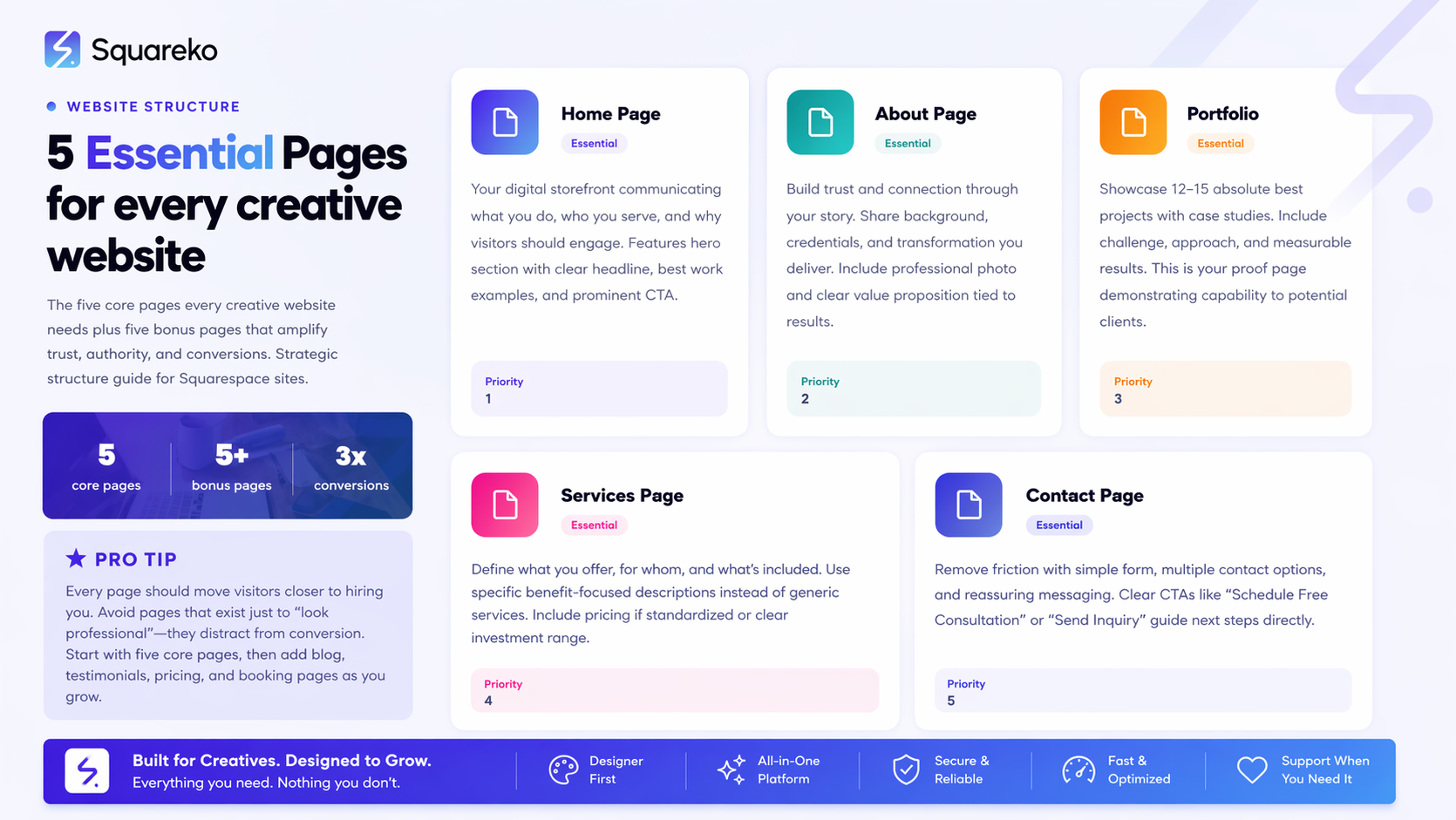
Home Page: Your first impression should immediately communicate what you do and who you serve—use clear headlines and genuine visual hierarchy
About Page: The most-visited page after your portfolio; people buy from people they trust, so focus on your story and credibility
Portfolio/Work Page: Showcase 12–15 of your absolute best projects with context (client industry, your role, results)
Services Page: Clearly define what you offer and for whom; vague service descriptions cost clients
Contact Page: Remove friction with a simple form, multiple contact options, and a clear call-to-action
Bonus Pages: Blog, testimonials, pricing, booking, and shop pages amplify trust and automate client acquisition
1. Home Page
Your home page is your elevator pitch in digital form. Most visitors spend under 15 seconds deciding whether to explore further, so every element must earn its place. The best creative home pages on Squarespace avoid generic "Welcome" headlines in favor of specific, benefit-driven statements: instead of "Creative Designer," try "I Design Brand Identities for Direct-to-Consumer Fashion Companies."
Include a hero section with a clear headline, supporting subheadline, and one primary call-to-action (usually "View My Work" or "Let's Talk"). Feature 3–4 standout portfolio pieces below the fold to immediately prove your capability. Add a short value proposition section that answers the question your visitor is asking: "Why should I work with you?" Include social proof—either a testimonial snippet or client logos—before the fold. Your home page shouldn't try to tell your entire story; it should intrigue visitors enough to click deeper into your site.
On Squarespace, use high-quality hero images or videos that reinforce your creative niche. If you're a photographer, that hero section is your portfolio. If you're a branding strategist, it's your case study. The technical setup matters less than the strategic messaging: match your headline directly to your visitor's need, not your job title.
2. About Page
Data shows the About page is often the second or third most-visited page on creative websites, yet most creatives treat it as an afterthought. Your About page isn't your resume—it's proof that you're trustworthy, capable, and someone your ideal client wants to work with. Start with your origin story, but keep it focused on why you started, not where you were born or what you studied. The magic is in connecting your experience directly to client results.
Use this structure: Start with a relatable challenge you overcame, explain what you learned, and connect it to how you now help clients avoid that same problem. For example, a photographer might write: "After shooting 200 weddings the wrong way, I discovered how to capture genuine moments in chaotic environments—now every couple I work with gets the relaxed, authentic photos they actually want."
Include your credentials, but frame them around client benefit (not your ego). Add a professional photo of yourself—it humanizes your brand and increases connection. If you have impressive stats (years in business, projects completed, client satisfaction rate), include those. End with a clear call-to-action that matches your business model: "Ready to work together?" with a link to your contact or booking page. Your About page should answer three unspoken questions: Who are you? Why should I trust you? What can you do for me?
3. Portfolio / Work Page
This is your proof page. Your portfolio page should feature your 12–15 absolute best projects, not everything you've ever created. Squarespace makes it simple to build portfolio galleries with project filters, but the quality of what you show matters infinitely more than the quantity or the fancy navigation.
For each project, include: a compelling project title (not "Project 1"), the client's industry or challenge, your specific role, what you created, and the measurable result (increased followers, improved conversion, brand recognition boost). This context transforms a portfolio from "I did this" to "Here's why this matters." Visitors want to see if you can solve their specific problem, so if you're a UX designer, emphasize the user research and iteration process. If you're a videographer, show the creative direction and equipment choices. Squarespace's Lightbox feature works well, but don't let it distract from what matters: images that demonstrate your best work.
Organize your projects in a logical flow. Ideally, start and end with your strongest work (the recency bias helps with the first impression, but ending strong leaves the lasting impression). If you serve multiple industries, use Squarespace's tag or filter system so visitors can see work relevant to their niche. Keep project descriptions scannable—bullets, short paragraphs, and whitespace are your friends.
4. Services Page
A vague services page leaves potential clients uncertain and costs you actual business. Instead of listing generic offerings, define what you do, for whom you do it, and what the client gets. This page converts when it's specific and benefit-focused.
For each service or service category, explain: what it is (one sentence), who it's for (a description of your ideal client for this service), what's included (deliverables, timeline, scope), and who it's not for (this builds credibility by showing you're selective). Many creatives shy away from being specific, fearing they'll "narrow their market"—the opposite is true. Specificity attracts the right clients and repels the poor-fit ones, saving everyone time.
Use Squarespace's tabbed or accordion layouts to keep the page from feeling overwhelming. If you offer service packages (Starter, Professional, Premium), use clear comparison columns so visitors understand the differences. Include pricing if you can (covered in the next section), or add a clear call-to-action like "Schedule a free consultation" that lets you qualify clients before discussing fees. End the services section with a testimonial from a client who used that service—social proof works especially well right when a visitor is considering purchasing.
5. Pricing Page
Whether to display pricing is the question we get asked most often. Our answer: show pricing if your services are scalable and standardized; be flexible if your work is custom and case-by-case.
If you offer fixed-scope services (e.g., a logo design package, a course, a template), publishing pricing on Squarespace increases conversions by filtering out budget-mismatched leads. If your work is highly custom (consulting, done-for-you branding), consider a "Custom Pricing" approach: explain that your investment depends on scope and timeline, but assure visitors you serve multiple budget levels. Then drive them to your contact page.
If you include a pricing page, follow this structure: service or package name, what's included, timeline, ideal client, and a call-to-action specific to that tier. Use comparison tables only if you have 3+ offerings; with two, just stack them vertically. Pricing pages are notoriously difficult to create on Squarespace without custom code, so many creatives link to a Google Sheet, PDF, or alternate solution. That's fine—clarity matters more than perfectly integrated design.
A well-structured pricing strategy shows confidence. Whether you publish exact figures or offer "custom pricing," be transparent about the decision. Visitors prefer a clear range ($2,500–$7,500) over complete opacity.
6. Blog
A blog serves two critical functions: it builds authority in your niche and creates compounding SEO value over time. You don't need a blog to be successful, but if you want organic search traffic to grow your business without paid advertising, a blog is how it happens. Squarespace's blogging platform is intuitive and indexes well with Google.
What should you write about? Topics your ideal clients are actively searching for and questions they ask during the sales process. A graphic designer might blog about logo design trends, how to brief a designer, or why your DIY Canva design isn't ready for print. A coach might write about the biggest obstacles to her client's goal and how to overcome them. Post consistently—even one thoughtful post per month compounds into 12 indexed pieces annually.
Blog posts do double duty: they warm up visitors who aren't ready to hire yet (building familiarity and trust) and they funnel organic search traffic from Google. Every blog post should link to your services or contact page at least once, turning educational content into a soft lead generator. On Squarespace, use categories and tags to group related content and create internal linking opportunities. Don't blog just to blog—every post should answer a real question your clients ask.
7. Contact Page
Your contact page is where browsers become leads. Many creatives treat this as a formality, but this page—and specifically how easy you make contact—directly impacts your conversion rate. The best contact pages on Squarespace combine multiple contact methods, reduce friction in your form, and include a clear incentive or follow-up message.
Keep your contact form simple: ideally Name, Email, Message. Anything beyond that (company size, budget, project type) is metadata you can ask about in the conversation, not barriers to entry. Include a reassuring message like "I'll respond within 48 hours" or "No spam, just genuine replies." Squarespace's native form integration works well and integrates with your email.
Go beyond the form. Include your email address (text link, not image), phone number if you take calls, and links to where you're active on social media. If you're busy and have a long sales cycle, consider adding a calendly or similar scheduling link ("Schedule a 15-min discovery call") to reduce the back-and-forth. For some creatives, a simple calendly link replaces the form entirely—test what generates better responses.
The section before your contact form should be a mini-value proposition: "Let's talk about your project" or "Ready to bring your brand to life?" followed by a brief explanation of what they should expect next. Reduce anxiety about reaching out. Your contact page is not about showing off your design skills; it's about making it effortless for the right client to take the next step.
8. Testimonials / Social Proof Page
Social proof is the accelerant that turns interest into trust. While you might include one testimonial on your home page and one on each service section, a dedicated testimonials page allows clients to see multiple satisfied customers at once. On Squarespace, testimonials work best as a clean layout with the quote, client name, title/company, and often a photo.
Don't write testimonials for yourself—ask actual clients to provide them. A specific, detailed testimonial ("Walid understood my vision immediately and delivered a website that actually attracts my ideal clients") is infinitely more valuable than a generic "Great designer!" Ask clients to mention the specific result or outcome: increased inquiries, faster sales process, improved brand perception. If you have metrics, even better: "Launched my portfolio and booked 3 new clients within the first month."
Organize testimonials by service type or industry so relevant visitors see the proof that matters most to them. If you're early in your business and don't have many testimonials, don't create a whole page yet—include 2–3 on your home page and revisit this as you accumulate more. Squarespace's testimonial blocks work seamlessly and feel native to the platform.
9. Shop / Digital Products Page
Not all creatives need a shop page, but if you sell physical products, digital downloads, courses, or templates, Squarespace's built-in shop functionality is a game-changer. This page converts a one-time service delivery into ongoing revenue from past clients and new audiences. Digital products work especially well for creatives: photography presets, design templates, Figma UI kits, preset lightroom collections, educational courses, or downloadable planning tools. The barrier to purchase is low, so a well-optimized shop page attracts impulse buyers and creates passive income. Squarespace handles the technical setup—payment processing, file delivery, shipping—so your job is to write compelling product descriptions and set up product categories.
Use product photography or visuals that show the product in use, not just a screenshot. Write descriptions that explain the benefit (not just the feature): instead of "20 Lightroom presets," write "Create a consistent aesthetic across your Instagram feed in 30 seconds per photo." Include usage examples, file formats, and any requirements (software version, Photoshop vs. Procreate, etc.). Price digital products low enough that they feel like an impulse buy but high enough that they're worth the production effort.
10. Booking Page
For service-based creatives—coaches, consultants, photographers, stylists—a booking page is your conversion machine. Rather than making potential clients email back-and-forth to schedule time, a Squarespace-integrated booking calendar handles availability, time zones, and confirmations automatically. Platforms like Calendly integrate seamlessly with Squarespace. Your booking page should include: what they're booking (one-on-one consultation, photoshoot, strategy session), how long it is, what to expect, any preparation they need to do, and your cancellation policy. Include a photo of yourself and a brief intro so they're not booking a stranger. After they select a time, send an automated confirmation with the Zoom link, location, or what to bring.
A booking page removes the friction that prevents interested prospects from taking action. Many creatives see inquiry response rates jump 40–50% when they add a simple booking link. Even if you have only two available slots per week, a booking page shows you're organized, professional, and respectful of their time.
Bonus: Pages NOT to Have
While we've focused on pages to include, it's equally important to recognize pages that clutter your site and confuse visitors. Blog Archive pages that aren't visually designed are noise—let blog categories and tags handle organization instead. Testimonials as a sub-page within services (unless you have 10+) spreads social proof too thin; concentrate it. A "Services Overview" page plus individual "Deep Dive" pages for each service creates decision paralysis; consolidate to one clear services page.
Avoid a Gallery pagethat duplicates your Portfolio—one is redundant. Skip mission statements or philosophy pages that aren't directly relevant to client decisions; weave these into your About page instead. And unless you're a thought leader with regular speaking engagements, skip a Press/Media page—you can add it later if the opportunity presents itself. Every page should earn its place by moving visitors closer to hiring you.
-
Start with these five: Home, About, Portfolio, Services, and Contact. These form the foundational framework that every creative business website needs to convert visitors into leads. Your home page acts as your digital storefront, immediately communicating what you do and who you serve. The About page builds trust and personal connection—people want to work with people, not faceless companies. Your Portfolio (sometimes called Work or Projects) demonstrates your capability with real examples. Services clarifies what you offer and for whom. Contact makes it effortless to take the next step. From there, add pages based on your business model: Blog if you're building authority and organic traffic, Testimonials if you have social proof, Pricing if your offerings are standardized, and Booking if clients need to schedule time with you. The key is intentionality—every page should serve a specific conversion purpose, not just exist because it sounds professional.
-
Structure your portfolio site around the user's journey from discovery to decision. Start with a Home page that immediately answers two questions: what do you do and who do you do it for? Below that, showcase 3–4 standout portfolio pieces to prove capability. Your navigation menu should be simple and clear: Home, About, Work/Portfolio, Services, Contact (with optional Blog, Testimonials, etc.). Within your Portfolio section, organize projects logically—either chronologically with your best work first and last, or by industry/service type if you serve multiple markets. For each project, include context: the challenge, your approach, and the result. This narrative structure transforms a portfolio from "here's what I made" to "here's how I solve problems." Use Squarespace's gallery and filter features to let visitors find relevant work, but don't over-engineer; many of the best portfolio sites are beautifully simple with clean galleries and clear project information.
-
No, but you should want one if you're serious about long-term growth. A blog serves two functions: it builds authority in your niche (positioning you as an expert) and it creates compounding SEO value over time. Every blog post is a potential entry point for someone searching Google who isn't yet ready to hire you—but the blog warms them up. If you're a graphic designer, a blog post about "How to Brief a Designer" attracts people searching that topic and subtly positions you as the kind of designer who gets it. If you're a coach, a post about your methodology attracts people searching for that solution. You don't need a blog to get clients—referrals and direct outreach work fine. But if you want to attract clients 24/7 without paid advertising, a blog is your compounding asset. The commitment is modest: one thoughtful post per month creates 12 indexed assets annually. If blogging feels like a chore, skip it for now and focus on other pages. You can always add one later.
-
It depends on your business model. Show pricing if your services are standardized and scalable (fixed-scope packages, courses, digital products, or recurring retainers with clear pricing tiers). Publishing pricing filters out budget-mismatched leads and speeds up the decision process—visitors who see your $5,000 minimum investment know immediately whether you're in their range. If your work is highly custom (consulting, bespoke branding, done-for-you services), publishing exact pricing is impossible and often hurts conversions. Instead, use a "Custom Pricing" approach: explain that your investment depends on scope and timeline, but assure prospects you serve multiple budget levels. Then direct them to a contact or consultation page to discuss specifics. The key principle: transparency builds trust. Whether you publish exact prices, a range, or invite discussion, being clear about your position is better than mystery pricing that confuses visitors.
-
Most successful creative websites have between 5 and 10 pages. Start with five: Home, About, Portfolio, Services, Contact. These are non-negotiable for converting visitors into clients. Add a sixth page (Blog or Testimonials) when you're ready to invest in authority-building or when you have significant social proof to showcase. If you sell digital products or offer multiple service tiers, add a Shop or more detailed Pricing page. If clients need to book time, add a Booking page. Beyond 10 pages, you're creating navigation complexity that confuses visitors rather than converting them. Every page should answer a specific question or move visitors closer to hiring you. Avoid pages that exist just to "look professional"—Pinterest boards, endless testimonials, or detailed team bios only distract from your core message. Focus on clarity and conversion; trim ruthlessly.
-
A good About page for a creative professional combines relatability, credibility, and a clear connection to client results. Start with a true story about why you started your creative practice—not a resume, but a genuine moment when you realized you had to do this work. For example, a photographer's About page might open with "After the worst family reunion photos of my life, I became obsessed with capturing genuine moments in chaotic settings." This vulnerability and specificity immediately connect you to visitors. Next, establish credibility: years in business, notable clients or projects, relevant education, or awards. Frame these around client benefit, not your ego. Then, explicitly connect your experience to what you solve for clients: "Now, every couple I work with gets the relaxed, authentic photos they've always wanted, even if they freeze in front of cameras." Include a professional photo of yourself—it humanizes your brand and increases trust. End with a clear next step: "Ready to work together?" with a link to your contact or booking page. The best About pages feel like talking to a friend who's really good at their job—expert, but approachable.
-
Yes, you need a dedicated Portfolio (or Work) page, though the terminology doesn't matter—clarity does. Your portfolio is where you prove your capability with real examples. Even if you feature standout projects on your home page, a separate portfolio section allows visitors to see your full range of work, organized logically. Squarespace's portfolio functionality makes this seamless—clean galleries, project filtering, and Lightbox overlays all feel native to the platform. The portfolio page isn't where you show everything you've ever made; it's where you curate your 12–15 absolute best projects with context (challenge, approach, result). Organize projects in a logical flow—strongest first and last, or filtered by industry/service type if you serve multiple markets. Include project descriptions that explain what you did and why it mattered, not just what the final product looked like. Your portfolio page is your proof page; treat it as the centerpiece of your website.
-
A contact page that generates responses combines multiple contact methods, a frictionless form, and reassurance about what happens next. Start with a simple form (Name, Email, Message are usually enough) and add a reassuring message: "I read every message and respond within 48 hours" or "No spam, just genuine replies." Include your email address as a clickable link, phone number if you take calls, and social media links where you're active. For service-based creatives, add a scheduling link (Calendly, Acuity Scheduling) so interested prospects can book time immediately without email back-and-forth. Include a brief section above the form that reinforces value: "Let's talk about your project" followed by 1–2 sentences about what they should expect. Reduce anxiety about reaching out. The copy on your contact page should feel like talking to a friend, not filling out a corporate form. After submission, set up an automated reply that confirms you received their message and reiterates your response timeline. Test different variations—some audiences prefer a simple form, others prefer a direct email or phone number. Your contact page is not about showcasing design skills; it's about making it effortless for the right client to take the next step.
Ready to Build Your Converting Creative Website?
The pages you've just learned about form the blueprint for a Squarespace website that doesn't just look good—it actually attracts clients and grows your creative business. But building a high-converting site goes beyond the structure; it requires thoughtful copy, strategic design, and ongoing optimization.At Squareko we specialize in building Squarespace websites for creative professionals. We don't just design beautiful sites—we design systems that convert. From your home page headlines to your services page copy to your contact page workflow, every element is intentional and tested.
Whether you're redesigning your existing site or building from scratch, our team understands the specific challenges creative professionals face: showcasing your best work, building trust quickly, and removing every friction point between interest and hiring.
Book a call →

From custom website design to SEO strategy, we help businesses launch a site that looks professional and performs better.

About the Author
Walid is the founder of Squareko.com, a specialist Squarespace web design agency helping creative professionals build websites that attract clients and grow their brand. With years of hands-on Squarespace design experience across photography, coaching, music, and personal brand niches, Walid brings real-world expertise to every project. When he's not designing websites, you'll find him writing about creative entrepreneurship and the intersection of design and business strategy.
