
How to Monetize Your Creative Brand with Squarespace in 2026
Introduction
You've built something extraordinary. Your portfolio is stunning. Your work speaks for itself. But here's the hard truth: creative talent alone doesn't generate reliable revenue.
Most creative professionals leave thousands of dollars on the table every year because their websites are galleries, not businesses. They showcase their work beautifully but fail to convert visitors into paying customers. According to a 2025 Adobe Creative Economy report, 67% of creative professionals earn less than 40% of their income from their actual creative work—the rest comes from unrelated jobs or gigs.
This doesn't have to be you.
The difference between struggling creatives and thriving ones isn't talent. It's revenue architecture—a strategic system for turning your skills, knowledge, and creative assets into multiple income streams. And Squarespace, with its integrated commerce, member areas, scheduling, and digital product capabilities, is one of the most underrated platforms for doing exactly this.
Whether you're a photographer, designer, musician, coach, course creator, or visual artist, this guide will show you how to build a revenue engine on Squarespace that works while you sleep. We're not talking about vanity metrics. We're talking about real money from digital products, online courses, exclusive memberships, and service packages—all powered by a single, elegant platform.
Key Takeaways How to Monetize Your Creative Brand with Squarespace in 2026
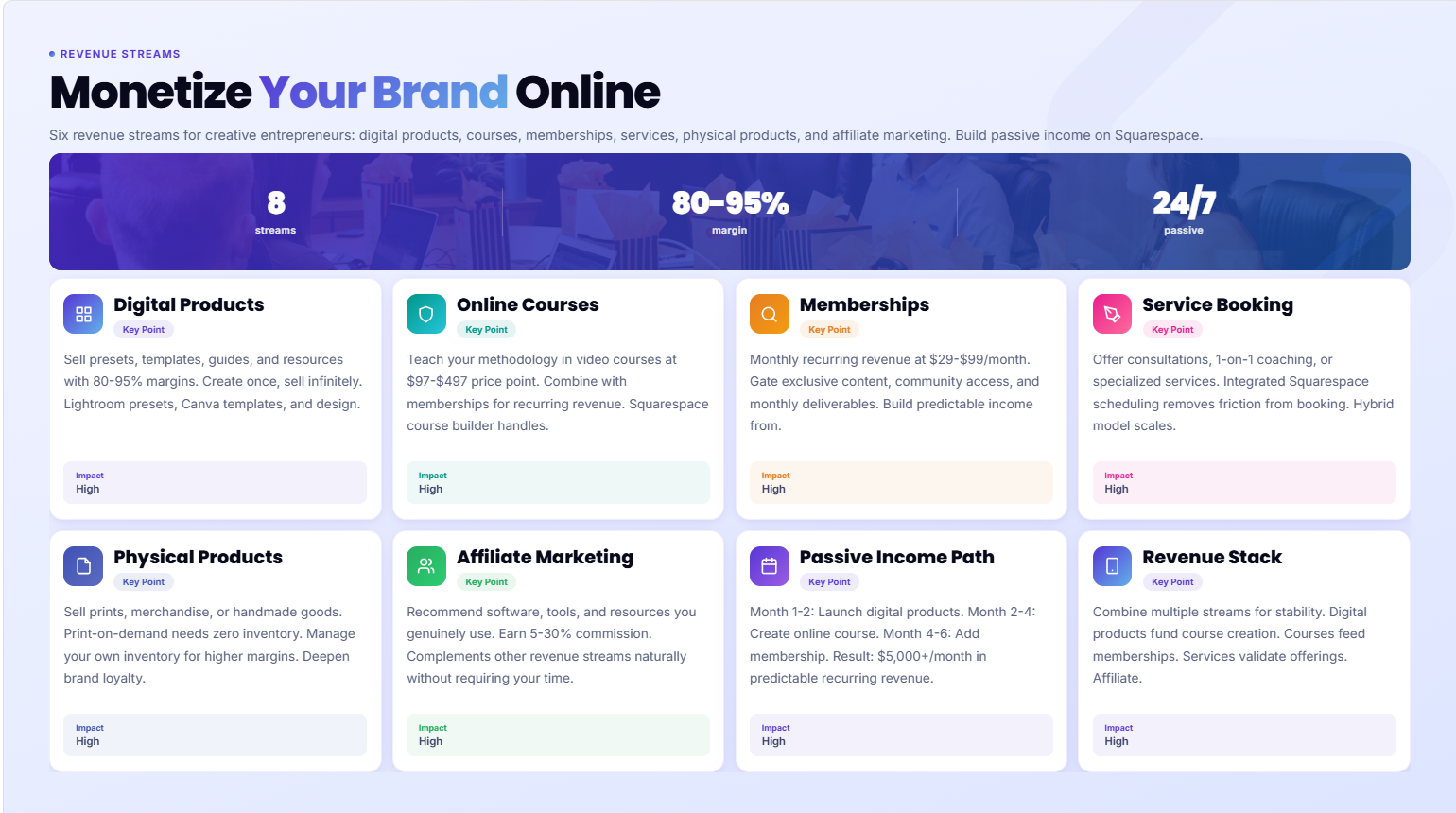
Multiple revenue streams are non-negotiable for creative sustainability; Squarespace supports 6+ income models without switching platforms
Digital products have the highest profit margin (80-95% after hosting) and lowest barrier to entry for immediate monetization
Membership sites and courses generate predictable recurring revenue and deepen customer relationships
You don't need technical skills; Squarespace handles payments, customer data, and delivery automatically
The right revenue stream depends on your creative type; we'll show you which to start with based on your niche
Why Most Creative Websites Leave Money on the Table
Let's start with a diagnosis. Most creative websites fail at monetization because they're built on a fundamental misunderstanding: a beautiful website is not a business.
A portfolio site tells visitors what you do. A business website tells visitors what they can buy, how they can buy it, and why they should. Those are completely different things.
According to HubSpot's 2025 State of Inbound report, 43% of small businesses don't have an ecommerce strategy at all. Among creative professionals, this number is even higher. Why? Because many creatives believe their work should "speak for itself," or they assume selling online requires technical expertise.
Here's what actually happens:
You get inquiries, not sales. Someone sees your work, loves it, but doesn't know how to buy anything, so they move on or ask for a custom project (which locks you into trading time for money).
You can't scale. Every dollar you earn requires your direct time or effort. There's no passive income, no leverage, no residual revenue.
You compete on price. Without clear service packages, digital products, or premium offerings, potential clients have no frame of reference for value. They ask "how much do you charge?" instead of "how can I buy this?"
You lose customers at the finish line. Even when people are ready to buy, if the purchase process is unclear or difficult, they abandon it. Research shows that 70% of shopping carts are abandoned, often due to friction.
Squarespace changes this equation. It gives you a fully integrated platform to sell digital products, offer courses, create membership communities, book services, sell physical merchandise, and accept payments—all from a single platform, with no coding required.
Revenue Stream 1: Can I Sell Digital Products on Squarespace?
Short answer: Yes. Absolutely. This should be your first priority.
Digital products are the fastest way to create scalable revenue. Why? Profit margins are 80-95% after hosting costs. You create once, sell infinitely. No inventory. No shipping. No restocking.
Common digital products creatives sell:
Design assets: Logo templates, Canva templates, Figma templates, brush packs, pattern libraries
Presets and filters: Lightroom presets, Photoshop actions, video filters, color grades
Guides and resources: Workflow guides, how-to PDFs, checklists, workbooks, mood boards
Photography and images: Print-on-demand files, stock photography, digital art prints, preset collections
Music and audio: Loops, samples, royalty-free tracks, sound effects, MIDI packs
Software and tools: Spreadsheet templates, Notion templates, planning tools, desktop wallpapers
With Squarespace Commerce, you can:
Upload digital files (unlimited file types and sizes)
Set your price and decide on licensing terms
Automate delivery—the file is sent to customers' email immediately after purchase
Create product bundles (sell 5 presets as a pack, or offer a "complete bundle" at a discount)
Manage variants (different file formats, tiers, license types)
Track inventory and see real-time sales data
The platform handles VAT, sales tax, payment processing, and customer records automatically. You literally just upload the file, set the price, and watch it sell.
Real-world example: A Squarespace-powered designer selling Instagram template packs generates $5,000-$8,000/month in passive revenue with zero ongoing effort after the initial design work. A photographer selling Lightroom preset bundles brings in $2,000-$4,000/month, recurring.
Revenue Stream 2: Can I Sell Courses on Squarespace?
Yes—and Squarespace's course functionality is built for exactly this.
Online education is a $250+ billion global market. The demand is there. People will pay for knowledge if it solves a real problem or teaches a valuable skill. The beauty of courses is recurring revenue and customer lifetime value.
A student who buys your $197 course once might spend $5,000+ with you over two years through additional courses, memberships, and services.
Squarespace lets you create and sell courses through:
Course builder with video hosting, lesson structures, and progress tracking
Drip-feed content (release lessons over time to maintain engagement)
Discussion boards for community and peer learning
Grading and quizzes to validate completion
Integrated billing (one-time purchase or payment plans)
Student management (track enrollments, completions, engagement)
Who sells courses successfully on Squarespace?
Coaches: Business coaching, mindfulness coaching, career counseling
Creators: Photography masterclasses, design principles, writing workshops
Musicians: Production courses, music theory, instrument tutorials
Fitness professionals: Workout programs, nutrition coaching, movement classes
Visual artists: Digital painting, illustration, animation techniques
Strategic tip: Combine courses with membership (more below). Sell individual courses at $97-$497, but offer a membership for $29-$99/month with access to all courses plus monthly new content. This creates recurring revenue and increases customer lifetime value by 300%.
Revenue Stream 3: Does Squarespace Support Membership Sites?
Yes. Member Areas are one of Squarespace's most powerful monetization features.
Memberships create predictable, recurring revenue. Instead of selling one $200 course, you sell access to a community for $39/month. Over a year, that's $468 per customer. Over 10 customers, that's $4,680/year. Over 100 customers, that's $46,800/year in recurring revenue.
Here's what Squarespace Member Areas enable:
Gated content (only members see it)
Multiple tiers (basic member at $19/month, pro member at $49/month, VIP at $199/month)
Recurring billing (set it and forget it)
Exclusive resources (downloads, files, templates, guides)
Live access (private community channels, forums, group coaching calls)
Analytics (see retention, churn, and member activity)
Creatives using memberships effectively:
Photographers: Private editing tutorials, preset releases, monthly Zoom critiques ($29-$49/month)
Designers: Weekly design challenges, live office hours, template libraries ($39-$79/month)
Musicians: Production samples, mixing tips, monthly production challenges ($19-$49/month)
Artists: Process videos, daily prompts, technique deep-dives, community gallery ($25-$99/month)
Coaches: Group coaching, accountability groups, resource libraries ($47-$197/month)
The key advantage: Memberships aren't about one-time value; they're about continuous value. You release new content monthly. Members feel they're getting fresh material every time they log in. This creates stickiness and reduces churn.
Revenue Stream 4: Can I Book Services on Squarespace?
Yes. Squarespace Scheduling is built for service-based creatives.
You don't need to replace hourly work with passive revenue immediately. A hybrid model—part services, part digital products—often works best in transition. Services also build your audience and credibility for future digital products.
Squarespace Scheduling lets you:
Offer appointments (consultations, coaching sessions, design reviews, music lessons)
Set availability (your calendar syncs with your booking page)
Collect payments upfront (no-show protection)
Automate confirmations and reminders (reduce no-shows)
Sell packages (3-session coaching packages, 5-design-review bundles)
Manage buffers and prep time (schedule time between appointments)
This works for:
Photographers: Portrait sessions, editing critiques, posing coaching
Designers: Design consultations, branding strategy calls, portfolio reviews
Coaches: One-on-one coaching, group workshops, accountability sessions
Musicians: Lessons, production consultations, collaboration sessions
Visual artists: Commission consultations, technique workshops, custom project planning
Pro strategy: Use services to build your audience for digital products. A $97 portrait consultation client is a $297 Lightroom preset pack buyer. A $197 coaching session client is a $497 group mastermind member.
Revenue Stream 5: Can I Sell Physical Products on Squarespace?
Absolutely. Squarespace Commerce handles print-on-demand and physical inventory.
Physical products are lower-margin (40-60% profit) but they deepen brand loyalty. Customers holding a mug with your art, wearing a shirt with your design, or displaying a print in their home become brand ambassadors.
Options:
Print-on-demand (no inventory: mugs, shirts, hoodies, hats, bags, phone cases)
Direct inventory (manage your own stock of products)
Etsy integration (sync your Squarespace store with Etsy for wider reach)
Fulfillment by Squarespace (order management + shipping integration)
Who sells physical products successfully:
Graphic designers: Branded merchandise (hoodies, tees, hats)
Photographers and artists: Prints, framed art, canvas, coffee table books
Musicians: Branded merch, vinyl records, cassettes, limited editions
Illustrators: Art prints, stickers, posters, calendars
Coaches: Workbooks, planners, branded merchandise
Profit calculation: A $20 t-shirt printed and shipped to you costs $6-$8. You sell it for $25. Margin: $17-$19 per shirt. 50 shirts/month = $850-$950 revenue. Not passive, but solid supplement.
Revenue Stream 6: What Is Affiliate Marketing for Creatives?
Affiliate marketing is recommending products you genuinely use and earning commission.
This works if you have an audience and genuine recommendations. It's not a primary revenue stream, but 3-8% additional income on top of other revenue sources.
Examples:
Designers recommend design software (Adobe, Figma, Canva), host platforms (Squarespace!), and stock resources → 10-30% commission
Photographers recommend editing software, presets, cameras, lighting, and storage solutions → 5-25% commission
Coaches recommend tools, books, courses, and platforms their clients use → 15-50% commission
Musicians recommend production software, instruments, and audio interfaces → 5-20% commission
Artists recommend supplies, platforms, and tools → 10-30% commission
Implementation:
Join affiliate programs (Amazon Associates, software vendors, hosting platforms)
Create comparison content (blog posts, guides, videos comparing tools)
Share affiliate links naturally in your course, membership, or newsletter
Disclose clearly (legal requirement; builds trust)
Recommend only what you use (credibility is everything)
Realistic numbers: If you have 10,000 email subscribers and recommend a $297 product at 30% commission, and 2% convert, that's $178.20/month. Scale to $1,000-$5,000/month with significant audience.
How to Set Up Your First Revenue Stream on Squarespace: Step-by-Step
Let's get tactical. Here's exactly how to set up digital product sales (the fastest revenue stream to implement):
Step 1: Create a Product
Log into your Squarespace site
Go to Commerce → Products
Click Add Product
Name it (e.g., "Lightroom Preset Bundle – Film Emulation")
Add a description and compelling product copy
Step 2: Set Up Digital File Delivery
Under Product Details, scroll to Fulfillment
Select Digital Product
Upload your file (any format: ZIP, PDF, LR preset, PNG, etc.)
Choose Email Delivery (automatically sent after purchase)
Step 3: Set Pricing and Variants
Under Pricing, enter your price (e.g., $27)
(Optional) Add variants for different file formats or license tiers
Set Quantity Limit if you want exclusivity (e.g., "limited to 500 copies")
Step 4: Create a Product Page
Under Display, set as Visible
Choose a URL (e.g., /lightroom-presets)
Set Product Page Layout (image, description, reviews)
Step 5: Add a Storefront Section
Go to Pages and create a new page (or edit existing)
Add a Shop section or Product Block
Display your digital product
Link it in your navigation
Step 6: Configure Payment Settings
Go to Settings → Payments
Ensure Squarespace Payments is enabled
Connect your bank account for payouts
Squarespace takes 2.9% + $0.30 per transaction (standard for ecommerce)
Step 7: Test the Purchase Flow
Add the product to your cart
Complete a test purchase
Verify the file is delivered to your test email
Refund the test transaction
Timeline: 30 minutes. Seriously. That's all it takes to create your first revenue stream.
Which Revenue Stream Is Right for Your Creative Type?
Not all revenue streams work equally for all creatives. Here's a framework:
Photographers
Start with: Digital products (presets, editing guides) + Services (editing critiques, portfolio reviews)
Then add: Membership (monthly editing tutorials, preset releases, community critique sessions)
Avoid initially: Online courses (too broad; people want your specific style)
Why: Your audience wants to shoot/edit like you. Presets are immediate (lower barrier), memberships create recurring revenue, services build relationships.
Designers and Visual Artists
Start with: Digital products (templates, brushes, fonts, design assets)
Then add: Courses (design principles, client onboarding, rebranding process)
Then add: Services (design consultations, portfolio reviews)
Avoid initially: Membership (unless you have significant audience)
Why: Designers love templates and resources. Courses demonstrate expertise. Services show results. Membership comes later when you have 5,000+ email subscribers.
Musicians and Producers
Start with: Digital products (samples, loops, presets, MIDI packs) + Services (production consultations)
Then add: Courses (production techniques, mixing, songwriting)
Then add: Affiliate (music software, equipment)
Avoid initially: Physical merchandise (requires brand strength)
Why: Your core audience wants your sounds. Samples are consumable and repeatable. Consultations build credibility. Courses scale production knowledge.
Coaches and Course Creators
Start with: Courses (your core offering)
Simultaneously: Services (1-on-1 coaching to validate course curriculum)
Then add: Membership (community for course graduates, bonus content, group coaching)
Then add: Affiliate (tools, platforms, resources your clients use)
Avoid: Digital products (not your strength; focus on teaching)
Why: Courses are your primary asset. Services validate demand and provide testimonials. Membership deepens relationships. Affiliate income complements naturally.
Illustrators and Digital Artists
Start with: Digital products (art prints, illustration files, character design packs, brushes)
Then add: Services (custom commissions, character design, illustration consultations)
Then add: Courses (illustration techniques, style development, client communication)
Then add: Physical products (printed books, merchandise, canvas prints)
Why: Digital assets scale infinitely. Services build portfolio and testimonials. Courses position you as expert. Physical products deepen fan connection.
Final Thoughts: Building Your Creative Business
Here's the truth that separates struggling creatives from thriving ones:
Talent creates beautiful work. Systems create sustainable income.
You don't need to abandon your craft to monetize it. You don't need to become a salesperson. You don't need to sacrifice authenticity or sell out.
What you need is clarity. Clarity about which revenue stream to start with. Clarity about your pricing. Clarity about what transformation your digital products, courses, and services provide. And clarity about the exact steps to implement.
Squarespace gives you every tool you need: commerce for digital products, courses for knowledge-based revenue, member areas for recurring income, scheduling for services, and physical product selling for merchandise. Everything is built in. Everything is integrated. Everything is designed for creatives, not technical founders.
The creatives winning in 2026 aren't the most talented. They're the ones who built systems. A photographer with moderate talent and a strong digital preset business ($5,000/month) beats a world-class photographer with only services ($3,000/month, capped by time).
Your next move: Pick one revenue stream from this guide. Start there. Launch within 30 days. Measure results. Then layer on the next stream.
If you need help building the website infrastructure to support your monetization strategy, that's exactly what Squareko specializes in. We work with creatives to design Squarespace sites that don't just look beautiful—they generate revenue.
Call to Action
Your creative work deserves a business model that supports it.
Squareko builds Squarespace websites designed to convert visitors into customers. Whether you're selling digital products, offering courses, building a membership community, or booking services, we design websites that work.
Learn about Squareko's Squarespace Design Services
Or if you're ready to start now, check out our free guides:

From custom website design to SEO strategy, we help businesses launch a site that looks professional and performs better.

About the Author
Walid Hassan is the founder of Squareko, a specialist Squarespace web design agency helping creative professionals build websites that attract clients and grow their brand. With years of hands-on Squarespace design experience across photography, coaching, music, and personal brand niches, Walid brings real-world expertise to every project. He's helped 150+ creatives build revenue-generating websites that support their artistic goals.
