
Squarespace vs WordPress for Creatives: 2026 Guide
Introduction
You're standing at a crossroads. You've built something amazing—your photography portfolio is stunning, your coaching practice is thriving, your music is resonating with listeners, or your design work is undeniable. But now you need a website that matches the quality of your work. And you're stuck on the same question thousands of creative entrepreneurs ask every single day: Squarespace or WordPress?
This isn't a trivial decision. The wrong platform choice can mean wasted time wrestling with technical issues when you should be creating, spending more money than necessary, or worse—launching a site that doesn't actually convert visitors into clients. The right platform becomes your business's digital foundation.
The truth is, squarespace vs wordpress for creatives doesn't have a one-size-fits-all answer. But it does have a clear answer for your type of creative business. After years of designing websites for photographers, coaches, musicians, authors, and designers, I've seen exactly what works and what doesn't on both platforms. This guide cuts through the noise and gives you the real verdict—backed by honest comparisons, specific recommendations by creative type, and the data you need to decide today.
Key Takeaways Squarespace vs WordPress for Creatives
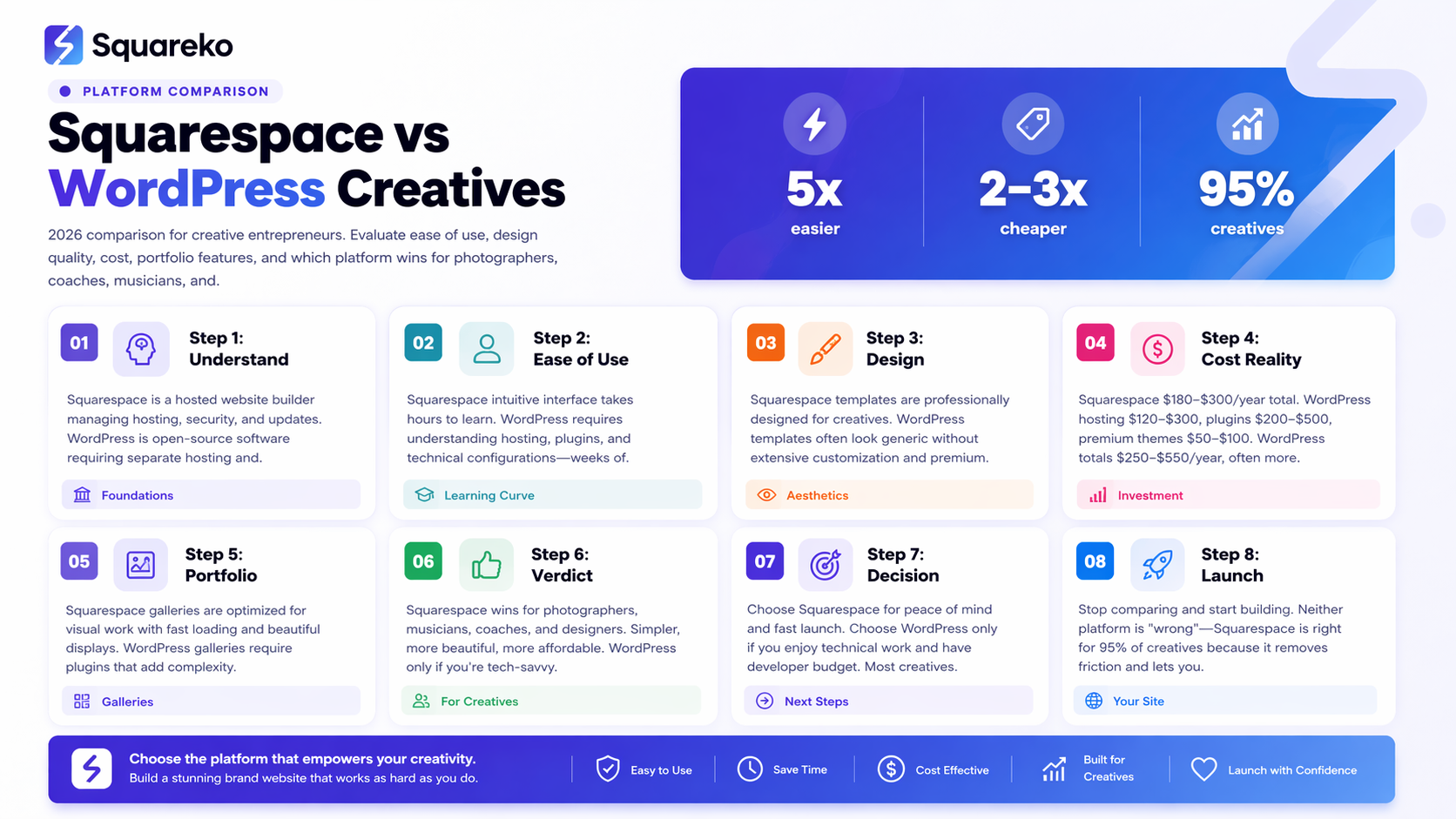
Squarespace wins for most creatives: Better design templates, easier portfolio building, and included hosting make it the right choice for photographers, musicians, and coaches who want to launch fast.
WordPress is for DIYers and serious developers: More flexibility and lower long-term costs, but requires technical skills or a developer hire—not ideal if you want a set-and-forget solution.
Squarespace is 3–5x easier to use: No plugins to manage, no server headaches, no security updates. You focus on your work; Squarespace handles the backend.
Cost matters more than you think: Squarespace's higher upfront price (starting $180/year) is offset by zero maintenance costs. WordPress can spiral to $500+/year once you add necessary plugins and premium themes.
Design quality differs dramatically: Squarespace templates are built for creatives and convert beautifully. WordPress templates can look "cheap" fast—premium ones cost extra.
Quick Verdict
Choose Squarespace if: You're a photographer, musician, coach, or designer who wants a beautiful, professional site up and running in hours—not days or weeks. You value simplicity, design quality, and never wanting to think about technical maintenance.
Choose WordPress if: You're tech-savvy, have specific customization needs that Squarespace can't meet, or you're willing to hire a developer and manage ongoing maintenance costs.
For 95% of creative entrepreneurs, Squarespace is the right choice in 2026.
Squarespace vs WordPress: The Core Differences
Before we compare features, let's start with the fundamental difference between these platforms.
Squarespace is a hosted website builder. You sign up, choose a template, add your content, and publish. Squarespace owns the servers, handles security updates, manages backups, and ensures your site stays online. It's a complete, managed solution.
WordPress is open-source software. You download it, install it on a web server, and manage everything yourself. (Or pay a hosting company to manage it for you—but that still means more moving parts, more complexity, and more bills.)
This distinction changes everything.
With Squarespace, you get a curated, beautiful experience out of the box. Templates are designed to convert visitors into clients. Features are intentionally limited to what actually works for small businesses—not the overwhelming sea of 50,000 plugins that makes WordPress exhausting.
With WordPress, you get infinite flexibility. Want a custom feature? Build a plugin. Want to redesign everything? Rewrite the code. But that freedom comes with responsibility: you're managing servers, security updates, plugin conflicts, and performance optimization. You're running a technical operation, not building a creative business.
Ease of Use: Which is Simpler for Creatives?
This is where Squarespace shines.
Squarespace's ease of use is unmatched. Every feature is discoverable, intuitive, and designed for someone who didn't study computer science. Adding a portfolio gallery is point-and-click. Building a contact form takes 30 seconds. Publishing a blog post feels natural. If you can use Instagram or Canva, you can build a Squarespace site.
The learning curve is measured in hours, not weeks.
WordPress has a steeper learning curve. The core WordPress interface is reasonably intuitive (it's been around since 2003, after all). But creatives usually hit a wall fast. You need to understand:
Hosting (shared vs. managed vs. VPS)
Domain registration (separate from hosting)
Plugin selection (which of 60,000 plugins do you need?)
Theme customization (Elementor? Gutenberg? PHP?)
Performance optimization (caching, image compression, CDNs)
Security hardening (SSL certificates, firewalls, backups)
For photographers and coaches who just want a beautiful site, this is overcomplication.
The real difference: With Squarespace, you're building a website. With WordPress, you're learning web development.
Design & Aesthetics: Which Looks Better?
Here's an uncomfortable truth about WordPress: most WordPress sites look like WordPress sites.
Not all of them. Top developers can create stunning WordPress sites. But out of the box, WordPress templates often look dated, clunky, or cheap. You need to invest in a premium theme ($50–$200), hire a designer to customize it, or spend weeks learning Elementor or custom CSS.
Squarespace templates are built for creatives and are objectively beautiful. Every template is:
Mobile-responsive
Fast-loading
Conversion-optimized
Professional enough to compete with agency websites
Beautifully spaced and typographically sound
This matters for creatives. Your website is a portfolio—a direct reflection of your taste and professionalism. A template that looks good builds trust. A template that looks compromised undermines your brand.
Photography sites on Squarespace look stunning because the platform understands that photographers need galleries that do justice to their work. Musicians get clean, elegant templating that highlights their music player. Coaches get layouts that build credibility and guide visitors to booking pages.
WordPress offers variety, but it doesn't guarantee beauty.
SEO Capabilities in 2026
Both platforms can rank in Google. But the question is: which one makes ranking easier?
Squarespace's SEO is solid and baked in. You get:
Clean URL structures
Mobile-first indexing (Squarespace is mobile-first by default)
Automatic sitemap generation
Page title and meta description editing
Open Graph tags for social sharing
CDN delivery (fast loading, which Google loves)
Built-in SSL (every Squarespace site is HTTPS)
In 2026, Squarespace's SEO capabilities are "good enough" for most creatives. You can optimize your pages, write blog content, build internal links, and rank—especially for local and long-tail keywords where you'll face less competition.
WordPress's SEO requires plugins. The core WordPress software doesn't include SEO features. You need Yoast SEO, Rank Math, or another plugin. These are powerful—maybe too powerful. They give you granular control over every SEO signal. But they add complexity and decision fatigue. Which plugin? How do you configure it correctly? Does it conflict with your theme?
WordPress's flexibility is an advantage only if you know how to use it. For a photographer or coach? The Yoast prompts and red/yellow/green lights just create stress. You'll still rank fine with the defaults.
The honest truth: Google cares about content quality, authority, and user experience—not your platform. A well-written blog post ranks on Squarespace the same as WordPress. But Squarespace gets you to "good SEO" in 10 minutes. WordPress takes 2–3 hours of setup plus ongoing learning.
For creatives, Squarespace's SEO is sufficient. You should spend your time creating great content, not chasing SEO plugin settings.
Cost Comparison
Money matters. Let's break it down honestly.
Squarespace costs are simple and predictable:
Personal plan: $180/year (good for portfolios, no e-commerce)
Business plan: $300/year (includes e-commerce for physical products)
Commerce Basic: $528/year (better for selling)
Advanced plans: $744+/year
No surprises. No hidden plugin fees. No security plugin subscriptions. The price you see is the price you pay, and everything is included—hosting, SSL, backups, mobile optimization, CDN.
WordPress costs seem cheaper but aren't:
Managed WordPress hosting: $120–$300/year (BlueHost, HostGator, etc.)
Domain registration: $10–$15/year (sometimes included)
Essential plugins: $0–$200/year
Security plugin (Wordfence, Sucuri): $90+/year
SEO plugin premium (Yoast, Rank Math): $50–$100/year
Page builder (Elementor Pro): $50–$100/year
Backup plugin: Free or $50+/year
Premium theme: $40–$100 (usually one-time, sometimes annual)
SSL certificate: $0–$80/year (usually included now)
Performance plugin: $0–$50/year
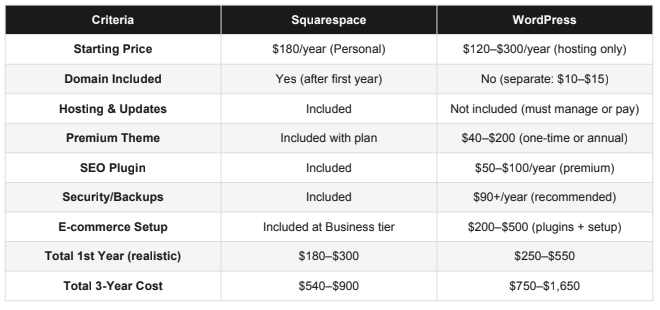
Real-world WordPress cost for creatives: $250–$550/year, plus your time learning and troubleshooting.
Real-world Squarespace cost: $180–$300/year, zero surprises.
Over 3 years, Squarespace costs $540–$900. WordPress costs $750–$1,650. And that's assuming no maintenance issues, no security breaches, no plugin conflicts that require hiring a developer.
Squarespace is cheaper for creatives. Full stop.
Cost Comparison Table

E-commerce & Selling Digital Products
Many creatives don't just want a portfolio—they want to sell. Coaching packages. Digital downloads. Music. Photo prints.
Squarespace includes solid e-commerce at the Business tier ($300/year). You get:
Product pages with descriptions
Shopping cart
Payment processing (Stripe, PayPal, Square)
Inventory tracking
Shipping integration
Digital product delivery (for downloads)
Customer accounts and order history
The checkout experience is smooth. Your customers won't feel like they're buying from a second-rate platform.
WordPress's e-commerce requires WooCommerce. It's free, but here's what you actually need:
WooCommerce plugin (free)
WooCommerce extensions for digital downloads ($299+)
Stripe or PayPal integration (free)
Inventory management plugin (often included)
Shipping calculators (often included)
Email notification plugins (often free)
WooCommerce is powerful but feels overly complex for selling a few digital products or coaching packages. Setting up a simple digital product should not require you to understand inventory management, shipping methods, and tax configuration. On Squarespace, it takes 15 minutes. On WordPress with WooCommerce, it takes an hour if you know what you're doing.
For creatives selling digital products: Squarespace wins easily. The checkout is faster, the setup is simpler, and your customers have a better experience.
Portfolio & Gallery Features
Your portfolio is your resume. It needs to be stunning.
Squarespace understands portfolio requirements. Every template includes gallery layouts designed to showcase creative work:
Full-screen image galleries
Lightbox overlays that let visitors view images at full resolution
Video embedding (Vimeo, YouTube, or self-hosted)
Grid layouts, carousel layouts, masonry layouts
Fast image delivery (Squarespace optimizes images automatically)
Mobile gallery optimization
Client filtering (for photographers with multiple categories)
Photographers, designers, and illustrators can build truly beautiful portfolios on Squarespace without touching code.
WordPress galleries are functional but not optimized for creatives. The core WordPress gallery feature is basic. You'll need plugins like Elementor, Envira Gallery, or Gutenberg's gallery blocks. Most require configuration and optimization. They're slower out of the box. Some don't scale your images properly, which means portfolio images look compressed or pixelated.
For a photographer, your portfolio is the reason someone hires you. Squarespace treats it like the centerpiece. WordPress treats it like a feature.
Clear winner: Squarespace for gallery and portfolio features.
Which Platform for Your Creative Type?
This is where things get specific. Different creatives have different needs.
Photographers
Use Squarespace.
Why? Your portfolio is your entire business. You need gallery layouts that make your images look incredible. You need fast image delivery (Squarespace has a global CDN). You need a gallery that doesn't compress or distort your work. Squarespace handles all of this out of the box.
You might also want to sell prints or offer digital downloads—Squarespace's e-commerce works beautifully for this. And you'll want SEO to attract wedding, portrait, or product photography clients locally—Squarespace's built-in SEO is sufficient for local search.
WordPress's flexibility doesn't matter when you just need a gallery to look stunning. Squarespace delivers that faster and better.
Coaches
Use Squarespace.
Why? You need to build trust and convert visitors into clients. This requires a professional site that loads fast, looks credible, and includes clear call-to-action buttons to book a call or join a program.
Squarespace's business templates are designed for this. You get clean layouts for testimonials, service descriptions, pricing tables, and booking integrations (through Calendly or similar). The mobile experience is excellent—most of your visitors will be on phones.
Selling digital courses or coaching packages? Squarespace's e-commerce handles this. You don't need WooCommerce's overwhelming complexity; you just need to sell access to PDFs, email sequences, or coaching hours.
WordPress is overkill for coaches. Squarespace gets you 95% of the way there in a fraction of the time.
Musicians & Producers
Use Squarespace.
Why? Squarespace has a dedicated music template with a built-in music player. Your tracks can stream directly from your site. The templates are designed for artists—they're beautiful, atmospheric, and let your work take center stage.
You can sell music files or stream links from your site. Album artwork looks stunning. The site loads fast (important for impatient visitors). And the aesthetic of Squarespace's music templates actually matches the professionalism of music industry standards.
WordPress with SoundCloud embeds works but feels clunky. Squarespace feels like a music platform.
Authors & Writers
Squarespace or WordPress—this one's closer.
If you're primarily blogging, building an email list, and selling books—use WordPress. WordPress has a longer history in the blogging space, plugins like Mailchimp integration are straightforward, and the writing experience is optimized. WordPress bloggers are a large community; you'll find more tutorials and resources.
But if you want a polished author site with portfolio elements, speaking engagements, testimonials, and a place to sell your books—use Squarespace.It's cleaner, faster, and the site will look more professional.
For most authors, I recommend Squarespace. The writing experience is fine (blog posts are just another content type), and everything else is easier.
Designers & Creative Directors
Use Squarespace.
Why? Your website is your portfolio and proof of taste. Squarespace templates are designed by designers, for creatives. You can show off multiple projects, case studies, and client work in beautiful layouts.
The visual design flexibility in Squarespace (custom colors, fonts, layouts) is sufficient for showcasing your work. You don't need WordPress's extreme flexibility because you're not building a platform—you're building a portfolio.
If you're a designer who wants to customize everything down to CSS, you might use WordPress. But then you're not really a "designer with a website"—you're a developer with a website. For most creatives, Squarespace's design tools are plenty.
Final Verdict
Let me be direct: Squarespace is the right choice for most creative entrepreneurs in 2026.
Here's why this matters:
You didn't become a photographer, coach, or musician to become a web developer. Your time is your most valuable resource. Every hour spent wrestling with WordPress plugins, managing security updates, or troubleshooting plugin conflicts is an hour not spent creating, not spent with clients, not spent growing your business.
Squarespace removes that friction entirely. You get a platform designed specifically for creatives. Your site will look professional. Your portfolio will showcase your work beautifully. Your SEO will be sufficient. E-commerce will just work. You'll never lose sleep over security updates.
The cost argument is settled: Squarespace is cheaper when you factor in the true cost of WordPress ownership.
The design argument is settled: Squarespace templates are more beautiful and conversion-optimized for small creative businesses.
The ease argument is settled: Squarespace is 3–5x simpler.
When should you use WordPress? Only if:
You're a technical person who enjoys managing servers and plugins
You need a specific feature or functionality that only WordPress can do
You're willing to hire a developer and pay ongoing maintenance costs
You have a highly complex website that requires extreme customization
For photographers, coaches, musicians, authors, and designers? Squarespace.
-
For the vast majority of creative entrepreneurs—photographers, coaches, musicians, designers—Squarespace is the better choice. It's simpler, more beautiful out of the box, includes all necessary features, and costs less over time when you factor in the true expense of WordPress maintenance.
Choose WordPress only if you're technically skilled, need features beyond what Squarespace offers, or already have a WordPress site and team expertise supporting it. For creatives at the decision stage, Squarespace saves time, money, and frustration.
The decision ultimately depends on your comfort level with technology. If you cringe at the thought of updating plugins, Squarespace is your answer. If you enjoy technical challenges and want infinite customization, WordPress might work. But most creatives find that Squarespace's simplicity is worth far more than WordPress's flexibility.Choose WordPress only if you're technically skilled, need features beyond what Squarespace offers, or already have a WordPress site and team expertise supporting it. For creatives at the decision stage, Squarespace saves time, money, and frustration.
The decision ultimately depends on your comfort level with technology. If you cringe at the thought of updating plugins, Squarespace is your answer. If you enjoy technical challenges and want infinite customization, WordPress might work. But most creatives find that Squarespace's simplicity is worth far more than WordPress's flexibility.
-
Yes, absolutely. For photographers, Squarespace is objectively better. Here's why:
Your portfolio is your entire sales pitch. Squarespace's gallery features, image optimization, and portfolio templates are designed specifically for visual work. Images load fast through their CDN. Galleries display at full resolution. Lightbox overlays let clients zoom and admire your work in detail.
WordPress galleries require extra plugins, more configuration, and often don't optimize images as well. Your portfolio—the most important part of your site—ends up as an afterthought.
Additionally, photographers benefit from Squarespace's out-of-the-box beauty. Your site needs to reflect your aesthetic taste. Squarespace templates do that. You can launch a stunning photography portfolio in a week. WordPress would take weeks or require hiring a designer.
For photographers, this isn't even close. Squarespace wins.
-
Squarespace appears more expensive upfront ($180–$300/year) but costs less overall.
WordPress hosting starts at $120–$300/year, but add in necessary plugins ($50–$200/year), premium themes ($50–$100), security tools ($90+/year), and performance optimization—and you're spending $250–$550 in year one.
Over three years: Squarespace costs $540–$900. WordPress costs $750–$1,650.
Plus, WordPress requires ongoing maintenance and troubleshooting—hours that have a real dollar value if you hire someone or lost opportunity cost if you do it yourself.
For creatives, Squarespace is cheaper. Period.
-
Yes. Squarespace's SEO capabilities are sufficient for creative entrepreneurs.
Squarespace includes:
Clean URL structures
Page title and meta description editing
Sitemap generation
Image alt text fields
Heading hierarchy controls
Mobile optimization (critical for Google)
Built-in CDN (fast loading improves rankings)
SSL security
You can write excellent blog content, optimize it for keywords, build internal links, and rank in Google—all on Squarespace. For photographers, coaches, and local creatives, Squarespace's SEO is more than adequate.
WordPress requires an SEO plugin to get equivalent functionality. Yoast or Rank Math add control, but also complexity. Most creatives don't leverage that complexity anyway. Squarespace's baked-in SEO is simpler and sufficient.
Bottom line: Don't choose WordPress for "better SEO." Both platforms rank fine when content is quality and promotion is strategic.
-
Yes, for most creatives, WordPress is unnecessarily complicated.
WordPress core is reasonable—the interface is intuitive. But creatives quickly hit complexity walls:
Choosing between shared/managed/VPS hosting
Installing and configuring plugins
Understanding child themes vs. parent themes
Updating everything constantly
Troubleshooting plugin conflicts
Managing security
Optimizing database and images
These are technical tasks that pull focus from your actual work. For a photographer, every hour learning WordPress is an hour not shooting. For a coach, every hour on WordPress is an hour not coaching.
Squarespace eliminates this complexity. You focus on your work; Squarespace handles the backend. That's worth the cost alone.
Is WordPress complicated? Yes. Does it have to be? No—but it often is.
-
Item descriptionYes, absolutely. Squarespace's e-commerce (starting at the Business plan, $300/year) includes digital product delivery.
You can upload PDFs, eBooks, video courses, audio files, or templates. When a customer purchases, they receive instant download links. No managing external services. No complex payment flows. No confusion.
This is perfect for coaches selling digital courses, musicians selling music files, designers selling templates, or authors selling eBooks. The entire transaction is smooth and professional.
WordPress offers this through WooCommerce, but setup is more involved, and you'll likely need additional plugins for proper digital delivery. Squarespace handles it natively.
-
IteSquarespace is better for coaches. Coaching is about trust and conversion—turning visitors into clients.
Squarespace's business templates are designed for service-based businesses. You get:
Clean layouts for testimonials and case studies
Professional service descriptions
Pricing tables that build confidence
Clear calls-to-action to book calls
Mobile optimization (most coaching site visitors are on phones)
Easy Calendly integration for booking
Professional checkout for course or package sales
WordPress works for coaches, but it requires more setup and customization. Squarespace gets you 95% of the way there faster. Your time is better spent coaching, not configuring WordPress.
For coaches, Squarespace is the obvious choice.
-
Yes. Squarespace has some of the best portfolio features of any website platform.
Every Squarespace template includes beautiful portfolio layouts:
Full-screen image galleries
Multiple gallery styles (grid, masonry, carousel)
Video embedding and optimization
Filterable portfolios (for photographers with multiple categories)
Fast image delivery
Professional lightbox overlays
Mobile optimization
These aren't afterthoughts—they're central to Squarespace's design philosophy. The platform was built by designers, for creatives. Portfolios look stunning.
WordPress offers portfolio functionality through plugins, but it doesn't match Squarespace's out-of-the-box beauty. Your portfolio is too important to rely on WordPress plugins. Use Squarespace and let your work shine.
Services CTA Section
Ready to Launch Your Creative Brand?
You've made the decision. You know your platform. But building a stunning, conversion-focused website is more than just choosing the right tool—it's about design, strategy, and execution that actually works.If you've chosen Squarespace (and based on this guide, there's a good chance you have), Squareko specializes in designing websites for creative professionals.We've built photography portfolios that book clients, coaching sites that convert visitors into students, musician platforms that showcase talent, and author sites that build authority.
We handle everything: design strategy, template customization, content optimization, SEO setup, and e-commerce integration. You launch a website that doesn't just look beautiful—it works for your business.

From custom website design to SEO strategy, we help businesses launch a site that looks professional and performs better.

Author Bio
Walid is the founder of Squareko, a specialist Squarespace web design agency helping creative professionals build websites that attract clients and grow their brand. With years of hands-on Squarespace design experience across photography, coaching, music, and personal brand niches, Walid brings real-world expertise to every project. When he's not designing websites, he's writing about the intersection of design, business, and creative entrepreneurship.
