How to Build a Stunning Personal Brand Website on Squarespace (Step-by-Step Guide)
Introduction
Your personal brand website is your digital handshake. It's where potential clients, collaborators, and opportunities discover who you are, what you do, and why they should work with you. Yet many creative entrepreneurs, coaches, and consultants struggle to translate their expertise into an online presence that actually converts visitors into clients. The good news? Building a professional personal brand website on Squarespace is far more achievable than you might think—and you don't need to be a designer or developer to do it.
In this guide, we'll walk through the exact steps to build a personal brand website on Squarespace that reflects your unique value, showcases your work, and brings in the clients you deserve. Whether you're launching for the first time or redesigning an outdated site, you'll have a clear roadmap to follow.
Key Takeaways Build a Stunning Personal Brand Website on Squarespace
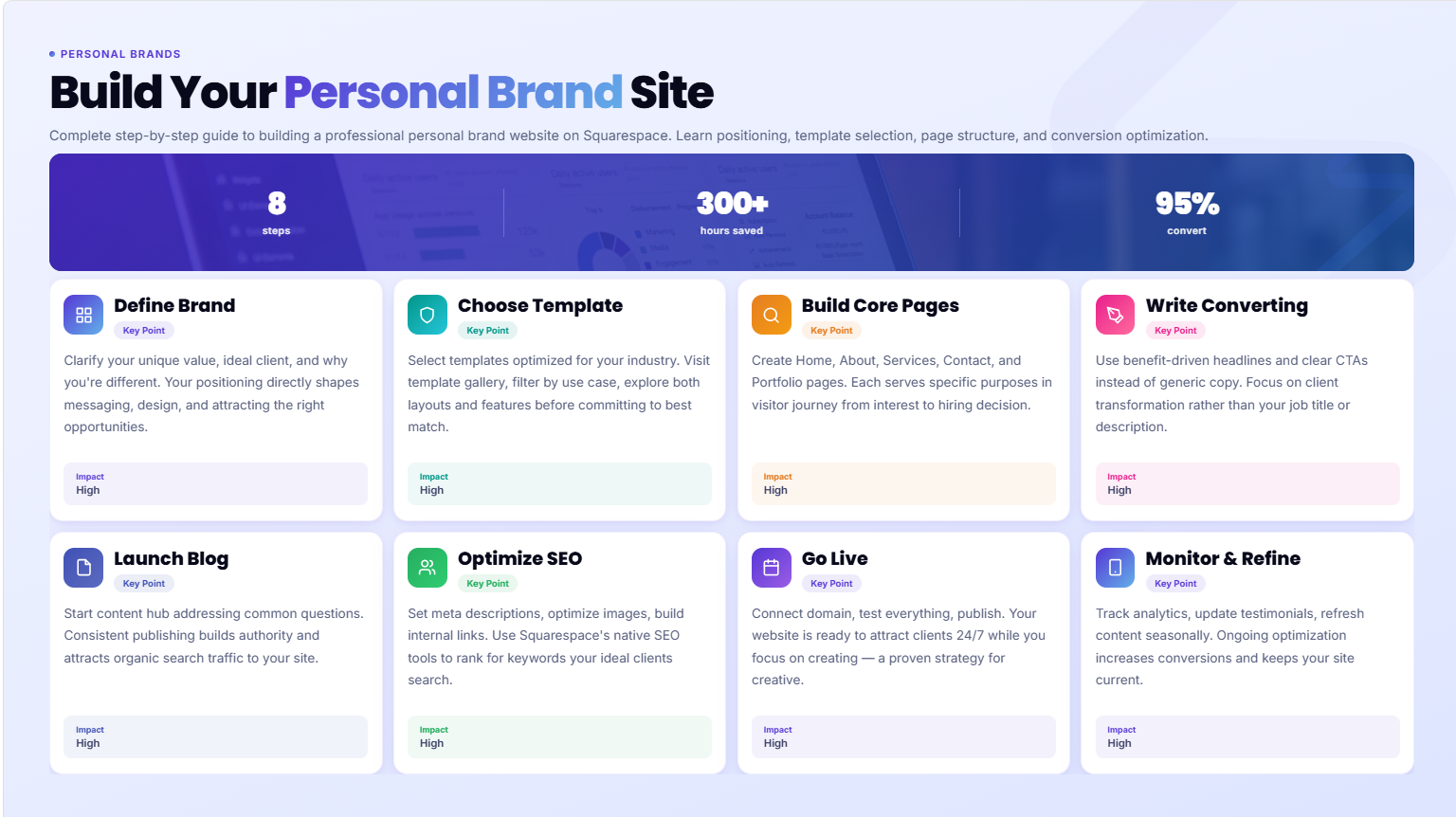
Define your brand identity first: Before touching Squarespace, clarify your unique value proposition, ideal client, and brand messaging
Choose a template that fits your brand: Squarespace offers purpose-built templates designed for coaches, consultants, creators, and entrepreneurs
Build essential pages strategically: Home, About, Services/Offerings, Contact, and a portfolio or blog are the foundation of a converting site
Write copy that converts: Your website copy should address client pain points and clearly show why you're the solution
Optimize for search from day one: Use Squarespace's built-in SEO tools, optimize images, and create valuable content that ranks
Step 1: Define Your Personal Brand Identity
Before you open Squarespace and start clicking buttons, you need clarity. Too many entrepreneurs skip this step and end up with a website that's technically sound but fails to communicate their unique value.
Start by answering these foundational questions:
Who are you and what do you do? Write a clear, jargon-free description of your services or expertise. For example, instead of "I help businesses optimize their digital presence," say "I help overwhelmed solopreneurs attract more clients through content marketing without hiring a team."
Who is your ideal client? Be specific. Not "anyone who needs help," but "female coaches in the wellness space looking to build a premium personal brand," or "freelance designers who want to stop competing on price." The more specific, the better your messaging will resonate.
What's your unique angle? Why should someone hire or follow you instead of one of your competitors? This might be your background, methodology, experience, or the transformation you deliver. This is your competitive advantage.
What do you want visitors to do? Whether it's scheduling a consultation, buying a course, booking a photography session, or signing up for your newsletter, clarity here shapes every design and copy decision you'll make.
What's your brand personality? Are you warm and approachable? Bold and innovative? Sophisticated and minimalist? This informs your color palette, typography, photography style, and tone of voice throughout your site.
Write these down. Reference them as you build. A clear brand foundation ensures your website feels cohesive and speaks directly to the people you want to serve.
Step 2: Choose the Right Squarespace Template for Your Brand
Squarespace offers dozens of templates, and this choice matters more than you might think. A well-chosen template gives you a professional head start and reduces the design decisions you need to make.
Start by visiting Squarespace's template gallery and filtering by your industry or use case. Squarespace organizes templates by category—there are dedicated options for coaches, photographers, creatives, consultants, and service providers. These industry-specific templates already include page structures and sections optimized for your niche.
Look for templates that feature:
A compelling homepage that can showcase your value proposition above the fold
Dedicated portfolio or services sections where you can display your best work or offerings
An About section with space for your story and photo
A clear call-to-action visible on every page
Mobile responsiveness that looks great on phones and tablets (all Squarespace templates are responsive, but some adapt better than others)
Some of the most popular templates for personal branding include Aviator, Brine, Farro,Foster, and Traction. Each has a slightly different aesthetic and layout philosophy. Spend time exploring which feels closest to your brand personality.
Don't overthink this decision—you can always change your template later without losing your content. But choosing intentionally from the start saves you rework and ensures you're starting with a structure that supports your goals.
Step 3: Set Up Your Core Pages
Every effective personal brand website needs a core set of pages. Think of these as the backbone of your site. Squarespace makes it simple to create and organize these pages from the Pages panel on the left side of the editor.
The Homepage is your digital first impression. It should clearly communicate who you are, what you do, and what visitors should do next. The best homepages feature a strong hero section (headline and image) that immediately answers the question "What is this site about?" followed by a brief overview of your services, testimonials or social proof, and a prominent call-to-action button.
The About Page is where you build connection and trust. Share your story, your background, and what led you to do this work. People do business with people they know and trust. Use a professional photo of yourself, be personable in your writing, and tie your background to the transformation you deliver for clients. Avoid lengthy personal history—focus on the relevant experience that builds credibility.
The Services or Offerings Page lists what you offer and the value each delivers. Whether you're a coach offering packages, a designer showing service tiers, or a consultant detailing offerings, be specific about what's included and the results clients can expect. Include pricing if appropriate for your business model.
The Contact Page should make it easy for people to reach you. Squarespace's built-in contact form works well for simple inquiries. If you need something more sophisticated, integrate tools like Calendly for scheduling, Typeform for detailed questionnaires, or your email service provider for newsletter signups. Make sure your contact information is clear and offer multiple ways to connect—email, phone, and perhaps a contact form.
The Portfolio or Case Studies Page (optional but powerful) showcases your best work. If you're a photographer, designer, or creative, this is essential. Display before-and-after shots, project galleries, or client case studies with results. Use Squarespace's native gallery features, which are well-designed and load quickly.
Set up these pages first, then add others as needed. You can always add a Testimonials page, a Resources page, or a Press page later. Start simple and build from there.
Step 4: Write Copy That Converts
Technical excellence means nothing if your words don't connect. Conversion-focused copy addresses your visitor's problems, positions you as the solution, and guides them toward taking action.
Your homepage headline should be benefit-driven, not ego-driven. Instead of "Welcome to My Coaching Practice," try "Build a 6-Figure Coaching Business Without Trading Hours for Dollars." The second version speaks to a desire your ideal client has.
Your service descriptions should focus on outcomes, not just activities. Avoid "I create beautiful websites." Instead: "I design websites that turn visitors into paying clients—no tech skills required." Show visitors what's in it for them.
Use storytelling in your About section. Don't just list credentials. Tell the story of how you discovered your expertise, a breakthrough moment, or a problem you solved that inspired your work. Make it relatable and human.
Social proof matters. Include client testimonials throughout your site. They're more powerful than claims you make about yourself. Feature the actual words clients use to describe their experience working with you, along with their name, title, and if possible, a photo. Video testimonials are even stronger.
Your calls-to-action should be clear and specific. Instead of a vague "Get Started" button, use language that matches what you're asking visitors to do: "Schedule Your Free Strategy Call," "View My Portfolio," "Join My Mailing List," or "Book a Session."
Keep paragraphs short. Most people scan websites. Use short, punchy sentences. Break up long sections with subheadings. Use bold text to highlight key points. Make your copy easy to scan.
Write all your copy in a Google Doc first, refine it with feedback, and then add it to your Squarespace site. This approach is faster and easier than writing directly in Squarespace.
Step 5: Set Up Your Blog or Content Hub
A blog serves two critical functions: it gives potential clients a reason to return to your site (fresh content), and it helps you rank for search keywords relevant to your business.
In Squarespace, creating a blog is straightforward. Go to Pages, click "Add Page," and select "Blog" as the page type. Squarespace will automatically create a blog feed page and set up the infrastructure for publishing posts.
Your first few blog posts should address common questions your ideal clients ask. If you're a business coach, write about "5 Mistakes Keeping Your Business From Six Figures." If you're a brand strategist, write "How to Define Your Brand Voice in 3 Simple Steps." If you're a photographer, share "What to Wear for Your Brand Photography Session."
Aim to publish one substantive post every two weeks. Each post should be 1,500+ words and thoroughly answer a question someone in your industry would search for. This builds authority, provides value, and naturally pulls in organic traffic over time.
Use Squarespace's native blog settings to set featured images, write descriptions for each post, and organize posts by category. Include a call-to-action at the end of each post—ask readers to sign up for your email list, schedule a call, or share the post.
Don't stress if you're starting from zero. Consistency beats perfection. Start with one post and build from there.
Step 6: Add SEO Foundations From Day One
Search engine optimization doesn't need to be intimidating. Squarespace has built-in SEO tools that handle much of the technical work for you. Your job is to be intentional about a few key elements.
Add an SEO title and meta description to every page. These are the headline and description that show up in Google search results. Your homepage SEO title might be "Squarespace Web Design for Creative Professionals | Squareko." Your meta description might be "Build a professional website that attracts clients. Expert Squarespace design for coaches, photographers, and creatives." Squarespace lets you edit these in the SEO section of the page settings.
Use descriptive page names and URLs. Instead of a page URL like "squarespace.com/page1234," make it "squarespace/squarespace-design-for-photographers." This helps both search engines and visitors understand what the page is about.
Optimize your images. Before uploading images to Squarespace, resize them appropriately and compress them to reduce file size. Use descriptive alt text for every image—this helps search engines understand your images and improves accessibility. For example, instead of alt text that says "Photo 1," use "Female business coach on video call with client."
Build internal links naturally. As you write blog posts and pages, link to other relevant content on your site. If you write a post about "Personal Branding Basics," link to your Services page or your About page where relevant. This helps search engines understand the relationship between your pages and keeps visitors on your site longer.
Claim your Google Business Profile. This isn't technically part of your Squarespace site, but it's essential for local search. If you work with local clients or want to appear in Google Maps, set up and optimize your Google Business Profile.
Write for humans first, search engines second. Squarespace's SEO recommendations are helpful, but don't sacrifice readability or value for keyword density. Write naturally, include your target keyword a few times throughout the page, and focus on creating genuinely useful content. Search engines are getting better at rewarding helpful content over keyword-stuffed fluff.
Step 7: Connect Your Domain and Go Live
Once your site is built, polished, and ready, it's time to make it live on the internet.
First, get a domain name. You can buy one directly through Squarespace or register it elsewhere (Google Domains, Namecheap, GoDaddy) and point it to your Squarespace site. A good domain should be short, memorable, and ideally include your name or the primary keyword related to your business. For personal brands, your name as the domain (yourname.com) is often the strongest choice.
If you buy through Squarespace, the setup is seamless. Go to Settings > Domain, click "Add Domain," and follow the steps. Your domain will be connected within minutes.
If you registered elsewhere, you'll need to update your domain's DNS records to point to Squarespace's servers. Squarespace provides clear instructions for every registrar, and support is available if you get stuck.
Set up an SSL certificate. Squarespace automatically provides an SSL certificate, so your site is secure (you'll see the padlock icon in browsers). This is essential for security and SEO.
Test everything before you officially launch. Click through all your pages from a mobile device. Check all your links. Test your contact form. Make sure images load quickly. Ask a friend to visit and give you feedback.
Once you've checked everything, click "Publish" in Squarespace. Your site is now live. Set a reminder to monitor your analytics over the next few weeks and make adjustments as needed.
How Much Does a Personal Brand Website Cost on Squarespace?
The cost of building a personal brand website on Squarespace includes your plan, your domain, and optionally, professional help.
Squarespace Plans: Squarespace offers several plans. As of 2026, the Business Basic plan (around $23/month billed annually) includes a professional website builder, e-commerce capabilities, and automated marketing tools. The Business Standard plan ($33/month) adds more advanced features like advanced scheduling and email campaigns. For most personal brand websites, Business Basic is more than sufficient.
Domain Registration: If you buy your domain through Squarespace, expect $20-$30 per year for a standard .com domain. Some premium domains or specialty extensions cost more.
Additional Tools: If you integrate Calendly, email marketing, or other third-party tools, those may have their own costs. Many have free tiers that work well when starting out.
Total first-year cost for a DIY site: Around $300-$400, which is dramatically less than hiring a designer.
Total cost with professional design help: Depending on the designer and scope, expect anywhere from $1,500 to $5,000+. This typically includes strategy, design, copywriting, and getting you set up to manage the site yourself going forward.
Many solopreneurs and entrepreneurs successfully build their own sites and scale their businesses without ever hiring help. Others prefer to invest upfront in professional design to launch with maximum impact. We'll explore this decision more in the next section.
DIY vs. Hiring a Squarespace Designer: What's Right for You?
There's no one-size-fits-all answer here, and the right choice depends on your situation, timeline, and budget.
Build it yourself if:
You have time to learn Squarespace and iterate. You're comfortable with technology and enjoy tinkering. You have a limited budget to invest upfront. You want complete control over every design decision. You're launching a "version one" and are okay with refining it over time.
The advantage of DIY is that you learn your platform deeply and can maintain and update your site confidently. Many successful creative entrepreneurs start this way.
Hire a designer if:
You want a polished, professional launch immediately. You don't have time to learn the platform. Your business depends on making a strong first impression (premium coaching, high-ticket services). You want custom copywriting and strategic positioning. You want ongoing support and someone to handle updates and improvements.
A professional designer brings expertise in conversion optimization, user experience, and strategic positioning that takes years to develop. The investment often pays for itself quickly if your service requires client trust and a polished presentation.
The middle ground: Many entrepreneurs start with a DIY site to validate their business, then invest in professional design once they have revenue. This approach minimizes risk while letting you test your market first.
Whatever path you choose, remember that your website is not static. Most successful personal brands evolve their sites over time as they grow, learn what resonates with clients, and refine their positioning.
-
For a DIY approach, your main costs are the Squarespace subscription plan (around $23-$33 per month, or $276-$396 annually) and a domain name (around $20-$30 per year). So a fully functional personal brand website costs $300-$425 for your first year, and roughly $300-$360 annually thereafter.
If you hire a professional Squarespace designer, you'll invest $1,500-$5,000 upfront for design, setup, and potentially copywriting and strategy. This option is faster and usually results in a more polished, conversion-focused site, but requires a larger upfront investment. Many designers offer maintenance packages for ongoing updates as well.
The ROI often depends on how seriously you commit to driving traffic to your site and converting visitors into clients. A $2,000 website investment is negligible if it helps you land even one high-ticket client.
-
Absolutely. Squarespace is specifically designed for non-technical people to create professional websites without coding. The drag-and-drop editor is intuitive, templates are pre-designed and customizable, and Squarespace provides excellent support documentation and video tutorials.
You don't need design or coding experience. Most people without any web design background can build a functional, attractive personal brand website in a few days to a week of part-time work.
The main requirements are patience to learn the interface, clarity about your messaging and brand positioning, and willingness to refine your site as you see what resonates with visitors.
Many successful solopreneurs, coaches, photographers, and consultants have built their own Squarespace sites and grown thriving businesses. If you have the time, it's absolutely doable.
-
If you're building it yourself, expect 5-15 hours of work spread over one to three weeks, depending on how much you already know about your brand positioning and copy.
Breaking this down: Planning and brand clarity might take 2-3 hours. Selecting a template and customizing colors/fonts might take 1-2 hours. Creating your main pages and adding content might take 3-5 hours. Writing blog posts, optimizing for SEO, and fine-tuning might take another 2-5 hours.
If you're hiring a professional designer, turnaround is typically 2-4 weeks from project kickoff to launch, depending on the designer's timeline and how quickly you provide feedback and content.
The key variable is how quickly you can clarify your brand message and write (or have written) your website copy. This is where most DIY projects stall. Spend adequate time on strategy and messaging upfront, and the actual website building goes much faster.
-
At minimum, you need five core pages: a homepage, an about page, a services or offerings page, a contact page, and ideally a portfolio or testimonials page if you have client work to showcase.
Additional pages that can boost conversions and SEO include a blog or resources section, an email signup page, a testimonials or case studies page, a FAQ page, and if you sell digital products or courses, a dedicated sales page.
Start with the five essentials, then add others based on your business model and what makes sense for your audience. A lean, focused website that converts is better than a sprawling one with outdated or redundant content.
-
Yes. Squarespace is an excellent platform for personal branding because it's specifically built to help service providers, creators, and solopreneurs look professional without technical skills. Templates are modern and designer-approved, the platform handles all the technical SEO and hosting, and you can customize your design to reflect your brand without hiring a developer.
Squarespace also includes e-commerce and email marketing integrations, so as your business grows, you can add product sales, online courses, or email campaigns without switching platforms.
That said, Squarespace is a premium platform (more expensive than some competitors like Wix or WordPress). It's worth it if you value ease of use, beautiful templates, and professional support. If you want the absolute lowest cost, there are cheaper options. If you want complete flexibility and technical control, WordPress might be better. For most personal brands, Squarespace hits the sweet spot
-
A portfolio typically showcases your work—beautiful photos of projects you've completed, client case studies, or examples of your craft. It's often minimal on text and heavy on visuals.
A personal brand website is broader. It includes your portfolio or work examples, but also clearly communicates who you are, what problems you solve, why you solve them differently, what you offer, and how people can work with you. It's designed not just to showcase past work, but to attract new clients and build your reputation.
A portfolio says "Here's what I've done." A personal brand website says "Here's who I am, why you should trust me, and here's how we can work together."
For most entrepreneurs and consultants, a personal brand website with an integrated portfolio section is more effective than a portfolio alone.
-
Not strictly required, but highly recommended. A blog serves two purposes: it keeps your site fresh with new content that search engines reward with better rankings, and it provides value to potential clients while positioning you as an expert.
If you write regularly about topics your ideal clients care about, you'll attract traffic from Google, build trust through your expertise, and have content to share on social media.
That said, if you have limited time, consistency matters more than having a blog. An abandoned blog with outdated posts hurts your credibility more than not having one at all. So only commit to blogging if you can realistically publish one to two posts per month.
If regular blogging isn't feasible, focus on having an excellent homepage, About page, and Services page. These are more important than a blog you won't maintain.
-
Differentiation comes from a combination of factors:
Unique positioning. Most people in your field position themselves similarly. Find your angle. Maybe it's your background, your methodology, your specific target client, or a transformation you deliver better than anyone else. Make this crystal clear on your homepage.
Authentic visuals. Use genuine photos of yourself, your process, and your clients rather than generic stock photos. Authentic visuals build connection and trust.
Distinctive voice. Write like a human, not a corporate robot. Use your personality. If you're witty, let that come through. If you're warm and empathetic, show that.
Social proof. Genuine client testimonials are powerful. A dozen glowing reviews from real clients will differentiate you more than any design choice.
Fresh content. A regularly updated blog signals that you're actively engaged in your field and committed to sharing knowledge. This builds authority.
Clear value proposition. Many websites leave visitors confused about what exactly you offer and why they should choose you. Make this abundantly clear.
Stand out by being genuinely better at serving your specific niche, showing up consistently, and building real relationships with your audience. Design and platform are important, but they matter far less than your authentic positioning and the value you deliver.
Ready to Build Your Personal Brand Website?
Your personal brand website is one of the most important business assets you can create. It's a platform that works for you 24/7, attracting clients while you sleep, building your credibility, and establishing your expertise in your field.
If you've followed the steps in this guide, you now have a clear roadmap to build a Squarespace website that actually converts visitors into clients. You understand your brand identity, you know which template will serve you best, you have a content strategy, and you're equipped with SEO fundamentals.
If you'd rather focus on your business while a professional handles the design, that's where we come in. At Squareko, we specialize in building beautiful, conversion-focused Squarespace websites for coaches, consultants, photographers, and creative professionals. We handle the strategy, design, copywriting, and setup—so you can launch with confidence and start attracting the right clients.

From custom website design to SEO strategy, we help businesses launch a site that looks professional and performs better.

About the Author
Walid is the founder of Squareko, a specialist Squarespace web design agency helping creative professionals build websites that attract clients and grow their brand. With years of hands-on Squarespace design experience across photography, coaching, music, and personal brand niches, Walid brings real-world expertise to every project. When he's not designing websites, you can find him exploring the intersection of design, psychology, and business strategy.