
Squarespace vs WordPress for Insurance Brokers: Which Platform Wins in 2026?
Introduction
Choosing between Squarespace and WordPress for your insurance brokerage website is one of the most critical decisions you'll make for your digital presence. Both platforms offer powerful features, but when it comes to managing client data, maintaining compliance, and building trust, the requirements for insurance professionals are markedly different from general business websites.
If you're an insurance broker or agent evaluating squarespace vs wordpress insurance brokers 2026, you need more than just a visually appealing site. You need FCA-compliant pages, secure document handling, GDPR-ready infrastructure, and the ability to integrate quote forms and client portals without technical headaches.
This comparison explores both platforms through the lens of insurance brokerage requirements, examining security measures, regulatory compliance support, integration capabilities, and total cost of ownership. By the end, you'll understand which platform aligns with your business goals and regulatory obligations.
Key Takeaways Squarespace vs WordPress for Insurance Brokers: Which Platform Wins in 2026?
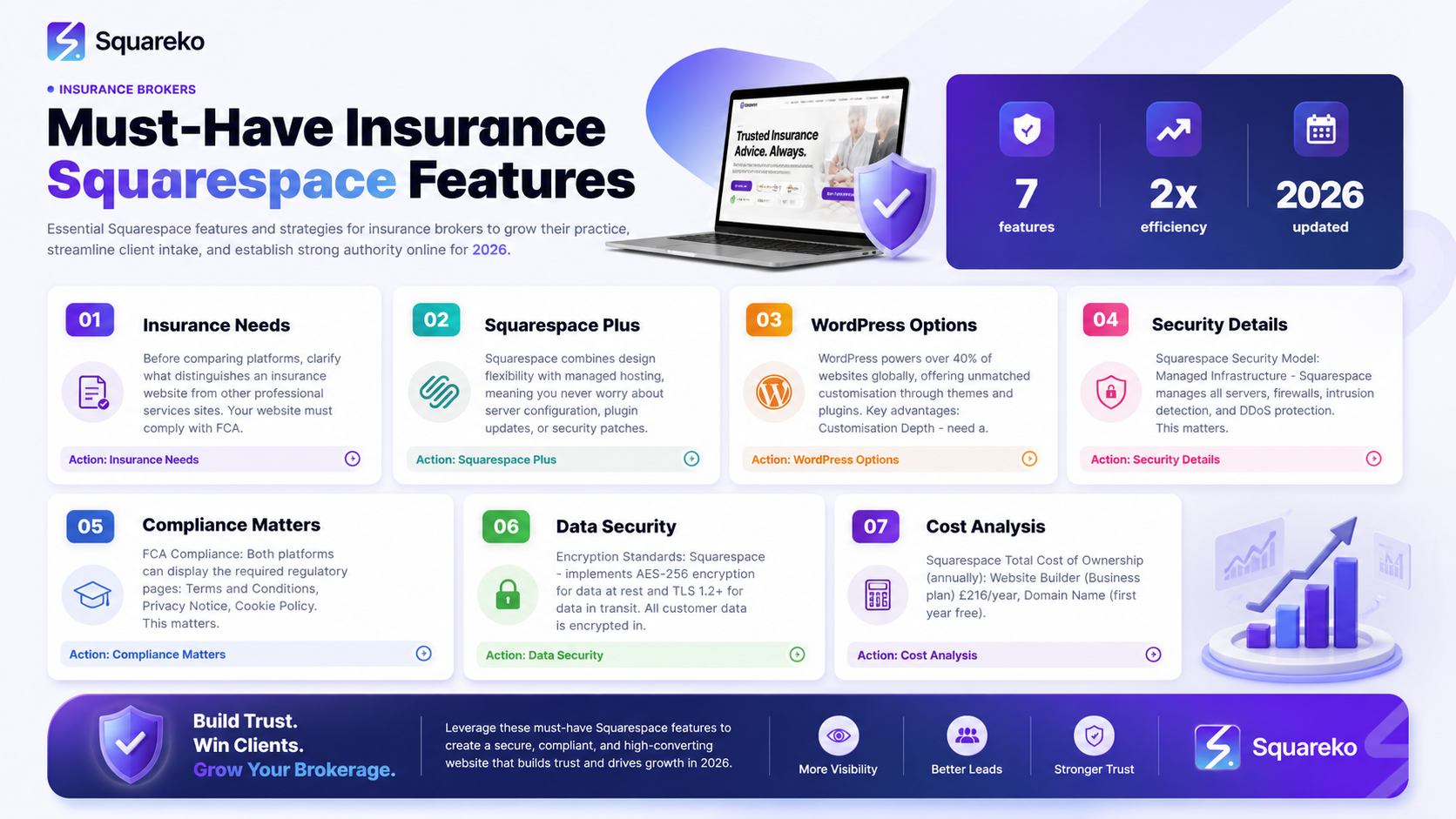
Squarespace is the winner for most insurance brokers due to superior built-in security, compliance support, and managed hosting that meets GDPR requirements without technical configuration.
Squarespace's all-in-one approach means no plugin vulnerabilities, automatic updates, and professional SSL encryption—critical for handling client data.
WordPress offers greater customisation and lower costs but requires significant technical expertise to achieve the same security and compliance standards.
Both platforms support quote forms and document uploads, but Squarespace's integrated approach is more secure for sensitive client information.
FCA compliance pages (Terms, Privacy, Cookie Policy) are easier to implement correctly on Squarespace's built-in framework.
GDPR data protection is a shared responsibility on WordPress; Squarespace handles much of this automatically.
Insurance brokers with limited technical resources should prioritise Squarespace; those with dedicated IT teams may find WordPress flexibility valuable.
Understanding Your Requirements as an Insurance Broker
Before comparing platforms, let's clarify what distinguishes an insurance website from other professional services sites.
Regulatory and Compliance Obligations
Your website must comply with FCA (Financial Conduct Authority) regulations if you operate in the UK. This includes displaying clear terms and conditions, privacy notices, cookie policies, and professional indemnity insurance information. Unlike general e-commerce sites, you cannot treat these as afterthoughts—they're legal requirements.
Client Data Sensitivity
Insurance brokers handle Personally Identifiable Information (PII) including names, addresses, contact details, and sometimes financial or health information. A security breach isn't just damaging to your reputation; it can trigger regulatory investigations and substantial fines.
Integration Needs
You'll likely need to integrate quote generation tools, client management systems (CRM), document management platforms, and email marketing. The platform you choose must support these integrations securely.
Professional Trustworthiness
Prospects visiting your site make snap judgments about your credibility. The platform should allow professional design without appearing generic or template-heavy.
Squarespace for Insurance Brokers: Overview and Strengths
Squarespace is a website builder and hosting platform designed for professionals who want a polished, secure website without extensive technical knowledge.
Why Squarespace Attracts Insurance Professionals
Squarespace combines design flexibility with managed hosting, meaning you never worry about server configuration, plugin updates, or security patches. The platform is built on a unified infrastructure where security is handled consistently across all sites.
Key Advantages for Insurance Brokers
Unified Security Model: Every Squarespace site benefits from the same security protocols, SSL certificates, and data centre protections. There's no version fragmentation or security patch lag.
Automatic Compliance Tools: Squarespace provides built-in templates for Terms of Service, Privacy Policy, and Cookie Notices. While you must customise these for your specific business, the framework is FCA-compliant.
GDPR-Ready Infrastructure: Squarespace's hosting and data management practices are aligned with GDPR. They provide Data Processing Agreements (DPA) required under GDPR Article 28, which WordPress (being open-source software) cannot guarantee.
Professional Design Templates: Squarespace's design library includes professional templates suitable for financial and professional services. Your site won't look like a template—customisation options are extensive.
Integrated File Hosting: You can securely upload and password-protect documents (client statements, policy documents, compliance certificates) directly within Squarespace.
WordPress for Insurance Brokers: Flexibility vs Complexity
WordPress powers over 40% of websites globally, offering unmatched customisation through themes and plugins.
Why Some Insurance Brokers Choose WordPress
WordPress's strength lies in flexibility. If you have a specific workflow or unique requirement, a plugin likely exists. With thousands of extensions for forms, security, compliance, and integrations, WordPress can technically do almost anything.
Key Advantages for Insurance Brokers
Customisation Depth: Need a bespoke client portal or unusual quote form workflow? WordPress's plugin ecosystem offers solutions.
Lower Ongoing Costs: WordPress itself is free; you only pay for hosting and premium extensions. Hosting can cost as little as £5–10 per month (though this is false economy for insurance data).
Plugin Variety: Thousands of plugins handle compliance, security, forms, and integrations. Popular options include WPForms, Ninja Forms, and Gravity Forms.
Ownership of Code: Self-hosted WordPress means you own your site's codebase and database directly.
The Complexity Trade-Off
However, each advantage carries a cost:
More plugins = more vulnerabilities. Each plugin is a potential security weak point unless actively maintained.
GDPR compliance is your responsibility. WordPress doesn't provide Data Processing Agreements; you must ensure your hosting provider does and manage consent correctly.
Updates are inconsistent. Plugin developers may abandon their products or release updates slowly, leaving your site exposed.
Technical expertise required. Configuring security, backups, compliance settings, and integrations requires PHP knowledge or hiring developers.
Security Comparison: Protecting Client Data
Security is non-negotiable for insurance brokers. Let's examine how each platform handles this critical aspect.
Squarespace Security Model
Managed Infrastructure: Squarespace manages all servers, firewalls, intrusion detection, and DDoS protection. You don't configure anything; security decisions are made by their engineering team.
Automatic Updates: Every security patch is deployed across all sites instantly. You never face a situation where a known vulnerability remains unpatched.
SSL/TLS Encryption: All Squarespace sites use HTTPS with automatic certificate renewal. Data in transit is encrypted by default.
PCI Compliance: If you process payments, Squarespace's payment handling is PCI DSS compliant, protecting cardholder data.
Access Controls: Two-factor authentication (2FA) is available for your Squarespace account, protecting against account takeover.
WordPress Security Model
Shared Responsibility: WordPress itself is secure, but responsibility shifts to you and your hosting provider. You must:
Choose a secure hosting provider with proper firewalls and monitoring.
Install and maintain a security plugin (Wordfence, iThemes Security).
Keep WordPress core, themes, and plugins updated.
Configure proper file permissions and database hardening.
Monitor for intrusions and malicious activity.
Plugin Vulnerabilities: Popular WordPress plugins occasionally contain security flaws. The plugin "Yoast SEO" (used by millions) has had vulnerabilities. You must stay alert to security advisories.
Hosting Variation: Security depends on your hosting provider. A £5/month shared host won't offer the same protections as enterprise hosting. For insurance data, you'd need premium managed WordPress hosting (£50–150+ per month).
Update Responsibility: While WordPress core updates are relatively easy, ensuring all plugins update correctly requires vigilance. Some plugins break compatibility; you must test before updating.
Compliance and Regulatory Requirements
FCA Compliance
Both platforms can display the required regulatory pages:
Terms and Conditions
Privacy Notice
Cookie Policy
Professional Indemnity Insurance Certificate
Authorisation Details (if applicable)
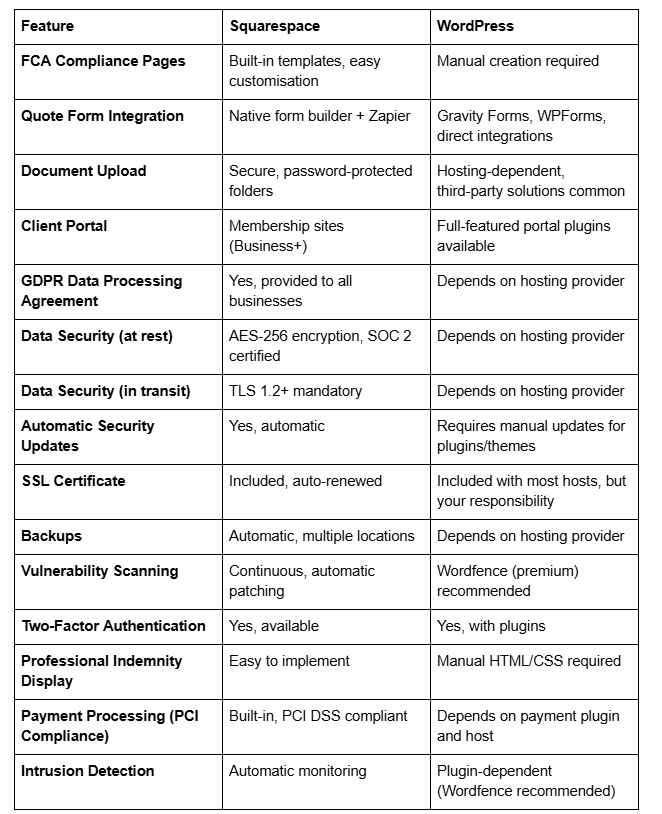
Squarespace advantage: Built-in policy generators and page templates make compliance pages easier to create correctly.
WordPress: You must manually ensure compliance pages are present and legally adequate. This requires legal expertise or consultant advice.
GDPR Compliance
GDPR mandates that you have a Data Processing Agreement with any organisation handling your customers' personal data.
Squarespace: Provides a DPA to all business customers, confirming their role as a data processor. Your privacy policy templates guide you through required disclosures.
WordPress: WordPress Foundation doesn't provide a DPA. Your hosting provider must offer one. Managed WordPress hosts typically do; budget hosts rarely do. This is a critical oversight for insurance brokers.
Insurance Regulatory Reporting
Some insurance brokers must file data protection impact assessments or maintain detailed breach records.
Squarespace: Simplifies this with clear policies on data retention, incident response, and breach notification procedures.
WordPress: You're responsible for documenting your security practices and incident response procedures.
Data Security for Insurance Websites
Given the sensitivity of insurance client data, let's examine how each platform protects information at rest and in transit.
Encryption Standards
Squarespace: Implements AES-256 encryption for data at rest and TLS 1.2+ for data in transit. All customer data is encrypted in Squarespace's data centres, which are SOC 2 Type II certified.
WordPress: Depends entirely on your hosting provider. Premium managed hosts offer similar encryption standards; cheap shared hosting does not. You must verify with your host.
Data Centre Security
Squarespace: Uses multiple geographically distributed data centres with strict access controls, environmental monitoring, and redundancy. Data is automatically backed up across multiple locations.
WordPress: If self-hosted, your hosting provider controls data centre security. Enterprise hosts (AWS, Google Cloud) offer excellent security; budget providers offer minimal protection. You're responsible for configuring backups and redundancy.
Access Controls and Permissions
Squarespace: Offers role-based access with granular permissions. You can limit team members' access to specific pages, forms, or content without sharing your account password.
WordPress: Provides user roles (Admin, Editor, Author, Contributor) with varying permissions. However, WordPress doesn't natively support granular permissions for sensitive documents—plugins are required.
Intrusion Detection
Squarespace: Continuous monitoring detects unusual activity automatically. If your account shows suspicious access, Squarespace alerts you and may require password reset.
WordPress: With a security plugin like Wordfence, you get similar monitoring. Without one, intrusion detection is passive at best.
Vulnerability Scanning
Squarespace: Automatically scans for known vulnerabilities. Patches are applied instantly across all sites.
WordPress: Plugin developers must release patches; adoption depends on your diligence. Wordfence offers vulnerability scanning, but requires a subscription for real-time protection.
Integration and Feature Capabilities
Quote Form Integration
Both platforms support quote generation, but the implementation differs.
Squarespace: Native form builder supports multi-step forms with conditional logic. Integrations with form processors like Zapier allow data to flow to your CRM or email system. However, the data remains on Squarespace's servers during processing.
WordPress: Gravity Forms and WPForms offer more advanced conditional logic and can pipe data directly to third-party systems. However, each form submission creates a database entry in your WordPress database, requiring your hosting provider's security standards.
Document Upload and Storage
Squarespace: Allows password-protected document folders. Clients can upload documents through forms, which are stored securely on Squarespace's servers. Bandwidth and storage limits apply (2TB for Business plan upwards).
WordPress: Document uploads depend on your hosting and security plugins. Direct uploads can pose security risks if not configured properly. Many brokers use third-party platforms like Dropbox or Google Drive with iframe embeds instead of native uploads.
Client Portal Options
Squarespace: Membership sites (available on Business+ plans) can function as basic client portals. Members log in to view exclusive content, documents, and resources. However, Squarespace's portal isn't a full CRM—it's primarily content management.
WordPress: Dedicated portal plugins create more sophisticated client access areas. If you need a full insurance CRM, WordPress integrates with platforms like HubSpot or Pipedrive more flexibly.
CRM and Email Integrations
Squarespace: Integrates with Zapier, which connects to hundreds of CRM systems including HubSpot, Salesforce, and Pipedrive. Direct integrations are limited; you typically go through Zapier.
WordPress: CRM platforms often offer native WordPress plugins. HubSpot, ActiveCampaign, and Pipedrive all have WordPress extensions, reducing reliance on third-party middleware.
SEO and Content Management
Squarespace: Built-in SEO tools (metadata, structured data, sitemap generation) are straightforward. However, customisation is limited. You can't directly edit HTML or implement advanced Schema markup.
WordPress: Yoast SEO and Rank Math plugins offer granular control over on-page optimisation, custom taxonomies, and structured data. Ideal if you want detailed SEO control.
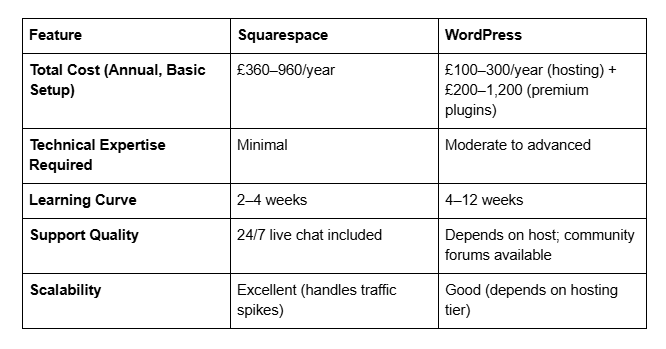
Feature Comparison Table
Cost Analysis: Total Investment Over 12 Months
Squarespace Total Cost of Ownership
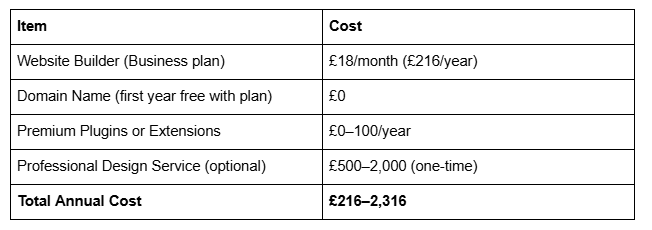
Additional notes: Squarespace Business plan includes email marketing (up to 5,000 contacts), advanced analytics, and priority support. If you choose a higher plan (Commerce or Commerce Advanced) for advanced e-commerce features, costs rise to £33–66/month.
WordPress Total Cost of Ownership
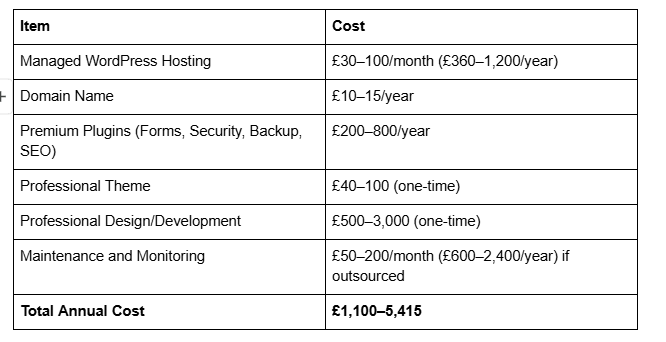
Budget hosting caveat: Whilst WordPress hosting can theoretically cost £5–10/month, budget providers rarely meet insurance industry security standards. We recommend £50+/month for enterprise-grade security and performance.
Cost Verdict
For most insurance brokers without dedicated IT staff, Squarespace's transparent, all-inclusive pricing (£216–300/year) is significantly cheaper than WordPress's true cost (£1,100–2,400+/year when accounting for hosting, security, and maintenance).
-
Yes, absolutely. Squarespace meets and exceeds security standards for handling insurance broker client data. The platform is SOC 2 Type II certified, uses AES-256 encryption, and provides Data Processing Agreements required by GDPR. Major financial institutions and professional services firms trust Squarespace with sensitive data. However, your own practices matter: use strong passwords, enable two-factor authentication, and don't share client data beyond your website without explicit consent.
-
Yes. Squarespace allows you to collect client information through forms, store it securely, and access it through your dashboard. Data is encrypted both in transit (TLS 1.2+) and at rest (AES-256). You can also upload documents to password-protected folders that clients access via secure links. For particularly sensitive information (bank details, medical history), many brokers use a separate encrypted client portal system; however, basic client information (contact details, policy preferences) is safe to collect via Squarespace forms.
-
Yes, with responsibility. Squarespace provides a Data Processing Agreement and compliance-ready privacy policy templates. However, you're responsible for:
Writing accurate privacy notices describing what data you collect and why.
Obtaining explicit consent for marketing communications.
Implementing retention policies and securely deleting data when no longer needed.
Responding to data subject access requests within 30 days.
Squarespace's infrastructure supports these practices; the legal obligations remain yours.
-
WordPress itself is secure, but security depends on your entire stack. WordPress core is maintained by a global community and patched regularly. However, you're responsible for choosing secure hosting, updating plugins, and configuring security properly. Poorly maintained WordPress sites are frequently compromised. For insurance brokers without technical teams, WordPress's decentralised security model is riskier than Squarespace's unified approach.
-
Squarespace and WordPress are roughly equal for SEO when properly configured. Squarespace's built-in SEO tools are simpler; WordPress plugins like Yoast offer more granular control. For most insurance brokers, Squarespace's SEO capabilities are sufficient. You'll rank based on content quality and backlinks far more than platform choice.
-
Yes, but it requires effort. You can export content from Squarespace (pages, blog posts, forms) and import into WordPress or another platform. However, you'll need to manually recreate design and layout. This is why choosing the right platform upfront matters. Squarespace's scalability is often underestimated—many large professional firms run on Squarespace without outgrowing it. Only switch if you have genuinely unique requirements WordPress solves better.
-
Squarespace includes email campaigns (up to 5,000 contacts) but not email hosting for your main business address. You'll use your domain's email via Google Workspace or Microsoft 365 separately. WordPress has no email capabilities built-in; you'll use third-party providers regardless. Both platforms integrate with email marketing tools (Mailchimp, ConvertKit) equally well.
Conclusion: Our Clear Recommendation
After comparing both platforms across security, compliance, integration, cost, and usability, we recommend Squarespace for the vast majority of insurance brokers.
Here's why:
Security is non-negotiable in insurance. Squarespace's managed hosting model, automatic updates, and SOC 2 certification eliminate entire categories of security risk. You're not gambling on whether a plugin developer will patch a vulnerability; Squarespace's infrastructure is hardened by default. For handling client data, this peace of mind is invaluable.
Compliance is simplified. GDPR, FCA, and professional indemnity requirements are accommodated by Squarespace's built-in templates, automatic policy generation, and Data Processing Agreements. WordPress requires you to independently verify that your hosting provider meets these standards—and many don't.
Cost is transparent and lower. Squarespace's all-in-one pricing (£216–300 annually) is straightforward. WordPress's true cost (£1,100–2,400+ annually when accounting for secure hosting, plugins, and maintenance) surprises most brokers. Our clients consistently find Squarespace cheaper by £500–2,000 per year.
Design quality is excellent. Squarespace templates are professionally designed and customisable. Your site won't look generic or template-heavy. You'll appear credible, modern, and trustworthy—critical for converting prospects.
Support is included. Squarespace's 24/7 live chat support is responsive and knowledgeable. WordPress support depends on your hosting provider and your technical knowledge.
WordPress is worth considering only if:
You have highly bespoke workflow requirements that Squarespace can't accommodate.
You employ a full-time developer who maintains your infrastructure.
You require integration with specialist insurance software (like ActQuoteBuilder or Quoter) that only works with WordPress.
For everyone else, Squarespace wins on security, compliance, cost, and simplicity.
Call to Action
Unsure which platform suits your insurance brokerage? At Squareko.com, we're Squarespace specialists for insurance professionals. We understand FCA compliance, GDPR requirements, and the unique needs of brokers.
We've helped dozens of insurance firms migrate to Squarespace, implementing secure quote forms, document portals, and professional designs that convert prospects into clients.
Get a free consultation: Contact Squareko.com today to discuss your requirements. We'll assess your current site (if you have one), explain how Squarespace meets your compliance needs, and provide a transparent quote for design and migration services.
Your website should make client data security effortless, not complex. That's what Squarespace delivers—and that's what we build for you.

From custom website design to SEO strategy, we help businesses launch a site that looks professional and performs better.

Author Bio
I'm Walid Hasan, a Certified Squarespace Expert and Squarespace Circle Platinum Partner with over 12 years of hands-on experience designing and optimizing high-performing websites. Over the years, I've had the privilege of building more than 2,000 Squarespace websites for clients around the world, always focusing on clean design, strong user experience, and conversion-driven results.
