
Squarespace vs WordPress for Health and Wellness Professionals: Which Wins in 2026?
Key Takeaways Squarespace vs WordPress for Health and Wellness Professionals: Which Wins in 2026?
Squarespace wins on speed-to-launch, built-in design quality, and zero technical maintenance; WordPress wins on ultimate customization and lower hosting costs at scale
For most solo health professionals without a developer, Squarespace delivers real business results faster; WordPress requires either ongoing developer support or constant learning
Squarespace includes booking systems, email campaigns, and SSL as standard; WordPress requires you to research, purchase, and integrate third-party plugins for these features
SEO capabilities are comparable between platforms when properly configured, but Squarespace's simplicity means fewer things to break or misconfigure
WordPress offers true ownership and data portability; Squarespace owns the infrastructure but guarantees uptime, security, and automatic updates
Hosting costs favor Squarespace for most health professionals ($16-33/month all-in); WordPress requires hosting ($10-30/month), plugins ($100+/year), and often a developer ($50-150/hour)
If you have developer access and advanced customization needs, WordPress can be worth it; if you want to focus on your practice, Squarespace is the faster path to revenue
You're ready to build a professional website for your health and wellness practice, but there's a fork in the road: Squarespace or WordPress? Both are legitimate platforms used by thousands of practitioners, but they represent fundamentally different philosophies about how websites should work. Squarespace is built-in simplicity with professional polish included. WordPress is customizable power with complexity as the tradeoff. For solo practitioners and small teams without a dedicated developer, the answer usually becomes clear once you understand what you're actually choosing. This guide compares both platforms honestly—where each wins, where each falls short, and which makes sense for your practice in 2026.
Ease of Use and Setup Speed
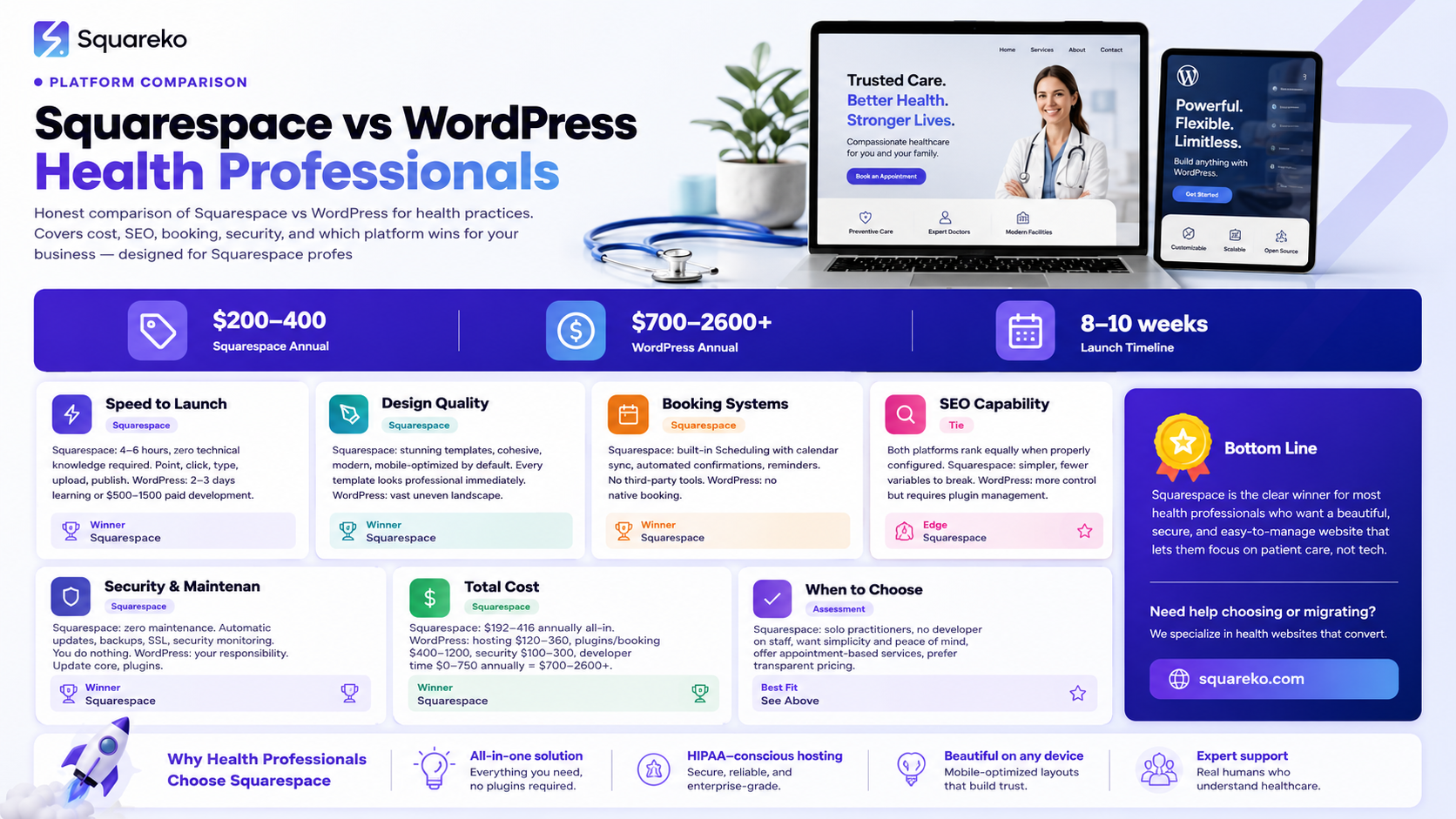
This is where Squarespace shines brightest. A health professional with zero technical experience can publish a professional website in 4-6 hours. Point, click, type, upload image, publish. No server to configure, no plugins to install, no cryptic database settings. The Squarespace interface is designed for non-developers.
WordPress demands technical literacy. You must choose a hosting provider, install WordPress (or pay for "one-click" installs that still require setup), configure basic settings, install and activate a theme, then install essential plugins (security, SEO, backup, etc.). For someone unfamiliar with hosting terminology, this is genuinely confusing. A realistic timeline for a beginner to go from zero to published website is 2-3 days of trial and error, or $500-1,500 paid to a developer.
Squarespace's learning curve is gentle. WordPress's is steep.
However, once WordPress is set up, adding new content is comparable to Squarespace. The ongoing publishing experience is similar. The delta is in initial setup and maintenance.
For a therapist wanting to start seeing clients this month, Squarespace's 4-6 hour launch time is a business advantage. You're not blocked by technical complexity.
Design Quality and Templates
Squarespace's design templates are stunning. They're cohesive, modern, and mobile-optimized by default. Every template can be customized through Squarespace's designer tools (no code required). A template built for restaurants can be adapted for a fitness coach with color changes, section rearrangement, and custom copy. The design never looks cheaply made.
WordPress's template landscape is vast and uneven. Professional-quality themes exist (Divi, Generatepress, Astra), but you're often choosing from hundreds of mediocre options. Many free WordPress themes feel dated or bloated. Premium themes cost $40-150, plus you need design skills or a designer to make them match your brand.
Squarespace's advantage: cohesive, high-quality design is the default. WordPress's advantage: unlimited custom design possibilities if you hire a designer or learn the codebase.
For health professionals who want their website to look professional immediately, Squarespace wins decisively. The design sets expectations for your expertise level, and Squarespace's templates communicate "professional practice" without additional work.
SEO Capabilities and Rankings
Both platforms can rank in Google when properly configured. Neither has a built-in SEO disadvantage.
Squarespace includes meta title and description editing, heading structure, readability checks, SEO recommendations, and clean URL structure. The platform handles technical SEO (site speed, mobile optimization, SSL) automatically. You focus on content quality.
WordPress requires plugins like Yoast SEO, Rank Math, or All in One SEO for comparable functionality. These plugins are solid, but they're additional software you must manage, update, and potentially pay for premium versions. An improperly configured Yoast can actually harm your SEO (over-optimization, misaligned keyword targeting). WordPress's default theme structure varies; some themes are SEO-friendly, others require tweaking.
The real difference: Squarespace makes SEO easy. WordPress requires you to get the technical setup right, then focus on content. Most health professionals don't have the bandwidth for both.
A well-optimized Squarespace website will outrank a poorly-optimized WordPress site. A well-optimized WordPress site will outrank a poorly-optimized Squarespace site. The platform matters less than execution.
For practical purposes: Squarespace reduces the variables you need to control. That's worth something.
Booking, Scheduling, and Client Management
This is a clear Squarespace win for appointment-based practices.
Squarespace's Scheduling feature is built-in. You set your availability, create service offerings, clients book directly, automatic confirmations go out, and your calendar syncs to Google/Outlook. You see real-time bookings. This feature prevents the "Did they book?" confusion and eliminates email back-and-forth. For a therapist, coach, or nutritionist, this is invaluable.
WordPress has no native booking system. You must install a plugin like Calendly integration, Acuity Scheduling, or Booking.com. These work, but they're external tools requiring a separate login, separate data storage, and potential sync delays. If Calendly goes down, your booking system is offline. If your WordPress plugin breaks, you're troubleshooting code.
For practices handling 5+ appointments weekly, Squarespace's integrated booking saves enormous time. For WordPress, you're either paying for a third-party service ($40-100+/month) or managing clunky plugin implementations.
One clear exception: If you use a specialized practice management software (Simple Practice, Acuity, Therapy Notes) that syncs better with WordPress, WordPress becomes viable. But this requires choosing your software first, then building the website around it.
E-Commerce and Digital Products
Both platforms support e-commerce, but with different philosophies.
Squarespace includes an e-commerce suite: product pages, shopping cart, payment processing (Stripe, PayPal), inventory management, email notifications, and order tracking. All built-in. Selling a digital product (e-course, guide, meditation audio) is straightforward.
WordPress requires WooCommerce (a popular plugin) or Shopify integration. WooCommerce is powerful but requires setup: payment gateway configuration, shipping settings, product uploads, and ongoing management. Security updates to WooCommerce are your responsibility.
For a health professional selling 5-10 digital products per month, Squarespace's simplicity wins. For a practice wanting to become a full e-commerce operation with hundreds of SKUs, both platforms can scale, but WordPress offers more granular control.
The real advantage: Squarespace's e-commerce is thoughtfully integrated with your website design. Products look professional by default. WordPress's WooCommerce often requires additional styling work.
Security, Maintenance, and Uptime
Squarespace: You do zero security maintenance. Squarespace handles SSL certificates, security patches, malware monitoring, backups, and uptime guarantees (99.9%). Updates happen silently without your involvement. Uptime is extremely reliable—their infrastructure powers enterprise clients.
WordPress: You are responsible for security. You must keep WordPress core updated, update all plugins regularly, update your theme, remove unused plugins, configure backups, choose a security plugin (Wordfence, iThemes Security), and monitor for breaches. A neglected WordPress site is a vulnerable WordPress site. Hosting providers vary in security; shared hosting is cheaper but less secure.
This is a massive operational difference. A Squarespace site requires zero maintenance. A WordPress site requires ongoing attention or paid management.
For a solo health professional with limited technical time, Squarespace's peace of mind is invaluable. WordPress's flexibility comes with responsibility.
If you choose WordPress, budget $100-300/year for security plugins and $0-1,500/year for professional management (depending on how hands-off you want to be).
Total Cost of Ownership
Let's calculate honest numbers for a solo health professional.
Squarespace:
$16-33/month (Business/Commerce plan) = $192-396/year
Premium domain: included or $20/year
Email: included
SSL: included
Booking: included
Email campaigns: included
Backups: included
Annual cost: $192-416 all-in.
WordPress:
Hosting: $10-30/month = $120-360/year
Premium domain: $10-15/year
SSL: often included in hosting
Theme: $0-100 one-time or $0-50/year
Essential plugins (security, SEO, backup): $0-200/year
Booking plugin/external service: $40-100/month = $480-1,200/year
If you hire a developer for updates/fixes: $50-150/hour, 2-5 hours/year = $100-750/year
Annual cost: $700-2,600+ depending on choices and outsourcing.
Squarespace is cheaper for 95% of health professionals. WordPress only wins on cost if you (1) already know how to manage it, (2) avoid external booking services and build clunky integrations, or (3) host multiple sites and amortize the cost.
However, WordPress hosts more of your data on your own infrastructure. If you value ownership over cost, that matters philosophically even if it costs more.
GDPR, Compliance, and Data Privacy
Both platforms can be GDPR-compliant, but Squarespace makes it easier.
Squarespace provides:
GDPR-compliant contact forms out of the box
Cookie consent tools
Data processing agreements (DPA)
Clear privacy documentation
Compliance is largely pre-configured; you just enable it
WordPress requires:
Installing a privacy/compliance plugin (GDPR Cookie Consent, iubenda, Termly)
Configuring the plugin correctly (many are misconfigured)
Obtaining legal review of your privacy policy
Managing data export/deletion requests manually
HIPAA compliance for health data requires specialized setup
For a health professional handling client data, GDPR and privacy compliance are non-negotiable. Squarespace's simpler compliance tools reduce your liability. WordPress's flexibility also means more ways to get it wrong.
If you serve EU clients, Squarespace's built-in compliance tools are a major advantage. If you handle HIPAA-regulated data (true medical records), neither platform is plug-and-play; you'll need specialized health data hosting or additional infrastructure.
Scalability and Growth
Both platforms scale. The difference is the growth trajectory.
Squarespace scales horizontally—you add features (booking, email campaigns, e-commerce, memberships) but stay on the same platform. Everything integrates. As you grow, your website grows with you. There's no moment where Squarespace "breaks."
WordPress scales vertically—you add plugins and customize code. Scaling a WordPress site from 100 visitors/month to 100,000 visitors/month requires optimizations: caching plugins, CDN, database optimization, code audits. A poorly configured WordPress site can slow dramatically under traffic.
For a health practice growing from solo to small team, Squarespace's scaling is seamless. You'll never hit a ceiling. For a practice with 1,000+ active clients, either platform works, but Squarespace requires less ongoing optimization.
The practical outcome: Squarespace grows with your practice. WordPress requires you to grow your technical knowledge or hire help.
When to Choose Each Platform
Choose Squarespace if:
You want a professional website live in days, not weeks
You're a solo practitioner without a developer on staff
You prioritize simplicity and peace of mind over ultimate customization
You offer appointment-based services (built-in booking is huge)
You want transparent pricing and no surprise costs
You serve clients in the EU or care deeply about GDPR compliance
You plan to sell digital products or membership content
You want your website to look professional by default
You don't want to manage security, backups, or updates
Choose WordPress if:
You're willing to invest time in setup and ongoing learning or hire a developer
You need highly custom functionality not available through Squarespace
You already have WordPress experience or have a developer on staff
You want true ownership of your hosting and data
You want unlimited design and functionality flexibility
You'll be creating large-scale e-commerce or membership operations
You're comfortable with ongoing security and maintenance responsibility
Cost is a primary factor and you can manage the complexity
Mid-Post CTA: Choosing Right the First Time
The decision between Squarespace and WordPress often determines whether your website becomes a revenue generator or a neglected sidepiece. The right choice depends on your technical comfort, resources, and business goals. The wrong choice costs time, money, and lost client opportunities. At Squareko, we specialize in building results-driven Squarespace websites for health and wellness professionals. We've helped therapists, coaches, and nutritionists grow their practices through professionally designed websites with zero technical burden on them. If you're exploring whether Squarespace is right for your practice, let's talk. Book a free consultation at squareko—no pressure, just honest guidance on what will work for you.
Frequently Asked Questions
-
No. Both platforms can rank well in Google. Squarespace includes solid SEO fundamentals (meta titles/descriptions, heading structure, sitemaps, SSL), and you can optimize for keywords just like WordPress. The difference is that Squarespace removes technical SEO variables—you don't have to worry about plugin conflicts breaking your SEO. For most health professionals, Squarespace's simplified SEO is actually better because there are fewer ways to accidentally break things.
-
Technically yes, but it's not automatic. You'd need to export your content from WordPress (posts, pages, images), then import and reformat it in Squarespace. This takes hours. URLs change, so redirects are necessary to preserve Google rankings. The better approach: choose the right platform first rather than plan a migration. If you're unsure, start with Squarespace—moving from Squarespace to WordPress is easier than the reverse.
-
In practice, this is rare for solo health professionals. Squarespace supports practices with thousands of clients, multiple service offerings, e-commerce, memberships, and team collaboration. You'd have to be scaling to serious enterprise level before Squarespace's features became limiting. At that scale, you'd hire developers or migration specialists, and the cost is negligible compared to your revenue.
-
Not for most health professionals. While WordPress hosting can be cheaper ($10-30/month), booking integrations, plugins, security, backups, and developer time add up. A typical WordPress setup costs $700-2,000+/year when you factor in everything. Squarespace is $200-400/year all-in. WordPress only wins on cost if you manage it yourself and avoid paid plugins and third-party services.
-
If you're hiring a developer to build your site, they can handle either platform. The better question: Are you hiring them one-time to build the site, or ongoing to manage it? If one-time build, Squarespace is faster and cheaper ($5,000-10,000 for a professional build). If ongoing relationship (updates, features, optimization), WordPress gives developers more flexibility. Clarify the scope before committing.
-
Squarespace retention is extremely high. Most practitioners stay for years—they set it up, it works, they don't think about it. WordPress retention is lower—either practitioners outgrow it (and migrate) or grow frustrated with maintenance and go back to Squarespace. Switching platforms is frustrating, so the better goal is choosing right the first time.
-
Yes, both support custom domains. You point your domain to the platform. With Squarespace, your domain points to their servers. With WordPress, you own the hosting and domain points there. If you later want to switch platforms, you keep your domain name—only the pointing changes.
-
Squarespace charges per site, so running two Squarespace sites costs $32-66/month total (shared admin account). For health professionals wanting separate sites for different service lines, this adds up. WordPress allows unlimited sites on a single hosting account, making WordPress cheaper for multi-site scenarios. But again, this assumes you're comfortable managing multiple WordPress installations.
Ready to Choose Your Platform and Launch
You've now seen the honest comparison. Both Squarespace and WordPress work for health professionals, but they serve different priorities. Squarespace is the right choice for practitioners who want a professional website running fast, with zero technical overhead. WordPress is the choice for those with developer support or significant customization needs. Getting this decision right saves hundreds of hours and thousands of dollars over the lifetime of your practice. If you're leaning toward Squarespace and want expert guidance on building a website that converts, let's talk. Walid at Squareko offers a free consultation to discuss your practice, your goals, and whether Squarespace is the right fit. Book your free consultation at squareko today—no obligation, just expert insight to help you decide.

From custom website design to SEO strategy, we help businesses launch a site that looks professional and performs better.

About the Author
Walid is the founder of Squareko
I'm Walid Hasan, a Certified Squarespace Expert and Squarespace Circle Platinum Partner with over 12 years of hands-on experience designing and optimizing high-performing websites. Over the years, I've had the privilege of building more than 2,000 Squarespace websites for clients around the world, always focusing on clean design, strong user experience, and conversion-driven results.
