
How to Build a Technology Solutions Website on Squarespace That Generates B2B Leads
Key Takeaways Build a Technology Solutions Website
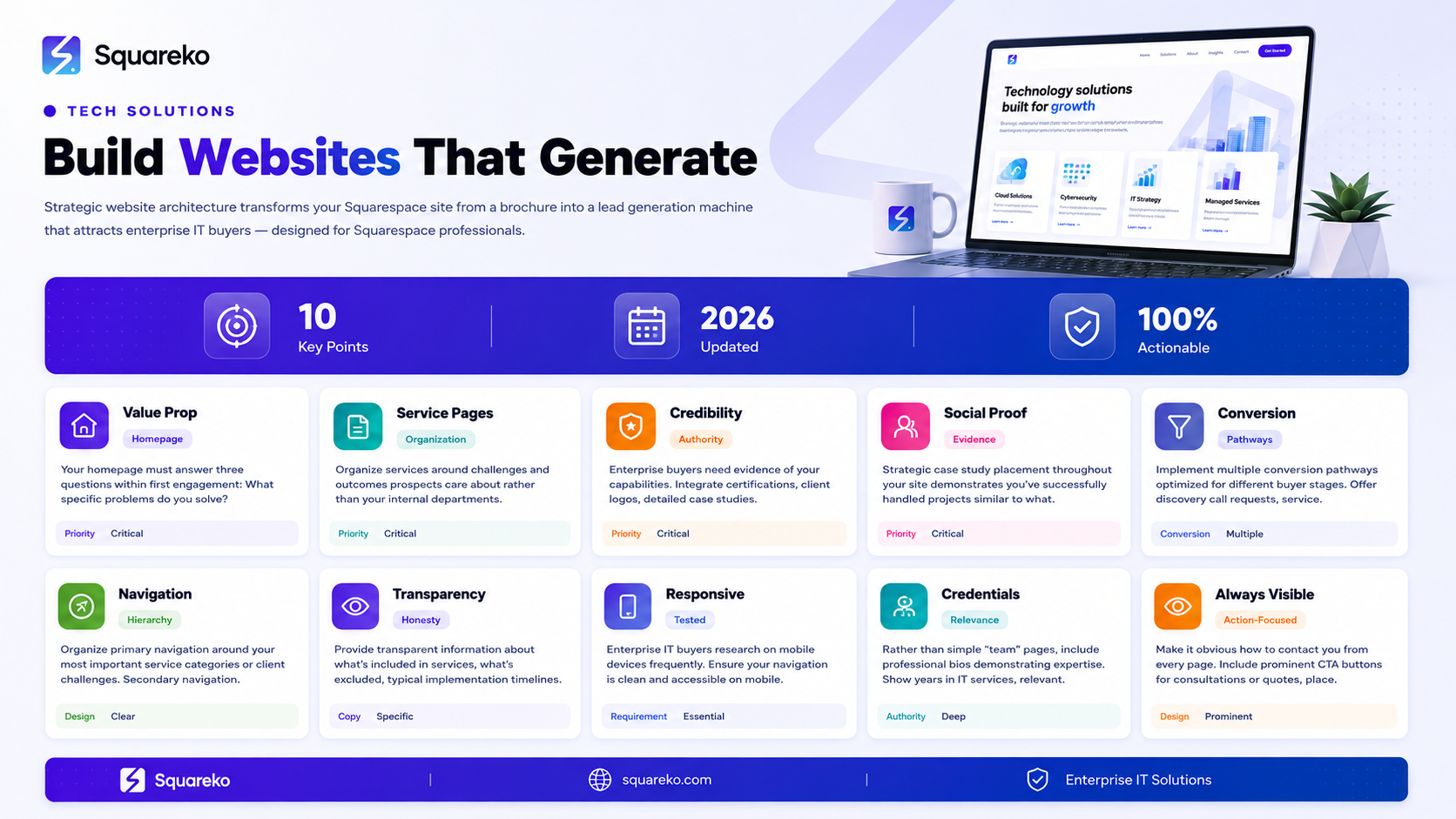
B2B lead generation for technology solutions companies requires specific website architecture, not generic business site design
Service page structure, clear value propositions, and trust signal placement dramatically impact qualified lead capture rates
Enterprise IT buyers expect transparent information about certifications, compliance, security practices, and proven ROI before contacting you
Strategic case study integration and client social proof must be woven throughout your site, not siloed in a single section
Effective CTAs for B2B technology solutions require multiple conversion pathways (discovery calls, service requests, quote generators) optimized for different buyer personas
Understanding B2B Lead Generation for Technology Solutions Companies
B2B lead generation for technology solutions companies operates under different rules than B2C marketing or even general B2B marketing. Your prospects are typically IT directors, CTOs, technology managers, or operations leaders evaluating providers based on technical criteria, risk assessment, and total cost of ownership. The path from awareness to contact is longer, more deliberate, and involves higher stakes for both you and your prospect.
Enterprise IT buyers don't rush to contact vendors. They research extensively, compare multiple providers, and build internal consensus before reaching out. Your website needs to support this research process by providing transparent, detailed information that builds confidence in your abilities before a prospect ever reaches the contact form.
The fundamental difference between a website that generates leads and one that doesn't isn't design beauty—it's strategic information architecture. Prospects need to find answers to specific questions at each stage of their evaluation journey. Your website structure either guides them efficiently toward their answers, or forces them to guess about what you offer and whether you can help with their specific challenges.
For technology solutions companies, B2B lead generation success depends on understanding that your prospects are conducting technical evaluation alongside business evaluation. They want to know: What exactly is this service? How does it work? What are the prerequisites? What's the typical implementation timeline? What certifications do you hold? How do you handle security and compliance? What's proven ROI? What happens if something goes wrong?
Website Architecture That Attracts Technology Services Prospects
Your website's overall architecture establishes the foundation for effective lead generation. This architecture has three layers: strategic positioning, information organization, and conversion pathways.
Strategic Positioning Layer
Before prospects contact you, they need to understand what you do and whether you're relevant to their situation. Your positioning establishes whether someone sees your business as a potential solution to their challenge or as a vendor they should dismiss quickly.
Your homepage should answer three questions within the first engagement:
What specific problems do you solve for technology buyers?
Why should they consider you specifically?
What's the next step if they want to explore working together?
Rather than generic statements like We provide comprehensive IT solutions, effective positioning gets specific: We help mid-market manufacturing companies reduce IT infrastructure costs by 35% through managed IT services, while eliminating the complexity of managing IT staff. This positions you for a specific prospect type, specific challenges, and specific outcomes.
Your positioning should also establish why you're different or worth contacting rather than calling a larger competitor. For smaller IT services companies competing against established firms, this might be specialized expertise, faster response times, industry-specific experience, or proven success with companies your size.
Information Organization Layer
With clear positioning established, your website architecture should organize information around how prospects think about their challenges, not how you organize your internal services.
Rather than structuring your site around your internal departments (Network Services, Security, Infrastructure, Support), organize around the challenges and outcomes prospects care about:
How do I reduce my IT infrastructure costs?
How do I improve my security posture?
How do I migrate to the cloud without disruption?
How do I get better IT support without hiring?
Each challenge or outcome becomes a primary navigation category, with your actual services positioned as solutions to those challenges. This structure mirrors your prospects' mental model and dramatically improves their ability to find relevant information.
Conversion Pathway Layer
Your website architecture should include multiple conversion pathways optimized for different buyer types and decision stages. Some prospects are ready to request a proposal. Others need more information before being willing to commit to even a discovery call.
Your website should support:
Discovery call requests (low-commitment conversation)
Service quote requests (specific service interest)
Request for proposal (advanced buying stage)
General inquiry (exploratory conversation)
Newsletter signup (awareness stage)
Event registration (if applicable)
Different pages should feature different CTAs depending on the prospect's likely buying stage. A prospect who has read your detailed case study about cloud migration implementation is likely further along than someone reading your homepage. Your CTAs should reflect this.
Designing Service Pages That Drive Qualified Leads
Service pages are the foundation of B2B lead generation for technology companies. Each service page should function as a mini-sales conversation, answering the questions your prospects ask at that stage of evaluation.
Service Page Structure for Lead Generation
Your service pages should follow this structure:
Clear Service Description (Above the Fold) What exactly is this service? Avoid technical jargon in the description and write it as if explaining to someone unfamiliar with IT services. Cloud migration means nothing to a business owner. Moving your business applications to cloud infrastructure so you can eliminate on-premises server costs and improve reliability means something.
Ideal Client Profile Who does this service work best for? Rather than saying all companies, specify: Mid-market manufacturing companies with 50-500 employees, currently running on-premises servers, looking to reduce IT infrastructure costs. This clarity helps prospects self-qualify while establishing that you understand their situation.
Specific Outcomes and ROI What will prospects actually achieve? Rather than saying improved efficiency, be specific: Reduced infrastructure costs by 40%, eliminated IT staffing needs for server maintenance (typically 1-2 FTE savings), improved application uptime from 97% to 99.9%.
Prerequisites and Considerations What needs to be true for this service to work? If cloud migration works best for companies with 20+ users, say so. If your security assessment requires access to current security policies and network documentation, state it. This transparency reduces unqualified leads.
Implementation Timeline How long does this service take? Be specific about phases if applicable. Cloud migration typically requires 8-12 weeks from planning to go-live, depending on application complexity and data volume.
Security and Compliance Details What certifications do you hold? What compliance standards do you meet? What security practices do you follow? Enterprise IT buyers absolutely require this information. Don't assume they'll ask—provide it proactively.
Case Study Integration Within Service Pages
Rather than linking to a separate case study page, embed a brief case study within each service page. The case study should demonstrate the service in action, showing a real client challenge, your approach, and the outcomes achieved.
Your case study should include: client background (anonymized if necessary), specific challenge they faced, your solution approach, timeline, and measured outcomes. This structure demonstrates that you've done this work before and achieved real results.
Lead Capture Optimization
At the end of each service page, include a specific CTA aligned with the prospect's likely next step. For service pages, CTAs typically include:
Schedule a consultation to discuss your specific situation
Request a pricing estimate for this service
Download our service guide
The CTA button should reference the specific service, making it clear what happens when they click: Get your cloud migration timeline estimate rather than the generic Contact us.
Building Trust Signals Into Your Website Structure
Trust signals are the evidence that convince enterprise IT buyers you're worth talking to. For technology solutions companies, trust signals include: certifications, security practices, client logos, testimonials, team expertise, years in business, industry affiliations, and security compliance information.
Certification and Compliance Display
Create a dedicated section (homepage hero section or navigation link) that displays your certifications prominently. If you're a Microsoft Gold Partner, display it. If you hold ISO 27001 certification, display it. If you're CompTIA Security+ certified, display it.
Enterprise IT buyers scan for these certifications. They need to see immediately that you've invested in professional credentials and industry recognition.
Security and Privacy Statement
IT buyers want to know: What security practices do you follow for client data? What's your information security policy? What happens if there's a security incident? Where do you host client data?
Create a transparent security and privacy page that addresses these questions directly. Even if you operate with standard industry practices, stating them explicitly reassures prospects that you take security seriously.
Client Logo Showcase
If you have 10+ clients, display their logos on your homepage and relevant service pages. Client logos serve as immediate social proof—if recognizable companies trust you, new prospects assume you're legitimate.
Don't display logos of every client you've ever worked with. Select logos of clients that your target prospect type recognizes as credible companies.
Detailed Team Member Information
Rather than a simple team page listing names, include professional bios that demonstrate expertise. How long has each team member been in IT services? What certifications do they hold? What specific expertise does each bring?
For IT services companies, your people are your product. Detailed team information builds confidence that you have experienced professionals who will handle their account.
Case Study and Success Story Showcase
Dedicate significant space to case studies and client success stories. Enterprise IT buyers need evidence that you've successfully handled projects similar to what they're considering.
Your case studies should demonstrate: specific challenge the client faced, your solution approach, implementation timeline, and measured business outcomes. Anonymize clients if necessary, but provide enough detail that prospects can envision how you'd approach their situation.
Third-Party Reviews and Ratings
If you have positive reviews on G2, Capterra, or similar platforms, mention this on your website. Include quotes from verified customer reviews. Third-party validation is more powerful than client testimonials because it comes from independent sources.
Years in Business and Industry Recognition
How long have you been in business? Do you have any industry recognitions or awards? Were you featured in industry publications? Display this information on your homepage and relevant pages. Established track record builds trust with risk-averse enterprise buyers.
Strategic Case Study Placement for Lead Conversion
Case studies are one of the highest-converting content assets for B2B technology sales. However, many IT services companies create case studies and then bury them in a separate section of their website. Strategic case study placement means integrating case study evidence throughout your site.
Homepage Case Study Feature
Feature one or two concise case studies on your homepage, selecting examples that best represent your strongest capabilities and most common client types.
Service Page Case Studies
On each service page, include a case study that demonstrates that specific service. A cloud migration service page should feature a cloud migration case study. Your managed IT services page should feature a managed services case study.
Dedicated Case Study Library
Create a dedicated section where prospects can browse all your case studies, filterable by industry, company size, or challenge addressed. This allows prospects who want deeper evidence to find relevant examples.
Case Study Download Offers
Create downloadable case study PDFs that prospects can request. This generates leads from prospects wanting deeper information. Your case study downloads should require email capture, converting interest into contact information.
Industry-Specific Landing Pages
If you serve multiple industries, create industry-specific pages (IT Services for Healthcare, IT Services for Manufacturing) with case studies specific to that industry. Prospects want to see evidence that you understand their industry's specific challenges and compliance requirements.
Lead Capture Optimization for IT Services Buyers
Lead capture is where your website architecture meets conversion. Effective lead capture for IT services requires multiple conversion points optimized for different buying stages and prospect types.
Discovery Call Requests
The lowest-commitment conversion action is a discovery call request. Many prospects aren't ready to share detailed information or request a proposal, but they're willing to have a preliminary conversation.
Your website should make it easy for prospects to request a 30-minute discovery call to discuss their situation. This CTA works well on pages where prospects are still evaluating whether your services are relevant to their challenges.
Your discovery call form should require minimal information (name, company, phone, email) and be positioned as a brief conversation to understand if you're a good fit—not a sales pitch.
Service-Specific Quote Requests
For prospects further along in evaluation, offer service-specific quote request forms. A prospect requesting a quote for cloud migration implementation is further along than someone requesting a discovery call.
Your quote request form can require more detailed information about their current situation, timeline, and goals. This form typically converts to a sales conversation with a specific proposal.
Consultation Request for Complex Services
For services requiring deep engagement (business continuity planning, security assessments, infrastructure redesigns), offer consultation request forms. These forms set expectations for longer engagement and deeper discovery.
Contact Form Accessibility
Ensure your contact form is easily accessible from every page. IT buyers shouldn't need to search for how to contact you. Place your contact form in the footer, sidebar, or within prominent sections on key pages.
Form Field Optimization
Your forms should capture the minimum information necessary for initial contact:
Name
Email
Phone
Company name
Brief description of their challenge or interest
Don't ask for extensive information on first contact. Detailed discovery happens on the call, not in the form. Long forms reduce conversion rates by requiring more commitment upfront.
Chatbot and Live Chat Support
Consider implementing live chat support for prospects who want immediate response. Many enterprise IT buyers research outside business hours and appreciate being able to start a conversation immediately, even if the response happens later.
Navigation and Information Architecture for B2B Buyers
Enterprise IT buyers navigate technology services websites differently than consumers browse e-commerce sites. Your navigation structure must anticipate how these buyers look for information.
Hierarchical Navigation
Organize your primary navigation around your most important service categories or client challenges. Secondary navigation should provide access to supporting pages (team, security policies, compliance information, case studies).
Your navigation shouldn't be so deep that prospects need three clicks to find what they're looking for, but it shouldn't be so flat that your homepage navigation is overwhelming.
Clear Pathway to Contact
Make it obvious how to contact you. Your call-to-action button for Schedule a Consultation or Request a Quote should be visible on every page, preferably above the fold on your most important pages.
Searchable Service Catalog
If you offer 10+ services, consider adding an on-site search function so prospects can quickly find the service they're interested in. This is particularly important for larger IT services companies with complex service portfolios.
Breadcrumb Navigation
Use breadcrumb navigation (visible path showing where you are in the site structure) to help prospects understand how different pages relate to each other and to navigate back to broader categories.
Mobile Navigation Optimization
On mobile devices, your navigation should be simplified and easy to access. Enterprise IT buyers research on mobile frequently. Your mobile navigation shouldn't require multiple taps to access key information.
Let Squareko Help Build Your B2B Lead Generation Website
Building a technology solutions website that consistently generates qualified leads is a strategic undertaking. It requires understanding your target buyer's research process, designing your information architecture around their mental model, and implementing conversion pathways that guide them toward contact at the right moment.
Squarespace provides an excellent platform for this, but template selection and structure alone don't guarantee results. Your website needs strategic architecture, clear value proposition messaging, trust signal placement, and conversion optimization—all aligned to how IT services prospects actually research and evaluate providers.
At Squareko we specialize in building technology solutions websites that generate qualified B2B leads. We work with managed services providers, IT consultancies, technology solutions firms, and B2B technology companies to create websites that attract their ideal prospects and convert them into clients.
FAQs
-
Create individual service pages for each distinct service that your sales team treats as a separate selling conversation. For most IT managed services providers, that's 3-6 primary service pages. Avoid creating a separate page for every variation. Instead, use subsections within primary service pages to explain variations and specializations.
-
Effective IT service pages include: clear service description, ideal client profile, specific outcomes and ROI metrics, implementation timeline, security and compliance details, prerequisites and considerations, embedded case study, and service-specific CTA. Each section should be specific enough that prospects can envision whether this service applies to their situation.
-
Display certifications prominently, include detailed team member bios, showcase client logos, feature detailed case studies, include transparent security and privacy information, and highlight third-party reviews or industry recognition. Rather than burying these signals in a single page, integrate them throughout your site on relevant service pages and the homepage.
-
Use multiple forms optimized for different conversion stages. A prospect reading your homepage might request a discovery call with minimal information. A prospect reading a detailed service page might request a specific quote. A prospect downloading a case study PDF might provide more detailed contact information. Multiple forms give prospects options aligned with their stage and commitment level.
-
On your website, feature condensed case studies (300-400 words) on service pages, with the full story available in downloadable PDF versions (2-3 pages). Website visitors typically scan rather than read extensively. Save detailed narrative for downloadable case studies that prospects request when they're further along in evaluation.
-
A high-converting technology solutions homepage includes: clear value proposition statement, 3-5 service category introductions, featured case study or client logos, team overview, customer testimonials or reviews, and clear CTA for next steps. Keep homepage content scannable with clear headings and visual hierarchy. Enterprise buyers shouldn't need to read paragraphs of copy to understand what you do.
-
Ensure your navigation is clean and accessible on mobile. Keep form fields minimal. Make your CTA buttons large and easy to tap. Use concise copy rather than long paragraphs. Ensure your site loads quickly on mobile connections. Test your site on actual mobile devices, not just browser previews.
-
It depends on your service model and competition. If your services are highly customized based on client size, infrastructure, and needs, pricing varies too much to display. In this case, CTAs should drive toward quote requests. If you offer tiered services with consistent pricing, displaying pricing builds transparency and attracts prospects willing to pay your rate.

From custom website design to SEO strategy, we help businesses launch a site that looks professional and performs better.

Author Bio
I'm Walid Hasan, a Certified Squarespace Expert and Squarespace Circle Platinum Partner with over 12 years of hands-on experience designing and optimizing high-performing websites. Over the years, I've had the privilege of building more than 2,000 Squarespace websites for clients around the world, always focusing on clean design, strong user experience, and conversion-driven results.
