
Best Squarespace Templates for Technology Solutions and IT Services Companies in 2026
Key Takeaways Best Squarespace Templates for Technology Solutions and IT Services Companies in 2026
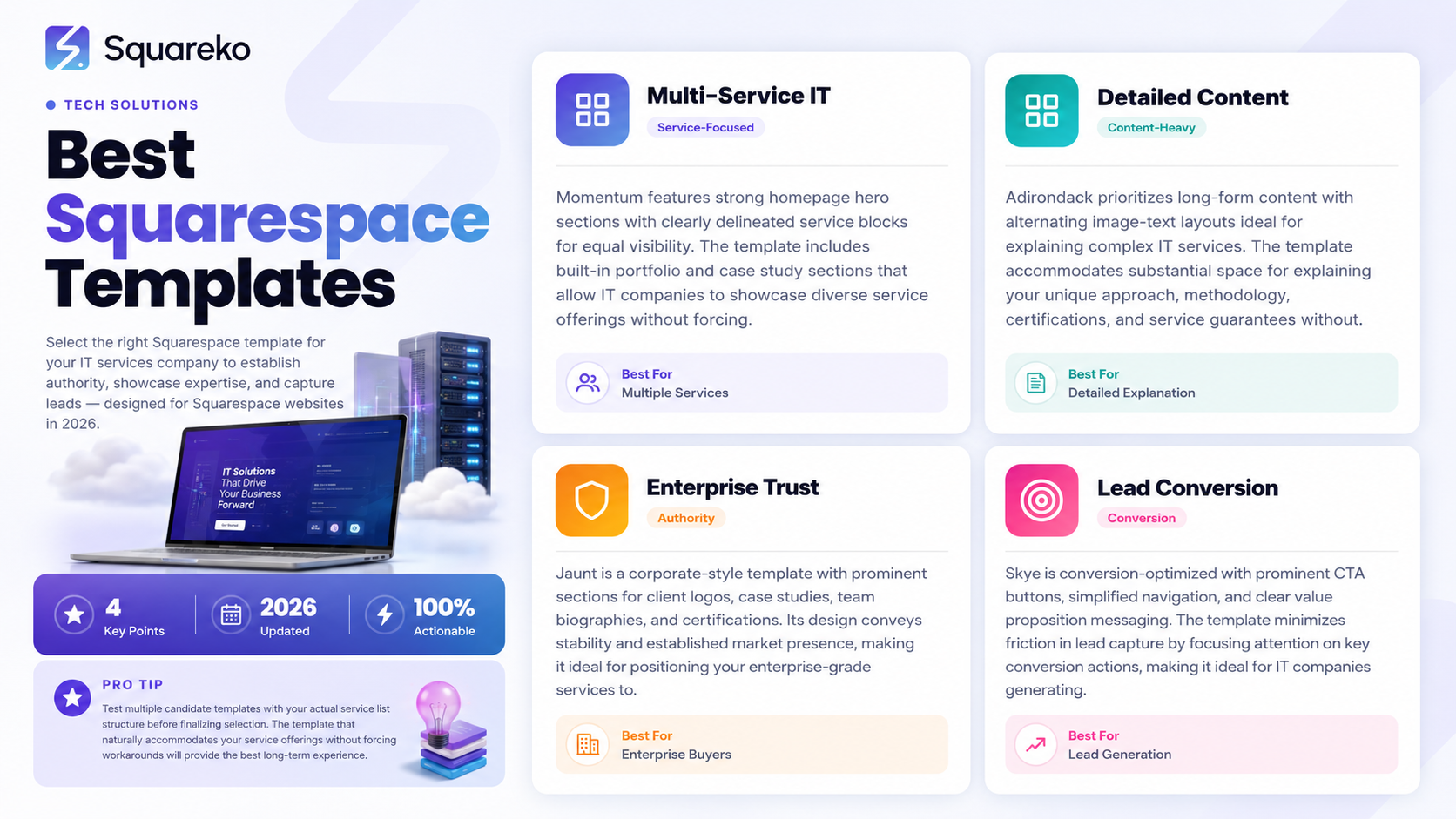
Squarespace offers pre-built templates specifically suited to B2B technology services that emphasize authority and trust
The best templates for IT companies feature clear service hierarchies, client testimonials, and enterprise-grade visual design
Modern IT services templates prioritize mobile optimization and fast load times—critical for enterprise buyers researching on multiple devices
Template selection impacts SEO, lead capture, and conversion rates, making the right choice foundational to your digital strategy
Customization within Squarespace templates allows IT companies to maintain brand consistency while showcasing complex service offerings
Why Template Selection Matters for IT Services Companies
Your website template is the foundational architecture of your digital presence. For IT services companies, this isn't a design afterthought—it's a strategic business asset that either attracts enterprise buyers or fails to compete for their attention.
When decision-makers at Fortune 500 companies evaluate managed services providers or IT solutions vendors, they're assessing not just your services, but your perceived stability and professionalism. Your template communicates this instantly. A poorly chosen template that feels generic, cluttered, or outdated signals to prospective clients that you may not keep up with industry standards. A thoughtfully selected template that showcases your expertise, service depth, and client success creates the foundation for trust.
The template you choose determines how easily you can structure complex service information, integrate social proof, optimize for search engines, and capture qualified leads. It affects page load speeds that impact both user experience and your SEO rankings. It influences how your content flows and whether visitors can quickly understand what you do and how you serve their needs.
For IT managed services providers, technology solutions firms, and IT consultancies, the template choice is particularly critical because your services often require explanation. Clients need to understand the difference between your managed IT services offering and a competitor's. They need to see proof that you've solved similar problems for companies in their industry. They need transparent information about certifications, compliance, SLAs, and support capabilities. Your template must accommodate all of this while remaining visually coherent and navigable.
Core Template Categories for Technology Solutions Providers
Squarespace templates fall into distinct categories based on primary use case. For IT services companies, understanding these categories helps you identify which templates align with your business model and service delivery focus.
Portfolio and Showcase Templates
These templates prioritize visual presentation and are ideal if your primary goal is demonstrating completed projects and client work. They feature gallery-heavy designs with clean image presentations and minimal text clutter. For IT services, these work if your value proposition is heavily visual—such as infrastructure overhauls, data center migrations, or network redesigns where before-and-after imagery communicates impact.
However, portfolio templates sometimes de-prioritize written service explanations and case study detail. If your ideal client needs to understand technical specifications, security certifications, or ROI calculations, portfolio-first templates may force you to work against the template structure.
Service-Focused Business Templates
Service templates put your offerings front and center. They feature prominent service section structures, allowing you to create individual service pages or detailed service category breakdowns. These templates typically include dedicated real estate for client testimonials, team bios, and credentials.
For managed services providers and IT solutions companies, service-focused templates are often the optimal starting point because they're built to answer the fundamental question your prospects have: What services do you offer, and how do they solve my specific problems?
Corporate and Enterprise Templates
Enterprise templates convey scale and established market presence. They feature professional color palettes, generous white space, and formal typography. These templates often include multiple navigation options, allowing complex organizational hierarchies to be represented clearly.
Technology solutions providers serving mid-market and enterprise clients benefit significantly from enterprise templates because they signal stability, process maturity, and professional service delivery. An MSP targeting Fortune 500 companies needs template design that matches the visual sophistication of those prospects' internal materials.
Minimalist and Conversion-Focused Templates
These templates strip away visual complexity in favor of directness. They reduce distractions, focus navigation on high-priority actions (like contact forms or service requests), and rely on clear hierarchy and white space rather than decorative elements.
For IT services companies generating leads through service requests, discovery calls, or consultations, conversion-focused templates can significantly improve lead quality by making the path to contact friction-free.
Top Squarespace Templates for 2026 by Type
Based on current Squarespace offerings and IT services company needs, several templates stand out for specific use cases.
Momentum for Multi-Service IT Companies
Momentum is designed for businesses with multiple service offerings that need to be presented equally. The template features a strong homepage hero section followed by clearly delineated service blocks. It includes built-in portfolio/case study sections, team pages, and client testimonial areas.
For IT managed services providers offering diverse services (network monitoring, security assessments, cloud migration, backup solutions, helpdesk support), Momentum's service architecture works well. It allows you to give equal visual weight to each service category without forcing a hierarchical structure.
The template includes professional footer options for contact information, social links, and newsletter signup. Navigation can be customized to accommodate service subcategories, and the color scheme adapts well to technology industry palettes (grays, blues, professional accent colors).
Adirondack for Detailed Service Explanation
Adirondack prioritizes long-form content and detailed section structures. It's built for businesses where prospects need comprehensive information before deciding to reach out. The template features prominent text sections, image-text alternating layouts, and clear visual breaks between content blocks.
This template works exceptionally well for IT solutions companies whose services require explanation. If you're positioning a managed IT services offering as different from competitors, Adirondack's structure allows you to dedicate substantial space to explaining your approach, methodology, certifications, and service guarantees without the page feeling dense.
Jaunt for Authority and Trust Building
Jaunt is a corporate-style template with a strong emphasis on trust signals. It includes prominent sections for client logos, case studies, team biographies, and certifications. The design conveys stability and established market presence.
For IT services companies positioned in the enterprise or mid-market segment, Jaunt's visual authority is a significant advantage. The template naturally accommodates large client logos in a Trusted by section, extensive case study presentation, and team expertise demonstration. It works well for managed services providers where client trust and proven track record are primary differentiators.
Skye for Lead Capture and Conversion
Skye is a conversion-optimized template designed to move visitors toward specific actions. It features prominent CTA buttons, simplified navigation, and clear value proposition messaging. The template de-emphasizes secondary information in favor of directing attention to key conversion actions.
For IT services companies generating leads through website form submissions or consultation request forms, Skye's structure minimizes friction. The template works well if your go-to-market strategy depends on capturing qualified leads through your website rather than directing traffic to a separate landing page.
Navigator for Complex Service Structures
Navigator is built for organizations with multiple departments, service lines, or geographic locations. The template supports sophisticated navigation hierarchies and multiple service category structures. It's particularly useful for IT consulting firms with different practice areas or managed services providers with regional offices.
The template features clear navigation organization, allowing visitors to navigate to specific service sections, regional information, or team departments. This is valuable for larger IT services companies with complex organizational structures that need clear digital representation.
Key Features to Prioritize in IT Services Templates
Beyond aesthetic preference, certain functional features are non-negotiable for IT services websites.
Service Page Architecture
Your template must allow you to create individual pages for each service or service category. Visitors should be able to find a dedicated page explaining your managed IT services offering, your security consulting services, your cloud migration services, and any other offerings. This structure supports both user experience and SEO, as individual service pages can be optimized for specific keywords.
Ideally, your template allows you to nest subcategories—for example, having Managed IT Services as a primary service with subcategories like Network Monitoring, Patch Management, and Help Desk Support. This supports both discovery and detailed explanation.
Social Proof Integration
The template should have dedicated sections for client testimonials, client logos, case studies, and team member biographies. These elements are critical for IT services companies because enterprise buyers rely heavily on social proof when evaluating providers.
Your template should make it easy to display multiple testimonials, feature client logos prominently, and create detailed case study pages without requiring extensive custom coding.
Lead Capture Optimization
Your template should support multiple lead capture methods: contact forms, consultation request forms, service quote request forms, and newsletter signups. The template architecture should make these CTAs prominent and accessible throughout the site without requiring custom code.
For IT services companies whose business model depends on generating qualified leads, template support for simple lead capture is essential.
SEO Foundation
Your template should include proper heading hierarchy support (H1, H2, H3), customizable meta tags per page, alt text fields for images, and clean code structure. Squarespace handles much of SEO infrastructure automatically, but your template should not create additional obstacles to proper optimization.
Mobile Responsiveness and Performance
Your template must be fully mobile-responsive and load quickly on slower connections. Enterprise IT buyers research providers on mobile devices, in meetings, and on various network conditions. A template that displays poorly on mobile or loads slowly undermines your credibility.
Squarespace generally handles responsive design well, but some templates perform better on mobile than others. Prioritize templates with clean, readable mobile views rather than templates that rely on complex hover states or desktop-centric layouts.
How to Evaluate Templates for Your Tech Company
Rather than selecting a template based purely on visual appeal, use this evaluation framework to assess which template best fits your IT services company's specific needs.
Define Your Primary Value Proposition
Before evaluating templates, clarify what your IT services company is primarily selling. Are you selling outcome-based managed IT services with a focus on proactive monitoring and cost reduction? Are you selling security expertise and compliance solutions? Are you selling complex cloud migration services? Are you selling break-fix and helpdesk support?
Your template should clearly communicate your primary value proposition within the first engagement. If your primary offering requires explanation, you need a template that accommodates detailed content. If your primary differentiation is visual (like successful data center migrations), you need a portfolio-heavy template.
Map Your Service Offerings
Create a comprehensive list of your services and how you want to structure them on your website. Then evaluate whether your candidate template can accommodate this structure naturally. If you need 15 individual service pages nested under 3 service categories, you need a template that supports this hierarchy without looking cluttered.
Assess Lead Capture Needs
Determine how many different lead capture scenarios you need. Do you need a single contact form? Do you need separate forms for different service types? Do you need consultation request forms, quote request forms, and general inquiry forms? Your template should accommodate your lead capture strategy without requiring workarounds or custom code.
Evaluate Case Study and Social Proof Capacity
Determine how many client logos, testimonials, and case studies you want to prominently feature. Your template should provide sections specifically designed to showcase this social proof without feeling like an afterthought.
Test on Mobile Devices
Evaluate your candidate templates on actual mobile devices, not just desktop browser previews. IT buyers research providers on phones. If your template doesn't display clearly and navigate easily on mobile, it's creating immediate friction.
Consider Customization Requirements
Assess how much customization you'll need to make the template align with your brand. Some templates require minimal customization and can go live quickly. Others require more extensive custom styling. If you're launching quickly with limited design resources, prioritize templates that work with minimal customization.
Customization Best Practices for IT Service Portfolios
Once you've selected your template, strategic customization amplifies its effectiveness for your IT services business.
Establish a Clear Service Hierarchy
Organize your services in a logical hierarchy that matches how prospects think about their IT needs. Rather than alphabetical ordering, consider ordering services by: highest revenue services, most common entry-point services, most strategic services, or services by business challenge solved.
For a managed services provider, your hierarchy might be: Managed IT Services (primary offering) > Security Solutions > Business Continuity > Cloud Services > IT Staffing. Each service gets prominent navigation and dedicated pages.
Use Consistent Service Page Templates
Create a consistent structure for all service pages. Each service page should include: service description, ideal client profile, key benefits, typical ROI/outcomes, security/compliance credentials relevant to that service, case studies demonstrating that service, client testimonials specific to that service (if available), and next steps (contact form or CTA).
This consistency helps visitors understand your service depth while reducing the cognitive load of navigating your site. Enterprise buyers appreciate standardized information architecture because it signals process maturity.
Leverage Color and Typography Strategically
Use your template's color options to create visual distinction between service categories without losing cohesion. For example, managed IT services might use a specific accent color, security services another, and cloud services a third. This helps visitors navigate and quickly identify relevant content while maintaining overall brand consistency.
Typography should be clear and professional. For IT services content, prioritize readability over decorative typography.
Optimize Image Selection
Choose images that reflect your actual IT services delivery. Enterprise buyers can quickly identify stock photography. Invest in actual photos of your team, your data center facilities (if relevant), your offices, and your service delivery environments. If you can't photograph actual service delivery, source photography that authentically represents IT service delivery rather than using generic business imagery.
Mobile Optimization and Performance Considerations
For IT services companies, mobile optimization is not a design nice-to-have—it's a competitive necessity. Enterprise IT buyers research providers on mobile devices between meetings, at conferences, and while managing urgent issues. Your template must deliver an excellent mobile experience.
Test Load Speed
Use Google PageSpeed Insights to evaluate your template's mobile load speed. Technology solutions prospects expect fast-loading sites. If your site takes 4+ seconds to load on mobile, you're losing credibility with enterprise buyers.
Squarespace generally performs well on speed, but template choice affects image optimization and code bloat. Simpler templates typically load faster than templates packed with animations and complex layouts.
Ensure Readable Mobile Navigation
Evaluate your template's mobile navigation. The navigation menu should be easily accessible (typically a hamburger menu), clearly labeled, and quick to navigate. Enterprise buyers shouldn't need multiple taps to find what they're looking for on mobile.
Optimize Mobile Forms
If your template includes contact forms or lead capture forms, test them extensively on mobile. Forms should be easy to complete on small screens without excessive scrolling or required horizontal scrolling. Multi-step forms should be clearly marked with progress indicators.
Maintain Visual Hierarchy on Mobile
Your template should maintain clear visual hierarchy on mobile devices. Primary CTAs should remain prominent. Service categories should be easy to identify. Team member bios and client logos should still communicate effectively on small screens.
Get Expert Help Building Your IT Services Website
Selecting and customizing the right Squarespace template is the beginning of building a technology solutions website that generates qualified leads and supports long-term client relationships. However, template selection is just one component of a comprehensive digital strategy for IT services companies.
The most successful IT services websites aren't just visually appealing—they're strategically architected to communicate your specific value proposition, demonstrate your expertise, build trust with enterprise buyers, and guide prospects toward your desired conversion actions.
If you're an IT services company, managed services provider, or technology solutions firm looking to build or optimize your Squarespace website, Squareko specializes in helping tech companies create websites that convert prospects into clients. We understand the specific needs of IT services companies—from service portfolio structure to lead capture optimization to enterprise buyer psychology.
FAQs
-
Momentum and Adirondack are both excellent for managed services providers. Momentum works if you have 4-6 major service offerings that need equal visibility. Adirondack works better if your services require detailed explanation or if you want to emphasize your methodology and differentiators. Test both templates with your actual service list to see which naturally accommodates your offering structure.
-
Yes, but with considerations. Portfolio templates work well if your primary differentiator is demonstrable project work (infrastructure upgrades, data center migrations, security implementations). However, you'll need to create "case study" project pages rather than service pages. Make sure your portfolio template includes project description areas for explaining technical scope, timeline, and business outcomes.
-
Create individual service pages for each distinct offering that your sales team treats as separate sales conversations. For a managed IT services provider, that might be: Managed IT Services, Security Solutions, Business Continuity, Cloud Services, and IT Staffing. Don't create a service page for every variation within each category. Instead, use your Managed IT Services page to explain subcategories (monitoring, patching, helpdesk) rather than creating 15 separate pages for each variation.
-
Not necessarily. Modern Squarespace templates are sophisticated enough for B2B IT services companies. However, significant customization may be worthwhile if you have specific branding requirements, complex service hierarchies, or unique design needs. Many IT services companies successfully launch with minimal template customization and refine their site based on user behavior and lead generation results.
-
Template choice affects SEO primarily through: page speed performance, mobile responsiveness, heading hierarchy support, and code structure. Most modern Squarespace templates are SEO-friendly. However, simpler templates with clean code structures typically perform slightly better than templates packed with animations and complex layouts. Your content strategy, keyword optimization, and technical SEO execution matter more than template choice, but your template should not create obstacles to good SEO practice.
-
Prioritize functionality and clear information architecture, with aesthetics as a secondary consideration. Enterprise IT buyers care about information clarity and professional presentation more than visual trends. A functional template with excellent service information hierarchy that looks professional will outperform a beautiful template that makes it difficult to navigate your services.
-
Yes, but changing templates affects your site structure and requires testing and potential content migration. If you're unhappy with your template choice after launching, you can migrate to a different template. However, this requires planning and testing. Choose your initial template thoughtfully rather than expecting to easily switch later.
-
Templates provide pre-built structures with customization options. Custom design means building your entire site structure from scratch without using a template framework. For most IT services companies, a well-selected and strategically customized Squarespace template provides 95% of the functionality and visual quality of custom design at a fraction of the cost and timeline. Custom design becomes necessary only for very specific branding requirements or complex functionality needs.

From custom website design to SEO strategy, we help businesses launch a site that looks professional and performs better.

Author Bio
I'm Walid Hasan, a Certified Squarespace Expert and Squarespace Circle Platinum Partner with over 12 years of hands-on experience designing and optimizing high-performing websites. Over the years, I've had the privilege of building more than 2,000 Squarespace websites for clients around the world, always focusing on clean design, strong user experience, and conversion-driven results.
