
10 Must-Have Pages Every Health and Wellness Website Needs on Squarespace
Key Takeaways 10 Must-Have Pages Every Health and Wellness Website Needs on Squarespace
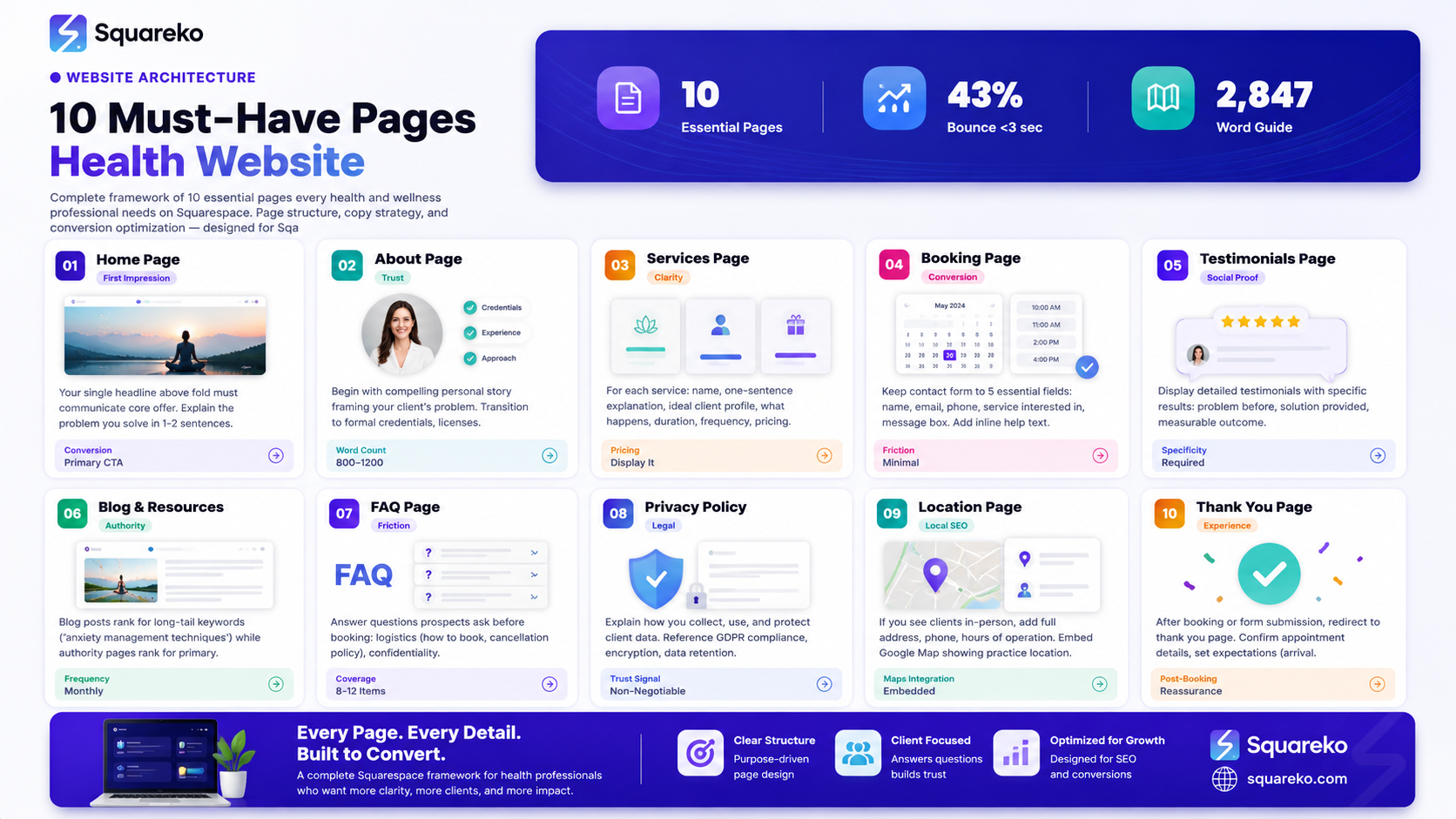
A complete health and wellness website requires 10 core pages to build trust, establish authority, and convert visitors into clients
Your home page should load above-the-fold with a clear value proposition and primary CTA within 100 words
About page credibility comes from combining personal story, professional credentials, and specific E-E-A-T signals that reduce client friction
Services page conversion increases when you describe each offering clearly, include pricing guidance (or range), and end with a CTA
Booking page simplicity is critical—every form field you remove increases completion rates; GDPR-compliant forms build trust
Testimonials and case studies page must include specifics (name, photo, results) or readers dismiss them as generic
FAQ page simultaneously serves two functions: reduces booking friction and creates structured data opportunity for Google
Privacy policy, location page, and thank-you page complete the functional website architecture that keeps clients safe and informed
Your health and wellness website isn't just a digital business card—it's your first client interaction, your sales engine, and your proof of expertise all wrapped into one. But a website missing key pages is like a therapy office with doors locked to certain rooms. Visitors bounce. Trust never builds. Clients book with your competitor instead. In this guide, you'll learn exactly which 10 pages every health and wellness professional needs on their Squarespace website, what belongs on each, and how to convert more visitors into paying clients. Whether you're a therapist, nutritionist, fitness coach, or wellness practitioner, this framework will ensure your website does the heavy lifting.
Home Page: First Impression and Conversion
Your home page is measured in seconds. Forty-three percent of website visitors will bounce within 3 seconds if they don't immediately understand what you do and why they should stay. The stakes are high.
Start above the fold—before scrolling—with a single headline that communicates your core offer. "Transform your relationship with movement" works better than "Welcome to My Fitness Practice." Use a high-quality hero image or video that reflects your ideal client. A therapist might show calm, professional office space. A fitness coach might display actual clients (with permission) mid-workout.
Below the headline, spend 1-2 sentences explaining the specific problem you solve. "If you've tried every diet and still feel stuck, we show you a sustainable nutrition path that actually works with your life." This is clarity, not fluff.
Add your primary CTA button above the fold. In Squarespace, use the Button block or CTA section. Link it to your booking or contact page. The text should be action-oriented: "Book Your Consultation," "Start Your Assessment," "Claim Your Free Initial Call"—not vague language like "Contact Us."
Include trust signals immediately: professional credentials, number of clients served, years in practice, or a recognizable credential logo. "30+ Years Helping Clients," "500+ Successful Transformations," or "Board-Certified Health Coach" answer the question visitors silently ask: "Is this person legit?"
Keep home page copy concise. Your goal isn't to sell everything on the home page—it's to warm up the visitor enough that they explore deeper. Secondary CTAs might link to your about page, services, or a free resource. End with a closing CTA section reiterating the primary offer.
On Squarespace, use the Summary Block for this CTA section and pin it near the fold for easy access as visitors scroll. The psychology is simple: see the hook, click the CTA, land on a dedicated sales page. No friction, clear path.
About Page: Story, Credentials, and E-E-A-T
The about page is where trust converts into commitment. Visitors who land here are interested—they want to know if you're the right fit.
Begin with a compelling personal story, not a resume. "I spent 10 years struggling with insomnia, trying every sleeping pill available, until I discovered breathwork and cognitive behavioral therapy. That transformation led me to train as a sleep specialist." This tells your story through the lens of your client's problem. You're relatable, not distant.
After the story, transition into your credentials and experience. List your formal training, certifications, licenses, professional body memberships, and relevant education. For a nutritionist, that might be "Registered Dietitian (RD), Certified Nutrition Specialist (CNS), Master's Degree in Nutrition Science." For a therapist: "Licensed Marriage and Family Therapist (LMFT), Certified Trauma Specialist, 12 years clinical experience."
Include why you specialize in your niche. "I specialize in working with perimenopausal women because that's the population I know inside-out—the specific hormonal shifts, energy drops, and anxiety patterns they face." Specificity builds authority faster than generalization.
Add a professional headshot—high quality, recent, and warm. This isn't LinkedIn; your photo should show approachability and professionalism. In Squarespace, use the Image block and caption it with your name and title.
Consider adding a section on your philosophy or approach. What's your core belief about how change happens? "I believe lasting wellness comes from understanding your body's signals, not fighting them. My approach combines evidence-based science with compassionate accountability." This differentiates you from generic competitors.
End the about page with a CTA: "Ready to work together?" linking to your booking page. The about page's job is to answer "Is this person right for me?" The CTA's job is to move the interested visitor forward.
Squarespace's About template is clean and designed for this narrative structure. Use the Carousel or Columns block to mix text and images, breaking up long paragraphs into scannable chunks.
Services Page: Clarity, Pricing, and CTAs
On the services page, your job is to remove confusion. Each service should answer three questions: What is it? Who is it for? How much does it cost (or what's the range)?
Structure each service description in short paragraphs. Start with the name and a one-sentence explanation. "One-on-one therapy sessions—personalized mental health support tailored to your specific challenges and goals." Then describe who it's for: "Best for clients working through anxiety, depression, relationship issues, or life transitions who prefer private, individualized attention."
Next, explain what's included. "Each 50-minute session includes assessment, evidence-based therapeutic techniques (CBT, somatic, or ACT depending on your needs), and a follow-up note with takeaways you can use between sessions." Specificity removes doubt.
Add pricing. Even if your pricing varies, provide a range or base rate. "Individual sessions start at $120/session. A 6-session package is $600 (save $20)." Transparency builds trust. If you prefer to say "pricing upon consultation," that's acceptable—but it creates friction for price-sensitive prospects.
Include a CTA for each service. Use a button block. "Book Your Session," "Start This Package," or "Schedule Your Consultation" makes the next step obvious. Each button should link directly to your booking page (or a form specific to that service if you use Squarespace's booking or form functionality).
Use the Columns block to display 2-3 services side-by-side, or stack them vertically for mobile readability. Squarespace's grid layouts work well here.
Consider adding a comparison table if you offer multiple tiers (e.g., "Basic Package vs. Comprehensive Package"). This reduces decision friction and helps prospects self-select into the right level.
End the services page with a closing CTA and maybe a testimonial: "Clients consistently report breakthroughs within 3-6 sessions." Social proof after service details works psychologically—the prospect has already imagined working with you.
Booking and Contact Page: Friction-Free Conversion
Every form field you require drops completion rates by approximately 5-10%. Your booking and contact page should feel like a smooth handshake, not an interrogation.
Use Squarespace's native Booking system if you offer time-based services (therapy, coaching, fitness classes). It integrates with your calendar, sends automatic confirmations, and allows clients to reschedule without emailing you. It's a game-changer for reducing your admin burden.
If you use a booking system, your contact page primarily serves three functions: (1) emergency contact, (2) inquiry for custom packages, and (3) visitors who prefer email to the booking form.
For the contact form itself, ask only what you genuinely need: name, email, phone (optional), service interested in, and a message box. Don't ask for company, address, or details not directly relevant to your first conversation. Squarespace's Form block allows you to customize fields easily.
Add inline help text. Above the phone field: "We use this to send appointment reminders—text-friendly." This explains why you're asking, reducing friction. At the top of the form: "We'll respond within 24 business hours."
Include a GDPR-compliant checkbox: "I agree to receive communications about my inquiry and occasional wellness tips. You can unsubscribe anytime." This signals you respect privacy and operate legally. Squarespace forms support this natively.
Set up email notifications so you're alerted instantly when someone submits a form. In Squarespace Settings > Email, configure who receives form submissions.
Add trust signals near the form. A small avatar or credential snippet: "All client information is encrypted and kept strictly confidential." This addresses unspoken concerns about data security.
Include alternative contact methods: phone, email, or hours of availability. "Prefer to call? Reach us at (555) 123-4567, Monday–Friday, 9am–5pm EST." Some prospects are ready to act but won't fill a form.
Squarespace's Contact Page template is well-designed. Use the Markdown block to add your opening paragraph, then embed the form below. Keep the design clean and focused—no sidebars with unrelated content here.
Testimonials and Case Studies Page: Social Proof
A generic testimonial "Great therapist, highly recommend!"—is worse than no testimonial. Prospects assume you made it up. Detailed, specific testimonials with names and photos are gold.
Each testimonial should follow this structure: The problem, the solution provided, and the measurable or emotional result. "I came to Sarah feeling completely overwhelmed with anxiety. She taught me grounding techniques and helped me identify triggers I didn't even know I had. Within 8 weeks, I was sleeping through the night and handling stress at work without panic attacks." Name it: "—Jennifer M., Marketing Manager, Austin, TX." Include a professional headshot if the client consents.
Consider creating 2-3 detailed case studies beyond testimonials. A case study is more in-depth: client background, specific challenges, your approach, timeline, and results. "My client Marcus, a 45-year-old executive, came to me with chronic back pain from 20 years of desk work. Over 12 weeks of personalized fitness coaching, we rebuilt his core strength, improved his posture, and he reported 80% less pain. He's now training 4x weekly and feeling more energetic than in years." Include before/after (if appropriate), specific metrics, and permission.
Squarespace's Testimonials section works well for shorter quotes. For longer case studies, create a dedicated page using Markdown or Columns blocks—this keeps them prominent and searchable.
Address the elephant in the room: You can ask satisfied clients for testimonials, but never pressure them or cherry-pick only glowing reviews. Ask via email: "Would you be willing to share a brief testimonial about your experience working with me? It helps other potential clients understand what we do together." Include an optional template to make writing easier.
Never invent testimonials or use stock photos. This destroys trust if discovered and violates FTC guidelines. Real testimonials—even critical ones—are more credible than fake perfection.
If you're just starting out, don't have testimonials yet? Offer your first few consultations at a discounted rate or free in exchange for detailed feedback and permission to use their testimonial. This builds your social proof library while serving new clients.
Add a short CTA near the testimonials section: "Ready to get results like these?" linking to your booking page.
Blog and Resources: Thought Leadership
A blog isn't optional for health and wellness professionals—it's your SEO engine and trust amplifier. When a prospective client searches "how to manage anxiety at home" or "recovery nutrition for runners," you want your resource to appear, not a generic health site.
Post consistently but realistically. One thoughtful post per month beats four rushed posts per month. Quality over frequency. Each post should genuinely help—solve a real problem, answer a real question, or provide actionable advice.
Structure blog posts for skimmability: short paragraphs, subheadings, bulleted lists, and bolded key points. Many visitors scan before reading. Make it easy.
Include a call-to-action within each post. Don't wait until the end. After your third section, add a paragraph like: "If you're ready to apply these strategies with professional guidance, we're here to support you. Book a free consultation at Squarespace.com to discuss your specific situation." (Customize with your booking link.)
Create a Resources page separate from your blog—a curated hub of downloadable guides, checklists, or templates. "Download our Free Sleep Hygiene Checklist" or "Get the 30-Day Nutrition Reset Guide." This builds your email list (Squarespace's Email Campaigns or integration with Mailchimp/Kit) while providing genuine value.
Monetize indirectly through email list growth. A prospect who reads your blog, downloads your guide, and lands on your email list is warm and familiar by the time they book. They're more likely to commit and less likely to no-show.
In Squarespace, create a Blog section, then a separate Resources page (use Columns or Summary blocks to display downloadable items). Link both from your navigation menu.
FAQ Page: Conversion Booster and SEO Goldmine
FAQ pages serve two critical functions. First, they answer questions prospects have before booking, reducing friction in the decision. Second, they're structured data opportunities—you can add FAQ schema markup so Google and AI search engines understand your content and surface it more intelligently.
Brainstorm the real questions prospects ask: "How much does a session cost?" "Do you take insurance?" "What should I prepare for my first appointment?" "What if I don't see results?" "Can I cancel if I need to?" "How long until I feel better?" Don't use questions you think sound professional—use questions you actually hear.
For each question, write a conversational, helpful answer. Not corporate jargon. "Do you take insurance?" should be answered directly: "Yes, we're in-network with most major insurers. At checkout, we'll verify your coverage and explain your out-of-pocket costs upfront. If you're unsure, email us your plan details and we'll check for you."
Structure it as FAQs in Markdown using H3 headings (### for each question). Then, below your FAQ content, include the JSON-LD schema markup (explained in the schema section below) so Google understands this is structured FAQ content.
Aim for 8-12 FAQ items. Squarespace's Accordion block is perfect for this—questions collapse until clicked, keeping the page clean and navigable.
Add a CTA near the bottom: "Didn't find your answer?" with a link to your contact page. This catches prospects with remaining concerns and gives you a chance to address them directly.
Privacy Policy and Legal Pages: Trust Foundation
These pages feel administrative, but they're critical trust signals. A health and wellness professional without a privacy policy appears careless or untrustworthy.
Include a Privacy Policy explaining how you collect, use, and protect client data. Mention GDPR compliance (if applicable), encryption, data retention, and client rights. You can use generators like Termly or Iubenda if hiring a lawyer isn't feasible, then customize to your practice.
Add a Terms of Service clarifying your cancellation policy, payment terms, and expectations for client conduct. "Sessions must be cancelled 24 hours in advance or a cancellation fee applies."
For health professionals, include a disclaimer: "The information provided on this website is for educational purposes only and is not a substitute for professional medical or mental health advice. Always consult a qualified healthcare provider for personal medical concerns."
Display these pages in your footer (Squarespace footers allow navigation links) and link from your contact page. Don't bury them—make them easy to find. Trust comes from transparency.
Location and Find Us Page: Local Authority
If you see clients in-person, a location page isn't optional—it's part of your local SEO strategy. Google Maps rankings depend partly on location clarity.
Include your full address, phone number, and hours of operation. Add a Google Map embed (Squarespace has a built-in Google Maps block) showing your practice location. A prospect shouldn't have to hunt for basic info.
Describe your office: "Conveniently located near downtown, with ample street parking. Our wellness suite includes a private therapy room, movement studio, and comfortable reception area." This sets expectations and reduces anxiety for first-time visitors.
If you serve multiple locations or offer virtual sessions, be explicit: "We offer in-person sessions at our downtown office and virtual sessions nationwide. Choose what works for you."
Include directions or transportation info: "20 minutes from the train station. Accessible entrance." Small details matter to clients with disabilities or mobility concerns.
Add a CTA: "Ready to visit?" linking to your booking page. Make it clear what the next step is.
Thank You Page: Post-Booking Experience
Most practitioners skip this page. That's a missed opportunity.
After a prospect completes a booking form or books an appointment, they should land on a Thank You page (Squarespace's Form block allows you to set a custom redirect). This page serves four purposes:
Confirmation: "Thank you for booking your session with us on date at time." Repeating the details reduces client anxiety.
Next Steps: "Here's what to expect: You'll receive an email confirmation. Please arrive 5 minutes early. Bring a water bottle and wear comfortable clothing." Explicit expectations reduce no-shows.
What to Prepare: "To make your first session most helpful, consider jotting down the main goal or concern you'd like to address." This primes them mentally.
How to Reach Us: "If you need to reschedule or have questions before your appointment, reply to the confirmation email or call number. We're here to help."
End the Thank You page with reassurance: "We're excited to work with you. See you soon!" Warmth matters.
Optionally, include a lead magnet: "While you wait for your appointment, download our free guide on topic to get started." This keeps prospects engaged and builds your email list.
In Squarespace, create this page as a standard page, then configure your booking form or contact form to redirect to it after submission. Use simple, calm design—nothing distracting.
Mid-Post CTA: Ready to Build Your Complete Website?
You now understand the architecture of a converting health and wellness website. But building it yourself takes time, and getting every page right matters. Squarespace is the tool—but strategy and execution are what separate thriving practices from abandoned websites. At Squareko, we specialize in building Squarespace websites specifically for health and wellness professionals. We handle discovery to understand your ideal client, design that reflects your expertise, copy that converts, and SEO that gets you found by the people who need you. Your website should be working for you 24/7, not sitting idle. Schedule a free consultation with Walid at Squareko to discuss your website strategy and let's get you booked up.
Frequently Asked Questions
-
No. Start with core pages: Home, About, Services, Booking, and Privacy Policy. These five pages establish your presence and allow booking. Once you're live, add Testimonials, FAQ, Blog, Location, and Thank You as you grow. Squarespace makes it easy to add pages without relaunching—each page publishes independently.
-
A contact form collects inquiries (name, message, email) and you respond manually. A booking system (like Squarespace's integrated Scheduling) lets clients reserve specific time slots directly, synced with your calendar. For appointment-based services (therapy, coaching, fitness), a booking system saves huge admin time and reduces no-shows.
-
Yes, whenever possible. Hidden pricing creates friction and filters out budget-conscious prospects who aren't your ideal client anyway. Even a range ("$75-150 per session") is better than vague "contact for pricing." You're filtering for the right fit, not playing games. Transparent pricing builds trust faster.
-
Three to five detailed testimonials with names and photos make a credible impact. Generic quotes from "John D." or "A satisfied client" hurt more than help. If you don't have testimonials yet, offer reduced-rate or free sessions to your first few clients in exchange for detailed feedback and permission to use their stories.
-
Yes, but they must understand your specific approach and client population. Hiring a health writer (not a generic content writer) is worth the investment. They'll know the nuance of your niche. Alternatively, you can write your own content and have an editor refine it—this preserves your voice while ensuring quality.
-
Consistency matters more than volume. One quality post per month is better than four rushed posts. Pick a schedule you can sustain—monthly, bi-weekly, whatever you'll actually publish. Tell your audience the schedule: "New wellness articles every first Monday of the month." This sets expectations and keeps visitors returning.
-
Store minimal information. Use encrypted contact forms (Squarespace encrypts by default). Your Privacy Policy should explain how you protect client data. Never store sensitive health details in public areas. If you use email for client communication, ensure it's HIPAA-compliant or use a secure messaging system. When in doubt, consult a healthcare attorney.
-
Yes, but only as a secondary action. Primary action is confirming their appointment and setting expectations. A secondary CTA like "Want to get a head start? Join our wellness newsletter" is fine—but don't make it pushy. The prospect just booked; they've already converted. Use the thank you page to delight and reassure them.
Ready to Build Your Converting Health Website
A website with the right pages, clear messaging, and strategic CTAs can transform your practice. You'll go from hoping for clients to having a 24/7 booking machine. But getting every page right—the copy, the design, the user flow—is where most health professionals get stuck. That's exactly what we do at Squareko We'll audit your current website (or build from scratch), implement all 10 pages strategically, optimize for conversions, and set you up to get found by the clients you want. Your first consultation is free, and there's zero obligation. Book your free consultation at squareko today and let's talk about your website strategy. We'll show you exactly where you're leaving money on the table and how to fix it.

From custom website design to SEO strategy, we help businesses launch a site that looks professional and performs better.

About the Author
Walid is the founder of Squareko
I'm Walid Hasan, a Certified Squarespace Expert and Squarespace Circle Platinum Partner with over 12 years of hands-on experience designing and optimizing high-performing websites. Over the years, I've had the privilege of building more than 2,000 Squarespace websites for clients around the world, always focusing on clean design, strong user experience, and conversion-driven results.
