
Squarespace vs WordPress for Consultants: Which Platform Is Better in 2026?
Key Takeaways Squarespace vs WordPress for Consultants
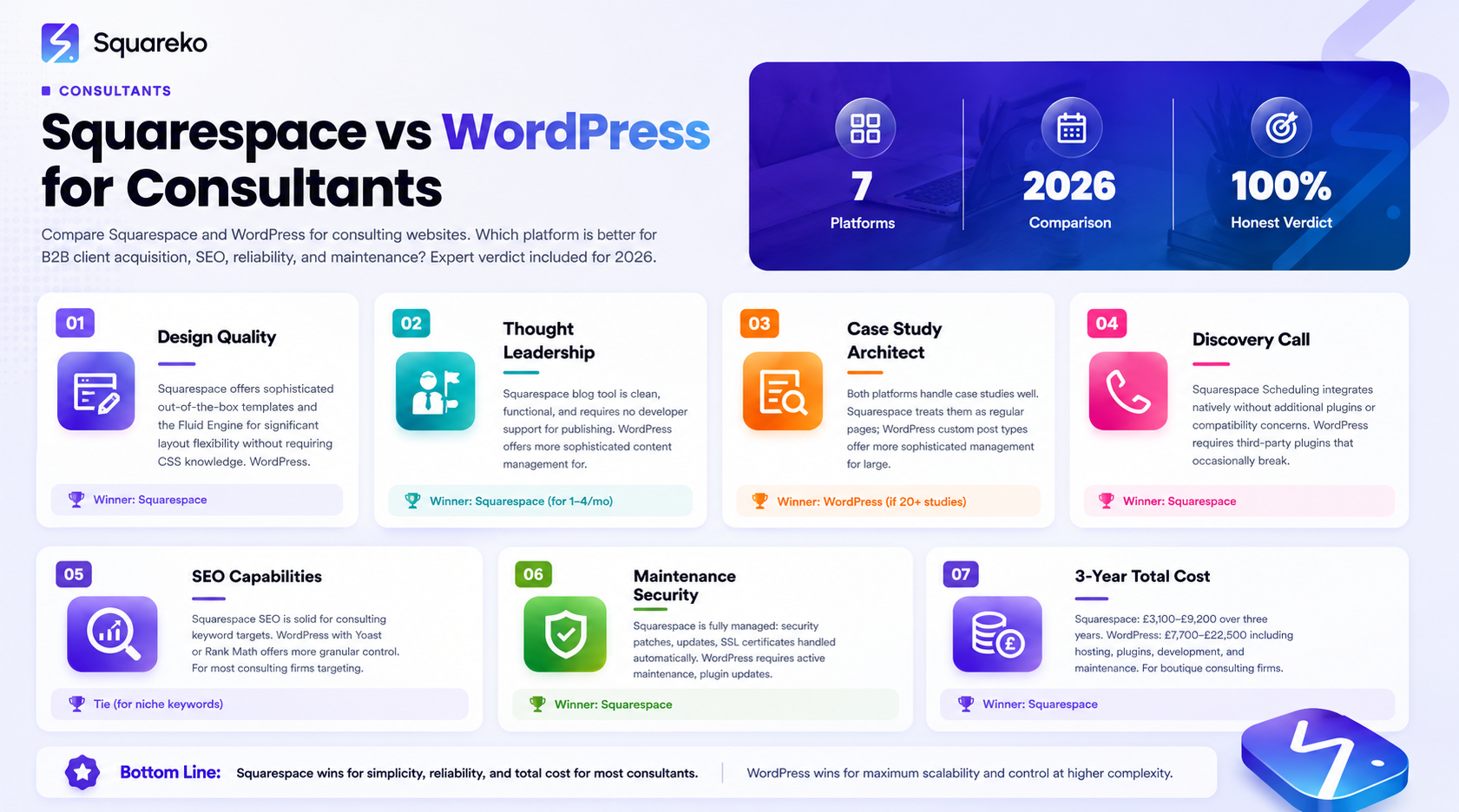
For independent consultants and boutique consulting firms (up to ~30 people), Squarespace delivers a better combination of design quality, ease of maintenance, and professional credibility
WordPress offers greater flexibility for complex content ecosystems, but this flexibility comes with significant maintenance overhead
Squarespace's scheduling, blog, and form tools cover 90%+ of consulting website needs without requiring plugins
The SEO capabilities of both platforms are comparable for consulting use cases when properly configured
For most solo and boutique consulting practices, Squarespace wins clearly — particularly for consultants who need to maintain their site themselves
If you're a consultant building or rebuilding your website, this is probably the question you've spent more time on than any other. Everyone has a strong opinion. Your developer friend says WordPress. Your design-conscious colleague says Squarespace. The internet is full of comparisons that seem designed to confuse rather than clarify.
This guide gives you the honest verdict — specifically for consulting firms, solo consultants, and advisory practices — based on what actually matters to your clients and your practice.
Spoiler: for most consultants, Squarespace wins clearly. But there are specific scenarios where WordPress makes more sense, and we'll tell you exactly what those are.
The Platform Decision for Consultants
The platform question matters because your website is a significant investment — not just financially, but in time and brand credibility. Getting this decision right means your site serves you for 3-5 years. Getting it wrong means a costly rebuild 18 months from now.
Consulting clients evaluate your digital presence more critically than most service providers. They're analytical, risk-aware, and often technically sophisticated. Your platform choice has real-world consequences for how your site looks, performs, and converts.
Here's what matters most for consulting website platform selection:
Professional design quality and flexibility
Reliability and uptime (a crashed site is a credibility disaster during a client evaluation)
Ease of content updates (you need to publish thought leadership without developer intervention)
Scheduling and booking integration
SEO capability for both traditional and AI search
Maintenance burden on you and your team
Let's assess both platforms against each of these criteria.
Design and Professional Appearance
Squarespace: Squarespace has invested heavily in template quality and now offers some of the most visually sophisticated out-of-the-box design available from any CMS. For consulting firms that need to project premium professional credibility without hiring a designer for every update, the design quality ceiling is genuinely high.
The Fluid Engine (Squarespace's drag-and-drop page builder) gives you significant layout flexibility while keeping the design system coherent. You don't need to know CSS to make your consulting site look polished.
WordPress: WordPress's design quality depends almost entirely on the theme and page builder you choose. With the right combination (Divi, Elementor, or a premium consulting-specific theme), WordPress sites can look exceptional. But they also require more ongoing maintenance, and poorly chosen themes or plugins frequently degrade design quality over time.
Verdict: For design quality per hour invested, Squarespace wins for most consulting firms. WordPress can achieve superior results with expert developer input, but that's a significant ongoing cost.
Thought Leadership and Blogging
For consultants in 2026, thought leadership publishing is a core client acquisition strategy — not an optional extra. AI platforms now recommend consultants based on content authority, and building that authority requires a well-structured, consistently updated blog.
Squarespace:Squarespace's blog tool is clean, functional, and easy to use. Authors can publish without developer support. Categories, tags, and featured posts work intuitively. The reading experience for visitors is clean and professional. For consulting thought leadership — where content quality matters more than complex content management features — Squarespace covers all requirements.
WordPress: WordPress's blogging capabilities are more sophisticated — category hierarchies, custom post types, advanced taxonomies, and editorial workflows make it the better choice for consulting firms with a dedicated content team producing 10+ articles per month. For complex content operations, WordPress remains the more powerful tool.
Verdict: For most consulting practices publishing 1-4 articles per month, Squarespace is entirely sufficient and significantly easier to manage. For high-volume content operations with dedicated editorial teams, WordPress offers more infrastructure.
Case Study and Portfolio Architecture
Squarespace: You can build case study pages effectively on Squarespace using a combination of regular pages and Squarespace's content blocks. The result looks professional and loads quickly. The limitation is that case studies are treated as regular pages, not a dedicated content type — which means managing a large number of them (20+) becomes slightly unwieldy without a structured naming convention.
WordPress: For consulting firms with large, complex case study libraries requiring custom fields, filtering by sector or service type, or sophisticated relationship mapping between case studies and consultants, WordPress's custom post type architecture is clearly superior.
Verdict: For most consulting firms with under 20 case studies, Squarespace handles the requirement well. For large advisory firms with extensive case study libraries requiring sophisticated search and filtering, WordPress is more appropriate.
Scheduling and Discovery Call Booking
Squarespace:Squarespace Scheduling (powered by Acuity) is built directly into the platform and integrates natively with your website. For consultants using discovery call booking as their primary conversion mechanism, this integration is seamless — booking widgets embed directly into any page, calendar availability syncs automatically, and pre-call qualifier forms work without additional plugins.
WordPress: WordPress scheduling requires third-party plugins (Calendly embed, Acuity embed, or plugins like Bookly). These work, but they require plugin updates, compatibility maintenance, and occasionally break with WordPress core updates. The integration is rarely as seamless as a native solution.
Verdict: Squarespace wins on scheduling for consulting discovery calls. The native integration is significantly simpler to set up and maintain.
SEO and AI Search Performance
Squarespace: Squarespace's SEO capabilities are solid for consulting use cases. Built-in title tags, meta descriptions, and URL control cover the basics. Schema markup can be added via code injection. The platform generates clean HTML that search engines index well. The key limitation is that advanced technical SEO customisation ( complex schema implementations, advanced redirect management) is more restricted than WordPress.
WordPress: WordPress with Yoast SEO or Rank Math gives you more granular control over every SEO element. Technical SEO customisation is significantly deeper — important for large consulting firms competing for highly competitive keywords.
For AI search (GEO — Generative Engine Optimisation), both platforms can support the key requirements: structured content, FAQ schema, clear E-E-A-T signals. Schema implementation is slightly more straightforward on WordPress, but entirely achievable on Squarespace with code injection.
Verdict: For most consulting firms targeting niche keywords and building authority through thought leadership, Squarespace's SEO capabilities are entirely sufficient. For enterprise consulting practices targeting high-competition terms and requiring advanced technical SEO, WordPress offers more control.
Maintenance, Security, and Reliability
This is where the gap between platforms is most significant for consulting firms — particularly solo consultants and small teams who don't have dedicated IT support.
Squarespace: Squarespace is a fully managed platform. Security patches, server maintenance, SSL certificates, and software updates are all handled by Squarespace. The uptime record is strong. A consultant who doesn't want to think about website maintenance can genuinely not think about it.
WordPress: WordPress requires active maintenance: core updates, plugin updates, theme updates, regular security monitoring, and backup management. A neglected WordPress site becomes a security liability — vulnerabilities in outdated plugins are the primary source of hacked consulting websites. This maintenance overhead is manageable with a developer on retainer, but adds ongoing cost and risk.
Verdict: For consulting firms without dedicated developer support, Squarespace wins clearly on maintenance. The total time and cost savings over 3-5 years are significant.
GDPR and Privacy Compliance
Squarespace: Squarespace provides built-in cookie consent banners, privacy policy templates, and GDPR-compliant form handling. For consultants operating under UK GDPR and EU GDPR requirements, the platform's built-in tools handle the basics well.
WordPress: WordPress GDPR compliance requires specific plugins and configuration. When properly set up, it's effective. But properly set up requires expertise and ongoing maintenance as regulations evolve.
Verdict: Squarespace's built-in GDPR tools give most consulting firms what they need without additional configuration. Financial and legal consultants handling sensitive client data may require more sophisticated privacy implementations, where WordPress with specialist configuration has an edge.
Cost Over Three Years
Let's look at realistic costs for a professional consulting website on each platform over three years:
Squarespace (Business Plan):
Platform subscription: ~£600 (£200/year)
Professional design setup: £2,500–£5,000 (one-time)
Ongoing content updates: £0 (self-managed) to £1,200/year (agency retainer)
3-year total: £3,100–£9,200
WordPress:
Hosting: ~£900 (£300/year for quality managed hosting)
Professional design and development: £4,000–£10,000 (more complex builds)
Plugin licenses: ~£300/year
Ongoing maintenance/security: £600–£2,400/year
3-year total: £7,700–£22,500
For most boutique consulting firms, Squarespace is significantly more cost-effective when you factor in maintenance, security, and the operational overhead of managing a WordPress site.
The Squareko Verdict: When Squarespace Wins, When WordPress Wins
After building websites for consulting firms across six specialties — business, financial, education, operations, marketing, and strategy — here's our honest recommendation:
Squarespace is the right choice for:
Solo consultants and independent advisors who need professional digital presence without ongoing technical overhead
Boutique consulting firms (2-15 consultants) that need to maintain and update their site without developer support
Consultants who publish 1-4 thought leadership pieces per month
Financial, education, and operations consultants who value reliability and professional design over maximum flexibility
Any consulting practice that doesn't have a dedicated developer on retainer
WordPress may make more sense for:
Large consulting firms (50+ people) with dedicated development resources and complex content ecosystems
Consulting firms running complex membership portals, custom client databases, or sophisticated e-commerce
Firms requiring advanced technical SEO customisation beyond Squarespace's capabilities
Management consultancies with enterprise-scale content marketing operations (10+ articles per month)
For the vast majority of our consulting clients, Squarespace delivers a better website, faster, at lower total cost, with significantly less ongoing maintenance burden.
Not sure which platform is right for your consulting practice? Squareko offers free platform strategy consultations for consulting professionals. We'll assess your specific requirements and tell you honestly which platform will serve you best — even if that answer is WordPress.
FAQs
-
Yes — for most consulting firms, Squarespace is an excellent choice. The platform offers professional design quality, reliable performance, built-in scheduling for discovery call booking, and adequate SEO capabilities for most consulting keyword targets. The main advantage over WordPress is significantly reduced maintenance burden, which matters considerably for busy consultants who don't want to manage website infrastructure.
-
Absolutely. Squarespace's blog tool handles thought leadership content publishing well for most consulting practices publishing 1-8 articles per month. Categories, tags, featured images, and author attribution all work cleanly. For consulting firms with high-volume editorial operations (10+ articles per month) or complex content management requirements, WordPress's more sophisticated blogging infrastructure becomes relevant.
-
Significantly easier. Squarespace is a fully managed platform — security, updates, and maintenance are handled automatically. A solo consultant can update their website, publish new articles, and manage their discovery call calendar without any technical knowledge. WordPress requires ongoing maintenance (plugin and core updates, security monitoring, backup management) that adds real overhead for busy consulting principals.
-
Yes. Squarespace supports the core SEO requirements for consulting firms: page-level title tags, meta descriptions, custom URL slugs, sitemap generation, and basic schema markup via code injection. For advanced technical SEO requirements, WordPress offers more granular control — but for most consulting firms targeting niche keywords and building authority through quality content, Squarespace's SEO capabilities are entirely sufficient.
-
For financial consulting specifically, Squarespace's clean, maintained platform has a reliability advantage — a financial consulting website that goes down due to a plugin conflict is a credibility disaster. Squarespace's built-in GDPR tools also handle basic financial data privacy requirements well. For financial firms requiring complex FCA compliance infrastructure or bespoke client portal functionality, WordPress may become appropriate.
-
For most independent strategy consultants and boutique corporate advisory firms, Squarespace delivers superior results. The premium visual aesthetic of top Squarespace templates, combined with the platform's ease of thought leadership publishing, matches the priorities of strategy consulting clients. Large strategy consulting firms with complex content needs or dedicated development teams may find WordPress more appropriate.
Your Consulting Website Platform Decision, Made Simple
If you're a consulting firm that needs a professional, low-maintenance website that converts clients and builds authority — choose Squarespace.
If you're a large consulting firm with dedicated development resources and complex content infrastructure needs — consider WordPress with professional development support.
Either way, the most important decision isn't which platform you choose. It's whether you invest in professional design and conversion architecture that makes your expertise visible to the right clients.
At Squareko, we build Squarespace websites for consultants that combine professional credibility with measurable client acquisition performance. We'd be happy to advise on whether Squarespace is right for your specific practice.

From custom website design to SEO strategy, we help businesses launch a site that looks professional and performs better.

Author Bio
I'm Walid Hasan, a Certified Squarespace Expert and Squarespace Circle Platinum Partner with over 12 years of hands-on experience designing and optimizing high-performing websites. Over the years, I've had the privilege of building more than 2,000 Squarespace websites for clients around the world, always focusing on clean design, strong user experience, and conversion-driven results.
