
Squarespace vs Teachable vs Kajabi for Course Creators: Which Is Best in 2026?
Introduction
If you're thinking about launching online courses, you've probably heard about Squarespace, Teachable, and Kajabi. But here's the real question: which platform is actually right for your course business?
The answer isn't simple—it depends on what you're trying to build. Are you creating a complete branded online presence with courses baked in? Or do you want a pure course platform where you can focus entirely on teaching? Maybe you need everything: courses, email marketing, sales funnels, and membership communities all in one place?
This is where things get interesting. Squarespace vs Teachable for course creators has become a hot comparison because Squarespace isn't just a website builder anymore—it's become a legitimate contender for selling courses alongside websites. Kajabi, meanwhile, positions itself as the all-in-one solution for course creators and digital entrepreneurs. But is it worth the price? And can Squarespace really compete with purpose-built platforms?
I've worked with hundreds of course creators over the years, and I've seen what works and what doesn't. In this guide, I'm going to break down exactly how these three platforms stack up, so you can make an informed decision based on your actual needs—not just marketing hype.
Key Takeaways Squarespace vs Teachable vs Kajabi for Course Creators: Which Is Best in 2026?
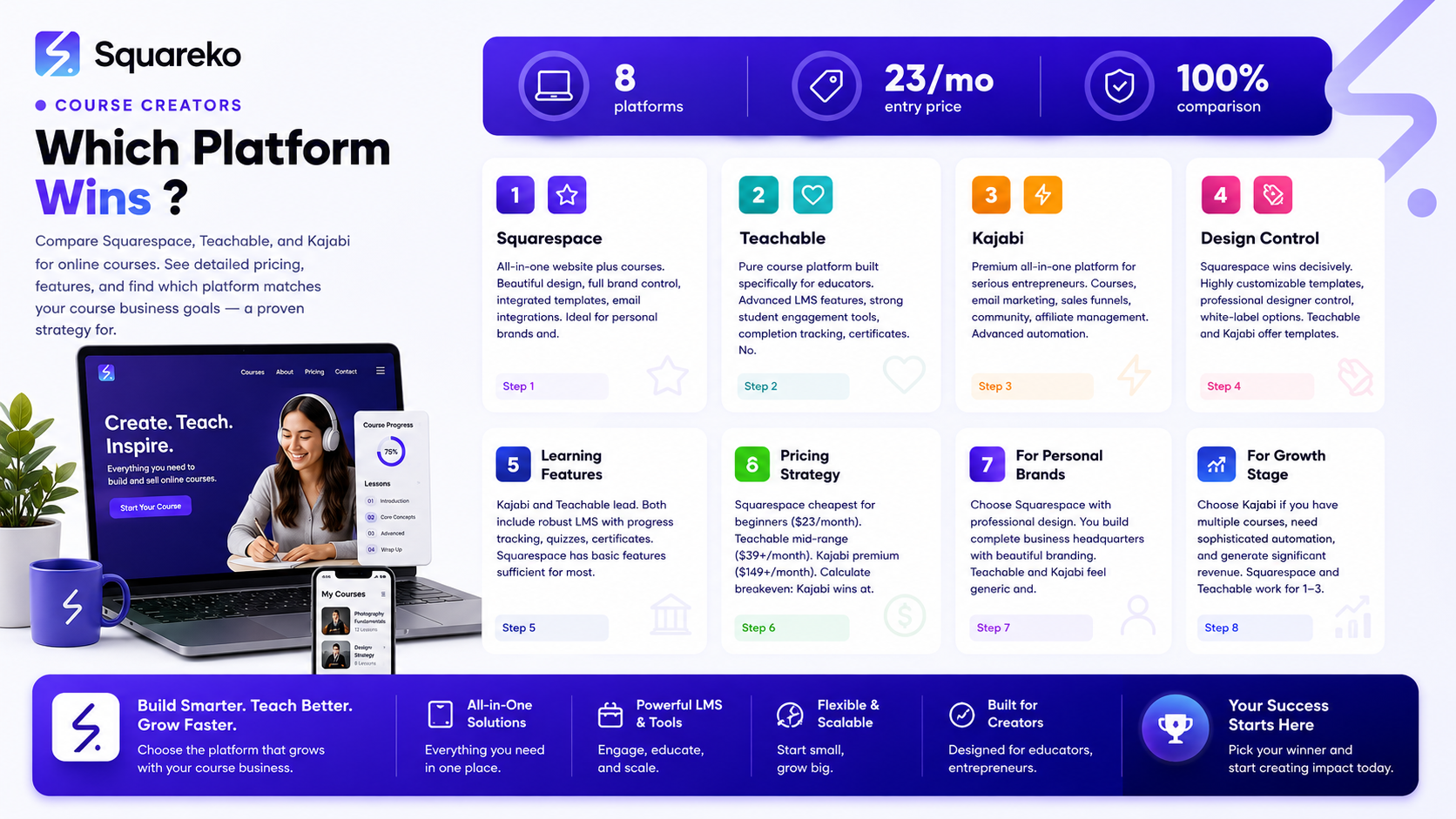
Squarespace offers the most powerful brand control and website design flexibility, making it ideal if you want a professional, custom-looking course site that doubles as your business headquarters.
Teachable is the pure play for course creators who want a dedicated learning platform without worrying about website design, at a fraction of the cost of Kajabi.
Kajabi is the all-in-one suite that includes courses, email, sales funnels, and community—but the premium pricing means it makes sense only if you're already generating significant revenue.
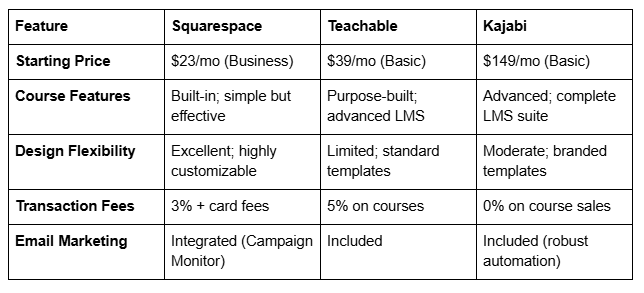
Pricing matters: Squarespace starts at $23/month for basic courses; Teachable at $39/month; Kajabi at $149/month.
Professional design from Squareko transforms Squarespace into a high-converting, branded course platform that often outperforms more expensive alternatives.
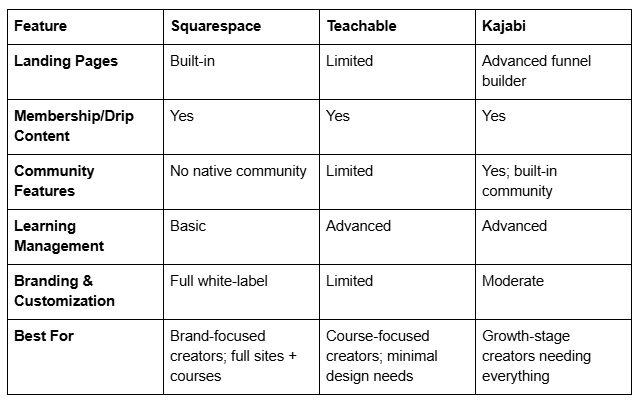
Quick Comparison Table
Squarespace for Course Creators
Squarespace wasn't built specifically for courses, but that's actually one of its biggest strengths. Here's why.
What Squarespace Does Well
Squarespace gives you something that Teachable and Kajabi can't: a genuinely beautiful, professional website that you control completely. When you sell courses on Teachable or Kajabi, you're getting a platform-branded experience. Your students land on Teachable pages, Teachable checkout, Kajabi emails. You're building on their real estate.
With Squarespace, your courses live on your domain, in your design, reflecting your brand completely. This matters more than people think—especially if you're building a personal brand or positioning yourself as a premium educator.
Pricing Structure
The Squarespace Business plan runs $23 per month (billed annually), and it includes everything you need to launch courses: video hosting, drip-fed lessons, quizzes, and discussion forums. If you want advanced ecommerce features, the Commerce plan at $28-$52 per month gives you additional payment options and advanced inventory management.
The transaction fee structure is 3% on course sales (plus payment processor fees), which is actually reasonable compared to Teachable's 5%.
Pros
Full brand control: Your courses live entirely on your branded domain and design system.
Beautiful, custom design: Squarespace's designer-first approach means your course site will look premium without hiring developers.
Integrated blogging: Run a course business plus a content marketing blog from one platform.
Affordable: At $23/month, you're getting a professional website plus course functionality.
Email integration: Built-in email marketing through Campaign Monitor, though you can also integrate other tools.
No transaction fees on digital products: Unlike some platforms, Squarespace doesn't take a cut of your course revenue (just payment processor fees).
Cons
Learning management is basic: Squarespace's LMS isn't as advanced as Teachable's or Kajabi's. Features like automated drip-feed content, detailed student progress tracking, and behavioral automation are simpler.
Limited marketing automation: If you want sophisticated email sequences triggered by student actions (like dropping out), Kajabi does this better out of the box.
No built-in community: Squarespace doesn't have a native community feature like Kajabi does.
Requires more design work: If you want a truly custom-looking site, you might need a designer (like the team at Squareko).
Smaller ecosystem: Fewer integrations and fewer pre-built templates specifically for course creators.
Teachable: Pros and Cons
Teachable is the pure play—it's designed specifically for course creators who want to focus on teaching, not web design.
Pricing Structure
Teachable's pricing is tier-based:
Free: Limited to 5 students, basic course features.
Basic: $39/month for up to 500 students.
Pro: $119/month for unlimited students.
Transaction fees: 5% on course sales plus payment processor fees.
Pros
Purpose-built for courses: Teachable's entire interface is designed around course creation and student management. Everything you need is there.
Advanced LMS features: Drip-feed content, quizzes, certificates, progress tracking, and detailed reporting are all strong.
Affordable entry point: At $39/month (or free to start), it's cheaper than Kajabi.
Student engagement tools: Email integrations, discussion forums, and student dashboards are well-implemented.
Integrations: Teachable connects well with email platforms, landing page builders, and webinar tools.
No design headaches: You pick a template, add your course, and launch. No need to think about web design.
Cons
Transaction fees (5%): Higher than Squarespace's 3%, which adds up as you scale.
Limited branding: While you can customize colors and logos, your courses feel Teachable-hosted. You're not building full brand ownership.
No website builder: Teachable is a course platform, not a website platform. You'll need a separate website for your blog, testimonials, case studies, etc.
Limited marketing automation: Email sequences exist, but they're not as sophisticated as Kajabi's.
No community features: Unlike Kajabi, there's no built-in community space for students to interact.
Limited sales funnel tools: Landing pages and sales funnels are basic compared to Kajabi.
Kajabi: Pros and Cons
Kajabi is the premium all-in-one platform for course creators who want everything in one place.
Pricing Structure
Kajabi operates on a simpler tier system:
Basic: $149/month for up to 5,000 contacts and basic features.
Growth: $199/month for unlimited contacts and more advanced features.
Pro: $399/month for the full suite with advanced automation.
Transaction fees: 0% on course sales (you only pay payment processor fees).
Pros
All-in-one platform: Courses, email marketing, landing page builder, sales funnels, affiliate management, community, and webinars all in one place.
No transaction fees: Kajabi doesn't take a cut of your course sales, just the payment processor fee (usually 2.2% + $0.30).
Advanced automation: Behavioral triggers, sequence automation, and sophisticated funnel building are exceptional.
Community features: Built-in community space helps create a cohesive student experience.
Membership and drip content: Advanced membership features with flexible content dripping.
Affiliate management: Built-in affiliate program tools help you leverage affiliates for growth.
Cons
Expensive: Starting at $149/month, Kajabi costs 3-4x more than Teachable or Squarespace. That's $1,800 per year just for the platform.
Overkill for beginners: If you're just launching your first course, you won't use 80% of Kajabi's features.
Limited design flexibility: While Kajabi's templates are professional, you don't have the design control that Squarespace offers. You're building within Kajabi's design system.
Steeper learning curve: The all-in-one nature means more complexity. It takes time to learn.
Marketing automation is powerful but complex: The advanced features require understanding email workflows and funnel architecture.
Head-to-Head Comparisons
Squarespace vs Teachable for Course Creators
Best for: Squarespace wins if you want a beautiful branded website that sells courses. Teachable wins if you want a pure course platform at a lower price.
Why the choice matters: Teachable is easier to launch with if you don't care about web design. But Squarespace gives you a complete business home that positions you as more professional and premium. If you're building a personal brand or targeting high-ticket courses, Squarespace's design advantage is worth the extra effort.
Pricing winner: Teachable's $39/month is cheaper than Squarespace's $23/month (Business) plus the cost of professional design. But if you invest in Squareko's design services, the ROI on a premium-looking course site often exceeds the investment within 6 months.
Teachable vs Kajabi for Course Creators
Best for: Teachable if you want simplicity and affordability. Kajabi if you're generating $15,000+ per month in revenue and need advanced marketing automation.
Why the choice matters: Kajabi's 0% transaction fee sounds great until you do the math. At Teachable's 5% fee, you'd need to be selling $10,000 per month in courses before Kajabi's $149/month platform cost breaks even. Below that, Teachable is simply cheaper.
But if you're running sales funnels, webinars, affiliate programs, and need sophisticated email automation, Kajabi's all-in-one nature might reduce the need for additional tools, which could justify the cost.
Clear winner: Teachable for revenue under $10,000/month. Kajabi for revenue above that if you need all the marketing features.
Squarespace vs Kajabi for Courses
Best for: Squarespace if design and branding are non-negotiable. Kajabi if you need complete marketing automation and community features.
Why the choice matters: Kajabi is more expensive, but you get more integrated features. Squarespace costs less but requires you to potentially add email marketing, landing pages, and other tools separately (or use integrations).
However, Kajabi's strength is in marketing automation and sales funnel sophistication. Squarespace's strength is in design and brand presentation. These are different priorities.
The real comparison: Would you rather have a beautiful, custom-branded course site with Squarespace, or an all-in-one marketing platform with Kajabi that might look more generic?
The Verdict: Which Platform Wins
If You Want Full Brand Control + a Premium Course Website: Choose Squarespace + Professional Design
Who this is for: Personal brands, premium course creators, coaches building their signature offering, creatives positioning themselves as high-ticket experts.
Why: Squarespace gives you complete design control and a professional website that positions you as premium. A beautifully designed Squarespace course site (especially one designed by professionals who understand conversion) builds trust and justifies higher course prices.
The investment in professional design from Squareko typically pays for itself within the first few course sales. You're not just getting a cheaper platform—you're getting a business-critical asset that becomes your competitive advantage.
Real talk: Buying a Squarespace design from Squareko is cheaper than paying Kajabi's yearly platform costs, and you end up with a site that looks 10x better than any standard Kajabi template.
If You Want a Pure Course Platform With Minimal Design Headaches: Choose Teachable
Who this is for: Course creators who want to launch fast, subject matter experts without design interest, teachers launching their first course, creators prioritizing content over presentation.
Why: Teachable is straightforward. You create your course, students enroll, you teach. The learning management system is robust, student engagement is built-in, and you don't have to think about website design. At $39/month, you're getting a dedicated platform for what it does best.
Teachable is the right choice if your concern is course content, not business branding.
If You're Generating Significant Revenue and Need Everything Integrated: Choose Kajabi
Who this is for: Full-time digital entrepreneurs with multiple income streams, creators running sophisticated launch campaigns, established course creators who've outgrown simpler platforms.
Why: Kajabi's all-in-one nature, zero transaction fees, and advanced automation make sense once your revenue reaches a certain level. If you're running webinars, affiliate programs, membership communities, and complex sales funnels simultaneously, Kajabi's integration saves you from juggling multiple tools.
But here's the honest part: most course creators don't need Kajabi. You probably don't either—unless you're already making serious revenue.
Why Professional Squarespace Design Wins
Here's something that isn't obvious when you compare these three platforms head-to-head: the design matters more than the features for course sales.
Think about it. When someone lands on your course site for the first time, they're making a judgment about you in milliseconds. Is this creator professional? Credible? Worth my money?
Kajabi and Teachable's default templates send a message: I'm using a course platform. They look like a million other course sites.
A professionally designed Squarespace course site sends a different message: I'm a serious creator who invested in this brand. You're in good hands.
That difference translates directly to conversion rates. A premium-looking course site converts higher, justifies higher prices, and builds customer loyalty.
This is why Squareko works with course creators. We don't just build websites—we build conversion machines that position you as the premium choice in your market. A Squarespace site designed for course creators, with conversion optimization, clear value propositions, and beautiful course presentation, outperforms more expensive platforms that look generic.
The real cost isn't the platform fee. It's the lost revenue from a site that doesn't reflect your expertise and positioning.
Frequently Asked Questions
-
Yes. Squarespace has a legitimate course platform built in that supports video, drip-fed content, quizzes, certificates, and discussion forums. It's not as feature-rich as dedicated course platforms, but for most educators, it's more than sufficient. The real advantage is that your courses live on a beautifully designed website that builds your brand, not on a generic course platform.
-
It depends on your priority. If you're prioritizing design, branding, and a complete website, Squarespace wins. If you're prioritizing course features and simplicity without worrying about design, Teachable wins. For revenue, Squarespace's 3% transaction fee beats Teachable's 5%, so Squarespace is cheaper to scale. But Teachable is easier to launch with initially.
-
For most course creators, yes. Squarespace covers courses, basic email marketing, and website hosting. Kajabi adds community features, advanced automation, and affiliate management. If you don't need those extras, Squarespace is better designed and costs less. If you need all-in-one marketing automation, Kajabi is more integrated. But there's significant overlap, and Squarespace usually wins on design and brand control.
-
Squarespace charges 3% transaction fees on course sales plus standard payment processor fees (usually 2.2% + $0.30 per transaction). This is lower than Teachable's 5% fee and comes without any platform transaction fee (Kajabi charges 0%, but requires a $149/month platform fee).
-
Yes, Squarespace has built-in LMS features including video hosting, lesson organization, quizzes, certificates, discussion forums, and student progress tracking. It's not as advanced as dedicated platforms like Teachable or Kajabi, but it covers the essentials and integrates seamlessly with your website design.
-
Squarespace with professional design wins here. High-ticket courses ($997+) require positioning and credibility. A professionally designed Squarespace site (especially through Squareko) positions you as premium and justifies higher prices better than generic platform templates. Kajabi is a close second if you need advanced sales funnels, but Squarespace's design advantage for premium positioning is significant.
-
At Squarespace, you're looking at $23-52/month plus transaction fees. At Teachable, it's $39-119/month plus transaction fees. At Kajabi, it's $149-399/month with zero transaction fees. However, professional design from Squareko is a one-time investment (not a monthly fee) that dramatically increases conversion and revenue. The ROI on professional design for a Squarespace course site typically pays for itself in the first 2-3 course sales.
-
Absolutely. Squarespace's templates are designed by professionals and are easy to customize. You can launch a course site yourself without hiring a designer. However, if your course is high-ticket or your brand is critical to your positioning, professional design will increase your conversion rate and justify the investment quickly.
Ready to Launch Your Course?
Here's what we know after comparing these three platforms: the platform you choose matters, but the design of your course site matters more.
Squarespace gives you the tools to sell courses. But a professionally designed Squarespace course site gives you something better: a business asset that positions you as the premium choice, justifies higher prices, and converts interested people into paying students.
Think about the course creators you admire. Their websites aren't generic. They're thoughtfully designed, visually distinctive, and they immediately communicate expertise and professionalism. That's not accident—that's intentional design strategy.
The Squareko team specializes in exactly this. We build Squarespace course sites that look like they cost $10,000, work like platforms that cost $500/month, and cost significantly less than both. We handle the design, the conversion optimization, the technical setup, and the SEO strategy. You focus on creating transformational content.
Most creators spend months choosing between Teachable and Kajabi when the real opportunity is building something uniquely theirs on Squarespace. We've worked with coaches, consultants, and educators who switched from other platforms and saw conversion rates jump 30-50% just from better design and positioning.
Your students will judge you in the first 3 seconds of landing on your site. Make those 3 seconds count.
Let's talk about building your professional course site.
Squareko Squarespace design services for course creators or Schedule a consultation for your course platform to see how we can transform your course business through design.

From custom website design to SEO strategy, we help businesses launch a site that looks professional and performs better.

About the Author
I'm Walid Hasan, a Certified Squarespace Expert and Squarespace Circle Platinum Partner with over 12 years of hands-on experience designing and optimizing high-performing websites. Over the years, I've had the privilege of building more than 2,000 Squarespace websites for clients around the world, always focusing on clean design, strong user experience, and conversion-driven results.
