Squarespace URL Slug Best Practice: Why It Is a One-Time Decision
The short answer: on Squarespace, changing a URL slug breaks the old URL immediately and permanently. There is no automatic redirect on any plan, ever. Squarespace's own documentation states it directly: "If you change a page's URL slug, traffic won't automatically redirect to the new URL... a 404 error will appear." Every slug is therefore a decision you make once, before publishing — which makes slug policy a governance question about who is allowed to edit them, not a formatting question about hyphens.
The rules, in decision order
Work down this list before you publish anything. After publishing, each of these becomes expensive.
Is the slug readable without the page? /squarespace-seo-audit passes. /service-2-final does not.
Does it contain the words someone would search? Not stuffed — present.
Is it as short as it can be while staying clear? Three to five words is the working range.
Does it avoid dates, years and version numbers? /seo-guide-2026 is a slug you will want to change in fourteen months, and you will not be able to change it cheaply.
Does it avoid words you might reorganise around? /blog-post-about-fonts ages badly; /squarespace-font-pairing does not.
Is it lowercase and hyphen-separated? Squarespace enforces the first automatically and the second is on you.
Would a colleague guess it from the page title? If not, one of the two is wrong.
Has someone with authority signed it off? On any site with more than one editor, this is the rule that actually protects you.
The constraint that changes everything: no automatic 301
Most content platforms create a redirect when you rename a page. Squarespace does not, on any plan, in any version.
The moment you save a new slug, the old URL is dead. Every external backlink to it 404s. Every link in an email newsletter you sent last year 404s. Printed material and QR codes pointing at it 404s. Google's index still holds the old URL and will keep sending people to a 404 page until it re-crawls, which its own documentation puts at "a few days to a few weeks".
Squarespace's recommended remedy is a three-part manual process: create a 301 redirect from the old URL to the new one, edit any internal links pointing at the page, and update the page's QR code and marketing materials.
The redirect goes in Settings → Developer Tools → URL Mappings:
/old-slug -> /new-slug 301
And there is a constraint on the redirect that catches nearly everyone: Squarespace states that "redirects only work if the page you're redirecting from has been deleted or disabled". Renaming a page does not create a deleted page — it moves the same page to a new address, leaving the old address unclaimed. That works. But if you duplicated the page instead of renaming it and left the original live, the redirect will never fire. URL mappings not working covers that failure mode in full.
Does changing a Squarespace URL actually cost you rankings?
Yes, temporarily, and sometimes permanently — and the honest answer is more nuanced than either "301s pass everything" or "never touch a URL".
With a correct 301 in place, Google's documented position is that redirects are the strongest canonicalisation signal available and that ranking signals consolidate onto the new URL. In practice on Squarespace sites I have migrated, rankings dip for one to three weeks while Google re-crawls and re-evaluates, then recover. The dip is real and it is worth planning around — do not rename your highest-traffic service page the week before a campaign launch.
Without a 301, you lose everything the old URL had earned. Backlinks point at a 404, which passes nothing. Google eventually drops the old URL and treats the new one as a brand-new page with no history.
What never fully recovers is traffic from sources you cannot edit: an old newsletter, a directory listing you no longer control, a printed flyer, someone else's blog post. A 301 catches those, which is exactly why the redirect is not optional.
What Squarespace allows in a slug, and what it silently changes
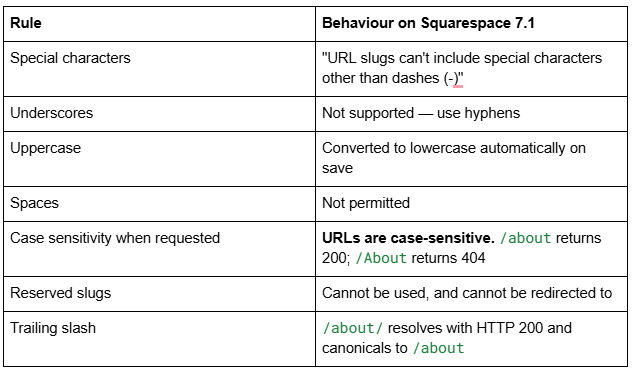
Two of those are worth dwelling on.
Auto-lowercasing is a trap for migrations. Your new Squarespace slugs will all be lowercase. If your old site had /About-Us, that exact URL is what external links point at, and a redirect rule must reproduce the old capitalisation exactly to catch them.
Hyphens, not underscores. Google treats hyphens as word separators and underscores as joiners, so squarespace_seo_audit reads as one long token. Squarespace does not enforce this, so it is on you.
How long should a slug be, honestly
There is no threshold. URL length is not a ranking factor in any Google statement, and the correlation people cite between short URLs and rankings is a proxy for homepages and top-level pages ranking well, not for URL length doing work.
What length genuinely affects:
Click-through, because the URL is displayed in the search result as a breadcrumb-style path
Shareability, because long URLs wrap badly in messages and emails
Human comprehension, which is the reason that matters
A workable rule: three to five words, under 60 characters. Not because 60 is magic, but because a slug you cannot read in one glance has stopped doing its only job.
Two failure modes at the extremes. Too long: /how-to-fix-your-squarespace-website-when-google-will-not-index-it. Too short: /fix, which tells nobody anything and is impossible to reuse later without collision.
Do keywords in the slug help?
A little, and less than most guides claim.
Google has been consistent that words in the URL are a very small ranking signal. What they genuinely do is confirm relevance to a human deciding whether to click, and give anyone linking to you a natural anchor text when they paste the raw URL.
So: include the primary phrase once, naturally, and stop. /squarespace-seo-audit is right. /squarespace-seo-audit-services-seo-audit-squarespace is keyword stuffing in a field where the return was small to begin with.
One Squarespace-specific note. The slug is generated from the title when you create a page or post, which means an unedited slug inherits everything wrong with a first-draft title. Post titles like "5 Things I Learned (Finally!)" produce slugs like /5-things-i-learned-finally. Check the slug field before the first save, because after that it is a one-way door.
Blog post URLs: the two-part structure
Every Squarespace blog post URL is composed of two parts:
/blog-page-slug/post-slug
Squarespace's documentation confirms it: "Blog post URLs always begin with the blog page URL slug. The rest of the slug is set by the post title and the default post URL format."
So a post called "Squarespace SEO Audit" on a blog page at /journal becomes /journal/squarespace-seo-audit. You control both halves, and they are edited in completely different places:
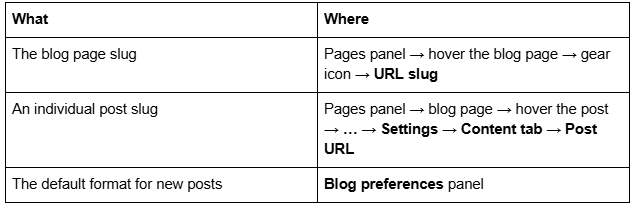
Changing the blog page slug renames every post under it
This is the single most expensive mistake available on a Squarespace site, and it takes about four seconds to make.
Rename your blog page from /blog to /journal, and every post underneath it changes URL at once. A blog with 200 posts has just produced 200 dead URLs, with no automatic redirects, all in one save.
If you must do it, redirect the whole collection in one rule. URL Mappings supports a collection variable that substitutes each item's own slug:
/blog/[name] -> /journal/[name] 301
[name] must appear on both sides, spelled exactly, in square brackets. That single line covers every post in the collection. Add it before you change the blog page slug if you can, so there is no window where the old URLs are simply dead.
Two things this rule does not cover. It does not fix internal links inside your own post bodies, which will still point at /blog/... and will now take an unnecessary redirect hop on every click. And it does not fix the tag and category archives, which live at /blog-page-slug/tag/Name and change with the parent too.
The practical advice: pick the blog page slug once, at launch, and treat it as immovable. /blog is a fine choice precisely because nobody ever wants to change it.
The default post URL format
New posts get their slug from a format set in the Blog preferences panel, using these variables:
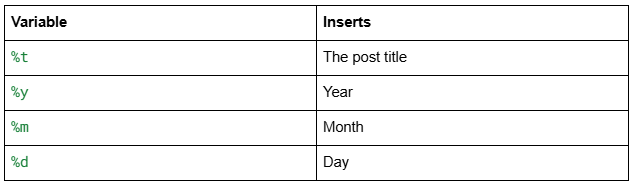
The default on 7.1 is %t alone, which is the right choice for nearly every site.
Do dates in blog URLs hurt SEO? Not directly. What they do is signal age in a place you cannot edit later, and permanently prevent you from updating and republishing a post without either keeping a misleading date in the URL or breaking the URL. For an evergreen blog — which is what most business blogs are — dates in the slug are a liability with no offsetting benefit. For a genuine news archive where the date is part of the identity of the item, they are defensible.
Where every slug field lives
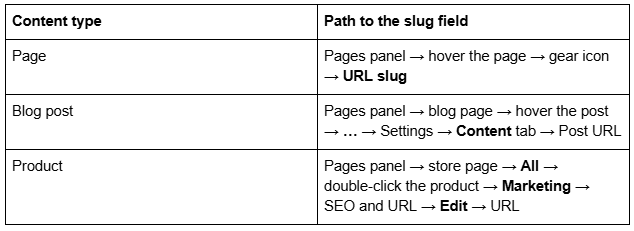
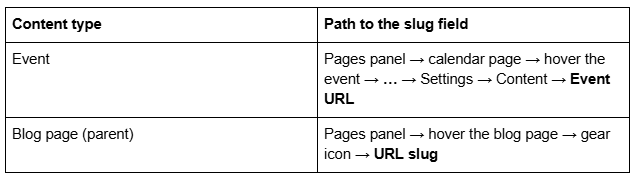
Note that products sit under /store-page-slug/p/product-slug on 7.1 — the /p/ segment is part of the path and matters when writing collection redirects.
Slug policy is a governance question
Because there is no undo, the useful output of this post is not a formatting convention. It is a rule about who is allowed to touch the field.
Write these three lines into whoever edits your site:
Slugs are set before first publish and not changed afterwards. If the title changes, the slug stays.
Any slug change requires a URL Mapping added in the same session. Not later, not on the list.
The blog page slug is fixed at launch and changed by nobody.
And run this audit quarterly, which takes about ten minutes:
Open yourdomain.com/sitemap.xml. It is auto-generated, cannot be edited, and lists every URL Squarespace is submitting to Google. Read it for slugs that are ugly, duplicated or auto-generated — on one live 7.1 site I audited, the sitemap contained /blog/h6nsw7gqqbf6rlgfcalk7vwy6tncho, the random slug Squarespace assigns to a post created without a title.
Open Search Console → Indexing → Pages → Not found (404). Sort by date. A cluster of new 404s means somebody renamed something.
Compare the URL Mappings list against those 404s and fill the gaps.
Ugly slugs on old, low-traffic pages are usually not worth fixing. The cost of a slug change is fixed — a redirect, a link sweep, some lost equity — and the benefit is a very small ranking signal. Change a slug when the URL is actively misleading, not when it is merely imperfect.
When this is worth handing over
Slug hygiene on a small site is a checklist, not a project. If you have twelve pages and a young blog, the rules above are the entire job and you do not need help with them.
Where it becomes worth outsourcing is a migration or a rebrand — a site changing its blog page slug, restructuring its service pages, or moving from 7.0 to 7.1 — because that is where hundreds of URLs change at once and a missed redirect is invisible until traffic drops a month later. Mapping old to new and testing every rule before launch is what our Squarespace SEO service does on migration work. For a site you are still building, get the slugs right before you publish and you will never need us for this.
FAQ
-
No, on any plan or version. Squarespace states that traffic will not automatically redirect and a 404 error will appear. You must add a 301 rule yourself in Settings → Developer Tools → URL Mappings, and update any internal links, marketing materials and QR codes pointing at the old URL.
-
There is no threshold that affects rankings. Three to five words and under about 60 characters is a workable rule, chosen for readability and click-through rather than for any ranking effect. A slug you cannot read at a glance has stopped doing its only job.
-
Squarespace states that slugs cannot include special characters other than dashes. Underscores are not supported, spaces are not permitted, and uppercase letters are converted to lowercase automatically on save. Requested URLs are case-sensitive, so /About returns 404 while /about returns 200.
-
Every post underneath it changes URL at once, because blog post URLs always begin with the blog page slug. A 200-post blog produces 200 dead URLs in one save. Redirect the whole collection with a single rule using the [name] variable: /blog/[name] -> /journal/[name] 301.
-
It should be derived from the title, not identical to it. Squarespace generates the slug from the title on creation, which means punctuation and filler words carry over. Trim it to the three to five words that carry meaning, then leave it alone permanently.
-
Not directly, but they permanently signal age in a field you cannot edit cheaply, and they prevent you updating and republishing a post without either a misleading URL or a broken one. The 7.1 default post URL format is %t — the title alone — and that is the right choice for most business blogs.

Author Bio
I'm Walid Hasan, a Certified Squarespace Expert and Squarespace Circle Platinum Partner with over 12 years of hands-on experience designing and optimizing high-performing websites. Over the years, I've had the privilege of building more than 2,000 Squarespace websites for clients around the world, always focusing on clean design, strong user experience, and conversion-driven results.