Squarespace Page Title vs SEO Title: What Each of the Three Fields Actually Controls
The short answer: Squarespace 7.1 pages have three title fields, not two. Navigation Title sets the link text in your menu. Page Title is the underlying name of the page and the fallback for search results. SEO Title is what search engines and browser tabs use when it is filled in. A fourth layer — the site-wide title format in SEO Settings — assembles the final <title> from those fields plus your site title. All three page fields cap at 100 characters, and Squarespace's own documentation is clear that they "don't need to match exactly."
The three page fields, side by side
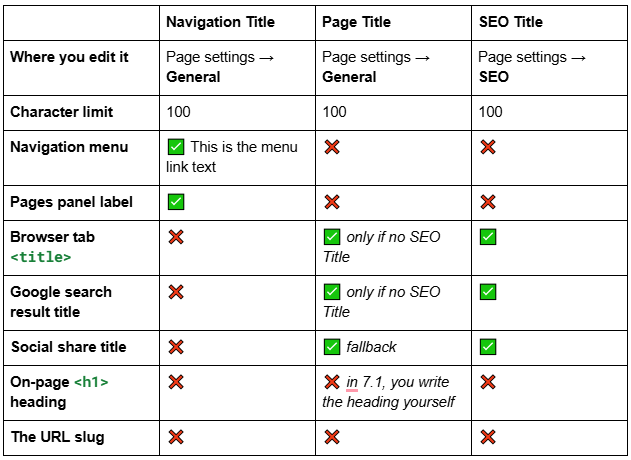
The last two rows are where most confusion lives. In Squarespace 7.1 the page title does not render as an on-page heading the way it did in some 7.0 templates — the <h1> is whatever text block you marked as Heading 1. And no title field controls the URL: the slug is its own field in the General tab, and changing it creates no automatic redirect, ever.
Navigation Title: the menu link, and nothing else
The Navigation Title in Squarespace 7.1 "creates the link name in your site's navigation menu", and it is also what labels the page in the Pages panel when you are logged in.
That is its entire job. It has no effect on search results, browser tabs or social shares.
Which is precisely why it is useful. Navigation wants short — "Services", "About", "Contact". Search wants specific — "Squarespace SEO Services for Service Businesses". If you only had one field you would have to compromise. You have three, so do not.
The practical rule: Navigation Title should be one or two words that fit a horizontal menu without wrapping on mobile. Everything descriptive belongs in the other two fields.
Page Title: the fallback, and the field people forget
The Page Title in Squarespace 7.1 is the page's underlying name. Squarespace's documentation states the behaviour plainly: "If there's no SEO title, the page title appears in browser tabs and search results."
So Page Title is a fallback — but it is a fallback that fires constantly, because most sites never fill in SEO Titles. On a typical inherited Squarespace site, the majority of pages have an empty SEO Title field and are ranking on their Page Title alone.
There is one place it is not just a fallback: on 7.1 store pages, the Page Title can display above the category navigation when that option is enabled.
The practical rule: treat Page Title as a serviceable default. If you never touch the SEO Title field, make the Page Title the thing you would want in a search result.
SEO Title: what search engines and browser tabs use
The SEO Title, set in the SEO tab of page settings, "displays in browser tabs, search engine results, and social shares". When it is present it takes precedence over the Page Title everywhere those three appear.
It is also the only one of the three fields that never shows to a visitor while they are on your site — which is what makes it free. You can write it purely for search intent without worrying about how it reads in a menu or above a store grid.
Length. The field allows 100 characters. Google truncates a title in search results at roughly 60 characters depending on pixel width. Write the useful part first and treat anything past 60 as insurance rather than content.
Google rewrites titles less often than descriptions, but it does rewrite them — usually when the title is stuffed with keywords, boilerplate across every page, or noticeably mismatched with the page's <h1>. The most reliable way to keep your title is to make it a fair description of the page.
Collection items have two fields, not three
Blog posts, products and events are collection items, and they work differently.
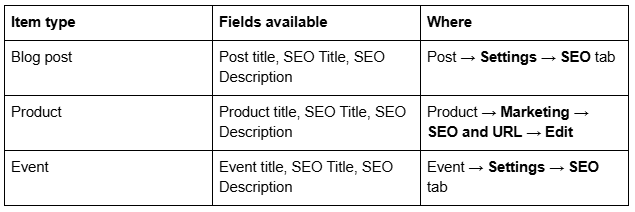
There is no Navigation Title on a collection item, because items do not appear in the navigation. The item title does double duty: it is the on-page heading, the link text in blog listings and summary blocks, and the fallback for the <title> element.
One Squarespace consequence worth naming. Blog featured images have no alt-text field — Squarespace uses the post title as the alt text. So on a blog post the title is simultaneously the heading, the search fallback, the listing link text, and the alt text of the featured image. That is four jobs for one string, and it argues for writing post titles descriptively rather than cleverly.
The fourth layer: the site-wide title format
None of the fields above becomes the <title> element on their own. Squarespace composes it from a template you set in SEO/AI Visibility → SEO Settings → Search Appearance, which has three tabs.
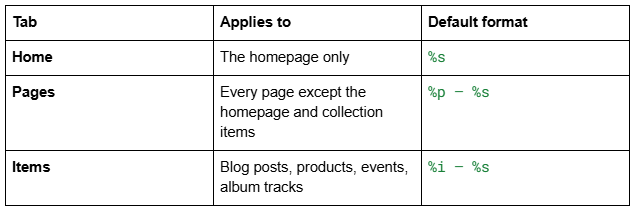
The variables:
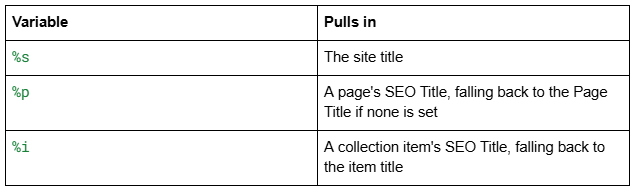
You can mix variables with plain text. %p — %s | Bristol on the Pages tab appends a location to every page title on the site.
Failure mode 1 — Removing %p or %i
Delete %p from the Pages tab and no page title appears in browser tabs at all — including on pages where you did write an SEO Title. Delete %i and the same happens to every blog post, product and event.
This one runs undetected for months because search results often still populate something from the underlying title, so the only visible symptom is a row of browser tabs showing nothing but the site name. Keep both variables in place.
Failure mode 2 — The site name appearing twice
This is common and it costs you the most valuable characters on the page.
It happens when someone writes the site name into an individual SEO Title and the title format also appends %s. On a live Squarespace 7.1 site I inspected in August 2026, a blog tag archive was rendering:
SEO — Squarespace Blog | Web Design, SEO & Business Growth Tips | Squareko | Squareko
The site name is there twice, and Google will truncate somewhere around "Web Design" — so the last 40 characters, including the second brand mention, do nothing at all.
The fix, and the decision behind it. Pick one place for the site name. Either keep — %s in the title format and never type the brand into an individual SEO Title, or strip %s out of the format and handle branding per page. The first is far easier to keep consistent. On a site with strong brand recognition it can be worth removing the suffix entirely to reclaim roughly 20 characters on every page.
Failure mode 3 — The homepage %p quirk
When a page is set as your homepage, its SEO Title field disappears from page settings.
%p still works in the Home format, but what it pulls depends on history: if that page had an SEO Title before it became the homepage, that old title is what appears. If it never had one, the Page Title appears. There is no way to see which from the panel — you have to view source on the live homepage and read the <title>.
If the homepage title is wrong and you cannot edit it, the workaround is to write the desired text directly into the Home tab's format field instead of relying on %p.
When should page title and SEO title differ?
Situation
Recommendation
Menu needs "About", search needs "About Our Bristol Studio"
Differ. Short Navigation Title, descriptive Page Title, keyword-led SEO Title
Page title already reads well as a search result
Match. Leave SEO Title blank and let %p fall through
Page title is a brand phrase nobody searches — "Our Ethos"
Differ. Write an SEO Title around the actual query
Product title is the product name
Match, unless the name alone is ambiguous
Blog post
Usually match, since the post title is already written for readers and doubles as featured-image alt text
The rule underneath all of that: write each field for the surface it appears on. Navigation Title for a menu, Page Title for the site, SEO Title for a search result. When the same string genuinely works for all three, leaving fields blank is not laziness — it is fewer things to keep in sync.
One thing that does not need to match: the <h1>. Your SEO Title and your on-page heading can differ and often should, because they are read in different contexts. A large mismatch does raise the odds of Google rewriting your title, so keep them about the same subject — but chasing an exact match costs you a natural-sounding heading for no gain.
When this is worth handing over
Title fields are a governance problem rather than a technical one. Setting them correctly on a five-page site takes an hour and needs no help. The reason sites get this wrong is that nobody wrote down which field does what, so three people fill in three different ones over two years.
Where it becomes worth outsourcing is a site with a few hundred collection items where the title format has been changed at some point and nobody knows which items carry a hand-written SEO Title and which are falling through to %i. Auditing that is a bulk export-and-compare job, and it is part of what our Squarespace SEO service does on a first pass. For a site you can read in one sitting, the table at the top of this post is the whole answer.
FAQ
-
The Page Title is the page's underlying name, edited in the General tab of page settings. The SEO Title, edited in the SEO tab, is what appears in browser tabs, search results and social shares. If the SEO Title is empty, Squarespace falls back to the Page Title.
-
It sets the link text in your site's navigation menu and labels the page in the Pages panel. It has no effect on search results, browser tabs or social shares, which makes it the right field for a short menu label like "About" while the other two fields carry the descriptive version.
-
No. Collection items — blog posts, products and events — have only an item title and an SEO Title, because they never appear in the navigation. The item title doubles as the on-page heading, the listing link text and, for blog posts, the featured image's alt text.
-
Because the site name is typed into an individual SEO Title and the site-wide title format also appends %s. Pick one. Keeping — %s in the format and never typing the brand into an individual title is the easier convention to maintain.
-
%p pulls in a page's SEO Title, falling back to the Page Title if no SEO Title is set. %i does the same for collection items and %s inserts the site title. Removing %p or %i from the format means no page title appears in browser tabs at all.
-
No. They serve different surfaces and can reasonably differ. A large mismatch does raise the odds of Google rewriting your title in search results, so keep them on the same subject — but an exact match is not required and usually makes the heading read worse.

Author Bio
I'm Walid Hasan, a Certified Squarespace Expert and Squarespace Circle Platinum Partner with over 12 years of hands-on experience designing and optimizing high-performing websites. Over the years, I've had the privilege of building more than 2,000 Squarespace websites for clients around the world, always focusing on clean design, strong user experience, and conversion-driven results.