
Squarespace SEO for SaaS Companies: Rank Your Product Website in 2026
Why SaaS SEO Is Different
SaaS SEO operates across a wider funnel than most other business types. Your potential users might be searching at any stage: learning about a problem they have (awareness), evaluating solutions (consideration), or looking specifically for your product or competitors (decision). Each stage requires different content, different keyword targeting, and different page design.
Add to this the dynamics of a market that changes quickly. New competitors emerge. Feature sets evolve. User needs shift. The SaaS company that builds robust organic traffic through SEO is more resilient than one dependent on paid acquisition — because organic traffic compounds over time, while paid traffic stops the moment you stop spending.
On Squarespace, you have the tools to build a serious SaaS SEO foundation. This guide covers how to use them effectively in 2026 — including the emerging channel of AI search optimization that's becoming increasingly important for SaaS product discovery.
Key Takeaways Squarespace SEO for SaaS Companies: Rank Your Product Website in 2026
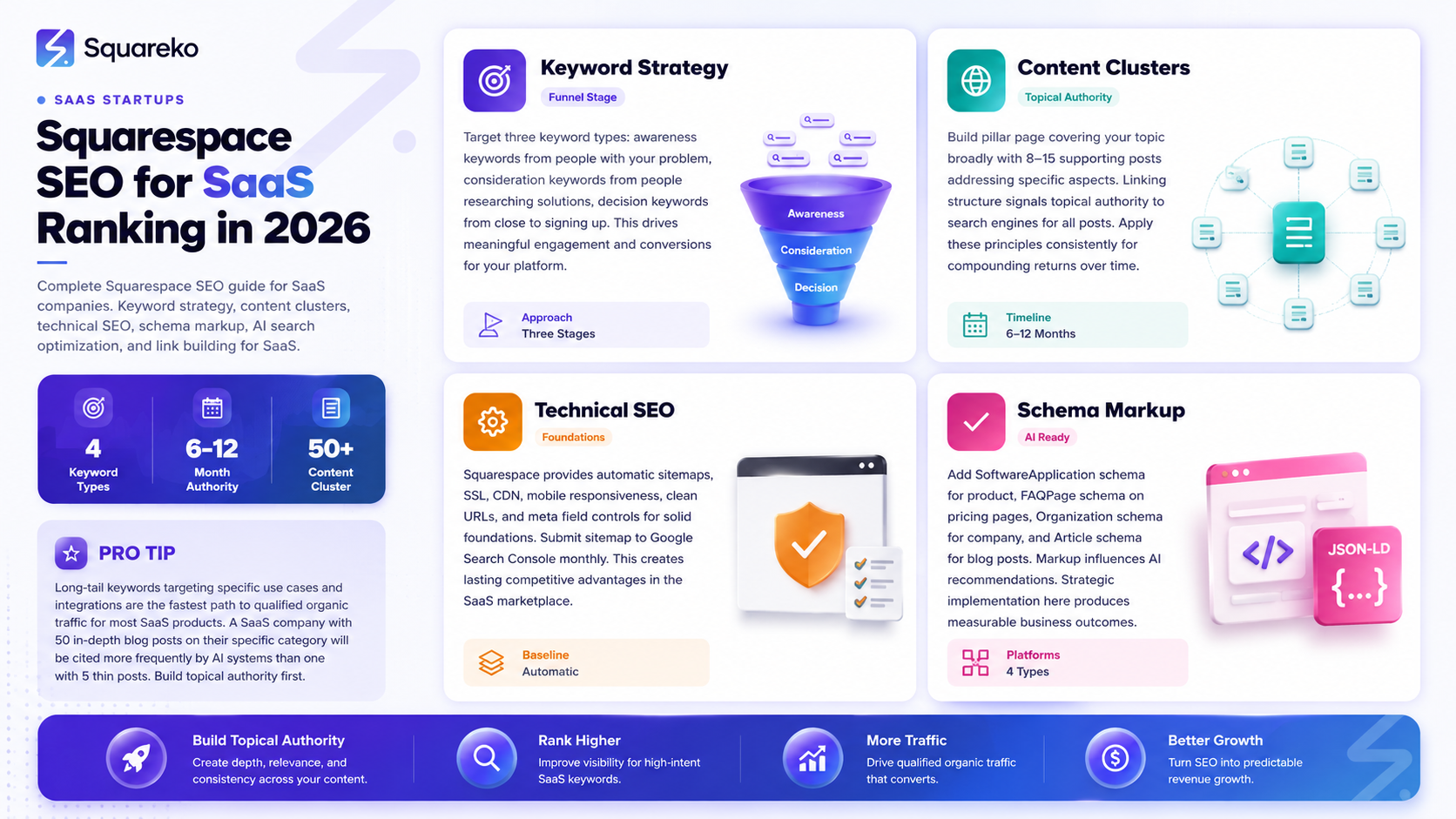
SEO for SaaS companies on Squarespace requires a specific approach — targeting buyers at every stage from awareness to decision
Long-tail keywords targeting specific use cases and integrations are the fastest path to qualified organic traffic for most SaaS products
A well-structured content cluster (pillar page + supporting posts) builds topical authority faster than isolated posts
In 2026, AI search optimization (GEO/AEO) is as important as traditional Google SEO for SaaS product discovery
Squarespace provides solid SEO foundations; the differentiator is content quality, keyword strategy, and consistent execution
Keyword Strategy for SaaS Companies
SaaS keyword strategy should map to your buyer journey: awareness keywords attract people who have the problem your product solves, consideration keywords attract people evaluating solutions, and decision keywords attract people ready to sign up.
Awareness Keywords
These are informational searches from people experiencing the problem your product addresses. They don't know your product exists yet.
Examples for a project management SaaS:
how to manage multiple client projects
why do team projects miss deadlines
remote team coordination best practices
Content for awareness keywords: blog posts, guides, educational content. Long form. Establish authority. Include your product as the natural solution at the end.
Consideration Keywords
These are people actively researching solutions — they know a tool exists for their problem and are comparing options.
Examples:
best project management software for agencies
squarespace vs webflow for project tracking
[competitor name] alternatives
project management tools for small teams
Content for consideration keywords: comparison posts, best X listicles, feature deep dives. These pages often convert at higher rates because the visitor is already in buying mode.
Decision Keywords
These target people who have heard of your product or your specific category and are close to signing up.
Examples:
[your product name] pricing
[your product name] reviews
[your product name] vs [competitor]
[your product name] for [specific use case]
These pages often have the highest commercial intent. Don't neglect them — your pricing page, reviews page, and head-to-head comparison pages serve these queries.
Integration Keywords
An often-overlooked SaaS SEO goldmine: integration-specific keywords.
[your product] + Slack integration [your product] + HubSpot integration [your product] Zapier
If your product integrates with popular platforms, dedicated integration pages can rank for these specific queries — and they attract users who are highly qualified (they already use the integration platform and are looking for compatible tools).
On-Page SEO for SaaS Core Pages
Homepage
Optimize your homepage for your primary brand keyword (typically your product category + core value proposition). Keep the meta title under 60 characters: Project Management Software for Agencies | [Product Name].
The homepage typically doesn't rank for high-volume informational keywords — it's better suited to brand and category queries. Focus homepage SEO on: clear H1, strong meta description with a hook, and fast page load.
Pricing Page
Your pricing page is a high-intent landing page. Optimize it for [product name] pricing and [product category] pricing. Include your pricing structure in the content clearly enough that Google can display rich results (and AI search engines can cite accurate pricing information).
Feature Pages
Build dedicated feature pages optimized for feature-specific queries:
Automated reporting software for agencies (not just Reporting feature)
Client portal software (not just Client portal)
Each feature page targets a specific keyword, serves a specific user question, and links back to the pricing and signup pages.
Integration Pages
Build dedicated pages for each major integration, optimized for [your product] [integration name] integration. Structure each page: what the integration does, how to set it up, what specific problems it solves. Add a CTA to start a trial.
Building a SaaS Content Cluster
A content cluster is a group of related blog posts that together cover a topic more comprehensively than any single post could — and that signal topical authority to search engines through their internal linking structure.
For a SaaS company, a content cluster works like this:
Pillar page: The Complete Guide to [Problem Your Product Solves] — a comprehensive 3,000+ word guide covering the topic broadly.
Supporting posts: 8-15 blog posts that each go deep on a specific aspect of the pillar topic:
How to [specific task related to your topic]
Best tools for [subtopic]
[Your product] vs [competitor] for [use case]
[Common mistake] and how to avoid it
Linking structure: Every supporting post links back to the pillar. The pillar links to each supporting post. External links from the cluster reinforce the topical authority signal.
Result: Over 6-12 months, this cluster of linked, high-quality content builds topical authority in your niche — causing Google and AI search engines to recognize your site as an authoritative source on this topic, which elevates ranking for all posts in the cluster.
In Squarespace, build your blog posts using the blog CMS. Category and tag organization helps maintain the cluster structure. Use the page editor's link tool to add internal links between related posts.
Technical SEO for SaaS on Squarespace
Sitemap and Crawlability
Submit your Squarespace sitemap (yourdomain.com/sitemap.xml) to Google Search Console immediately after launch. Verify that all important pages are included. Check Search Console monthly for crawl errors.
Page Speed for SaaS
Page speed is a ranking signal and a conversion factor. SaaS websites that load slowly lose visitors who are evaluating multiple options simultaneously. Optimize:
Images: compress before upload. Use WebP format where possible. Squarespace compresses images on serving, but starting with smaller files helps significantly.
Third-party scripts: Intercom, HubSpot, Segment, analytics scripts — each adds load time. Load non-critical scripts asynchronously where possible using Squarespace's code injection header/footer distinction.
Video: If you use video backgrounds, disable them on mobile (faster load) and optimize video file size.
URL Structure
Clean, keyword-rich URLs improve both user experience and SEO.
Good: yourdomain.com/blog/saas-pricing-page-best-practices Poor: yourdomain.com/blog/post-127
In Squarespace, edit the URL slug for every blog post and page before publishing. By default, Squarespace generates URLs from the page title — review and refine them to ensure they're clean and keyword-relevant.
Canonical Tags
Squarespace automatically adds canonical tags to prevent duplicate content issues. If you're syndicating content to Medium, LinkedIn, or other platforms, add a canonical reference pointing back to your Squarespace original.
Schema Markup for SaaS Websites
Schema markup is structured data that tells search engines and AI platforms exactly what your content contains. For SaaS websites, three schema types are particularly valuable:
SoftwareApplication Schema
SoftwareApplication schema tells search engines that your product is software and provides structured information about it: name, description, category, operating system, price range, and rating. This can trigger rich results in Google search — including star ratings and pricing information displayed directly in the SERP.
{
  "@context": "https://schema.org",
  "@type": "SoftwareApplication",
  "name": "[Your Product Name]",
  "applicationCategory": "BusinessApplication",
  "description": "[Your product's core value proposition]",
  "offers": {
    "@type": "Offer",
    "price": "29",
    "priceCurrency": "USD",
    "priceSpecification": {
      "@type": "UnitPriceSpecification",
      "unitText": "MONTH"
    }
  },
  "aggregateRating": {
    "@type": "AggregateRating",
    "ratingValue": "4.8",
    "reviewCount": "340"
  }
}
Add this via Squarespace Settings → Advanced → Code Injection.
FAQPage Schema
Add FAQPage schema to your pricing page, FAQ page, and any feature page with a FAQ section. This makes your FAQ content eligible for Google's featured snippet boxes and AI search answers.
Review Schema
If you have customer testimonials on your site, ReviewSchema can mark them up for rich results. Note: only use review schema for genuine reviews — search engines penalize sites for fake or misleading review markup.
AI Search Optimization for SaaS Products
In 2026, AI search platforms (ChatGPT, Perplexity, Gemini) are increasingly where SaaS buyers discover tools. When someone asks what's the best project management tool for agencies, the AI's answer is shaped by the web content it has access to. Here's how to be in that answer.
Be Explicitly Structured
AI search engines pull content that is clearly organized with direct answers. Write feature descriptions, FAQ answers, and page introductions as direct Q&A format where possible: What does [product] do? [Product] is [direct answer].
Define Your Category Clearly
AI systems need clear categorization to recommend your product appropriately. Define your product category explicitly and consistently across your site: We're a [category] tool for [specific user type]. Don't be coy about what you are — clarity helps AI systems understand when to recommend you.
Entity Recognition
Make sure your product name, company name, and key features appear consistently and clearly enough that AI systems can recognize them as distinct entities. AI search engines build knowledge about products from aggregated web content — consistent entity signals across your site, your integrations pages, and third-party mentions help AI systems include you accurately in their responses.
Third-Party Reviews and Mentions
AI search engines increasingly cite G2, Capterra, and Trustpilot reviews alongside company-owned content. A strong presence on these review platforms — with genuine, detailed reviews — reinforces your authority signal to AI systems.
Link Building for SaaS Companies
Backlinks remain an important ranking signal. For SaaS companies, the most efficient link-building strategies:
Integration partner pages: If you integrate with Shopify, HubSpot, Zapier, or similar platforms, get listed on their integration directories. These are high-authority domains with relevant anchor text.
Tool directories: SaaS-focused directories (G2, Capterra, GetApp, Product Hunt) provide relevant backlinks alongside review exposure.
Guest posts on industry publications: Write genuinely useful articles for publications your target audience reads. Link back to specific resources or tools on your site — not just your homepage.
Data-driven content: Original research or data reports attract backlinks naturally. A State of [your industry] 2026 report with original survey data is frequently cited by other publications.
Partner and affiliate programs: If you have an affiliate or partner program, affiliates build links to your product as part of their promotion — often to landing pages and product-specific content.
Measuring and Iterating Your SaaS SEO
Key Metrics to Track
Organic traffic growth: Track month-over-month organic traffic in Google Analytics 4. Expect gradual growth for the first 3-6 months, accelerating after 6-12 months of consistent publishing.
Keyword rankings: Track your target keywords in a tool like Ahrefs, Semrush, or Google Search Console's Performance report. Focus on position changes for your priority keywords.
Organic trial signups: Track how many trial signups originate from organic search in Google Analytics 4. This is your ultimate SEO ROI metric.
Pricing page organic traffic: If visitors from organic search are landing on your pricing page, it signals high commercial intent. Track this separately.
Content performance: Which blog posts drive the most traffic, the most time-on-page, and the most trial signups? Double down on the content types and topics that perform.
Build Your SaaS SEO Strategy With Squareko
Squareko helps SaaS companies on Squarespace build organic traffic strategies that work — from keyword research and content architecture to schema markup and technical setup.
FAQs
-
Yes. Squarespace 7.1 provides solid SEO foundations: automatic sitemaps, SSL, mobile responsiveness, clean URLs, and meta field controls. It supports schema markup via code injection, which is essential for SaaS-specific schema types (SoftwareApplication, FAQPage). For most SaaS marketing sites, Squarespace's SEO capabilities are more than sufficient when paired with a strong content strategy.
-
Expect 3-6 months to see meaningful ranking improvements, and 6-12 months to see significant organic traffic growth. SEO compounds over time — a SaaS company that publishes consistently for 12 months will see dramatically different results than one that published for 3 months. Start early and maintain consistency.
-
Start with long-tail decision and consideration keywords — they're less competitive and attract higher-intent visitors. "[Your product] alternatives," "[your category] for [specific use case]," and "[competitor] vs [your product]" are high-value starting points. Informational awareness keywords can be added once you have the foundational pages ranking.
-
Absolutely. For most SaaS companies, content marketing is the highest-ROI long-term SEO channel. Blog posts that answer questions your ideal users are searching capture qualified traffic before they're aware of your product. A well-structured content cluster covering your core topic comprehensively is more effective than a long list of unrelated posts.
-
The most valuable schema types for SaaS websites: SoftwareApplication (for your product), FAQPage (for pricing page, feature pages, and FAQ pages), Organization (for your homepage), Review/AggregateRating (for customer testimonials if applicable), and Article (for blog posts). All implemented via JSON-LD code injection in Squarespace.
-
Structure your content with clear Q&A format, define your product category explicitly, write direct answer sentences at the start of each content section, add FAQPage schema markup, build topical depth through a content cluster, and maintain a strong presence on review platforms (G2, Capterra) that AI search engines frequently cite.
-
Very important — both as a Google ranking signal and as a user experience factor. SaaS audiences typically research multiple tools simultaneously and make fast judgments. A site that loads in 3+ seconds loses visitors to faster competitors. Optimize images, minimize third-party scripts, and use Squarespace's CDN effectively. Aim for a Google PageSpeed Insights score of 80+ on mobile.
-
A content cluster is a group of related blog posts — typically one comprehensive pillar post and 8-15 supporting posts — that together cover a topic in depth. Each supporting post links back to the pillar, and the pillar links to each supporting post. This internal linking structure signals to search engines that your site covers this topic comprehensively, building topical authority that elevates ranking for all posts in the cluster over time.
From custom website design to SEO strategy, we help businesses launch a site that looks professional and performs better.

Author Bio
I'm Walid Hasan, a Certified Squarespace Expert and Squarespace Circle Platinum Partner with over 12 years of hands-on experience designing and optimizing high-performing websites. Over the years, I've had the privilege of building more than 2,000 Squarespace websites for clients around the world, always focusing on clean design, strong user experience, and conversion-driven results.
