
Squarespace SEO for Photographers: Rank on Google & AI Search
Introduction
You've invested in your camera gear, spent hours perfecting your craft, and built a portfolio that makes you proud. But here's the thing: if potential clients can't find your website, none of that matters.
This is where Squarespace SEO for photographers comes in. Whether you're a wedding photographer in Austin, a commercial photographer in New York, or a fine art photographer with a global audience, search engine optimization is the bridge between your work and the clients who need it. In 2026, that bridge now has two lanes: traditional Google search and AI-powered search engines like ChatGPT, Claude, and Google's AI Overviews.
The good news? Squarespace gives you all the tools you need to rank. The better news? Most photographers aren't using them properly, which means there's a real opportunity for you to stand out. This guide walks you through everything you need to know about ranking on Google and getting discovered on AI search—all while using Squarespace as your platform.
Key Takeaways Squarespace SEO for Photographers: Rank on Google & AI Search
Squarespace SEO requires intentional strategy: it's not automatic, but the platform gives you enough control to rank competitively.
Image optimization is your secret weapon—photographers have a huge advantage if they properly optimize file names, alt text, and compression.
Local SEO is critical for service-based photographers; claim your Google Business Profile and optimize for geo-targeted keywords.
AI search optimization (AEO) is the new frontier: getting your content indexed and cited by ChatGPT, Claude, and Google AI Overviews requires different tactics than traditional SEO.
Squarespace-specific settings matter: from custom URLs to schema markup, small configurations compound into ranking advantages.
1. Why SEO Is Non-Negotiable for Photography Websites
Let's start with reality: 93% of online experiences begin with a search engine. Your potential clients aren't browsing blindly for photographers—they're searching. They're typing wedding photographer near me or headshot photographer in [city] or photography portfolio examples into Google.
If your Squarespace photography website isn't optimized for those searches, you're invisible.
The difference between a photographer who ranks and one who doesn't isn't always technical expertise or years of experience. It's often just strategic thinking about how people search for photographers and how search engines reward clarity, relevance, and authority.
Squarespace is a solid platform for photographers. It handles images well, loads fast, and looks beautiful out of the box. But good looking doesn't equal findable. You need strategy on top of aesthetics. Consider this: A wedding photographer in Denver could capture the same quality of work as a competitor, but if one ranks on page one of Google for Denver wedding photographer and the other is on page three, the ranking photographer will book significantly more inquiries. That's not luck—that's SEO.
2. Keyword Research for Photographers: How to Find the Right Terms
Before you optimize anything, you need to know what people are actually searching for. This is keyword research, and it's the foundation of every successful SEO strategy.
Understanding Search Intent for Photography
Photography searches fall into several categories:
Service searches (wedding photographer in [city], family portrait photographer near me) indicate high purchase intent. These are your moneymakers.
Informational searches (how to pose for portraits, photography tips for beginners) are educational but can build authority and drive traffic.
Portfolio/inspiration searches (best wedding photography, commercial photography examples) build brand recognition and can attract clients impressed by your work.
Your SEO strategy should prioritize service searches first, then build outward.
How to Find Photographer-Specific Keywords
Google Search Console (free): Shows you real searches that already bring traffic to your site, plus keywords you could rank for with a little optimization.
Google Keyword Planner (free): Reveals search volume and competition for photography keywords. Use your core offering—wedding photography, portrait photography, commercial photography—and expand with location modifiers.
Ahrefs or SEMrush (paid, but powerful): These reveal what your competitors rank for, the actual difficulty of ranking, and long-tail opportunities.
Answer the Public (free): Shows the actual questions people ask about photography services. This is gold for creating content that answers real client questions.
Building Your Keyword List
Here's a practical approach:
Start with your core offering. What do you photograph? Write down the main category: wedding photography, pet photography, architectural photography, etc.
Add location modifiers. If you serve specific areas, add them: [city] wedding photographer, [city] portrait photographer.
Expand with intent modifiers. Add,near me, affordable, best, professional, candid—whatever matches your positioning.
Identify long-tail keywords. These have lower search volume but higher intent. Outdoor wedding photography in [city] has less competition than wedding photographer.
For example, a portrait photographer in Portland might target:
Portrait photographer Portland
Professional headshots Portland
Family portrait photographer Portland
Affordable headshot photographer near Portland
Candid family photography Portland
Portrait photography session Portland
Aim for a mix: some high-volume terms (harder to rank for, but bigger payoff) and lots of long-tail terms (easier to rank for quickly).
3. On-Page SEO: Page Titles, Headers, and Meta Descriptions
On-page SEO is what you control directly on your Squarespace pages. It tells search engines what your page is about.
Page Titles (Your Most Important Element)
Your page title appears as the clickable headline in search results. It's read by search engines and humans, so it matters twice.
Best practices:
Include your primary keyword naturally (but don't stuff keywords)
Keep it under 60 characters so it displays fully in search results
Put your unique value or location at the beginning if possible
Make it compelling—your title influences click-through rates
Examples for photographers:
❌ Portfolio (vague, no keywords)
✅ Wedding Photography Portfolio | Candid, Romantic Stories
❌ Professional Photography in Austin Texas and Surrounding Areas
✅ Austin Wedding Photographer | Romantic, Candid Storytelling
In Squarespace, edit your page title in Settings > SEO (individual page level).
Meta Descriptions (Your Sales Pitch)
The meta description appears below your title in search results. It doesn't directly impact rankings, but it affects click-through rates—which does impact rankings indirectly.
Best practices:
150–160 characters (Google truncates beyond ~160)
Include your keyword naturally
Write it as a benefit statement, not a description
Include a compelling reason to click
Examples:
❌ This is a page about wedding photography services.
✅ Award-winning Austin wedding photographer capturing genuine moments. Romantic, documentary-style storytelling. Book your free consultation today.
Header Tags (H1, H2, H3)
Your H1 tag should match (or closely match) your page title. It's the main heading on the page, and every page should have exactly one H1.
Use H2 and H3 tags to structure content logically. Search engines use these to understand your page's hierarchy.
On a Wedding Photography service page:
H1: Austin Wedding Photography: Romantic, Candid Stories H2: What Makes Our Wedding Photography Different H3: Candid, Unposed Moments H3: Artistic Post-Processing
Keyword Placement
Include your target keyword naturally in:
Page title (once)
H1 heading (once)
Meta description
First 100 words of your page
Subheadings where relevant
Body text (naturally, not forced)
The key word is naturally. Search engines penalize keyword stuffing. If it doesn't read naturally to a human, rewrite it.
4. Image SEO: The Photographer's Secret Weapon
Here's where you have a massive advantage over other industries: you work with images. Google now ranks images heavily, and optimizing your images can drive traffic you don't expect.
Image File Names Matter
The name of your image file is the first signal to search engines about what the image contains.
❌ DSC_2847.jpg (tells search engines nothing)
✅ bride-groom-first-kiss-ceremony-austin-wedding.jpg (immediately clear what the image shows and where)
For a photographer's portfolio, use descriptive file names that include:
What's happening in the image
Location (if relevant to your keywords)
Photography style if applicable
Before uploading an image to Squarespace, rename it. It takes 10 seconds and can drive significant image search traffic.
Alt Text: Accessibility + SEO
Alt text serves two purposes: it describes images to people using screen readers (accessibility), and it tells search engines what images contain (SEO).
Best practices:
Write in plain language
Describe the image and its context
Include your keyword if it fits naturally
Keep it under 125 characters
Don't start with image of or picture of
Example:
❌ Image of couple
✅ Bride and groom share first kiss during outdoor wedding ceremony in Austin, Texas
In Squarespace, add alt text when you upload images (there's an Alt text field) or edit existing images through the page editor.
Image Compression: Speed Matters
Large image files slow down your website. Slow websites rank worse. Slow websites also drive away visitors (poor user experience = worse rankings).
Photographers often upload massive, uncompressed files directly from their camera. This is a ranking mistake.
Image optimization strategy:
Edit images in Lightroom or Photoshop
Export at web-friendly dimensions (not full resolution)
Compress with Tiny PNG, Image Optim, or Squoosh (free)
Aim for < 200 KB per image on portfolio pages
Aim for < 100 KB for images on blog posts or smaller galleries
Squarespace handles some compression automatically, but don't rely on it. Pre-optimize before uploading.
Image Sitemap
Squarespace automatically generates an image sitemap, which helps Google discover and index your images. You don't need to do anything here—just make sure your images are properly named and alt-text is good.
5. Local SEO for Photographers: Rank in Your City
If you're a service-based photographer (weddings, portraits, headshots, events), local SEO is your money shot.
Google Business Profile (Non-Negotiable)
Your Google Business Profile is the single most important local SEO asset. It's free, and it appears in Google Maps and the local pack (those 3 map results at the top of search results).
Setup checklist:
Claim your business on Google Business Profile search.google.com/business
Use your real, consistent business name
Add your primary service location
Upload 10–20 high-quality photos (not just portfolio—show your business, team, studio space)
Add your phone number and website
Write a compelling business description (120 characters max)
Verify your business (Google will send a postcard or text)
Tips for photographers:
Use keywords in your business description: Award-winning Austin wedding photographer
Request reviews from recent clients (more reviews = better local ranking)
Respond to all reviews (positive and negative) professionally
Post regularly in the Posts section (Google rewards active profiles)
Update photos seasonally
Local Landing Pages
If you serve multiple cities, create dedicated landing pages for each. Don't just mention the city in your main services page—create targeted pages.
Example structure:
/wedding-photography-austin
/wedding-photography-dallas
/wedding-photography-houston
Each page should:
Include the city name in the H1
Mention local landmarks, neighborhoods, or venues
Reference local competitors positively (shows you know the area)
Include your Google Business Profile embed
Be at least 500–800 words of unique content
Local Keywords
Target location + service keywords:
[City] [photography type]
[Photography type] photographer near [city]
Best [photography type] in [city]
[Neighborhood] photographer
Reviews and Ratings
Reviews are a ranking factor for local SEO. More reviews, higher ratings, and recent reviews all boost local ranking.
Ask clients to leave reviews on:
Google Business Profile (most important)
Yelp
The Knot (if you do weddings)
Waze (yes, really—maps matter)
Make it easy: send a follow-up email with a direct link to your Google review page.
6. How to Get Your Photography Website Found on ChatGPT, Claude, and Google AI Overviews in 2026
This is the new frontier of SEO: AI search optimization (AEO). In 2026, ChatGPT, Claude, Google AI Overviews, and other AI search tools are changing how people find information. They don't always work like traditional Google search.
How AI Search Works (And Why It's Different)
Traditional Google search: User searches → Google returns ranked links → User clicks and visits websites.
AI search: User searches → AI reads from indexed websites → AI synthesizes answer and cites sources → User reads answer (may or may not click through).
This is the crucial difference. You're competing not just for rankings, but for being cited as a source in AI responses. That citation is the new click-through.
Getting Your Content Indexed by AI
ChatGPT and Claude:
These tools have knowledge cutoffs but can access live web content through search
Having a sitemap in Squarespace helps (Settings > Basic > Sitemap)
Mobile-friendly pages rank better for AI indexing
Clear, well-structured content is prioritized
Google AI Overviews:
These appear in regular Google search results
They favor pages with clear headers, lists, and structured data
They cite sources directly
They prioritize authoritative, well-reviewed content
AEO Optimization Tactics for Photography Websites
1. Create Answer-Focused Content
AI search rewards content that directly answers questions. Instead of burying answers in paragraphs, make them scannable.
For example:
❌ Many people wonder if hiring a professional photographer is worth the cost. While it depends on your needs, a professional can offer...
✅ Is hiring a professional photographer worth the cost? Yes—here's why:
Professional photographers have studio-grade equipment
They understand lighting and composition
They deliver edited, gallery-quality images
Professional sessions save you time and stress
2. Use Clear Formatting and Structure
AI systems parse:
Numbered lists
Bullet points
Tables
Headers (H2, H3)
Short, scannable paragraphs
Break up long paragraphs. Use lists. Make your content easy to parse algorithmically.
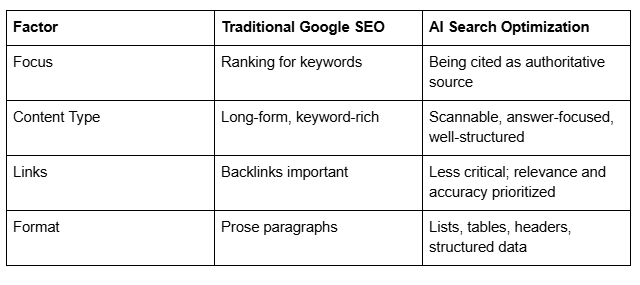
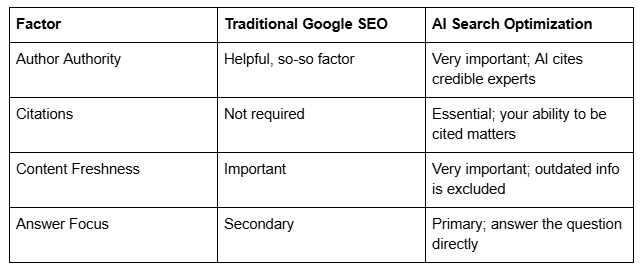
3. Create Comparison Tables and Summaries
AI systems love structured data. A comparison table is pure gold for AEO.
Example: Traditional Google SEO vs AI Search Optimization for Photographers
4. Add AI-Friendly Schema Markup
Schema markup tells search engines (and AI systems) exactly what your content is. It's machine-readable metadata.
For photographers, use:
Local Business schema (for your business)
Breadcrumb List schema (for site navigation)
FAQ Page schema (for FAQ pages)
Review schema (for client testimonials)
Image Object schema (for portfolio images with metadata)
We'll cover schema implementation in the next section.
5. Optimize Your Author Bio
AI systems prioritize author expertise. Include:
Your name and credentials
Years of experience
Published work or recognition
Professional associations
Educational background
Your Squareko blog posts should include a strong author bio with this information.
6. Create FAQ Content
AI systems frequently cite FAQ content. When someone asks ChatGPT What should I look for in a wedding photographer?, the AI often pulls from FAQ pages.
Create comprehensive FAQs that answer:
Service questions
Process questions
Pricing questions
Portfolio questions
Technical questions (about your process)
7. Citation Architecture
Think of your website as a citation-worthy source. You want to be the resource that photographers, clients, and AI systems reference.
Create ultimate guides, industry insights, and expert commentary that's worth citing. For example:
The Complete Guide to Wedding Photography Styles
Why Professional Headshots Matter: 2026 Insights
The Photographer's Guide to Posing Your Clients
These are the pages that get cited in AI responses.
7. Schema Markup for Photography Websites
Schema markup is code that tells search engines what your content is about. It's not required for ranking, but it helps—especially for local SEO and AI search.
Squarespace supports schema markup through:
Automatic markup for certain page types
Custom code injection (Settings > Advanced)
Essential Schema for Photographers
Local Business Schema
This tells Google (and AI systems) that you're a real business with a location and contact info.
Add this to your site header (Settings > Advanced > Code Injection, Header):
{
  "@context": "https://schema.org",
  "@type": "LocalBusiness",
  "name": "[Your Photography Business Name]",
  "image": "[Your logo or headshot URL]",
  "description": "[Your tagline or elevator pitch]",
  "telephone": "[Your phone number]",
  "email": "[Your email]",
  "address": {
    "@type": "PostalAddress",
    "streetAddress": "[Your street address or 'By appointment']",
    "addressLocality": "[City]",
    "addressRegion": "[State]",
    "postalCode": "[ZIP]",
    "addressCountry": "US"
  },
  "url": "[Your website URL]",
  "priceRange": "[Price range, e.g., $$$]",
  "areaServed": {
    "@type": "City",
    "name": "[Cities you serve]"
  }
}
Professional Service Schema
This specifically identifies your photography business as a professional service:
{
  "@context": "https://schema.org",
  "@type": "ProfessionalService",
  "name": "[Your photography business name]",
  "image": "[Your photo or logo]",
  "priceRange": "[Your price range]",
  "description": "[Description of your services]",
  "areaServed": "[Cities/regions served]",
  "url": "[Your website URL]"
}
Review Schema
If you have client testimonials, mark them up as reviews:
{
  "@context": "https://schema.org",
  "@type": "Review",
  "reviewRating": {
    "@type": "Rating",
    "ratingValue": "5"
  },
  "reviewBody": "[Client testimonial]",
  "author": {
    "@type": "Person",
    "name": "[Client name]"
  }
}
ImageObject Schema
Mark up important portfolio images:
{
  "@context": "https://schema.org",
  "@type": "ImageObject",
  "name": "[Image title]",
  "description": "[Image description, include keywords]",
  "url": "[Image URL]",
  "datePublished": "[Date]"
}
FAQ Schema
If you have an FAQ page, use FAQPage schema (we'll cover this in the FAQ section below).
How to Add Schema to Squarespace
Option 1: Manual Code Injection
Go to Settings > Advanced > Code Injection > Header, and paste your schema markup wrapped in script tags:
<script type="application/ld+json">
[Your schema JSON here]
</script>
Option 2: Use a Schema Plugin or Generator
Tools like:
JSON-LD Generator (json-ld.org)
Schema.org Markup Helper (Google)
Structured Data Markup Helper (Google)
These generate schema for you without coding.
Option 3: Squarespace's Built-In SEO Settings
Squarespace automatically adds some schema markup. Check your site's schema by searching [Your website] on Google, clicking the three dots next to your URL, and selecting About this result to see what Google knows about you.
8. Building Backlinks as a Photographer
Backlinks are links from other websites to yours. They signal authority to Google and AI search systems. A site with many high-quality backlinks is seen as more credible.
Building backlinks is harder than other SEO tactics, which is why many photographers skip it. That's your opportunity.
Why Backlinks Matter for Photography SEO
Backlinks signal: Other reputable sites endorse this photographer. That matters to both search engines and potential clients.
Backlink Sources for Photographers
1. Photography Directories and Listings
TheKnot.com (weddings)
WeddingWire (weddings)
Yelp
Local chamber of commerce
Professional photography associations
These aren't all-powerful backlinks, but they're free and relevant.
2. Photography Blog Posts and Features
Reach out to photography blogs, wedding blogs, and industry publications. Offer:
A case study of your work
Expert commentary on a trend
An interview about your process
A guest post about photography tips
For example: I'd love to contribute a post about posing techniques for your wedding photography blog.
3. Client Testimonials on Their Websites
When clients use your work on their websites (wedding venues, event planners, etc.), ask them to link to your site. A wedding venue that features your photos on their Featured Photographers page is a high-quality backlink.
4. Local Business Partnerships
Build relationships with complementary businesses in your area:
Wedding planners
Venues
Florists
Catering companies
Makeup artists
Link to each other's sites. This is especially powerful for local SEO.
5. Press Coverage and Awards
Get featured in local news, industry awards, or photography publications. These high-authority backlinks are powerful.
6. Niche Communities and Forums
Photography communities like Fred Miranda Forums, Photography Talk, or subreddits allow signatures or mentions. Contribute genuinely, and mention your site when relevant.
Backlink Strategy for Photographers
Don't chase quantity. One backlink from a high-authority photography publication is worth more than 20 from low-quality directories.
Focus on:
Industry-relevant sites (photography sites, wedding blogs, etc.)
Local sites (local business directories, news, venues)
High-authority sites (even one Forbes or HuffPost mention helps)
Sites with real traffic (a link from a dead blog is worthless)
9. Squarespace-Specific SEO Settings and Common Mistakes
Squarespace is generally SEO-friendly, but there are specific settings and common mistakes that impact rankings.
Squarespace SEO Settings You Must Configure
1. Site Title and Tagline
Settings > Basic > Site Title and Tagline
Your site title appears in browser tabs and as a fallback for pages without titles. Include a keyword if it fits naturally.
❌ Portfolio ✅ Sarah Chen | Wedding & Portrait Photographer | Austin, TX
2. Favicon
Settings > Basic > Favicon
It doesn't impact SEO directly, but it improves click-through rates in search results (people are more likely to click a result with a recognizable icon).
3. Sitemap Settings
Settings > Basic > Sitemap
Squarespace automatically generates a sitemap (yoursite.com/sitemap.xml). Make sure it's enabled. This tells search engines all your pages.
4. Meta Title and Description
Every page should have:
Unique meta title (under 60 characters)
Unique meta description (150–160 characters)
Go to each page's SEO settings (right-click page > Edit SEO) to customize these. Don't rely on defaults.
5. Custom URLs (Slug Names)
When creating pages, customize the URL slug (the part of the URL that comes after your domain).
❌ /page-1, /portfolio-123 ✅ /wedding-photography-austin, /about-sarah-chen
Include your keyword in the slug if possible.
6. Mobile Optimization
Squarespace is mobile-responsive by default, which is good. But test your site on mobile (Settings > Design > Mobile) to ensure it looks good and loads fast.
Google ranks mobile-friendly sites higher, and more than 60% of searches now come from mobile devices.
7. SSL Certificate
Squarespace includes a free SSL certificate. Make sure your site uses HTTPS (it should be automatic). This is a ranking factor.
Common Squarespace SEO Mistakes
Mistake #1: Not Customizing Page Titles and Descriptions
Leaving default meta data is a missed opportunity. Every page should have a unique, keyword-optimized title and description.
Mistake #2: Ignoring Image Optimization
Uploading huge, uncompressed files from your camera. This slows your site and misses image SEO opportunities. Pre-optimize all images before uploading.
Mistake #3: Using Generic Page URLs
Leaving Squarespace's default URL slugs. Custom, descriptive URLs rank better and help with keyword relevance.
Mistake #4: No Internal Linking
Internal links (links from one of your pages to another) help search engines understand your site structure and distribute ranking power.
Link related pages. For example, from your wedding photography service page, link to engagement photo sessions or elopement photography.
Mistake #5: Weak or Nonexistent Blog
A blog is one of the best SEO tools available. It gives you pages to rank for long-tail keywords, builds topical authority, and gives you content to share on social media.
A photography blog might include:
Photography tips
Industry trends
Client stories
Behind the scenes posts
Frequently asked questions (answered in detail)
Mistake #6: Not Claiming Your Google Business Profile
If you serve local clients and don't have a Google Business Profile, you're leaving massive local SEO opportunity on the table.
Mistake #7: Poor Mobile Experience
Preview your site on mobile. Is it fast? Can you easily navigate? Are images clear? Mobile experience affects rankings and conversions.
Mistake #8: No Schema Markup
Schema markup isn't required, but it helps, especially for local SEO and AI search. Most photographers skip it, so adding it gives you an advantage.
10. Your Photography SEO Action Plan
Knowledge without action is worthless. Here's a step-by-step plan to improve your Squarespace SEO starting today.
Week 1: Foundation
Claim your Google Business Profile (if you haven't)
Audit your current rankings (search photography [your city] and see where you rank)
Research 10–15 keywords using Google Keyword Planner
Analyze top 3 competitors (what are they ranking for? What pages do they have?)
Take a screenshot of your current homepage for before/after comparison
Week 2: On-Page Optimization
Customize page titles and meta descriptions for your 5 main pages (Home, Services, Portfolio, About, Contact)
Optimize your H1 headers to include keywords naturally
Add 3–5 internal links to every page (linking related pages)
Review and optimize your About page (include your story, credentials, years of experience)
Create or update your services pages with clear, keyword-focused content (minimum 300 words each)
Week 3: Image Optimization
Rename 20–30 portfolio images with descriptive file names (before uploading or re-uploading)
Add alt text to every portfolio image
Compress all portfolio images to under 200 KB
Create a dedicated Portfolio page if you don't have one (gallery with proper image markup)
Week 4: Local SEO
Complete your Google Business Profile (add 20+ photos, write compelling description, add all services)
Create location-specific landing pages if you serve multiple cities (/wedding-photography-city)
Add your Google Business Profile embed to your Contact page
Ask 5–10 recent clients to leave Google reviews
Respond to all existing Google reviews (positive and negative)
Week 5: Blog and Content
Set up a blog if you don't have one
Publish 2–3 blog posts on topics clients search for (use your keyword research)
Optimize each post with headers, lists, and clear structure
Add an FAQ section to your site (7–10 questions)
Optimize blog posts with internal links to your service pages
Week 6: Technical SEO
Add schema markup (Local Business + Professional Service schemas minimum)
Test your site speed (use Google Page Speed Insights)
Ensure your sitemap is generating correctly
Test your site on mobile devices
Fix any indexing issues (Google Search Console > Coverage)
Week 7+: Ongoing
Publish a new blog post every 2 weeks
Monitor rankings in Google Search Console
Respond to reviews and messages promptly
Build backlinks (reach out to local businesses, publications, photography blogs)
Update Google Business Profile with fresh photos every month
Analyze performance with Google Analytics
Frequently Asked Questions
-
A: It depends on competition and how aggressively you optimize, but most photographers see meaningful results within 3–6 months. Some keywords will rank faster (long-tail, less competitive), and some will take longer (high-volume, lots of competition). Start with long-tail keywords where there's less competition—you'll build momentum and authority. Expect 3 months minimum before you see consistent traffic.
-
A: Squarespace is very capable for SEO. While WordPress offers more customization, Squarespace gives photographers everything they need: clean code, fast loading, mobile optimization, customizable titles/descriptions, and schema markup support. The difference between Squarespace and WordPress for photographer SEO is minimal—80% of your ranking success comes from content quality, keywords, and strategy, not the platform. Use what works for your business.
-
A: Both, but prioritize Google ranking first (it drives more traffic currently). Once you're ranking on Google, you're already positioned for AI search—the tactics overlap significantly. Clear, well-structured content optimized for Google will also be cited by AI systems. Think of AI search as a bonus layer on top of traditional SEO. Start with Google, then apply AEO principles.
-
A: Use Google Search Console (free). It shows you real search queries that drive traffic, your ranking position for those keywords, and how many times you appeared in search results. Set up GSC and check monthly. Also use Google Analytics to see where your traffic comes from. If you're not seeing traffic for your target keywords after 3 months, your keywords might be too competitive or you need to create more targeted content.
-
A: For service-based photographers (weddings, portraits, events), local SEO is more important. People search "photographer near me" or "photographer in [city]." For conceptual photographers (fine art, stock, online coaching), general SEO matters more. Most photographers benefit from prioritizing local SEO first, then expanding nationally if desired.
-
A: Quality over quantity. Publish one comprehensive, well-optimized blog post every 2 weeks (26 posts/year) rather than two rushed posts per week. Search engines reward consistent, fresh content, but a single great post ranks better than five mediocre ones. Once you're established, you can scale up.
-
A: Yes, especially for local SEO and long-tail keywords. Backlinks aren't required, but they accelerate ranking. For competitive keywords (especially national ones), backlinks become more important. Start by ranking for keywords where you can win without many backlinks, then build backlinks to attack more competitive keywords.
-
A: AI Overviews pull from Google search results. If you rank on Google, you have a chance of being cited. Improve your odds by: using clear formatting (lists, tables, headers), providing authoritative answers to common questions, including schema markup, and building topical authority (many related posts). Create FAQ content—Google frequently cites FAQs in AI Overviews.

From custom website design to SEO strategy, we help businesses launch a site that looks professional and performs better.

About the Author
I'm Walid Hasan, a Certified Squarespace Expert and Squarespace Circle Platinum Partner with over 12 years of hands-on experience designing and optimizing high-performing websites. Over the years, I've had the privilege of building more than 2,000 Squarespace websites for clients around the world, always focusing on clean design, strong user experience, and conversion-driven results.
