
Build a Photography Website on Squarespace That Books Clients
Introduction
Your photography is incredible. Your portfolio is filled with stunning work that makes people stop and stare. Yet somehow, your inquiry form sits empty, and you're scrambling for bookings month after month.
The problem isn't your talent—it's your website.
A photography website does more than showcase beautiful images. It's your 24/7 sales team, working to pre-qualify leads, build trust, and make it ridiculously easy for clients to book with you. When done right, a well-built photography website on Squarespace becomes a consistent client acquisition engine that handles inquiries, displays your best work, and closes deals while you're shooting.
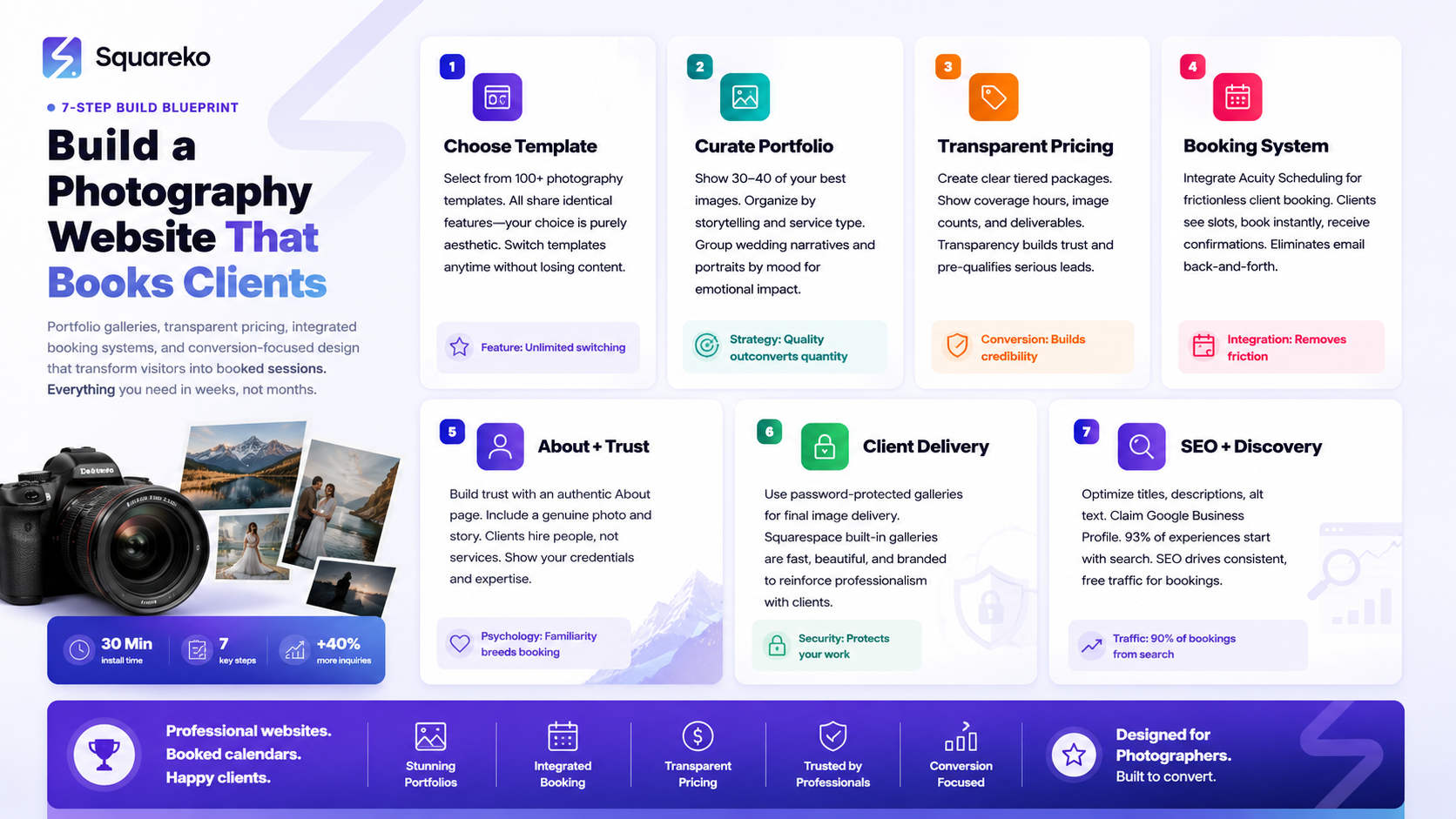
At Squareko we've helped dozens of photographers transform their online presence from a static portfolio into a conversion-focused business tool. In this guide, you'll learn exactly how to build a photography website on Squarespace that attracts serious clients and actually books them—from gallery setup to pricing pages to integrated booking systems.
Key Takeaways For Build a Photography Website on Squarespace That Books Clients
Squarespace is purpose-built for photographers, with stunning templates and native portfolio tools that require zero coding
Your template choice matters more than you think—pick one that matches your style and puts images first
Gallery design directly impacts your conversion rate; organization, pacing, and storytelling turn browsers into bookers
A transparent pricing page eliminates time-wasting inquiries from budget-mismatched prospects
Integrated booking and scheduling tools (like Acuity Scheduling) remove friction from the client journey and close more deals
An effective about page builds trust and explains why clients should choose you—not just what you do
Basic SEO setup ensures your photography website actually gets found by potential clients searching for photographers in your area
Your client gallery delivery system must be secure, beautiful, and branded to reinforce professionalism
Why Squarespace Works So Well for Photographers
When you're deciding where to build your photography website, the options feel endless. WordPress, Wix, Showit, Webflow, Shopify—the list goes on. So why should photographers choose Squarespace?
Squarespace was designed with visual storytelling in mind. Unlike generic website builders, Squarespace's templates prioritize large, beautiful imagery. The platform gives your photos the space they deserve. You won't fight clunky interfaces or sacrifice image quality for speed. Every template is optimized for both desktop and mobile, ensuring your work looks perfect on any device.
Built-in portfolio and gallery tools eliminate the need for plugins or workarounds. Squarespace's native portfolio blocks let you organize images exactly how you want them. You can create galleries with custom layouts, add descriptions, apply filters, and even set up protected galleries for client deliverables. No third-party app confusion. No compatibility headaches. It just works.
The platform integrates seamlessly with business tools photographers actually use. Want to add booking and scheduling? Acuity Scheduling integrates directly into Squarespace. Need a simple contact form? Built in. Want to add a store for prints or products? Squarespace Commerce is native. This integration means your entire business ecosystem lives in one place, making it easier to manage and maintain.
Your website won't slow down your clients. Squarespace is fast. The platform handles server infrastructure, caching, and optimization automatically. When a potential client clicks your link from Instagram, your site loads instantly. They see your images in all their glory, not a spinning loading wheel. Speed directly impacts conversions, and Squarespace delivers.
You get professional hosting, SSL security, and backups without the headache. WordPress requires you to manage hosting, plugins, updates, and security. Squarespace handles everything behind the scenes. Your photography website stays secure, stays live, and stays fast without you needing to hire a developer.
For photographers, Squarespace hits the sweet spot between simplicity and flexibility. You get enough control to make your site uniquely yours, without the technical debt of more complex platforms.
Choosing the Right Template for Your Photography Style
Your Squarespace template isn't just a skin—it's the foundation of your website's conversion power. The right template positions your work front and center, guides visitors toward booking, and communicates professionalism before they read a single word.
Assess your photography style first. Are you a wedding photographer? Your clients want to see couples, emotions, and storytelling moments. Templates like Adirondack or Montauk emphasize full-width image layouts and flowing narratives. Are you a portrait photographer? Waldo or Bryant give you grid layouts that let individual portraits shine. Are you a commercial or lifestyle photographer? Photography-specific templates like Helix or Bryn work beautifully for multiple project categories.
The homepage layout sets the tone for your entire website. Some templates open with a full-screen hero image and a simple tagline—a bold, confident statement. Others feature a grid of your work immediately. Some include a featured project or latest work. Your job is to choose a layout that matches how you want to present yourself. A minimalist approach projects luxury and exclusivity. A richer layout with more visual information feels open and approachable.
Navigation simplicity matters more than you think. Your template's navigation menu should guide visitors to the three most important things: your work (portfolio), your process or about section, and how to book you. When a potential client lands on your site, they shouldn't have to hunt for a contact form or pricing information. The best templates keep navigation intuitive and distraction-free.
Mobile-first design is non-negotiable. More people view websites on mobile phones than computers. Your template needs to make galleries look stunning on small screens, keep navigation accessible, and ensure booking buttons and contact forms are easy to tap. All Squarespace templates are mobile-responsive, but some templates handle mobile layouts more elegantly than others. Always preview your template on a phone before committing.
Don't get seduced by features you don't need. Some templates come with blog sections, built-in video backgrounds, or complex animation effects. If you're a photographer focused on bookings, these extras often become distractions. Choose a template that lets your images do the talking. A clean, fast template that showcases your work will always outperform a feature-heavy template with bells and whistles.
The best template for your photography website is the one that feels most like you and makes your best work look irresistible.
Building a Portfolio Gallery That Stops Scrollers
Your portfolio gallery is your sales presentation. It's where potential clients make or break their decision to book you. Gallery design isn't just about looking pretty—it's about psychology, storytelling, and strategic curation.
Curation beats quantity every single time. You might have thousands of images from dozens of shoots. Your gallery shouldn't show all of them. Show your 30-40 absolute best images. When a visitor sees your weakest work mixed in with your best, it anchors down their perception of your overall quality. Show only work that makes you proud. Show only work that represents the type of clients you want to book.
Organize by story, not just chronology. Instead of listing 2025 Weddings, 2025 Portraits,2024 Portraits, create galleries that tell a coherent story. Group similar work by style, tone, or narrative arc. If you're a wedding photographer, don't just show ceremony clips—show a full wedding day from getting ready through the reception. This storytelling approach keeps visitors engaged because they're not just scrolling through pretty pictures; they're following a narrative.
Use Squarespace's portfolio layout options strategically. Squarespace offers grid layouts, collage layouts, slideshow layouts, and more. Different layouts create different emotional responses. A grid layout feels organized and composed. A collage layout feels artistic and dynamic. A slideshow feels intimate and intentional. Choose layouts that match the vibe you're going for. You can even mix layouts on the same site—use a grid on your main portfolio, a slideshow on a featured project section, and a collage on an additional gallery. This variety keeps the experience fresh.
Pacing and breathing room matter more than you realize. If you pack 200 images onto one gallery page, visitors get overwhelmed and leave. They're scrolling through a fire hose of content with no opportunity to reflect. Instead, create galleries with 10-15 images maximum per page. Let each gallery breathe. This pacing gives viewers time to absorb your work emotionally.
Write captions that add context, not just description. Instead of Bride and groom first look, try The moment she first sees him—pure, unfiltered emotion. Captions that add emotional context help visitors connect with your work beyond the visual. They understand not just what you photograph, but how you capture feeling.
Test your galleries on mobile. Open your portfolio on a phone and scroll through as if you were a potential client. Do the images load quickly? Can you see the captions? Do the gallery transitions feel smooth or janky? If the mobile experience feels clunky, potential clients won't stick around long enough to book.
Include images that show your range without confusing your positioning. If you shoot weddings, portraits, and commercial work, your portfolio should show all three. But organize them clearly so visitors know what to expect. Don't mix commercial work into your wedding gallery. Instead, create separate gallery pages for each service. This clarity helps visitors find exactly what they're looking for and reinforces your expertise in each area.
Your portfolio gallery should feel like a carefully curated exhibition, not a photo dump. Every image should earn its place. Every gallery should tell a story. Every page should move viewers closer to hitting that booking button.
Creating a Pricing Page That Pre-Qualifies Clients
This is where most photographers get it wrong. They either hide their pricing entirely (hoping to sell them on value first) or they post one flat rate for all services. Neither approach works.
A transparent pricing page does three powerful things. First, it pre-qualifies leads. Second, it sets expectations. Third, it builds trust by showing confidence in your work.
Start with a clear headline that explains your pricing philosophy. Something like Investment in Your Story or Pricing That Reflects Your Vision immediately communicates that you're serious and professional. Your pricing isn't arbitrary; it reflects the value you deliver.
Break down your packages with crystal clarity. Don't just list Wedding Photography: $3,000. Instead, create packages with clear tiers. Something like:
Engagement Package: Includes two hours of coverage, 150+ edited images, digital gallery access, and print releases for $1,500.
Full Wedding Day: Includes eight hours of coverage, 600+ edited images, two-photographer team, digital gallery, printed album, and print releases for $3,500.
Premium Wedding Day: Our most popular package. Includes ten hours of coverage with two photographers and a videographer, 800+ edited images, morning-of preparation coverage, two digital albums, premium printed album with leather cover, and unlimited prints for $5,500.
Notice how each package builds value. You're not just listing hours and image counts—you're explaining what's included, what you do, and what makes each tier different. Potential clients see instantly where they fit and what they're paying for.
Address the elephant in the room: your lowest price tier. Many photographers hesitate to share their entry-level pricing because it feels cheap. But potential clients are searching for pricing in every range. If your lowest wedding package is $3,000, say it. Own it. A client with a $2,000 budget will self-select out. A client with a $3,500 budget will look at your packages, see the value, and might splurge for a higher tier. Transparency wins.
Include a package customization line. Want something different? Let's talk about custom packages tailored to your vision. This tells potential clients that you're flexible without opening the floodgates to endless negotiations.
Answer price-related questions proactively. Add a FAQ section right on your pricing page that addresses common concerns: What's your travel fee? Do you offer payment plans? What happens if we go over the included hours? Do you provide a backup photographer? These FAQs pre-empt objections and show you've thought through the entire customer experience.
Use Squarespace's pricing table block for clean presentation. Squarespace has a built-in pricing table element that presents your packages beautifully. Use it. The clean, organized layout makes comparisons easy and makes your pricing feel professional.
Emphasize value, not just price. Include a section that explains what you're including beyond the hours and image count. Do you provide a custom album design? Unlimited outfit changes? A second photographer for free on full day weddings? These value-adds justify your pricing and help clients understand they're getting more than they think.
A transparent pricing page doesn't hurt your booking rate—it improves it. You'll lose budget-mismatched prospects, but you'll attract serious clients ready to invest in your work.
Setting Up Online Booking (Acuity Scheduling + Squarespace)
The difference between a visitor and a booking often comes down to friction. How many steps does it take someone to schedule a consultation with you? If it takes more than two minutes, many will abandon the process.
Acuity Scheduling is a booking and scheduling platform that integrates directly into Squarespace. It's built for service-based businesses like photography, and it's the best way to add online booking to your Squarespace site.
Start by setting up your service offerings in Acuity. Create separate services for different things you offer: Initial Consultation Call, Engagement Session Wedding Day Coverage, Mini Session, etc. For each service, define the duration, price (if any), and description.
Set up your availability. This is where Acuity saves you hours. Instead of emailing back and forth about times, you set your available time slots directly. You can define different hours for different days, block out time for editing or personal commitments, and even set buffer time between appointments. When a potential client books, they're selecting from times you've already confirmed you're available.
Create a consultation booking button on your contact page. Instead of a generic contact form, give visitors a clear call to action: Schedule Your Free 20-Minute Consultation. This positions a consultation as something valuable that requires setup, not just something you'll get to whenever. People are more likely to commit to a scheduled appointment than to fill out a vague inquiry form.
Embed your Acuity booking form directly into Squarespace. You don't need to send people away from your site to another platform. Squarespace's Acuity integration lets you embed the booking calendar right on your contact page or as a modal popup. Visitors book without ever leaving your site.
Customize your booking confirmation email. This is your first impression as a responsive business owner. Your confirmation email should be warm, professional, and clear. Include the date and time confirmed, your phone number, a reminder to come prepared with ideas and inspiration, and a link to your portfolio or the type of work you do. Set expectations and build excitement.
Set up automatic reminders. Acuity can send automated reminder emails to clients before their consultation. This reduces no-shows and keeps you top-of-mind. A gentle reminder 24 hours before the appointment, sent with a positive tone and a link to reschedule if needed, shows professionalism.
Use the consultation call to understand their vision and qualify them. During the consultation, ask about their ideal style, their vision, their timeline, and their budget. Take notes in Acuity so you have a record. This consultation isn't a hard sell—it's a discovery call where you understand if you're the right fit and they understand if your services match their needs.
Follow up with a proposal. After the consultation, if there's mutual interest, send a custom proposal. You can generate quotes directly in Acuity that include your services, pricing, timeline, and terms. A professional proposal closes more deals than a casual email saying We could do your wedding for $3,500.
Online booking removes the barrier between interest and commitment. It's the single biggest improvement most photographers can make to their booking process.
Your Contact Form: Making It Easy to Say Yes
Even with online booking set up, you'll still need a contact form. Some visitors prefer to fill out a form rather than immediately booking a call. Your contact form is a backup conversion path, and it should be optimized accordingly.
Keep it short. A contact form with 15 fields feels like a job application. Ask for only the essentials: name, email, phone, service they're interested in, event date (if applicable), and a message. That's it. You'll ask more detailed questions once they contact you.
Use conditional fields. If someone selects Wedding Photography, show an additional field asking about their wedding date. If they select Portraits, show a dropdown for session type. Squarespace's form builder supports conditional fields that appear based on answers. This keeps the form short for everyone while ensuring you get the right information from different visitor types.
Write a compelling form headline and description. Instead of Contact Us, try Let's Create Something Beautiful Together or Tell Us About Your Vision. The headline sets the tone and makes submitting the form feel like joining something exciting, not just filling out paperwork.
Set clear expectations in your form description. Add a line like We typically respond within 24 hours. We'll ask follow-up questions to better understand your vision and confirm we're the right fit. This manages expectations and reduces anxiety about whether they'll hear back.
Add a subject line field. This helps you categorize and organize inquiries. Visitors can select Wedding Inquiry, Portrait Session, Other, which helps you quickly identify what they're interested in when the email comes through.
Make the submit button action-oriented. Instead of Submit use Send My Inquiry or Let's Talk or Show Me Possibilities. The button text should feel inviting, not transactional.
Set up an auto-responder email. When someone submits your contact form, they should get an immediate confirmation that acknowledges receipt and sets expectations for your response time. This auto-responder buys you credibility. It tells the visitor, Your message mattered enough to get an instant response.
Route inquiries strategically. Set your form to send to your email, but also consider having Acuity create a contact record if you're using their full suite of tools. This way, your inquiry doesn't get lost in your email inbox.
Your contact form is your backup conversion tool. Make it irresistible.
The About Page Photographers Always Get Wrong
Most photographers' about pages read like this: Hi, I'm Sarah. I've been photographing since 2015. I love helping couples capture their special moments. I use a Canon 5D Mark IV. In my free time, I enjoy hiking and drinking coffee.
This doesn't tell a potential client why they should book you. It's background information, not a reason to choose you.
Your about page has one job: build trust and answer the client's unspoken question, Why should I hire you instead of the other 50 photographers in my area?
Start with a compelling photo of you. Show yourself doing what you do or in your environment. A genuine, warm photo of you connecting with a client during a shoot does more than a professional headshot. It shows you in action and makes you relatable.
Tell the story of why you became a photographer. Not I bought a camera and started charging for shoots. Instead, share the moment something clicked. Maybe you picked up your mom's old camera and felt an instant connection. Maybe you realized during another job that you were always the one documenting moments with your friends. Maybe you experienced a life event that taught you how much a great photograph matters. This narrative hook makes you human and explains your deeper motivation.
Explain the specific impact you create for clients. I help couples remember the feeling of their wedding day, not just the look of it is stronger than I photograph weddings. I capture the confidence and authenticity that every person deserves to see in themselves is stronger than I do portraits. What's the real transformation you provide?
Address your specific approach or philosophy. Maybe you specialize in documentary-style coverage that captures real moments without staging. Maybe you excel at working with introverted couples or nervous families. Maybe you're known for creating couples who feel comfortable and natural. Whatever your approach is, name it clearly. This helps the right clients find you and the wrong clients self-select out.
Show social proof without being over the top. A sentence like I've photographed over 150 weddings and have a 98% referral rate is powerful. A testimonial from a real client adds credibility. Don't overload the page with 50 testimonials, but 2-3 genuine ones strengthen trust.
Connect your experience to their needs. With 8 years of experience, I've learned how to anticipate moments before they happen, which means you get genuine, unguarded shots—not awkward posed photos. You're not bragging about your experience; you're explaining what your experience does for clients.
End with a clear next step. Don't assume visitors know what to do next. End your about page with a clear CTA: Ready to work together? Schedule a free consultation to discuss your vision.
Your about page isn't about you—it's about why the client should trust you enough to book.
Client Gallery Delivery: Built-in vs Third-Party Options
Once you've booked the client and captured their shoot, you need to deliver their images. This moment matters. How you deliver galleries affects whether clients share your work, recommend you to friends, and feel like they got professional service.
You have two main options: Squarespace's built-in password-protected galleries or a third-party platform.
Squarespace's built-in password-protected galleries are surprisingly good. You can upload your edited images into a password-protected portfolio gallery that you give access to only your clients. The gallery is beautiful, loads quickly, and feels professional. Clients can view, download, and share images. The gallery automatically remembers their place, so they can come back and continue where they left off. Best of all, everything stays on your site, keeping your branding front and center while they review and download their photos.
The advantage of Squarespace galleries: Everything stays within your site's ecosystem. Your branding, your fonts, your aesthetic surrounds their entire experience of receiving their photos. It feels premium and professional. There's no redirecting them to a third-party platform. The speed is excellent because images are optimized within your Squarespace site. You control the layout and presentation completely.
The limitation of Squarespace galleries: If you deliver to hundreds of clients per year, Squarespace's built-in system might feel basic. You don't get detailed download tracking (which images were downloaded by whom and when), proofing tools for selection feedback before editing, or print product integration where clients can order directly.
Third-party platforms like Pixieset or SmugMug offer advanced features. These platforms specialize in photographer workflow and client delivery. Pixieset, for example, offers order-based galleries where clients can purchase prints, products, or full downloads directly. You get detailed analytics showing which images are being viewed and downloaded. SmugMug offers similar features plus built-in proofing where clients can mark favorites or request edits.
The advantage of third-party galleries: You get advanced features like print sales, bulk order options, and detailed analytics. For volume photographers, these features can generate additional revenue. The platforms are purpose-built for photographer workflows, so they often handle things like digital package delivery, backup storage, and image organization better than generic website builders.
The limitation: Your branding takes a back seat. The gallery is hosted on Pixieset or SmugMug's domain. Clients leave your site to view and download. The platform adds its own branding around your work. For photographers building a premium brand experience, this off-site redirect can feel less polished.
Our recommendation at Squareko: Start with Squarespace's built-in galleries. They're clean, professional, and fast. For most photographers, they're more than adequate. As your business scales and you want to add print sales or more detailed analytics, explore third-party platforms. You can integrate links to Pixieset galleries within your Squarespace site, so you get the best of both worlds—your Squarespace branding with premium gallery features.
Whichever you choose, the gallery experience should feel thoughtful and premium. This is the last touchpoint before clients become repeat customers or referral sources. Make it count.
Quick-Win SEO Setup for Your Photography Website
SEO (search engine optimization) is how potential clients find you when they Google wedding photographer near me or headshot photographer in [your city]. A photography website on Squarespace without basic SEO is like having a beautiful storefront with no sign.
The good news: basic SEO doesn't require technical expertise. Here are the quick wins that actually move the needle for photographers.
Set up Google Business Profile. This is foundational. Create or claim your Google Business Profile (formerly Google My Business). Add your business name, phone, address, hours, and a link to your website. Upload photos. Ask happy clients to leave reviews. When someone searches photographers near me, your business shows up on the map. This drives local traffic.
Optimize your page titles and meta descriptions. Every page on your site has a title (what shows in browser tabs and search results) and a meta description (the snippet below the title in search results). For your homepage, use something like Wedding and Portrait Photography | Sarah Chen | [City].For your wedding gallery, use Wedding Photography Galleries | Captured Moments. Make titles include location and service type. Include your focus keyword naturally.
Add location and service pages if you serve multiple areas. If you shoot weddings in multiple cities or states, create separate pages or sections for each market. A page titled Chicago Wedding Photography or Denver Portrait Photographer helps you rank for location-specific searches. Each page should mention that specific location naturally throughout the content.
Use descriptive alt text on all images. Search engines can't see images, so they rely on alt text (alternative text) to understand what images show. Instead of photo-1.jpg, name your image files wedding-ceremony-rings-exchange.jpg. In Squarespace, add alt text describing each image in your galleries. This isn't primarily for SEO—it's also for accessibility—but it helps both.
Write a strong homepage headline and description. Your homepage is usually your most visited page and your best chance at ranking for competitive keywords. Don't waste it. Your headline should include your service and location: Award-Winning Wedding Photography in Seattle and San Francisco. The introductory paragraph should naturally include your focus keyword: We specialize in intimate, documentary-style wedding photography that captures authentic emotion.
Create a blog section with SEO-focused content. A photography blog seems obvious, but most photographers neglect it. Writing blog posts about your process, photography tips, client stories, and styling advice does two things: it gives you more opportunities to rank for keywords (a post about how to pose for engagement photos can rank for that phrase), and it positions you as an expert while improving your site's authority. Aim for one blog post every 2-4 weeks.
Build internal links strategically. Link from your blog to your service pages and gallery pages. Link from your about page to your contact page. Internal links help Google understand your site's structure and spread authority around. They also help visitors navigate deeper into your site, increasing the chance they book.
Ensure your site is mobile-friendly. Google prioritizes mobile-friendly sites. Squarespace templates are all mobile-responsive, so you're covered. But test your site on a phone to confirm it looks and functions properly.
Set up Google Search Console. This free tool from Google shows you how your site appears in search results, what keywords you're ranking for, and what you can improve. You'll get notifications about technical issues. It's invaluable for understanding your SEO performance.
Check your site speed. Site speed is a ranking factor. Google Page Speed Insights (tools.google.com/pagespeed) analyzes your site and gives recommendations. Squarespace sites are generally fast, but if you're using many high-resolution images, compression matters. Optimize images before uploading them to your site.
Get a few quality backlinks. A backlink is when another website links to yours. Links from photography associations, local business directories, or wedding websites tell Google your site is trustworthy. You don't need hundreds of backlinks. A few from relevant, authoritative sources is better than many from random sites.
SEO is a long-term game. You won't rank for competitive keywords overnight. But consistent optimization compounds over months and years. A photography website that ranks organically for local keywords brings consistent, free traffic. That traffic converts to bookings.
Your Launch Checklist
Before you flip the switch and make your photography website live, run through this checklist. These final details catch oversights that might hurt your credibility or conversion rate.
Content & Copy
Homepage headline is compelling and includes location + service
All page titles and meta descriptions are optimized
About page tells your story, not just your credentials
Pricing page is clear, transparent, and includes all services
All gallery images are edited, optimized, and arranged logically
Portfolio galleries have captions that add emotional context
Contact page has a clear CTA (booking button, contact form, or both)
FAQ section answers real questions from potential clients
All copy is proofread for typos and grammar errors
Technical Setup
Custom domain is connected (not squarespace.com/yoursite)
SSL certificate is enabled (all pages should show as secure/https)
Contact form is tested and sends to your email
Acuity Scheduling booking is embedded and functional
All links (internal and external) are tested
Site navigation is intuitive and leads to key conversion pages
Mobile layout looks professional on multiple devices
Site speed is tested and acceptable
SEO & Discovery
Google Business Profile is created and verified
Google Search Console is set up and your sitemap is submitted
Alt text is added to all images
Focus keyword naturally appears in your homepage content
Location-specific pages or content are in place if you serve multiple markets
No keyword stuffing or unnatural language
Trust & Professionalism
About page includes a warm, genuine photo of you
Client testimonials are included (2-3 minimum)
About the Author or bio section includes credentials and experience
Email confirmation messages from contact forms are set up
Consultation confirmation email from Acuity is customized
No broken images, incomplete pages, or coming soon sections
Phone number and email are easy to find
Social media links are current and active
Analytics & Insights
Google Analytics 4 is installed and tracking page views
Google Search Console is monitoring search traffic
Acuity Scheduling is synced to calendar and notifications are on
Run through this checklist before launch. A polished, complete site wins more clients than a flashy site with rough edges.
Frequently Asked Questions
-
Squarespace plans start at $12/month for basic sites and go up to $33/month for e-commerce sites with advanced features. For most photographers, the Business plan ($18/month) or Commerce Basic plan ($23/month) works perfectly. Factor in your custom domain (~$12/year) and any integrations like Acuity Scheduling (which has its own pricing). Total startup is typically $200-300/year, with monthly costs around $20-30. This is minimal compared to hiring a web designer ($2,000-5,000) or maintaining a self-hosted WordPress site.
-
Yes. Acuity Scheduling integrates seamlessly with Squarespace and is built for photographers. You can embed booking calendars, contact forms, and consultations directly into your site. Clients book without leaving your website. Other options include Calendly (simpler but more basic) or Schedulicity, but Acuity is specifically designed for service-based businesses like photography and offers the most control and customization.
-
Free consultations work better for photographers. A free 20-30 minute consultation removes the barrier to initial contact. During the call, you understand the client's vision, confirm fit, and build rapport. Then you send a custom proposal. Charging for consultations can seem suspicious (like you're not confident enough in a free conversation) and eliminates leads. The consultation is your sales tool—keep it free.
-
Squarespace's password-protected gallery feature is excellent. Upload your edited images into a password-protected portfolio gallery and share the password with your client. They can view, download, and share images securely. The gallery stays on your site, maintaining your branding and control. For most photographers, this is more than adequate. Only consider third-party platforms like Pixieset or SmugMug if you need print sales integration or advanced analytics.
-
A functional photography website can be set up in a few hours to a day. Picking a template (1-2 hours), setting up pages and navigation (2-3 hours), uploading and organizing galleries (2-4 hours depending on how many), and optimizing copy (2-3 hours). If you're working with a professional, a complete, polished site typically takes 5-10 hours of work, spread over 1-2 weeks. The beauty of Squarespace is that you can launch a basic version quickly and refine it over time.
-
Squarespace is a full-featured website builder with portfolio, e-commerce, blogging, and booking capabilities. Showit is more design-focused and visual, giving you more control over pixel-level placement, but it's more complex. Pixieset is specifically for photo delivery and proofing—it doesn't replace a website; it supplements one. For photographers who want one platform that handles their entire web presence, Squarespace is the winner. If you want absolute design flexibility, Showit. If you need advanced photo proofing and ordering, use Pixieset alongside another platform.
-
Three things: Get a solid Google Business Profile set up and verified (this is the foundation for local search). Create location-specific page content that mentions your city naturally. Build a few backlinks from local sources (chamber of commerce, wedding venue websites, local directories). Produce consistent content on your blog. Local ranking takes 2-3 months of consistency, but these steps get you there. Local SEO for photographers.
-
Yes. Squarespace Commerce lets you set up a store and sell digital downloads, prints, or products directly from your site. You can integrate with print fulfillment services so orders print and ship automatically. However, if you want clients to order prints from their gallery delivery (so they see their images and can order), you might prefer a third-party option like Pixieset that has built-in print ordering. For standalone print sales, Squarespace's built-in store works great.
Ready to Build a Photography Website That Books Clients?
You've got the blueprint. You know what your photography website needs: a template that showcases your work, galleries that tell stories, transparent pricing that pre-qualifies leads, booking tools that remove friction, and content that builds trust. You know that a photography website on Squarespace doesn't just look beautiful it converts browsers into paying clients.
But here's the thing: knowing what to do and actually building it are two different things. Many photographers get stuck picking the right template. Others spend weeks perfecting galleries only to realize their pricing page isn't pre-qualifying leads. And plenty of talented photographers launch a website, then wonder why they're not getting inquiries.
At Squareko.com, we're Squarespace specialists who work exclusively with photographers and creative professionals. We don't just build pretty websites—we build conversion machines. We set up your portfolio galleries for storytelling impact. We create pricing pages that attract the right clients and repel the wrong ones. We integrate booking systems that turn inquiries into scheduled consultations. We optimize your about page to build trust. And we set up the SEO fundamentals so you actually get found.
Whether you're starting from scratch or you're frustrated with a website that isn't booking clients, we'll build something that works.
Here's how: Schedule a free 30-minute discovery call with our team. We'll ask about your photography, your business goals, and where your current website is falling short. We'll show you exactly what's possible for your specific situation. And if we're a great fit, we'll share our approach and pricing.
The call is free. No obligation. No sales pitch—just a conversation between photographers and Squarespace experts about building a website that actually moves the needle for your business.

From custom website design to SEO strategy, we help businesses launch a site that looks professional and performs better.

About the Author
I'm Walid Hasan, a Certified Squarespace Expert and Squarespace Circle Platinum Partner with over 12 years of hands-on experience designing and optimizing high-performing websites. Over the years, I've had the privilege of building more than 2,000 Squarespace websites for clients around the world, always focusing on clean design, strong user experience, and conversion-driven results.
