
Best Squarespace Templates for Photographers in 2026 (Free + Premium)
Introduction
The right Squarespace template can save you weeks of design work and give you a professional-looking site that actually sells your services. But with dozens of options available, finding the best Squarespace templates for photographers isn't always straightforward.
This guide walks you through the top templates built right into Squarespace's 7.1 platform—the ones that photographers are actually using to book clients, showcase galleries, and build their brands. Whether you shoot weddings, portraits, commercial work, or fine art, we'll help you understand which template fits your style and business needs.
Key Takeaways
Paloma, Forma, and Hester are the most popular templates among photographers in 2026 because they prioritize image quality and gallery layouts
Different template types suit different photography specialties—wedding photographers benefit from templates with built-in client booking features, while fine art photographers need minimal, distraction-free gallery displays
Free templates in Squarespace offer excellent starting points, but premium templates often include advanced features like product purchasing, appointment scheduling, and client galleries
Installation takes minutes; customization (adding your own branding, colors, and content) typically takes 1–3 weeks depending on your comfort level with web design
If you need something beyond the standard template library, Squareko custom builds offer fully tailored designs specifically optimized for your photography business
What Makes a Great Photography Website Template?
Before we jump into individual templates, let's talk about what separates a good photography website template from a mediocre one.
Gallery Responsiveness. Your photos need to look stunning on all devices—desktop, tablet, and mobile. The template should showcase images at full resolution without forcing awkward crops or slow load times.
Client Booking Integration. Many photographers need clients to schedule sessions, check availability, and book appointments directly from the website. The best templates have built-in or easy-to-integrate appointment systems.
Color & Typography Control. You want flexibility to match your brand, but not so much complexity that you're overwhelmed by design options. The sweet spot is a template that's beautiful out of the box but customizable when you want to make it yours.
Fast Loading Speeds. Image-heavy websites can be slow. Look for templates that use Squarespace's built-in image optimization and lazy loading.
Mobile Experience. At least 50% of website traffic comes from mobile devices. Your gallery should feel natural to scroll through on a phone, not cramped or clunky.
With those criteria in mind, here are the best Squarespace templates for photographers in 2026.
Paloma — Clean & Minimal for Fine Art Photographers
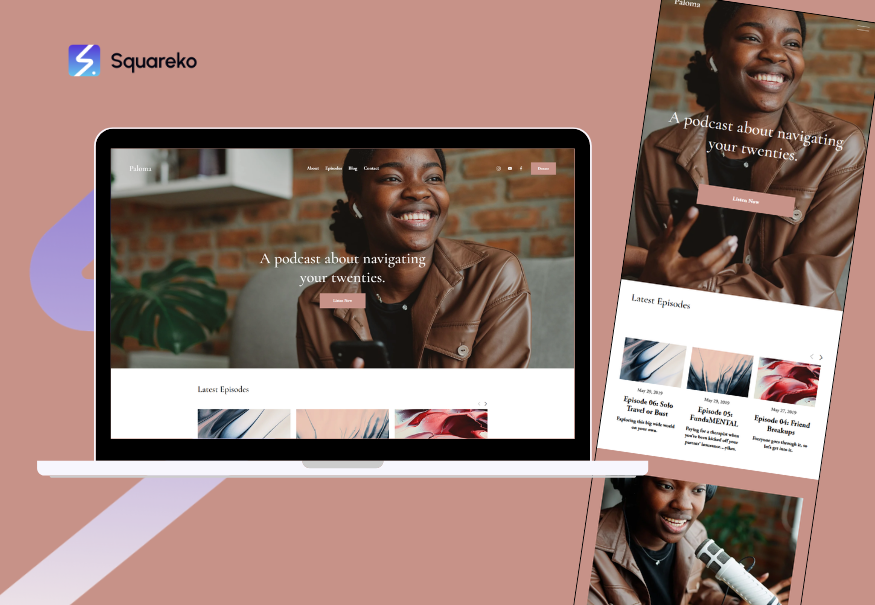
Paloma is the go-to template for fine art photographers who want their work to be the star of the show. It features a minimal, almost gallery-like aesthetic with plenty of white space and distraction-free layouts.
Standout Features:
Single-column gallery layouts that let full-width images breathe
Customizable header navigation that can be hidden or simplified
Video embedding support for artist statements or process videos
Flexible footer with social media links and contact information
Built-in support for Squarespace's blogging platform
Pros:
Extremely clean and professional out of the box
Fast loading times due to minimal design elements
Easy to customize colors and fonts without breaking the layout
Perfect for artists who want minimalist branding
Cons:
Limited e-commerce features (not ideal if you're selling prints)
Doesn't include appointment scheduling by default
May feel too minimal for photographers who want more visual variety on the homepage
Best For: Fine art photographers, art directors, gallery artists, and creative professionals who prioritize image quality over other features.
Installation Difficulty: Easy — works well for beginners.
Forma — Bold & Editorial for Commercial Photographers

Forma is the opposite of Paloma: it's bold, editorial, and designed for photographers who want their site to make a statement. It features large hero images, multi-column layouts, and strong typography.
Standout Features:
Large hero image section with text overlay options
Multi-column grid gallery layouts
Featured project carousel on the homepage
Blog integration for case studies and behind-the-scenes content
Integration with Squarespace's native newsletter platform
Pros:
Makes a strong visual impression immediately
Excellent for fashion, commercial, and lifestyle photographers
Built-in case study or project showcase section
Great for storytelling alongside images
Cons:
Requires more content to look good (sparse Forma sites look empty)
Heavy on images means slower load times on mobile without optimization
Booking integration requires third-party plugins
Best For: Commercial photographers, fashion photographers, product photographers, and anyone who wants their site to be visually bold and editorial in tone.
Installation Difficulty: Moderate — requires thoughtful content planning.
Hester — Bright & Gallery-Forward for Portrait Photographers
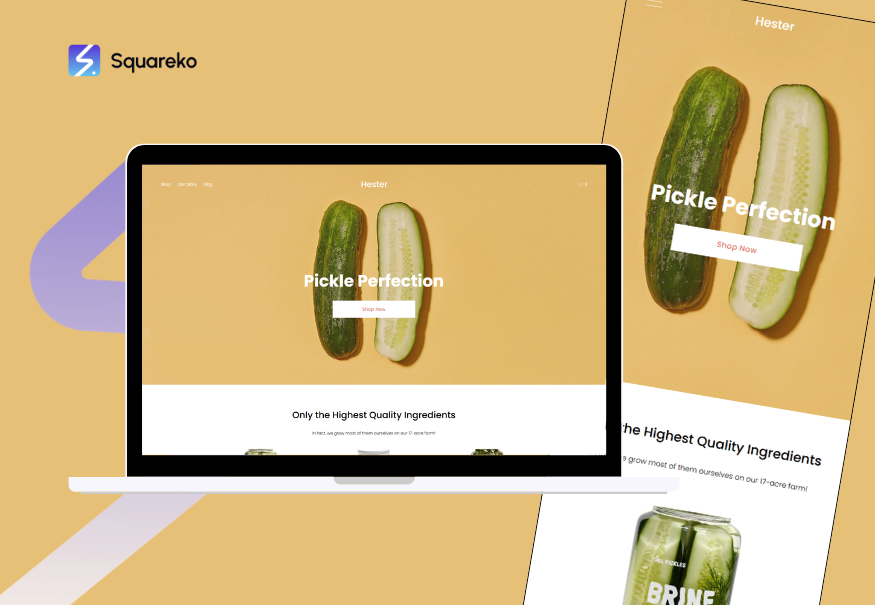
Hester is a vibrant, gallery-focused template that emphasizes image grids and organized collections. It's particularly popular among portrait, family, and headshot photographers.
Standout Features:
Organized collection galleries (sortable by project type, season, or theme)
Bright, airy color palette (customizable to match your brand)
Client gallery support for private password-protected photo sharing
Built-in testimonials section
Simple contact form and email integration
Pros:
Makes it easy to organize and display large numbers of images
Client galleries are built-in (perfect for wedding and portrait photographers)
Responsive grid layouts look great on all devices
Fun, approachable aesthetic that appeals to families and clients
Cons:
The bright, airy style may not suit fine art photographers
Limited text/storytelling opportunities on the homepage
Requires good quality images to look polished (weak photography can show through)
Best For: Portrait photographers, family photographers, headshot photographers, and anyone who shoots lots of sessions and needs organized galleries for clients.
Installation Difficulty: Easy to moderate — setup is straightforward, but organizing galleries takes planning.
Roseti — Elegant & Sophisticated for Wedding Photographers
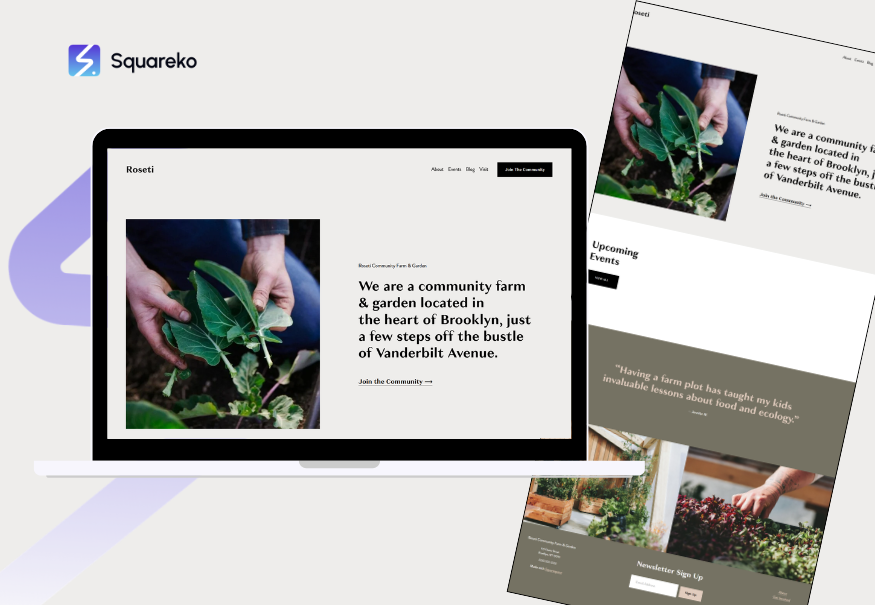
Roseti is built specifically for high-end wedding and event photographers. It combines elegance, functionality, and romance in a way that speaks directly to bride and groom clients.
Standout Features:
Full-screen image galleries with smooth transitions
Built-in testimonials section (ideal for social proof)
Event booking and inquiry form integration
Customizable color schemes (classic whites, ivories, blush tones)
Meet the photographer section with bio and image
Link to wedding registry or vendor recommendations
Pros:
Specifically designed for wedding photographer conversions
Sophisticated, timeless design that doesn't feel trendy
Includes appointment/inquiry scheduling options
Built-in client review and testimonial features
Cons:
May feel too wedding-specific if you also shoot other genres
Heavy use of serif typography (stunning but requires good fonts)
Requires quality content to avoid looking empty
Best For: Wedding photographers, engagement photographers, and event photographers who want a high-end, romantic aesthetic.
Installation Difficulty: Moderate — requires thoughtful curation of images and testimonials.
Flatiron — Clean Portfolio Layout for All Photography Types
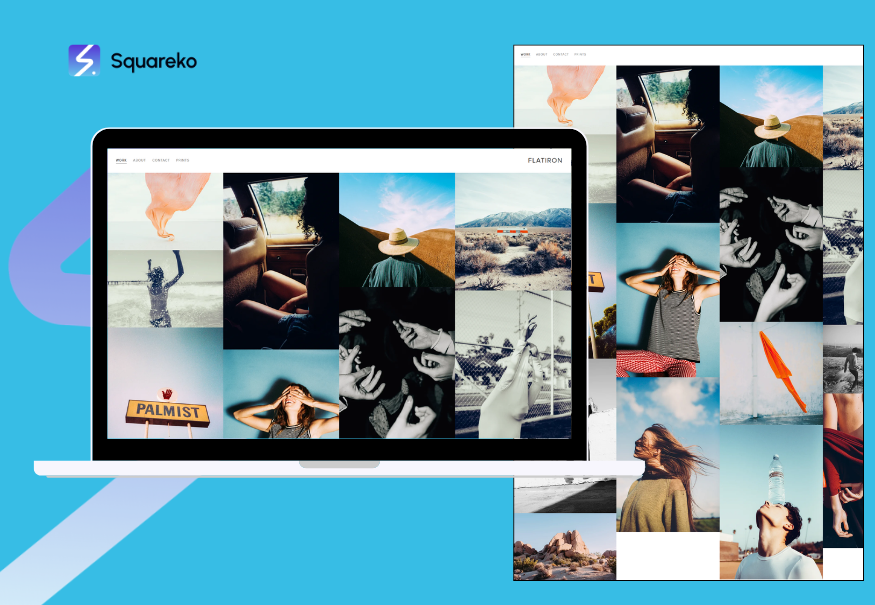
Flatiron is a versatile workhorse template that works well for photographers of all specialties. It features a clean, grid-based portfolio layout with strong navigation and professional branding tools.
Standout Features:
Customizable grid-based portfolio layout
Built-in portfolio filtering (organize by project type, date, or category)
Professional about page template
Integrated contact form with custom fields
Support for multiple portfolio sections (let clients see different work)
Client gallery and password protection features
Pros:
Flexible enough for wedding, portrait, commercial, and fine art photographers
Professional out of the box
Easy to update and add new portfolio pieces
Strong homepage branding options
Cons:
Somewhat generic—doesn't have a signature style
May not stand out as much as more distinctive templates
Booking integration requires third-party tools
Best For: Photographers who shoot multiple genres, agency photographers, or anyone who prioritizes versatility and professional branding over aesthetic distinctiveness.
Installation Difficulty: Easy to moderate — straightforward setup and customization.
Montauk — Lifestyle & Travel Photography
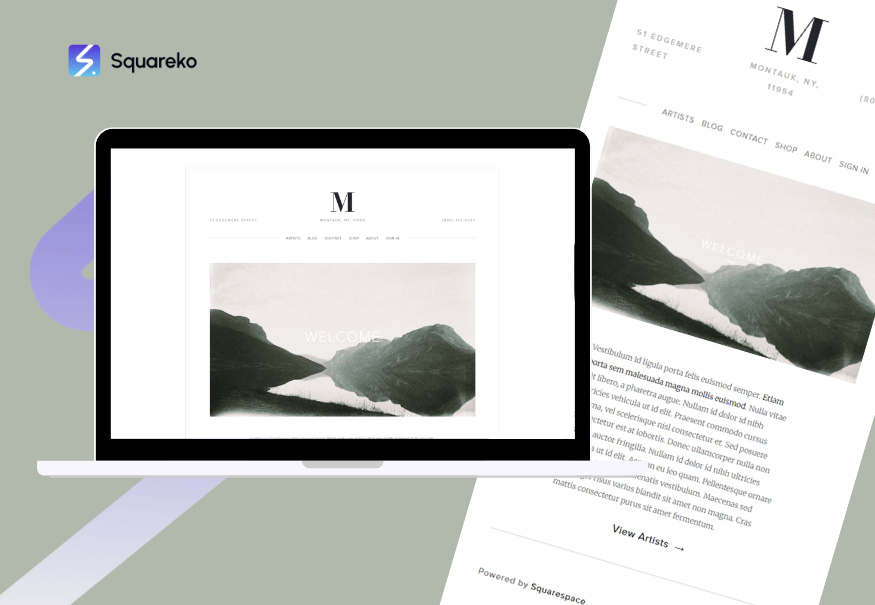
Montauk is a lifestyle-focused template perfect for travel photographers, adventure shooters, and lifestyle brands. It emphasizes storytelling alongside images, with blog integration and editorial layouts.
Standout Features:
Full-screen hero images with text overlay
Integrated blog platform for travel stories and behind-the-scenes content
Social media feed integration (Instagram, TikTok)
Customizable color overlays and filters
Video background support on homepage
Newsletter signup integration
Pros:
Excellent for storytelling and narrative photography
Blog integration allows for SEO-friendly content creation
Great for travel and lifestyle photographers building an audience
Social integration helps grow your following directly from your site
Cons:
Blog-heavy design means it's as much a publishing platform as a portfolio
Requires regular blog content to look active and fresh
May not be ideal if you just want a clean portfolio with minimal text
Best For: Travel photographers, lifestyle photographers, adventure photographers, and content creators who want to build an audience alongside selling their work.
Installation Difficulty: Moderate — requires ongoing blog maintenance.
Sofia — Minimalist for Studio Photographers
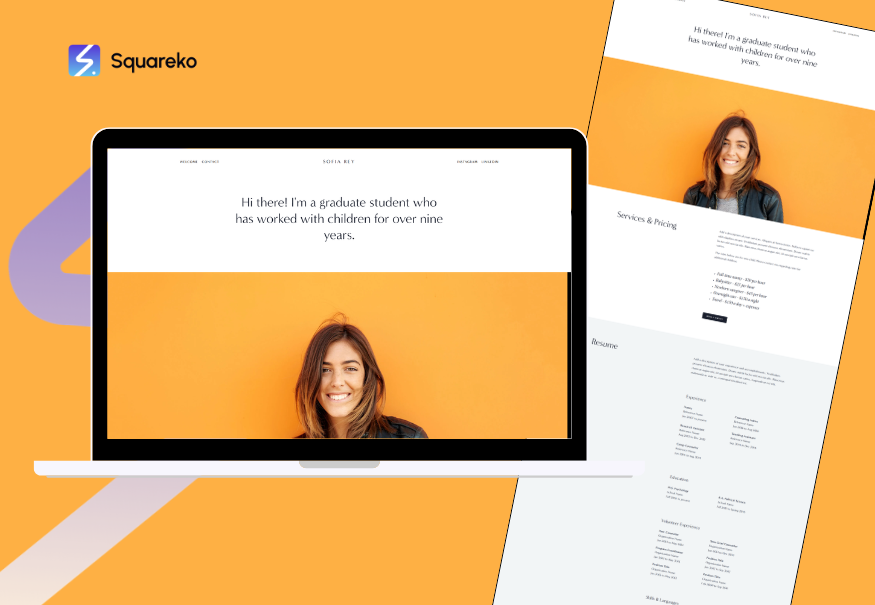
Sofia is a stripped-down, minimal template that prioritizes simplicity and elegance. It's ideal for studio photographers who want clean, distraction-free layouts.
Standout Features:
Minimal homepage with featured image and text
Simple, single-column gallery layouts
Customizable navigation (sticky or standard)
Client testimonials section
Built-in contact form
Newsletter signup support
Pros:
Incredibly fast loading times (minimal CSS and JavaScript)
Easy to customize even for non-technical users
Perfect for photographers with a strong personal brand
Mobile-first responsive design
Cons:
Very minimal—requires strong branding to stand out
Limited portfolio organization features
No built-in booking or appointment scheduling
Best For: Studio photographers, headshot photographers, minimalist personal brands, and photographers who want a fast, clean, simple site.
Installation Difficulty: Easy — excellent for beginners.
Waverly — Modern & Clean for Wedding & Event Photographers
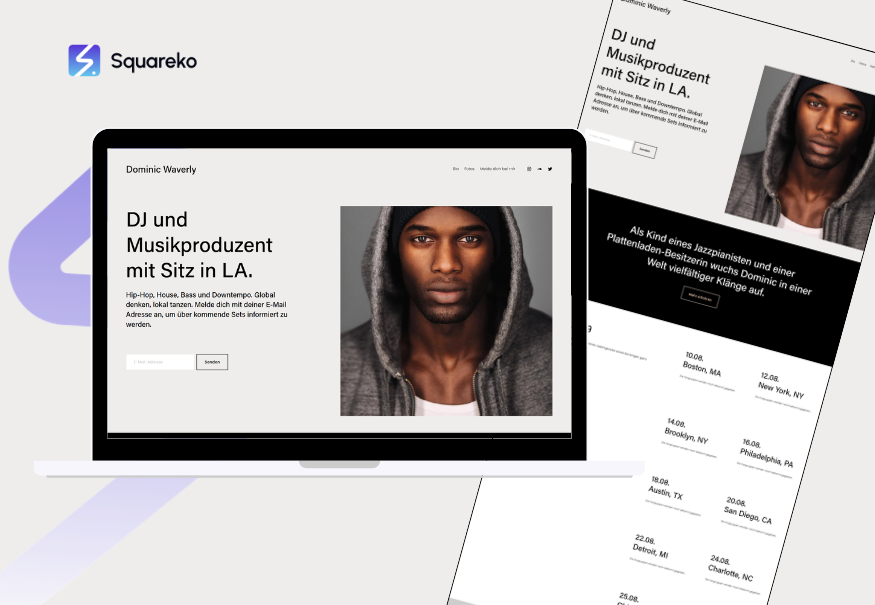
Waverly is a modern, clean template with a contemporary aesthetic. It strikes a balance between sophistication and approachability, making it popular with wedding and event photographers who want a current, not-too-trendy look.
Standout Features:
Clean, card-based gallery layouts
Modern sans-serif typography
Built-in testimonials and social proof section
Appointment scheduling integration (Acuity Scheduling, Calendly)
Call-to-action buttons throughout for bookings and inquiries
Blog support for wedding planning tips and industry insights
Pros:
Modern but timeless design that won't feel dated in a year
Strong CTA placement drives client inquiries and bookings
Testimonials and review features build trust
Works well for both wedding and non-wedding photographers
Cons:
Requires good photography to look its best
Somewhat generic—many photographers use the same template
Third-party booking integrations can add complexity
Best For: Wedding photographers, event photographers, and any photographer who wants a contemporary, clean aesthetic with strong client conversion features.
Installation Difficulty: Moderate — scheduling integration requires setup.
When to Choose a Custom Build Over a Template
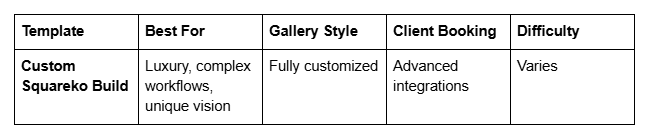
Templates are fantastic starting points, but they're not the only option. If you're a photographer with specific needs—complex client workflows, multiple service offerings, or a truly distinctive brand vision—a custom-built website might be worth considering.
You might want a custom build if:
You need advanced client management features (session galleries, invoicing, automated email sequences)
Your photography business has multiple service lines that don't fit neatly into a single template structure
You want a completely custom design that reflects your unique brand and aesthetic
You're a high-end photographer targeting luxury clients who expect bespoke experiences
You need advanced e-commerce features (selling prints, presets, digital downloads)
You want custom integrations with your existing tools (email marketing, CRM, accounting software)
At Squareko, we specialize in custom Squarespace builds for photographers who have outgrown templates. We handle everything from initial strategy and design through launch and optimization, ensuring your site reflects your brand and drives real business results.
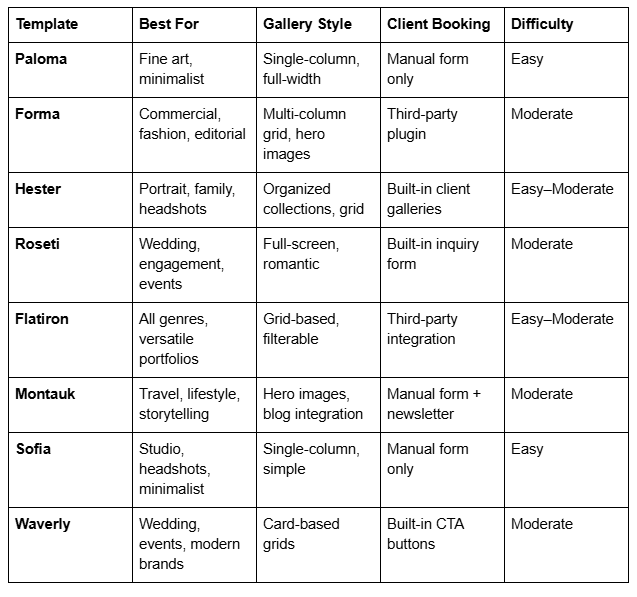
Photography Template Comparison Matrix
Frequently Asked Questions
-
Yes, you can change templates, but it's not seamless. Your content (text, images, blogs) will transfer, but your layout customizations won't. If you've spent weeks customizing colors and fonts in Paloma and then switch to Forma, you'll lose those customizations. For this reason, it's worth taking time to choose the right template upfront. That said, changing templates is easier than redesigning a custom WordPress site, so don't let this stop you from switching if your needs change.
-
Some do, some don't. Roseti and Hester have client gallery features, and Waverly has strong CTA buttons for bookings. But most templates don't include appointment scheduling out of the box—you'll need to integrate a third-party service like Acuity Scheduling, Calendly, or Picktime. Squarespace's native appointment feature is available, but it requires a bit of setup. Custom builds often include more seamless booking integrations tailored to your specific workflow.
-
Hester or Roseti. Both are beautiful, include the features wedding photographers actually need (client galleries, testimonials, inquiry forms), and are free to use with any Squarespace plan. Roseti is specifically designed for weddings, but Hester works great too if you also shoot other portrait work.
-
Template installation takes about 30 minutes. Basic customization (changing colors, adding your logo, uploading your gallery) takes 1–2 weeks, depending on how polished you want it. If you're working with a designer or agency like Squareko, the process is faster and more refined, typically 2–4 weeks from start to launch.
-
Yes, you can. Many photographers use the same templates. What matters is how you customize it—your unique brand colors, photography style, copy, and overall personality will make your site stand out. That said, if you want a truly differentiated website, a custom build ensures no one else has your exact design.
-
Squarespace templates are built to be SEO-friendly and fast. All templates use responsive design, fast-loading image optimization, and clean code. There's no SEO penalty for using a template vs. a custom build. The main speed factor is your image file sizes and how much content you have—that's up to you, not the template.
-
You have two options: use a Squarespace plugin or integration to add functionality (like Acuity Scheduling for appointments), or switch to a custom build. Most common photography needs (booking, client galleries, testimonials, blogs) can be solved with integrations. More complex or highly customized needs usually require a custom build.
-
Paloma, Forma, and Roseti are specifically designed to prioritize and showcase photography. They use large images, minimal text, and elegant spacing. If your photography is your strongest asset, any of these three will serve you well. For organized galleries of multiple sessions, Hester excels.
Ready to Launch Your Photography Website? Let Squareko Help You Stand Out
Choosing the right template is just the first step. The real work—and the real results—come from turning that template into a website that reflects your unique style, attracts your ideal clients, and actually converts visitors into bookings.
Many photographers we work with start with a template and quickly realize they want something more. Maybe you need a custom client gallery system that integrates with your workflow. Maybe your wedding photography packages don't fit neatly into the standard template structure. Or maybe you want a site that's so distinctive, potential clients immediately know it's you and not three other photographers using the same design.
We're Squarespace web design specialists focused specifically on photographers and creative professionals. We don't just slap your images into a template and call it done. We start by understanding your business—how you work with clients, what makes you different from other photographers in your market, and what success actually looks like for your website.
From there, we either customize an existing template to perfection or build a completely custom Squarespace site tailored to your business needs. We handle everything: strategy, design, custom functionality, copywriting, image optimization, and launch. Once you go live, we stay involved with SEO optimization, analytics review, and ongoing tweaks to improve your conversion rate.
Our clients typically see results fast: more qualified inquiries, higher booking rates, and a website they're genuinely proud to show potential clients.
If you're ready to move beyond a DIY template and want a website that actually drives your photography business forward, book a free discovery call with our team. No pressure, no sales pitch—just a conversation about your goals and how we can help.

From custom website design to SEO strategy, we help businesses launch a site that looks professional and performs better.

About the Author
I'm Walid Hasan, a Certified Squarespace Expert and Squarespace Circle Platinum Partner with over 12 years of hands-on experience designing and optimizing high-performing websites. Over the years, I've had the privilege of building more than 2,000 Squarespace websites for clients around the world, always focusing on clean design, strong user experience, and conversion-driven results.
