
Squarespace SEO for Content Creators: Rank on Google & AI Search
Introduction
If you're a content creator building your brand online, you've probably invested serious time into producing quality work. Your videos are engaging, your photos are stunning, but there's one problem: almost nobody's finding you. That's where Squarespace SEO for content creators becomes your secret advantage.
Most content creators focus on uploading to YouTube or TikTok and calling it a day. But here's what they're missing: a strategically built website owned entirely by you—one that ranks in Google searches, appears in AI-generated recommendations, and builds real business authority. Squarespace makes this easier than ever, but only if you know how to set it up right.
In 2026, the competition for visibility isn't just happening on social platforms anymore. Google's AI overviews are changing how people discover creative professionals. AI search engines like ChatGPT, Claude, and Perplexity are directing users to specific creators and portfolio sites. If your Squarespace website isn't optimized for both Google and these emerging AI search channels, you're leaving opportunities on the table. This guide shows you exactly how to win in all three channels: traditional Google search, YouTube, and the AI-powered search landscape that's reshaping discovery.
Key Takeaways Squarespace SEO for Content Creators: Rank on Google & AI Search
Squarespace SEO for content creators requires a multi-channel strategy: your website + YouTube + AI search visibility
Proper schema markup (VideoObject, Person, Organization) helps Google and AI engines understand who you are and what you create
The YouTube + Squarespace blog combination ranks better than either platform alone when done strategically
AI search visibility demands E-E-A-T signals: publish author bios, credentials, and consistent brand messaging across your site
Technical SEO, fast page speeds, and mobile optimization directly impact your ranking potential on Squarespace
1. Why SEO Matters More Than Ever for Content Creators in 2026
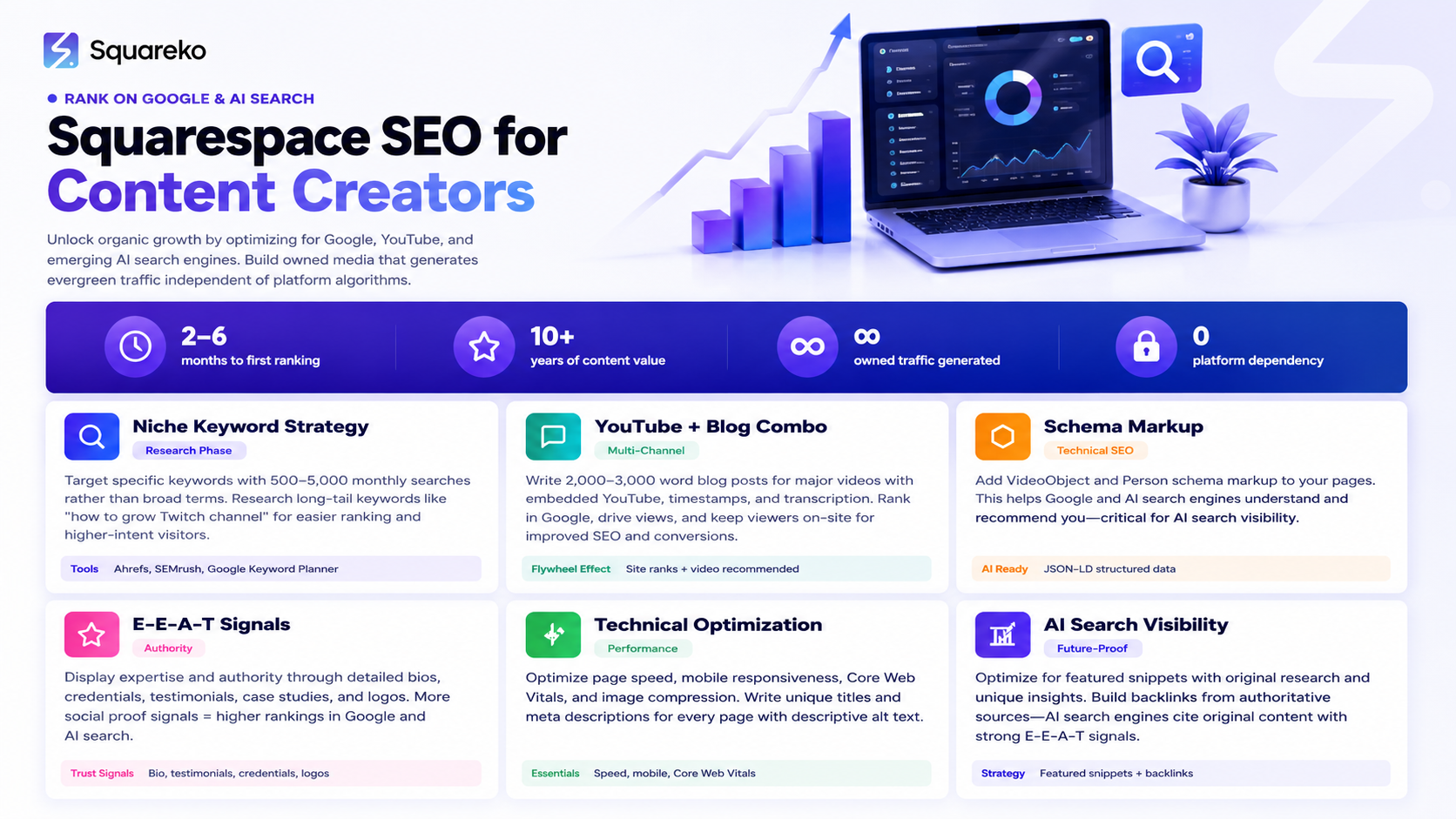
The creator economy is massive. Millions of people are building audiences, launching courses, selling digital products, and building personal brands. But here's the reality: 90% of them are entirely dependent on social media platforms they don't own. Algorithm changes on YouTube or Instagram can tank your reach overnight.
This is where SEO becomes non-negotiable. Unlike social media, search engine traffic is:
Owned by you. Google can't delete your search rankings overnight. Your site is yours.
Consistently high-intent. When someone finds you through Google, they're actively searching for exactly what you offer. Compare that to scrolling through Instagram where engagement is often accidental.
Evergreen. A blog post you write today can generate traffic for years. Social media posts disappear in days.
Diversified income and opportunity access. Sponsors, brand partnerships, and client work become easier when you can prove consistent, owned traffic. AI search algorithms are starting to surface creator websites more prominently, which means your Squarespace site could be the first thing someone sees when asking an AI for video recommendations, photography tips, or music production advice.
2. Squarespace SEO Foundations for Creators
Before you can rank anywhere, your Squarespace site needs to be technically sound. Think of these foundations like the base of a house; you can't build a mansion on a weak foundation.
Page Titles and Meta Descriptions
Every page on your Squarespace site needs a unique page title and meta description. These are the first things people see in Google search results, so they need to be compelling.
Page Title Formula for Creators:
Include your focus keyword early
Keep it under 60 characters (including spaces)
Make it specific, not generic
Meta Description Formula:
150-160 characters maximum
Include a call to action when relevant
Example: Award-winning landscape photographer specializing in desert environments. See my work and hire me for commercial shoots.
URL Slugs
Squarespace auto-generates URL slugs, but you should customize them for clarity. Instead of /p/5a3b2c1d0e9f, use /landscape-photography-portfolio or /about-the-photographer.
Short, keyword-rich slugs help both users and search engines understand what a page is about.
Image Alt Text and File Names
This is where creators often drop the ball. When you upload a photo or screenshot, rename the file before uploading. Instead of IMG_4821.jpg, use landscape-sunset-colorado-mountains.jpg.
Then, in Squarespace's SEO panel, write descriptive alt text: Golden sunset lighting mountain peaks in Rocky Mountain National Park, Colorado. This serves two purposes:
Accessibility: Screen reader users get context about your images
SEO: Google's image search algorithm can now identify what's in your photos, potentially driving traffic from Google Images
Heading Hierarchy
Use one H1 per page. This is typically your main page title or post title. Use H2s and H3s to structure subsections logically. Proper heading hierarchy helps search engines understand your content structure and makes your site easier to navigate.
3. Keyword Strategy for Content Creators
Generic keywords like photographer or content creator are too broad to rank for. You need a layered keyword strategy that combines niche, platform, and location signals.
Finding Your Niche Keywords
Start with your specific expertise. Instead of photography, target landscape photography Colorado or portrait photography for nonprofits.
Tools like Ahrefs, SEMrush, and even free tools like Google Keyword Planner show search volume and competition for specific terms. Look for keywords with:
500-5,000 monthly searches (lower volume but easier to rank for initially)
Moderate competition (not impossible to beat)
Clear creator intent (someone searching for portfolios, tutorials, or services)
Platform-Specific Keywords
Include terms that signal where your content lives. Examples:
YouTube gaming channel design portfolio
Squarespace YouTube SEO for streamers
Content creator website examples
These keywords often have lower volume but extremely high intent. Someone searching for Squarespace YouTube SEO is literally looking for someone like you.
Location and Niche Combinations
If you serve clients locally or have a geographic focus, combine location with niche:
Wedding videographer Austin Texas
Music production courses Los Angeles
Fitness content creator Boston area
Geographic specificity dramatically improves your ranking potential and attracts quality leads.
The Long-Tail Keyword Advantage
Long-tail keywords (3+ words) are your secret weapon. A keyword like how to optimize Squarespace for YouTube videos has fewer competitors than just Squarespace and usually converts better. Long-tail searches show higher purchase intent.
4. The YouTube + Squarespace Blog Combination Strategy
This is where most creators miss a massive opportunity. YouTube is excellent for distribution, but Squarespace is better for ranking. Together, they create a flywheel.
How the Combination Works
Imagine you create a 10-minute YouTube video about lighting setups for portrait photographers. You upload that video to YouTube, where it gets some initial views. Meanwhile, you write a 2,500-word blog post on your Squarespace site covering the same topic in depth.
In that blog post, you:
Embed your YouTube video
Link to your portfolio, services page, and client case studies throughout the content
Optimize the post for lighting setups for portrait photographers
Now you're ranking in Google search for that keyword and YouTube is recommending your video to people interested in photography.
The Content-Repurposing Formula
For every significant video, create companion blog content:
Video: 8-minute tutorial on editing product photos
Blog Post: Complete Guide to Product Photography Editing: Step-by-Step Tutorial + Settings I Use
The blog post becomes evergreen SEO real estate. Your YouTube video is more discoverable. Together, they drive traffic to your Squarespace website, where you can convert visitors into email subscribers, course students, or service clients.
Embedding Best Practices
When you embed your YouTube video in a Squarespace blog post:
Write introductory text before the embed (at least 100 words) explaining what the video covers
Add timestamps in the post body so readers can jump to specific sections
Include a transcription or detailed summary below the video
Link to related blog posts and resources
This structure keeps people on your site longer, gives Google more context about your content, and makes it more likely that AI search engines recognize your authority.
5. Schema Markup for Video Creators
Schema markup is structured data that helps search engines and AI systems understand what's on your pages. For creators, this is critical.
VideoObject Schema
If you're embedding videos, use VideoObject schema. Here's what it looks like:
{
  "@context": "https://schema.org",
  "@type": "VideoObject",
  "name": "Lighting Setups for Portrait Photography",
  "description": "Complete guide to three professional lighting setups for portrait photography. Covers equipment, positioning, and camera settings.",
  "thumbnailUrl": "https://yoursite.com/images/video-thumbnail.jpg",
  "uploadDate": "2026-03-15",
  "duration": "PT8M42S",
  "embedUrl": "https://www.youtube.com/embed/videoID",
  "author": {
    "@type": "Person",
    "name": "Your Name",
    "url": "https://yoursite.com"
  }
}
Squarespace doesn't automatically add this, but you can add it to your blog posts using custom code blocks or by working with a developer like Squareko.
Person Schema
This tells search engines and AI systems who you are:
{
  "@context": "https://schema.org",
  "@type": "Person",
  "name": "Your Full Name",
  "url": "https://yoursite.com",
  "image": "https://yoursite.com/images/headshot.jpg",
  "sameAs": [
    "https://youtube.com/yourhandle",
    "https://instagram.com/yourhandle",
    "https://twitter.com/yourhandle"
  ],
  "jobTitle": "Portrait Photographer & Content Creator",
  "description": "Award-winning portrait photographer specializing in corporate headshots and personal branding photography.",
  "knowsAbout": ["Portrait Photography", "Lighting", "Photo Editing", "Branding"]
}
Organization Schema
If your creator business is a named entity (like "Creative Studios by Sarah"), use Organization schema:
{
  "@context": "https://schema.org",
  "@type": "Organization",
  "name": "Creative Studios by Sarah",
  "url": "https://creativestudios-sarah.com",
  "logo": "https://creativestudios-sarah.com/logo.png",
  "description": "Professional photography and content creation services.",
  "founder": {
    "@type": "Person",
    "name": "Sarah"
  },
  "sameAs": [
    "https://youtube.com/creativestudiosbysarah",
    "https://instagram.com/creativestudiosbysarah"
  ]
}
6. How to Get Found on AI Search as a Content Creator
This is the frontier. While Google dominated the 2010s, AI-powered search is reshaping discovery in 2026.
Understanding AI Search Engines
ChatGPT, Claude, Gemini, and Perplexity aren't perfect Google replacements, but they're changing how people find information and creators. When someone asks an AI, "Who are the best portrait photographers in Austin?", they get an answer citing specific creators or portfolios.
The AI systems are trained to cite authoritative sources. A Squarespace website with proper E-E-A-T signals (Expertise, Authoritativeness, Trustworthiness) is more likely to be cited than a social media profile.
Getting Cited in AI Responses
To appear in AI-generated recommendations:
Optimize for featured snippets on Google. AI systems often source from Google's featured snippets. Write content that answers specific questions clearly and concisely (50-100 words). Format these answers as:
Numbered lists
Bullet points
Tables
Clear definitions
Build verifiable credentials. Create an "About" page with real credentials, certifications, awards, and client testimonials. AI systems check for these signals.
Publish consistently. AI training data comes from the web. If your Squarespace site hasn't been updated in months, it's less likely to be cited. Publish new blog posts at least monthly.
Get backlinks from authoritative sources. When reputable websites link to you, AI systems treat that as a trust signal. Pursue backlinks from photography associations, industry publications, and collaborative projects.
Use specific, structured content. Interview posts, case studies, and "creator spotlight" content are more likely to be cited in AI responses than generic advice.
Content That AI Systems Value
Create content specifically designed to be cited:
Case studies: "How I Grew My YouTube Channel from 0 to 100K Subscribers" (with actual results and timeline)
Original research: Survey your audience or conduct an experiment and publish the results
Interviews with other creators: These get cited as primary sources in AI responses
Detailed tutorials: Step-by-step guides with screenshots and explanations
Unique perspectives: Your personal methodology or unconventional approach
7. Building Your Creator Authority: E-E-A-T Signals That Matter
E-E-A-T stands for Expertise, Experience, Authoritativeness, and Trustworthiness. Google's ranking algorithm explicitly rewards sites with strong E-E-A-T signals. For AI search, these same signals matter.
Demonstrating Expertise
On your Squarespace site:
Credentials section: List relevant certifications, awards, and formal training. If you studied under a notable mentor or attended prestigious institutions, mention it.
Portfolio with context: Don't just show your best work. Explain the process, challenges, and results. Example: "Fashion Photography for Luxury Brands: Portfolio, Process, and Client Results."
Educational content: Regular blog posts teaching your craft demonstrate that you understand your field deeply.
Proving Experience
Years active: If you've been creating for 5+ years, say so. Longevity builds trust.
Client case studies: Feature 3-5 detailed case studies showing transformations or results. Include metrics when possible.
Published work: Link to your work featured in major publications, blogs, or platforms.
Building Authoritativeness
Guest posts and features: Write for industry blogs and publications. Link back to your Squarespace site from these guest posts.
Speaking engagements: If you speak at conferences or virtual events, mention them in your "About" page and blog.
Media mentions: Screenshot and link to any interviews, features, or mentions in media outlets.
Establishing Trustworthiness
Contact information: Make it easy for people to reach you. A hidden contact form damages trust. Use a prominent email, phone number, or contact form.
Testimonials and reviews: Feature real client testimonials with photos and names when possible.
Privacy and security: Clearly state your privacy policy and data protection practices.
Transparent pricing: If you offer services, publish pricing or a clear process for getting quotes.
Author bio on every post: Every blog post should include a byline with your photo, name, and a brief description.
8. Technical SEO for Squarespace Creator Websites
Even with great content, a slow or poorly structured site won't rank. Squarespace handles much of this automatically, but there are optimizations you should make.
Page Speed and Core Web Vitals
Google prioritizes fast-loading websites. Squarespace sites are generally fast, but you can optimize further:
Compress images before uploading. Use TinyPNG or ImageOptim to reduce file sizes without losing quality.
Limit video embeds per page. Multiple embedded videos slow down pages. Consider linking to videos instead of embedding, or limiting embeds to 1-2 per page.
Use Squarespace's built-in optimization. In Settings > SEO, enable "Enable SEO optimizations for page titles and descriptions."
Check Core Web Vitals. Use Google's PageSpeed Insights tool to see your scores on Largest Contentful Paint (LCP), First Input Delay (FID), and Cumulative Layout Shift (CLS).
Mobile Optimization
Over 50% of searches come from mobile devices. Squarespace templates are mobile-responsive by default, but test how your content displays on phones.
Use Squarespace's mobile preview. Switch to a mobile view while editing to ensure text is readable, images display properly, and calls-to-action are tappable.
Keep buttons large. Mobile users need finger-sized tap targets (48x48 pixels minimum).
Test video embeds. Videos should resize responsively on mobile.
XML Sitemaps and Robots.txt
Squarespace automatically generates these files, and they're usually fine as-is. But verify:
Check your sitemap: Visit yoursite.com/sitemap.xml to ensure all important pages are listed.
Test robots.txt: Visit yoursite.com/robots.txt to verify nothing important is blocked from crawling.
Verify Search Console: Link your Squarespace site to Google Search Console to monitor crawl errors and indexation status.
Internal Linking Structure
This is critical for SEO. Every blog post should link to:
2-3 other blog posts (related content)
Your portfolio or featured work
Your services or offerings
Use descriptive anchor text, not generic "click here" links. Example: Instead of "Check this out," write "See my landscape photography portfolio."
9. Content Strategy: What to Blog About as a Creator to Drive Traffic
Not all blog content is created equal. You want to write things that rank, drive traffic, and convert visitors into followers, clients, or students.
The Content Pyramid Strategy
Tier 1 - Pillar Content (1,200-2,500 words) These are comprehensive guides on major topics:
Complete Guide to Portrait Photography Lighting
How to Start a Successful YouTube Channel from Zero
What Software Do Professional Video Editors Use in 2026?
Pillar content targets your main keywords and serves as a hub for related blog posts.
Tier 2 - Cluster Content (800-1,200 words) These are specific, detailed posts that support your pillar content:
Softbox vs. Octabox: Which Is Better for Portrait Photography?
YouTube Monetization Requirements: Full 2026 Guide
DaVinci Resolve vs. Adobe Premiere: Complete Comparison
Tier 3 - Evergreen Content (400-800 words) Quick tips, tutorials, and how-tos:
5 Lighting Mistakes Beginner Photographers Make
How to Optimize Your YouTube Channel for Search
Best Free Editing Software for Content Creators
Content Ideas That Rank
Tutorial content: How to... posts consistently rank well and attract targeted traffic.
Comparison posts: People search for X vs. Y constantly. If you have experience with competing tools or techniques, write about it.
Trends and what's new: What's New in [Your Field] in 2026 attracts both search and AI-generated recommendations.
FAQ posts: Common questions in your niche often have decent search volume and lower competition.
Opinion/methodology posts: My Process for [Task] or Why I Prefer [Method] establishes your unique angle.
Keyword Research for Content Ideas
Check your YouTube analytics for search terms people use to find your videos
Look at comments on your videos; people often ask questions that make great blog post topics
Use Google Suggest (start typing a keyword in Google and see what appears)
Check competitor blogs to see what topics they're covering
Use keyword tools like Ahrefs, SEMrush, or free alternatives like Ubersuggest
Publishing Frequency
Consistency matters. Publishing one high-quality post monthly is better than publishing five low-quality posts in a week and then disappearing for two months.
Aim for:
1-2 posts per month initially
Build to 2-4 posts per month as you scale
Maintain this schedule consistently
10. 30-Day SEO Kickstart Plan for New Creator Websites
Ready to apply everything we've covered? Use this 30-day plan to launch your SEO foundation.
Week 1: Foundation
Days 1-2: Technical Setup
Verify your Squarespace site in Google Search Console
Verify your site in Google Analytics
Add Person or Organization schema markup to your site (or hire Squareko to do this)
Days 3-4: On-Page Optimization
Audit and update page titles and meta descriptions on your top 5 pages
Write descriptive alt text for all images on your homepage, about, and portfolio pages
Create or update your XML sitemap
Days 5-7: Content Assessment
Identify your 3 main topic clusters (the things you create content about)
List existing blog posts, videos, or portfolio items in each cluster
Identify gaps where you could write pillar or cluster content
Week 2: Content Creation
Days 8-14: Pillar Post
Write one comprehensive 1,500-2,500 word pillar post on your main topic
Optimize for your primary focus keyword
Include 2-3 internal links to related content
Add featured snippet opportunities (lists, tables, clear definitions)
Embed a YouTube video if relevant
Add an author bio and schema markup
Week 3: Authority Building
Days 15-21: Supporting Content
Write 2 cluster posts (800-1,200 words each) that support your pillar post
Write 2 quick-tip posts (400-600 words each)
Update your About page with expanded E-E-A-T signals (credentials, experience, testimonials)
Create or update your Contact page to be prominent and professional
Week 4: Optimization & Promotion
Days 22-30: Polish & Promotion
Review your analytics for the past 30 days
Identify your best-performing pages
Add 2-3 new internal links to your pillar post from other blog posts
Create a social media post for each new blog post (even if you use content distribution services, do this manually to start)
Reach out to 3 industry contacts about linking to your pillar post
Submit your sitemap to Google Search Console if not already done
-
A: Realistic timeline is 2-6 months to see measurable rankings for competitive keywords. For less competitive, niche keywords, you might see results in 4-8 weeks. Consistency matters more than speed.
-
A: Start with your Squarespace site and Google rankings. YouTube has its own algorithm and takes longer to build. Once your website is generating organic traffic, leverage that audience back to YouTube.
-
A: Not initially. Use Google Search Console (free), Google Analytics (free), and Google Keyword Planner (free) to start. As you scale, paid tools like Ahrefs or SEMrush are worth the investment.
-
A: Very important for authority and ranking faster. Guest post on 3-5 industry blogs, submit to creator directories, and build relationships with other creators in your niche who might link to your work.
-
A: Yes, but don't duplicate it exactly. Create a blog post that complements the video with written depth, examples, and links. This creates value for both search engines and readers.
-
A: Audit all your content first. Identify your best pieces and either republish them on your Squarespace blog or create new blog content around those topics with YouTube embeds. Consolidate your authority on your own site.
-
A: Check Google Search Console monthly. Track: clicks (how many people click from Google), impressions (how many times you appear in search results), and average position (where you rank). If clicks and impressions increase over 90 days, your strategy is working.
Ready to Rank? Let's Build Your Creator Authority
Here's the reality: You didn't become a content creator to chase algorithm changes on social media. You became a creator because you have talent, vision, and something valuable to share. But talent alone doesn't guarantee discovery.
A properly optimized Squarespace website becomes your greatest business asset. It's a 24/7 portfolio that works for you while you sleep. It ranks in Google. It appears in AI recommendations. It converts visitors into fans, clients, and customers.
But here's where most creators get stuck: They understand SEO matters, but they don't know where to start. They feel overwhelmed by technical requirements. They aren't sure whether to prioritize YouTube or their website. They build beautiful sites but get zero organic traffic.
That's where we come in.
At Squareko, we specialize in building Squarespace websites for content creators like you. We handle the technical SEO setup, schema markup, and strategic planning so you can focus on what you do best: creating amazing content. Our discovery calls help us understand your specific niche, target audience, and business goals—then we build a website strategy that actually works.
In our free discovery call, we'll discuss:
Your current content assets and how to leverage them for SEO
The specific keywords your audience is searching for
How to position your Squarespace site as an authority in your niche
A 90-day roadmap to your first 1,000 organic monthly visitors
This isn't a sales pitch. It's a working session where we diagnose your current situation and give you actionable insights—whether you work with us or not.
Recommended Internal Links
To maximize SEO impact, link from this post to:
About Page - Link in E-E-A-T Signals section when discussing credentials and author expertise
Squarespace Design Services Page - Link in CTA and Technical SEO section for creator website builds
Portfolio/Case Studies Page - Link when discussing E-E-A-T signals and creator examples
Blog Archive/Content Hub - Link in Content Strategy section as reference for existing creator content
SEO Consultation/Discovery Page - Link in opening and closing CTAs for qualified lead generation

From custom website design to SEO strategy, we help businesses launch a site that looks professional and performs better.

About the Author
Walid Hasan | Squareko
I'm Walid Hasan, a Certified Squarespace Expert and Squarespace Circle Platinum Partner with over 12 years of hands-on experience designing and optimizing high-performing websites. Over the years, I've had the privilege of building more than 2,000 Squarespace websites for clients around the world, always focusing on clean design, strong user experience, and conversion-driven results.
