
Squarespace Ecommerce SEO: The Complete Guide to Ranking Your Online Store in 2026
Introduction
If you're running an ecommerce store on Squarespace, you understand that building a beautiful storefront is only half the battle. The other half—the one that separates thriving online retailers from the rest—is getting customers to find you through search engines. That's where Squarespace ecommerce SEO guide 2026 practices come in.
Squarespace has made significant strides in ecommerce functionality and SEO capabilities. The platform now offers built-in tools for schema markup, customisable meta tags, and improved mobile responsiveness. However, simply having these features doesn't guarantee high rankings. You need a strategic, integrated approach that combines technical excellence, content mastery, and modern search optimisation techniques.
This guide will walk you through everything you need to know to optimise your Squarespace store for search engines in 2026. Whether you're launching your first product or scaling an established business, you'll find actionable strategies backed by current best practices.
Key Takeaways
Keyword Research Forms the Foundation: Identify search intent and priorities high-intent keywords that attract customers ready to purchase
Product Page SEO is Non-Negotiable: Unique descriptions, strategic keyword placement, and compelling calls-to-action drive both search visibility and conversions
Schema Markup is Essential: Implement Product, BreadcrumbList, and Review schemas to enhance rich snippets and SERP appearance
Technical SEO Cannot Be Overlooked: Page speed, mobile responsiveness, XML sitemaps, and crawlability directly impact rankings
AI Search Optimisation Requires New Thinking: Structure data for AI shopping assistants, leverage review aggregation, and optimise for generative search queries
Blog Content Attracts and Converts: Build topical authority through strategic content that addresses customer questions and pain points
Continuous Monitoring and Testing Drive Results: Track metrics, analyse performance, and refine your strategy monthly
Keyword Research for Squarespace Ecommerce
Keyword research is the bedrock of any successful SEO strategy. Without understanding what your customers are searching for, you're essentially shooting in the dark.
Understanding Search Intent
Ecommerce keyword research differs from content marketing in one crucial way: search intent. While a blog post targeting "how to choose a running shoe" is informational, a searcher looking for best running shoes under £100 has commercial intent and is ready to purchase.
For Squarespace stores, prioritise these keyword types:
Transactional Keywords: "buy [product]", "[product] for sale", "[brand] UK"
Commercial Investigation: "best [product]", "[product] comparison", "[product] reviews"
Branded Keywords: Your store name, variations, and brand + product combinations
Long-Tail Variations: Specific product features, colours, sizes, and use cases
Tools and Resources for Ecommerce Keyword Research
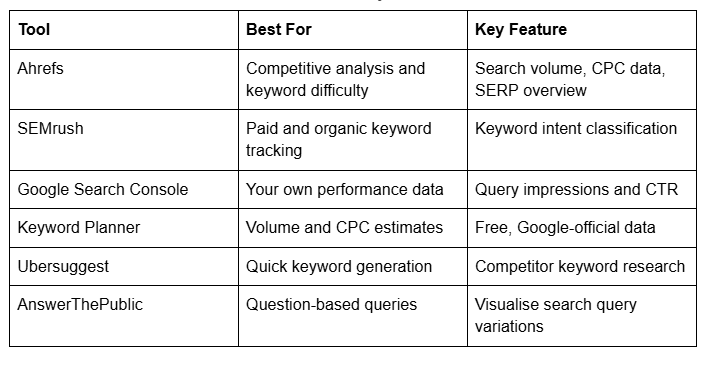
Structuring Your Keyword Strategy
Create a keyword spreadsheet for your Squarespace store with these columns:
SEO Tool Comparison for Squarespace Stores
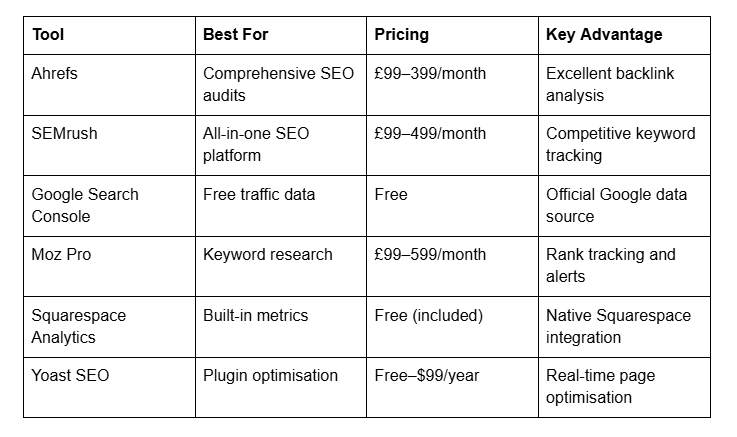
Keyword phrase
Search volume (monthly searches)
Keyword difficulty (0-100 scale)
Commercial intent (high/medium/low)
Current ranking (if tracked)
Target page (product, collection, or blog post)
Internal link anchor text (planned interlinking)
Aim for a mix: 30% high-difficulty branded keywords, 40% medium-difficulty long-tail keywords, and 30% quick-win, low-difficulty keywords.
On-Page SEO Fundamentals for Your Store
On-page SEO is everything you can control directly on your website. For Squarespace, this includes meta tags, header hierarchy, content structure, and internal linking.
Crafting Compelling Meta Titles and Descriptions
Your meta title (60 characters max) and meta description (155–160 characters) are your first impression in search results.
Squarespace Meta Title Best Practice:
Include primary keyword near the beginning
Include your brand name if space permits
Avoid keyword stuffing; remain natural and compelling
Example: "Women's Organic Cotton T-Shirts | EcoBrand Store"
Squarespace Meta Description Best Practice:
Lead with your unique value proposition
Include secondary keywords naturally
End with a subtle CTA when appropriate
Example: "Shop premium organic cotton tees in 8 colours. Ethically made, sustainable fabrics. Free shipping on orders over £50. Browse our collection today."
Header Hierarchy and Content Structure
Squarespace automatically generates H1 headers from your page titles. Ensure:
One H1 per page (your main product or page title)
Multiple H2 headers for subheadings and sections
H3 headers for detailed subsections
Logical flow matching user expectations
Internal Linking Strategy
Internal links distribute authority and help search engines understand site structure.
For product pages:
Link to related products using descriptive anchor text ("see our [product type] collection")
Link to relevant blog posts that support purchase decisions
Include category/collection links in navigation
For collection pages:
Link to individual products
Link to comparison blog posts
Link to buying guides
Product Page SEO: Optimising Individual Listings
Product pages are the revenue drivers of your ecommerce store. Optimisation here directly impacts both rankings and conversions.
Unique Product Descriptions
Never use manufacturer descriptions. Search engines penalise duplicate content, and more importantly, unique descriptions help you rank for long-tail, commercial keywords.
Your product description should include:
Primary keyword (naturally, within first 100 words)
Product benefits (not just features)
Specifications (dimensions, materials, weight, colours available)
Use cases and ideal customer profile
Social proof (reviews, customer testimonials)
Clear call-to-action ("Add to Basket", "Choose Your Size")
Length varies by product complexity, but 200–400 words typically strikes the right balance for search engines and conversion optimisation.
Strategic Keyword Placement
Title tag: Primary keyword
Meta description: Secondary keyword variant
First 100 words: Primary keyword and related terms
Subheadings: Long-tail variations
Product specifications: Natural keyword inclusion
Alt text on images: Descriptive, includes relevant keywords
Product Images and Alt Text
Images account for a surprising amount of ecommerce traffic. Optimise them:
Use descriptive alt text for every product image: "navy blue merino wool jumper front view" rather than "product-123.jpg"
Optimise file names: product-navy-jumper-mens.jpg instead of IMG_8372.jpg
Compress images to reduce page load time (Squarespace handles this reasonably well, but review)
Consider image schema (part of Product schema) to appear in Google Images
Reviews and User-Generated Content
Search engines and AI algorithms increasingly favour pages with genuine customer reviews. Squarespace's built-in review functionality is valuable:
Encourage customers to leave reviews (email follow-ups after purchase)
Respond to reviews (both positive and negative) to boost engagement signals
Include review schema markup (covered in schema section)
Display star ratings prominently (schema helps this appear in SERPs)
Blog Strategy to Drive Organic Traffic
A Squarespace blog integrated with your ecommerce store is a powerful acquisition channel. Blogs address questions and pain points your customers have before they're ready to buy.
Content Themes That Drive Sales
Develop blog content clusters around your product categories:
Buying guides: "The Complete Guide to Choosing Running Shoes" (targets high-intent searches)
How-to content: "How to Care for Merino Wool Clothing" (builds trust and authority)
Product comparisons: "[Product A] vs [Product B]" (commercial intent)
Trend and industry content: "2026 Fashion Trends in Sustainable Fabrics" (informational, builds authority)
Problem-solution content: "Why Your Feet Ache After Work (And the Shoe Solution)" (high intent)
Structuring Blog Posts for SEO
Each blog post should:
Target a specific keyword (ideally a long-tail variation of a product page keyword)
Include an internal link to relevant product pages (2-4 per post)
Be at least 1,500 words for substantial ranking potential
Include subheadings (H2 and H3) with keyword variations
Incorporate images with descriptive alt text
End with a relevant CTA that links to products or collections
Publishing Frequency and Consistency
Quality trumps quantity, but consistency matters:
Publish 1–2 substantial blog posts per month to signal to search engines that your site is active
Maintain a consistent publishing schedule (Squarespace allows scheduled posts)
Repurpose blog content into social media, email, and other channels
Technical SEO for Squarespace Stores
Technical SEO ensures search engines can crawl, index, and understand your store effectively.
Page Speed and Core Web Vitals
Squarespace has made significant improvements to page speed. Still, ensure:
Test your store with Google PageSpeed Insights (target >90 score)
Minimise uncompressed images and use modern formats (WebP when possible)
Disable unneeded Squarespace features (unused apps, tracking pixels)
Monitor Core Web Vitals: Largest Contentful Paint, First Input Delay, Cumulative Layout Shift
A slow site loses rankings and conversions. Aim for pages under 3 seconds load time on 4G mobile connections.
Mobile Responsiveness
Squarespace uses responsive design by default, but:
Test on actual devices, not just browser emulation
Ensure buttons are tap-friendly (minimum 48x48 pixels)
Avoid popups that obscure content on mobile
Test checkout flow on mobile thoroughly
XML Sitemaps and Robots.txt
Squarespace generates XML sitemaps automatically:
Verify sitemap existence: Visit yoursite.com/sitemap.xml
Submit to Google Search Console for monitoring
Check robots.txt (yoursite.com/robots.txt) to ensure no accidental blocking
If you have >50,000 products, consider:
Breaking sitemaps into smaller files (by category)
Setting a crawl budget priority (featured products first)
Canonical Tags
Squarespace handles canonicalisation automatically, but verify:
No duplicate product pages created by colour/size filters
Secure HTTPS protocol enforced (yoursite.com, not http)
WWW consistency (use one standard across your site)
Crawlability and Indexation
Check in Google Search Console:
Coverage report to identify unindexed pages
Excluded URLs to ensure only intentional pages are blocked
Mobile usability for errors
Remove outdated products from the index (delete or noindex)
Schema Markup and Rich Snippets
Schema markup is structured data that helps search engines understand your content. For ecommerce, it's increasingly essential—especially with AI shopping assistants now indexing product data.
Product Schema Implementation
Product schema is the most important for ecommerce stores. Here's a complete example for Squarespace:
{
  "@context": "https://schema.org/",
  "@type": "Product",
  "name": "Men's Merino Wool Base Layer",
  "image": [
    "https://example.com/product-front.jpg",
    "https://example.com/product-back.jpg"
  ],
  "description": "Premium 100% merino wool base layer, naturally temperature-regulating and odour-resistant. Available in black, navy, and grey. Machine washable.",
  "sku": "BASEMERINO-BLK-M",
  "brand": {
    "@type": "Brand",
    "name": "YourBrandName"
  },
  "offers": {
    "@type": "Offer",
    "url": "https://example.com/products/merino-base-layer",
    "priceCurrency": "GBP",
    "price": "89.99",
    "priceValidUntil": "2026-12-31",
    "availability": "InStock",
    "seller": {
      "@type": "Organization",
      "name": "Your Store Name"
    }
  },
  "aggregateRating": {
    "@type": "AggregateRating",
    "ratingValue": "4.7",
    "reviewCount": "243",
    "bestRating": "5",
    "worstRating": "1"
  },
  "review": [
    {
      "@type": "Review",
      "reviewRating": {
        "@type": "Rating",
        "ratingValue": "5"
      },
      "author": {
        "@type": "Person",
        "name": "Sarah M."
      },
      "reviewBody": "Incredibly warm without being bulky. Perfect for winter hiking."
    }
  ]
}
Squarespace allows you to add custom code blocks for schema markup. Add this to your product page footer or in Squarespace's SEO panel where available.
BreadcrumbList Schema
BreadcrumbList helps search engines understand site structure and appears as navigation breadcrumbs in SERPs:
{
  "@context": "https://schema.org/",
  "@type": "BreadcrumbList",
  "itemListElement": [
    {
      "@type": "ListItem",
      "position": 1,
      "name": "Home",
      "item": "https://example.com"
    },
    {
      "@type": "ListItem",
      "position": 2,
      "name": "Clothing",
      "item": "https://example.com/collections/clothing"
    },
    {
      "@type": "ListItem",
      "position": 3,
      "name": "Base Layers",
      "item": "https://example.com/collections/base-layers"
    },
    {
      "@type": "ListItem",
      "position": 4,
      "name": "Men's Merino Wool Base Layer",
      "item": "https://example.com/products/merino-base-layer"
    }
  ]
}
Add this to your product page header or in a custom code block.
Aggregate Review Schema
Make your review ratings visible in search results:
{
  "@context": "https://schema.org/",
  "@type": "AggregateRating",
  "ratingValue": "4.7",
  "reviewCount": "243",
  "bestRating": "5",
  "worstRating": "1"
}
Include this within Product schema (as shown in the full example above).
Organization and Local Business Schema
For brands with physical locations:
{
  "@context": "https://schema.org/",
  "@type": "Organization",
  "name": "YourStore",
  "url": "https://example.com",
  "logo": "https://example.com/logo.png",
  "sameAs": [
    "https://www.instagram.com/yourstore",
    "https://www.twitter.com/yourstore"
  ],
  "address": {
    "@type": "PostalAddress",
    "streetAddress": "123 High Street",
    "addressLocality": "London",
    "postalCode": "SW1A 1AA",
    "addressCountry": "GB"
  },
  "telephone": "+44 20 7946 0958"
}
Local SEO for Ecommerce Businesses
If your Squarespace store is connected to a physical location—whether a shop, warehouse, or shipping hub—local SEO amplifies your visibility to nearby customers.
Google Business Profile Optimisation
Your Google Business Profile is essential:
Claim and verify your business listing
Complete all sections: business category
Add photos (store exterior, team, products)
Ensure accurate address, phone, hours
Link to your Squarespace store in the website field
Respond to reviews (ask for customer feedback after purchases)
Local Citations and NAP Consistency
NAP (Name, Address, Phone) consistency across web directories improves local ranking:
Consistent business name across Google Business Profile, your website, directories
Matching address (avoid abbreviations)
Single phone number throughout all listings
Submit your store to:
Yell.com (UK business directory)
Thomson Local
Your industry-specific directories
Local chamber of commerce websites
Localised Landing Pages and Content
If you ship nationwide or internationally:
Create location-specific content: "Delivering to London in 2 Hours" or "Shipping Across the UK"
Local keywords: "buy [product] in [city]" pages
Community engagement: Partner with local influencers, sponsor local events, feature customer stories from specific regions
AI Search Optimisation and GEO
2026 marks the maturation of generative AI in search. ChatGPT's Advanced Voice Mode, Claude's multimodal capabilities, and Google's AI Overviews are reshaping how customers discover products. Your Squarespace store must be optimised for this new landscape.
Understanding AI Shopping Assistants
AI shopping assistants (like ChatGPT's integrated shopping, new Perplexity commerce features, and Google's generative commerce) work differently from traditional Google search:
They analyse multiple sources, including structured data, reviews, and price aggregators
They prioritise rich schema markup (Product, Review, Offer schemas)
They favour established brands and high-review-count products
They emphasise price transparency and availability
Structuring Data for AI Shopping Discovery
AI systems rely heavily on schema markup. To rank in AI shopping results:
Implement complete Product Schema (as shown earlier) on every product page
Include Offer schema with current pricing and inventory status
Embed Review schema with genuine customer ratings (5+ reviews optimal)
Use Breadcrumb schema for clear categorisation
Add Product availability schema (InStock, OutOfStock, PreOrder, BackOrder)
Update your schema when prices change or stock status shifts. Real-time schema data is increasingly important.
Optimising for Generative Search Queries
AI generates responses from multiple sources, prioritising:
Comprehensive product descriptions (300–500 words)
Specific product attributes (materials, dimensions, colours, care instructions)
Pros and cons (even negative aspects build credibility)
Comparison content (how your product differs from competitors)
Original customer research (surveys, case studies)
Your content should answer questions AI assistants will pose:
What are the best [product type] for [use case]?
Which brands offer the best value for [criteria]?
How does [your product] compare to [competitor]?
What do customers say about [product]?
Review Aggregation and AI Rankings
AI systems scan reviews from:
Your website's Product review schema
Third-party review sites (Trustpilot, Feefo, TrustMate)
Marketplace listings (Amazon, eBay reviews referenced)
To maximise AI-driven visibility:
Encourage reviews on your site (email automation post-purchase)
Maintain profiles on reputable review aggregators
Respond to reviews (shows active engagement)
Aggregate review counts in your schema
Monitor and respond to mentions on third-party platforms
Featured Snippets and Position Zero
AI often draws from featured snippets and position zero results. Optimise for these:
Answer questions directly in the first 40–60 words
Use clear formatting: numbered lists, bullet points, tables
Target question-based keywords: How to..., What is..., Why should...
Provide structured data (FAQ schema helps)
Example structure for a blog post section that targets featured snippets:
## How to Choose the Right Running Shoe (H2)
The right running shoe depends on three factors:
1. Foot type (neutral, pronation, supination)
2. Running surface(road, trail, track)
3. Distance and frequency (casual, competitive training)
[More detailed paragraphs follow...]
SEO Checklist for Squarespace Ecommerce
Use this 40-point checklist to audit your store monthly:
Keyword & Content (5 items)
Primary keywords identified for all major product categories
Long-tail keyword variations researched and prioritised
Competitor keyword analysis completed
Monthly blog content calendar planned
Content gaps identified and prioritised
On-Page Optimisation (8 items)
Meta titles < 60 characters, includes primary keyword
Meta descriptions 155–160 characters, includes CTA
All product pages have unique descriptions (300+ words)
Internal linking strategy implemented (2–4 links per page)
Image alt text added to all product images
Header hierarchy correct (one H1, multiple H2/H3)
Keywords naturally distributed throughout copy
CTAs placed prominently (above and below fold)
Technical SEO (10 items)
XML sitemap submitted to Google Search Console
Robots.txt checked for accidental blocking
HTTPS enabled site-wide
Mobile responsiveness tested on actual devices
Page load speed >90 on PageSpeed Insights
Core Web Vitals monitored (LCP, FID, CLS)
Canonical tags implemented correctly
404 errors fixed or redirected (301)
Duplicate content identified and consolidated
Search Console coverage report reviewed (errors/excluded pages)
Schema Markup (5 items)
Product schema added to all product pages
BreadcrumbList schema implemented
Aggregate Review schema active (if reviews >5)
Organization schema added to footer/header
FAQ schema added to blog posts/FAQ page
Reviews & Trust (4 items)
Review request email automation set up
Reply template prepared for customer reviews
Google Business Profile verified and complete
Review aggregator accounts claimed (Trustpilot, etc.)
Analytics & Monitoring (3 items)
Google Search Console monitored weekly
Google Analytics 4 configured with ecommerce tracking
Monthly SEO performance report created
Content & Blog (4 items)
New blog posts published (monthly minimum)
Pillar content updated with latest information
Internal link structure reviewed (hub-and-spoke model)
Long-form content optimised for AI queries
Local SEO (1 item)
Google Business Profile updated and optimised (if applicable)
Frequently Asked Questions
-
SEO is a long-term investment. Most stores see initial ranking improvements within 3–6 months of consistent optimisation, with significant results typically appearing after 6–12 months. Competitive keywords may take longer. Product pages often rank faster than blog content because of lower competition for long-tail variations.
-
Squarespace is perfectly capable of ranking well. It handles technical SEO basics competently, supports schema markup, and integrates blogs seamlessly. Shopify offers some SEO advantages (better app ecosystem, faster load times on some builds), but success depends far more on your optimisation strategy than platform choice. Squarespace is ideal for smaller stores and content-driven brands.
-
Product schema is structured data (JSON-LD) that machines can read, enabling rich snippets in search results and AI shopping assistant compatibility. Without it, search engines and AI systems must guess product details from your HTML. Schema is particularly important for showing star ratings, prices, and availability in SERPs.
-
Quality beats quantity. One well-researched, optimised blog post per month is far more valuable than four weak posts. For competitive niches, 2–4 posts monthly accelerates growth. Consistency matters more than frequency—establish a realistic schedule you can maintain.
-
Yes, in multiple ways. Reviews generate fresh user-generated content, provide keyword-rich text, signal engagement to search engines, and are increasingly factored into AI shopping recommendations. They also lower bounce rates and increase time-on-page. Aim for at least 5 reviews per product for schema benefits.
-
Voice search queries are typically longer and more conversational ("best running shoes for wide feet" vs "running shoes wide"). Optimise for these long-tail, question-based queries in your content and FAQ schema. Ensure your Featured Snippets are strong, as voice search often pulls from position zero.
-
Squarespace automatically handles this well—variations typically exist on a single product page (size/colour dropdowns). If separate pages are created, use canonical tags pointing to the primary product page. This consolidates authority and prevents duplicate content penalties.
-
Absolutely. PPC (Google Shopping, Facebook ads) and organic SEO complement each other. Use ads for fast wins and brand awareness while building organic rankings. Many successful stores run both simultaneously. Squarespace doesn't penalise paid advertising.
-
Use a clear hierarchy with descriptive names. For example: Home → Clothing → Men's → Base Layers → Wool. Each level should have its own optimised landing page with unique descriptions. Avoid generic names like "Product Category A". Internal linking between categories and products is essential for distributing authority.
-
Review and refresh product descriptions every 6–12 months. Update with new customer review insights, seasonal variations, or product improvements. However, avoid unnecessary changes to pages already ranking well. If descriptions are thin (<100 words), expand immediately.
-
It depends on inventory cost and storage. For products you're phasing out, consider noindexing the page (tell search engines not to index it) rather than deleting. This preserves authority without creating 404 errors. For slow sellers you plan to keep, light optimisation (keyword targeting, price competitiveness) may revive sales.
-
Squarespace handles filter parameters responsibly with noindex tags, so filtered views don't cause duplicate content issues. However, monitor Search Console to ensure filtered pages aren't accidentally indexed. If they are, use robots.txt or noindex meta tags to exclude them.
Call to Action
Squarespace ecommerce SEO doesn't require guesswork or expensive agencies. By following the strategies in this guide, you can systematically improve your visibility, drive targeted traffic, and increase conversions.
Ready to elevate your Squarespace store's SEO performance? At Squareko, we specialise in helping online retailers build sustainable organic growth. Whether you need help with keyword research, product page optimisation, or a complete technical SEO audit, our team understands the unique opportunities and challenges of Squarespace ecommerce.
Get started today:
Explore our Squarespace SEO services
Download our free Squarespace SEO checklist
Schedule a free 30-minute store audit with our team
Your next customer is searching right now. Make sure they find you.

From custom website design to SEO strategy, we help businesses launch a site that looks professional and performs better.

About the Author
I'm Walid Hasan, a Certified Squarespace Expert and Squarespace Circle Platinum Partner with over 12 years of hands-on experience designing and optimizing high-performing websites. Over the years, I've had the privilege of building more than 2,000 Squarespace websites for clients around the world, always focusing on clean design, strong user experience, and conversion-driven results.
