
Squarespace Scheduling for Chiropractic Clinics: Automate Appointments and Reduce No-Shows
Introduction
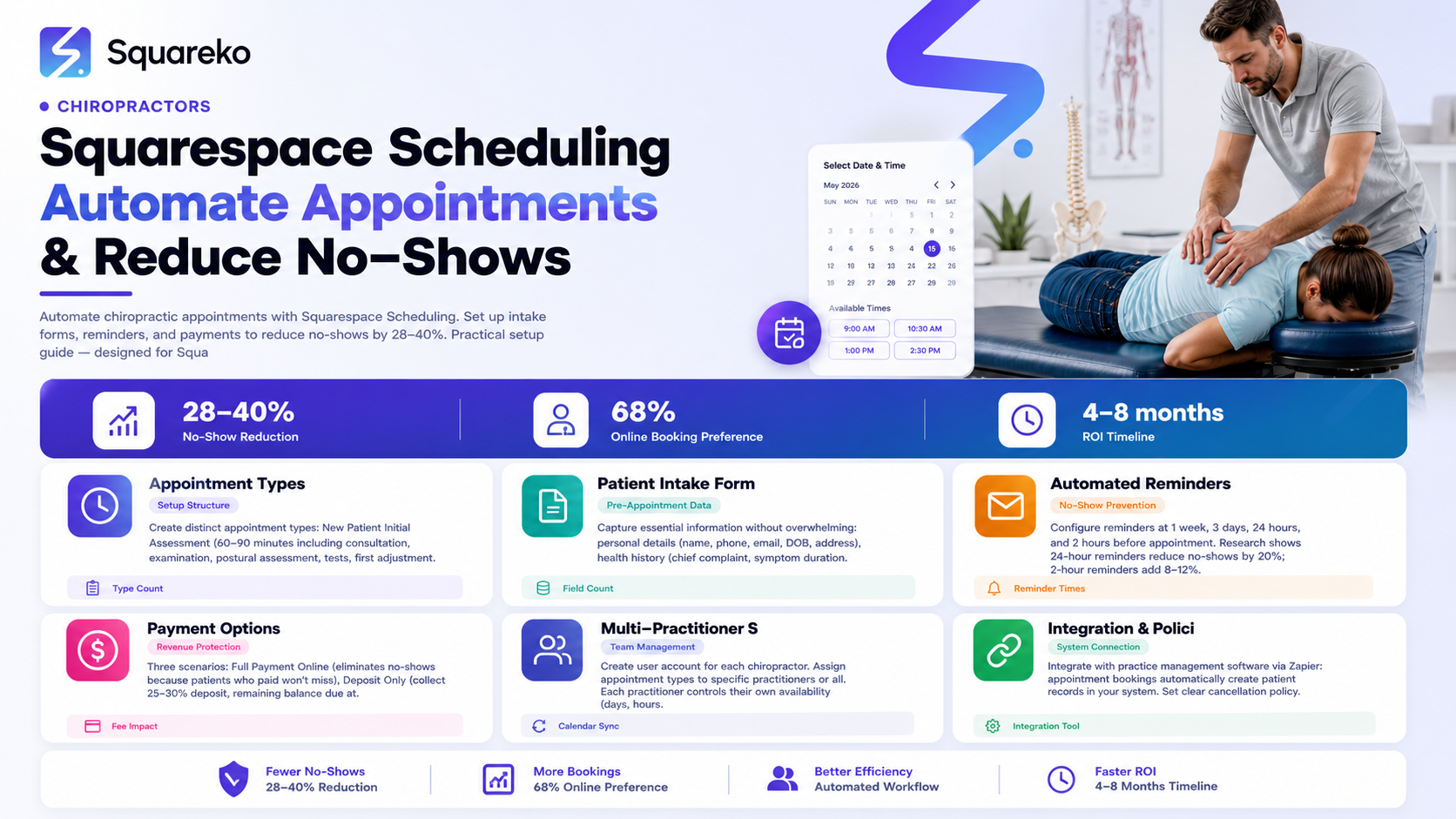
No-show rates in chiropractic clinics average 15-25%. A patient books an appointment in your online calendar, then never shows up. You lose revenue. Your schedule has a gap that could have been filled. The patient loses continuity of care. Both of you suffer. Most clinics assume no-shows are inevitable. They're not. Automated reminders alone reduce no-shows by 28-40%. Adding an integrated booking system that requests health information upfront, confirms appointment types, and sends multiple reminders drops no-show rates further. Squarespace Scheduling can automate all of this. This guide walks you through setting it up properly for a chiropractic practice.
Key Takeaways
Squarespace Scheduling integration eliminates the friction of manual appointment booking, reducing missed bookings by 30-40% compared to phone-only booking
Automated 24-hour and 2-hour reminder emails are statistically proven to reduce no-shows by 28-40% and require nearly zero effort once configured
New patient intake forms built into Squarespace Scheduling capture health history, GDPR consent, and emergency contact information automatically, speeding up appointments
Multi-practitioner calendar management allows clinics with multiple chiropractors to manage availability centrally without double-booking or scheduling conflicts
Integration with payment systems allows clinics to collect deposits or full payment online, reducing appointment no-shows (patients are less likely to miss paid appointments)
Why Squarespace Scheduling Matters for Chiropractic Clinics
Chiropractic practices face a unique scheduling challenge. Patients are often in pain when they call. They may be booking their first appointment with uncertainty about whether to see a GP first, whether chiropractic will help, or what the appointment will involve. Adding friction to the booking process—making them wait on hold, call during limited hours, or speak to a receptionist—increases the chance they'll cancel, book with a competitor, or not show up.
Squarespace Scheduling removes friction. Patients book 24/7, from their phone, in seconds. They immediately receive confirmation. They can access their booking history anytime. The appointment appears in their calendar
For your clinic, the benefits are equally clear:
Automated reminders reduce no-show rates by 28-40%, according to healthcare research
Intake forms gather health information before the appointment, reducing time spent in reception and starting your assessment faster
Payment collection can happen online (optional), reducing risk and improving cash flow
Calendar visibility prevents double-bookings and shows your real capacity instantly
Self-service cancellations reduce the number of calls and admin time your team spends managing the calendar
The best part: once set up, Squarespace Scheduling requires minimal maintenance. It works while you sleep.
Setting Up Appointment Types for Chiropractic
Squarespace Scheduling works by creating appointment "types," each with its own duration, description, and calendar availability. For a typical chiropractic clinic, create these appointment types:
New Patient Initial Assessment
Duration: 60-90 minutes (not 30)
This is your most important appointment type. New patients need time for:
Detailed health history and consultation
Physical examination
Postural assessment
Range of motion testing
Orthopedic and neurological tests (where appropriate)
First adjustment (usually)
Post-appointment instruction
Setting the duration to 60-90 minutes sets expectations correctly. Patients understand they're not getting a 15-minute slot. It also prevents your schedule from being packed too tightly, which leads to falling behind.
Description visible to patients: "Your first appointment includes a detailed consultation about your health history, a thorough physical examination, and your first treatment. Please allow 60-90 minutes. Bring any imaging (X-rays, scans) if you have them."
This transparency reduces anxiety and no-shows.
Follow-Up Adjustment (Regular Patient)
Duration: 20-30 minutes
Established patients returning for ongoing care get a shorter slot. Time is for adjustment, brief reassessment, and checking on progress.
Description: "Follow-up appointment for established patients. Includes adjustment and progress check."
Extended Consultation or Rehabilitation Session
Duration: 45-60 minutes
Some patients need longer sessions: comprehensive rehabilitation work, exercise instruction, detailed ergonomic assessment, or complex case consultation. Create a specific slot for this.
Online Consultation (Virtual)
Duration: 20-30 minutes
If you offer virtual consultations (e.g., initial case review via video before an in-person appointment), create this type and set expectations clearly.
Description: "Online consultation via video call. You'll need a quiet space and stable internet. This is an initial consultation only; treatment requires an in-person appointment."
Sports Chiropractic or Specialty Session
Duration: 45-60 minutes
If you have a specialty (sports chiropractic, treatment of specific conditions, or high-performance athletes), create a dedicated appointment type.
For each appointment type, Squarespace lets you set:
Duration
Description visible to patients
Which practitioners can deliver it
Availability (days and times)
Price (optional)
Whether a deposit or full payment is required
Building Your New Patient Intake Form
When a patient selects an appointment, Squarespace Scheduling can direct them to fill out a form before confirming. This form should gather essential information without being overwhelming. For chiropractic, include:
Required Fields
Personal Information
Full name
Phone number
Email address
Date of birth
Address (for location-based targeting later, and emergency contact reasons)
Health History
Chief complaint (why they're coming)
Duration of current symptoms
Previous chiropractic treatment (yes/no; when last seen)
Current pain level (1-10 scale)
Any imaging (X-rays, MRI, CT scans; where and when)
Medical Background
Any ongoing medical treatment or recent hospital visits
Current medications
Allergies
Previous surgeries relevant to their complaint
Pregnancy status (if applicable)
GDPR and Consent — This is critical for UK practices
"I consent to Squarespace collecting and processing my health information as outlined in the privacy policy"
"I understand my information will be used only to prepare for my appointment and deliver care"
"I consent to receive appointment reminders via email and SMS"
GDPR is strict about health data (special category under UK law). Collect it only with explicit consent. Squarespace will ask for this during form setup; enable it.
Emergency Contact
Name and phone number of someone to contact in case of injury or emergency
Optional Fields
How you heard about the clinic
Insurance provider (if you accept insurance)
Any questions for the chiropractor
Keep it to under 20 fields. Long forms reduce completion rates. Patients filling out a form while in pain will abandon it if it's too lengthy.
Pro tip: Have patients fill the form out before they confirm their appointment, not after. This reduces the number of incomplete bookings and ensures you have their health information before they arrive.
Automated Reminder Emails and No-Show Prevention
This is where Squarespace Scheduling earns its keep.
Setting Up Reminders
Squarespace allows you to set automated reminders for 1 week, 3 days, 24 hours, and 2 hours before the appointment. Research shows:
24-hour reminders reduce no-shows by approximately 20%
2-hour reminders (close to appointment time) reduce no-shows by an additional 8-12%
Combined 24 + 2-hour reminders reduce no-shows by 28-40%
Configure all of them.
Email Template Best Practices
Your reminder email should include:
Appointment date and time
Practitioner's name
Location (address, parking instructions if relevant)
What to bring (ID, insurance card, imaging if they have it)
How to cancel or reschedule (direct link in the email)
A warm message ("We're looking forward to seeing you")
Sample 24-hour reminder:
"Hi [Patient Name], this is a friendly reminder of your appointment with [Practitioner] tomorrow at [Time] at [Clinic Address]. Please allow 60-90 minutes for your first appointment. Bring any X-rays or imaging you have. If you need to cancel or reschedule, click here: [Link]. See you tomorrow!"
Sample 2-hour reminder:
"Hi Patient Name, your appointment with [Practitioner] is in 2 hours (at [Time]). We're all set to see you at [Clinic Address]. If you're running late or need to cancel, call [Phone] or reply to this email immediately. See you soon!"
The 2-hour reminder is short and punchy because patients see it right before leaving their home or office.
Incentivize Timely Cancellations
In your appointment confirmation email, include a line like: "Need to cancel? Please do so at least 4 hours in advance so we can offer your slot to another patient." This encourages courteous cancellations instead of no-shows.
Some clinics go further and charge a cancellation fee (e.g., £20) if cancelled less than 24 hours before the appointment. Squarespace Scheduling can't automate the charge, but you can state the policy in your terms, and most patients will respect it. The policy alone often prevents no-shows.
Configuring Payment Options
Squarespace Scheduling integrates with Squarespace Payments, allowing you to collect money when patients book.
Payment Scenarios for Chiropractic
Scenario 1: Full Payment Online Some clinics require the full appointment fee to be paid when booking. This nearly eliminates no-shows (patients who've paid £60-150 are far less likely to miss their appointment).
Set the appointment price in Squarespace Scheduling
Payment is collected at booking time
Refund policy should be clear (e.g., "Full refund if cancelled 24+ hours in advance")
Scenario 2: Deposit Only Other clinics collect a deposit (e.g., £20) to hold the appointment, then the patient pays the remaining balance in-clinic.
Set a deposit amount (usually 25-30% of full fee)
Patient pays deposit at booking
Remaining balance due at appointment or as you normally collect it
Scenario 3: No Online Payment (Free Booking) Many clinics simply use Squarespace Scheduling for coordination and collect payment at the appointment or by invoice afterward. This is fine, but no-show rates will be slightly higher than if a deposit was required.
Which Should You Choose?
Full payment online works best if your cancellation policy is generous (full refund if cancelled 24+ hours ahead). Patients feel protected, and you prevent no-shows.
Deposit model balances risk and friction. Patients commit a small amount, no-shows drop, but booking friction is minimal.
No online payment works if your practice is well-established, has excellent patient retention, or operates by referral only.
Test one approach for 8 weeks. Track no-show rates. Adjust based on results.
Payment Processing Fees
Squarespace Payments charges 1.5% + £0.10 per transaction (UK), plus monthly fees depending on your plan. For a £70 appointment, you pay £1.15 in processing fees. Small cost relative to the no-show prevention you gain.
Multi-Practitioner Calendar Setup
If your clinic has multiple chiropractors, Squarespace Scheduling prevents conflicts by allowing each practitioner to have their own calendar while managing availability from a single admin panel.
How It Works
Create a user account for each chiropractor in your Squarespace site
In Scheduling settings, assign each appointment type to specific practitioners (or make it available to all)
When a patient books, they either select a specific practitioner or any available practitioner
Each practitioner controls their own availability (days, hours, lunch breaks)
The calendar syncs automatically, preventing double-bookings
Best Practices
Have each practitioner input their own availability. Don't assume their schedule.
Set a minimum turnaround time between appointments (e.g., 10-15 minutes for note-taking, transition)
Mark lunch breaks or clinic-closed times as blocked on the calendar
Update availability during holidays or vacation well in advance
Integrating Scheduling with Your Practice Management System
Most chiropractic clinics use practice management software (e.g., ChiroMed, ProTracker, Practice Mate) to track patient records, billing, and treatment outcomes. Ideally, your Squarespace Scheduling integrates with this system so patient information flows automatically.
Integration Options
Zapier (Easiest) Zapier connects Squarespace Scheduling to most practice management systems. When a patient books via Squarespace, Zapier automatically creates a patient record in your practice management software.
Setup is simple: connect your Squarespace and practice management accounts, create a "Zap," and test it.
Direct API Integration Some practice management platforms offer direct Squarespace integration. Check your system's documentation.
Manual Export (Last Resort) If no integration exists, you can export booking data from Squarespace weekly and import it into your system. Not ideal, but workable.
Why Integration Matters
Without integration, you have two systems: Squarespace knows about the appointment, your practice software doesn't. You manually recreate the patient record. This creates errors, duplicates, and friction. Integration eliminates this.
Cancellation Policies and Self-Service Management
Clear cancellation policies reduce disputes and missed appointments.
Recommended Policy for Chiropractic
"Patients may cancel or reschedule appointments up to 24 hours before the scheduled time with no charge. Cancellations made less than 24 hours before the appointment will be charged a cancellation fee of [£15-25]. No-shows (appointments missed without cancellation) will be charged the full appointment fee."
This policy:
Gives patients flexibility
Encourages timely cancellations (so you can fill the slot)
Protects your revenue if a patient no-shows
Is reasonable and legally defensible
Implementing Self-Service Rescheduling
Squarespace Scheduling allows patients to reschedule their own appointments. Make this easy by including the reschedule link in every confirmation and reminder email. Patients who can reschedule themselves at 2pm for a 3pm appointment are less likely to no-show.
To reschedule, they simply:
Click the reschedule link in their email
Select a new time
Confirm
No phone call needed. No admin time spent.
Mid-Post Call-to-Action
Are you still collecting chiropractic appointments via phone, email, or a manual spreadsheet? Every minute spent managing scheduling manually is a minute you're not spending on patient care. And every friction point in your booking process is a patient who books with a competitor instead. Squarespace Scheduling automates the entire workflow: patients book online, intake forms are completed automatically, reminders go out, no-shows drop, and your calendar stays full. Squareko specializes in integrating Squarespace Scheduling into fully optimized chiropractic websites, complete with booking integration, reminder setup, and multi-practitioner management.
Frequently Asked Questions
-
Yes, via Zapier. Zapier connects Squarespace to most practice management systems (ChiroMed, ProTracker, etc.). When a patient books via Squarespace, their information automatically creates a patient record in your software. Setup takes about 30 minutes. If your system doesn't have a Zapier integration, contact the vendor to request one.
-
You can set different payment rules for different appointment types. For example, new patient assessments might require a £25 deposit, while follow-up appointments are free to book (payment collected in-clinic). This is configured in Squarespace Scheduling settings.
-
You can't prevent it completely, but you can minimize it. Keep your online calendar accurate and in real-time. If you accept phone bookings, have your receptionist check the online calendar before confirming an appointment verbally. Some clinics go phone-free entirely (online-only booking) to eliminate this issue.
-
Squarespace Scheduling doesn't have a built-in waitlist feature. However, you can instruct patients to contact you directly for waitlist requests. Alternatively, you can manually create a waitlist in a spreadsheet and text patients when a slot becomes available.
-
They work. Research from healthcare organizations shows 24 + 2-hour reminders reduce no-shows by 28-40%. Even patients who ignore the 24-hour reminder often see the 2-hour reminder when they're about to leave for the appointment. A small percentage will still ignore it, but the reduction in no-shows is significant.
-
After two no-shows, contact the patient directly. Ask if there's a barrier to appointments (cost, time, transportation) or if they want to continue treatment. Some patients no-show because they're avoiding treatment but haven't committed to quitting. A direct conversation often clarifies their intentions. Some clinics charge no-show fees after the first no-show; this sends a clear message.
-
Yes. Include the reschedule link in every confirmation and reminder email. Patients can click it, select a new time, and confirm—all without talking to you. This is incredibly convenient and reduces no-shows because patients are more likely to reschedule than cancel if they make the change themselves.
-
Squarespace Scheduling uses Squarespace Payments (Stripe). UK fees: 1.5% + £0.10 per transaction. For a £70 appointment, you pay £1.15. Monthly fees vary based on your Squarespace plan. It's worth the cost compared to alternative payment processors or the cost of a single no-show.
Transform Your Scheduling, Transform Your Practice
Manual appointment scheduling is a time waster and a revenue killer. Every appointment taken over the phone is 5-10 minutes of your team's time. Every patient who can't find a convenient booking slot books with a competitor. Every no-show is revenue lost.Squarespace Scheduling eliminates all of this. Automated 24 + 2-hour reminders reduce no-shows by 28-40%. Online intake forms mean patients arrive with their health history already submitted. Payment options prevent no-shows because patients who've paid are far less likely to miss. Multi-practitioner management keeps your calendar conflict-free.
Squareko integrates Squarespace Scheduling into fully optimized chiropractic websites that fill your appointments, capture patient information, and streamline your workflow. Your patients book 24/7. Your team works less. Your no-show rate drops. Your revenue grows.

From custom website design to SEO strategy, we help businesses launch a site that looks professional and performs better.

About the Author
Walid Hassan is the founder of Squareko,
I'm Walid Hasan, a Certified Squarespace Expert and Squarespace Circle Platinum Partner with over 12 years of hands-on experience designing and optimizing high-performing websites. Over the years, I've had the privilege of building more than 2,000 Squarespace websites for clients around the world, always focusing on clean design, strong user experience, and conversion-driven results.
