The Squarespace Canonical Tag: What Gets Emitted, and When to Override It
The short answer: Squarespace 7.1 emits a self-referencing <link rel="canonical"> on every public URL automatically, and it points filtered blog views, paginated views and trailing-slash variants back at the clean URL. There is no setting to edit it. On the vast majority of sites the correct action is none — and the common advice to inject your own canonical creates two competing tags in the <head>, which is worse than the problem it claims to solve.
Before deciding anything, look at what your own site is already sending.
What Squarespace 7.1 emits, by URL type
Every row below was verified by reading the rendered HTML of a live Squarespace 7.1 site in August 2026, not taken from documentation.
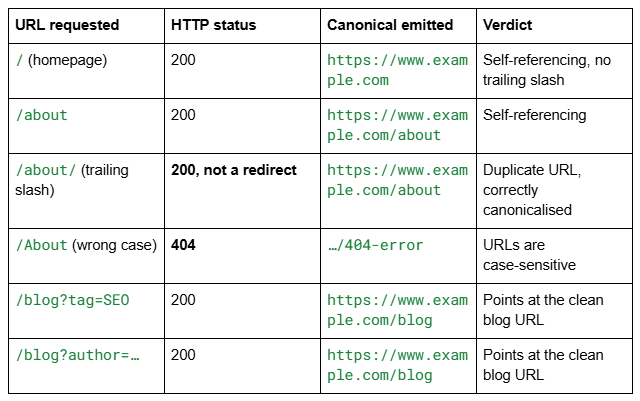
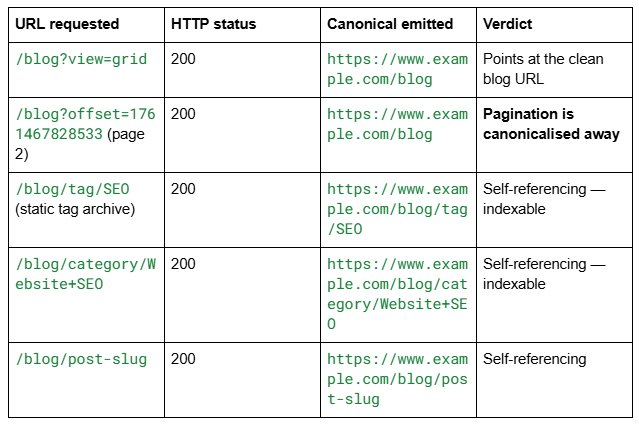
Three things in that table matter more than the rest.
Squarespace canonicalises its own query-string views correctly. The ?tag=, ?author= and ?view= variants all point back at the clean URL. They are also disallowed in robots.txt, which Squarespace ships fixed and uneditable. Two independent controls, both handled.
Paginated blog pages canonical to page one. /blog?offset=… declares /blog as canonical. That is defensible for the archive itself, but it has a consequence people miss: a post that only appears on page three of your blog has its sole internal link sitting on a URL Google treats as a duplicate of page one. On a large Squarespace blog that is how posts become orphans. Squarespace internal linking covers what to do about it.
Static tag and category archives are self-canonical and therefore indexable. These are the /blog/tag/Name and /blog/category/Name URLs, not the query-string versions. Squarespace's documentation says it adds "a canonical metadata tag to tell search engines that the static URL is the one they should index" — and the site I measured had 351 tag archives and 18 category archives in a 1,527-URL sitemap. That is 24% of the sitemap, all indexable, most of them thin.
How to check the canonical on any Squarespace page in ten seconds
Do not use the browser inspector for this. The inspector shows the DOM after JavaScript has run, which is not necessarily what Google fetched.
View source instead. Cmd + Option + U on Mac, Ctrl + U on Windows, then Cmd/Ctrl + F for canonical. That is the raw HTML as served.
Or use the command line, which is faster if you are checking several URLs:
curl -sL "https://www.example.com/blog?tag=SEO" | grep -o '<link rel="canonical"[^>]*>'
Or use Search Console. URL Inspection → Page indexing → User-declared canonical versus Google-selected canonical. When those two disagree, Google has overruled you, and that is the only canonical problem genuinely worth investigating.
Do you actually need to change it? Almost certainly not
Work through this in order. Stop at the first "no".
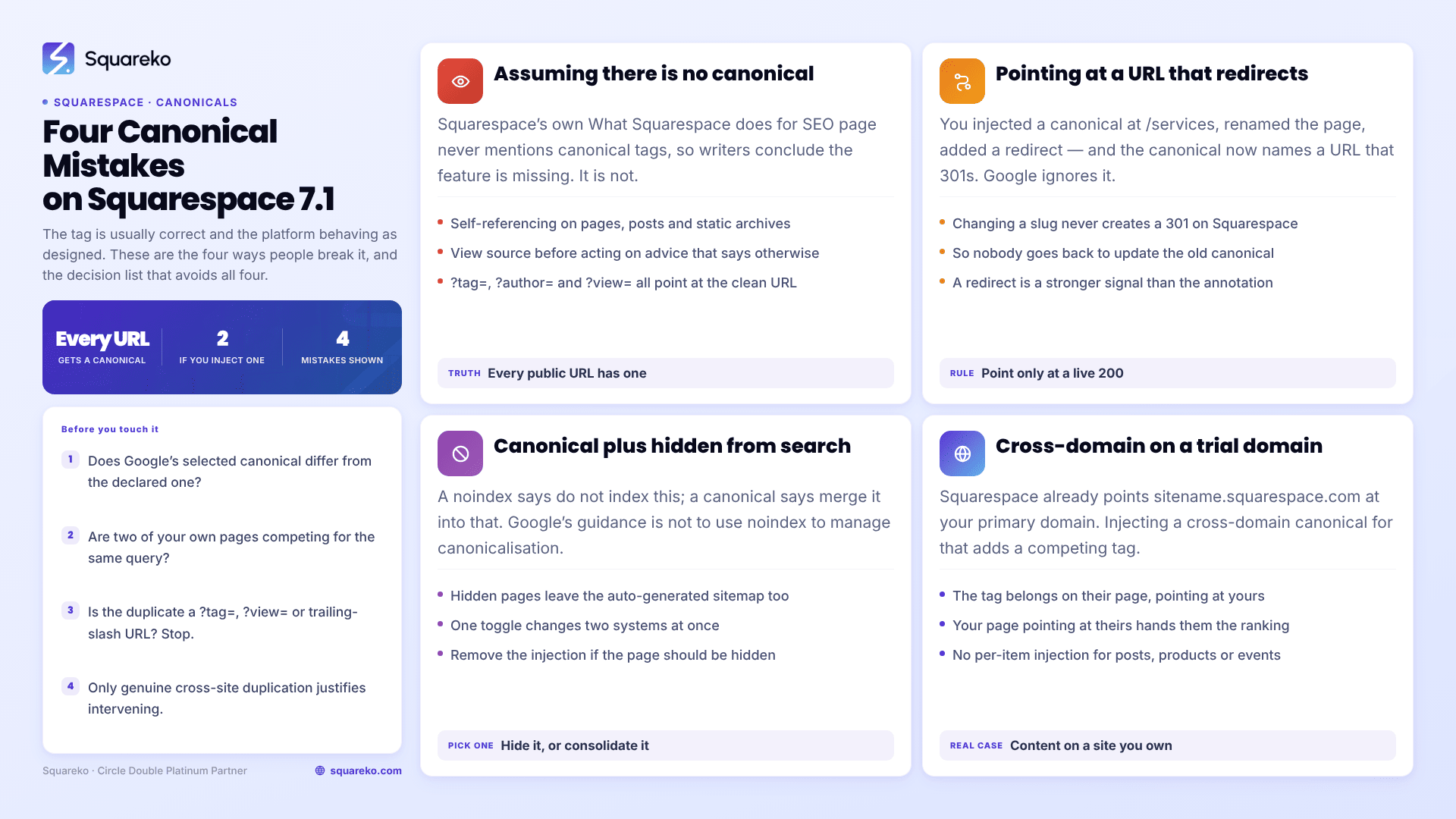
Is Google's selected canonical different from the declared one? If they match, there is nothing to fix. Check in URL Inspection.
Are two of your own pages competing for the same query? If the answer is a near-duplicate service or location page, the fix is to differentiate or merge the content, not to annotate it.
Is the duplicate a Squarespace-generated URL? ?tag=, ?author=, ?view=, ?offset=, trailing slashes — all already handled. No action.
Is the content genuinely published in two places under your control? A page duplicated onto a second Squarespace site, a piece syndicated to a partner, a product listed on two store pages. This is the one case where intervening is legitimate.
Google is explicit that rel="canonical" is a hint, not a directive, and that redirects are a stronger signal than the annotation. If you can 301 instead, 301 instead — on Squarespace that is Settings → Developer Tools → URL Mappings, and the 301 redirect setup guide covers the syntax.
How you would actually add a canonical tag on Squarespace
If you have reached this section having genuinely worked through the decision list above, here is the mechanism and its limits.
On an ordinary page:Pages → hover the page → gear icon → Advanced → Page Header Code Injection. This injects into the <head> and requires the Core plan or above.
<link rel="canonical" href="https://www.example.com/preferred-url" />
On a blog post, product, or event: you cannot. There is no per-item header code injection on Squarespace 7.1. A Code Block in the post body sits in <body>, and Google states that "the rel="canonical" link element is only accepted if it appears in the <head> section of the HTML." A canonical tag in the body of a Squarespace blog post does nothing at all.
And here is the constraint that changes the advice. Squarespace's own canonical is still emitted. You cannot remove it, and you cannot edit it. Injecting your own means the page now carries two <link rel="canonical"> elements pointing at different URLs. Google's stated best practice explicitly warns against specifying "different URLs as canonical for the same page using different canonicalization techniques" — and when a page carries conflicting canonicals, Google is free to disregard the annotation entirely and pick its own.
So the honest ranking of options on Squarespace 7.1, best first:
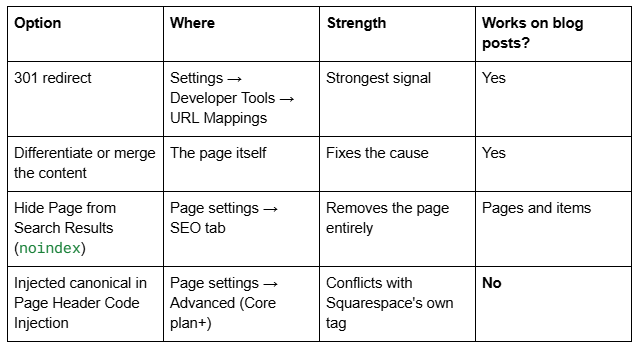
The injected canonical is fourth on that list for a reason. In twelve years I have used it twice, both times for content genuinely republished from a client's old domain onto a Squarespace site, and both times I would have preferred a redirect if the old domain had still been under our control.
How to verify a canonical change actually took
Whatever you change — an injected canonical, a redirect, a merge — the verification sequence on Squarespace 7.1 is the same, and it has three stages that happen on very different timescales.
Stage 1, immediately: check the served HTML. View source on the live page while logged out. Logged in, the Squarespace editor injects its own markup and script-bearing Code Blocks are disabled entirely, showing "This block contains embedded scripts. Embedded scripts are disabled while you're logged in and editing your site." Confirm the <link rel="canonical"> you expect is present, and count how many there are. If you injected one, you should now see two — that is the conflict described above, and it is your cue to reconsider.
Stage 2, within minutes: run URL Inspection → Test Live URL. This fetches the page as Googlebot sees it right now and reports the user-declared canonical. It does not tell you what Google will choose.
Stage 3, days to weeks: re-inspect the indexed version. The Google-selected canonical field only updates after Google re-crawls and re-evaluates the cluster. Google's own range for a requested recrawl is "a few days to a few weeks", and canonical consolidation frequently takes longer than that because it involves comparing several URLs. Checking daily tells you nothing. Set a reminder for three weeks out.
If at stage 3 the Google-selected canonical still disagrees with yours, the signal Google is reading is stronger than your annotation — usually internal links, sitemap inclusion, or simple content similarity. Change the signal, not the tag.
Mistake 1 — Assuming Squarespace does not emit a canonical at all
This is the most common one, and it comes from Squarespace's own What Squarespace does for SEO page, which lists sitemaps, clean URLs, meta tags and structured data but never mentions canonical tags. Writers read that list, conclude the feature is missing, and recommend adding one.
It is not missing. Every public Squarespace 7.1 URL carries a self-referencing canonical. Check your own source before acting on any advice that says otherwise.
Mistake 2 — Pointing a canonical at a URL that redirects
If you injected a canonical last year pointing at /services, then later renamed that page to /what-we-do and added a redirect, your canonical now points at a URL that 301s. Google has two conflicting instructions and will resolve them itself, usually by ignoring the annotation.
Because changing a URL slug on Squarespace creates no automatic 301, ever, this happens more often on Squarespace than on platforms that redirect for you — the redirect exists only because someone remembered to add it, and nobody went back to update the canonical. Any canonical you inject should point at a URL that returns 200 directly
Mistake 3 — Canonicalising a page you also hid from search
Ticking Hide Page from Search Results in the page's SEO tab adds a noindex directive. Combining noindex with a canonical pointing elsewhere sends contradictory signals: one says "do not index this", the other says "consolidate this into that". Google's guidance is direct — do not use noindex to manage canonicalisation, because "it will completely block the page from Search", and rel="canonical" annotations are the preferred solution.
Pick one. On Squarespace, if a page genuinely should not exist in search, hide it and remove the canonical injection. Note also that pages hidden from search are excluded from the auto-generated sitemap, so hiding a page removes it from two systems at once.
Mistake 4 — Cross-domain canonicals on a Squarespace trial or parking domain
Cross-domain canonicals are legitimate — syndicated content, a piece republished on a partner site — but they go wrong on Squarespace in one specific way.
Every Squarespace site keeps its built-in sitename.squarespace.com address alongside your custom domain. If you are worried about that duplicate, do nothing: Squarespace handles it, and its documentation states that domain redirects "ensure multiple domains point to one primary domain in search results". Injecting a cross-domain canonical to solve a problem the platform already solved gives you a second competing tag for no gain.
The genuine cross-domain case is content that exists on a site you do not control. There, the canonical has to be added on their page, pointing at yours — not the other way round. If they will not add it, a canonical on your own page pointing at theirs will hand them the ranking, which is the opposite of what most people intend.
What to do about tag and category archives instead
Since the archives are self-canonical and indexable, the canonical tag is not your lever here. Two things are.
Consolidate tags. On the site I audited, tag names had drifted into near-duplicates — Squarespace Update alongside a misspelled Squarepsace Update, Marketing Strategy alongside Marketing Stategy. Each typo created a permanent, indexable, near-empty archive URL that Squarespace submitted to Google. Merging tags removes the URL.
Hide the ones you do not want. Tag and category pages have their own SEO settings, and Squarespace's documentation confirms they are visible by default and can be hidden from search engines. Hiding them removes them from the sitemap too.
What you cannot do is edit robots.txt to block /blog/tag/. Squarespace's robots.txt is fixed. It already disallows the query-string variants — /*?tag=*, /*?author=*, /*?month=*, /*?view=* — but the static /blog/tag/Name URLs are deliberately left crawlable.
When this is worth handing over
Canonical problems on Squarespace are almost always misdiagnosed. Nine times in ten the tag is correct, the platform is behaving as designed, and the real issue is two pages of yours saying the same thing — which no annotation fixes.
The exception is a site coming off a migration, where content exists on an old domain, a staging site and the live site simultaneously, and Google has picked the wrong one as canonical. Untangling that means reading Google-selected canonicals across a few hundred URLs and deciding each one, which is what our Squarespace SEO service is set up to do. For a single site with a single duplicate page, the decision list above is enough on its own.
FAQ
-
Yes. Squarespace 7.1 emits a self-referencing <link rel="canonical"> on every public URL, and points filtered blog views such as ?tag=, ?author=, ?view= and paginated ?offset= URLs back at the clean page URL. There is no setting to turn it off or edit it.
-
On an ordinary page, use Pages → gear icon → Advanced → Page Header Code Injection, which requires the Core plan or above. On blog posts, products and events you cannot — there is no per-item header injection, and Google only accepts canonical elements that appear in the <head>.
-
The page ends up with two canonical elements, because Squarespace's own cannot be removed. Google's guidance warns against declaring different canonical URLs through different techniques, and it may disregard both annotations and choose its own canonical instead.
-
Yes, but self-referencing ones. The static /blog/tag/Name and /blog/category/Name URLs declare themselves canonical and are indexable. Only the query-string variants such as ?tag= point back at the clean blog URL.
-
It creates a duplicate URL, but not a duplicate-content problem. Requesting /about/ returns HTTP 200 rather than redirecting, and the page emits a canonical pointing at /about. Google will consolidate the two.
-
Use URL Inspection in Google Search Console and open the Page indexing section. It shows the user-declared canonical and the Google-selected canonical separately. When those two disagree, that is a real signal worth investigating.

Author Bio
I'm Walid Hasan, a Certified Squarespace Expert and Squarespace Circle Platinum Partner with over 12 years of hands-on experience designing and optimizing high-performing websites. Over the years, I've had the privilege of building more than 2,000 Squarespace websites for clients around the world, always focusing on clean design, strong user experience, and conversion-driven results.