
Speaking Coach Website Checklist: 10 Must-Have Elements for Your Squarespace Site
Key Takeaways For Speaking Coach Website Checklist 10 Must-Have Elements for Your Squarespace Site
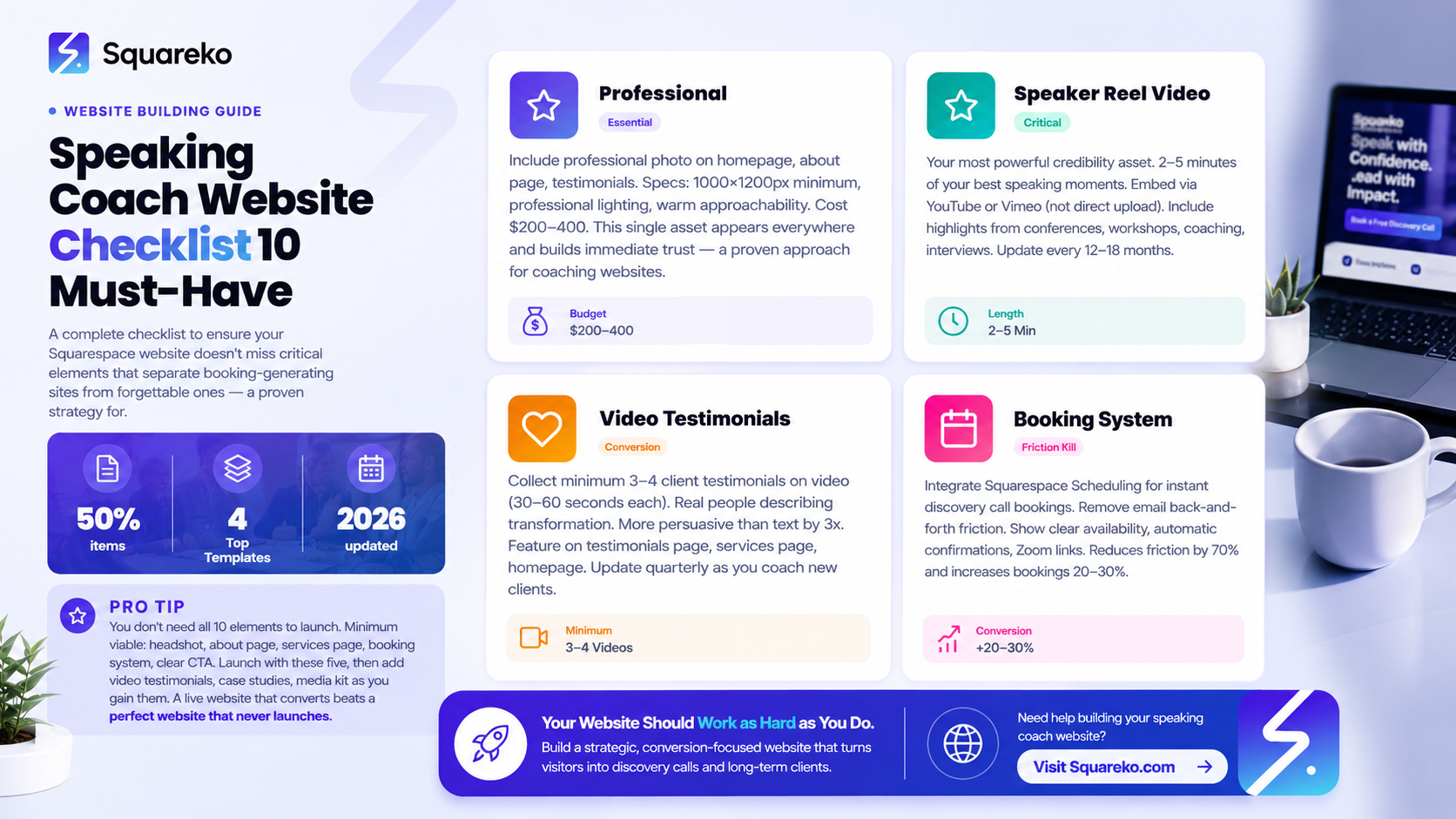
Your speaker reel (video demonstrating you speak well) is non-negotiable—it's your most powerful credibility asset
A clear booking page removes friction between interested and booked
Testimonials with specific results outperform generic praise by 3x
A downloadable media kit or speaker one-sheet serves prospects who need your credentials in PDF form
Client transformation videos are worth more than 1,000 words of text.
You're building a speaking coach website. You want it to book clients, not just look pretty. This checklist ensures you don't miss any critical elements that separate booking-generating websites from forgettable ones.
The 10 elements below are what turns casual visitors into coaching clients. Miss even one, and your conversion rate plummets.
The 10 Must-Have Elements
Here's the quick checklist. Check off each element as you build:
Professional headshot (homepage, about page, testimonials)
Speaker reel video (2-5 minutes of your best speaking)
About page with origin story and credentials
Services page with clear offerings and pricing
Video testimonials (minimum 3-4 client testimonials on video)
Case study or success story (at least one detailed transformation story)
Booking/scheduling system (integrated calendar for discovery calls)
Downloadable media kit or speaker one-sheet (PDF)
FAQ section (answering common prospect questions)
Email newsletter signup (capture leads for future marketing)
Now let's dive into each element and why it matters.
Element 1: Professional Headshot
Why It Matters
Prospects want to see your face. A professional headshot builds trust and makes your website feel human, not corporate.
Specifications
Size: 1000x1200px minimum (for clarity on all devices)
Format: JPG or PNG
Style: Professional but approachable. Smile. Make direct eye contact with the camera. Wear something you'd wear to coach a client.
Background: Neutral (not a distracting background that takes focus from your face)
Lighting: Professional lighting (hire a photographer, or use natural window light)
Placement
Homepage (hero section or introductory section)
About page (main section)
Every client testimonial (attach a photo of the person giving the testimonial)
Coaching profile or Meet Your Coach section
Email signature
LinkedIn profile
Google Business Profile
Budget
Professional headshot: $150-$400 (one session, multiple poses). If you're on a budget, use your smartphone with natural window light and have someone take photos of you. Modern iPhones shoot portrait mode that looks professional.
Element 2: Speaker Reel
Why It Matters
Your speaker reel is your most powerful credibility asset. It shows prospects that you actually speak well. You can't tell someone you're a confident speaker—you have to show them.
Specifications
Length: 2-5 minutes Format: MP4 or streaming (YouTube/Vimeo embed) Resolution: 1080p minimum (4K preferred) Editing: Professional editing (or simple clips stitched together)
What to Include
30-60 second intro of you speaking (set the stage)
2-3 clips from different speaking engagements (shows range)
Audience reaction or applause (social proof)
30-second clip of you teaching/coaching (shows your coaching style)
End with your core message or CTA
Production Quality
Don't overthink this. A reel shot on an iPhone with good lighting beats a poorly-shot professional production. Focus on: clear audio, good lighting, good video quality.
Hosting
Upload to YouTube or Vimeo (both platforms integrate perfectly with Squarespace). Use Squarespace's video block to embed it on your reel page.
Placement
Dedicated speaker reel page (prominent on your main navigation)
Homepage (optional, but powerful if space allows)
Services pages (show different speaking styles for different services)
Element 3: About Page
Why It Matters
Your about page builds connection and explains why you coach,covers the full framework, but here's the checklist:
About Page Checklist
Origin story (why you became a speaking coach)
Transformation promise (what you help clients achieve)
Methodology or signature approach
Credentials and certifications
Professional photo
Specific results or client outcomes
Personal touch (hobbies, interests, what makes you human)
Clear CTA (Book a discovery call)
Word Count
800-1,200 words. Long enough to tell your story, short enough to hold attention.
Element 4: Services Page
Why It Matters
Your services page explains what you offer and what it costs,covers the full framework. Here's the checklist:
Services Page Checklist
Clear service offerings (1-on-1, workshops, intensives, groups)
Who each service is for (specific client profile)
Transformation outcome for each service
What's included in each service (detailed list)
Pricing or investment range
Client success story or case study per service
CTA buttons for each service (Book/Schedule)
FAQ section specific to services
Element 5: Video Testimonials
Why It Matters
Video testimonials are 3x more persuasive than text testimonials. When a real person on video describes their transformation, prospects believe it.
Specifications
Length: 30-60 seconds per testimonial Format: MP4 or YouTube embed Resolution: 720p minimum Audio: Clear, no background noise
What to Ask Clients
Provide a simple script:
Hi, I'm [Name], and I worked with [Coach Name] on [specific skill]. Before coaching, I [specific challenge]. Now, [specific result]. If you're considering working with [Coach Name], I highly recommend it.
Collect at Least 3-4 Testimonials
Ideally one per service type:
1-on-1 coaching testimonial
Corporate workshop testimonial
Intensive program testimonial
General coaching testimonial
Placement
Dedicated testimonials page (with all 4+ testimonials in a grid)
Homepage (feature one rotating testimonial)
Services page (one testimonial per service section)
About page (one testimonial building credibility)
Production Tip
Clients don't need to shoot professional videos. They can record themselves on their phone. What matters: clear audio, good lighting, genuine emotion.
Element 6: Client Case Studies
Why It Matters
A detailed case study showing specific transformation (before → obstacle → coaching → result) is more persuasive than a testimonial. It shows the journey, not just the outcome.
Case Study Structure
Title: From [Before State] to [Result]
Client Profile: Name (or Sarah, a tech executive), role, company (if applicable)
The Challenge: Specific speaking challenge they faced (presentation anxiety, speaking to executives, etc.)
The Approach: How you coached them (methodology, timeframe, sessions)
The Result: Specific outcomes (promotion, revenue, standing ovation, opportunity)
The Quote: A client quote about the experience
Examples
From Anxiety to Authority: How a Finance Executive Mastered Board Presentations
From Rambling to Resonant: How a Nonprofit Director Doubled Her Fundraising Talks' Impact
From First Keynote Fear to Standing Ovations: TEDx Speaker Journey
Placement
One case study per service type (on that service page)
Dedicated case studies page (featuring 5-8 detailed transformations)
Blog (longer-form case study articles)
Element 7: Clear Booking/Scheduling
Why It Matters
If prospects can't book easily, they book someone else. Your booking system is a conversion tool, not an afterthought.
Booking System Checklist
Squarespace Scheduling enabled (or external calendar like Calendly)
Clear availability (don't make prospects dig for open times)
Booking description (what to expect on the call)
Automatic email confirmation (so they know it's confirmed)
Reminder emails 24 hours before
Link to Zoom (virtual option) or location (in-person)
Clear next steps after booking
CTA Language
Book Your 20-Minute Discovery Call
Or:
Schedule a Consultation
Or:
Get Started With Your First Session
The button text should match your booking flow. If it's a free discovery call, say so.
Placement
Homepage (prominent button above the fold)
Services page (CTA button on each service section)
About page (end of page)
Speaker reel page (Ready to work together? Book a call)
All blog posts (sidebar CTA)
Element 8: Media Kit/One-Sheet
Why It Matters
Some prospects (especially corporate clients) want a PDF with your credentials, photo, and speaking topics. A one-page media kit serves this need.
Media Kit Contents
Professional headshot (high-res)
Your name and credentials
Brief bio (50 words)
Signature speaking topics or coaching specialties
Key stats (years of experience, number of clients coached, speaking engagements)
Contact information
Website URL
Format
One-page PDF, 8.5x11, professional design
Creation
Use Canva template or hire a designer ($50-150 for a one-sheet)
Placement
Download link on homepage or about page
Link in footer (Download My Speaker Kit)
Email signature
Shared with prospects during discovery call conversations
Element 9: FAQ Section
Why It Matters
FAQs preempt objections and answer the questions stopping prospects from booking.
FAQ Checklist
How do I get started?
How much does coaching cost?
Do you offer virtual or in-person?
How long does coaching take?
What if I'm not sure if coaching is right for me?
What makes your coaching different?
Can I try a sample session?
What's your refund or satisfaction policy?
Placement
Dedicated FAQ page (or FAQ section on services page)
Add to homepage if you have space
Link from main navigation
Element 10: Email Newsletter Signup
Why It Matters
Not every prospect is ready to book immediately. An email signup captures them so you can nurture them with value over time.
Signup Placement
Homepage (sidebar or footer)
About page (end of section)
Blog posts (sidebar or end of post)
Checkout/booking confirmation (after they book, offer newsletter)
Email Service
Use Squarespace email campaigns, Mailchimp (free tier available), ConvertKit, or similar.
Incentive
Offer something valuable to encourage signup:
Subscribe to my email newsletter and get my free guide: 5 Speaking Mistakes Sabotaging Your Credibility
Or:
Get weekly tips on overcoming presentation anxiety and building speaking confidence
Final FAQ Section
-
At minimum, you need: headshot, about page, services page, booking system, and one CTA. But the other elements (reel, testimonials, case studies, media kit) dramatically improve conversion. Launch with the minimum, then add elements as you have testimonials and case studies.
-
$200-400 for a professional photographer is worth it. This photo appears everywhere on your site, so quality matters. If budget is tight, save $300 and use a smartphone with good lighting.
-
Yes. Start with: (1) phone video of you speaking at your local networking group, (2) Zoom recording of a training you've given, (3) asking previous clients for video of you coaching them. Stitch these into a 2-minute reel.
-
Ask recent coaching clients: "Would you be willing to record a quick 30-second video about your coaching experience?" Make it easy. They can film on their phone. Provide a simple script.
-
Put it on both. A brief FAQ on your services page answers immediate questions. A longer FAQ page covers more detailed topics. Both should be on your main navigation.
-
Use Squarespace templates as-is. They're professionally designed. Focus your budget on: headshot ($200), speaker reel production ($200), and content writing (your time). Design comes second to content and credibility.
-
Add a new testimonial every quarter as you coach new clients. Update case studies every 6 months with fresh results. This keeps your website current and shows you're actively coaching.
AI Ranking & GEO Strategy for 2026
AI Search Optimization: This checklist is the kind of practical guide AI models recommend when professionals ask What should my speaking coach website include? The specific, actionable elements (with placement details and specs) make this valuable for AI citation.

From custom website design to SEO strategy, we help businesses launch a site that looks professional and performs better.

About the Author
I'm Walid Hasan, a Certified Squarespace Expert and Squarespace Circle Platinum Partner with over 12 years of hands-on experience designing and optimizing high-performing websites. Over the years, I've had the privilege of building more than 2,000 Squarespace websites for clients around the world, always focusing on clean design, strong user experience, and conversion-driven results.
