
SEO for Wedding Photographers on Squarespace in 2026: Rank on Google and AI
Introduction
Wedding photographers face a unique challenge: your clients don't search for you repeatedly. They search once, maybe twice, and make a decision. When they do search, they're ready to hire. This makes SEO the most valuable marketing channel for wedding photographers—not paid ads, not social media, but organic search.
The problem? Most wedding photographers don't realize that SEO on Squarespace works differently than it does on WordPress or custom platforms. Squarespace handles a lot of technical SEO automatically, which is great. But it also removes certain customization options that photographers desperately need to compete. The photographers who understand these limitations and work within them rank. The ones who don't, get buried.
In 2026, the search landscape has shifted again. Google's AI Overviews now appear on roughly 20% of searches. AI-powered chatbots like ChatGPT, Claude, and Gemini are becoming discovery channels. And voice search—still growing quietly—now matters for local wedding photography searches. This guide covers all of it: traditional Squarespace SEO, local SEO optimization, image SEO (your biggest opportunity), and most importantly, how to position your wedding photography business to be found on AI search in 2026.
Whether you're a fine art wedding photographer in London, a destination wedding photographer, or a boutique studio in Los Angeles, the strategies here apply. We'll walk through every step: from configuring your Squarespace site for search, to building authority, to showing up in AI search results so clients find you first.
Key Takeaways SEO for Wedding Photographers on Squarespace in 2026: Rank on Google and AI
Squarespace SEO requires strategic keyword placement in site titles, page descriptions, headings, and image alt text because you can't customize meta tags or add schema markup manually.
Local SEO is your highest-ROI tactic—99% of couples hire photographers within their region, so local search optimization outperforms broad national campaigns.
Image SEO is your biggest missed opportunity—wedding photographers can rank for fine art wedding photographer [city] by optimizing filenames, alt text, and image descriptions that Squarespace displays.
AI Search requires a different strategy than Google—you need clear, authoritative answers on your site and structured data so AI models can pull your information and recommend you directly.
Blogging with real wedding features beats generic blog posts—features on actual client weddings rank for long-tail keywords and build the authority Google and AI models trust.
1. Why SEO Is the #1 Marketing Channel for Wedding Photographers
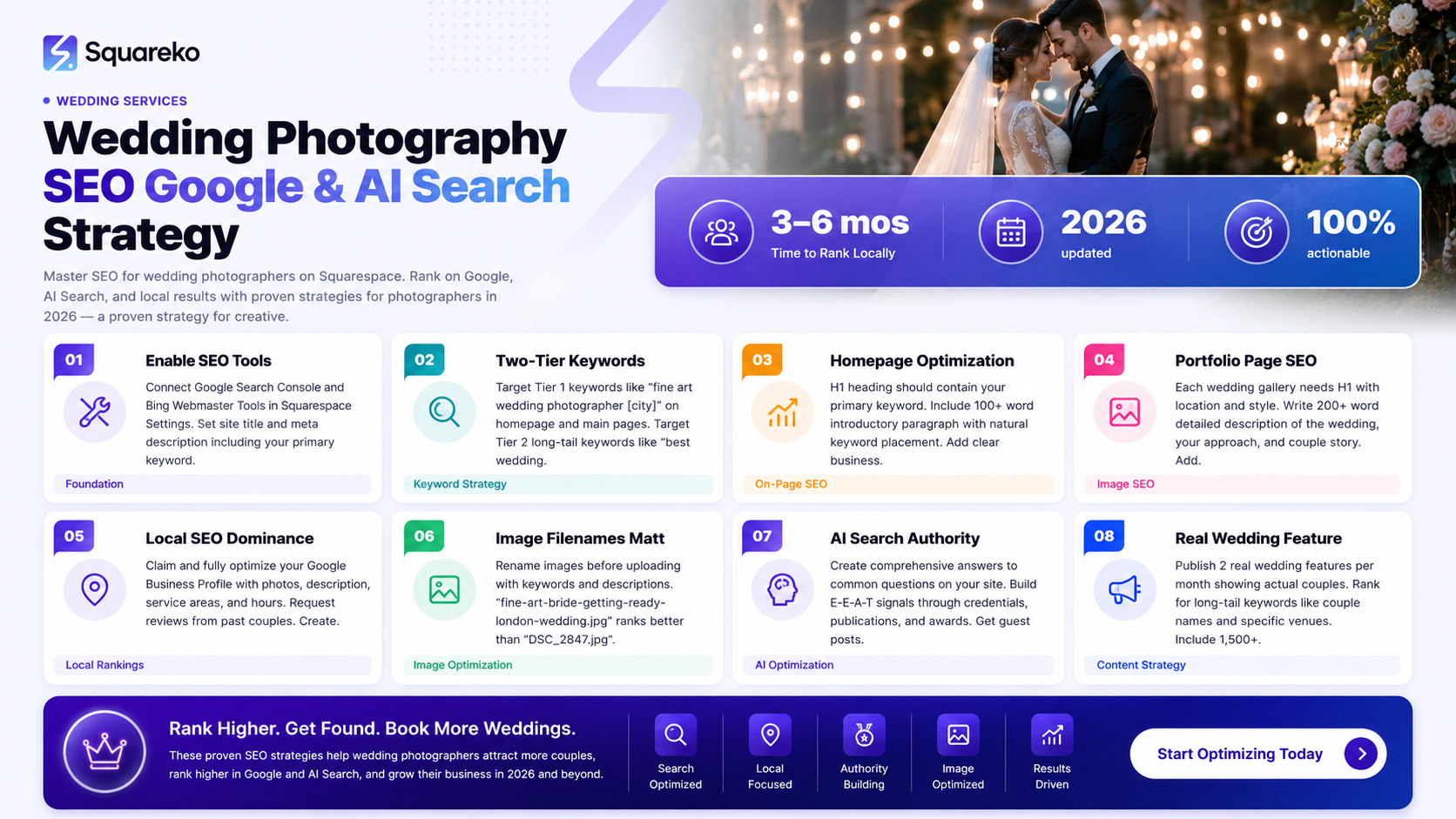
Before diving into tactics, let's establish why SEO matters more for wedding photographers than any other marketing channel.
Your Clients Are Searching with Intent
When someone searches wedding photographer [their city], they're not just browsing. They're at the decision-making stage. They're ready to book. Compare this to social media, where people scroll past your work without intention, or paid ads, which you stop paying for as soon as your budget runs out. Organic search traffic is permanent. It compounds over time.
High-Value Leads and Premium Pricing
Wedding photography clients who find you through organic search are typically willing to pay your full rate. They didn't click a discount ad. They researched, they found you, and they chose you. This means higher conversion rates and better margins than paid channels.
Your Biggest Competitors Aren't Using Squarespace
Most photography studios use custom WordPress sites or outdated platforms. Squarespace photographers have less competition in SEO simply because fewer photographers are optimizing on it. This is your advantage. You can dominate your local search results before anyone else catches on.
Search Consistency Across Seasons
Wedding photographers see seasonal fluctuations in inquiries, but search traffic remains relatively stable throughout the year because couples are always planning weddings at different points in their engagement timeline. SEO gives you a consistent stream of leads, not the feast-and-famine cycle of paid ads.
2. Squarespace SEO Basics: What to Configure Before Anything Else
Squarespace handles much of technical SEO automatically: mobile optimization, site speed, SSL certificates, and XML sitemaps are built-in. But you still need to configure critical settings properly.
Enable SEO Tools in Squarespace Settings
First, turn on Google Search Console integration and Bing Webmaster Tools integration in your Squarespace settings. This allows search engines to crawl your site faster and you'll see search performance data directly.
Go to Settings > SEO and ensure:
Site title is set (this appears in browser tabs and some search results)
Site-wide meta description is filled (150-160 characters, including your focus keyword)
Indexing is enabled for all pages (not blocked by robots.txt)
Create a Keyword-Targeted Site Description
Your site description on Squarespace should include your primary keyword naturally. Example:
Award-winning wedding photographer specializing in fine art and documentary photography in London. We capture authentic moments at weddings across the UK and destination events.
This description appears in search results and helps Google understand your niche immediately.
Configure Your Homepage Strategically
Your homepage is the most important page for Squarespace SEO. Here's what to include:
H1 heading containing your primary keyword (e.g., Fine Art Wedding Photographer in London)
Introductory paragraph (100+ words) that naturally includes your focus keyword and semantic variations
Clear business information: location, service areas, photography style
Strong call-to-action that moves people to inquire or book
Don't stuff keywords. Write for humans first. Your H1 should genuinely describe what you do.
Set Up Proper URL Structure
Squarespace URLs are clean by default, which is good. But ensure your main pages have clear, keyword-relevant URLs:
/services/ or /wedding-photography/ (not just /page1/)
/portfolio/ (not /photos/)
/about/ (not /page2/)
This helps search engines understand your site structure and gives you keyword placement in URLs.
Configure Your Local Business Information
In Settings > Business Information, fill in:
Business name (exactly as it appears legally)
Address (full street address—necessary for local SEO)
Phone number (local area code)
Business category (Photography, Photographer, Wedding Photographer)
This information syncs to search results and Apple Maps, though it's not as powerful as Google My Business (which we'll cover in the local SEO section).
3. Keyword Strategy for Wedding Photographers: The Two-Tier Approach
Wedding photographer SEO requires a two-tier keyword strategy: broad service keywords and hyperlocal, long-tail keywords. This is where most photographers fail—they target either national keywords (impossible to rank for) or keywords too specific to generate traffic.
Tier 1: Broad Service Keywords (Lower Volume, High Priority)
These keywords define your style and services:
Fine art wedding photographer [city]
Documentary wedding photographer [city]
Wedding photographer [city] prices or wedding photographer [city] cost
Modern wedding photographer [city]
LGBTQ+ wedding photographer [city]
Destination wedding photographer
Elopement photographer [city]
These keywords have moderate monthly search volume (100-500 searches depending on city size) and medium-to-high commercial intent. They should anchor your homepage, services pages, and main portfolio pages.
Tier 2: Long-Tail Keywords (Higher Volume, Long-Term Play)
These are three-to-five-word phrases your potential clients actually use:
Best wedding photographer in [neighborhood]
Affordable wedding photographer [city]
Wedding photographer for small weddings [city]
Garden wedding photographer [city]
Vintage wedding photographer [city]
[Specific venue name] wedding photographer
Long-tail keywords are the backbone of blog posts and portfolio category pages. They're easier to rank for and generate highly qualified leads.
Semantic Keywords You Should Weave In
These aren't keywords you rank for—they're words Google uses to understand your relevance:
bridal photography, groom preparation, first look, reception coverage
natural light wedding photographer, posed and candid, wedding day timeline
Your specific style: fine art, editorial, lifestyle, traditional, contemporary
Use these naturally throughout your site so Google understands your niche.
How to Find Keywords for Your Location
Use free tools like Google Search Console (if you already have traffic) and Google Trends. Search your city + wedding photographer in Google and look at the autocomplete suggestions. These are real searches from real couples.
For paid tools, Ahrefs, Semrush, and SE Ranking show search volume and keyword difficulty. Aim for keywords with 50-200 monthly searches in your location (if it's a mid-sized city) and difficulty scores below 40 (indicating you can realistically rank).
Avoid massive national keywords like wedding photographer (billions of searches, impossible to rank for unless you have a massive site). Instead, compete locally.
4. On-Page SEO for Your Key Pages (Homepage, Portfolio, Services)
On-page SEO is where you tell Google and potential clients exactly what you offer. On Squarespace, you're limited in some ways (you can't add custom meta tags to each page), but you have powerful tools through headings, page descriptions, and content.
Homepage Optimization
Your homepage should be your strongest-ranking page. Structure it this way:
H1 (only one per page): Fine Art Wedding Photographer in [City] or Award-Winning Wedding Photographer Serving [Region]
First paragraph (100+ words): Introduce yourself, your photography style, and your service area. Include your primary keyword naturally at least once.
H2 sections: Our Approach, Why Couples Choose Us,Services We Offer
Business information: Full address, phone, email, hours
Testimonial section: Social proof with reviewer name, date, and what they say
Call-to-action: Book Your Discovery Call or View Our Portfolio
Services/Pricing Page
This page ranks for keywords like wedding photographer [city] prices and wedding photography packages [city].
H1: Wedding Photography Packages in [City]
H2 headings for each package: Engagement Session + Full-Day Coverage, Elopement Package, Reception Only
Under each package: Include specifics (hours, deliverables, locations covered) and price (or starting at if variable)
Clear explanation of what's included: Number of photographers, albums, digital files, editing timeline
Frequently asked questions about pricing and packages
This page converts browsers to leads. Make it thorough and transparent.
Portfolio/Gallery Pages
Portfolio pages are your hidden SEO goldmine because Squarespace displays image alt text publicly. Every wedding gallery should include:
Page H1: Fine Art Wedding Photography Portfolio or [Couple Names]'s Destination Wedding in [Location]
Detailed page description (200+ words) describing the wedding, the location, and your approach
Image alt text (we'll cover this extensively in the Image SEO section)
Example portfolio page structure:
H1: Emma & James's Fine Art Wedding in Cotswolds
Page Description: Emma and James's summer wedding in the Cotswolds showcases our approach to fine art wedding photography. The bride wanted natural light, emotion-focused moments captured throughout the day. We worked with [venue name] and coordinated with the wedding planner to capture preparation, ceremony, and reception with a contemporary editorial style. The couple's love for vintage details and garden settings is evident in every photograph.
Images: Each image has descriptive alt text like Bride in lace dress walking down garden aisle toward groom and Fine art close-up of bride's jewelry and flowers before ceremony.
This approach gives you multiple keyword placements and tells search engines exactly what you photograph and how.
About/Bio Page
This page rarely generates search traffic but builds trust and ranks for branded searches (people searching your name).
H1: Your name and title (Walid, Fine Art Wedding Photographer)
Authentic bio (300-500 words): Your story, why you became a photographer, your approach, credentials
Professional photo of you: Helps establish E-E-A-T (Expertise, Experience, Authoritativeness, Trustworthiness)
Awards, publications, features: Featured in Vogue, Brides Magazine, The Knot
Services offered: Brief overview of what you shoot
5. Local SEO Mastery: How to Dominate Your Wedding Photography Market
Local SEO is where wedding photographers win. Most couples hire photographers within their region. Your goal is to appear in Google Maps, local search results, and the People Also Ask section when someone searches wedding photographer [city].
Claim and Optimize Your Google Business Profile
This is non-negotiable. Your Google Business Profile (formerly Google My Business) is the single most important local SEO asset.
Go to google.com/business and:
Claim or create your profile (verify ownership)
Fill in every field completely:
Business name: Exactly as it legally appears
Business category: Photographer or Wedding Photographer (Google will suggest options)
Address: Full street address (not a PO box)
Service areas: Select all cities/regions you serve
Phone: Local number, always answered
Website: Your Squarespace site
Hours: Available for booking or specific hours
Upload high-quality photos (15-20): Your best wedding shots, your studio, you photographing, team photos
Write a business description (750 characters max): Award-winning wedding photographer specializing in fine art photography. We capture authentic moments at weddings throughout [region]. Our style is documentary with artistic direction. [Your specialties].
Add attributes: LGBTQ-owned, Woman-owned, Female photographer, etc. (if applicable)
Request reviews from past clients (we'll cover this below)
Generate Local Reviews and Manage Your Reputation
Google reviews are the second-biggest ranking factor for local SEO (after your business profile quality). Aim for 4.8+ stars with at least 15-20 reviews.
Strategies to get reviews:
Send a follow-up email 2 weeks after the wedding: Include a link to your Google review, make it easy to click
Thank clients in person on wedding day: We'd love a quick review on Google—it helps other couples find us
Respond to every review (positive and negative) within 48 hours: Thank them, address concerns, build community
Never buy fake reviews or ask clients for 5-star reviews (Google penalizes this). Authentic reviews, even 4-star ones, are more valuable.
Create Location-Specific Pages
If you serve multiple cities or neighborhoods, create a page for each:
/wedding-photographer-london/
/wedding-photographer-cotswolds/
/destination-wedding-photographer/
Each page should include:
H1: Wedding Photographer in [Location]
200-300 words on why you love photographing in that location
2-3 sample photos from weddings in that area
Local venue partnerships (if any)
Local keywords naturally integrated
These pages serve a double purpose: they rank for location-specific keywords and give clients location-specific landing pages.
Partner with Local Wedding Vendors
Backlinks from other wedding vendors (planners, florists, venues) signal authority to Google's local algorithm. Reach out to:
Wedding planners in your area
Venues where you've shot
Florists and designers
Caterers and wedding coordinators
Offer to feature them on your blog (with a backlink) in exchange for a mention or backlink to your site. Example: You write a blog post titled How to Plan the Perfect Timeline with Your Wedding Photographer and Planner and link to your planner partner's site.
Optimize for Near Me Searches
Mobile users searching wedding photographer near me should find you if you're local. This is handled automatically if your Google Business Profile is complete, but ensure:
Your address is visible on your Squarespace homepage (footer or header)
Your phone number is clickable (mobile users will tap to call)
Your service area radius in Google Business is accurate
6. Image SEO: The Photographer's Secret Ranking Advantage
Here's the reality: Most wedding photographers overlook image SEO, which means it's your biggest opportunity to rank ahead of competitors.
Google Images is a primary traffic source for photographers. But more importantly, image alt text and descriptions help your entire site rank because they give Google context about what you photograph.
Image Filename Strategy
Before uploading to Squarespace, rename your image files with keywords and descriptive words:
❌ Bad: DSC_2847.jpg, IMG_001.jpg
✅ Good:
fine-art-bride-getting-ready-london-wedding.jpg
groom-reaction-first-look-ceremony-cotswolds.jpg
reception-dance-couple-emotional-moment-wedding.jpg
Include your keyword naturally in the filename. This helps Google understand the image content.
Alt Text Optimization
Squarespace allows you to add alt text to images. This is critical for accessibility and SEO.
For each image, write 8-15 word alt text that describes the image and includes a keyword:
❌ Bad: Wedding photo, Bride and groom, ceremony moment
✅ Good:
Fine art wedding photography of bride in lace dress walking down garden aisle
Groom's emotional reaction during first look with bride in London garden wedding
Candid reception moment of newlyweds dancing to first song at Cotswolds venue
The alt text should describe the image genuinely (for accessibility) while working in keywords naturally (for SEO).
Image Captions and Descriptions
On portfolio pages, Squarespace allows you to add captions below images. Use these strategically:
Instead of just Emma & James's Wedding, write:
Emma & James exchanged vows in the Victorian garden at Thornbury Castle. This candid moment captures the groom's reaction as his bride walked toward him. We used natural light and shot from a documentary perspective while directing specific poses for fine art wedding photography.
This approach:
Gives Google more context about your photography style
Includes long-tail keywords (Victorian garden wedding, documentary wedding photography)
Tells the story of the wedding
Improves user engagement (people spend more time reading)
Optimize Image File Size
Large image files slow down your site, which hurts SEO. Compress images before uploading:
Use TinyPNG.com or ImageOptim (Mac) to reduce file size without visible quality loss
Squarespace also automatically optimizes images, but pre-optimization is better
Aim for images under 500KB each
Use Descriptive Gallery Titles
When you create image galleries in Squarespace, give them keyword-rich titles:
❌ Bad: Wedding 1, Photos, Gallery
✅ Good:
Emma & James's Fine Art Garden Wedding in Cotswolds 2025
Sarah & Tom's Documentary-Style Wedding at Thornbury Castle
Reception Moments and Dance Photos from Modern London Wedding
7. Schema Markup for Wedding Photography Websites
Schema markup (structured data) helps Google understand what's on your page without reading all the text. Squarespace adds basic schema automatically, but you can do more.
LocalBusiness Schema
This tells Google you're a local business. Squarespace adds this automatically if you've filled in your business information, but ensure it's complete in Settings.
Photograph/CreativeWork Schema
This schema is perfect for wedding photographers. You can add it to portfolio pages to tell Google each image is a photograph (artwork).
Unfortunately, Squarespace doesn't give you direct access to add custom schema via the interface. However, you can:
Contact Squarespace support and ask them to add a code block to your footer where you can paste JSON-LD schema
Use a Squarespace code injection tool (in Site Tools > Code Injection)
Here's example schema markup for a wedding portfolio page:
{
  "@context": "https://schema.org",
  "@type": "CreativeWork",
  "name": "Emma & James's Fine Art Wedding in Cotswolds",
  "author": {
    "@type": "Person",
    "name": "Your Name",
    "url": "https://yoursite.com"
  },
  "image": "https://yoursite.com/images/wedding-photo.jpg",
  "description": "Fine art wedding photography from Emma and James's ceremony and reception at Thornbury Castle in the Cotswolds.",
  "datePublished": "2025-06-15"
}
Organization/LocalBusiness Schema (Enhanced)
Add this to your homepage via code injection:
{
  "@context": "https://schema.org",
  "@type": "LocalBusiness",
  "name": "Your Photography Studio Name",
  "image": "https://yoursite.com/your-photo.jpg",
  "description": "Award-winning fine art wedding photographer in London.",
  "address": {
    "@type": "PostalAddress",
    "streetAddress": "Your Street Address",
    "addressLocality": "London",
    "addressRegion": "England",
    "postalCode": "Postcode",
    "addressCountry": "GB"
  },
  "telephone": "+44 20 XXXX XXXX",
  "url": "https://yoursite.com",
  "priceRange": "££££",
  "areaServed": ["London", "Cotswolds", "Destination"],
  "aggregateRating": {
    "@type": "AggregateRating",
    "ratingValue": "4.9",
    "reviewCount": "25"
  }
}
This schema helps Google display your business information in rich snippets in search results.
Review Schema
If you have testimonials or Google reviews, add this schema to display star ratings in search results:
{
  "@context": "https://schema.org",
  "@type": "AggregateRating",
  "ratingValue": "4.9",
  "reviewCount": "25",
  "name": "Fine Art Wedding Photography"
}
8. How to Get Found on AI Search as a Wedding Photographer in 2026
This is the future of search, and it's here now. Google's AI Overviews appear on ~20% of searches. ChatGPT, Claude, and Gemini are becoming discovery channels. Your wedding photography business needs to be visible on AI search, not just Google.
Understanding AI Search vs. Google Search
Google Search (traditional): User enters a query, Google shows websites that match.
AI Search: User asks a question (often conversational), an AI model generates an answer synthesized from multiple sources, then recommends creators/brands to visit.
Example:
Google Search Query: fine art wedding photographer London Result: Links to photographer websites
AI Search Query (ChatGPT/Claude): I want a fine art wedding photographer in London. Who should I contact? What should I look for? Result: Fine art wedding photography emphasizes artistic composition and emotion. Consider photographers like [name], who are known for [style]. You should look for [qualities].
The difference: AI doesn't just list results; it synthesizes information and makes recommendations. If your site is authoritative enough, AI models cite you or recommend you directly.
How Wedding Photographers Can Optimize for AI Search
1. Create Clear, Authoritative Answers on Your Site
AI models are trained on public web content. They pull answers from the most authoritative, relevant sources. Your site should answer common questions thoroughly:
What is fine art wedding photography? (answer on your homepage or blog)
How do we choose a wedding photographer? (answer on your About or Services page)
What is documentary vs. posed wedding photography? (answer on your blog)
Write 500+ word sections that answer these questions comprehensively. AI models will pull from these sections when answering user questions.
2. Establish E-E-A-T (Expertise, Experience, Authoritativeness, Trustworthiness)
AI models, like Google, assess E-E-A-T. Build it with:
Your credentials: Trained at [institution], Member of [professional organization]
Publications: Featured in Vogue, Brides Magazine, The Knot
Awards: Winner of [competition], Award from [organization]
Years in business: Photographing weddings for 10+ years
Client testimonials: Detailed reviews with names and photos
Case studies: In-depth real wedding features showing your process
AI models weight authoritative content higher.
3. Optimize for Conversational Queries
AI search is conversational. People ask questions, not keywords. Write content that answers questions:
Instead of optimizing for the keyword wedding photographer packages, create content answering:
What are typical wedding photography package prices in 2026?
How many hours of coverage do wedding photographers typically offer?
What's included in a full-day wedding photography package?
Use natural language, question-and-answer formats, and directly address what people want to know.
4. Add FAQ Content Your Site
Frequently asked questions are gold for AI search. When you answer common questions thoroughly on your site, AI models can cite your site when answering similar questions.
Examples for wedding photographers:
What's the difference between fine art and documentary wedding photography?
How far in advance should I book a wedding photographer?
Do you offer engagement sessions?
What's your wedding photography style?
How many photos will we receive?
Do you offer second shooters?
Do you travel for destination weddings?
What's your editing style?
Write 150-300 word answers for each. wedding photography FAQ section.
5. Create Content About Your Specific Style
AI models are trained on content about different photography styles. If you specialize in a style, create educational content about it:
What is fine art wedding photography? (blog post)
Documentary vs. Posed Wedding Photography: Which Style Is Right for Your Wedding? (comparison post)
How Fine Art Photography Captures Authentic Emotion at Weddings (educational post)
This positions you as an authority in your niche and makes it more likely AI models recommend your style (and thus your site) when asked about it.
6. Optimize for Voice Search and Conversational Queries
Voice search and AI search both use conversational language. Optimize for questions you'd answer if someone called:
How much does a wedding photographer cost in London? (not just wedding photographer prices)
Can I get copies of my wedding photos? (not just digital files)
Do you photograph small weddings? (not just small wedding photography)
Include these conversational phrases naturally in your FAQ, blog content, and page text.
7. Build Content Around Local AI Search
Local AI Search is emerging fast. Google's AI Overviews now include local recommendations. To rank:
Claim and fully optimize your Google Business Profile (covered earlier)
Create location-specific content (covered earlier)
Get local reviews and maintain high rating
Build backlinks from local sources (covered later)
Example: When someone asks Claude, What's a good fine art wedding photographer in London?, if your Google Business Profile is strong and your site is authoritative, you have a decent chance of being recommended.
8. Monitor Your Site's Appearance in AI Search
Use these tools to see if AI models are referencing your site:
ChatGPT: Ask recommend a fine art wedding photographer in [your city]
Claude: Same query
Gemini: Same query
Google Search: Search your primary keywords and look for AI Overviews (marked with a blue box at the top of results)
If AI models mention you, great—you're on the radar. If not, double down on authority building (backlinks, publications, reviews, content).
If Google AI Overviews appear but don't mention you, analyze which sites they do mention and see what those sites have that you don't (usually more reviews, more backlinks, or more published features).
9. Consider Guest Posts on Wedding and Photography Blogs
AI models are trained on popular websites. If your content appears on high-authority wedding blogs and publications, AI models see your ideas, photography, and expertise across multiple sources—boosting your perceived authority.
Reach out to:
Wedding blogs and publications
Photography industry publications
Lifestyle and design magazines
Local media and publications
Write guest posts on topics like:
Fine Art Wedding Photography Trends in 2026
How to Choose a Wedding Photographer: A Checklist
The Ultimate Guide to Destination Wedding Photography
Each guest post should link to your site, increasing your authority.
9. Building Authority Through Backlinks and Partnerships
Authority (measured in part by backlinks) is critical for both Google and AI search ranking. Backlinks tell search engines and AI models that other authoritative sites trust your content.
Where to Get Wedding Photography Backlinks
Wedding Publications and Blogs
The Knot, Brides, Vogue, Wedding Wire: These receive thousands of backlinks. A feature here sends referral traffic and authority.
Local wedding blogs: Easier to get featured on. Usually receive 10,000+ monthly visitors.
Photography industry sites: Shoot for publications like Expert Photography, Digital Trends, Photography Life
How to get featured: Reach out to editors with story ideas:
Hi [Editor], I have a story idea: 'Fine Art Wedding Photography Trends Emerging in 2025.' I could provide exclusive images and expertise on [specific trend]. Would you be interested?
Vendor Partnerships and Resource Pages
Wedding planning websites: Find a vendor pages with photographer categories
Wedding venue websites: Often have recommended photographer lists
Wedding planner portfolios: Planners feature photographers they've worked with
Corporate directories: Photographer business directories
Outreach strategy:
Hi [Venue Manager], I've photographed [X number] of weddings at [Venue Name]. I'd love to be listed as a recommended photographer on your site. Here's my website: [URL].
Create Linkable Assets
Make content so good, other sites want to link to it:
Comprehensive guides: The Complete Guide to Wedding Photography Styles (2,000+ words, visual examples)
Original research: Survey of 500 Couples: What They Wish They'd Known About Wedding Photography (collect real data, publish results)
Trend reports: Wedding Photography Trends in 2026 (data-driven predictions)
Tools/calculators: Wedding Photography Budget Calculator (helps planners estimate costs)
Sites link to resources that help their audience. Create resources, publicize them, and watch backlinks roll in.
Get Mentioned (But Not Linked)
Sometimes sites mention you without linking. That's still authority. Reach out to:
Wedding blogs reviewing photographers
Photography comparison sites
Industry round-ups: 10 Best Wedding Photographers in [Region]
Ask if they'd include your site (with a link) in these roundups.
Partnerships with Complementary Businesses
Partner with wedding planners, venues, florists, and designers. Create:
Co-authored blog posts: Wedding Planner + Photographer: How We Collaborate to Create Your Dream Day (published on both sites, each gets a link)
Referral agreements: You recommend planners, they recommend you
Featured content: Meet Our Recommended Vendors sections on each site
10. Blogging Strategy: Using Real Wedding Features to Rank
Blog posts are your engine for long-tail keyword traffic. But generic blog posts (10 Tips for Looking Good in Wedding Photos) rarely rank. Real wedding features rank and convert better.
Why Real Wedding Features Rank
A real wedding feature showcases an actual client's wedding with:
Their names and unique story
Specific venue details
Specific date and location keywords
Detailed imagery
Emotional narrative
Google loves them because they're unique, detailed, and authoritative. Couple names, venues, and details create long-tail keyword opportunities. Sarah and Tom's wedding at Thornbury Castle ranks for Thornbury Castle weddings, Fall weddings in Cotswolds, etc.
Real Wedding Blog Post Structure
Each real wedding feature should be 1,000-1,500 words and include:
H1: [Couple Names]'s Fine Art Garden Wedding in [Venue Name]
Opening (100 words): Tell the couple's story. How they met, why this venue, their vision for the day. This sets up emotional connection.
Couple Q&A: Answer questions from the couple:
Where did you get married and why?
What was your wedding photography style vision?
What was your favorite moment from the day?
Any advice for other couples
Include couple photos next to Q&A.
The Details (300 words):
Venue name and location
Date and season
Color palette and theme
Special moments or traditions
Photography timeline and approach
Photo Essay (50 images, organized by moment):
Getting ready (bride and groom)
Family portraits
Ceremony
First look or first kiss
Reception (cocktail, dinner, dancing)
Final moments and exit
Each image should have descriptive alt text (as covered in Image SEO section).
Photographer's Note (200 words): Explain your photography approach for this wedding. What made it unique? What did you focus on? This builds authority and teaches readers about your style.
Couple Testimonial: Full testimonial from the couple praising your work, professionalism, and the final images.
Call-to-Action: Love this style? Let's create your wedding story. [Book a discovery call]
Publishing and Promotion
Publish on your blog
Share on social media
Email to past clients
Pitch to wedding publications
Link from relevant pages
Blog Publishing Schedule
Consistency matters. Aim for:
2 real wedding features per month
1 educational blog post per month
This gives you 36+ blog posts per year—enough to dominate long-tail keywords in your niche.
11. Wedding Photography SEO Checklist 2026
Use this checklist to ensure you're covering all SEO bases:
Squarespace Setup (Foundation)
Google Search Console connected and property verified
Bing Webmaster Tools connected
Site title and meta description filled in
Homepage H1 contains primary keyword
All pages have descriptive, keyword-relevant titles
Mobile optimization tested (site responsive)
Page load speed under 3 seconds (test with PageSpeed Insights)
Keyword Strategy
Primary keywords identified and listed
Location-specific keywords prioritized
Long-tail keywords for blog posts identified
Semantic keywords weaved into main pages
Keyword placement: title, H1, first paragraph, headings
On-Page Optimization
Homepage optimized (H1, intro paragraph, CTAs)
Services/Pricing page complete and transparent
Portfolio pages have descriptive titles and descriptions
About page includes E-E-A-T signals (credentials, publications, awards)
All pages have clear structure (H1 > H2 > H3)
Internal linking implemented (3-5 links per page to relevant pages)
Image SEO
Image filenames are descriptive and keyword-relevant
Alt text added to all images (8-15 words, descriptive)
Image captions added to portfolio images
Image file sizes optimized (under 500KB)
Gallery titles are keyword-rich
Local SEO
Google Business Profile claimed and fully optimized
Address, phone, hours, service area filled in
15-20 business photos uploaded
4.8+ star rating with 20+ reviews
Location-specific pages created (if serving multiple areas)
Local venue partnerships established
Schema Markup
LocalBusiness schema added (automatic in Squarespace)
Organization schema added via code injection
Photograph schema added to portfolio pages (if possible)
Review/AggregateRating schema added
Authority Building
Guest posts published on 3+ wedding/photography blogs
Backlinks from wedding publications and directories
Awards and credentials prominently displayed
Testimonials with names and photos added
Professional certifications or associations mentioned
Content and Blogging
Real wedding features published (minimum 2 per month)
Educational blog posts published (1 per month)
FAQ page created with 8+ questions answered
Long-tail keywords targeted in blog posts
Internal links added from blog to main pages
AI Search Optimization
FAQ content comprehensive (150-300 words per question)
Clear, authoritative answers to industry questions
Guest posts on high-authority wedding blogs (for authority signals)
E-E-A-T signals prominent (credentials, publications, reviews)
Tested AI search queries to see if you rank
Technical SEO
XML sitemap submitted to Google Search Console
404 errors fixed
Broken internal links repaired
Page speed optimized
Mobile usability tested and verified
SSL certificate active (HTTPS)
Monitoring and Maintenance
Google Search Console checked weekly
Keyword rankings monitored monthly
Google Business Profile reviews responded to daily
Blog updated consistently (2x per month minimum)
Broken links monitored and fixed
Frequently Asked Questions
-
3-6 months to see meaningful results for location-specific keywords. Authority builds gradually. Local keywords ("fine art wedding photographer in [your city]") rank faster (60-90 days) than broader keywords. Real wedding features and consistent blogging accelerate results.
-
Yes, with caveats. Squarespace handles technical SEO automatically (mobile optimization, site speed, SSL), which is good. The downside: you can't customize meta tags per page or add custom schema easily. Work within Squarespace's framework (strong headings, keyword placement, image optimization) and you'll rank fine. Many successful wedding photographers use Squarespace.
-
Yes, if you want long-tail keyword traffic. Real wedding features rank for long-tail keywords like "Emma and Tom's Cotswolds wedding" and "Victorian garden weddings." Without a blog, you're limited to ranking for main service pages. Blogs are your engine for consistent, growing traffic.
-
Critical for local SEO. Google heavily weights reviews and ratings in local algorithm. Aim for 4.8+ stars with 20+ reviews. Reviews also build trust with potential clients reading your Google Business Profile.
-
Create location-specific pages for each service area and target location keywords on those pages. Use broad service keywords (your style + "wedding photographer") on your homepage. Target location + long-tail combinations in blog posts. This way, you're visible for both broad searches (your niche) and local searches (your specific areas).
-
Guest posts and partnerships are most effective. Write high-quality guest posts for wedding blogs and publications (with a link back to your site). Partner with venues, planners, and other vendors for co-authored content and mutual linking. Reach out directly: "I'd love to be featured as a recommended photographer on your vendor list."
-
No. SEO is higher-ROI for wedding photographers long-term. Paid ads work while you're paying; organic search traffic is permanent and compounds over time. However, combining organic SEO with a small paid ads budget for high-intent keywords can accelerate growth.
-
Create comprehensive, authoritative content answering common questions (why fine art photography matters, how to choose a style, etc.). Build E-E-A-T signals: credentials, publications, awards, testimonials. Get featured on high-authority wedding blogs. Optimize your Google Business Profile. AI models are trained on this content and will recommend you if you appear as authoritative in multiple places.
Ready to Dominate Your Local Wedding Photography Search Results?
Ranking on Google and AI search doesn't happen by accident. It requires a strategy, consistent effort, and understanding how search engines (and AI models) actually work in 2026.
The photographers who are winning right now are the ones who:
Owned their local search by fully optimizing their Google Business Profile and building reviews
Invested in content—real wedding features that rank for long-tail keywords and generate qualified leads
Built authority—through publications, partnerships, and high-quality content that appears across the web
Stayed ahead of the curve—by optimizing for AI search while most competitors still ignore it
If you're still hoping social media or paid ads will build your business, you're missing the biggest opportunity: couples actively searching for you right now on Google and AI platforms.
At Squareko we specialize in helping creative businesses like photography studios build websites that rank, convert, and attract premium clients. We don't just design beautiful Squarespace sites—we build them for search, with SEO strategy baked in from the start.
Here's what we do:
We conduct a full SEO audit of your Squarespace site, identify ranking opportunities in your market, and build a strategy to dominate your local search results. We handle keyword research, on-page optimization, technical SEO setup, content strategy, and AI search optimization—so you focus on photographing weddings.
During our 30-minute discovery call, we'll:
Audit your current website and SEO setup
Identify keywords you should be ranking for (but aren't)
Show you exactly where your competitors are winning
Map out a 6-month SEO strategy to start generating consistent, qualified leads from search

From custom website design to SEO strategy, we help businesses launch a site that looks professional and performs better.

About the Author
I'm Walid Hasan, a Certified Squarespace Expert and Squarespace Circle Platinum Partner with over 12 years of hands-on experience designing and optimizing high-performing websites. Over the years, I've had the privilege of building more than 2,000 Squarespace websites for clients around the world, always focusing on clean design, strong user experience, and conversion-driven results.
