
How to Build a Wedding Photography Website on Squarespace That Wins Bookings
Introduction
You've invested in your camera gear, refined your craft, and built a portfolio that turns heads. But if your website isn't pulling in wedding bookings, all that talent remains invisible to the couples who need you most.
The truth is simple: a beautiful portfolio alone doesn't fill your calendar. Couples researching wedding photographers online are making decisions based on more than just images. They're evaluating your pricing transparency, reading what previous clients say about you, scanning your about page to decide if they trust you, and checking whether contacting you is frictionless or frustrating.
This is where a strategic wedding photography website on Squarespace changes everything. When built correctly, your Squarespace site becomes a booking machine—not a digital portfolio gathering dust. It qualifies leads before they contact you, builds confidence through social proof, and removes every barrier between discovery and that first conversation.
In this guide, we'll walk through exactly how to structure your wedding photography website to win more bookings. We'll cover portfolio curation, pricing psychology, form optimization, and the mobile experience that most couples actually use when browsing photographers on their phones at 11 PM on a Sunday. Whether you're starting from scratch or redesigning an existing site, these strategies work.
Key Takeaways How to Build a Wedding Photography Website on Squarespace That Wins Bookings
Portfolio curation beats quantity — Show 15-20 of your absolute best weddings, organized by style and season, not chronologically
Transparent pricing builds trust — Couples want to know what you cost before clicking contact; hiding prices kills bookings
Your about page closes sales — Couples book photographers they trust and connect with; your story and values matter more than credentials alone
Forms pre-qualify leads before contact — Use Squarespace forms and tools like Acuity Scheduling to filter inquiries and save yourself time responding to poor fits
Mobile optimization directly impacts bookings — Over 70% of couples browse wedding vendors on mobile; a sluggish desktop-only site leaves money on the table
Understanding the Wedding Photography Client Journey
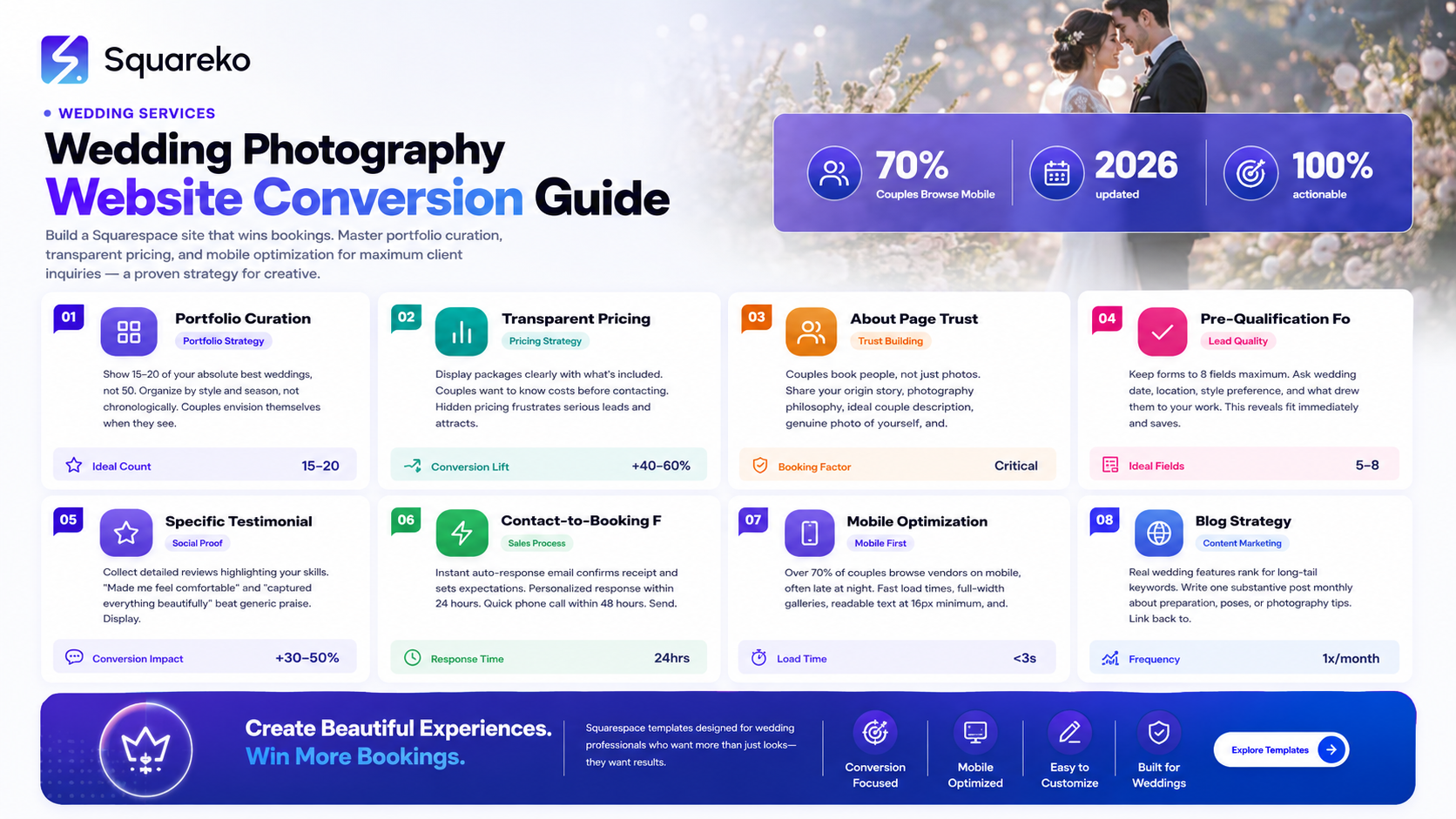
Before building your website, you need to understand how couples actually find and book wedding photographers. This isn't random browsing—it follows a predictable pattern.
The Awareness Stage
Couples typically begin their search 6-12 months before their wedding. They're often triggered by engagement, a friend's recommendation, or stumbling across a photographer's work on Instagram. At this point, they don't know you exist. They're asking questions like: What's a good wedding photographer near me? or How much does wedding photography cost? or What's the difference between traditional and documentary wedding photography?
This is where content on your website—and a solid blog strategy—can capture them.
The Research Stage
Once they've identified a few photographers, couples deep-dive into your website. They're looking at your portfolio, comparing styles, checking your pricing, reading about you as a person, and scanning testimonials from couples just like them. This is the most critical stage for conversion. If your website doesn't clearly communicate your value, pricing, and booking process, they'll move to the next photographer.
The Decision Stage
By the time a couple fills out your contact form, they've usually narrowed down to 2-3 photographers. The final decision often comes down to: Do I trust this person? Will they deliver the images I want? Can I afford them? Do they feel aligned with my vision?
Your website needs to answer all three questions before that first email lands in their inbox.
The Booking Stage
Once they contact you, the friction between initial inquiry and booking should be minimal. Couples want a quick response, a clear next step, and ideally, an easy way to reserve their date and pay any deposit. The longer this process takes, the more likely they book someone else.
Understanding this journey shapes every design and content decision you make on your wedding photography website.
Choosing the Right Squarespace Template for Wedding Photography
Squarespace offers several portfolio-focused templates, but not all are ideal for wedding photographers who need to convert leads into bookings.
What to Look For
Your template should prioritize:
Full-width image galleries — Wedding photos demand space. Templates with small thumbnails or overly structured grids minimize impact.
Clear navigation — Couples should find your portfolio, pricing, about, and contact page within two clicks.
Built-in testimonial sections — Social proof matters. Templates with dedicated testimonial blocks make this easier.
Contact form visibility — Your inquiry form shouldn't be buried. It should be accessible from multiple pages.
Mobile-first responsiveness — Over 70% of website traffic for wedding photographers comes from mobile devices. Your template must look stunning on phones.
Top Squarespace Templates for Wedding Photographers
The Avada, Momentum, and Jasper templates work well for wedding photography because they showcase large images, offer clean navigation, and include built-in portfolio and testimonial sections. However, the best template is ultimately the one you'll actually customize and keep updated.
Don't fall into the trap of spending three months finding the perfect template. Pick one with the core features above, and focus your energy on content, portfolio curation, and optimization—that's what drives bookings.
Once you've chosen your template, make it yours. Change the colors to match your brand, upload a professional brand image or logo, and write custom copy instead of leaving placeholder text. Couples notice when websites feel templated and generic. Your site should feel like an extension of your creative vision.
Building a Portfolio That Sells Your Style
Your portfolio is your most powerful sales tool. But here's where most wedding photographers get it wrong: they show too much.
Curation Strategy: Less Is More
Aim for 15-20 wedding galleries, not 50. Each gallery should represent a complete wedding story—from getting ready through the reception. This depth matters more than breadth.
Why? Because when a couple sees a complete wedding story, they can envision you at their wedding. They see the quiet moments you capture, your eye for details, how you handle group photos, and your style through the day's light changes.
Organize by Style and Season, Not Chronologically
Don't display your weddings in reverse chronological order. Instead, group them by:
Style — Modern + Romantic, Intimate + Timeless, Bold + Colorful
Venue type — Garden Venues, Urban Lofts, Destination Weddings
Season — Spring, Summer, Fall, Winter
This organization helps couples quickly find weddings that match their vision. If they love the vibe of a garden wedding and you've shot 12 of them, they should be able to find that collection easily.
Gallery Layout and Image Ordering
Within each wedding gallery, order images intentionally:
Start strong — The first 3-5 images should be your absolute best shots. This is where couples decide if they keep scrolling.
Tell a story — Move through the day logically. Getting ready → portraits → ceremony → reception → details.
Vary your shots — Alternate between wide establishing shots, emotional close-ups, and detail work. Variety holds attention.
End with emotion — Your final images should leave a lasting impression. A meaningful first dance shot or joyful exit works well.
The Hidden Gallery Test
Here's a practical test: Would you be proud to show these images to your best clients? If any wedding in your portfolio doesn't pass that test, remove it. Couples will judge your overall quality based on your weakest work.
The Pricing Page Strategy: Yes, Show Your Prices
This is the biggest mistake wedding photography websites make: hiding prices behind a contact for pricing wall.
Why Hidden Pricing Kills Bookings
When couples see contact for pricing, they think one of three things:
You're too expensive for their budget, and you don't want to say it
You have inconsistent pricing and want to customize per couple (red flag for scope creep)
You're not transparent, and they can't trust you
Hidden pricing doesn't protect you. It filters out fewer leads. It just frustrates the couples who might have booked you if they'd known your price upfront.
How to Price Transparently
Display your packages clearly. Here's a framework:
Package name — Engagement + Wedding Day, Wedding Day Only, Intimate Elopement
What's included — Number of hours, number of photographers, edited image count, album or prints, etc.
Base price — The starting investment for that package
What adds cost — Extra hours, travel, rush editing, premium album options
Example:
Full Day Package — $3,500
8 hours of coverage
Two photographers
600+ fully edited images
Online gallery for download
20% discount on prints and albums
Why this works: Couples can immediately see if you're in their budget. Those who can't afford you self-select out. The ones who contact you are already mentally prepared to invest in your work.
Handling Price Variations
If your pricing varies significantly by season, location, or wedding size, explain why:
Wedding day coverage pricing starts at $3,500 for local events. Destination weddings, weekend travel, or dates during peak season (May–October) include travel and coordination fees ranging from $500–$1,500.
This transparency builds trust. Couples appreciate honesty far more than they appreciate the false promise of custom pricing.
Your About Page: Why Couples Book People, Not Just Photos
Here's a fact that surprises many photographers: couples often book based on the about page before even deciding they love your portfolio.
Why? Because they book people, not just photos.
When a couple hires a wedding photographer, they're inviting a stranger into their most important day. They need to trust you. They need to believe you'll capture what matters. And they need to feel like you'll treat them with respect and care.
Your about page is where you build that trust.
What to Include
Your origin story — How did you get into photography? Most couples don't care about your gear. They care about your why. Did you pick up a camera after a meaningful experience? Do you photograph weddings because you believe in celebrating love? Start there.
Your style and philosophy — Describe how you approach wedding photography. Are you documentary-focused? Artistic and posed? A blend? Why does this approach matter?
Example: I believe the best wedding photos capture the unscripted moments—the laugh before the vows, the quiet hand-holding between photos, the joy on a parent's face. I'm there to document your day as it unfolds, with artistic direction that feels natural, not forced.
Who you work best with — You don't need to serve every couple. Identify your ideal couple. Are they adventure-seeking? Romantic? Laid-back? Formal? Be specific.
I work best with couples who want authentic, emotion-first photography. If you're planning a casual, fun wedding where you want to feel like yourselves (not posed), we're likely a great fit.
A genuine photo of you — Not a headshot. A real, personable photo. Smile. Look approachable.
Your credentials (but frame them right) — If you've won awards, been published, or studied under someone respected, mention it. But don't lead with credentials. Lead with who you are, then mention relevant achievements.
A clear call-to-action — Let's talk about your wedding or Book a free consultation or See if we're a fit.
The about page that wins bookings feels like a conversation with a friend, not a resume.
Setting Up Your Inquiry Form to Pre-Qualify Leads
Your contact form isn't just about collecting inquiries. It's a qualification tool that should help you attract the right couples and filter out poor fits before they even contact you.
What to Ask in Your Contact Form
Keep it short—no more than 8-10 fields. Long forms kill conversion. Here's what matters:
Name (required)
Email (required)
Phone (optional but recommended)
Wedding date (required) — This tells you immediately if you're available and if they're in your ideal timeline
Wedding location/venue (required) — Tells you if you travel to their area
Wedding size/style (required) — 50 intimate guests, 200+ formal celebration, etc. Helps you gauge fit
What drew you to my work? (optional) — A simple text field. This one question reveals so much about fit. If they say I love your bright, airy style and you're a moody, dramatic photographer, that's useful information.
Any questions for me? (optional)
Beyond Squarespace Forms
Squarespace forms work fine, but many wedding photographers integrate with Acuity Scheduling or similar tools. This allows you to:
Automatically send custom responses based on answers
Schedule consultations directly
Collect payments for engagement sessions or deposits
Set conditional logic
Squarespace booking system integration wedding photography
The Pre-Qualification Magic
Here's what pre-qualification does: It ensures that when a couple submits a form, you already know:
They can hire you on your timeline
They're geographically available (or you travel there)
Your style resonates with them
The wedding scope aligns with what you offer
This cuts down on back-and-forth emails with couples who aren't a fit. It protects your time and ensures your responses go to leads who are likely to book.
Testimonials and Social Proof: Making It Impossible to Doubt You
A great portfolio shows what you can do. Testimonials prove you deliver, communicate well, and create an experience couples love.
Couples read testimonials before booking. They want to know: Did this photographer deliver the images on time? Were they easy to work with? Did they handle stressful moments well?
How to Collect Testimonials
Don't wait for couples to volunteer feedback. Ask for it systematically:
1. In-delivery email — When you send edited images, include a request:
I'd love to hear about your experience working with me. A few sentences about what you loved or what stood out would mean the world. If you're open to me sharing your words (with your name and wedding date) on my website, let me know. Here's a quick form: [link]
2. Follow-up after 2-3 weeks — Couples are still in the glow of their wedding. This is prime time for feedback.
3. Annual re-engagement — Send a one year later email with photos from their wedding day. Ask them to reflect on how much those images mean. Nostalgia is powerful.
What Makes a Strong Testimonial
Avoid vague praise: Great photographer! — Nobody remembers this.
Seek specific feedback:
I was nervous about being in photos, but Walid made me feel so comfortable. Every image captures genuine joy, not forced smiles.
We had only 6 hours and Walid captured everything we wanted. The images tell the complete story of our day in a way that surprised us.
The editing is stunning. Our photos look like they belong in a magazine, but they still feel like us.
Display testimonials alongside a photo of the couple (with permission). Real faces build trust far more than anonymous quotes.
Where to Place Testimonials
Homepage (2-3 standout quotes)
About page (3-4 detailed testimonials)
Individual wedding gallery pages (the couple's own testimonial, if they gave one)
A dedicated testimonials page (optional, but it works)
Video Testimonials
If any couples are willing, a 30-second video testimonial is gold. They don't need to be professionally shot. A phone recording of a couple talking about their experience builds trust in a way text can't match.
The Contact-to-Booking Flow: Reducing Friction at Every Step
From the moment a couple submits your contact form to the moment they sign a contract and pay a deposit, every step matters.
Step 1: Instant Confirmation
Set up an auto-responder email that fires immediately when someone fills out your form. This tells them you got their inquiry and when they can expect a response.
Example:
Hi [Name], thanks for reaching out! I got your message about your [date] wedding. I read every inquiry personally and I'll be back to you within 24 hours. Can't wait to learn about your celebration. — Walid
This simple step reduces the anxiety couples feel after hitting submit.
Step 2: Personalized Response (Within 24 Hours)
When you respond, reference specific details from their form. Don't send a generic template.
Instead of: Thanks for your interest. Here are my rates...
Try: Hey Sarah and David, I loved what you said about wanting authentic, emotion-first photos at your garden wedding. Your venue sounds stunning, and your vision totally aligns with my style. I'd love to chat about making your day special.
Personalization signals that you actually read their inquiry and care about their specific wedding.
Step 3: Quick Phone/Video Consultation
Within 48 hours, offer a brief call or video chat. This doesn't need to be long—15-20 minutes is plenty. The goal is to:
Confirm that you're a good fit for each other
Answer any questions they have
Make them comfortable with you as a person
Move toward a booking decision
If they love you, you'll know. If they don't, save both of you time.
Step 4: Contract and Deposit
If the fit is right, send a professional contract and invoice for your deposit. Squarespace integrates with Stripe and other payment processors, making this seamless.
Your contract should cover:
Dates and timing
Deliverables (hours of coverage, final image count, etc.)
Revision policy
Payment schedule
Cancellation terms
Keep it simple, but cover yourself legally. Consider having a lawyer review your contract once.
Step 5: Follow-up After Booking
Once booked, confirm the date on your calendar immediately. Send a welcome email that includes:
A reminder of what's included
Next steps and timeline
A style questionnaire or inspiration doc (helps you understand their vision)
Your phone number and email for questions
This keeps momentum and reduces post-booking communication friction.
The Entire Flow Should Take 3-5 Days
From form submission to signed contract and deposit. Any longer, and couples book someone else.
Mobile Optimization for Wedding Photography Websites
Here's a statistic that changes everything: over 70% of couples browse wedding vendors on their mobile phones.
Most wedding photography websites are beautiful on desktop. They fall apart on mobile.
Common Mobile Mistakes
Images don't load quickly (couples give up before the site fully loads)
Navigation is hard to find or requires excessive scrolling
Buttons and forms are too small to tap comfortably
Galleries load all images at once, creating lag
Text is hard to read (too small, poor contrast)
Pricing information is hidden behind expandable sections
Mobile Optimization Best Practices
1. Test on Real Devices
Don't just test in Chrome's mobile emulator. Test on an actual iPhone and Android phone. You'll notice issues that emulators miss.
2. Prioritize Image Loading
Use Squarespace's built-in image optimization or a CDN to ensure images load fast. A two-second delay on mobile kills conversion. Consider:
Lazy loading (images only load as users scroll)
Responsive image sizes (serve smaller images on mobile, full-res on desktop)
JPEG compression (maintain quality while reducing file size)
3. Simplify Navigation
On mobile, your navigation should be a simple hamburger menu. Limit to: Home, Portfolio, About, Pricing, Contact. That's it.
4. Make Your CTA Button Obvious
Your Contact Me or Inquire About Your Wedding button should be visible above the fold on mobile. Make it big, use contrast, make it impossible to miss.
5. Forms Should Be Mobile-Friendly
Long forms on mobile are painful. Use Squarespace's native form builder, which automatically adjusts for mobile. Keep fields to what you actually need.
6. Fast-Load Portfolio Preview
On mobile, don't load all 600 images from a wedding gallery at once. Use Squarespace's gallery feature, which automatically optimizes image delivery.
Test Mobile Speed
Use Google Page Speed Insights (check your website, it's free). Aim for a score of 80 or above on mobile. If you're below 70, you're losing bookings.
Most Squarespace sites score well by default, but you can improve by:
Reducing large image files
Minimizing plugins or custom code
Enabling caching
Blog Strategy for Wedding Photographers: How to Turn SEO Traffic into Bookings
Your blog isn't about building an audience or becoming a thought leader. It's a tool to answer the questions couples ask Google before they know you exist.
What Couples Search For
How to choose a wedding photographer
What to expect during a wedding photography session
How much should I spend on wedding photography?
What to wear for engagement photos
How to pose for wedding photos
Wedding photography trends 2024
Your Blog Strategy
1. One Post Per Month
You don't need to blog daily. One substantive post per month is enough to build momentum.
2. Solve a Problem Couples Actually Have
Don't write about your personal gear or photography philosophy. Write about:
How to prepare for your engagement session
Common mistakes couples make when hiring photographers
How to manage wedding day timing to maximize photos
The difference between documentary and traditional wedding photography
3. Use Target Keywords
When you write a post, include your target keyword naturally:
Title: How to Prepare for Your Wedding Photography Session Include: wedding photography session, prepare for photos, what to wear, etc.
But don't keyword-stuff. Write for humans first.
4. Link Back to Your Services
Every blog post should link back to your contact page or relevant service page. Example:
If you're ready to book a photographer who knows how to direct poses naturally and capture authentic moments, [get in touch].
5. Repurpose Blog Content
Write a blog post, then:
Pull quotes for Instagram captions
Record a 60-second video summary for Instagram Reels
Create a downloadable checklist (great for email list building)
Repurpose for Pinterest (wedding planning is a big Pinterest category)
Frequently Asked Questions
-
A: Squarespace is ideal for wedding photographers. It handles portfolio galleries beautifully, includes built-in contact forms, is mobile-responsive by default, and requires zero technical knowledge. WordPress is more flexible but requires hosting, security updates, and often costs more. For a wedding photography website, Squarespace gets you 90% of the way there with 10% of the hassle.
-
A: Display 15-20 complete weddings, not 50. Quality over quantity. Couples judge you on your weakest work. Show only weddings you'd be proud to display to your best clients.
-
A: Update your portfolio quarterly (add new weddings, archive old ones). Update your blog monthly if you have one. Update your pricing annually or when rates change. Don't overhaul the entire site constantly—consistency matters for SEO.
-
A: Yes. Offering a deposit upfront (30-50% of total cost) with the remainder due before or on the wedding day reduces risk for you and makes the investment feel more manageable for couples. Some photographers offer monthly installment plans (e.g., 3 payments over 6 months). This increases bookings.
-
A: Track these metrics: (1) Form submissions per month (aim for 1-2), (2) Average inquiry-to-booking ratio (aim for 50%+), (3) Mobile traffic percentage (should be 70%+), (4) Average session duration on portfolio pages (more than 2 minutes is good). Use Squarespace's built-in analytics or Google Analytics to monitor these.
-
A: Respond professionally and quickly. Don't ghost them. Suggest another photographer whose style better matches their vision. This builds goodwill and referrals. Example: "Your vision is beautiful, but I specialize in documentary photography, and I think you'd love a photographer who specializes in styled, romantic portraits. Let me recommend someone I trust..."
-
A: Yes, if you offer them. Create a dedicated page explaining what's included, how long it lasts, what to wear, and how couples book. Link to it from your homepage and about page. Many couples book engagement sessions after falling in love with your portfolio, so make it easy to purchase.
-
A: Under 3 seconds on mobile. If it takes longer, you're losing bookings. Test on Google PageSpeed Insights and aim for 80+ on mobile. Squarespace handles most optimization automatically, but monitor image file sizes.
Ready to Build a Wedding Photography Website That Actually Books Clients?
Your wedding photography website is your hardest-working sales tool. But only if it's built to convert leads into bookings.
We've covered portfolio curation, transparent pricing, pre-qualifying forms, mobile optimization, and the complete contact-to-booking flow. You now know exactly what separates wedding photography websites that sit pretty from ones that actually fill calendars.
But here's the truth: building (or rebuilding) your website takes time. You need to curate galleries, write your about page, set up forms, optimize for mobile, and ensure everything works seamlessly. And if you're not a web designer, it's easy to miss critical details—a slow-loading portfolio, a contact form buried three pages deep, or a pricing page that confuses more than it clarifies.
This is where Squareko comes in.
We specialize in Squarespace web design for service providers—including wedding photographers. We understand what couples look for. We know how to structure your portfolio to sell your style. We optimize for conversion, not just aesthetics. And we handle the technical details so you can focus on what you do best: capturing beautiful moments.
We've worked with photographers to redesign their websites, resulting in a 40-50% increase in qualified inquiries within three months. Not because we built something fancy—but because we built something strategic. Every element serves a purpose. Every page guides couples closer to booking.

From custom website design to SEO strategy, we help businesses launch a site that looks professional and performs better.

About the Author
I'm Walid Hasan, a Certified Squarespace Expert and Squarespace Circle Platinum Partner with over 12 years of hands-on experience designing and optimizing high-performing websites. Over the years, I've had the privilege of building more than 2,000 Squarespace websites for clients around the world, always focusing on clean design, strong user experience, and conversion-driven results.
