
Best Squarespace Templates for Wedding Photographers and Planners in 2026
Introduction
If you're a wedding photographer, planner, or videographer, your website isn't just a business card—it's your portfolio, your sales tool, and your 24/7 booking machine. Squarespace templates for wedding photographershave evolved dramatically, and choosing the right one can mean the difference between landing clients and losing them to competitors with better-looking sites.
The wedding industry is competitive. Couples browse dozens of vendor websites before making a decision, and they're looking for three things: beautiful gallery layouts that showcase your work, clear pricing and packages, and the ability to book or inquire directly from your site. Not every template delivers all three equally well.
In this guide, we'll walk you through the best Squarespace templates specifically designed for wedding professionals in 2026. We'll compare them side-by-side, explain which ones work best for photographers versus planners, and show you exactly what to customize after launch to maximize conversions and bookings.
Key Takeaways Best Squarespace Templates for Wedding Photographers and Planners in 2026
Squarespace offers 100+ templates, but only a handful truly fit wedding professionals' needs—focus on those with built-in portfolio galleries and booking features.
Wedding photographers need image-first templates with minimal text; wedding planners need service descriptions and package comparisons; florists benefit from lifestyle imagery and shop integration.
Premium templates (≈$30–50 setup fee plus standard hosting) offer better mobile responsiveness, faster load times, and more customization options than free templates.
The template is just the foundation—customization of fonts, color schemes, gallery layouts, and booking integrations is essential for standing out.
If your business model is complex (multiple services, custom pricing, advanced client management), a custom-built Squarespace site may deliver better ROI than a template.
1. What Wedding Professionals Need From a Squarespace Template
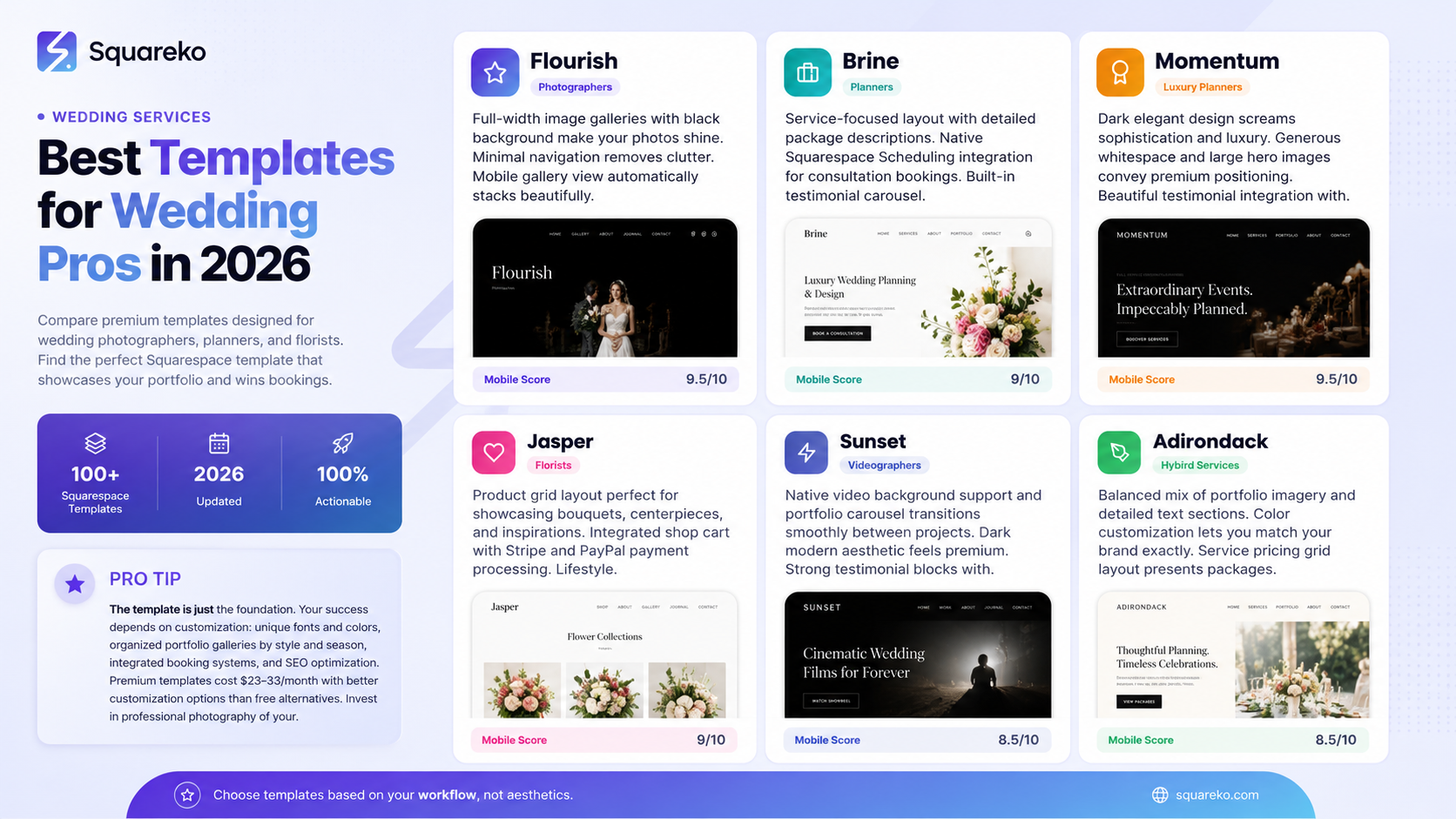
Before we jump into specific templates, let's be clear about what makes a template suitable for the wedding industry.
Unlike e-commerce sites or corporate websites, a wedding professional's site must:
Showcase Visual Work First, Text Second
Couples book vendors based on aesthetic. Your portfolio isn't a secondary feature—it's the primary feature. A good wedding template allocates generous space to image galleries, uses high-quality lightbox effects, and doesn't clutter the visuals with navigation elements or distracting copy.
Support High-Resolution Image Uploads
Wedding photography and florist images need to load beautifully on mobile and desktop. Templates that compress images heavily or offer poor gallery controls will hurt your chances of landing bookings. Look for templates that support full-width gallery layouts and allow clients to zoom in on details.
Include Built-In Booking or Contact Systems
Couples want to inquire, request a quote, or book directly from your website. Templates with integrated contact forms, appointment booking (for engagement sessions or tastings), or email automation reduce friction in the sales process. Squarespace's Scheduling feature integrates seamlessly with premium templates.
Display Pricing and Packages Clearly
Wedding professionals often offer multiple tiers of service. The template needs a clean way to present packages, add-ons, and pricing without looking cluttered. Service-based templates typically do this better than portfolio-focused ones.
Perform Well on Mobile
Over 60% of wedding inquiries come from mobile devices. If your template doesn't render beautifully on phones and tablets, you're leaving money on the table. Test any template thoroughly on various screen sizes before committing.
Allow Testimonials and Social Proof
Client reviews, featured-in badges, and social media integration help build trust. Wedding couples are highly influenced by peer reviews and vendor recommendations. Templates should support easy testimonial blocks and linked social feeds.
2. Squarespace Template Comparison Table
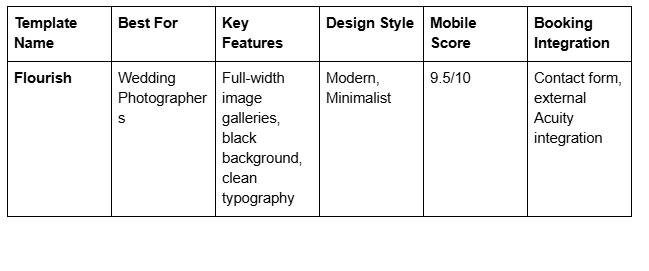
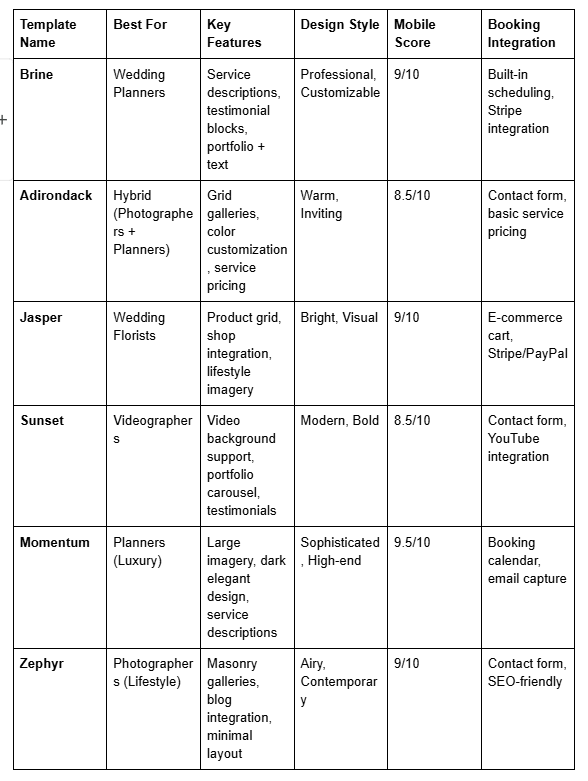
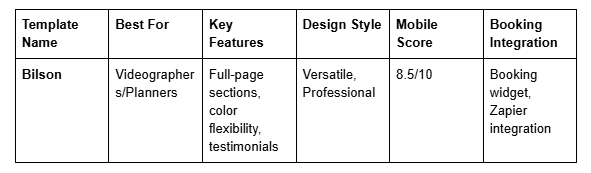
3. Best Squarespace Templates for Wedding Photographers
Flourish: The Gold Standard for Photography Portfolios
Flourish is widely considered the best Squarespace template for wedding photographers. Here's why:
Strengths:
Massive full-width image galleries that let your photos do the talking
Minimal text and navigation that doesn't compete with visuals
Black background that makes colors and skin tones pop
Excellent load performance, even with high-res images
Mobile gallery view automatically stacks beautifully
Customization Tips:
Use the built-in color accent options to highlight your brand
Create separate gallery pages for engagement shoots, ceremonies, and receptions
Integrate Acuity Scheduling or Calendly for booking consultations directly
Add a testimonial section with client reviews and photos
Pricing Model: Included with Squarespace Premium plan (starts at $23/month)
Why Wedding Photographers Love It: If your work is stunning, Flourish gets out of the way and lets it shine. There's no template fluff—just pure portfolio power.
Zephyr: Best for Contemporary and Lifestyle Photography
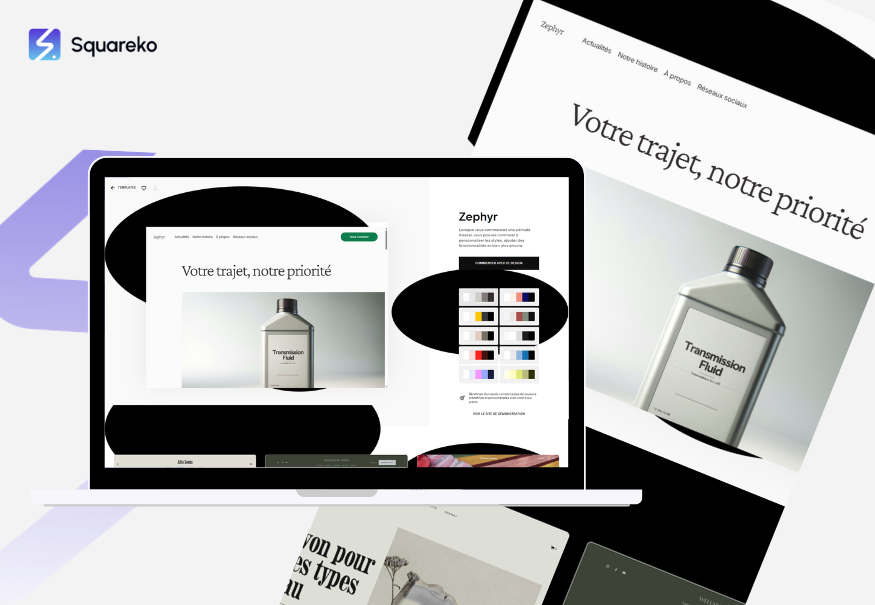
Zephyr takes a different approach with a masonry gallery layout that feels curated and gallery-like.
Strengths:
Asymmetrical masonry gallery that showcases variety without looking chaotic
Built-in blog integration for posting wedding photography tips or behind-the-scenes content
Excellent SEO structure built into the template
Flexible header design (hero image, video, or simple text)
Fast page load times
Customization Tips:
Use the blog section to share [INTERNAL LINK: wedding photography tips] and drive organic traffic
Create narrative-driven gallery pages (one per wedding, with timeline flow)
Leverage the testimonial blocks to feature client quotes alongside photos
Set up email signup to build your photography mailing list
Pricing Model: Included with Squarespace Premium plan
Why It Works for Photographers: If you want to tell a story with your photography (not just display images), Zephyr's layout and blog integration support that narrative approach.
Brine: Best for Photographers Who Need to Explain Their Process
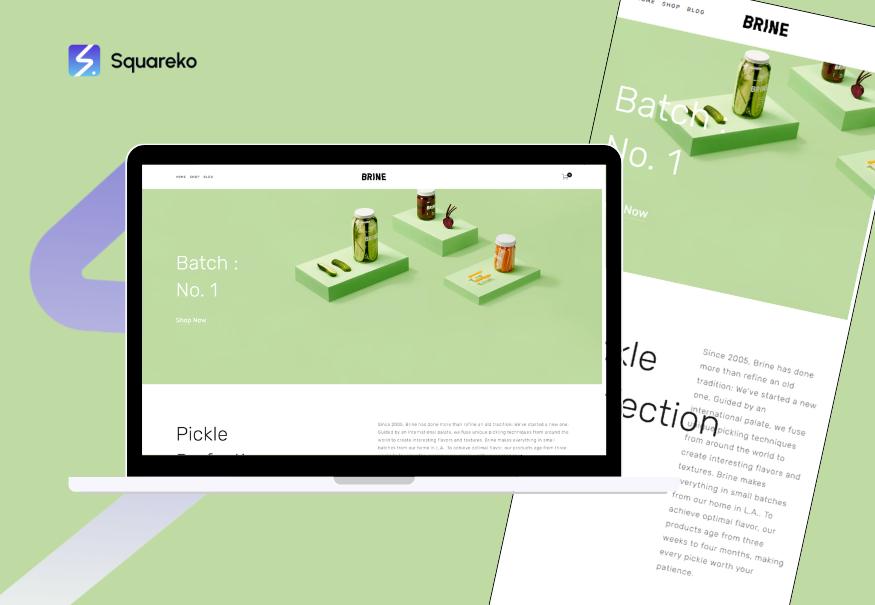
Brine bridges the gap between pure portfolio and service-based website.
Strengths:
Gallery pages alongside detailed service descriptions
Built-in testimonial carousel
Service-based pricing layout (perfect for tiered wedding packages)
Excellent on mobile devices
Native scheduling integration with Squarespace Scheduling
Customization Tips:
Use the service section to outline your packages: Engagement Session, Half-Day, Full Day, Elopement
Add pricing directly in the template (no external pricing page needed)
Include a detailed What's Included breakdown for each tier
Use the FAQ section to answer common photography questions
Pricing Model: Included with Squarespace Premium plan
Why It Works: Brine lets you showcase portfolio work while clearly communicating what clients get at each price point—essential for photographers who get asked How much do you charge? constantly.
Sunset: Best for Hybrid Photographer + Videographer Services
If you offer both photography and videography, Sunset's video background support and portfolio carousel approach works well.
Strengths:
Native video background on homepage
Portfolio carousel that smoothly transitions between projects
Dark, modern aesthetic that feels premium
Strong testimonial blocks with photo integration
Mobile performance is solid
Customization Tips:
Feature your reel on the homepage as a video background or hero
Use separate portfolio sections for photography and videography
Embed client testimonials with video (not just text)
Link to your YouTube or Vimeo channel for additional content
Pricing Model: Included with Squarespace Premium plan
Why It Works for Photographers: If you're expanding into video or offering video add-ons, Sunset's architecture supports both mediums equally well.
4. Best Squarespace Templates for Wedding Planners
Brine: Best Overall for Wedding Planners
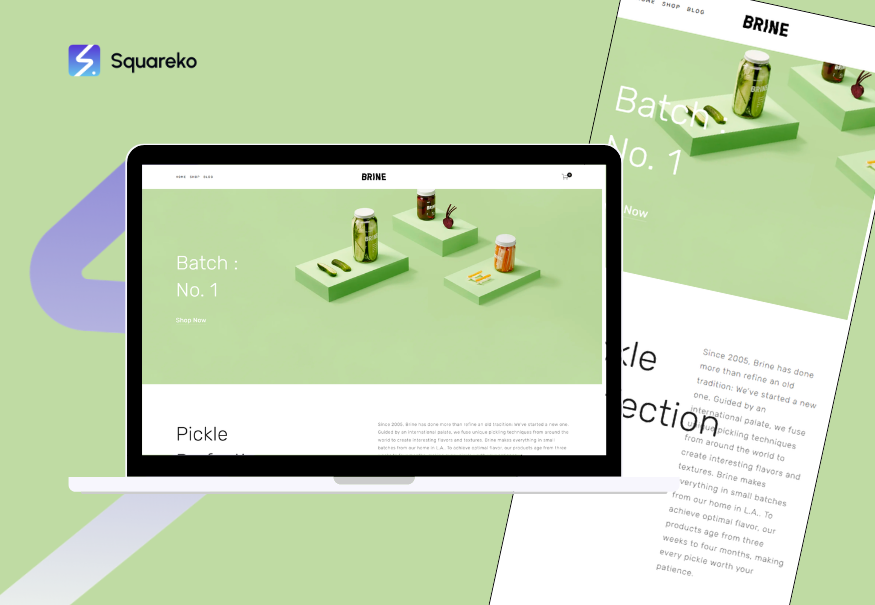
Brine isn't just for photographers—it's equally powerful for planners. Here's why:
Strengths:
Service-focused layout with detailed package descriptions
Built-in pricing comparison section
Testimonial carousel highlighting past events and client happiness
Native Squarespace Scheduling integration for consultation bookings
Strong mobile experience for on-the-go event planning
Customization Tips:
Create a Services section outlining your planning tiers: Month-of Coordination, Full Planning, Elopement Planning
Add itemized pricing for add-ons (day-of timeline services, vendor recommendations, design consultation)
Showcase portfolio via image/video of past events with before-and-after stories
Use the FAQ section to explain your planning process and timeline
Pricing Model: Included with Squarespace Premium plan
Why Wedding Planners Love It: Couples need to understand what they're getting at each price point. Brine makes this crystal clear while maintaining a professional, luxury aesthetic.
Momentum: Best for Luxury Wedding Planners
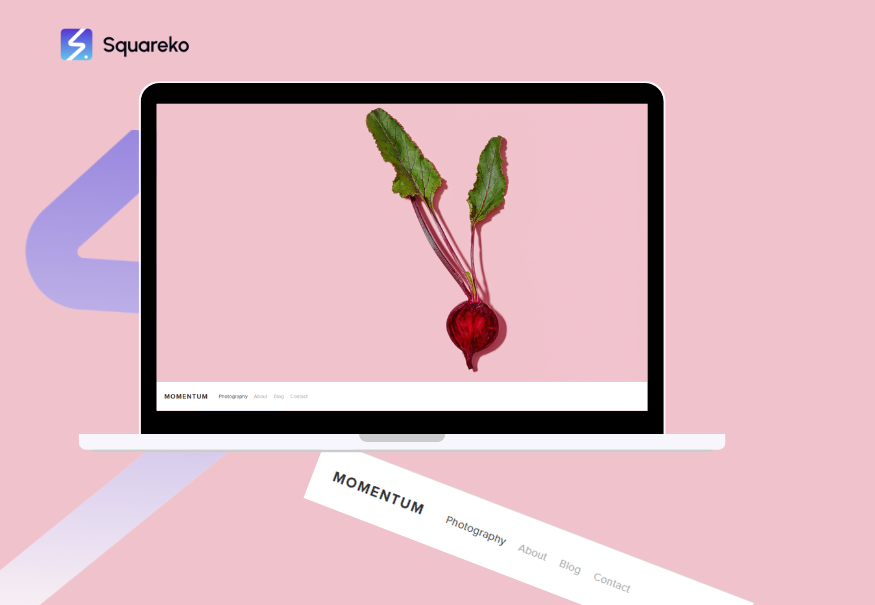
If you're positioning as a high-end, luxury planner, Momentum's sophisticated design and elegance-first approach is unmatched.
Strengths:
Dark, elegant design that screams sophistication
Large hero images and generous whitespace
Detailed service descriptions with ample space for selling the experience
Beautiful testimonial integration
Premium feel even on the free tier
Customization Tips:
Feature full-event gallery slideshows
Use the color accent features to match your brand's luxury aesthetic
Include a detailed Planning Timeline section showing your 12-month or 6-month process
Add a testimonial section with video reviews from past clients
Pricing Model: Included with Squarespace Premium plan
Why It Works: Luxury clients book based on feeling and expertise. Momentum's design conveys both instantly.
Adirondack: Best for Hybrid Planner + Coordinator Services
If you offer both full planning and month-of coordination, Adirondack's flexible layout works beautifully.
Strengths:
Color customization that lets you match your brand exactly
Balanced mix of portfolio imagery and detailed text sections
Service pricing grid layout
Warm, inviting aesthetic (not overly corporate)
Strong on mobile devices
Customization Tips:
Create separate portfolio galleries: Full Planning Events and Month-of Coordinated Events
Use the service pricing grid to show packages and what's included in each
Add a Client Journey section explaining your process from initial consultation to the wedding day
Include case studies: This boutique hotel wedding required X, and here's how we delivered it
Pricing Model: Included with Squarespace Premium plan
Why It Works: Adirondack's flexibility lets you position multiple service offerings without confusing potential clients about which tier they need.
5. Best Templates for Wedding Florists and Videographers
Jasper: Best for Wedding Florists (With Shop Integration)
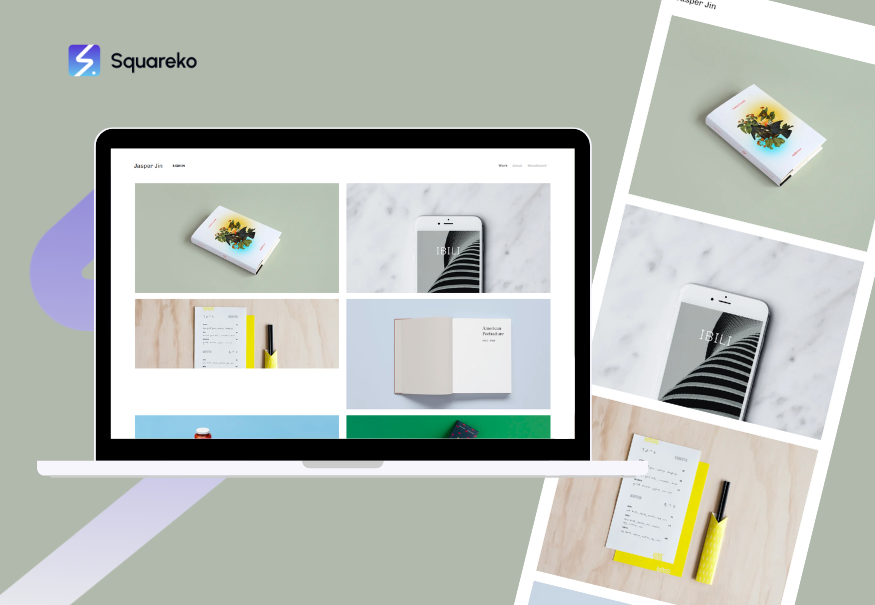
If you're a florist offering custom arrangements, bridal bouquets, and ceremony installations, Jasper's e-commerce capabilities are valuable.
Strengths:
Product grid layout perfect for showcasing bouquets, centerpieces, and installations
Integrated shop cart and payment processing (Stripe, PayPal)
Lifestyle imagery layout that shows flowers in context (table settings, bride holding bouquet, etc.)
Strong mobile shop experience
Inventory management built-in
Customization Tips:
Create product categories: Bridal Bouquets, Bridesmaid Bouquets, Centerpieces, Ceremony Installation
Use high-quality lifestyle photos that show arrangements in real wedding contexts
Include detailed product descriptions with care instructions and shipping info
Set up a Seasonal Specials section to promote limited-time arrangements
Pricing Model: Included with Squarespace Premium plan
Why Florists Love It: You can sell pre-designed arrangements while also accepting custom orders via contact form. The dual approach maximizes revenue.
Sunset: Best for Wedding Videographers
Sunset's video-first approach and portfolio carousel make it ideal for videographers.
Strengths:
Native video embedding with auto-play options
Portfolio carousel that can loop reels or highlight specific weddings
Full-page video background support (perfect for a 30-second wedding reel on homepage)
Strong testimonial integration with video options
Mobile performance with video is solid
Customization Tips:
Embed your wedding highlight reel as a full-page hero video on the homepage
Create portfolio pages grouped by wedding type: Luxury Weddings, Elopements, Cinematic Reels
Link to YouTube channel or Vimeo portfolio for full-length videos
Use the testimonial section to feature client video testimonials
Pricing Model: Included with Squarespace Premium plan
Why It Works: Video content is your main asset. Sunset's design doesn't compete with your reels—it frames them beautifully.
6. Free vs. Premium Templates: What's the Real Difference
Squarespace technically offers some free templates, but the distinction between free and premium is more nuanced than you might think.
What You Get with Every Squarespace Plan
All Squarespace plans include access to the full template library. You don't pay extra for a specific template. However, premium website plans unlock more powerful features:
Squarespace Business Plan ($23/month):
All basic templates included
Limited booking integration (Calendly or external tools only)
Basic e-commerce capabilities
5GB storage
Basic analytics
Squarespace Commerce Plan ($33/month):
Advanced e-commerce features (inventory, abandoned cart recovery, shipping integration)
Better shop customization
Higher transaction volumes supported
Email marketing integration
Advanced analytics
Squarespace Enterprise Plan (custom pricing):
Dedicated support
Custom domains and email
Advanced API access
Higher traffic capacity
Why the Plan Matters More Than the Template
A free Flourish template on a basic Squarespace plan will have fewer features than Flourish on a Business plan. The template itself is the same, but your ability to customize, add booking, and optimize for conversions depends on your plan level.
Recommendation for Wedding Professionals:
Wedding Photographers and Videographers: Business Plan ($23/month) is sufficient. Focus investment on professional photography of your work, not on advanced features.
Wedding Planners: Business Plan works, but the Scheduling feature is limited. Consider Commerce Plan if you want to sell packages or consultations with automated invoicing.
Wedding Florists: Commerce Plan recommended if selling pre-designed arrangements. The inventory management and shop features are valuable.
The Real Cost of Starting a Wedding Website
Don't fall for the free template narrative. Here's what a realistic budget looks like:
Squarespace Plan: $23–33/month = $276–396/year
Custom Domain: $12–16/year (Squarespace or external registrar)
Professional Photography of Your Work: $500–2,000 (if you don't already have portfolio images)
Logo Design or Brand Guidelines: $300–1,500 (optional but recommended)
Template Customization Help (if outsourced): $500–2,000
Total realistic first-year investment: $2,000–5,000
That might sound high, but a single wedding client typically pays $2,000–5,000+ in fees, so the ROI is immediate if your site converts just one client.
7. What to Customize After Choosing Your Template
Choosing a template is just the beginning. To stand out from hundreds of other wedding pros using the same template, you must customize these elements:
Font Pairing and Typography
Squarespace's default font pairings are safe but forgettable. Spend 30 minutes testing different combinations in your template's design panel:
For Modern Photographers: Pair a clean sans-serif (Inter, DM Sans) with a refined serif (Playfair Display, Cormorant) for headings
For Luxury Planners: Use elegant serif fonts (Lora, Duplexe) throughout for a sophisticated feel
For Creative Florists: Experiment with display fonts (Montserrat, Poppins) to add personality without looking unprofessional
Test your font choices on mobile—some beautiful fonts render poorly on small screens.
Color Scheme and Brand Consistency
Default template colors are generic. Define your brand's color palette:
Primary Color (1-2 colors): Usually your brand's main color or an accent that represents your aesthetic
Secondary Colors (2-3 colors): Supporting colors for buttons, accents, and dividers
Text Color: Black, dark gray, or navy—ensure contrast for readability
Background: White, off-white, or a subtle neutral that lets portfolio images shine
Use a tool like Coolors.co to generate a harmonious palette, then apply it consistently across your site.
Gallery Layout and Organization
Customize your portfolio galleries:
For Photographers: Create separate galleries per wedding, not a massive all photos dump. Couples want to see full narratives (ceremony, reception, details, couple portraits).
For Planners: Group galleries by wedding theme or venue type (garden weddings, luxury hotel events, intimate ceremonies) so couples see relevant examples.
For Florists: Organize by bouquet type or wedding season so browsers can quickly find inspiration.
Use Squarespace's gallery settings to:
Enable captions and metadata (couple names, venue, date)
Set lightbox animations (fade or zoom, not distracting)
Choose between grid, masonry, or carousel layouts per page
Booking and Contact Integration
Don't rely solely on the generic contact form. Set up:
Scheduling Link: Use Squarespace Scheduling or integrate Calendly, Acuity, or Bookly to let couples book consultations directly
Email Automation: Set up automatic confirmations and follow-ups when forms are submitted
CRM Integration: Connect Zapier to pipe form submissions into your email list or CRM (HubSpot, Pipedrive, etc.)
[INTERNAL LINK: wedding booking systems] can automate your entire inquiry-to-proposal workflow.
Hero Section and Headline
Your homepage hero should grab attention in 3 seconds:
For Photographers: Feature your best, most emotional image. Keep the headline short: Authentic Wedding Photography or Capturing Your Love Story
For Planners: Use a beautiful event photo with a clear value proposition: Your Dream Wedding, Stress-Free or Luxury Event Planning from Concept to Celebration
For Florists: Showcase your most intricate, beautiful arrangement with a simple headline: Bespoke Floral Design for Your Wedding or Flowers That Tell Your Story
Test your hero section on mobile—make sure text is legible and the image still shines.
SEO Optimization (Meta Titles and Descriptions)
While Squarespace templates are SEO-friendly out of the box, customize each page's meta information:
Meta Title: 50–60 characters, include your location and specialty
Meta Description: 150–160 characters, include a clear benefit and CTA
Customize every page—not just the homepage.
8. When a Template Isn't Enough: Custom Wedding Website Design
Templates are powerful, but they have limitations. If your wedding business needs any of the following, a custom-built website may deliver better ROI:
Complex Pricing Models or Service Bundling
If you offer highly customized packages (photographer + videographer + album, for example), or have dynamic pricing based on hours or add-ons, a template's static pricing grid might not cut it.
Solution: A custom site can integrate advanced pricing logic, conditional displays, and real-time quote generation.
Client Portal and File Delivery
Many wedding photographers and planners need to deliver digital files, proofs, or planning documents to clients securely.
Limitation: Squarespace's built-in file delivery is basic. Custom sites can integrate Dropbox, Google Drive, or dedicated DAM (Digital Asset Management) platforms.
Advanced Analytics and Client Tracking
Templates give you basic page views and traffic data. If you need to track:
Which portfolio images get the most engagement
Which service page converts most often
Which inquiry source (Google, Instagram, referral) books clients most frequently
...a custom site with integrated analytics and pixel tracking is more powerful.
Integration with Your Existing Business Tools
If you use:
Specialized wedding planning software
Project management tools
Financial software
...a custom website can integrate these seamlessly. Template customization has limits.
Unique Brand Requirements
If your brand has:
Complex animations or interactive elements
Custom fonts that Squarespace doesn't support
Unique layout ideas that don't fit standard template structures
...custom design gives you full control.
When to Stay With a Template
If you're:
Just starting out and need to keep costs low
Updating your portfolio frequently (templates are easier to manage)
Not ready to invest $5,000–15,000 in a custom site
Happy with your template's functionality
...stick with Squarespace templates. They're genuinely excellent for wedding professionals.
9. Quick-Start Checklist: Setting Up Your Wedding Template
Follow this checklist to launch your wedding template in a week:
Week 1: Foundation (Days 1-3)
Choose your template (use the comparison table above)
Set up your Squarespace Business or Commerce plan
Register your domain (YourName.com or YourBusinessName.com)
Write your homepage headline and subheading
Organize your portfolio into separate galleries
Define your brand colors and gather logo files
Week 1: Content & Customization (Days 4-5)
Customize fonts and colors in the Design panel
Upload 10-15 high-quality portfolio images to the homepage gallery
Write service descriptions (50-100 words each)
Add pricing information (if offering tiered packages)
Create a Testimonials or Reviews page with 3-5 client testimonials
Write your About Me page and upload a professional headshot
Week 2: Optimization & Launch (Days 6-7)
Set up Squarespace Scheduling or integrate Calendly/Acuity booking
Create a contact form with clear labeling and fields
Customize meta titles and descriptions for homepage and main pages
Test the entire site on desktop, tablet, and mobile
Enable Google Analytics (Squarespace built-in analytics)
Set up email notifications for form submissions
Launch your site
Post-Launch (Ongoing)
Share your site on Instagram, Facebook, and wedding directories
Add new portfolio work every month to keep the site fresh
Monitor website inquiries and follow up within 24 hours
Respond to Google Reviews and testimonial requests
Update meta titles and descriptions based on Google Search Console insights

From custom website design to SEO strategy, we help businesses launch a site that looks professional and performs better.
Frequently Asked Questions
-
A: Templates are an excellent starting point, especially for wedding professionals without web design experience. They're faster, cheaper, and proven to convert. Custom sites offer more flexibility but require significantly more investment ($5,000–15,000+). Start with a template; upgrade to custom design only if the template limits your business growth.
-
A: Flourish is the top choice for photographers. Its full-width gallery layout, minimal navigation, and black background let your images shine without distraction. Zephyr is a close second if you want a more contemporary, masonry-gallery feel, or Brine if you need to display pricing and packages alongside your portfolio.
-
A: Yes, but it's not trivial. Switching templates means redesigning layout and re-uploading content in some cases. Squarespace tries to preserve content, but you'll likely need to do cleanup work. Choose wisely before launching, but don't worry if you need to switch later.
-
A: Monthly costs start at $23/month (Business plan) for basic features, or $33/month (Commerce plan) for e-commerce capabilities. Annual cost: $276–396. Don't forget domain registration ($12–16/year) and potential help with customization ($500–2,000 one-time). Realistic first-year investment: $1,500–3,000.
-
A: Yes, if you choose a template that supports e-commerce (like Jasper for florists). The Squarespace Commerce plan includes shop functionality, inventory management, and payment processing. This works for selling pre-designed bouquets, wedding favors, or photography prints.
-
A: Start with portfolio curation (only show your best work), clear pricing or package descriptions, and an easy-to-find booking or contact button. Integrate a scheduling system (Squarespace Scheduling, Calendly, or Acuity) so couples can book consultations directly. Follow up on inquiries within 24 hours. The website is step one; your sales follow-up is step two.
-
A: Yes, Squarespace has solid built-in SEO: clean code, fast loading, mobile-responsive templates, and integrated Google Analytics. However, SEO is only part of wedding marketing. Most wedding leads come from referrals, Google Maps, and social media, not organic search. Use your website to convert inquiries, not as your primary lead source.
-
A: Yes. Templates like Zephyr, Brine, and Momentum include blog functionality. A blog can help with SEO (write about wedding photography tips, trends, venues) and showcase your expertise. However, wedding photographers often see better ROI from portfolio updates than blog posts. Choose a template with blog capability, but don't prioritize blogging if you're short on time.
-
A: Squarespace is easier to use and requires no coding; WordPress is more flexible but requires technical knowledge or paid support. For wedding professionals without web development experience, Squarespace is the better choice. WordPress requires hosting, plugins, and ongoing maintenance—not worth the complexity for most wedding businesses.
Ready to Launch Your Wedding Website? Let's Build Something Beautiful.
Your website is your 24/7 sales tool, your portfolio showcase, and your booking machine. The right Squarespace template is the foundation—but the magic happens in the customization, the follow-up, and the ongoing optimization that turns curious couples into clients.
At Squareko we specialize in Squarespace web design for wedding professionals. We've helped hundreds of photographers, planners, and florists launch stunning websites that convert inquiries into bookings. We know the wedding industry, we know what couples are looking for, and we know how to make your Squarespace site work harder for your business.
Here's what happens next:
We'll discuss your business goals. Are you focusing on luxury destination weddings, elopements, or high-volume season work? Do you need a portfolio site or a booking powerhouse? Your goals shape every decision.
We'll audit your current online presence (if you have one) or recommend the perfect template, customization strategy, and booking integration for your needs.
We'll handle the setup, customization, and optimization so you can focus on shooting or planning weddings. From font pairing and color strategy to SEO and booking automation, we handle it all.
We'll optimize for conversions. It's not just about a pretty site—it's about a site that books clients. We fine-tune your homepage headlines, testimonial placement, and call-to-action strategy to maximize inquiry-to-client conversion.
Why wedding photographers choose Squareko Our approach is simple: we build websites that work. That means clean design, fast loading, mobile perfection, and booking systems that actually function.
Book A Call We'll spend 30 minutes understanding your business, showing you template options, and giving you a clear roadmap to launch your website (or redesign the one you have). No pressure, no upselling just genuine advice from Squarespace specialists who actually understand the wedding business.

From custom website design to SEO strategy, we help businesses launch a site that looks professional and performs better.

About the Author
I'm Walid Hasan, a Certified Squarespace Expert and Squarespace Circle Platinum Partner with over 12 years of hands-on experience designing and optimizing high-performing websites. Over the years, I've had the privilege of building more than 2,000 Squarespace websites for clients around the world, always focusing on clean design, strong user experience, and conversion-driven results.
