
How Wedding Planners Build a Professional Business Website on Squarespace
Introduction
If you're a wedding planner without a professional website, you're leaving money on the table. Engaged couples start their planner search online—usually on Google or Instagram—and they expect to find a polished, trustworthy business ready to manage their big day.
Building a wedding planner website on Squarespace gives you everything you need: beautiful templates designed for service businesses, integrated booking systems, mobile responsiveness, and built-in SEO tools. Unlike generic website builders, Squarespace understands that wedding planners need portfolio galleries, client testimonials, process walkthroughs, and an easy way for couples to request consultations.
This guide walks you through building a professional wedding planner website on Squarespace from setup to going live. You'll learn which template works best for your business, how to structure your pages to convert browsers into clients, and the specific Squarespace features that work for event planners. Whether you're just starting out or redesigning your existing site, this step-by-step approach will help you create a website that actually books weddings.
Key Takeaways How Wedding Planners Build a Professional Business Website on Squarespace
Squarespace offers purpose-built templates and features specifically valuable for wedding planning businesses, including portfolio galleries and integrated booking systems
Your website structure matters: Services, Portfolio, Planning Process, Booking, Testimonials, and Blog pages should all be strategically designed to convert engaged couples
Consultation booking should be friction-free—integrate Acuity Scheduling or use Squarespace's native appointment system to let couples book directly
Your portfolio doesn't require real client photos; styled shoots, mock-ups, and themed galleries work equally well and protect client privacy
Local SEO and consistent blogging about wedding planning topics help engaged couples find you when they search on Google
Why Wedding Planners Need a Different Website Than Photographers
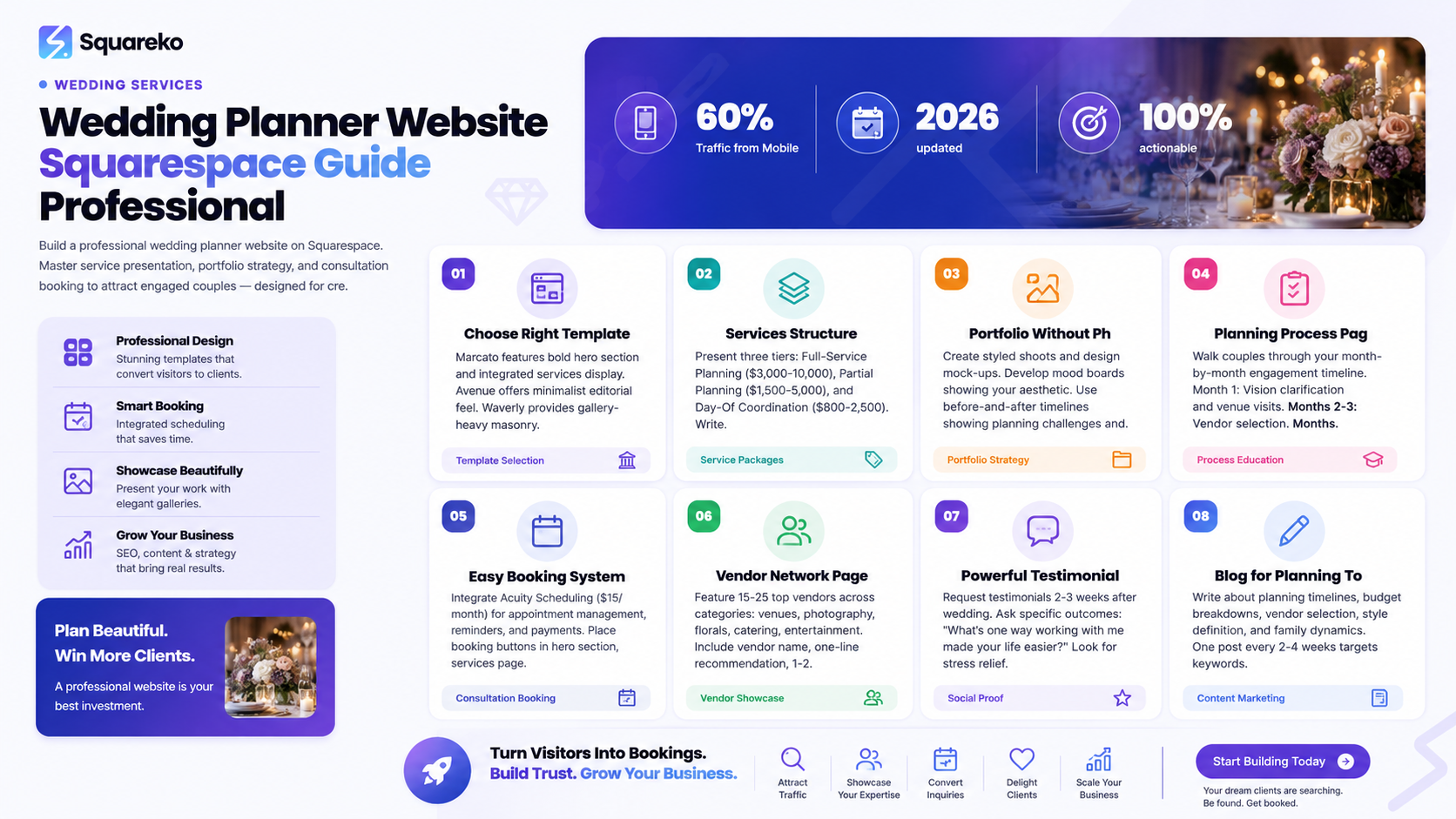
Your website isn't just a portfolio. Unlike wedding photographers—whose primary job is to show images and let the photos do the talking—wedding planners sell a service, a process, and peace of mind.
An engaged couple visiting your website needs to understand:
What exactly you do as their planner
What the planning process looks like month by month
How much your services cost
How to book a consultation with you
Why your experience and vendor relationships matter
A photographer's website might be 90% gorgeous images with minimal text. Your website is a sales tool that educates couples about your process, builds trust, and removes friction from booking you.
Squarespace templates designed for event planners include sections for services, testimonials, timelines, and built-in booking functionality. These aren't afterthoughts—they're central to the design. This is why a standard photography or portfolio template won't serve you as well as a template purpose-built for service-based businesses like yours.
Choosing the Right Squarespace Template for a Wedding Planning Business
The template you choose sets the tone for your entire site. It should feel elegant and professional—couples are trusting you with their most important day—while remaining approachable and warm.
Top Squarespace Templates for Wedding Planners
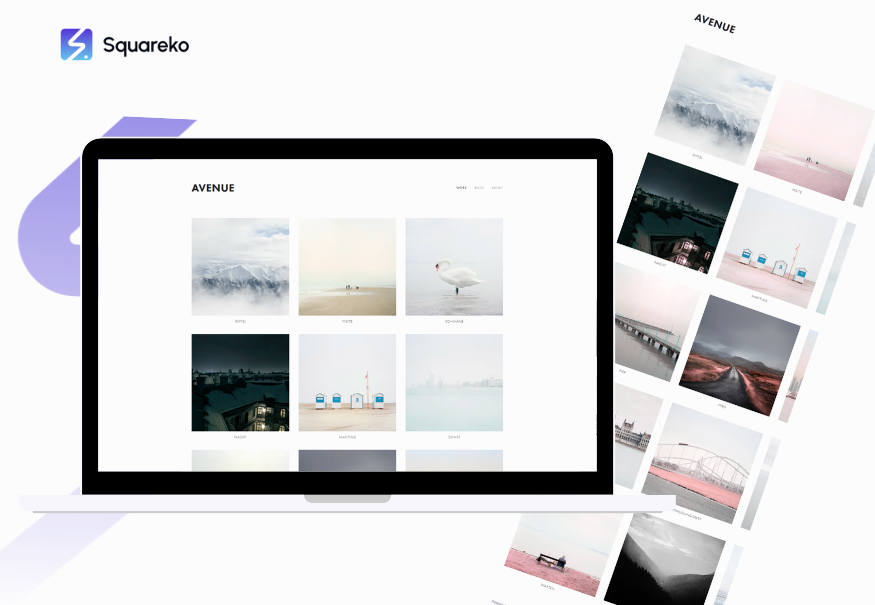
Avenue works well if you want a more minimalist, editorial feel. It has strong typography, a prominent services section, and excellent mobile optimization. It appeals to couples looking for modern, contemporary planning styles.
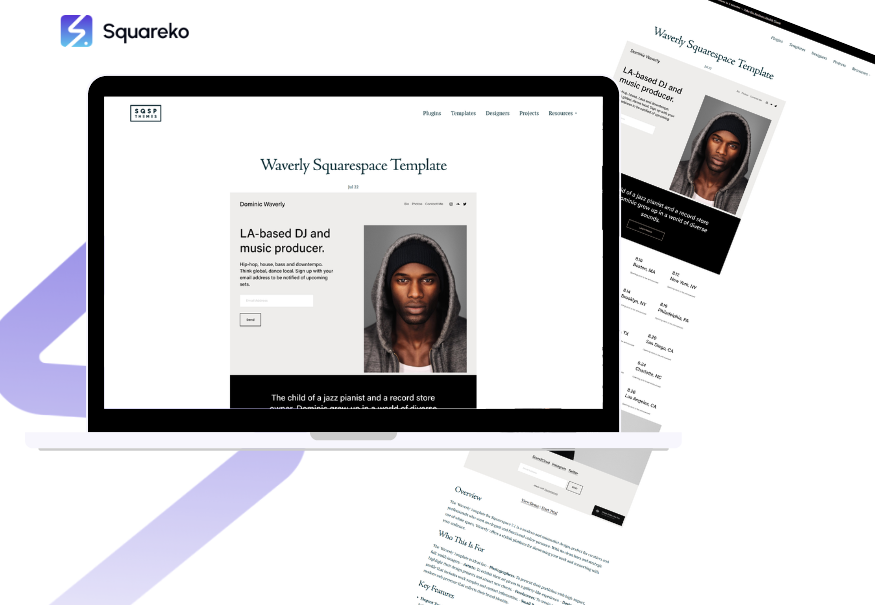
Waverly offers a gallery-first approach with beautiful masonry layouts for your portfolio. If you want to showcase styled shoots and design concepts, Waverly gives you a gallery-heavy layout that still includes solid services and booking sections.
Customization Strategy
Once you've chosen your template, resist the urge to add too many customizations immediately. Use the template's default structure for your first month, then refine based on what feels off. Squarespace templates are designed to convert—overly heavy customization often breaks that conversion flow.
Start with:
Your logo and brand colors (Squarespace's style editor makes this simple)
High-quality hero images (we'll discuss this next)
Your core content in each section
Advanced customization (custom fonts, layout modifications, unique animations) can come later.
The Services Page: How to Present Wedding Planning Packages That Sell
Your services page is where curiosity becomes commitment. This is where couples decide whether they can afford you and whether your approach matches their vision.
Structure Your Service Tiers Clearly
Full-Service Planning ($3,000–$10,000+): You're involved from day one, from vendor selection through final walkthrough. Describe what's included: venue selection, vendor negotiation, budget management, design direction, day-of coordination, timeline creation, and vendor management.
Partial Planning: Couples have already selected their venue and booked some vendors, but need help with the remaining pieces. This typically costs $1,500–$5,000 depending on scope.
Day-Of Coordination: You handle the final 2–4 weeks and the wedding day itself. These packages run $800–$2,500 and appeal to couples who've already planned but want professional execution.
Write Benefit-Focused Descriptions
Don't list features. Describe outcomes.
Instead of: I manage vendor timelines and communicate throughout planning
Write: You'll never chase a vendor for a reply again. I keep everyone on the same page, follow up on contracts, and handle all coordination so you can focus on the fun parts of planning—your dress, your décor, your celebration.
Include specific value propositions:
How much time couples will save
Stress reduction language
The specific outcome they get (a flawless wedding day, vendor harmony, on-budget execution)
Use a Pricing Table or Comparison
Squarespace allows you to create tables. A simple 3-column layout showing your three service levels helps couples self-identify which option fits their needs. Include columns for:
Service name
What's included (brief bullets)
Price range or contact for quote
This self-qualification saves you time on sales calls and attracts serious couples.
Add a Clear CTA Below Services
Every service description should end with a button: Book a consultation or Let's talk about your wedding. This button links directly to your booking system (more on that below).
Your Portfolio / Past Weddings Page: Showcasing Your Work Without Real Client Photos
This is where many wedding planners hesitate. If you're early in your business, you might not have real client weddings to show. Even if you do, many clients ask you not to share their photos online.
The solution: you don't need real client weddings in your portfolio. You need to showcase your planning aesthetic and design capability.
Building a Portfolio Without Real Client Photos
Styled Shoots and Mock Weddings
Partner with photographers, florists, venues, and other vendors to create styled shoot concepts. These are mini-weddings designed specifically for portfolio and marketing. They showcase your design direction, theme execution, timeline management, and vendor coordination—without depending on a specific client's wedding.
A single styled shoot gives you 30–50 portfolio-quality images. Shoot 3–4 styled shoots per year (one per season, or themed around different planning styles: rustic, modern, romantic, minimalist).
Concept Mood Boards
Create digital mood boards for different planning styles you offer. If you specialize in modern minimalist weddings, create a mood board with color palette, sample florals, venue style, linens, table styling, and photography direction. This shows your aesthetic without requiring client photos.
Before-and-After Timelines
Use client permission (or create hypothetical examples) showing:
The client's initial vision/budget/timeline
The planning challenges that arose
Your solution
The final result
This demonstrates your problem-solving skills and planning value without needing proprietary client photos.
Themed Gallery Sections
Organize your portfolio not by client name but by planning style:
Modern + Minimalist Weddings
Garden + Romantic Celebrations
Intimate Elopement Planning
Large-Scale Destination Weddings
Each section shows 6–12 images of that aesthetic, all from styled shoots or client-approved imagery.
Squarespace Portfolio Best Practices
Use Squarespace's Gallery page type. It supports:
Masonry layout
Captions on each image
Lightbox viewing
Albums and sub-galleries
Create captions like: Modern Garden Wedding | Spring 2025 | Venue: [Name] | Florals by [Vendor] | Photography by [Vendor]
This credits your vendor partners and shows couples your go-to professionals.
The Planning Process Page: Walking Couples Through What It's Like to Work With You
Engaged couples are buying confidence. They want to know exactly what the planning experience will feel like working with you.
Create a detailed planning process page that walks through your engagement timeline month-by-month.
Month-by-Month Planning Timeline
Month 1 (Initial Planning): First consultation, vision clarification, budget setting, venue site visits, vendor referrals
Months 2–3 (Vendor Selection): Meetings with florist, caterer, photographer, videographer, stationery designer
Months 4–6 (Design & Logistics): Finalizing color scheme, table layout, ceremony details, creating timelines, confirming vendor contracts
Months 7–10 (Details & Communication): Finalizing menus, addressing guest accommodations, creating vendor packets, managing RSVPs
Months 11–12 (Final Walkthrough): Final venue walkthrough, rehearsal coordination, day-of timeline creation, final vendor meetings
Wedding Week: Coordination calls, final confirmations, family briefings, day-of execution
Use Squarespace's Timeline Feature or Accordion
Squarespace's Accordion block lets you create expandable sections. Each month is a header; clicking reveals what happens that month.
Alternatively, create a visual timeline using images and text. This feels more engaging than plain text.
Address Couple Concerns in Each Phase
Don't just list what happens. Address questions couples have:
By Month 3, you'll have your entire vendor team locked in. This gives us half the timeline to manage details without rushing, and ensures all your vendors know each other and can collaborate smoothly.
Most couples worry about staying on budget. Monthly check-ins keep us aligned. By Month 6, 100% of your major spending is committed, so there are no surprise expenses.
This educational approach positions you as a guide who understands couple anxiety and has a system to address it.
Setting Up Consultation Booking (Acuity Scheduling on Squarespace)
A friction-free booking system is non-negotiable. Every time a couple has to email to schedule a call, you risk losing them to a competitor with an online booking button.
Integration Options
Acuity Scheduling (Squarespace's native integration) is the simplest setup. Acuity handles appointment management, reminders, payment processing, and automated confirmations.
To integrate Acuity on Squarespace:
Create an Acuity account (starting at $15/month)
Set up appointment types:
30-minute consultation (free or paid discovery call)
Planning session (paid, for ongoing clients)
Vendor meeting (internal scheduling)
In Squarespace, go to Pages > Add Page > Scheduling
Choose Acuity Scheduling and connect your account
Select which appointment types show on your website
Customize the booking page (brand colors, instructions, confirmation message)
Placement Strategy
Add booking buttons in multiple places:
Primary CTA button in your hero section
In the Services section (below each service tier)
Dedicated Book Now page in main navigation
In testimonials and portfolio sections
As a CTA in your email signature
Consultation Strategy for Wedding Planners
Use your free consultation to qualify leads and build rapport, not to sell. Many planners offer:
Free 30-minute consultation if the couple seems like a potential fit
Paid consultation ($75–$150) if someone is serious about booking, which gets applied to your planning fee later
The paid option filters out tire-kickers and ensures couples who book are committed.
In your consultation, you should:
Understand their vision and budget
Explain your process
Share your vendor network and approach
Address their concerns
Send a follow-up proposal the next day
The website's job is to get them to book the consultation. The consultation's job is to turn them into a client.
Vendor Network Page: Showcasing Your Relationships and Expertise
Your vendor network is a hidden asset. Most couples don't realize how valuable a planner's vendor relationships are—until they have a crisis and a vendor scrambles to help because they trust the planner.
Create a dedicated page showcasing your top 15–25 vendors across key categories.
Vendor Categories
Venues (indoor, outdoor, alternative)
Photography
Videography
Catering and bartending
Florals and design
Music and entertainment
Stationery and invitations
Rentals (linens, furniture, lighting)
Decor and styling
Hair and makeup
Officiant services
Vendor Feature Format
For each vendor, include:
Their name and business
A 1–2 sentence description of why you recommend them
1–2 portfolio images
Link to their website
Your specific experience working with them
Use Squarespace's Portfolio or Gallery blocks to create a grid of vendor recommendations.
Write From Your Experience
Avoid vague praise. Write like this:
Maria at [Florist Name] specializes in garden roses and has an incredible instinct for color palettes. I've worked with her on 14 weddings. She always delivers beyond expectations and is incredibly responsive if a couple wants last-minute changes.
This tells couples:
Who you genuinely recommend
Why they're good (specific skills)
That you have real experience together
That they're reliable and flexible
Testimonials and Reviews: Building Trust with Engaged Couples
Social proof is everything. A couple is more convinced by a genuine testimonial from a bride than by anything you write about yourself.
Collecting Powerful Testimonials
Send a simple email to past clients 2–3 weeks after their wedding (after the chaos settles but while the experience is fresh):
Hi [Couple Name], I'd love to ask a quick favor. I'm working on my website and would be so grateful if you'd share a few sentences about your planning experience. What was the biggest way working with me made your life easier? What would you tell another couple considering my services?
Most couples will respond with 3–5 sentences. You're looking for:
Specific outcomes
Emotional language
Comparison statements
Editing for Power
Take a longer testimonial and pull out the most compelling sentence or two:
Full: When we first met Walid, we had no idea what we were doing. We'd chosen a venue but we were overwhelmed about everything else. Having her guide us through the process month by month took so much pressure off. On our wedding day, everything went perfectly. Our families kept saying how smoothly everything ran. We would recommend her to anyone.
Pulled: Having her guide us through the process took so much pressure off. Our wedding day ran perfectly, and everyone kept saying how smooth everything felt. — Sarah & David
Display Testimonials Strategically
Place testimonials in multiple locations:
Homepage: 3–4 featured testimonials in a carousel or grid
Services page: Testimonials from couples who used each service tier
Dedicated testimonial page: All of your testimonials with photos if couples agreed to photos
Portfolio: Pair testimonials with portfolio images (same bride's testimonial with her styled shoot gallery)
Request Google and Wedding Vendor Reviews
Ask clients to leave reviews on:
Your Google Business Profile
The Knot
WeddingWire
Yelp (if applicable to your area)
Link to these reviews from your website. Third-party review platforms carry more weight with couples than your own website testimonials.
Blogging for Wedding Planners: What to Write to Attract Your Ideal Client
Blogging isn't just for SEO—though it is crucial for local search visibility. Blogging also positions you as an expert and gives couples reasons to keep visiting your site.
Blog Topics Wedding Planners Should Write About
Planning Timeline & Process Posts
Wedding Planning Timeline: What to Do in Each Month
How Far in Advance Should You Book Your Vendors?
The Complete Day-Of Timeline: A Bride's Hour-by-Hour Guide
Budget & Money Posts
Wedding Budget Breakdown: Where Couples Spend the Most
How to Negotiate with Wedding Vendors and Save Money
Budget-Friendly Wedding Ideas Without Sacrificing Style
Vendor & Logistics Posts
What Questions to Ask Your Wedding Photographer
How to Choose a Wedding Venue: A Complete Checklist
How a Wedding Planner's Vendor Network Saves You Time and Money
Style & Design Posts
Wedding Color Palettes for 2025
Intimate Wedding Ideas for 50 Guests or Fewer
How to Define Your Wedding Style: Pinterest Mood Board Guide
Couple & Family Posts
How to Handle Family Opinions About Your Wedding
Planning a Destination Wedding: Complete Step-by-Step Guide
Elopement Planning: Just the Two of You
SEO Strategy for Wedding Planner Blog Posts
Each post should target 1–2 keywords that couples actually search for:
wedding planning timeline (high volume, couples search this early)
how to choose a wedding photographer (specific vendor question)
small wedding ideas (specific need)
wedding on a budget (pain point)
Write 1,500–2,500 word posts that truly answer the question. A post answering How to negotiate with vendors should actually teach couples specific negotiation tactics, not just say communicate well.
Post new blog content every 2–4 weeks. Consistency matters more than frequency.
Link blog posts back to your services: If you're feeling overwhelmed by these timelines, a wedding planner can handle all of this for you. Wedding Planning Services
Getting Found Locally: SEO Tips for Wedding Planners on Squarespace
Local search is where wedding planners win. Most engaged couples search wedding planner near me or wedding planner in [city].
Google Business Profile Setup
Claim and complete your Google Business Profile with
Accurate address and phone number
Service area (cities you serve)
Hours (even if you work by appointment)
Complete category: Wedding planner
10+ high-quality photos of your work
Respond to all reviews (positive and negative)
Google pulls information from your website. Make sure your Squarespace site includes:
Your business name in your site title
City and service area on your homepage
Phone number and contact info in the footer
Local addresses if you have an office
On-Page SEO on Squarespace
Homepage Optimization: Your homepage headline should mention your city and service. Instead of Wedding Planning Services, write Wedding Planner in [Your City] | Full-Service Planning
Page Titles and Meta Descriptions: Every page needs an optimized title (50–60 characters) and meta description (150–160 characters). In Squarespace, go to each page's SEO settings and fill these in.
Example:
Title: Wedding Planner in Seattle | [Your Business Name]
Meta Description: Professional wedding planner in Seattle specializing in modern, elegant weddings. Full-service planning, day-of coordination, and vendor management.
Location Page (if you serve multiple cities): Create a dedicated page for each major city you serve. This page should:
Mention the city 4–5 times naturally
List neighborhoods you serve
Mention popular venues in the area
Include a client testimonial from someone in that city
Link to your Google Business Profile
Schema Markup: Squarespace automatically adds some schema markup (business info, contact details). You can add custom schema in Squarespace's code injection for:
Local Business schema (confirms your location and service area)
Reviews schema (displays star ratings in Google search results)
FAQ schema (makes FAQs appear in search results)
Building Local Authority
Write blog posts about local aspects of weddings:
The Best Wedding Venues in [Your City]
Your Complete Guide to Wedding Planning in [Your Area]
Popular Wedding Neighborhoods in [Your City]
These posts target local keywords couples search.
Partner with local vendors for styled shoots and feature them on your site. Link to their websites. Google recognizes these local network signals.
Technical Squarespace Setup for Wedding Planners
Beyond design and content, a few technical configurations matter.
Mobile Optimization
Roughly 60% of wedding-planning traffic comes from mobile devices. Engaged couples browse on their phones while at venues, vendor meetings, or comparing options.
Test your site on mobile with Squarespace's responsive preview tool. Check:
Menu navigation is clear
Text is readable (not too small)
Images load quickly
Buttons are thumb-friendly (large enough to tap easily)
Booking buttons are prominent on mobile
Page Speed
Squarespace handles most speed optimization automatically. To maximize speed:
Use high-quality but not oversized images (Squarespace's image optimization helps)
Avoid auto-playing videos that load on page open
Limit the number of large gallery pages
Test your site speed with Google PageSpeed Insights. Aim for a score above 75.
SSL/HTTPS
Squarespace provides SSL certificates automatically. Your site is secure by default. Make sure your booking system is secure (it is with Acuity/Squarespace integration).
Email Setup
If you use a custom domain (yourbusiness.com), set up professional email addresses like hello@yourbusiness.com or contact@yourbusiness.com. Squarespace integrates with email forwarding services, or you can use Gmail's custom domain setup.
Frequently Asked Questions
-
Absolutely. Squarespace is built for service-based businesses and offers everything a wedding planner needs: portfolio galleries, testimonials, integrated booking, blog functionality, SEO tools, and professional design. Major wedding planning brands, from large planning firms to solo planners, successfully use Squarespace. The key is using the right template and setting it up strategically.
-
A: Squarespace plans range from $14/month (Personal) to $38/month (Business). For a wedding planner, the Business plan ($33/month, billed annually) is ideal because it includes the scheduling integration, email campaigns, and additional analytics. Add Acuity Scheduling ($15/month) for appointment booking, and your total is around $50/month. This is incredibly affordable compared to hiring a web designer or using custom development.
-
A: No. As discussed, you can showcase styled shoots, mood boards, and design concepts instead of real client weddings. Many successful wedding planners launched their sites with styled shoots and mock-up galleries, then added real client weddings as their business grew. Start with 2–3 styled shoot collections and grow from there.
-
A: Always get written permission from clients before featuring their wedding photos or details online. Some clients will agree enthusiastically; others will decline. Build your portfolio with a mix of client-approved work and styled shoots so you're never blocked. Include a clause in your contract about website features and ask clients at the end of their planning, when they're most satisfied.
-
A: Both work. Squarespace's native scheduling is simpler to set up and integrates seamlessly. Acuity Scheduling is more powerful if you need advanced features (multiple service types, payment processing, form customization, or team scheduling). For a solo wedding planner, either works—choose Squarespace's native option for simplicity, or Acuity if you want more flexibility down the road.
-
A: Consistency matters more than frequency. A realistic goal is one blog post every 2–4 weeks. That's 12–26 posts per year, which gives you enough content for Google to recognize your site as an active resource while remaining manageable alongside your planning work. If you can only manage one post per month, that's fine. Avoid posting weekly then disappearing for three months—Google likes steady activity.
-
A: Track inquiries and bookings as your primary metrics—these directly impact revenue. Additionally, monitor Google Search Console for impressions and clicks, Google Analytics for traffic and user behavior, and your email newsletter signups. Set goals: aim for 10+ qualified inquiries per month, a conversion rate of 15-25% from inquiry to booking, and consistent month-over-month traffic growth. Use Google Analytics goals to track when visitors reach your booking page or send an inquiry form.
-
A: Both approaches work depending on your comfort level and budget. Building it yourself saves $2,000-5,000 but requires 40-60 hours of work and learning. Hiring a Squarespace designer ($2,500-7,000) gets you a professionally designed, optimized site in 4-6 weeks. If you're comfortable with design and have time, DIY works. If you want a site that positions you as premium and attracts high-end clients, designer investment often pays for itself through better conversions.
-
A: A photographer's site is primarily a portfolio—couples browse images and make a decision. A planner's site is a sales tool and educational resource. Couples need to understand your process, see testimonials about your reliability, and understand your pricing before they commit. The structure, messaging, and functionality differ significantly. A photographer's site might be 90% images; a planner's site balances portfolio, process education, testimonials, and booking functionality.
Ready to Build Your Wedding Planner Website? Let's Get Started.
You now have a complete roadmap for building a professional wedding planner website on Squarespace. You know which template to choose, how to structure your pages, what content sells your services, and how to optimize for couples searching for you online.
But here's the truth: knowing what to build and actually building it are two different things.
If you're feeling overwhelmed by template choices, unsure about your service page messaging, or stuck trying to figure out your portfolio strategy, you don't have to do this alone. Many wedding planners are in the exact same position—they understand their planning expertise but aren't sure how to translate that into a website that converts.
At Squareko.com, we specialize in building professional websites for wedding planners, event professionals, and service-based businesses on Squarespace. We've built dozens of planning business websites, and we know exactly which template works best for your style, how to showcase your portfolio to attract your ideal couples, and how to set up your booking and testimonial systems for maximum conversions.
Here's what we can do for you:
We'll conduct a free 30-minute discovery call to understand your business, your ideal couple, your service offerings, and your goals. During this call, we'll discuss your brand, competitive landscape, and what success looks like for your website. We'll walk away with a clear plan of what your site should include, which Squarespace template fits your aesthetic, and what the investment looks like.
No sales pitch. No high pressure. Just an honest conversation about whether we're a good fit to build your website and how we can help you attract more engaged couples.

From custom website design to SEO strategy, we help businesses launch a site that looks professional and performs better.

About the Author
I'm Walid Hasan, a Certified Squarespace Expert and Squarespace Circle Platinum Partner with over 12 years of hands-on experience designing and optimizing high-performing websites. Over the years, I've had the privilege of building more than 2,000 Squarespace websites for clients around the world, always focusing on clean design, strong user experience, and conversion-driven results.
