
Sell Children's Products Online | Squarespace Ecommerce Guide
Introduction
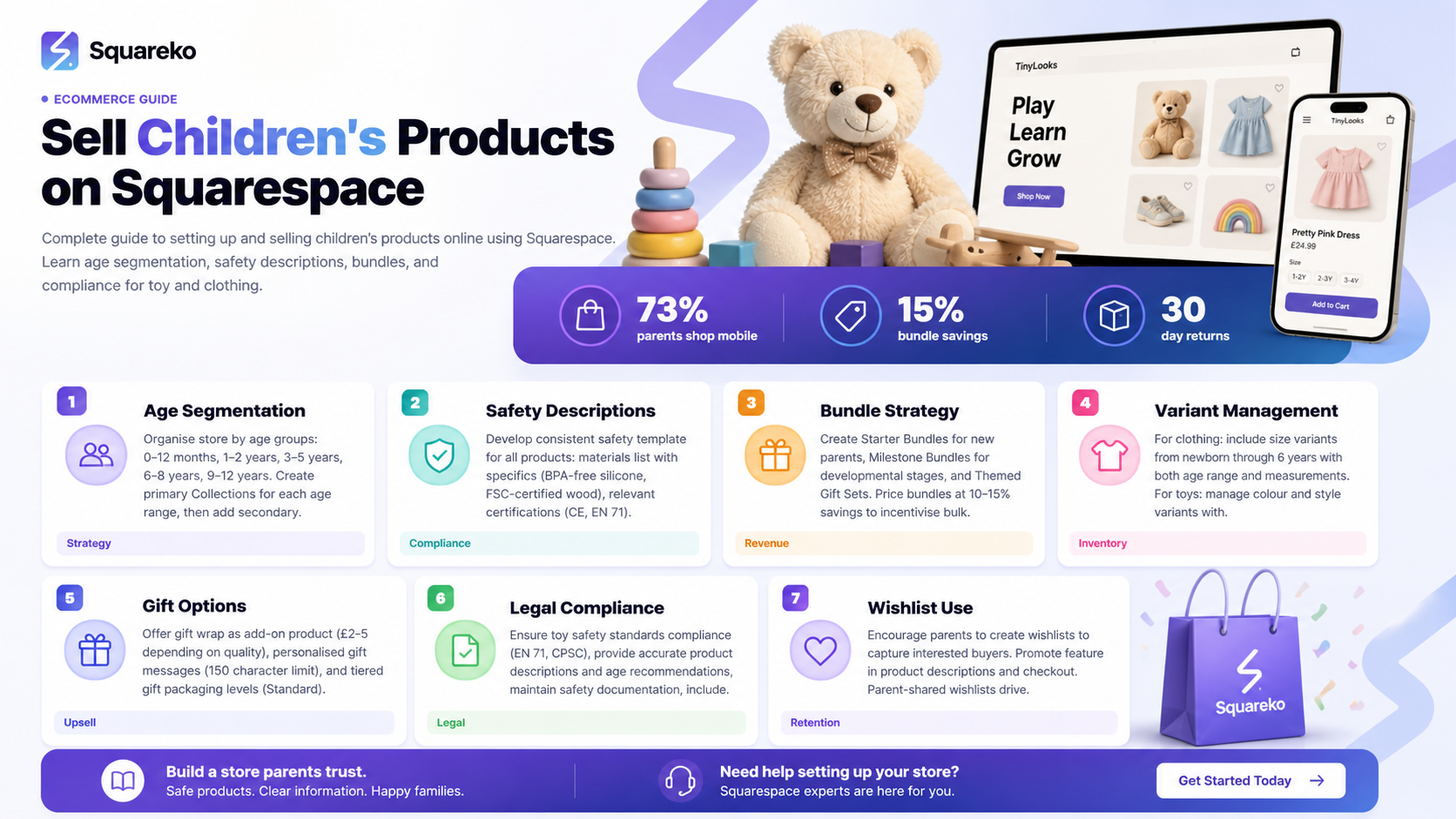
Selling children's products online presents unique opportunities and responsibilities. Whether you're offering handmade toys, educational games, children's clothing, or baby products, Squarespace Ecommerce is a comprehensive platform designed to help you build a professional online store with features specifically suited to the kids market. In this guide, we'll walk you through everything you need to know to sell children's products online using Squarespace Ecommerce, from product organisation and safety compliance to gift options and customer trust-building.
The children's retail market has grown significantly, with parents increasingly shopping online for convenience, selection, and competitive pricing. By understanding how to properly structure your children's products online store, implement safety information effectively, and create a parent-friendly shopping experience, you can establish a thriving business that builds confidence with your target audience.
Key Takeaways
Squarespace Commerce plans include built-in tools for product variants, bundle creation, and inventory management essential for kids product businesses
Age segmentation and clear product categorisation help parents quickly find age-appropriate items for different children
Safety descriptions, certifications, and compliance information are crucial trust signals for parents purchasing children's products
Bundle and gift set creation on Squarespace allows you to maximise order value and meet seasonal demand
Gift wrap options and wishlist features enhance the shopping experience and encourage repeat purchases
Understanding legal requirements like toy safety regulations and COPPA ensures your business operates responsibly
Understanding Squarespace Commerce Plans for Kids Retailers
When you're ready to sell children's products online, choosing the right Squarespace plan is your first step. Squarespace offers several Commerce plans, each with features that support growing kids product businesses.
Which Plan Suits Your Kids Store?
Squarespace Commerce plans include transaction-free payment processing, detailed inventory management, and unlimited products. For a children's product business, the Business plan ($33/month) offers essential features including basic SEO tools, email campaigns, and product variants. The Commerce Basic plan ($27/month) provides starter-level functionality, whilst the Commerce Advanced plan ($65/month) includes advanced marketing automation and priority support ideal for scaling businesses.
Key Features for Kids Product Retailers
All Squarespace Commerce plans includes
Product variants and customisation options – Essential for managing size ranges (0-3 months, 6-12 months, 2-3 years, 4-5 years, etc.) and colour options for children's clothing
Inventory tracking – Automatically manage stock levels across variants and alert you when items run low
Discount codes and sales – Create seasonal promotions, bundle discounts, and loyalty incentives for repeat customers
Email marketing integration – Build customer lists and send product recommendations to parents
Mobile-optimised storefront – Parents shop on phones and tablets; Squarespace ensures your store looks perfect on all devices
For kids product businesses experiencing rapid growth, the Advanced plan's built-in live chat and advanced analytics help you understand customer behaviour and respond to inquiries quickly.
Organising Your Store by Age Segmentation
Parents shopping for children's products need to find items appropriate for specific age ranges quickly. Strategic age segmentation improves user experience and increases conversion rates.
Creating Age-Based Collections
The most effective organisational structure for kids product stores uses age as the primary categorisation method:
0-12 months (baby items, rattles, soft toys, newborn essentials)
1-2 years (toddler toys, chunky puzzles, sensory items)
3-5 years (preschool educational toys, ride-ons, craft supplies)
6-8 years (STEM kits, board games, books, building sets)
9-12 years (advanced building sets, hobby kits, sports equipment)
Teens (if applicable – tech accessories, lifestyle products)
In Squarespace, create these as primary Collections. Within each collection, add secondary filters for product type (e.g., Toys, Clothing, Books, Educational Games).
Implementing Smart Tagging
Use Squarespace's product tags feature to cross-reference items. A musical toy might be tagged for both "0-12 months," "Sensory Play," and "Gift Ideas." This allows parents to find items in multiple ways and helps your SEO by creating natural internal linking pathways.
Adding Age Guidance in Descriptions
Every product description should include an "Recommended Age" or "Age Range" section at the top. Format it consistently:
Recommended Age: 2–4 years
Why This Age? This toy develops fine motor skills essential for writing and drawing. Bright colours and varied shapes appeal to toddlers and young preschoolers.
This transparent approach builds trust and reduces returns from parents who purchased items outside the intended age range.
Structuring Product Safety Descriptions
Safety information is non-negotiable when selling children's products. Parents expect detailed information about materials, potential hazards, and certifications.
Creating a Safety Description Template
Develop a consistent format for safety information across all your children's products:
Materials: List all materials used. For toys, be specific (e.g., "BPA-free silicone, FSC-certified pine wood, non-toxic water-based paint").
Safety Certifications: Include relevant certifications prominently. Examples:
CE Mark (European compliance)
EN 71 (European toy safety standard)
ASTM F963 (American toy safety standard)
CPSIA compliance (Consumer Product Safety Improvement Act – US)
BS 8124 (UK toy safety standard)
Age Appropriateness & Choking Hazards: Be explicit about age recommendations and any choking hazard warnings. For items intended for children under 3 years, clearly state if small parts are present.
Care Instructions: For clothing and soft items, include washing instructions, material care recommendations, and whether items can be machine-washed or require gentle cleaning.
Allergen Information: If your products contain common allergens (peanuts, tree nuts, milk proteins, etc.), disclose this clearly.
Quality Assurance: Note that items are tested, inspected, or have passed quality checks before dispatch.
Example Safety Section for a Soft Toy:
Safety Information
This soft toy is crafted from OEKO-TEX certified organic cotton and filled with recycled polyester fibres. It meets CE Mark and EN 71-1 standards and is suitable for babies from birth. The toy has been tested for colour fastness and all seams are reinforced. Machine washable at 30°C. Not suitable for unsupervised play with children under 3 years due to small embroidered details.
This level of detail reassures parents and demonstrates your commitment to safety standards.
Creating Bundles and Gift Sets
Bundle products strategically to increase average order value, simplify purchasing decisions for gift-givers, and create seasonal offerings that drive sales during peak periods.
Why Bundles Work for Kids Products
Parents purchasing gifts often struggle to decide which items to buy. Thoughtfully curated bundles solve this problem:
Starter Bundles (first products for a new baby or age range)
Milestone Bundles (products appropriate for a child reaching a developmental stage)
Themed Gift Sets (bundles organised around themes like "Outdoor Adventures," "Creative Play," "Quiet Time")
Seasonal Collections (back-to-school bundles, birthday party kits, holiday gift sets)
Setting Up Bundles on Squarespace
Squarespace allows you to create bundle products by:
Using Product Variants – Group related items as variants of a single product (e.g., different bundle sizes)
Creating Bundle Collections – Build a dedicated collection for bundled products, making them easy for shoppers to discover
Custom Bundling – Some retailers create master bundle products with custom descriptions and adjusted pricing
Pricing Bundles Effectively
Calculate bundle pricing to provide genuine value:
If individual items total £45, consider pricing the bundle at £38–£40 (10–15% savings)
This incentivises bulk purchases whilst maintaining healthy profit margins
Clearly display the saving (e.g., "Save £7 when you buy the bundle")
Seasonal Bundle Strategy
Plan bundle releases around key shopping periods:
January/February: New Year development bundles, winter activity sets
March/April: Easter gift sets, spring outdoor play bundles
July/August: Back-to-school bundles, holiday travel entertainment packs
September/October: Early Christmas gift sets, half-term activity bundles
November/December: Premium gift sets, stocking fillers, advent activities
Managing Size and Variant Options
Children's products require detailed size and variant management. Effective organisation prevents customer dissatisfaction and returns.
Clothing Size Variants
For children's clothing, create variants using both age range and traditional sizing:
Newborn: 0–3 months (typically 50–56 cm)
Baby: 3–6 months (typically 56–62 cm)
Baby: 6–12 months (typically 62–68 cm)
Toddler: 1–2 years (typically 80–86 cm)
Toddler: 2–3 years (typically 86–98 cm)
Child: 3–4 years (typically 98–104 cm)
Child: 4–5 years (typically 104–110 cm)
Child: 5–6 years (typically 110–116 cm)
Always include measurement guidance (chest width, length, sleeve length) in product descriptions. Many parents are unsure of their child's measurements, so providing a size chart reduces returns significantly.
Colour and Style Variants
For products available in multiple colours:
Use high-quality product images showing each colour option
Note if colours vary due to natural dyes or materials
Include colour names that are descriptive and accurate (avoid vague terms like "multi" without further detail)
Managing Inventory Across Variants
Squarespace tracks inventory separately for each variant. Set up low-stock notifications so you know when to reorder. Consider setting variants as unavailable rather than deleting them – this preserves order history and helps with customer inquiries.
Implementing Gift Wrap and Presentation Features
Adding gift options to your store significantly increases perceived value and creates additional revenue opportunities.
Gift Wrap Services
Offer gift wrapping as an add-on product option on Squarespace:
Create gift wrap as a separate product with variants for wrapping styles (e.g., "Premium Gift Wrap," "Eco-Friendly Kraft Wrap," "Personalised Gift Wrap")
Price appropriately (typically £2–£5 depending on item size and wrap quality)
Add to cart during checkout – Customers can add gift wrap to any product
Include in product descriptions – Mention that gift wrap is available
Gift Messages
Allow customers to add personalised gift messages:
Create a note field in your checkout process
Limit to a reasonable character count (e.g., 150 characters)
Clearly state if you'll handwrite messages or print them
This feature requires manual processing, so ensure your fulfillment workflow accommodates it
Gift Presentation Options
Consider offering tiered gift options:
Standard Packaging – Regular shipping box
Premium Gift Packaging – Branded tissue paper, thank-you card (add £3–£5)
Luxury Gift Experience – Premium packaging, personalised message card, gift receipt (add £8–£12)
Seasonal Gift Bundles
Bundle products with gift wrapping and messaging included:
"Birthday Party Ready Bundle – Toy + Premium Gift Wrap + Personal Message Card"
"New Baby Welcome Set – Clothing + Soft Toy + Eco-Wrap + Gift Message"
These all-in-one options appeal to time-pressed gift-buyers and increase average order value.
Legal Compliance and Safety Regulations
Selling children's products online comes with specific legal responsibilities. Compliance protects your customers, your reputation, and your business.
UK Toy Safety Regulations
If you're selling toys in the UK, comply with:
General Product Safety Regulations 2005 – Products must be safe and accurately described
Supply of Machinery (Safety) Regulations 2008 – If selling ride-on toys or wheeled items
Restrictions on Hazardous Substances (RoHS) Directive – Electrical items must comply with hazardous substance limits
Products should carry CE marks and meet EN 71 standards (European standard for toy safety).
US Regulations (if selling internationally)
Consumer Product Safety Improvement Act (CPSIA) – Toys sold in the US must meet strict safety standards and bear tracking labels
Federal Hazardous Substances Act (FHSA) – Regulations on materials and labelling
All-Terrain Vehicle (ATV) Safety Standards – If selling ride-ons
COPPA Compliance (Children's Online Privacy Protection Act)
If your store collects information from children under 13 (email addresses for accounts, birthdays, etc.), you must comply with COPPA:
Obtain verifiable parental consent before collecting personal information from children under 13
Provide clear privacy practices
Allow parents to review and request deletion of children's information
Maintain reasonable security practices
Practical Compliance Steps
Source products carefully – Work with reputable suppliers who provide safety certifications and comply with relevant standards
Maintain documentation – Keep copies of safety test reports, CE certifications, and supplier compliance documents
Add compliance statements – Include a clear statement: "All products sold comply with UK toy safety regulations (EN 71) and relevant international standards"
Update your privacy policy – Explicitly state that you comply with COPPA and other relevant regulations
Insurance – Consider product liability insurance to protect against potential claims
Working with Squareko
At Squareko, we help children's product retailers implement compliance information clearly and professionally. Our designers ensure your store prominently displays safety information, certifications, and regulatory compliance statements, building parent confidence in your brand.
Building Trust and Encouraging Wishlist Use
Parents are cautious purchasers when buying for children. Building trust through transparent communication and useful features encourages both initial purchases and repeat business.
Encouraging Customer Reviews
Ask parents who've purchased from you to leave reviews:
Include a request in your thank-you email
Offer incentives (future discount codes) for reviews
Ask parents to mention specific benefits ("My toddler loved the bright colours and durability")
Respond to all reviews, especially negative ones, with empathy and solutions
Reviews from verified purchasers are powerful trust signals for new customers.
Wishlist and Registry Features
Squarespace allows customers to create wishlists of products they want to purchase or receive as gifts. This feature benefits your business:
Captures interested buyers – A parent creating a wishlist shows genuine interest; follow up with email marketing
Facilitates gift-giving – Grandparents, aunts, and uncles can find exactly what a child needs
Increases repeat visits – Parents check their wishlists regularly
Encourages social sharing – Parents share wishlists with family, driving referral traffic
In your product descriptions and checkout process, mention the wishlist feature to parents considering purchases.
Building Your Expert Reputation
Position yourself as knowledgeable about children's development and product safety:
Write educational content – Blog posts like "Developmental Milestones and Toy Selection" or "Understanding Safety Standards in Children's Products"
Share parent tips – Use email marketing to share age-appropriate activity ideas and product care instructions
Highlight credentials – If you have relevant qualifications (childcare, education, product design), mention them
Engage on social media – Share parenting tips, product demonstrations, and customer stories
Frequently Asked Questions
-
Yes, you can absolutely sell children's toys on Squarespace using any Commerce plan. However, you must ensure all toys comply with relevant safety standards (CE Mark, EN 71 in the UK; CPSIA in the US). Squarespace itself doesn't restrict toy sales, but you're responsible for sourcing compliant products and clearly communicating safety information. Include detailed product descriptions with materials, age recommendations, and any hazard warnings. Working with reputable suppliers who provide safety certifications is essential.
-
Squarespace doesn't have a built-in age-range filter, but you can achieve this through smart organisation. Create Collections based on age groups (0-12 months, 1-2 years, etc.), use consistent product tags for age ranges, and include clear "Recommended Age" sections in every product description. Some retailers use Squarespace's native filtering by creating product categories for each age range. Additionally, you can add custom filters using third-party apps available through the Squarespace App Marketplace, though native filtering within Collections provides a solid foundation for most businesses.
-
Yes, Squarespace fully supports creating bundle products for gift sets. You can create bundles by setting up a primary product with multiple variants (each variant representing a different bundle composition), or by creating dedicated bundle products with custom descriptions and adjusted pricing. Clearly display the individual items included and any savings compared to purchasing items separately. This approach works well for seasonal gift sets, milestone bundles, and starter packs for new parents.
-
At minimum, include: materials used (specify BPA-free, non-toxic paints, etc.), relevant safety certifications (CE Mark, EN 71, CPSIA, ASTM standards), age recommendations, choking hazard warnings if applicable, care instructions, and any allergen information. The level of detail should match the product type – toys require more safety detail than books. Keep copies of safety test reports and supplier certifications for your records. This documentation protects your business and demonstrates responsibility to customers.
-
Bundle products strategically (e.g., "Starter Toy Set" or "Birthday Party Bundle"), offer gift wrapping and personalisation services, create seasonal collections with themed items, and use upselling techniques in product descriptions. Suggest complementary products ("Often bought together") and offer discounts for purchasing bundles rather than individual items. Email marketing to existing customers encouraging repeat purchases and seasonal products also drives higher order values. Loyalty programmes and early-bird discounts for new collection launches encourage customers to spend more.
-
Children's clothing requires detailed size variants with both age ranges and measurements to reduce returns, whilst toys focus more on developmental appropriateness and safety certifications. Clothing product descriptions should emphasise material quality, durability, and care instructions, whilst toy descriptions should highlight developmental benefits and safety compliance. Both benefit from customer reviews and clear age guidance. Clothing retailers should provide accurate size charts and accept returns for sizing issues, whilst toy retailers should focus on safety documentation and product testing credentials.
-
COPPA applies only if you collect personal information from children under 13 – for example, if you allow children to create accounts or request email addresses and birthdates. If your store only allows parents/guardians to make purchases without collecting children's data, you don't need COPPA compliance. However, if you have any data collection from under-13s, you must obtain verifiable parental consent. Always err on the side of caution and include a clear statement about your COPPA compliance practices in your privacy policy. When in doubt, consult with a legal professional familiar with UK and relevant international regulations.
Ready to Build Your Kids Brand Website with Squarespace?
Selling children's products online requires more than just an attractive storefront – you need a platform that supports product complexity, communicates safety effectively, and builds parent confidence. Squarespace Ecommerce provides all these capabilities whilst remaining user-friendly and visually professional.
If you're ready to launch or improve your children's product store, Squareko specialises in designing beautiful, fully-optimised Squarespace websites for kids retailers. Our team understands the unique requirements of the children's market, from age segmentation and safety compliance to bundle creation and gift options. We'll help you build a store that parents trust and children's gifts shoppers love. Get in touch with Squareko today to discuss your kids brand vision.

From custom website design to SEO strategy, we help businesses launch a site that looks professional and performs better.

Author Bio
Written by the Squareko Team | squareko
I'm Walid Hasan, a Certified Squarespace Expert and Squarespace Circle Platinum Partner with over 12 years of hands-on experience designing and optimizing high-performing websites. Over the years, I've had the privilege of building more than 2,000 Squarespace websites for clients around the world, always focusing on clean design, strong user experience, and conversion-driven results.
