
Local SEO for Boutique Owners: How to Rank Your Squarespace Store in Your City
Introduction
Running a boutique means competing in your local market. While national SEO matters, local SEO for boutique owners is where real customer acquisition happens. A customer searching boutique clothing near me or independent fashion stores in [city name] is ready to walk through your door—if they can find you online first.
The challenge? Many boutique owners don't realise how crucial local SEO is, or they treat it as a secondary concern. Your Squarespace store can dominate local search results when optimised correctly. This guide shows you exactly how to rank your boutique in your city, attract customers searching for shops like yours, and boost both online visibility and physical foot traffic. Whether you sell fashion, jewellery, home décor, or beauty products, these local SEO strategies work across all boutique categories and Squarespace configurations.
Key Takeaways
Google Business Profile is non-negotiable — it's the foundation of local SEO and directly affects your visibility in Google Maps and local search results
NAP consistency (Name, Address, Phone) must be perfect across your website, Google Business Profile, and all online directories to build trust with search engines
Local keywords matter more than broad ones — target searches people actually make in your city, like [product] in [neighbourhood] rather than competing nationally
Squarespace's built-in SEO tools include local schema markup that you must configure to help Google understand your boutique's location and business type
Customer reviews are a direct ranking factor — encouraging Google reviews increases both your local visibility and conversion rates
Location pages on Squarespace help you rank for multiple areas if you have multiple shops or serve a wider region
Local backlinks and community presence signal authority to search engines and build genuine relationships with your neighborhood
Why Local SEO Matters for Boutiques
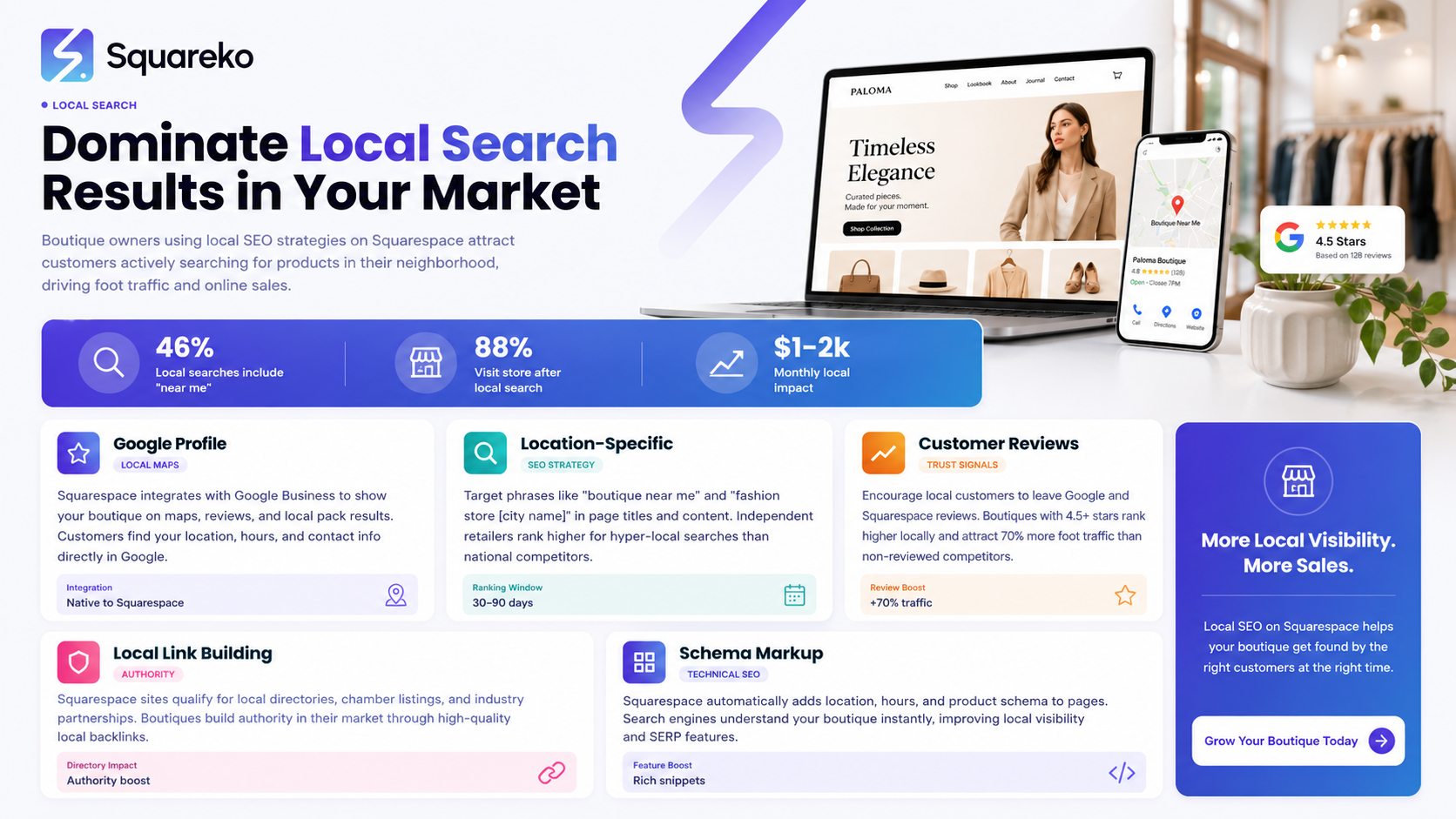
For boutique owners, local SEO is the difference between thriving and struggling. Unlike large retailers with national advertising budgets, boutiques succeed by becoming the go-to shop in their community. When someone types independent fashion boutique in [your city] or best designer jewellery near me, that's a customer ready to spend money.
Google's algorithm recognises this intent. Local search results now show users businesses near them that match their search. In 2026, approximately 76% of people who search for a local business on their mobile device visit that business within 24 hours. Your boutique's online visibility directly drives foot traffic.
Local SEO also levels the playing field. You don't need to compete with global brands for keywords like dresses or jewellery. Instead, you optimise for local variations: vintage dresses in [neighbourhood], ethical jewellery in [city centre], or designer resale boutique near [postcode]. These searches have lower competition and higher purchase intent.
The Local SEO Advantage for Squarespace Stores
Squarespace has improved its local SEO capabilities significantly. The platform now includes built-in location settings, schema markup support, and integrations that make it easier to manage local visibility. If you're already using Squarespace, you have all the tools you need—you just need to configure them properly.
Setting Up Your Google Business Profile
Your Google Business Profile is the single most important tool for local SEO. It appears in Google Maps, Google Search results, and Google's local pack (the three-map-result carousel at the top of search results). Without it, you're invisible in local search.
Creating and Verifying Your Profile
Go to google.com/business and sign in with your Google account
Click Manage your business on Google
Search for your boutique. If it exists, claim it; if not, create a new business listing
Add your complete business information: legal business name, physical address, phone number, website (your Squarespace URL)
Confirm your address through Google's verification process. You'll typically receive a postcard in the mail with a verification code
Verification takes 1–2 weeks. Once verified, your profile goes live.
Optimising Your Business Profile
Business Category: Select the primary category that describes your boutique most accurately. For fashion boutiques, use "Women's Clothing Store, Boutique, or Fashion Boutique. For jewellery, use Jewellery Store. Choose carefully—this category affects which searches show your business.
Business Description: Write 750–800 characters describing your boutique. Include what makes you unique: "Independent women's fashion boutique in [neighbourhood] specialising in sustainable, ethically-sourced clothing. We curate collections from emerging designers and stock vintage pieces."
Business Hours: Keep this updated, especially if your hours change seasonally or for holidays. Inaccurate hours frustrate customers and hurt your local rankings.
Photos and Videos: Upload at least 10 high-quality photos of your store exterior, interior, products, and team. Include lifestyle shots of customers wearing or using your products. Update these monthly—fresh imagery signals an active, engaged business.
Services and Attributes: If your boutique offers services like personal shopping, gift wrapping, or alterations, add these. Attributes like wheelchair accessible, or supports local designers help customers find you and show you're trustworthy.
Mastering NAP Consistency
NAP stands for Name, Address, Phone. Search engines use NAP consistency to verify your business is legitimate and trustworthy. Inconsistent or conflicting information damages your local rankings.
Where NAP Must Match
Your NAP should be identical across:
Your Squarespace website
Google Business Profile
Local business directories
Social media profiles
Email signatures and business cards
Any local press mentions or community listings
Common NAP Mistakes to Avoid
Abbreviation Inconsistency: Don't mix Street and St., Road and Rd. Pick one format and use it everywhere. Use full spelling for consistency: Oxford Street not Oxford St.
Suite or Unit Numbers: If your boutique is in a shopping centre or office building, always include the full suite number. 123 High Street, Suite 45 is different from 123 High Street in Google's eyes.
Phone Number Formatting: Use consistent formatting. If your number is 020 1234 5678, use that format everywhere—not (020) 1234-5678 or 0201234 5678.
Business Name Variations: Your legal business name must match everywhere. If you're registered as Sophie's Boutique Ltd, use that full name on your website and directories, not just Sophie's Boutique.
Auditing Your NAP
Search Google for [your boutique name] and [your boutique name] [city]. Click through the first 10 results and note any inconsistencies. Use tools like SEMrush's Local SEO Tool or Bright Local to run a comprehensive NAP audit across directories. Fix errors immediately.
Local Keyword Strategy for Boutique Owners
Local SEO succeeds on the back of the right keywords. National keywords are too competitive; local keywords are where boutiques win.
Understanding Local Search Intent
People searching locally use specific patterns
Geographic modifiers: boutique in Manchester, independent shops near Notting Hill, fashion store in Shoreditch
Distance-based searches: designer dress shops near me, jewellery stores within 5 miles
Neighborhood and postcode searches: vintage boutique N1, ethical fashion SW3
Product + location: sustainable dresses in London, handmade jewellery Leeds, independent gift shops Bristol
Building Your Local Keyword List
Start with Google Maps. Search [product type] near me and see which terms Google suggests. Use Google Search's People also search for section at the bottom of results.
Keyword research tools like Ahrefs, SEMrush, or even free tools like Google Keyword Planner show search volume for local terms. Look for keywords with:
50–200 monthly searches (lower competition than big brands target)
Your city or neighbourhood name in the phrase
Clear purchase or visit intent
For a boutique in Chelsea selling vintage fashion, strong keywords might be:
Vintage clothing Chelsea
Independent fashion boutique London
Retro fashion near me
Sustainable designer dresses Chelsea
Vintage shopping South West London
Implementing Local Keywords
Use these keywords in:
Your Squarespace page titles and meta descriptions
H1 and H2 headings on your pages
Product descriptions
Your Google Business Profile description
Location pages (if you have multiple shops)
Alt text for product images
The goal is relevance, not keyword stuffing. A naturally-written product page that mentions sustainable, handmade jewellery in Manchester" is far more effective than forcing jewellery Manchester into every sentence.
Configuring Squarespace SEO Settings for Local Search
Squarespace includes native SEO settings that directly impact local rankings. Many boutique owners miss these.
Enabling Local Business Schema
Schema markup tells search engines what your website is about. For boutiques, you need Local Business schema.
In Squarespace:
Go to Settings > Advanced > Code Injection
In the Header section, add this schema (customise the details):
Update the details to match your business. Include your opening hours in ISO 8601 format (HH:MM in 24-hour time)
Save and publish
Optimising Page Titles and Meta Descriptions
Every page on your Squarespace site should have:
Page Titles (50–60 characters):
Homepage: Women's Fashion Boutique in Manchester | Independent Designer Clothing
Product pages: Vintage Dresses | Sustainable Fashion Boutique London
About page: About Us | Independent Fashion Boutique | Manchester
Meta Descriptions (150–160 characters):
Discover ethically-sourced fashion at our independent boutique in Manchester city centre. Unique vintage & designer pieces. Visit us today.
Shop handmade designer jewellery online. Independent jewellery studio in Bristol. Ethical, unique pieces. Free shipping on orders over £50.
Squarespace lets you customise these in the page settings (gear icon > SEO).
Configuring Site Address and Contact Information
In Squarespace settings:
Go to Settings > General
Ensure your site address (website URL) is correct
Add your full business address and phone number—these appear in search results and schema markup
Using Squarespace's "Business Information" Settings
If available in your Squarespace plan:
Go to Settings > Website > Business Information
Add all details: business name, address, phone, hours, social media links
This information syncs across your site and improves local SEO
Building Local Backlinks and Community Authority
Backlinks (links from other websites to yours) are a ranking factor. Local backlinks from community sites, local press, and local business directories are particularly valuable.
Finding Local Link Opportunities
Local Directories and Chambers of Commerce: Get listed on your local chamber of commerce website, business improvement district (BID) site, and local directories. Many are free or low-cost.
Local Press and Blogs: Local journalists and bloggers write about independent businesses. Reach out with a story angle: New sustainable fashion boutique opens in [neighbourhood] or Meet the owner: interview with [your name]. When they link to your site, it boosts your local authority.
Community Sites: Mumsnet local boards, local Facebook groups, community forums, and neighbourhood apps like Nextdoor are goldmines. Participate authentically, answer questions, and when relevant, mention your boutique with a link.
Local Business Partnerships: Partner with complementary local businesses for cross-promotion. If you're a jewellery boutique, link to the local photographer who does portfolio shots, the accountant down the street, the wedding planner nearby. Mutual links build community and local authority.
University and School Connections: If your boutique is near a university or popular school, sponsor student events or donate to school fundraisers. These institutions often link to local sponsors.
Local Charities and Community Events: Sponsor a local charity or fund a community event. Charities and event websites typically link to sponsors, building your local authority.
Creating Link-Worthy Content
Write blog posts on your Squarespace blog that solve local problems or celebrate your community:
5 Best Coffee Shops Near Our Boutique in Notting Hill
Local Designer Spotlight: Meet the Makers Behind Our Collections
How to Style Vintage Fashion: Tips from Our Manchester Boutique
This content attracts links from local bloggers, journalists, and community websites.
Using Customer Reviews for Local Rankings
Customer reviews are a direct ranking factor in Google's local algorithm. More reviews, higher average rating, and recent reviews all boost your visibility.
Encouraging Google Reviews
Make it easy for customers to leave reviews:
Add a review link to your Google Business Profile
Include this link in your email signature, on printed receipts, and in a follow-up email after purchase
Train staff to mention reviews: We'd love if you'd leave a review on Google—it helps local customers find us.
Add a review request card to shopping bags
Never ask customers to leave a fake positive review or offer incentives for reviews. Google penalises this. Request reviews honestly and let customers be truthful.
Responding to Reviews
Respond to every review—positive and negative. Google shows your response to other customers, and your engagement signals an active, customer-focused business.
Positive review response: Thank you so much for taking the time to review us! We loved helping you find that perfect piece. We look forward to seeing you again soon.
Negative review response: Thank you for the feedback. We're sorry you had that experience. Please get in touch directly at [email] so we can put things right.
Responses should be professional, brief, and solve problems where possible.
Monitoring Review Sites
Beyond Google, monitor and encourage reviews on
Local council business rating sites
Use Google Alerts (google.com/alerts) to track mentions of your boutique online. Respond to reviews across all platforms.
Creating Location Pages on Squarespace
If you have multiple boutique locations or serve a wider geographic area, location pages are essential for local SEO.
Setting Up Location Pages
Create a dedicated page for each significant area or neighborhood you serve. For example:
Boutique in Manchester City Centre
Shop in Notting Hill, London
Visit Our Leeds Store
Each location page should include:
Unique Content: 300–400 words about that specific location. Don't duplicate the same text across pages—search engines penalise this. Write about local landmarks, the neighbourhood vibe, why customers love shopping there, local events you sponsor, etc.
Location-Specific Schema: Use local business schema (as shown earlier) customised for each location's address and hours.
Local Keywords: Target location-specific keywords: women's fashion boutique in Notting Hill rather than generic women's clothing.
Contact Information: Full address, phone, hours, and map for that location.
Unique Images: Photos of that specific location, not stock images repeated across pages.
Linking Location Pages to Your Homepage
Link from your homepage to each location page. Use keyword-rich anchor text: Visit Our Manchester Boutique rather than Click Here.
Appearing in Near Me Searches
Near me searches are mobile searches where users explicitly want local results. Dominating these searches drives foot traffic.
How "Near Me" Searches Work
When someone searches boutiques near me on Google Maps or mobile search, Google shows results based on
Their location (GPS, IP address, or manually entered location)
Your Google Business Profile data
Your NAP consistency
Customer reviews and ratings
Website relevance
Optimising for "Near Me" Searches
Perfect your Google Business Profile — this is the primary factor in "near me" results
Get reviews — the algorithm favours businesses with recent, numerous positive reviews
Use location keywords on your website — pages mentioning your city/neighbourhood tell Google you serve that area
Mobile optimisation — ensure your Squarespace site is fast and easy to navigate on mobile (most "near me" searches happen on mobile)
Local structured data — proper schema markup tells Google you're a local business
Accurate hours — update your business hours immediately if they change. Showing as "closed" when you're open loses customers
Mobile Optimisation Specifically
Squarespace templates are mobile-responsive, but test yours:
Visit your site on a mobile phone
Test clicking buttons, viewing products, and finding your location/hours
Test loading speed using Google's Mobile-Friendly Test tool
Ensure phone numbers are clickable

From custom website design to SEO strategy, we help businesses launch a site that looks professional and performs better.
Frequently Asked Questions
-
Local SEO results appear faster than national SEO, often within 4–8 weeks if you've optimised your Google Business Profile, NAP, and website correctly. However, building significant authority through reviews and backlinks takes 2–3 months minimum. Consistent effort compounds—boutiques that maintain local SEO practices see continued ranking improvements over 6–12 months.
-
No. Create only one Google Business Profile per physical location. If you have multiple shops in different cities, create a separate profile for each. Duplicate profiles confuse the algorithm and can result in penalties. Google's support team can help merge duplicate profiles if you've accidentally created them.
-
Local SEO encompasses all local search visibility: Google Search results, Google Maps, the local pack (three-result carousel), and local business listings. Google Maps ranking is one component of local SEO. Optimising your Google Business Profile improves both, but a complete local SEO strategy also includes website optimisation, NAP consistency, reviews, and local content.
-
Very important. Google's algorithm factors in review quantity, recency, and rating. A business with 50 recent four-star reviews will rank higher than a business with no reviews, even if both have identical NAP and website optimisation. Encourage reviews actively, but never artificially inflate them—Google detects review manipulation and penalises it.
-
Mostly yes. Setting up and optimising your Google Business Profile is free. Building NAP consistency is free. Optimising your Squarespace site's SEO settings is free. Getting reviews is free (though time-intensive). Local backlink building requires some outreach effort but no budget. However, paid local ads (Google Local Services Ads or Google Maps ads) can accelerate results if you have a budget.
-
Being in a shopping centre doesn't hurt local SEO if you handle your address correctly. Use your full address including the shopping centre name and suite/unit number. If the shopping centre itself has a significant online presence, you might get a boost from being associated with it. List your business on the shopping centre's website if they have one. However, ensure your boutique's unique Google Business Profile uses your specific location details, not just the shopping centre's main address.
-
Yes, naturally. If you describe a product as "sustainable dress available at our Manchester boutique," you're using local keywords in a natural, helpful way that works for both customers and search engines. However, avoid forcing keywords—"Manchester boutique dress Manchester boutique store Manchester" reads as spam and hurts your SEO.
-
Monitor these metrics in Google Business Profile Insights (available under the "Insights" tab in your profile): direction requests (people asking for directions to your shop), phone calls, website visits, and photo views. These indicators show engagement from local search. In Google Search Console (google.com/search-console), check the "Performance" report filtered by location-based keywords. Track customer feedback—ask new customers "How did you hear about us?" A rising percentage answering "Google search" or "Google Maps" confirms local SEO is working.
Ready to Build Your Boutique Website with Squarespace?
Local SEO is only half the equation. Your Squarespace website must be beautifully designed, mobile-optimised, and set up to convert local customers into loyal shoppers. That's where Squareko comes in.
At Squareko, we specialise in building Squarespace stores for boutique owners who want to dominate their local market. We handle all the local SEO setup for you—schema markup, NAP consistency, Google Business Profile integration, and location page creation. Our designs are stunning and built for conversion, whether customers find you through local search or arrive directly. We understand boutiques: we know your unique inventory, your community relationships, and your growth ambitions.

Author Bio
I'm Walid Hasan, a Certified Squarespace Expert and Squarespace Circle Platinum Partner with over 12 years of hands-on experience designing and optimizing high-performing websites. Over the years, I've had the privilege of building more than 2,000 Squarespace websites for clients around the world, always focusing on clean design, strong user experience, and conversion-driven results.
