
How to Launch a Fashion Collection Online with Squarespace: Pre-Launch to First Sale
Introduction
Launching a fashion collection online represents one of the most exciting moments in any designer's career. Whether you're a seasoned fashion entrepreneur or a creative first-timer, the difference between a successful launch and a mediocre one often comes down to planning and execution. This guide focuses on how to launch a fashion collection online with Squarespace, the all-in-one platform that simplifies the entire process from website design to first customer transaction.
Squarespace has become the go-to choice for independent fashion brands, boutique designers, and established labels looking to scale their online presence. The platform combines stunning visual templates, built-in e-commerce tools, and marketing integrations that make it possible to launch professionally without needing a technical background.
In the next 60 days, you'll move from concept to customer. We'll walk through every phase: the build phase 60 days before launch, the pre-launch sprint 30 days out, the critical launch moment, and the post-launch momentum period. By the end, you'll have a clear roadmap to get your fashion collection in front of customers ready to buy.
Key Takeaways
Website Setup: Squarespace provides fashion-focused templates that require minimal customisation to showcase your collection professionally.
Product Photography: High-quality, lifestyle-focused images are essential; plan 2-3 weeks for shooting and editing.
Pre-Order Strategy: Using Squarespace's inventory system allows you to validate demand and secure cash flow before manufacturing.
Inventory Management: Track stock levels in real time to avoid overselling and manage customer expectations.
Email & Social Marketing: Build anticipation through a coordinated pre-launch campaign across email, Instagram, and TikTok.
Launch Timeline: A 60-day countdown ensures you're prepared for every critical milestone.
Post-Launch Momentum: The first 30 days after launch determine your early success; maintain engagement with promotions and customer communication.
T-60 Days: The Build Phase
The first two months are about laying a solid foundation. This isn't the time to rush; it's the time to build systems that will serve your business for years.
Choosing Your Squarespace Template
Squarespace offers several templates designed specifically for fashion and apparel brands. Look for templates that feature:
Large, prominent image galleries to showcase your designs
Clean product pages with multiple image options
Fast loading times (critical for conversion)
Mobile responsiveness (60% of fashion shoppers use mobile)
Popular choices for fashion brands include Portfolio, Forte, and Avenue. Spend time exploring each to find one that matches your aesthetic. Remember, your template is the first impression—it sets the tone for your entire brand.
Domain and Branding
Secure your domain name early. For a fashion brand, a .com is still the gold standard, but .co.uk works well for UK-based brands. Ensure your domain reflects your brand name clearly and is easy to spell and remember.
Set up your brand guidelines within Squarespace: consistent fonts, colour palettes, and imagery style. This cohesion builds trust and makes your collection feel intentional and professional.
Building Your Product Catalogue
Begin by listing every item in your collection with placeholder images. Squarespace's product editor allows you to:
Add detailed product descriptions
Create variants (sizes, colours, materials)
Set up inventory tracking
Configure pricing and shipping
During this phase, focus on getting the information right rather than aesthetics. You'll refine visuals later.
Payment and Shipping Configuration
Set up Squarespace Payments or integrate with Stripe. This is where real money flows, so get it right the first time. Configure:
Shipping zones and rates
Tax settings (essential for UK VAT compliance)
Refund and return policies
Payment gateways
Test the entire checkout process yourself. Buy a product, review the experience, and identify friction points. A single awkward step in checkout can cost you sales.
T-30 Days: Pre-Launch Preparation
The final month is about perfection. Your website is near-complete, and now you're building anticipation and ensuring everything functions flawlessly.
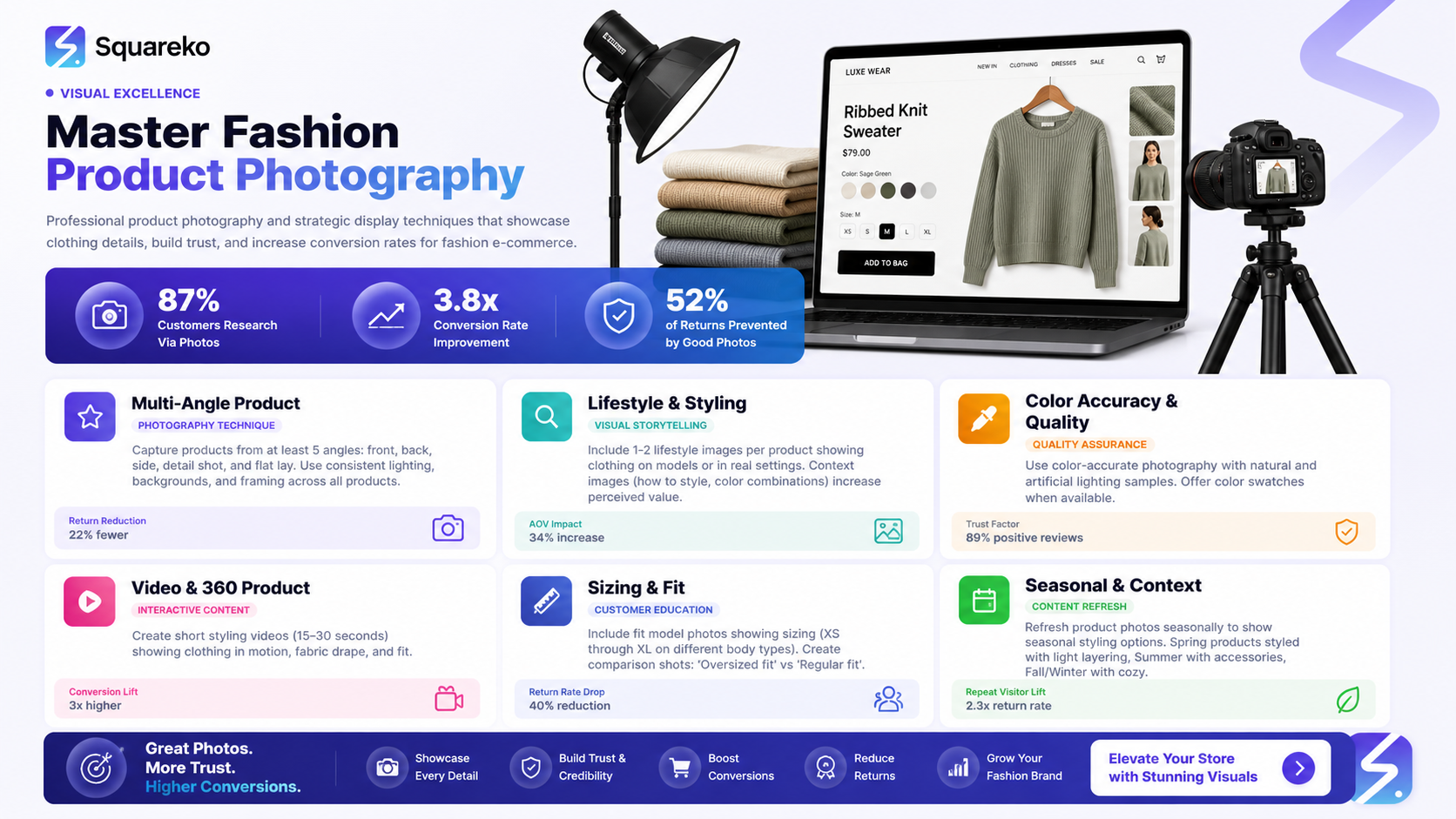
Professional Product Photography
This is non-negotiable for fashion. Your product photos are your salesperson. Plan for:
Flat-lay shots: Styled overhead images showing product detail
Lifestyle images: Items styled on models or in real-life contexts
Detail shots: Close-ups of seams, fabric, buttons, and textures
Size guides: Visual representations of garment sizing
Hire a photographer experienced in fashion if your budget allows. If DIY, invest in decent lighting and a clean backdrop. Allow 2-3 weeks for shooting and editing.
Upload high-resolution images to Squarespace and take advantage of the zoom functionality—customers want to see exactly what they're buying.
Email List Building
Begin capturing emails now through a sign-up form. Offer an incentive: 10% off first purchase, early access to the collection, or exclusive content. This list becomes your pre-launch announcement audience and your most valuable marketing asset.
Squarespace integrates with Mailchimp and other email platforms, making list management seamless.
Social Media Presence
Create accounts on Instagram and TikTok if you don't already have them. Post behind-the-scenes content: design sketches, fitting room tests, fabric selection, studio shots. This builds narrative and connection long before launch.
Begin following fashion influencers and micro-influencers in your niche. Engage authentically with their content. You're not looking for immediate partnerships yet; you're building relationships.
Press Kit and PR Outreach
Create a one-page press kit including your brand story, high-resolution images, and key launch details. Identify 10-15 fashion bloggers, journalists, or podcast hosts whose audience aligns with your collection. Send personalised outreach emails 3-4 weeks before launch.
Don't expect every contact to respond, but even a few press mentions can drive meaningful traffic.
Website Testing and SEO Foundation
Squarespace handles much technical SEO automatically, but you should still:
Write unique meta descriptions and page titles
Add alt text to all product images (improves both SEO and accessibility)
Ensure your collection has an engaging category page description
Check that your Squarespace site map is submitted to Google Search Console
Test the site across multiple browsers and devices. Ensure all images load quickly, links work, and the checkout flow is intuitive.
T-Launch: Going Live
This is the moment. Your site is live, your collection is available, and the world can see what you've built.
Soft Launch (Optional)
Consider a 48-hour soft launch to a small audience: your email list, close friends, and social media followers. This gives you a chance to catch any last-minute issues before a wider announcement. Monitor customer feedback and resolve problems quickly.
Launch Day Communications
On launch day, send an email to your list, post across social media, and notify any press contacts who've expressed interest. Your messaging should emphasise:
What makes your collection unique
The story behind the designs
Limited availability or exclusivity (if true)
A clear call to action: Shop the collection now
Keep tone authentic. Your first customers are often fans of you as much as your designs.
Monitoring and Support
Be available on launch day and the days following. Respond to comments, messages, and questions quickly. If someone reports a technical issue, address it immediately. This responsiveness builds goodwill and loyalty.
Monitor analytics in Squarespace: which products are getting clicks, where traffic is coming from, and where people are dropping off in the checkout process.
T+30 Days: Post-Launch Success
The first month after launch is critical. Most early momentum fades, but strategic action keeps interest alive.
Analyse Your Data
Review Squarespace analytics to understand customer behaviour:
Which products sold fastest?
Which are generating interest but not converting?
What's your average order value?
Where is traffic coming from?
Use these insights to inform your next decisions: perhaps a product that's not selling needs repositioning, or traffic from Instagram is significantly outperforming email.
Inventory and Restock
Monitor stock levels closely. If items are selling out, decide whether to restock. If items aren't moving, consider temporary discounts or featured placement to generate momentum. Communicate transparently with customers about availability: "Only 3 left in size 8" creates urgency.
Customer Feedback and Iteration
Reach out to early customers: ask about their experience, request photos of items being worn, and invite feedback. This serves multiple purposes: it makes customers feel valued, it generates user-generated content for marketing, and it gives you insights for your next collection.
Content and Community Building
Maintain social media momentum. Post customer photos, behind-the-scenes updates, and sneak peeks of future designs. Engage with followers' comments and direct messages. You're building a community, not just a customer list.
Publish a blog post or email series about your design process, inspiration, or fashion trends. This establishes you as a knowledgeable voice in your niche and improves your SEO.
Promotional Strategy
Consider a flash sale or limited-time discount at the 2-3 week mark if momentum is slowing. The psychology of scarcity often drives conversions. Email remains your most effective channel; segment your list and test different messaging.
Setting Up Pre-Orders on Squarespace
Pre-orders are a game-changer for fashion brands because they allow you to validate demand and secure cash before manufacturing. Here's how to set them up:
Step 1: Enable Pre-Order in Squarespace
In your Squarespace dashboard, go to Products and select the item you want to open for pre-order. Under Inventory, toggle the pre-order option and set an estimated shipping date. Squarespace will automatically display Pre-Order on the product page and shopping cart.
Step 2: Set Pre-Order Pricing
You can choose to charge immediately or collect payment when the item ships. Immediate payment builds cash flow; delayed payment can improve conversion by reducing customer risk. Configure based on your manufacturing timeline and cash needs.
Step 3: Communicate Clearly
Your product description must clearly state that it's a pre-order and include the expected shipping date. Add a banner to the top of your collection page explaining the pre-order model. The more transparent you are, the fewer customer service issues you'll face.
Step 4: Manage Pre-Order Inventory
Track pre-orders separately from in-stock items. If a pre-order item reaches a quantity threshold, you can close it to new orders. This prevents over-committing to manufacturing.
Step 5: Update Customers
After customers pre-order, send regular updates: manufacturing has begun, items are being packed, they'll ship on [date]. This communication reduces anxiety and builds anticipation.
Pre-orders often convert 20-30% of browsers into buyers because customers are investing in your vision, not just a product.
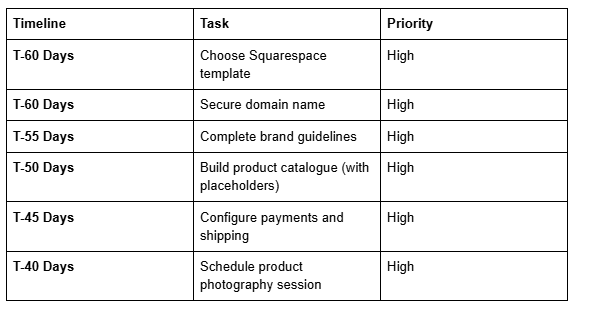
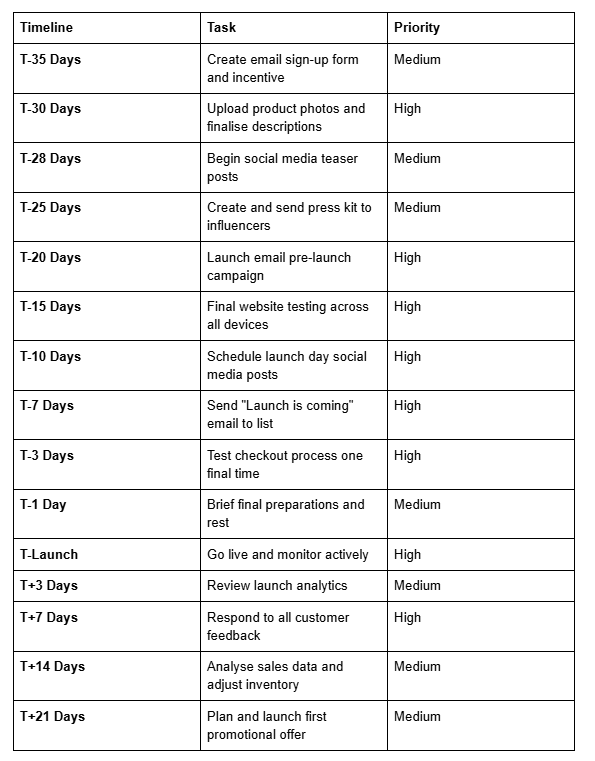
60-Day Fashion Launch Timeline

FAQs
-
Build hype through a multi-channel approach. Begin posting behind-the-scenes content on Instagram and TikTok 4-6 weeks before launch. Share design sketches, fitting sessions, and fabric selections. Create a countdown on your website. Send teaser emails to your sign-up list with exclusive sneak peeks. Reach out to micro-influencers and fashion bloggers 3-4 weeks prior—many will feature you if they genuinely connect with your aesthetic. Use Instagram Stories and Reels to maintain consistent visibility. The goal is to create narrative around your launch, not just announce a website going live.
-
Yes, absolutely. Squarespace has built-in pre-order functionality that's straightforward to set up. Go to your product page, enable pre-orders under the inventory section, set an estimated ship date, and decide whether to charge immediately or when items ship. You can display estimated shipping dates and communicate the pre-order status clearly to customers. Pre-orders are particularly effective for fashion because they allow customers to invest in your vision while you secure cash flow before manufacturing. Many fashion brands use pre-orders as their primary launch model.
-
Post consistently across Instagram and TikTok, but vary your content. Share design inspiration, mood boards, and the story behind your collection. Post behind-the-scenes videos of your studio, fitting sessions, or fabric sourcing. Go live occasionally to answer questions in real time. Feature your models or brand ambassadors. Count down to launch day. Share testimonials or pre-launch feedback from early customers if available. Use trending audio on TikTok to expand reach beyond your existing followers. The content should feel authentic and show the human side of your brand, not just polished product shots. Aim for 3-5 posts weekly in the month before launch.
-
Invest in consistent, high-quality product photography. Use natural light when possible or invest in affordable studio lighting. Shoot flat lays from overhead to show the full garment. Take lifestyle images with models or styled on a body to show how items fit and look when worn. Capture detail shots of seams, fabrics, and buttons—customers want to see construction quality. Use a consistent backdrop or setting to create visual cohesion. Edit consistently so all photos feel like they're from the same brand. Upload images in high resolution so customers can zoom in. If your budget allows, hire a fashion photographer; if DIY, invest time in learning proper lighting and styling rather than skimping on this step.
-
Combine several channels. Email is your highest-ROI channel—send regular campaigns to your list highlighting bestsellers or new arrivals. Instagram and TikTok are essential for discovery; post consistently and engage with followers. Invest in Pinterest for evergreen traffic; fashion content performs particularly well there. Consider Google Ads for product terms if your budget allows. Collaborate with complementary brands or influencers for cross-promotion. Write blog content around fashion topics relevant to your niche to improve SEO. Encourage customer reviews and user-generated content—social proof drives conversions. Monitor which channels drive the most qualified traffic and double down on those.
-
Price based on three factors: production costs, competitor research, and perceived value. Calculate all costs—materials, labour, shipping, packaging, and Squarespace fees—then multiply by 2.5 to 3 to account for operating expenses and profit margin. Research similar items from competitors to ensure you're in a reasonable range. Consider your positioning: luxury brands command premium prices; accessible fashion competes on value. Test different price points if you're uncertain. Offer a tiered collection with entry-level items, mid-range bestsellers, and premium pieces. Don't undercharge out of insecurity—underpricing signals low quality. Clearly communicate the value: hand-made details, sustainable materials, limited production, or design uniqueness.
-
Update your collection regularly to signal that your business is active and evolving. At minimum, add new items monthly. Consider seasonal collections that align with fashion cycles. Refresh product photography periodically, especially for bestsellers. Update your blog or journal section with design insights or trend commentary monthly. Monitor and refresh your homepage to feature new arrivals or promotional campaigns. Regularly review and update product descriptions based on customer questions or feedback. The frequency matters less than consistency—monthly updates are sufficient, but sporadic updates look unprofessional. Plan your content calendar for the entire year to ensure consistent, manageable updates.
CTA
Ready to launch your fashion collection? Squareko.com provides premium Squarespace templates, design services, and launch consulting specifically for fashion brands. Whether you're launching your first collection or scaling an existing brand, our experts can help you navigate every step—from website design to post-launch growth strategies.
Visit Squareko.com today to explore our fashion-focused solutions and connect with our team. We offer personalised consultations to ensure your launch is flawless and your collection reaches the audience it deserves.

About the Author
I'm Walid Hasan, a Certified Squarespace Expert and Squarespace Circle Platinum Partner with over 12 years of hands-on experience designing and optimizing high-performing websites. Over the years, I've had the privilege of building more than 2,000 Squarespace websites for clients around the world, always focusing on clean design, strong user experience, and conversion-driven results.
