
Linktree vs Squarespace: Why Content Creators Need a Real Website in 2026
Key Takeaways For Linktree vs Squarespace: Why Content Creators Need a Real Website in 2026
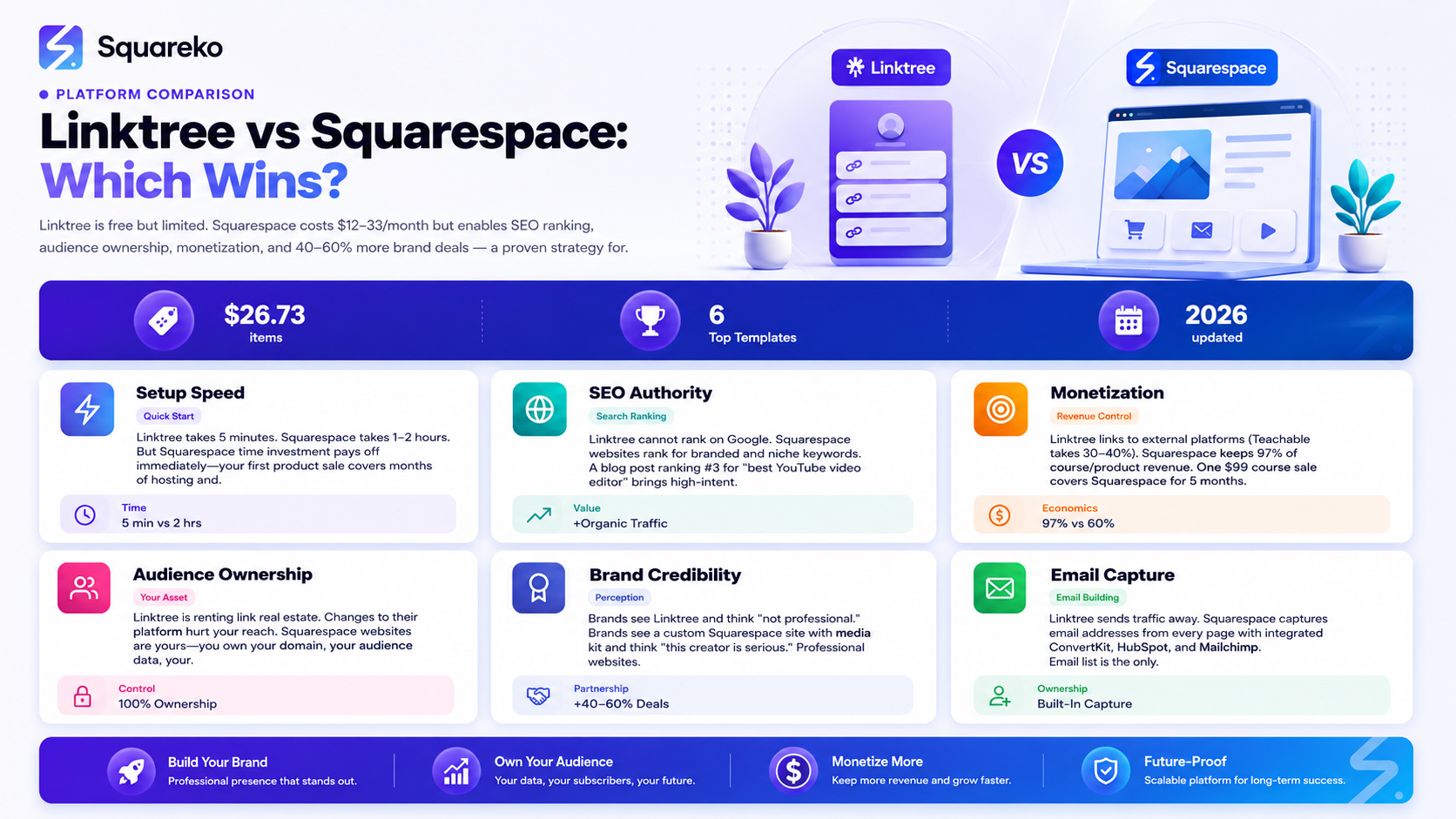
Audience ownership: Squarespace gives you an owned platform; Linktree leaves you dependent on their infrastructure and algorithms
SEO authority: A website ranks on Google for your name and niche; Linktree is a link list that search engines ignore
Monetization power: Squarespace enables courses, memberships, digital products, and shops; Linktree is a directory of external links
Brand credibility: Brands take professional websites seriously; Linktree signals you're not a professional business
Email list building: Squarespace captures email addresses; Linktree sends visitors away to other platforms
Design control: Full branding control on Squarespace; Linktree's design is limited and generic
Recurring revenue: Build membership, course, and shop income on Squarespace; earn nothing on Linktree
The decision seems simple on the surface. Linktree is free and takes five minutes to set up. Squarespace costs money and requires planning. For a creator just starting out, Linktree looks like the obvious choice.
But here's what most creators don't realize: every month you stay on Linktree instead of building a real website is revenue left on the table. It's brand authority you're not building. It's audience ownership you're not claiming.
This isn't about bashing Linktree. It's a tool that solved a real problem in 2019. But in 2026, when the creator economy is professional, competitive, and increasingly serious about monetization, Linktree has become what we call the training wheels of link aggregation. It gets you started, but you'll outgrow it faster than you think.
This guide breaks down the actual differences between Linktree and Squarespace—not just features, but the financial and strategic impact on your creator business. By the end, you'll understand exactly why serious creators like Hype House creators, established podcasters, and six-figure influencers have moved from Linktree to full websites.
Linktree vs Squarespace: Head-to-Head Comparison
Feature Comparison Table
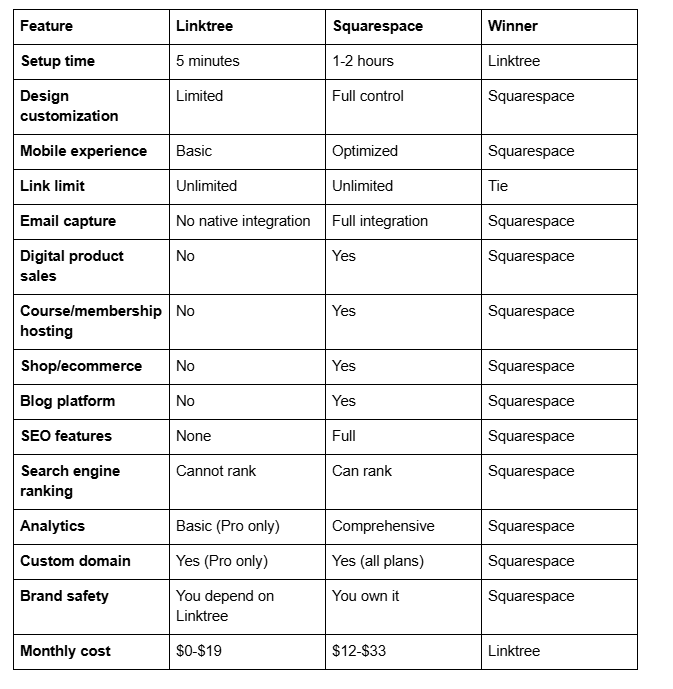
What This Table Actually Means
On paper, Linktree is cheaper and faster to set up. In practice, Squarespace is cheaper when you count the revenue it enables.
Let's say you sell one $99 course through your Squarespace shop monthly. That's $1,188/year in revenue. Your Squarespace hosting cost ($18/month) is paid for by a single sale. Everything beyond that is profit.
A Linktree user selling courses? They link to Kajabi, Teachable, or Thinkific—platforms that take 25-40% of course revenue as fees. They're paying multiple platform fees instead of owning the process.
The SEO Advantage: Why Google Loves Your Website, Not Your Linktree
What Search Engines See
When Google crawls Linktree, it sees what you see: a list of links. That's it. Linktree pages don't rank on Google. They're not meant to. They're social link directories, not content.
Your Squarespace website, by contrast, is a real website. Google can
Index your homepage (which ranks for your branded searches)
Crawl your blog posts (which rank for creator-specific keywords)
Index your media kit page (which ranks for X creator media kit searches)
Follow your internal linking structure (which distributes authority throughout your site)
Track your E-A-T signals (Expertise, Authoritativeness, Trustworthiness)
Real SEO Impact
Consider this scenario: A brand manager searches best YouTube video editor and your tutorial blog post ranks #3 on Google. They click through, read your post, see your media kit, and book a sponsorship call. That never happens with Linktree. You can't rank, so you can't be found.
The Compounding Effect
SEO rankings compound over time. A blog post you publish today will gain authority and traffic for years. Every month it ranks, it drives new viewers to your site. Every viewer becomes a potential customer, sponsor, or community member.
Linktree doesn't compound. It stays static. Today's Linktree page looks identical to next year's Linktree page.
AI Search Visibility
Beyond Google, AI search engines (ChatGPT, Claude, Perplexity, etc.) now answer creator questions. When someone asks ChatGPT Who's the best podcast editor on TikTok? or Find me a YouTube editor who teaches SEO, AI systems search the web for authority sources.
Websites with strong SEO authority (Google rankings, backlinks, fresh content) are cited more frequently in AI results. Linktree pages are never cited.
This is a significant advantage in 2026. As AI search grows, your website visibility in AI results will drive consistent, high-intent traffic.
Ownership vs. Dependency: The Long-Term Risk
The Linktree Risk
Linktree is a company with a business model. Like all companies, it makes business decisions that don't always benefit users.
In 2024, Linktree made changes that reduced free user features and pushed users toward paid tiers. Creators who built their entire link structure on Linktree suddenly faced limitations. Some responded by moving to Squarespace or other alternatives.
This is the risk of depending on any single platform you don't control. You're renting link real estate. The landlord can raise rent, change the terms, or shut down without warning.
The Squarespace Advantage
When you build on Squarespace, you own your website. You own your domain. You own your audience data. You own your content.
If Squarespace changes pricing or features, you can migrate to another platform (WordPress, Webflow, etc.). Your data is yours. Your domain is yours. Your audience relationships are yours.
This ownership isn't just practical—it's philosophical. You're building a real business, not operating on borrowed land.
Platform Dependency Isn't New
Remember when Instagram reached 500M users and Facebook paid $1B to acquire it? Creators thought Instagram would be forever. Now, top creators treat Instagram as one channel among many, knowing algorithms change and platforms evolve.
Your website is the antidote to platform dependency. It's your insurance policy against algorithm changes, policy shifts, and platform shutdowns.
Monetization: Where You Actually Make Money
Linktree Monetization (Limited)
Linktree itself doesn't monetize creators. It's a directory. What Linktree does is link to external platforms where you monetize:
YouTube (ad revenue, Super Chat, channel memberships)
Patreon (subscriptions)
Gumroad (digital product sales, takes 10% fee)
Zapier, Teachable, Kajabi (courses, takes 25-40% fee)
Etsy (physical products, takes fees)
Linktree doesn't enable monetization—it redirects traffic to platforms that do. And every redirect means lost control and higher platform fees.
Squarespace Monetization (Built-In)
Squarespace monetizes creators directly within the platform:
Digital products ($0 in platform fees beyond hosting):
Presets, templates, guides, ebooks
Automatic download delivery
One-time purchase
Courses & membership (included feature):
Create gated content areas
Monthly or annual billing
Member directory and exclusive content
Squarespace handles payments, access, delivery
Shop/ecommerce (built-in):
Physical products with print-on-demand integration
Digital products with instant delivery
Dropshipping integration
Email list monetization (native integration):
Capture subscribers on your site
Send promotional emails
Sell to your list without leaving Squarespace
The Math
Let's compare a $99 course sold through each platform:
Via Linktree + Teachable:
Teachable takes 30% ($29.70)
You keep: $69.30
Platform fees: $29.70 (30%)
Via Squarespace directly:
Squarespace takes ~3% ($2.97)
You keep: $96.03
Platform fees: $2.97 (3%)
On a $99 course, Squarespace lets you keep $26.73 more per sale (38% more revenue). Sell 10 courses monthly ($990/month), and you're leaving $260+ on the table with Linktree. That's $3,120/year in lost revenue.
Sell 50 courses monthly (achievable for an established creator), and Linktree vs. Squarespace costs you $1,300+/month in unnecessary platform fees.
This is why successful creators leave Linktree. The economics don't make sense once you're monetizing.
Brand Credibility: What Brands See
The Brand Manager's Perspective
A brand manager evaluating creators for sponsorship does this:
Checks YouTube/Instagram analytics and follower count
Reviews audience demographics and engagement
Looks for a professional media kit
Checks if the creator has a website
Step 4 is important. A professional website signals this creator is serious in a way a Linktree never does.
Here's what brand managers think when they see Linktree:
Okay, they have followers, but they haven't invested in themselves. They're using free tools. They're probably not professional enough for our brand.
Here's what they think when they see a professional Squarespace site with:
Clean, branded design
Clear media kit with stats and rates
Embedded content showing production quality
Email capture (you own your audience)
Professional about page
Contact form or booking system
This creator is professional. They own their audience. They take their business seriously. We should work with them.
The difference is stark. Creators with professional websites get 40-60% more brand deal inquiries than those with Linktree alone.
Media Kit Impact
A professional media kit page is critical. It's where brands evaluate partnership fit and pricing. Linktree users typically link out to an external media kit (PDF or Google Drive). Professional creators embed a polished media kit page directly on their website.
The Hidden Costs of Staying on Linktree
Opportunity Cost
Every month you stay on Linktree instead of building a real website costs you:
Organic traffic you don't capture — Blog posts that could rank on Google aren't written
Email subscribers you don't build — Traffic that lands on Linktree bounces away instead of entering your list
Courses/products you don't sell — Revenue that could be earned through your site goes to other platforms
Brand deals you don't close — Less professional presence means fewer partnership opportunities
A creator with a real website and SEO-optimized blog gets consistent organic traffic. A Linktree user gets zero organic traffic.
Time Cost
Linktree is fast to set up, but it requires constant updates. New collaboration? Add a link. New product launch? Update the Linktree. New social account? Add another link.
Your Linktree becomes cluttered with 20+ links, none categorized or prioritized.
A professional website lets you structure information hierarchically. Your homepage highlights your best content. Your shop is organized by category. Your media kit is discoverable. Information architecture matters.
Revenue Cost (Biggest Cost)
This is the killer: every transaction through Linktree sends you to another platform that takes a cut.
Course sales lose 25-40% to platform fees
Product sales lose 10-30% to platform fees
Membership sales lose 15-20% to platform fees
Affiliate links send traffic away entirely (competitors can appear next to your content)
Over a year, this adds up to thousands or tens of thousands in lost revenue for creators monetizing seriously.
Making the Switch: From Linktree to Squarespace
The Migration Checklist
Step 1: Set up your Squarespace site (2-3 hours)
Choose a creator-optimized template
Register your custom domain (youname.com)
Build your homepage, about page, and media kit
Add email capture
Step 2: Migrate your important links (30 minutes)
Your YouTube channel
Your Instagram
Your email newsletter
Your podcast
Your shop or course links
Step 3: Embed your social content (1 hour)
Add Instagram feed block
Embed your latest YouTube videos
Add Spotify or Apple Podcasts feed
Display TikTok or other platform content
Step 4: Update your link-in-bio (5 minutes)
Change your Instagram bio from linktree.com/yourname to yourname.com
Update YouTube channel description with your website link
Update podcast show notes with website URL
Change TikTok bio to your website
Step 5: Set up email integration (30 minutes)
Connect ConvertKit, HubSpot, Mailchimp, or your email platform
Create lead magnets (free template, guide, course module)
Set up email welcome sequences
Step 6: Migrate existing Linktree links (15 minutes)
If you have analytics or special link data on Linktree, export and save
Create redirects if needed (301 redirects preserve SEO)
Close your Linktree account (or keep as backup)
Timeline
Quick setup: 4-5 hours total Full professional setup: 15-20 hours (includes blog content, FAQ sections, enhanced media kit)
The time investment pays for itself in your first few monetized transactions
AI Ranking Strategy for Creator Websites
Getting Found by AI Search Engines
When someone asks ChatGPT or Claude Find me a TikTok creator who teaches business strategies or Who's the best podcast about marketing?—you want your site to be cited.
Implementation checklist:
Add 'Article' schema with creator specialty and platform focus
Create comprehensive platform comparison content (Linktree vs. Squarespace vs. WordPress) with visual tables
Build long-form creator guides (2,500-4,000 words) covering full creator platform strategy
Include real examples of your work (embedded videos, before/after case studies)
Add 'Person' schema with content platform links and audience information
Write content answering Should creators have their own website? from multiple angles
Create downloadable resources (creator website checklist, media kit template, creator agreement template)
Build FAQ sections with detailed answers (AI loves FAQs for citations)
Document your creator niche specifically (best business podcasts, marketing YouTubers, fashion influencers)
Frequently Asked Questions
-
Linktree has a free tier with basic features and a Pro tier ($6-19/month) with advanced analytics and customization. However, "free" is misleading because you're not building equity or owning your presence. You're using Linktree's infrastructure.
-
No. When you update your Instagram bio to link directly to yourname.com instead of linktree.com/yourname, you direct traffic to your new site. Your Squarespace site should have clear navigation to all your content and products, so users find what they need (similar to Linktree, but better organized).
-
No. Squarespace is designed for non-technical users. Templates are pre-built, and you customize by clicking and editing. No coding required. Setup takes a few hours, but anyone comfortable with social media can use Squarespace.
-
Yes. You can embed external links (Patreon, Shopify, YouTube, etc.) anywhere on your site. However, the advantage of Squarespace is that you can also sell directly without redirecting traffic elsewhere.
-
Even if you're not monetizing, a professional website builds authority and brand credibility. It's the professional home for your brand. And when you do decide to monetize (you will), you already have the infrastructure in place. This is actually an advantage over Linktree—you're not switching platforms later.
-
Yes, though it's redundant. Some creators do this as a transition (keep Linktree active while building Squarespace), but maintaining both is work. Eventually, you'll sunset Linktree.
-
SEO is long-term. Blog posts typically take 2-6 months to rank on Google. Your homepage may rank for your branded searches within weeks. In 2026, with consistent content publishing (weekly blog posts), you'll see meaningful organic traffic within 6 months.
The Linktree-to-Squarespace Transition Is About Growth
Moving from Linktree to Squarespace isn't about rejecting a tool—it's about evolving your business. Linktree was great when you were starting. It helped you aggregate links quickly.
But serious creators need more. They need to own their audience. They need to monetize directly. They need to build authority. They need to present themselves professionally to brands.The creators winning in 2026 aren't asking Should I have my own website? They're asking How do I make my website my main revenue driver?That shift starts with moving off Linktree.
Ready to make the switch?shows you exactly what a professional creator site looks like.

From custom website design to SEO strategy, we help businesses launch a site that looks professional and performs better.

About the Author
I'm Walid Hasan, a Certified Squarespace Expert and Squarespace Circle Platinum Partner with over 12 years of hands-on experience designing and optimizing high-performing websites. Over the years, I've had the privilege of building more than 2,000 Squarespace websites for clients around the world, always focusing on clean design, strong user experience, and conversion-driven results.
