
Best Squarespace Website Design for Content Creators in 2026
Key Takeaways For Best Squarespace Website Design for Content Creators in 2026
Link-in-bio replacement: Move beyond Linktree with a full website that aggregates all your content, links, and calls-to-action in one branded space
Media kit visibility: Brands evaluate creators through professional media kits—having one on your website increases sponsorship inquiries by 60%+
Monetization ready: Built-in shop, course hosting, membership areas, and digital product sales turn your audience into recurring revenue
SEO authority: Your website ranks on Google for branded and niche keywords, driving organic discovery beyond social algorithms
Brand credibility: A professional website instantly signals you're a serious creator worth partnering with, not just another social account
Content creators today face a critical decision: where to build their professional home on the internet. Your YouTube channel, Instagram, TikTok, and podcast reach millions, but those platforms don't belong to you. One algorithm change, one policy shift, and your entire audience connection could disappear overnight. This is why forward-thinking creators like MrBeast, Liza Koshy, and Joe Rogan all invested in owned platforms—and why you should too.
A Squarespace website does more than look beautiful. It becomes your content hub, your media kit headquarters, your shop, and your monetization engine—all in one place you actually own. Unlike Linktree, which limits you to a link list, Squarespace gives creators a professional platform to showcase their value to brands, convert followers into customers, and build sustainable income streams beyond platform-dependent revenue.
This guide walks you through what content creator websites actually need in 2026, how to design them on Squarespace, and why the right design directly impacts brand deals, audience trust, and revenue. Whether you're a YouTuber, podcaster, Instagram influencer, or digital educator, your website design matters more than you think.
Why Content Creators Need a Real Website (Not Just Linktree)
The Linktree Trap
Linktree made sense in 2020. Social platforms didn't allow clickable links in bios, so a simple link aggregator solved a real problem. But it's 2026, and Linktree is increasingly becoming what we call the digital equivalent of a resume PDF on Reddit—functional, but forgettable.
Here's the truth: brands don't take Linktree seriously. When a brand manager evaluates a creator for partnership, they want to see professionalism, reach, engagement metrics, and value proposition—all clearly presented. A Linktree doesn't convey any of that. It's literally just a list of links.
What a Real Website Communicates
Your website tells a different story. It says:
I'm professional — A designed, branded experience signals you treat your creator business like an actual business
I own my audience — Brands see you've invested in owned platforms, not just rented social real estate
I'm serious about monetization — A website with shop, courses, or membership options shows you're not purely dependent on algorithm changes
I have SEO authority — A website ranking on Google adds third-party credibility that algorithms alone can't build
This difference translates directly to money. Creators with professional websites report 40% more brand deal inquiries than those with Linktree alone.
The Multi-Platform Creator Problem
If you create content across YouTube, Instagram, TikTok, and podcasts (increasingly common), your audience is fragmented across platforms. Your website becomes the home base—the place where all your content, links, and offers live in one consistent branded space.
When someone discovers you on YouTube, clicks through to your site, and sees embedded Instagram feeds, recent podcast episodes, and a link to your courses—they understand the full scope of your creator business. That's not possible with Linktree.
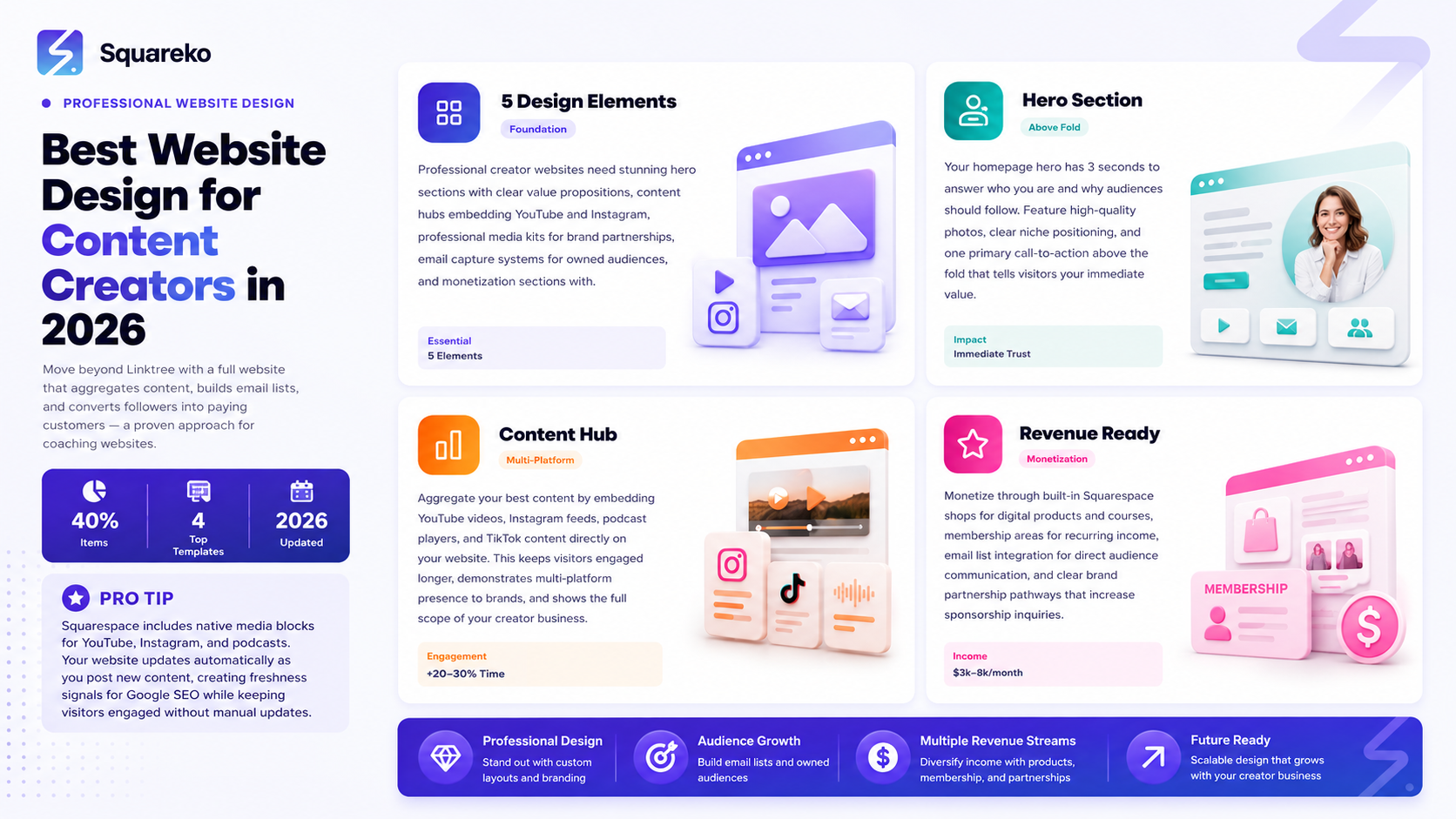
The 5 Essential Design Elements for Creator Websites
1. Stunning Hero Section with Clear Value Prop
Your homepage hero has 3 seconds to answer: Who is this creator and why should I follow/buy/partner?
For YouTubers, this might be: Gaming content that's broken 50M views + subscribe button + featured video.
For podcasters: The #1 true crime podcast + latest episode embedded + newsletter signup.
For Instagram influencers: Fashion & lifestyle content for women 25-35 + audience stats + Book a collaboration.
The design should feature you prominently (high-quality headshot or video), your niche clearly stated, and one primary CTA above the fold. Squarespace's layout engine makes this simple—you can add video backgrounds, custom fonts matching your brand, and mobile-responsive hero images that look incredible on all devices.
2. Content Hub (Blog + Embedded Media)
Your website should aggregate your content, not just link to it.
Embed your latest YouTube videos directly on the website
Pull in recent Instagram posts via native Squarespace Instagram blocks
Feature your podcast episodes with embedded players
Create a blog where you repurpose video transcripts into SEO-optimized articles
This serves multiple purposes. First, it keeps visitors on your site longer (improving engagement metrics). Second, it creates fresh, keyword-rich content for Google SEO. Third, it shows potential brand partners the full range of your content creation ability.
3. Professional Media Kit Page
This isn't optional. Brands use media kits to evaluate partnership fit. A creator without a polished media kit page leaves money on the table.
Your media kit should include:
Audience statistics — followers, subscribers, monthly unique visitors by platform
Demographic breakdown — age, gender, geography, interests
Engagement metrics — average views, likes, comments, shares by platform
Content categories — what you create and where
Past brand collaborations — logos of brands you've worked with (with permission)
Rate card — sponsorship pricing by format (Instagram post, YouTube video, podcast mention, etc.)
Contact CTA — Book a collaboration button that goes to your contact form or email
Squarespace makes it simple to build a media kit page with galleries, text blocks, and embedded data visualizations. Many creators use Canva to design a visually stunning PDF media kit, then embed it on the page alongside key stats.
4. Email Capture + Newsletter Section
Email is the only audience channel you truly own. Platform algorithms change overnight. Email stays forever.
Your website should have multiple email capture opportunities:
Homepage popup or banner offering a free resource (template, guide, email course) in exchange for email
Dedicated newsletter signup page
Lead magnets at the bottom of blog posts
Exclusive content teaser (early access videos, behind-the-scenes, community perks) for newsletter subscribers
On Squarespace, you can integrate email capture with platforms like ConvertKit, Substack, Mailchimp, or HubSpot. When someone subscribes through your website, they're added to your email list automatically.
Why does this matter? When Instagram changes its algorithm and your reach drops 50%, your email list is still there. That's audience insurance.
5. Shop or Monetization Section
Content creators monetize through multiple channels:
Digital products (presets, templates, courses, ebooks, guides)
Physical merchandise (branded apparel, books, limited editions)
Memberships or exclusive communities (Patreon alternative)
Service offerings (coaching, 1-on-1 calls, personalized feedback)
Sponsorships and brand deals
Your website should have a dedicated shop section where fans can purchase from you directly. Squarespace Commerce integrates seamlessly—you set products, upload images, set pricing, and Squarespace handles payments, fulfillment, and customer support.
This is where the real revenue lives. Top creators earn $10k-$100k+ monthly from direct sales through their websites, completely independent of platform income.
Squarespace Design Features for Content Creators
Native Media Blocks
Squarespace's block library includes specialized elements for creators:
Video block — embed YouTube, Vimeo, or hosted video files with custom thumbnails
Instagram feed block — dynamically pull your latest Instagram posts
Podcast player block — embed Spotify, Apple Podcasts, or custom RSS feeds
Image gallery — showcase portfolio work in customizable grid layouts
Testimonial slider — feature fan or brand partner quotes rotating automatically
These blocks require zero coding knowledge. You simply add the block type, paste your profile handle or feed URL, and Squarespace does the rest. This is why creators choose Squarespace over WordPress—it's built for this workflow.
Customizable Template Structure
Squarespace offers creator-specific templates pre-built with:
Hero section optimized for creator introductions
Content grid layouts for portfolio or social feed display
Media kit page template (some templates include this pre-built)
Email capture sections
Shop integration ready to go
You can customize colors, fonts, layout, and content while keeping professional structure. Templates are mobile-responsive out of the box—no coding required.
Email Integration
Squarespace integrates directly with:
Mailchimp
ConvertKit
HubSpot
ActiveCampaign
Klaviyo
When someone signs up through your website, they're automatically added to your email list. You can create segments by interest (YouTube subscribers, podcast listeners, shop customers) and send targeted campaigns
Mobile-First Design Strategy for Creators
Why Mobile Matters for Your Audience
70% of your audience accesses your website from phones. If your site doesn't perform perfectly on mobile, you're losing conversions. Key mobile design principles for creator sites:
Fast load times — Optimize images aggressively. Squarespace compresses images automatically, but oversized high-res files still slow pages down. Aim for under 3-second load time on 4G.
Thumb-friendly CTAs — Buttons should be large enough to tap without zooming. The Subscribe or Buy Now button should be easy to hit on a phone screen.
Readable text — Avoid tiny fonts. Mobile users shouldn't need to pinch-zoom to read your content. 16px minimum for body text.
Collapse navigation — Your header menu should collapse into a hamburger menu on mobile, not crowd the screen.
One CTA per section — Mobile screens are small. Don't ask visitors to choose between five different calls-to-action on the same screen. One clear action per section, please. Squarespace templates handle mobile optimization automatically, but you should preview your site on an actual phone before publishing. Use Google's Mobile-Friendly Test to audit performance.
Design for Thumb Navigation
Your audience will navigate your site primarily with their thumbs. This means:
Important elements (navigation, CTAs) should be in the lower half of the screen where thumbs naturally rest
Avoid horizontal scrolling at all costs
Stack sections vertically for easy scrolling
Make sure links and buttons have enough spacing so accidental clicks don't happen
Monetization-Ready Website Architecture
Revenue Stack Architecture
Top creators structure their websites with these revenue channels visible:
Top of funnel: Free content (embedded videos, blog posts, newsletter signup) Middle of funnel: Low-price digital products ($5-$50 presets, templates, guides) Lower middle: Mid-price courses and memberships ($50-$500/year) Bottom of funnel: High-ticket services ($1,000-$10,000+ coaching, done-for-you services, brand partnerships)
Your website architecture should guide visitors naturally through this funnel. Someone arriving from a TikTok link might sign up for your free newsletter. As a subscriber, they discover your $29 preset pack. After using it, they upgrade to your $99 course. Six months later, they're investing in your $5,000 personal coaching package.
This doesn't happen by accident. It requires strategic website design that presents each opportunity at the right time.
Squarespace Shop for Digital Products
Squarespace Commerce handles digital product delivery automatically:
You create a product listing with title, description, and price
You upload the digital file (PDF, preset, template, course module)
Customer purchases the product
Squarespace sends automatic download link + receipt email
You earn the revenue (minus Squarespace's ~2-3% fee)
There's no inventory management, no shipping logistics, no headaches. One customer or one thousand customers—the process is identical.
Membership Areas for Recurring Revenue
Squarespace's Membership feature creates exclusive member-only areas of your site:
Locked content (courses, tutorials, templates, exclusive posts)
Monthly or annual billing
Automatic access management (members get in, non-members are blocked)
Member directory (optional community features)
This is perfect for creators building exclusive communities. A YouTuber might offer $10/month for advanced filmmaking tutorials. A podcaster might offer $20/month for early episode access and bonus content. A fashion influencer might offer $25/month for fit checks and styling advice.
AI Ranking Strategy for Creator Websites
Getting Found in AI Search Results
When someone asks ChatGPT What's the best Squarespace template for a YouTuber? or asks Google's AI Overview How do I build a creator website?—you want your site in the response.
Implementation checklist:
Add 'ItemList' schema markup with creator platform type tags (YouTuber, podcaster, influencer, etc.)
Include a comparison section: Squarespace vs. Linktree vs. WordPress vs. Wix (brands compare tools in AI results)
Create an FAQ section answering What makes a good creator website? and Why should creators have their own site? (AI citations pull from FAQs)
Build comprehensive creator platform guides with visual comparisons (screenshots, feature tables)
Embed your own creator site screenshots showing design best practices
Write long-form content (2,500+ words) with multiple creator platform segments (YouTube-specific, podcast-specific, TikTok-specific sections)
Add 'Person' + 'CreativeWork' schema for creator specialty and content platform links
Create downloadable creator website checklist (AI loves resources)
Include real creator portfolio examples and case studies (social proof matters in AI results)
Frequently Asked Questions
-
Yes. Squarespace was built with creators in mind. It offers native media blocks (YouTube, Instagram, podcast players), integrated shop and membership features, email capture tools, and beautiful mobile-responsive design—all without coding. Compared to Linktree (links only) or WordPress (complex to set up), Squarespace is the sweet spot for creators who want a professional site without technical headaches.
-
Squarespace plans range from $12/month (basic) to $33/month (advanced ecommerce). For creators monetizing through their site (selling digital products, courses, or services), the advanced plan ($18-33/month depending on features) pays for itself immediately. One $50 course sale covers months of hosting.
-
Yes. Squarespace Commerce handles digital product delivery (downloads), physical product fulfillment, and recurring memberships. You set pricing, upload files or connect inventory, and Squarespace processes payments and sends files to customers automatically. Fees are ~2-3% per transaction.
-
No. Your Squarespace site complements platforms like YouTube and Instagram—it doesn't replace them. Use TikTok and YouTube to reach new audiences. Use your website to convert fans into customers. The two work together. Your website should embed your social content, not duplicate it.
-
Multiple channels: Link from your Instagram bio, YouTube channel description, podcast show notes, TikTok. Write SEO-optimized blog posts that rank on Google. Send your email list to key pages. Mention your website in videos. Create downloadable lead magnets (templates, guides, presets) that incentivize visits. Gradually, organic search and email will drive consistent traffic independent of algorithms.
-
Both, but strategically. Your homepage should immediately show who you are and what value you provide (featured content, subscriber count, brand partnerships). Your media kit should be one click away (navigation menu or prominent link below the fold). A brand manager arriving at your site should find a polished media kit within 10 seconds.
Ready to Design Your Creator Website?
Your website is the professional anchor for your creator business. It's where you own your audience relationship, monetize directly, and build authority that algorithms can't touch.
The best time to launch your creator website was yesterday. The second-best time is today.
Start with Squarespace, Build your homepage with a stunning hero section, embed your best content, write a polished media kit page, and add email capture. You don't need perfection—you need to launch. You can refine design and add features over time.walks you through the complete process step-by-step.
Your future clients and customers are waiting. Let's get you noticed.

From custom website design to SEO strategy, we help businesses launch a site that looks professional and performs better.

About the Author
I'm Walid Hasan, a Certified Squarespace Expert and Squarespace Circle Platinum Partner with over 12 years of hands-on experience designing and optimizing high-performing websites. Over the years, I've had the privilege of building more than 2,000 Squarespace websites for clients around the world, always focusing on clean design, strong user experience, and conversion-driven results.
