
Life Coach Website Checklist: 10 Must-Have Elements for Your Squarespace Site
Key Takeaways for 10 Must-Have Elements for Your Squarespace Site
Most life coach websites are missing at least 2–3 of these essential elements — the most commonly missed are the intake form, internal linking, and schema markup
A website checklist isn't about being exhaustive — it's about ensuring the foundational elements are in place before adding anything extra
Each element serves either trust-building, conversion, or search visibility — all three are required for a website that works
Squarespace supports all 10 of these elements natively or via code injection
Completing this checklist gives you a website that works for client acquisition even before adding advanced marketing layers
There's a lot of advice about what a life coach website should look like, Beautiful photography, A blog Testimonials. An email list. A podcast, A YouTube channel, Social proof, A freebie download, A sales funnel.
Not all of it is equally important, and not all of it is equally actionable — particularly for coaches who are building or rebuilding their site and need to prioritise.
This checklist cuts through the noise. These are the 10 elements that every life coach website genuinely needs to function as a client acquisition tool. Not nice-to-haves, not aspirational additions for someday — foundational elements that your Squarespace site needs to convert visitors into discovery calls and clients.
Use this checklist to audit your existing site or to guide a new build. Each element is explained in enough detail to understand not just what it is, but why it matters and how to implement it on Squarespace.
Element 1: A Transformation-Focused Homepage Hero
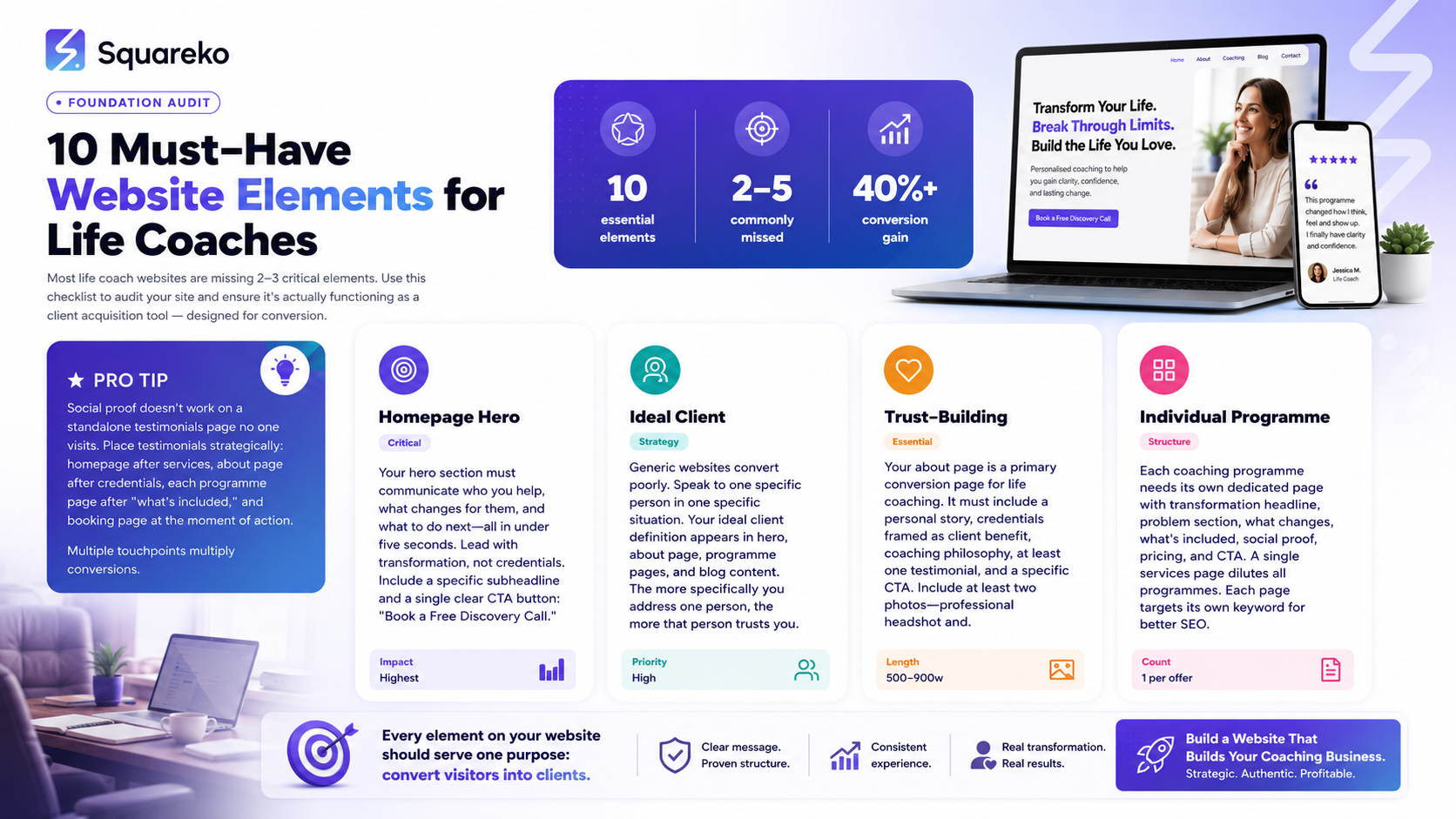
The Check: Does your homepage hero (the section visible before scrolling) communicate who you help, what changes for them, and what to do next — in under five seconds?
Why It Matters
The hero section is your one chance to convince a visitor to stay. If it doesn't immediately resonate with your ideal client, they leave. Most life coach hero sections fail this test — they lead with the coach's name and credentials rather than the client's situation and the transformation available to them.
How to Implement on Squarespace
In your Squarespace homepage, your first section should be a full-width image or video block with a text overlay. The headline should communicate the transformation (not Hi, I'm Sarah, a life coach — but From Stuck to Clear-Headed: Coaching for Women Who Know Something Needs to Change).
The subheadline adds specificity. The CTA button says Book a Free Discovery Call — not Learn More. In Fluid Engine, you have full control over the layout, typography, and placement of these elements.
✅ Checklist item: Hero section has a transformation-focused headline, specific subheadline, and a single clear CTA button.
Element 2: A Specific Ideal Client Definition
The Check: Does your website speak to one specific person in one specific situation — or does it try to appeal to everyone?
Why It Matters
Generic coaching websites convert poorly because no one feels specifically addressed. A website that says I help people live their best lives could be written for anyone — which means it speaks to no one with real conviction.
The most effective life coaching websites are uncomfortably specific. They name the client, the situation, the problem, and the desired outcome with enough specificity that the right person immediately thinks this is exactly what I'm looking for — and the wrong person self-selects out.
How to Define Your Ideal Client
Your ideal client definition appears throughout your site — in your hero section, your about page, your programme pages, and your blog content. Before writing any of this, get clear on:
Who are they? (demographic, life stage, profession, or situation)
What's their primary struggle right now?
What do they want to achieve?
What's stopped them from getting there so far?
Once you have this, every page of your site should speak directly to this person.
✅ Checklist item: Website copy consistently speaks to one specific type of client in one specific situation — not broadly to anyone who wants coaching.
Element 3: An Authentic, Trust-Building About Page
The Check: Does your about page include a personal story, your credentials framed in terms of client benefit, your coaching philosophy, and a CTA?
Why It Matters
For life coaching — a deeply personal service — the about page is a primary conversion page. Potential clients read your about page specifically to decide whether they can trust you with their inner life. A bare biography doesn't do that job. A genuine personal narrative — your connection to the work, your relevant experience, and your approach — does.
Implementation on Squarespace
Structure your about page as: client-focused opening → your relevant personal story → credentials (framed as client benefit) → coaching philosophy → testimonials (1–2) → specific CTA to book a discovery call.
In Squarespace, use alternating text and image sections to create visual rhythm. Include at least two photos — your professional headshot near the top and a candid or lifestyle shot lower in the page.
✅ Checklist item: About page has a personal story, framed credentials, coaching philosophy, at least one testimonial, and a specific CTA.
Element 4: Individual Service or Programme Pages
The Check: Does each of your coaching offerings have its own dedicated page — rather than all programmes listed on a single services page?
Why It Matters
A single services page listing five programmes serves none of them well. Each programme has its own ideal client, its own transformation promise, its own set of questions to answer and objections to handle. Combining them on one page dilutes all of them.
Individual programme pages also perform better for SEO — each can be optimised for its own keyword, allowing you to appear in multiple specific searches rather than competing broadly on one page.
Implementation on Squarespace
Create a separate page for each programme. Structure each page with: transformation headline → problem section → what changes → what's included → social proof → pricing → CTA. Link to these pages from your main services navigation item using a dropdown or a page of Work With Me cards.
✅ Checklist item: Each coaching programme or service has its own dedicated page with a full conversion structure.
Element 5: Strategic Social Proof Placement
The Check: Do you have testimonials appearing in at least three strategic locations across your website — not just on a standalone testimonials page?
Why It Matters
A testimonials page that no one visits is social proof that doesn't convert anyone. Social proof works by appearing at the exact moment a visitor needs reassurance — which is multiple moments throughout the page, not at the bottom of a single page.
Where to Place Testimonials
Homepage: after your services overview section
About page: after your credentials and philosophy
Each programme page: after the what's included section and near pricing
Booking page: reinforcing the decision at the moment of action
Use Squarespace's quote blocks and grid sections to feature testimonials. For video testimonials, embed them using Squarespace's video block — they can be hosted on YouTube or Vimeo and embedded inline.
✅ Checklist item: Testimonials appear in at least three locations across the site — not only on a dedicated testimonials page.
Element 6: A Smooth Booking System
The Check: Can a visitor book a discovery call with you in under 60 seconds, without leaving your website, and without any manual coordination on your part?
Why It Matters
Every step between I want to book and I've booked is an opportunity for a potential client to change their mind, get distracted, or give up. A discovery call should be bookable in under a minute — no emailing back and forth, no Calendly link buried in an email footer, no contact me to arrange a time.
Implementation with Squarespace Scheduling
Set up Squarespace Scheduling (powered by Acuity) with a Free Discovery Call appointment type. Create a dedicated Book a Call page and embed the scheduling calendar directly on the page using a scheduling block. Link to this page from every CTA button across your site.
Set up automated confirmation emails (with the meeting link) and at least one reminder email (24 hours before). Add an intake form (2–3 questions) to gather context before the call.
✅ Checklist item: Discovery calls can be self-booked in under 60 seconds through an embedded calendar, with automated confirmations and reminders configured.
Element 7: SEO-Optimised Page Titles and Meta Descriptions
The Check: Does every page of your website have a unique, keyword-informed page title (under 60 characters) and meta description (150–160 characters)?
Why It Matters
Page titles and meta descriptions are the most fundamental SEO elements on any website. They tell Google what each page is about and they're what potential clients see when your page appears in search results. Generic or blank metadata means lower search rankings and lower click-through rates.
Implementation on Squarespace
In Squarespace, go to each page, click the gear icon to access page settings, and fill in the SEO Title and SEO Description fields. Don't rely on Squarespace's defaults — they typically generate the page name as the title, which is rarely keyword-optimised.
For your homepage: [Specialty] Life Coach | [Your Name] | [City or Online] For programme pages: [Programme Name] — Life Coaching for [Specific Client] For blog posts: the target keyword, framed as a compelling headline
✅ Checklist item: Every page has a unique, keyword-informed meta title and meta description entered in Squarespace page settings.
Element 8: A Blog With a Content Strategy
The Check: Does your website have an active blog with content specifically targeting the questions your ideal life coaching clients search for?
Why It Matters
A blog is your single most effective long-term organic traffic tool. Each well-optimised post is a search entry point — a door into your world for someone searching a specific question. A life coach website without a blog relies entirely on referrals and social media, both of which are volatile channels you don't control.
What to Write
Focus on three content types: problem-aware posts (for clients experiencing the issue you solve, not yet aware they need coaching), educational posts (explaining what coaching is, how it works, what to expect), and transformation stories (anonymised client journeys that make the results feel real and achievable).
Publish at least once per month. Aim for 2,000+ words per post. Each post should include a contextual CTA to book a discovery call.
✅ Checklist item: Blog is active with at least 6 posts published, each targeting a specific search question, and each including a CTA to book a discovery call.
Element 9: Schema Markup
The Check: Does your Squarespace site include JSON-LD schema markup for FAQPage, Person, and ProfessionalService?
Why It Matters
Schema markup tells search engines (and AI search platforms) what type of content your site contains and who the author is — in a structured format they can read easily. FAQPage schema means your FAQ content is eligible for Google featured snippets. Person schema establishes you as a named expert in your field. ProfessionalService schema tells search engines you offer a professional service.
In 2026, schema markup also influences AI search platforms — systems like ChatGPT and Perplexity prefer to reference content that's structured with clear, parseable metadata.
Implementation on Squarespace
Add JSON-LD schema via Squarespace's code injection (Settings > Advanced > Code Injection > Header). Add FAQPage schema to every page that contains FAQs. Add Person and ProfessionalService schema to your homepage or about page.
✅ Checklist item: FAQPage schema, Person schema, and ProfessionalService schema are added via code injection. FAQ schema is included on every page containing FAQ content.
Element 10: Google Analytics and Search Console
The Check: Is Google Analytics 4 connected to your Squarespace site? Have you verified your site in Google Search Console and submitted your sitemap?
Why It Matters
You can't improve what you can't measure. Google Analytics 4 tells you where your traffic is coming from, which pages visitors spend time on, and where they drop off. Google Search Console shows you which keywords your site ranks for, whether Google has indexed all your pages, and whether there are any crawl errors.
Without these two tools, you're flying blind — unable to identify whether your SEO is working, which pages are converting, or where your website is losing potential clients.
Implementation on Squarespace
Connect Google Analytics 4 via Squarespace > Settings > Advanced > External Services. Add your GA4 Measurement ID. Connect Google Search Console via Settings > Domains > Connect Google Search Console, or via the meta tag verification method in Search Console. Submit your sitemap at yoursite.com/sitemap.xml.
✅ Checklist item: Google Analytics 4 is connected and receiving data. Site is verified in Google Search Console with sitemap submitted.
Your Checklist Score: How Does Your Site Rate?
Count how many of the 10 elements your current life coaching website has fully in place:
9–10: Your site has a strong foundation — focus on content and traffic growth
7–8: Close to fully optimised — address the missing 2–3 elements before adding anything new
5–6: Significant gaps that are likely costing you clients — prioritise the booking system, social proof, and page titles first
Under 5: Your site needs a strategic rebuild before any marketing investment makes sense
Squareko builds Squarespace life coaching websites with all 10 of these elements implemented and tested from launch day. No missing pieces, no afterthoughts.
How to Rank This Content on AI Search Platforms
AI search platforms — ChatGPT, Perplexity, Gemini, and Google's AI Overviews — are increasingly the first stop for potential coaching clients. Getting your content cited by these platforms requires a different approach from traditional SEO.
What AI Platforms Look For
When an AI platform answers a question like What should a life coach website include?, it pulls from pages that:
Give direct, structured answers — The page answers the question in the first paragraph, not buried after 600 words of preamble
Show clear expertise — Author credentials, specific experience, and first-hand knowledge signals
Use natural question-and-answer formatting — FAQs and clear H2/H3 structures that AI can parse
Cite data and specifics — Vague generalities get ignored; specific details get cited
Practical GEO Actions for This Post
Add FAQ schema markup — The JSON-LD schema at the end of this post helps AI platforms understand the Q&A structure
Build E-E-A-T signals — Your author bio, credentials page, and About page all contribute to your site's authority in AI systems
Answer questions directly — When you update this post, ensure the first sentence under each H2 answers the implied question of that heading
Get cited on other sites — Guest posts, podcast appearances, and press mentions all increase the likelihood that AI platforms treat you as a credible source
Keep content fresh — AI platforms favour recently updated content; review and update this post every 6 months
Entity Prominence for Life Coaching AI Search
To appear in AI answers for life coaching queries, your site needs to establish entity prominence — the idea that your name and business are clearly associated with life coaching expertise. This means consistent NAP (Name, Address, Phone) across directories, a complete Google Business Profile, schema markup identifying you as a life coach, and content that repeatedly and clearly establishes your specialism.
FAQs
-
If forced to choose one, it's the homepage hero section — specifically the headline. If your opening headline doesn't immediately resonate with your ideal client, nothing else on the site gets seen. Every other element depends on the visitor staying long enough to encounter it.
-
A functional life coaching website needs at minimum five pages: homepage, about page, at least one programme or services page, a blog (with at least a few published posts), and a booking/contact page. Most established coaches benefit from having individual pages for each programme rather than a combined services page.
-
Yes — Squarespace is one of the most accessible professional website platforms available. Using this checklist as your guide, a coach who dedicates 2–3 focused weekends to the build can launch a functional, professional site. The question isn't whether it's possible, but whether your time is better spent on coaching and client work. Coaches who earn more per hour than the cost of professional design typically find the investment worthwhile.
-
For most life coaches, the Business plan ($23/month billed annually) is the right starting point — it provides custom CSS, advanced analytics, and all third-party integrations. If you're selling coaching packages or programmes directly through Squarespace Commerce, the Basic Commerce plan ($27/month) removes transaction fees. Squarespace Scheduling is a separate subscription from your website plan.
-
A full checklist audit every 6–12 months is worthwhile — things change, content goes stale, new elements become available (Squarespace adds features regularly), and your coaching business evolves. In between full audits, check your Google Search Console monthly for any indexing issues or traffic changes that might indicate a problem with specific pages.
-
Not all 10 before launch — but as close as possible. The non-negotiables for launch are: transformation-focused homepage hero (1), specific ideal client definition (2), about page with CTA (3), at least one programme page (4), social proof in at least two places (5), working booking system (6), and page titles/meta descriptions (7). Schema markup (9) and analytics (10) can be added in the first week after launch. The blog (8) can grow over time.
-
Set up a conversion event in Google Analytics 4 — track visits to your "thank you for booking" page or form submission confirmation. This gives you a conversion rate: the percentage of visitors who take the desired action. For most coaching websites, a healthy discovery call conversion rate is 2–5% of homepage visitors. If yours is significantly lower, use the checklist to identify which elements might be creating friction or missing trust signals.
-
Ideally both — and ideally integrated rather than separate. A web designer without a copy strategy builds a beautiful site that doesn't convert. A copywriter without a design implementation produces great words that don't get seen correctly. The most effective approach is a specialist who integrates both, as Squareko.com does for coaching websites.

From custom website design to SEO strategy, we help businesses launch a site that looks professional and performs better.

Author Bio
I'm Walid Hasan, a Certified Squarespace Expert and Squarespace Circle Platinum Partner with over 12 years of hands-on experience designing and optimizing high-performing websites. Over the years, I've had the privilege of building more than 2,000 Squarespace websites for clients around the world, always focusing on clean design, strong user experience, and conversion-driven results.
