
How Insurance Brokers Build Trust and Generate Quotes with Their Squarespace Website
Introduction
Insurance brokers operate in an industry built on trust. Your clients entrust you with their financial security, their liability protection, and sometimes their peace of mind. When potential clients land on your website, they're making split-second assessments about whether you're credible, whether you understand their needs, and whether you'll guide them honestly through complex coverage decisions.
The challenge is this: insurance brokers build trust generate quotes squarespace by combining transparent regulatory credentials, professional authority markers, client social proof, and user-friendly quote request systems. A well-designed Squarespace website isn't just a digital brochure—it's your first conversation with prospects who are evaluating your expertise against competitors.
In this guide, we'll walk through the specific trust signals that matter to insurance clients, how to display them on your Squarespace site, and how to optimise your website for quote generation without pressuring visitors into uncomfortable conversations.
Key Takeaways How Insurance Brokers Build Trust and Generate Quotes with Their Squarespace Website
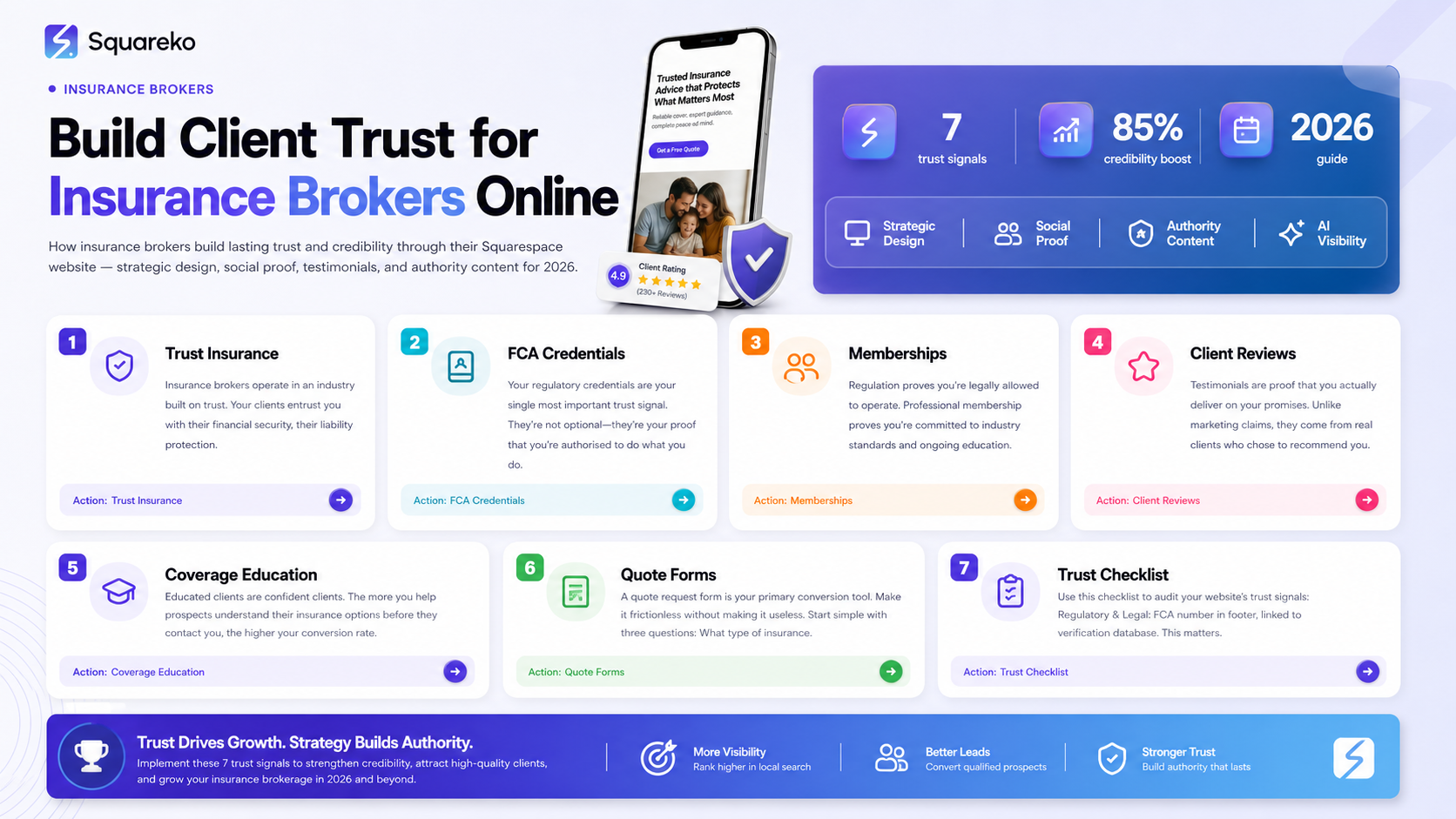
Regulatory transparency matters: Display your FCA number (UK) or state licence number (US) prominently—it's your credential in the insurance industry.
Professional membership signals credibility: BIBA membership, CII membership, or equivalent bodies reassure clients you meet industry standards.
Client reviews build confidence faster: Genuine testimonials addressing trust concerns (reliability, transparency, fair pricing) convert hesitant prospects.
Coverage comparison tools reduce friction: Interactive comparison guides help prospects understand their options without feeling sold to.
Secure data handling is non-negotiable: Displaying security badges and privacy assurances is essential when collecting sensitive client information.
No-pressure consultation offers lower barriers: Free consultations or needs assessments reduce client anxiety about early-stage conversations.
Why Trust Matters More for Insurance Brokers
Insurance clients aren't shopping for entertainment or consumer goods. They're making decisions that protect their livelihoods, their families, and their businesses. A gap in coverage could cost thousands. A misunderstanding about policy terms could lead to denied claims.
This is why trust isn't an optional feature on an insurance broker's website—it's the foundation of everything.
The Psychology of Insurance Decision-Making
When prospects visit your site, they're typically anxious. They may not fully understand what they need. They worry about paying too much. They're concerned about being talked into unnecessary coverage. They want reassurance that you're not just trying to close a sale; you're genuinely helping them.
Every element of your Squarespace website—from your About page to your testimonials to your security badges—addresses these anxieties. Your goal is to shift their mindset from Will this broker take advantage of me? to "This broker understands my industry and will recommend only what I actually need.
Why Insurance Brokers Lose Prospects Before They Ask for a Quote
The moment your website fails to signal trustworthiness, prospects leave. They assume you're less qualified than competitors. They worry about hidden fees or pushy sales tactics. They doubt your understanding of their specific insurance needs.
The insurance brokers we work with at Squareko.com often discover that adding regulatory credentials, professional certifications, and client testimonials increases their quote request conversion rate by 20–35%.
Displaying Regulatory Credentials on Your Squarespace Website
Your regulatory credentials are your single most important trust signal. They're not optional—they're your proof that you're authorised to do what you do.
Where to Display Your Licence Number
For UK-based brokers: Your FCA (Financial Conduct Authority) reference number should appear in:
Your footer (all pages)
Your About page (with explanation of what FCA regulation means)
Your contact page
Your quote request form (reassurance as they submit data)
For US-based brokers: Your state insurance licence number should be displayed in:
Footer with your state abbreviation
About page with full licensing details
Contact page
Regulatory compliance page (if you operate in multiple states, list all)
How to Explain Regulatory Status
Don't just list a number and assume visitors understand its significance. Add context:
Example (UK): "We are FCA regulated. Our FCA number is [XXXXXX]. You can verify our authorisation on the Financial Conduct Authority register at [link]."
Example (US): "Licensed insurance broker in [State]. Licence number: [XXXXX]. Verify our licence with the [State Insurance Commissioner's office]."
The key phrase here is "you can verify"—it shows you have nothing to hide.
Creating a Regulatory Compliance Page
On Squarespace, add a dedicated page under your main navigation called "Regulatory Information" or "Compliance & Credentials." Include:
Your FCA/licence number(s)
Direct link to verification databases
Explanation of what regulation means for the client
Any regulatory complaints procedure information (transparency wins trust)
Professional indemnity insurance details (shows you're covered if something goes wrong)
Professional Memberships: Your Industry Authority Markers
Regulation proves you're legally allowed to operate. Professional membership proves you're committed to industry standards and ongoing education.
UK-Based Insurance Brokers
British Insurance Brokers Association (BIBA) BIBA membership is the gold standard for UK brokers. Display the BIBA logo on your site (you have permission as a member), and include a sentence explaining membership:
We are proud members of the British Insurance Brokers Association (BIBA). BIBA membership ensures we adhere to strict codes of conduct and maintain professional indemnity insurance.
Chartered Insurance Institute (CII) If you or your team hold CII qualifications (Diploma in Insurance, Advanced Diploma, etc.), display these prominently. They signal ongoing professional development.
Other Professional Bodies Depending on your specialism, you may belong to:
General Insurance Standards Council (GISC)
Association of Commercial Employers' Liability Insurers (ACELI)
Worshipful Company of Insurance Brokers
Each of these should feature on your website with a brief explanation.
US-Based Insurance Brokers
Independent Insurance Agents & Brokers of America (IIABA) Similar to BIBA, IIABA membership signals professional standards. Display membership status and explain what it means.
National Association of Insurance Commissioners (NAIC) Compliance with NAIC standards can be mentioned, though this is more regulatory than professional.
Speciality Association Memberships If you specialise in commercial, health, or employee benefits insurance, memberships in speciality bodies (e.g., National Association of Health Underwriters) enhance credibility.
Displaying Memberships Effectively
Create a section on your About page or homepage that shows:
Logo + membership name
1–2 sentence explanation of what the membership means
Link to the organisation (so visitors can verify)
This takes 10 seconds to scan but transforms your credibility.
Leveraging Client Reviews and Testimonials
Testimonials are proof that you actually deliver on your promises. Unlike marketing claims, they come from real clients who chose to recommend you.
Types of Insurance-Specific Testimonials
The most effective testimonials for insurance brokers address specific concerns:
The Trust-Building Testimonial "When I switched to [Broker Name], I was worried they'd just try to sell me more coverage. Instead, they actually reduced my premium while improving my protection. That's when I realised I could trust them completely."
The Clarity Testimonial "Insurance terminology is confusing to me. [Broker Name] spent time explaining exactly what I was getting and why it mattered. I felt informed for the first time.
The Transparency Testimonial I appreciated that [Broker Name] showed me three different coverage options with honest pros and cons for each. They didn't just push the most expensive option.
The Reliability Testimonial When we had a claim, [Broker Name] guided us through every step. They didn't disappear after the sale—they were there when we needed them.
Where to Display Reviews on Squarespace
Homepage: Feature 2–3 top testimonials above the fold
About page: Show 4–5 testimonials with client names and industries
Service pages: Add testimonials specific to that insurance type
Quote request page: Place a testimonial above the form to reduce anxiety
Footer: Include a rotating testimonial or Google Reviews link
Getting More Reviews
Add a section to your Squarespace site that makes it easy:
Link to Google Reviews
Link to Trustpilot (increasingly used for B2B services)
Link to industry-specific review platforms
Follow up with clients post-quote and ask them to leave a review
Building Coverage Comparison and Educational Content
Educated clients are confident clients. The more you help prospects understand their insurance options before they contact you, the higher your conversion rate.
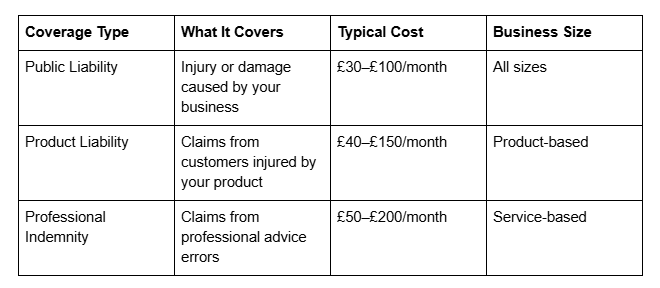
Creating Coverage Comparison Guides
Use Squarespace's layout tools to build comparison tables that show:
Common coverage types
What each covers
Typical costs (ranges only—avoid firm quotes without consultation)
Who needs it most
Gaps if coverage is missed
Example structure:
Industry-Specific Educational Content
Create blog posts or downloadable guides that address common questions:
Why does my industry need professional indemnity insurance?
What liability gaps do small businesses commonly miss?
How much coverage is enough for my business?
These aren't sales pages—they're educational resources that build authority and draw organic search traffic.
Structuring Frictionless Quote Request Forms
A quote request form is your primary conversion tool. Make it frictionless without making it useless.
The Three-Question Framework
Start simple:
What type of insurance are you looking for?
What's your business type or personal situation?
What's the best way to contact you?
Then, use Squarespace's conditional logic to show advanced questions only if relevant. If someone selects cyber liability, show questions about data handling. If they select personal car insurance, show questions about vehicle type.
Building Trust During Data Collection
As your form asks for sensitive information (business financials, claims history, personal details), reassure the visitor:
Above the form: We keep your information completely confidential and will never share it without your consent. Your data is encrypted and stored securely.
Include:
Your privacy policy link
SSL/security badge (Squarespace provides this automatically)
Estimated response time ("We'll contact you within 24 hours")
Mobile Optimisation
Squarespace forms are mobile-responsive by default, but test them. Many quote requests come from mobile users researching during lunch breaks or commutes.
Security, Privacy, and Data Protection Signals
When prospects enter their business details, personal information, or claims history into your form, they're trusting you with sensitive data. Signal that you take this responsibility seriously.
GDPR Compliance (UK) and CCPA Compliance (US)
UK brokers: Your website must have a clear GDPR privacy notice explaining:
What data you collect
Why you collect it
How long you store it
Their rights
US brokers: Include a privacy policy that addresses California Consumer Privacy Act (CCPA) requirements if you serve California clients, or comparable state laws if you operate elsewhere.
Squarespace makes this easy with built-in compliance tools.
Data Security Messaging
On your quote request page and contact page, include a sentence like: Your data is protected with 256-bit SSL encryption and stored securely. We never sell or share your information.
Professional Indemnity Insurance Display
If you have professional indemnity insurance (required for FCA-regulated brokers, strongly recommended for all), mention it: Our professional indemnity insurance provides [£X million] cover for our clients' protection.
This signals you stand behind your advice and clients are protected if something goes wrong.
Insurance Trust Signals Checklist
Use this checklist to audit your Squarespace website. The more items you can tick, the higher your trust score with prospects.
Regulatory & Legal (Essential)
FCA number (UK) or state licence number (US) displayed in footer
FCA/licence number linked to verification database
Regulatory Compliance page created and linked in footer
Professional Indemnity Insurance details displayed
Privacy policy linked and compliant with GDPR/CCPA
Terms & Conditions clearly accessible
Professional Credentials (High Impact)
BIBA logo and membership explanation (UK)
IIABA membership displayed (US)
CII qualifications listed for team members
Speciality association memberships shown
Team member professional photos and bios
Staff credentials and experience clearly stated
Client Social Proof (High Impact)
Minimum 5 client testimonials displayed across site
Testimonials include client name and industry
At least one testimonial above quote request form
Google Reviews or similar platform linked
Trustpilot (or equivalent) integrated if available
Case studies showing real client outcomes (anonymised if necessary)
Educational Content & Transparency (Medium-High Impact)
Coverage comparison guide or table created
Frequently asked questions section addressing trust concerns
Blog articles on insurance topics for organic search
No-pressure consultation offer clearly visible
Pricing guidance or cost ranges provided where possible
Claims process explanation included
Website Technical & UX (Medium Impact)
SSL certificate active (HTTPS everywhere)
Security badge displayed (Squarespace provides)
Mobile-responsive design tested
Fast page load speed (test with Google PageSpeed Insights)
Clear About page with company history and team story
Contact page with phone number and email clearly visible
Quote Request & Conversion (High Impact)
Quote request form uses conditional logic (progressive disclosure)
Form asks for sensitive data only when relevant
Data protection notice above form
Estimated response time commitment stated
Confirmation page thanks visitor and sets expectations
Form captures enough information to generate meaningful quotes
Industry Specificity (Medium Impact)
Services tailored to specific industries
Industry-specific case studies or examples
Specialist team members identified by industry focus
Industry-specific FAQs or guides
Niche insurance products highlighted
-
Yes. If you're a UK insurance broker, displaying your FCA number is a legal requirement under FCA regulations. It must appear on your website (and all marketing materials) so clients can verify your authorisation. We recommend placing it in the footer of every page and on a dedicated Compliance page. Make sure it links to the FCA register so visitors can confirm you're legitimate.
-
The key memberships depend on your location and specialism:
UK: BIBA membership is the most recognised. If you or your team hold CII qualifications (Diploma, Advanced Diploma, Fellowship), display these prominently. Some brokers also belong to niche associations (e.g., GISC for general insurance).
US: IIABA membership signals professional standards. Speciality associations (National Association of Health Underwriters, NAHU) are valuable if you focus on that area.
Display these with logos, brief explanations, and links to the organisations so visitors can verify membership. This takes minimal space but significantly boosts credibility.
-
Start by asking satisfied clients directly. After you've issued a quote or renewed their policy, follow up with a simple email:
"We'd love to hear about your experience. Would you mind leaving a quick review on Google? [link] It takes 2 minutes and helps other business owners find us."
Second, make it visible. Link to Google Reviews, Trustpilot, or industry-specific platforms from your website's About page and contact page. The easier you make it, the more reviews you'll get.
Third, respond to every review—positive and negative. Thank clients for positive reviews and address concerns in negative reviews professionally. This shows prospective clients you care about feedback.
-
Collect enough to generate a meaningful quote, but not so much that visitors abandon the form:
Minimum required:
Insurance type needed
Business type or personal situation
Contact name and email/phone
Secondary (use conditional fields based on insurance type):
Number of employees
Annual turnover or revenue
Claims history (last 3 years)
Specific coverage requirements
Avoid asking for:
Credit card information (you only need this if you're processing payment)
Extremely detailed business information upfront (get this in the consultation)
Information you don't actually need (every question must serve a purpose)
Test your form by filling it out yourself. If it takes more than 3 minutes, it's too long.
-
Most insurance brokers should offer free initial consultations. Here's why: insurance clients are risk-averse and hesitant about early-stage conversations. Charging a fee immediately signals that you're transactional rather than consultative. A free consultation removes the barrier and builds trust.
During the consultation, you'll understand their needs and recommend appropriate coverage. Your profit comes from commission or fees on placed policies, not from initial advice.
Position it as: "Free insurance consultation. No obligation. Let's find out what you actually need."
-
Include a brief privacy notice on your quote request page and contact page:
"Your data is encrypted with 256-bit SSL security and stored confidentially. We never share your information without your consent. [Link to Privacy Policy]"
Squarespace automatically provides an SSL certificate, so your site is HTTPS. Display the security badge (usually in the footer). Create a proper Privacy Policy that explains what data you collect, why, how long you store it, and visitors' rights.
For GDPR (UK) or CCPA (US), Squarespace has built-in compliance tools. Use them. Compliance is trust.
-
Squarespace is excellent for your public website and quote requests. However, once clients are onboarded and you're managing ongoing policies and claims, move sensitive data to a dedicated client portal or insurance management software. Squarespace is not designed as a secure client data repository for regulated financial services.
Your website should assure prospects that you use industry-standard secure systems for client data management—but the day-to-day secure storage happens elsewhere.
Conclusion
Building trust as an insurance broker on your Squarespace website is about being transparent, credible, and genuinely helpful. Your prospects are anxious about insurance because the stakes are real. They worry about hidden costs, coverage gaps, and whether they can actually trust the advice you give them.
Every element of your website your regulatory credentials, professional memberships, client testimonials, educational content, and security signals addresses these anxieties step by step.
The insurance brokers who generate the most quote requests aren't necessarily the ones with the fanciest websites. They're the ones who signal trustworthiness at every touchpoint. They display their FCA number prominently. They show BIBA or CII credentials. They feature honest client testimonials that address the specific worries prospects have. They explain their coverage options transparently. They assure visitors that their data is secure.
When you combine these trust signals with a frictionless quote request form, you create an environment where hesitant prospects feel confident enough to take the next step. They move from Is this broker trustworthy? to I think I can work with this broker.
That's where quote generation begins.
Ready to Build Your Insurance Broker Website?
If you're ready to transform your Squarespace website into a trust-building, quote-generating machine, Squareko.com specialises in designing and optimising websites for insurance brokers. We understand your regulatory requirements, we know what trust signals convert prospects, and we build Squarespace sites that are as compliant as they are beautiful.
Whether you're starting from scratch or redesigning an existing site, we'll help you implement the trust signals and conversion strategies covered in this guide. Our insurance broker clients have seen quote request increases of 20–35% after working with us.

From custom website design to SEO strategy, we help businesses launch a site that looks professional and performs better.

About the Author
I'm Walid Hasan, a Certified Squarespace Expert and Squarespace Circle Platinum Partner with over 12 years of hands-on experience designing and optimizing high-performing websites. Over the years, I've had the privilege of building more than 2,000 Squarespace websites for clients around the world, always focusing on clean design, strong user experience, and conversion-driven results.
