
Law Firm Website Design Best Practices Squarespace 2026
Introduction
Your law firm's website is your digital storefront, and first impressions matter profoundly in the legal profession. When potential clients search for attorney services, they're evaluating not just your credentials, but your entire online presence—including how professionally your website is designed. Law firm website design best practices on Squarespace for 2026 now incorporate stricter accessibility standards, enhanced mobile responsiveness, and sophisticated visual hierarchy that communicates authority at a glance. A well-designed legal website builds trust through visual consistency, appropriate typography, colour psychology, and thoughtfully curated imagery. This guide outlines the essential design principles that transform a standard website into a credibility-building asset for your practice.
Key Takeaways Law Firm Website Design Best Practices Squarespace 2026
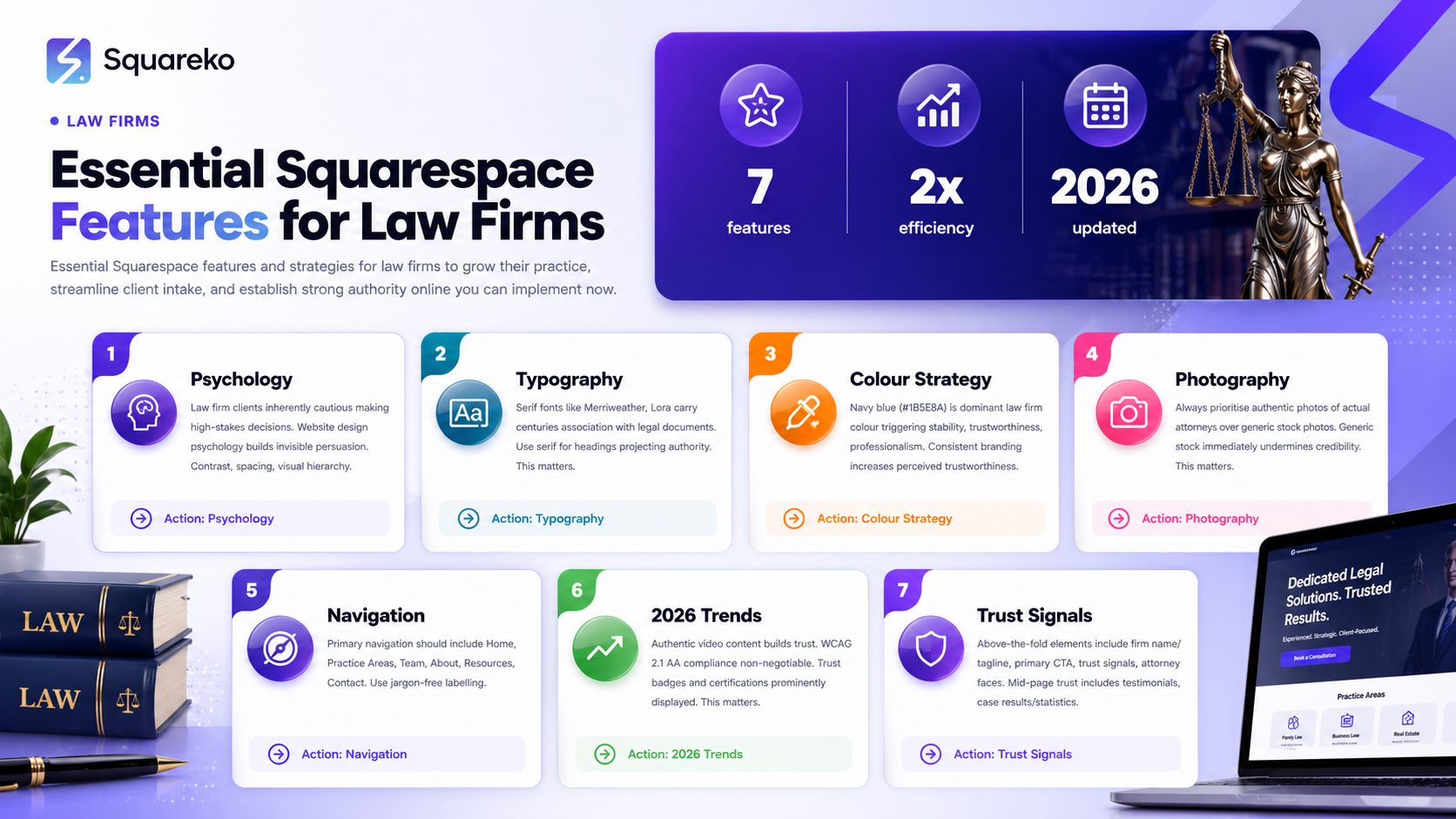
Authority through typography: Choose serif fonts (Merriweather, Lora) for headings to project legal credibility, paired with readable sans-serif body text
Colour psychology matters: Navy blue (#1B5E8A), charcoal, and dark green convey trustworthiness; avoid bright colours that undermine professional authority
Photography standards: Use professional headshots and candid office images over generic stock photos; authenticity builds client confidence
Navigation architecture: Organise practice areas logically with clear, jargon-free labels to help visitors find relevant legal services quickly
Mobile-first design: At least 60% of legal searches occur on mobile devices; responsive design is non-negotiable in 2026
Trust signals integration: Display bar association memberships, client testimonials, case results, and security badges prominently above the fold
Performance optimisation: Page load speed under 3 seconds and Core Web Vitals compliance directly influence search rankings and user experience
The Psychology of Law Firm Website Design
Legal clients are inherently cautious decision-makers. They're entrusting you with sensitive matters—property disputes, family concerns, criminal defence, or corporate regulations. Before they'll pick up the telephone, they'll scrutinise your website for indicators of competence, reliability, and professionalism. This is where design psychology becomes your invisible persuader.
Contrast, spacing, and visual hierarchy communicate confidence. When elements feel cramped, cluttered, or inconsistently styled, visitors unconsciously perceive disorganisation. Conversely, generous whitespace, deliberate alignment, and consistent branding signal control and precision—qualities clients desperately seek in legal counsel.
Squarespace's design tools allow law firms to create layouts that balance information density with visual breathing room. Your homepage should guide visitors through a logical journey: immediate trust signals (credentials, areas of practice), then detailed service offerings, then calls to action (scheduling consultations or requesting case evaluations).
Typography: Building Authority Through Font Selection
Serif vs. Sans-Serif: The Legal Font Debate
Serif typefaces (fonts with small decorative lines at the end of letters) carry centuries of association with printed legal documents, contracts, and formal institutional communication. Fonts like Merriweather, Lora, Playfair Display, or Cormorant Garamond instantly telegraph authority and gravitas.
However, serifed fonts can feel dated if misapplied. The contemporary law firm website uses serif fonts strategically:
Headings and display text (H1, H2, H3): Serif fonts create distinction and authority
Body copy (paragraphs and running text): Readable sans-serif fonts (Open Sans, Inter, Outfit, Mulish) ensure accessibility and prevent eye strain on screens
Squarespace offers native support for Google Fonts, so combining Merriweather (headings) with Open Sans (body) is straightforward and requires no technical expertise.
Font Size, Weight, and Hierarchy
Legal content often includes dense information: practice areas, fee structures, testimonials, and service descriptions. Without careful hierarchy, it becomes overwhelming.
Optimal sizing:
Primary heading (H1): 48–56 pixels
Secondary headings (H2): 32–40 pixels
Tertiary headings (H3): 24–28 pixels
Body text: 16–18 pixels (minimum for web accessibility)
Small text (disclaimers, metadata): 14 pixels minimum
Font weight variation (300 for light, 400 for regular, 600–700 for bold) creates visual contrast. Your firm's name and practice areas should be bold and distinctive, while explanatory paragraphs should be regular weight for comfortable scanning.
Colour Strategy for Legal Credibility
Primary Colour Psychology
Colour triggers emotional responses. Research in design psychology confirms that navy blue (#1B5E8A) is the dominant colour choice for law firms because it conveys stability, trustworthiness, and professionalism. Darker shades of green and charcoal are equally effective alternatives.
Avoid:
Bright reds, oranges, or yellows (associated with urgency or frivolity)
Pastels or light, washed-out tones (perceived as lacking gravitas)
Neon or highly saturated colours (read as unprofessional or trendy)
Accent and Secondary Colours
Your brand should include a limited secondary palette:
Primary: Navy blue or dark forest green
Neutral: Charcoal (#333–#555), off-white (#F5F5F5)
Accent: A single complementary colour for call-to-action buttons—often a warmer tone like gold, warm grey, or muted burgundy
For example, Squareko often employs a #1B5E8A primary navy with charcoal neutrals and a subtle gold or stone accent for buttons and highlights.
Background and Text Contrast
WCAG 2.1 accessibility standards require a contrast ratio of at least 4.5:1 between text and background. Dark text on white (or off-white) backgrounds is legally and ethically necessary. Avoid reversed text (white on dark) in body copy, as it reduces readability.
Photography and Imagery Guidelines
Real Attorneys, Not Stock Photos
Stock photography is immediately recognisable and undermines authenticity. A generic handshake photo or smiling professional in a suit communicates that you're hiding behind borrowed imagery. Legal clients expect to see the actual people representing them.
Best practice photography includes:
Professional headshots: Each attorney should have a high-quality portrait—consistent lighting, neutral background, genuine expression. Budget £200–400 per headshot.
Candid office photography: Images of attorneys in consultation, reviewing documents, or collaborating with staff feel authentic and human.
Courtroom or office environment shots: Photographs of your actual workspace build credibility.
Team photos: A unified team photo signals stability and professionalism.
Image Technical Specifications
Resolution: Minimum 1200 pixels wide for website use (higher if potential for print use)
Format: JPEG for photographs (smaller file size), PNG for graphics (supports transparency)
File size: Optimised under 200KB per image (Squarespace's built-in tools compress automatically)
Aspect ratios: Maintain consistency—if headshots are 3:4, use that ratio throughout your team section
Avoid watermarks, dramatic filters, or oversaturated colours that might clash with your navy and charcoal palette.
Navigation and Information Architecture
Menu Structure and Practice Areas
A law firm's navigation must be intuitive because legal prospects are often stressed and time-constrained. They're searching for a specific service: divorce solicitor in Manchester, employment law, or commercial property advice.
Primary navigation should include:
Home
Practice Areas (individual pages for each service: Family Law, Criminal Defence, Corporate Law, etc.)
Our Team (with attorney profiles and bios)
About Us (firm history, credentials, mission statement)
Resources (blog, legal guides, FAQs—demonstrates expertise)
Contact (phone, email, contact form, map)
Jargon-Free Labelling
Legal terminology is precise but inaccessible to the general public. Your navigation and body copy should balance accuracy with clarity:
Instead of Conveyancing, write Property Transfers & Conveyancing
Instead of Dispute Resolution, write Resolving Disputes & Litigation
Instead of Testamentary Documentation, write Wills & Estate Planning
This approach doesn't compromise authority; it demonstrates the ability to communicate complex ideas accessibly—an essential skill for attorneys.
Mobile Optimisation for Law Firm Websites
The Mobile-First Imperative
Over 60% of legal searches now occur on mobile devices. Potential clients are searching for solicitor near me or personal injury lawyer directly from their phones. Your website must function flawlessly on mobile.
Mobile-specific considerations:
Responsive design: All elements adapt gracefully to screen sizes from 320px (small phones) to 2560px (ultra-wide monitors). Squarespace handles this automatically, but custom layouts require testing.
Touch-friendly buttons: Call-to-action buttons must be at least 48 pixels square to accommodate finger taps.
Streamlined navigation: Mobile visitors can't easily see a full menu bar. Use a hamburger menu or collapsible sections.
Readable font sizes: Body text should be 16px minimum on mobile (prevents automatic zoom on iOS).
Fast loading: Mobile users are less patient. Pages should load in under 3 seconds on 4G.
Mobile-Specific CTAs
Add a click-to-call button on mobile versions of your contact page. Visitors should be able to call your firm directly from the website without retyping your number.
2026 Law Firm Website Design Trends
1. Authentic Video Content
Short attorney introductions or case outcome explanations build trust more effectively than written text. Video doesn't require Hollywood production—professional iPhone video with good lighting and clear audio suffices.
2. Accessibility as Standard
WCAG 2.1 AA compliance is no longer optional. Alt text for images, keyboard navigation, screen-reader compatibility, and sufficient colour contrast are expected.
3. Trust Badges and Certifications
Display bar association memberships, accreditations (Lexcel, Chambers recognition), and security certificates (SSL) prominently. These small visual elements significantly increase conversion rates.
4. Personalised Service Pages
Rather than generic practice area pages, create detailed service pages that address common client questions: How much does a contested divorce cost? or What should I expect in a criminal defence consultation? This targets long-tail search queries and demonstrates expertise.
5. Client Testimonials with Outcomes
Great service testimonials are forgettable. Specific, outcome-focused testimonials—They achieved a £45,000 settlement in my personal injury claim—are persuasive and SEO-beneficial.
6. Progressive Web App (PWA) Features
Squarespace's native functionality now includes PWA capabilities, allowing users to install your website as an app and receive push notifications about legal updates or new service offerings.
7. Interactive Legal Calculators
Estimate divorce costs, personal injury compensation, or mortgage deed costs using interactive tools. These increase time-on-site and demonstrate accessibility to potential clients.
8. Dark Mode Support
Some users prefer dark interfaces. Squarespace's CSS options allow you to support both light and dark modes automatically based on user settings.
Essential Website Elements and Trust Signals
Above-the-Fold Elements
Your homepage hero section should immediately communicate:
Firm name and tagline: Expert Legal Representation in Family Law, Corporate Law, and Litigation (clear, specific, no jargon)
Primary call-to-action: Schedule a Consultation or Request a Case Evaluation (action-oriented, not passive)
Trust signals: Established 2010 | 50+ Cases Won | 5-Star Reviews or similar
Attorney faces: At least one professional headshot on the homepage
Mid-Page Trust Elements
Client testimonials (3–5 with names and photos where permitted)
Case results or statistics (£2.3M in settlements recovered)
Bar association credentials (Law Society, Chartered Institute of Legal Executives, etc.)
Awards or recognition (Best Law Firm in Manchester, etc.)
Footer Trust Elements
Disclaimer and legal notice: Required for legal professionals
Privacy policy and data protection: GDPR-compliant, accessible
Contact information: Phone, email, office address(es)
Bar association registration numbers: Solicit Code number, Law Society reference
Law Firm Website Design Checklist 2026
Typography
Serif font (Merriweather, Lora, or Playfair Display) used for headings
Sans-serif font (Open Sans, Inter, or Mulish) used for body text
Primary heading (H1) between 48–56 pixels
Body text minimum 16 pixels for accessibility
Font weights vary (300 light, 400 regular, 600–700 bold) for hierarchy
Maximum 2–3 font families used across entire site
Colour
Primary colour is navy blue (#1B5E8A), dark green, or charcoal
No bright reds, oranges, yellows, or pastels in main palette
Text-to-background contrast ratio is 4.5:1 or higher
Secondary accent colour chosen (gold, warm grey, or muted burgundy)
Colour palette limited to 4–5 total colours
Imagery
Professional headshots of all attorneys (consistent style, lighting)
At least 3–5 candid or office environment photographs
No generic stock photos on homepage
All images optimised under 200KB per file
Images include descriptive alt text for accessibility
Navigation
Main menu includes Home, Practice Areas, Team, About, Resources, Contact
Practice area labels are jargon-free and client-friendly
Mobile menu is hamburger-style or collapsible
Contact information accessible from every page
Breadcrumb navigation on inner pages (optional but recommended)
Mobile
Website responsive from 320px to 2560px screen widths
Click-to-call button on mobile contact pages
Touch-friendly buttons are minimum 48 pixels square
Font sizes are 16px minimum on mobile
Page load time under 3 seconds on 4G connection
No horizontal scrolling required
Speed & Performance
Google PageSpeed Insights score above 70
Largest Contentful Paint (LCP) under 2.5 seconds
First Input Delay (FID) under 100 milliseconds
Cumulative Layout Shift (CLS) under 0.1
Images lazy-loaded to improve initial page load
CSS and JavaScript files minified
Trust Signals
Bar association memberships displayed above the fold
Client testimonials on homepage (3–5 minimum)
Case results, statistics, or success metrics visible
Attorney biographies include credentials, qualifications, years of experience
SSL security certificate active (HTTPS throughout)
Privacy policy and GDPR-compliant data handling statement
Professional email addresses used
Frequently Asked Questions
-
Law firms should prioritise navy blue, dark forest green, or charcoal as primary colours because these hues trigger psychological associations with stability, trustworthiness, and professionalism. Navy blue (#1B5E8A) is the most popular choice globally. Avoid bright colours like neon red, orange, or pastel shades, which undermine authority and appear frivolous. Pair your primary colour with neutral backgrounds (off-white, light grey) and ensure text-to-background contrast meets WCAG accessibility standards (4.5:1 minimum). A secondary accent colour—such as soft gold, warm grey, or muted burgundy—works well for call-to-action buttons and highlights without overwhelming the design.
-
Always prioritise authentic photography of your actual attorneys and office environment over generic stock photos. Potential clients expect to see the people who will represent them, and stock photographs damage credibility immediately—they're recognisable and suggest the firm is hiding something. Invest in professional headshots (budget £200–400 per attorney) with consistent lighting and neutral backgrounds. Include candid office photographs showing attorneys in consultation or collaboration. These authentic images build trust and demonstrate transparency. If you must use supplementary imagery (perhaps background textures or thematic images), choose carefully curated stock photography that complements your design rather than dominates it.
-
Serif fonts such as Merriweather, Lora, Playfair Display, or Cormorant Garamond are traditionally associated with legal documents and formal institutional communication, making them ideal for headings and display text. However, modern law firm websites pair these classical serif fonts with clean, readable sans-serif fonts (Open Sans, Inter, Outfit, Mulish) for body copy. This combination balances authority with accessibility. Avoid extremely decorative or modern fonts for primary content, as they can undermine professionalism. Ensure your chosen fonts are available in multiple weights (300, 400, 600, 700) to create visual hierarchy and emphasis. Google Fonts offers excellent professional options at no cost.
-
Organise practice areas logically by legal specialty (Family Law, Criminal Defence, Corporate Law, Commercial Property, Employment Law) and use clear, jargon-free labels. Instead of "Conveyancing," write "Property Transfers & Conveyancing." Each practice area should have a dedicated page explaining what that service involves, common scenarios, costs, and timelines. Use your navigation to help stressed, time-constrained prospects find their specific legal need quickly. Consider a secondary filter or search function if your firm handles many practice areas. This balance between specificity and accessibility demonstrates both expertise and client empathy.
-
Core Web Vitals are three Google-measured metrics that affect search rankings and user experience: Largest Contentful Paint (LCP, how quickly the page appears to load), First Input Delay (FID, how responsive the page is to user interaction), and Cumulative Layout Shift (CLS, how stable the page layout remains while loading). Law firms should aim for LCP under 2.5 seconds, FID under 100 milliseconds, and CLS under 0.1. These metrics influence search visibility—a faster website ranks higher in Google results. Squarespace generally handles Core Web Vitals well automatically, but optimising image sizes, removing render-blocking scripts, and minimising CSS/JavaScript improve performance.
-
Display trust signals prominently and consistently: bar association memberships and registration numbers, client testimonials with specific outcomes (not generic praise), case results or settlement statistics, attorney credentials and qualifications, security badges (SSL certificate), awards or recognition (Best Law Firm in X region), and media features. Include detailed attorney biographies that establish expertise and experience. Ensure your contact information is professional (your own domain email, not Gmail), and include a comprehensive privacy policy and GDPR compliance statement. These elements, especially when placed above the fold or at strategic decision points, significantly increase conversion rates and client confidence.
-
Over 60% of legal searches now occur on mobile devices. Potential clients search "solicitor near me," "personal injury lawyer," or "divorce solicitor" directly from their phones while commuting or during lunch breaks. If your website doesn't load quickly or isn't responsive on mobile, you lose these prospects to competitors. Mobile users also require click-to-call buttons, touch-friendly interface elements (48px minimum button sizes), and fast page loading (under 3 seconds on 4G). Mobile-first design isn't optional—it's a fundamental requirement for competitiveness in 2026.
Ready to Build Your Law Firm Website on Squarespace?
Your law firm's website is your most powerful marketing tool. A professionally designed site—with careful typography, appropriate colour psychology, authentic imagery, and strategic trust signals—converts website visitors into paying clients.
At Squareko, we specialise in creating bespoke Squarespace websites for legal firms that combine stunning design with conversion-focused strategy. We understand the unique challenges of legal services marketing: the need for credibility, the importance of clear service descriptions, and the technical requirements around accessibility and security.
Whether you're launching a new practice or refreshing an existing website, our team can implement these best practices seamlessly. We handle typography hierarchy, colour strategy, mobile optimisation, and trust-signal integration—leaving you to focus on practising law.
Ready to transform your law firm's online presence? Contact Squareko today to discuss your project. Our design specialists are ready to build a website that attracts quality clients and establishes your firm's authority.

From custom website design to SEO strategy, we help businesses launch a site that looks professional and performs better.

Author Bio
I'm Walid Hasan, a Certified Squarespace Expert and Squarespace Circle Platinum Partner with over 12 years of hands-on experience designing and optimizing high-performing websites. Over the years, I've had the privilege of building more than 2,000 Squarespace websites for clients around the world, always focusing on clean design, strong user experience, and conversion-driven results.
