
How to Use Squarespace Scheduling for Personal Training and Group Classes
Introduction
Manual booking is killing your business. Every time a potential client has to email you, wait for a response, or figure out your availability, you lose sales. Squarespace Scheduling (powered by Acuity Scheduling) handles bookings 24/7, collects payments upfront, and automates follow-ups—all without you lifting a finger. This guide shows you how to set up Squarespace Scheduling for 1:1 training, group fitness classes, package sales, waivers, and client management.
Key Takeaways
Squarespace Scheduling (Acuity) integrates seamlessly into your website for appointment booking, payment collection, and intake forms
Multiple appointment types (free taster, 1:1 sessions, packages, group classes) can coexist in one calendar
Payment options include full payment upfront or deposit + balance models, with support for package sales and recurring retainers
Automated intake forms (PAR-Q, waivers, GDPR consent) collect essential information before sessions
Calendar management features prevent double-booking, manage travel time, set availability blocks, and handle cancellations
Group class management supports capacity limits, class passes, waitlists, and email confirmations
Setting Up Appointment Types in Squarespace
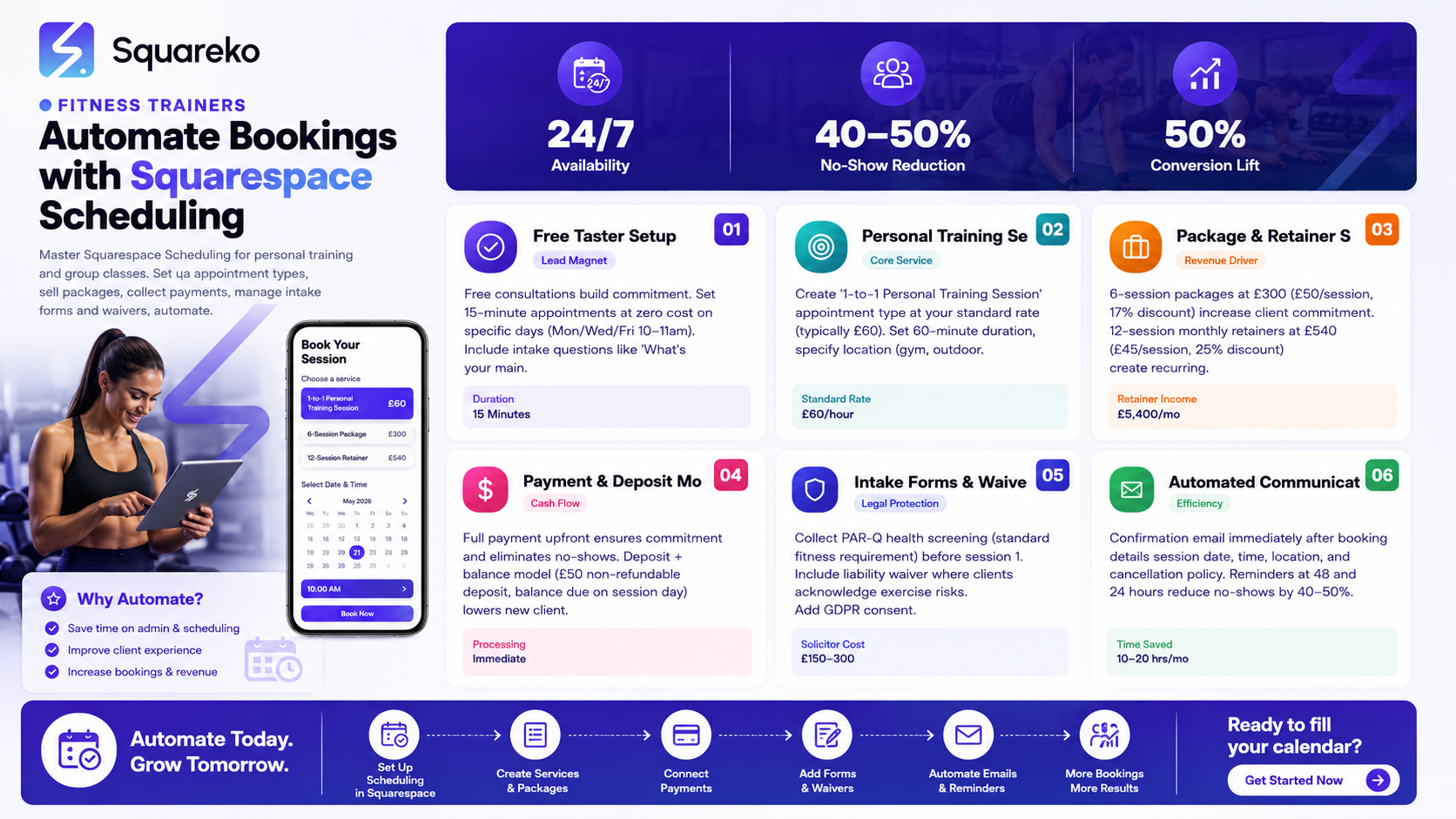
Squarespace Scheduling allows unlimited appointment types. This means you can offer free consultations, paid 1:1 sessions, group classes, and specialised packages all from the same calendar.
Free Taster or Consultation
New clients often want a free 15–30 minute initial consultation before committing to paid training.
Setup:
Appointment type name: "Free Initial Consultation"
Duration: 15 minutes (keeps your calendar uncluttered)
Price: £0
Location: In-person (gym address) or Video Call (Zoom)
Availability: Set specific time slots (e.g., Mon/Wed/Fri 10am–11am) to control when taster sessions happen
Intake form: Add questions ("What's your main fitness goal?", "Any injuries or limitations?") to qualify leads
Free consultations build commitment. Clients who book and attend are 3x more likely to buy paid sessions than cold inquiries.
1:1 Personal Training Sessions
Your bread and butter—individual sessions with clients.
Setup:
Appointment type name: "Personal Training Session"
Duration: 60 minutes (or 45 if that's your standard)
Price: £60 (or your rate)
Location: Gym location or "Video Call"
Intake form: Include PAR-Q screening (see below)
Availability: Set your availability (e.g., 6am–7am Mon, 12pm–1pm Tue/Wed, 6pm–8pm Mon/Wed/Fri)
Buffer time: 15 minutes between outdoor sessions to account for travel
Pro tip: If you train clients at multiple locations (two gyms, outdoor training, online), create separate appointment types for each: "PT Session—Gym A", "PT Session—Outdoor", "PT Session—Online". This prevents double-booking across locations.
6-Week or 12-Week Training Programs
Many trainers offer fixed-length programs (6 weeks at 3x per week = 18 sessions, or similar).
Setup:
Appointment type name: "6-Week Fat Loss Program (3x/week)"
Duration: 60 minutes
Price: £540 (or £300 for deposit, with remaining balance due at session 1)
Availability: Set rolling start dates (e.g., programs start Monday of each week)
Intake form: Detailed questionnaire (fitness history, injuries, goals, lifestyle, food preferences) to understand the client before day 1
With programs, you can set all 18 session dates at booking—the client's calendar locks in immediately, and you know your schedule 6 weeks out.
Group Fitness Classes
If you run group classes (bootcamps, strength sessions, HIIT classes), Squarespace Scheduling handles bookings with capacity limits.
Setup:
Appointment type name: "Monday Bootcamp (6 spots)"
Duration: 60 minutes
Price: £15 per class or £60 for a 4-class pass (monthly)
Capacity: 6 people (prevents over-booking)
Recurring: Set the class to repeat weekly on Monday at 6:30pm
Waitlist: Enable automatic waitlist when capacity is full
Intake form: One-time waiver (collected at first booking)
Clients book online, payment is collected immediately, and a confirmation email with location/Zoom link is sent automatically.
Online Coaching Check-In Calls
If you offer remote coaching, monthly check-in calls, or progress reviews, create a dedicated appointment type.
Setup:
Appointment type name: "Monthly Progress Call"
Duration: 30 minutes
Price: Included in retainer (£0 if client has paid monthly retainer) or £30 standalone
Location: Video Call (Zoom)
Intake form: Optional brief check-in form ("How are you feeling this month?", "Any challenges?")
Selling Training Packages and Retainers
Package sales increase average transaction value and client commitment. Instead of clients booking individual sessions, they commit to blocks.
6-Session Package
Most clients commit to 6 sessions (2–3 weeks of training at 2–3x per week).
Setup in Squarespace:
Create an appointment type: "6-Session Personal Training Package"
Price: £300 (£50 per session, vs £60 if paid per-session, a 17% discount)
Set it to allow bookings, then the client books their 6 sessions from a calendar of your available slots
Client journey:
Client books "6-Session Package" (£300)
Payment is collected
Client receives confirmation email with next steps
Client books their first session from available slots
After session 1, automated reminder: "You have 5 sessions remaining"
12-Session Retainer (Monthly)
Monthly retainers (12 sessions per month at 3x per week) are your most profitable offering.
Setup:
Appointment type: "Monthly Retainer (12 Sessions)"
Price: £540 (£45 per session, vs £60 individual rate, a 25% discount)
Recurring billing: Enable monthly autopay
Client books sessions month-to-month; if they cancel, the subscription stops
Advantages:
Predictable income (12 sessions × £45 × 10 clients = £5,400/month recurring)
Higher client retention (monthly commitment > pay-as-you-go)
Your calendar fills up (you can limit retainer spots to, say, 10 clients)
Selling Packages: Best Practices
Show the discount: "6-Session Package £300 (was £360, save £60)" — anchors the value
Limit packages: Only sell 10–15 "slots" per month. Scarcity drives urgency
Auto-renewal optional: For retainers, make auto-renewal optional so clients feel in control
Expiry dates: Set package expiry (e.g., 6-session package expires 8 weeks after purchase) to prevent unlimited future claims
Payment Processing and Deposit Strategies
Squarespace Scheduling integrates Stripe or Square for payment collection. This means money lands in your bank account immediately—no chasing payments, no invoicing, no cash-flow delays.
Full Payment Upfront
For packages and group classes, collect full payment upfront.
Why:
Ensures client commitment (paid clients attend 90% of sessions; free clients attend 40%)
Eliminates no-show risk
Improves cash flow
Setup:
Package booking (£300 for 6 sessions): Full payment collected at booking
Group class subscription (£60 for 4 classes): Full payment collected
1:1 sessions (£60): Full payment due at booking
Deposit + Balance Model
For high-ticket services or uncertain clients, offer a deposit to book, with balance due before or at session 1.
Example:
"New Client Consultation & First Session: £50 deposit (to secure booking), £110 due on session day (total £160)"
Deposit is non-refundable; balance is refundable (up to 48 hours before session)
Why:
Lowers friction for new clients ("I just pay £50 to try")
Still ensures commitment (deposit is lost if they no-show)
Balances revenue: you get paid either way, but clients feel more control
Setup in Squarespace:
Appointment type: "First Session (Deposit)"
Price: £50 (deposit) + £110 (due at session)
Note in confirmation email: "Your deposit of £50 is non-refundable. Final payment of £110 is due before your session."
Autopay for Monthly Retainers
For retainer clients, enable automatic monthly billing.
Setup:
Appointment type: "Monthly Retainer (£540)"
Enable "Recurring transaction" (autopay every 1st of the month)
Client approves the recurring charge at booking
Reminder email sent 7 days before charge (optional, good UX)
Important: Always provide a simple way to cancel (via email, link, or phone). Forced subscriptions invite chargebacks and bad reviews.
Waiver and Intake Forms
Every client should complete a PAR-Q (Physical Activity Readiness Questionnaire) and sign a liability waiver before training.
PAR-Q Screening Form
PAR-Q is a simple health screening. Clients answer 7 yes/no questions:
Do you have a family history of heart disease?
Have you been inactive for more than 3 months?
Do you have any injuries or conditions?
Etc.
A "yes" answer requires medical clearance before training.
Setup in Squarespace:
Create a custom intake form in Squarespace Scheduling
Add PAR-Q questions as checkboxes or short-answer fields
Clients complete the form when booking their first appointment
You receive responses via email and can review before session 1
Liability Waiver
A liability waiver (sometimes called a "release form" or "fitness waiver") is a legal document where clients acknowledge the risks of exercise and absolve you of liability for injuries.
What to include:
Statement that exercise carries inherent risk
Client confirms they're healthy/medically cleared
Client releases you from liability for injury
Client understands they're responsible for reporting pain/discomfort
Setup:
Add waiver as a PDF or text block in Squarespace Scheduling intake form
Include a checkbox: "I have read and agree to the waiver"
Collect signature (some platforms like Acuity allow e-signature; otherwise, request a scanned waiver before session 1)
Legal note: Consult a lawyer for a waiver specific to your location (UK fitness law differs from US). A solicitor review costs £150–300 but protects you legally.
GDPR Consent
UK fitness professionals must collect GDPR consent for storing client data, sending marketing emails, etc.
Add to your intake form:
"I consent to Squareko storing my personal data for the purpose of training and communication."
"I opt in to receive email updates about fitness tips, promotions, and special offers."
Separate checkboxes for each consent type
Squarespace Scheduling stores data securely and complies with GDPR by default, but you must disclose this to clients.
Calendar Management and Availability
A well-managed calendar prevents double-bookings, reduces confusion, and keeps your sanity.
Setting Availability Windows
In Squarespace Scheduling, set your available hours for each appointment type.
Example for a personal trainer:
Monday–Friday: 6am–7am (early bird sessions), 12pm–1pm (lunch clients), 6pm–8pm (evening)
Saturday: 9am–12pm (group classes, weekend warriors)
Sunday: Blocked (off)
Clients can only book within these windows. This prevents evening clients from booking your 6am slot.
Travel Time and Buffer Zones
If you train clients at multiple locations or outdoors, set buffer time between sessions.
Example:
Gym A session: 60 minutes
Buffer: 15 minutes (travel between gyms)
Gym B session: 60 minutes
Squarespace Scheduling can block 15 minutes automatically between appointments, preventing back-to-back 120-minute days.
Availability Blocks
Block your calendar for:
Holidays (Easter, summer break, Christmas)
Training days (professional development, courses)
Admin time (invoicing, planning, admin work—block 1–2 hours per week)
Setup: In Squarespace, mark these as "Unavailable" so clients can't book.
Cancellation and Rescheduling
Squarespace Scheduling allows clients to cancel or reschedule online (up to 48 hours before, typically). This reduces admin work and keeps clients happy.
Best practice:
Allow free cancellation/rescheduling up to 48 hours before session
Charge a £10–20 cancellation fee for cancellations within 48 hours (deters no-shows)
3 no-shows = client removed from retainer, cash-only basis
Automated Communications
Squarespace Scheduling automates client communication, saving you dozens of hours per month.
Booking Confirmation
When a client books, they receive an automatic confirmation email with:
Session date, time, location (or Zoom link)
What to bring (water bottle, towel, etc.)
Cancellation policy
Your contact info
You can customise the template in Squarespace Scheduling.
Example template:
Your Personal Training Session Confirmed
Session Details Date: Monday, 25 March 2026 at 6:00 PM Location: Gym A, 123 Main Street Duration: 60 minutes
What to bring: Water bottle, towel, appropriate footwear
Cancellation Policy: Free cancellation up to 48 hours before. Cancellations within 48 hours incur a £15 fee.
Questions? Reply to this email or call 07700 123456.
Reminder Emails
Squarespace Scheduling can send reminders 48 hours and 24 hours before sessions.
Why this matters: Reminders reduce no-shows by 40–50%. A client who "forgot" about their session now remembers and shows up.
Post-Session Follow-Up
Create a custom automation for post-session follow-ups (especially for new clients).
Example:
"Hi [Name],
Thanks for training with me today! How did you feel during the session? Any questions or soreness?
Reply with feedback anytime. Can't wait to see you [next session date].
[Link to book next session]"
This personal touch builds rapport and encourages repeat bookings.
Class Cancellation Alerts
For group classes, if you need to cancel a session (illness, weather), send automated cancellation email to all booked clients.
Example:
"Monday's 6:30 PM Bootcamp is CANCELLED due to studio maintenance.
Rescheduled for Wednesday 6:30 PM or Saturday 10:00 AM. Click below to rebook."
Mid-Post CTA: Streamline Your Scheduling
Manual scheduling is costing you money. Every email back-and-forth, every payment you chase, every no-show because the client forgot—that's revenue lost.
Squarespace Scheduling (Acuity) automates all of it. Clients book 24/7, pay upfront, receive confirmations, get reminders, and reschedule online. You focus on training, not admin.
But setting this up right takes knowledge. You need to know:
Which appointment types to create
How to structure packages for maximum perceived value
Payment strategies that balance cash flow and client friction
Legal requirements (PAR-Q, waivers, GDPR)
Automation sequences that reduce no-shows and boost retention
Squareko specialises in helping personal trainers and fitness studios set up high-converting Squarespace Scheduling systems. We configure your appointment types, package structures, payment flow, intake forms, and automations so you never chase a booking again.
Frequently Asked Questions
-
Yes. Create two separate appointment types: "Single Session (£60)" and "6-Session Package (£300)". Clients choose which suits them. Packages are higher perceived value (17% discount) and increase commitment.
-
For new clients, a £50 non-refundable deposit with balance due at session works well. It's low friction (new clients commit to just £50) while ensuring commitment. For returning clients or package buyers, full payment upfront is better.
-
Require upfront payment (no-shows are less likely when money is at stake). 2. Send reminders 48 and 24 hours before. 3. Charge a £10–20 cancellation fee if they cancel within 48 hours. 4. After 3 no-shows, move clients to cash-only or remove them.
-
Yes. Set capacity to the number of spots (e.g., 6 for a small bootcamp). Squarespace disables booking once capacity is reached, and enables an automatic waitlist.
-
Yes. PAR-Q is a standard health screening. Add it as a custom form in Squarespace Scheduling so clients complete it when booking. You review responses and follow up with medical clearance if needed.
-
Liability waivers vary by country. In the UK, they don't fully absolve you of negligence, but they do show due diligence. Consult a fitness industry solicitor (about £150–300) to draft a UK-compliant waiver. This protects you legally.
-
Squarespace Scheduling doesn't natively support different pricing by time slot. You'd need separate appointment types ("Early Bird Session—6am (£50)" vs "Evening Session—6pm (£60)") or a custom solution.
-
Enable client-initiated cancellation/rescheduling up to 48 hours before (free), with a fee for later cancellations. For refunds, Squarespace Scheduling integrates with Stripe/Square, so you can process refunds from your dashboard.
Ready to Automate Your Bookings
Your booking system should work for you, not against you. Squarespace Scheduling automates the entire client journey—from booking through payment, reminders, follow-ups, and rescheduling—so you focus on training, not admin.
If you're ready to eliminate manual scheduling, stop chasing payments, and reduce no-shows, Squareko can help. We set up high-converting Squarespace Scheduling systems for personal trainers and fitness studios.

From custom website design to SEO strategy, we help businesses launch a site that looks professional and performs better.

About the Author
Walid is the founder of Squareko,
I'm Walid Hasan, a Certified Squarespace Expert and Squarespace Circle Platinum Partner with over 12 years of hands-on experience designing and optimizing high-performing websites. Over the years, I've had the privilege of building more than 2,000 Squarespace websites for clients around the world, always focusing on clean design, strong user experience, and conversion-driven results.
