
5 Personal Trainer Website Mistakes That Cost You Clients on Squarespace
Introduction
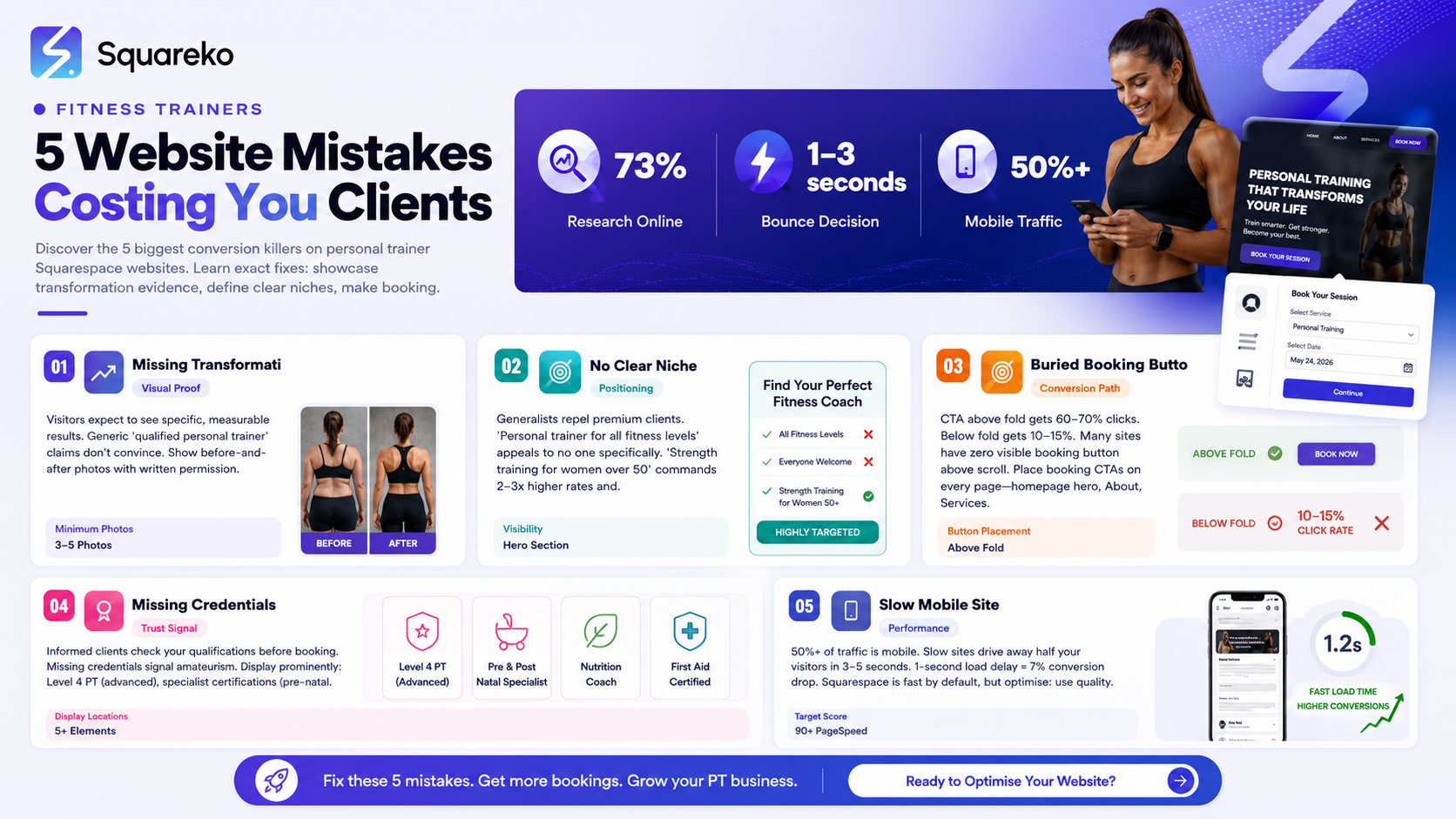
Your website is supposed to attract clients. Instead, it's costing you money. Every visitor who lands on your site and doesn't see proof of results, can't find your booking button, or doesn't know your qualifications is a lost lead. Studies show that 73% of potential fitness clients research their trainer online before contacting them. If your website fumbles that research, they contact someone else. These 5 mistakes are killing conversions on personal trainer Squarespace sites. Fix them, and watch your inquiry rate climb.
Key Takeaways
Missing transformation evidence — visitors expect to see specific, measurable results; vague credentials alone don't convince
No clear niche or specialisation — "I help everyone get fit" repels premium clients; niches win
CTA buried below the fold — clients want to book a trial session instantly; they won't hunt for your contact page
Missing professional credentials — REPs/CIMSPA registration and qualifications build trust; their absence signals amateurism
Slow, mobile-unfriendly site — poor performance drives away 50%+ of mobile users before they see your content
Vague copy and generic language — "results-driven" and "transformative" mean nothing without specifics
Mistake 1: No Transformation Evidence
Visitors don't care that you're "qualified". They care that you get results.
The Problem
A typical personal trainer homepage reads:
"Qualified Personal Trainer | Get Fit Fast | Expert Coaching | 10+ Years Experience"
This tells a visitor nothing about results. "Qualified" and "expert" are claims every trainer makes. A potential client asks: "Have you actually helped someone like me?"
The Proof
Google "personal trainer" and look at the top 10 websites. The ones converting clients have:
Before-and-after photos (with client consent)
Specific outcome statements ("Lost 18kg in 6 months")
Testimonials with measurable results ("Deadlift increased from 20kg to 60kg")
Case studies with client bios
The Fix
Create a dedicated Results or Transformations page showing:
Client case study format:
Sarah, 42, Marketing Director
Starting point: Sedentary desk job, wanted to "get back in shape", had no gym experience, self-described "unfit"
Programme: 3 PT sessions per week, 24-week strength programme
Results:
Weight: 82kg → 68kg (lost 14kg)
Body fat: 38% → 28%
Strength: Couldn't do a push-up → 10 consecutive push-ups
Energy: "I feel genuinely energetic in the afternoons now, instead of needing coffee"
Quote: "I was terrified of the gym before working with John. He made it feel safe, taught me proper form, and I actually enjoy training now. The physical change is real, but the mental shift—feeling strong and capable—that's changed my life."
This is citeable, specific, and credible. A potential client in a similar situation sees themselves in Sarah and books.
Photos of Transformation
Include before-and-after photos (always with written permission). Before-and-afters are the highest-converting content on fitness websites. They provide instant visual proof.
Squarespace tip: Use Squarespace's image gallery block to showcase results. High-quality images justify premium positioning.
Numbers Over Narratives
Include specific metrics:
Weight lost: "18kg"
Strength gains: "Deadlift increased 40kg to 80kg"
Body composition: "Lost 8kg fat, gained 4kg muscle"
Performance: "5K run time improved from 28 mins to 23 mins"
Consistency: "Didn't miss a session in 12 weeks"
Vague statements like "Sarah felt more confident" don't convert. Specific numbers do.
Mistake 2: No Clear Niche or Specialisation
The biggest conversion killer: being everything to everyone.
The Problem
A homepage that says "Personal Trainer | Weight Loss | Strength Training | Athletic Performance | Online & In-Person" signals zero specialisation. Every client type thinks: "Is this really for me?"
A client looking for post-pregnancy training sees the same generic messaging as someone looking for athletic performance. Neither feels seen. Both click the back button.
The Data
Personal trainers with a clear niche command:
2–3x higher rates (£60–80/hour vs £40/hour)
Longer client retention (40% higher 6-month retention for niche trainers)
Better word-of-mouth (clients recommend you to similar clients)
The Fix
Choose one primary niche. Make it unmissable in your hero section.
Bad hero section:
"Personal Trainer | Results-Driven Coaching for All Fitness Levels"
Good hero section:
"Strength Training for Women Over 50 — Build Confidence, Prevent Injury, Reclaim Your Body"
Niche Examples That Work
"Strength training for busy professionals" (40–50 year old desk workers)
"Post-pregnancy fitness for new mothers" (6–12 months post-birth)
"Athletic performance coaching for amateur runners" (5K to marathoners)
"Pre-habilitation and injury prevention for desk workers" (pain-free movement focus)
"Confidence-building strength training for women intimidated by gyms" (anxiety-free approach)
Each niche has:
Clear pain points you solve
Specific transformations you deliver
A defined audience (easy to find and speak to)
Premium pricing (niche audiences are less price-sensitive)
Show Your Niche Everywhere
Hero section: Clear statement
About page: Your story connects to why you specialise in this niche
Services page: Offerings tailored to the niche (not generic)
Testimonials: From your niche specifically
Blog content: Niche-specific challenges and solutions
A visitor should know your niche within 3 seconds of landing on your homepage.
Mistake 3: Burying the Booking CTA
Visitors come to your site to book a trial session or consultation. Make it easy.
The Problem
Many trainer websites have:
No visible booking button above the fold
Booking link buried in a footer or contact page
Vague CTAs ("Let's Chat" instead of "Book Your Free Trial")
Forms that ask 15 questions before letting them book
A potential client lands on your homepage. They want to book. They can't find the button. They leave.
The Data
CTA above the fold: 60–70% of clicks
CTA below the fold: 10–15% of clicks
A CTA that's not visible without scrolling is invisible.
The Fix
1. Sticky Header CTA
Add a button to your Squarespace site header that stays visible when users scroll. On mobile, this is critical.
Squarespace: Header → Settings → Add a CTA Button → "Book Your Free Trial"
2. Large Hero Section CTA
Your homepage hero (the first thing users see) should have:
Bold heading (niche-focused)
Subheading (supporting detail)
Large, high-contrast button: "Book Your Free Trial"
Optional: testimonial or social proof
3. Specific CTA Copy
Compare:
Weak: "Get Started" (vague, generic)
Strong: "Book Your Free Consultation" (specific, clear)
"Free Consultation" or "Free Trial Session" converts better than generic CTAs. Potential clients know exactly what they're booking.
4. Multiple CTAs
Include booking buttons on:
Homepage hero
About page
Services page
Results/testimonials page
Every blog post (end of post: "Ready to transform? Book your consultation")
Squarespace Scheduling Integration
Use Squarespace Scheduling (Acuity) to connect your booking button directly to your calendar. Clients see real-time availability, book instantly, and you get an automated confirmation.
No back-and-forth emails. No "Let me check my calendar." Instant conversion.
Mistake 4: Missing Professional Credentials
Informed clients check your qualifications before booking. Missing credentials signal amateurism or dishonesty.
What Credentials Matter
Essential (for UK fitness professionals):
Level 3 Personal Training Diploma (CIMSPA or REPs accredited)
Level 4 Personal Training Diploma (advanced, commands premium pricing)
REPs or CIMSPA membership (shows ongoing professional development)
Specialist qualifications (increase perceived value by 20–40%):
Nutrition Level 3 (if offering nutritional guidance)
Pre/Post-natal Specialisation (for pregnancy-related training)
Strength & Conditioning Level 2 (for athletic performance)
Prehab/Movement Specialisation (for injury prevention)
Breathing or Mindfulness Certification (for stress/anxiety-focused training)
The Problem
Many trainer websites mention "qualified" but show no actual credentials. Others hide credentials in a footer or tiny text.
A client searching "personal trainer Level 4 qualification" wants to see immediately that you have it.
The Fix
1. Create a Credentials Section
Add a dedicated "Qualifications" or "Credentials" page or section (Squarespace: Add a new page or section to your homepage).
2. Display Clearly
Format like this:
Qualifications
Level 4 Personal Training Diploma CIMSPA Accredited | Achieved 2021 [Verify my CIMSPA registration]
Pre/Post-natal Specialisation REPs Accredited | Achieved 2023 [Verify my REPs registration]
Nutrition Level 3 ISSN Accredited | Achieved 2024
Professional Memberships REPs Member (Verified #12345) CIMSPA Member (Verified #67890)
3. Add Official Logos
Display logos of REPs, CIMSPA, and awarding bodies. This builds visual trust.
4. Enable Verification
Link to official registries (REPs.org.uk, CIMSPA registries) so informed clients can verify you're genuinely registered.
On Your Homepage
Mention credentials prominently:
Bad: "10 years' experience"
Good: "Level 4 PT | Pre/Post-natal Specialist | REPs Registered | Trained 200+ Clients"
The second version tells a client immediately that you're qualified, specialised, and experienced.
Mistake 5: Slow, Unoptimised Mobile Site
50%+ of website traffic is mobile. A slow, broken mobile site drives away half your visitors.
The Problem
Large, uncompressed images load slowly on mobile (3G/4G networks)
Site isn't responsive (doesn't adapt to phone screens)
Text is too small, hard to read on mobile
CTA buttons are hard to tap
Videos autoplay and drain data
Visitors abandon slow sites in 3–5 seconds. Before they see your results, credentials, or CTA, they're gone.
The Data
1-second delay in page load = 7% drop in conversions
Mobile-friendly sites have 2x higher engagement
50% of mobile users expect pages to load in under 2 seconds
The Fix: Squarespace-Specific Optimisations
Squarespace is fast by default, but you can optimise further.
1. Image Compression
Squarespace compresses images automatically, but use quality originals:
Before-and-after photos: High-quality JPG (2–3MB max)
Headshots: 1–2MB
Squarespace handles compression; trust it
2. Use WebP Format
Modern browsers support WebP (smaller file size, same quality):
Squarespace: Settings → Website → Image Format → WebP
Automatically serves WebP to compatible browsers
3. Mobile Menu Simplification
Keep your mobile menu simple:
Logo + hamburger menu
4–5 main links (Home, About, Services, Blog, Contact)
Avoid deep navigation trees
4. CTA Button Sizing
On mobile, buttons should be at least 44x44 pixels (tap-friendly).
Squarespace: Buttons are 44px by default; verify in preview.
5. Load Testing
Check your mobile speed
Google PageSpeed Insights (free) — shows score and recommendations
GTmetrix (free) — detailed breakdown
Target: 90+ score on PageSpeed Insights.
Performance Impact
A site that loads in 1 second converts 2–3x better than a 3-second site. Image optimisation is often the fastest fix for slow sites.
Mid-Post CTA: Fix Your Website, Fix Your Income
These 5 mistakes are costing you clients. Individually, each costs 10–20% in lost conversions. Combined, they might be killing 50%+ of your potential leads.
The good news: they're all fixable.
But fixing them requires:
High-quality before-and-after photos and case studies
Clear niche positioning
Proper CTA setup
Credential visibility
Mobile optimisation
This is technical and strategic work. It's also the difference between a website that attracts clients and one that repels them.
Squareko specialises in fixing fitness websites. We audit your Squarespace site, identify these 5 mistakes (and others), and implement fixes that convert browsers into paying clients.
Frequently Asked Questions
-
At least 3–5, ideally 10+. They're your highest-converting content. More is better. Rotate them periodically to keep your site fresh.
-
It's tempting, but no. Stock photos of random people exercising don't prove results. Visitors assume stock = fake. Real before-and-afters (with client permission) are infinitely more credible.
-
Show what you have. If you've worked with 5 clients and got great results, showcase those 5. As you get more clients, expand. Honesty builds trust more than exaggeration.
-
Ideal client type. You can train online or travel. A "strength trainer for women over 50" is a stronger niche than "personal trainer in Manchester." Location is secondary.
-
Keep it simple: one section, clean layout, clear descriptions. Squarespace's heading + text blocks work fine. Avoid jargon; explain what each qualification means ("Level 4 = Advanced qualification for specialist training").
-
Yes. Squarespace is faster than most alternatives (Wix, GoDaddy). Image optimisation is your main lever. Follow the compression tips above and you'll be fine.
-
Yes. Niche sites rank better. "Strength trainer for women over 50 in Manchester" is easier to rank for than "personal trainer." Google sees specialisation as authority.
-
Ask directly: "I'd love to feature your transformation on my website. Would you be comfortable with before/after photos and a testimonial? I'll only use first name and general location." Most clients are proud of results and say yes.
Start Converting More Clients
Every conversion-killing mistake on your website is costing you money. Fix these 5, and your inquiry rate will climb immediately.
The personal trainer websites that convert clients all share these 5 elements:
Proof of results (before-and-afters, case studies)
Clear niche positioning
Visible, easy booking
Displayed qualifications
Fast, mobile-optimised design
If your site is missing any of these, you're losing clients.
Squareko specialises in fixing fitness websites. We identify these mistakes and implement fixes that turn browsers into paying clients.

From custom website design to SEO strategy, we help businesses launch a site that looks professional and performs better.

About the Author
Walid is the founder of Squareko,
I'm Walid Hasan, a Certified Squarespace Expert and Squarespace Circle Platinum Partner with over 12 years of hands-on experience designing and optimizing high-performing websites. Over the years, I've had the privilege of building more than 2,000 Squarespace websites for clients around the world, always focusing on clean design, strong user experience, and conversion-driven results.
