
How to Use Squarespace and Social Media Together to Grow Your Fashion Brand
Introduction
Building a successful fashion brand requires more than just a stunning website. You need a cohesive strategy that connects your beautiful Squarespace store with the platforms where your customers already spend their time. When Instagram, TikTok, and Pinterest work in harmony with your Squarespace site, you create a powerful ecosystem that drives traffic, builds community, and ultimately increases sales.
The fashion industry is inherently visual and social. Your potential customers are discovering new brands through trending reels, Pinterest boards, and TikTok videos every single day. Yet many fashion entrepreneurs treat their website and social channels as separate entities, missing the enormous opportunity to create a unified brand presence. Squarespace and social media together to grow your fashion brand isn't just possible—it's essential for competing in today's market.
This guide walks you through practical, actionable strategies to integrate your Squarespace store with social platforms, create a conversion-focused funnel, and execute a proven 90-day growth plan designed specifically for fashion brands.
Key Takeaways
Squarespace offers native integrations with Instagram Shop, Pinterest Shopping, and built-in social sharing tools that simplify omnichannel selling
A social-to-website conversion funnel moves potential customers from discovery (social platforms) through consideration and into purchase (Squarespace store)
Instagram and TikTok drive visual storytelling and community engagement; Pinterest acts as a long-form discovery engine
A 90-day growth plan combining content pillars, posting schedules, and cross-platform promotion can increase your Squarespace store traffic by 150–300%
Off-platform strategies such as affiliate partnerships, user-generated content campaigns, and email list building amplify the reach of your paid social efforts
Understanding the Squarespace-Social Media Opportunity
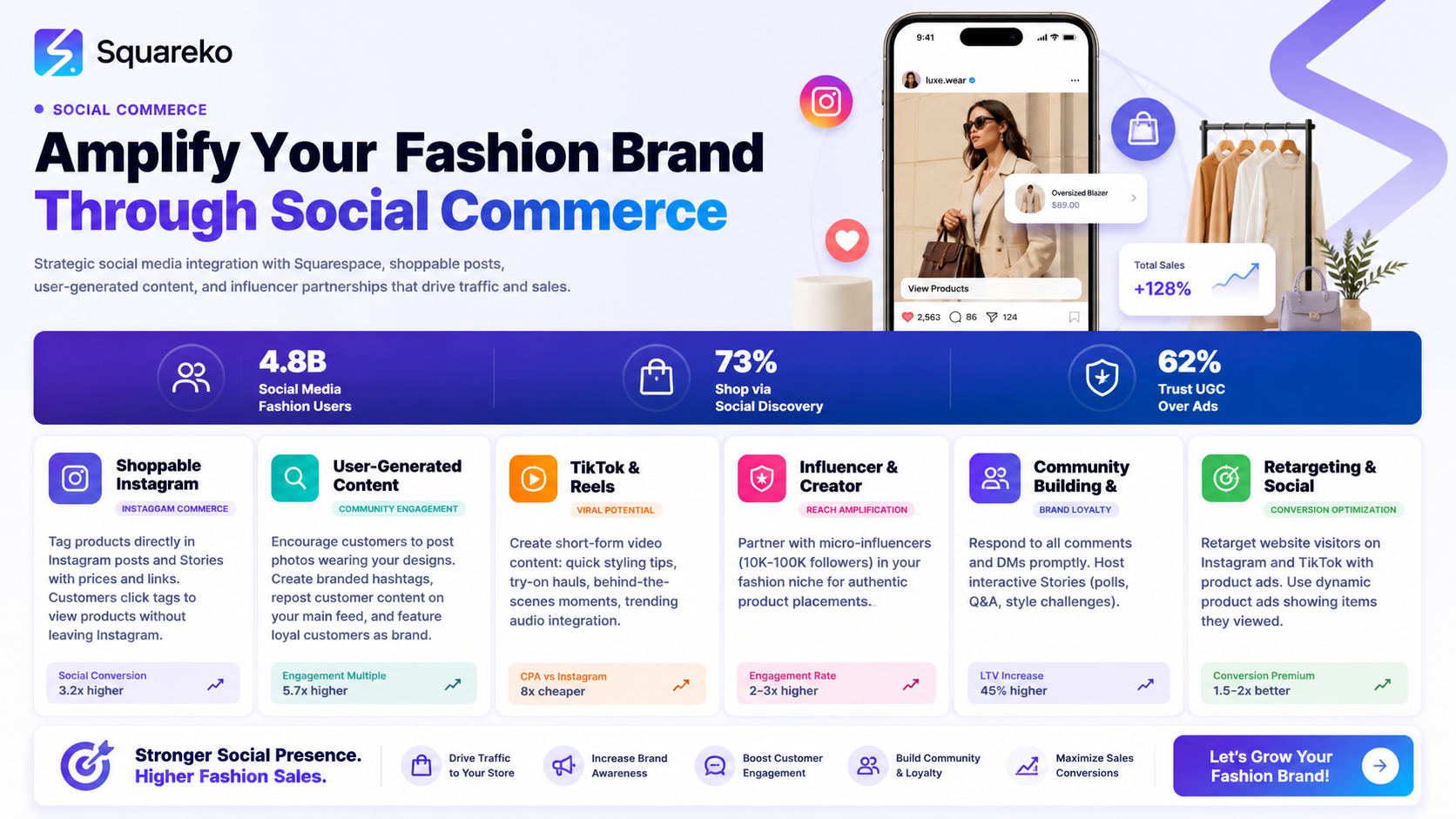
Fashion is the second-largest industry on social media, trailing only beauty. What makes this significant is how social platforms have become the primary discovery channel for new fashion brands. Consumers see a post, tap a link, and arrive at your store—all within seconds. Squarespace gives you the foundation: a beautiful, mobile-optimized storefront with built-in e-commerce tools, email marketing, and analytics. Social platforms provide the audience. Connecting them isn't optional anymore—it's the baseline for fashion brand success.
The beauty of this integration is that it works in both directions. Your Squarespace store provides social-ready content—product photography, customer testimonials, behind-the-scenes images—which you then amplify across platforms. Meanwhile, social platforms generate the traffic and trust signals that feed customers back to your store.
Think of Squarespace as your owned media (you control the experience) and social platforms as earned and paid media (you earn reach through engagement and pay for advertising). Together, they create a full-funnel marketing system.
Instagram and Squarespace: Turning Followers into Customers
Instagram remains the most direct channel for fashion brands. The platform's visual nature, shoppable posts, and engaged audience make it indispensable for reaching fashion-conscious consumers.
Native Instagram Shop Integration
Squarespace allows you to link your Instagram Shop directly to your website. Here's how this works: when you enable Instagram Shop integration in Squarespace, your products appear directly on Instagram, and customers can explore without leaving the app. You're also creating a dual-path to purchase: impulse buys happen on Instagram, while browsers visit your Squarespace store for the full experience.
To set this up, connect your Instagram business account to Squarespace, configure your product catalogue, and wait for Instagram's approval. Once approved, you can tag products in posts, stories, and reels.
Stories, Reels, and Conversion
Instagram Stories have a 24-hour lifespan, but they're where engaged followers spend their time. Use Stories to:
Showcase new arrivals with direct links to your Squarespace store
Share customer reviews and user-generated content
Run limited-time promotions (40% off in your Squarespace store)
Conduct polls about upcoming products
Reels, Instagram's short-form video format, now drive the majority of the algorithm's recommendations. A single Reel can reach 100,000 people who don't follow you. The strategy is simple: create entertaining, trendy Reels that showcase your fashion aesthetic, then drive clicks to either your Squarespace store or a landing page designed to capture email addresses.
One of the most effective Reel formats for fashion is the fit check or styling tips series. Show three outfit combinations using your products, ask followers to comment their favourite, and add a link in your bio directing them to the full collection on Squarespace.
Building a Community that Buys
Instagram's engagement (likes, comments, saves) signals to the algorithm that your content matters. More importantly, it builds community. Fashion customers who feel connected to your brand become repeat buyers and advocates.
Reply to every comment on your posts. Ask followers questions in your captions. Run engagement-focused contests where the prize is a discount code to your Squarespace store. Create a hashtag unique to your brand and encourage followers to tag themselves wearing your pieces. This community becomes your most valuable asset—a group of people who will watch your stories, engage with your posts, and click through to your store.
TikTok and Squarespace: Scaling with Viral Content
TikTok's algorithm doesn't care how many followers you have. A fashion brand with 500 followers can reach 100,000 people if the content resonates. This is why TikTok represents the fastest growth opportunity for emerging fashion brands.
The TikTok Algorithm Works for You
Unlike Instagram, where you primarily reach your existing followers, TikTok shows your content to a broad audience in the "For You Page." If viewers engage (watch to the end, like, comment, share), the algorithm pushes it to more people. This creates an exponential growth curve: one viral video can bring thousands of new visitors to your Squarespace store.
Content Formats That Perform
Fashion-related TikToks that drive the most engagement:
Hauls and unboxings: Document yourself opening a new shipment of inventory. Followers find this satisfying to watch, and you're subtly showing off your products.
Outfit transitions: Show yourself changing between outfits using your pieces. These videos are highly shareable and often go viral.
Problem-solving videos: I thrifted this jacket and remade it into... or How to style this one shirt five different ways. These provide value and showcase your creativity.
Trend participation: Use trending sounds and hashtags, but adapt them to fashion. If a sound is trending, film yourself styling outfits to it.
Behind-the-scenes: Show your design process, packing orders, customer feedback. Authenticity performs exceptionally well on TikTok.
Converting TikTok Viewers to Squarespace Customers
The TikTok-to-Squarespace conversion differs from Instagram because TikTok videos don't include direct product links. Instead, your strategy involves:
Bio link: Your TikTok bio should link directly to your Squarespace store or a custom landing page specific to TikTok traffic. This could be a collection page or a single product that's going viral.
Handle consistency: Use the same handle across TikTok and Squarespace, or mention your Squarespace brand name in every video. Check out @[YourBrand] to see the full collection makes it easy for viewers to find you.
Exclusive TikTok offers: Give TikTok followers something special. A discount code they can use on Squarespace creates urgency and is trackable.
Pinterest and Squarespace: The Long-Tail Traffic Machine
If Instagram is about immediate discovery and TikTok is about viral scale, Pinterest is about sustained, long-tail traffic. Users come to Pinterest to plan and research—to save outfit ideas, mood boards, and shopping wishlists. This mindset makes Pinterest users highly qualified for fashion purchases.
Pinterest Shopping Integration
Squarespace integrates with Pinterest Shopping, allowing your products to appear in Pinterest's shopping features. When you enable this integration, your products get tagged, and users can click directly from a pin to your Squarespace product page.
Set up consists of connecting your product feed to Pinterest, waiting for approval, and then creating Rich Pins—pins that include real-time pricing, availability, and product details.
Creating Pins That Drive Traffic
Pinterest success requires a different content strategy than Instagram or TikTok. Pins aren't about trends or personality—they're about solutions and inspiration.
Design pins that address specific search queries:
Minimalist workwear outfits for women
Sustainable fashion brands under £50
How to style leather jackets with summer dresses
Create multiple pins for each product, each optimized for different search terms. A single dress could have pins focused on styling tips, brand story, customer reviews, and sustainability messaging.
Pinterest's native design tool is free and intuitive. Use high-contrast colours, bold typography, and your product image. Include text overlays that highlight the benefit or emotion.
Driving Consistent, Passive Traffic
One of Pinterest's greatest strengths is longevity. A pin you create today can drive traffic for years. Unlike Instagram posts that disappear from feeds within days, Pinterest pins remain discoverable through search and recommendations.
Create a content calendar where you batch-produce pins monthly. Schedule them consistently using Pinterest's native scheduling tool (available on Squarespace's linked accounts). Aim for 10–15 pins weekly across all your products and content themes.
Building Your Social-to-Website Conversion Funnel
A conversion funnel moves people from awareness (they discover you on social) through consideration (they engage with your content) to conversion (they purchase from your Squarespace store). Without a clear funnel, you might generate lots of engagement but minimal sales.
Stage 1: Awareness — Social Discovery
Goal: Get in front of people interested in fashion.
Tactics:
Create aspirational content (mood boards, styling ideas, trend reports) that people save and share
Use relevant hashtags on Instagram (research high-engagement hashtags in your niche)
Participate in trending audio and challenges on TikTok
Design pins for popular search terms on Pinterest
Run paid social ads targeting lookalike audiences based on your email subscribers
Success metric: Reach, impressions, profile views
Stage 2: Engagement — Building Familiarity
Goal: Turn passive viewers into engaged followers who know your brand.
Tactics:
Post consistently (at least 3x weekly on Instagram, 5x weekly on TikTok, daily pins on Pinterest)
Reply to every comment, reply to DMs when possible
Share user-generated content (repost customer photos and videos)
Create series: weekly styling tips, Monday motivation, Friday unboxings
Host Instagram Lives showing new collections or answering customer questions
Success metric: Engagement rate, comments, saves, shares, DM conversations
Stage 3: Consideration — Directing to Your Store
Goal: Move engaged followers to your Squarespace store where you control the experience and own the customer data.
Tactics:
Link to specific products in your Instagram bio, Stories, and Reels
Create exclusive landing pages for social traffic
Offer limited-time discounts to social followers (use unique discount codes traceable to each platform)
Use email signup forms on your Squarespace store to capture visitors and nurture them
Retarget social followers who visited your store but didn't purchase using pixel tracking
Success metric: Click-through rate, traffic from social to Squarespace, email signups
Stage 4: Conversion — Purchase
Goal: Turn Squarespace visitors into paying customers.
Tactics:
Optimize your Squarespace checkout for mobile (most social traffic is mobile)
Display social proof on product pages (customer reviews, user-generated photos)
Offer multiple payment options and fast shipping information
Implement email remarketing in Squarespace to recover abandoned carts
Create a loyalty programme to encourage repeat purchases
Success metric: Conversion rate, average order value, return customer rate
Stage 5: Retention — Turning Customers into Advocates
Goal: Transform purchasers into repeat buyers and brand advocates who refer others.
Tactics:
Send a follow-up email after purchase with styling tips and care instructions
Share customer photos and reviews on social media (with permission)
Create an email campaign that highlights new collections and exclusive sales
Offer a referral programme where customers get a discount for recommending you
Engage with customers on social media; respond to mentions and tagged posts
Success metric: Repeat purchase rate, customer lifetime value, referrals
Your 90-Day Fashion Brand Growth Plan
This plan assumes you're starting from zero or with a small, engaged audience. It's designed to be executed by a solo founder or small team.
Month 1: Foundation (Days 1–30)
Squarespace Setup:
Ensure your Squarespace store is fully optimized with high-quality product photography, clear descriptions, and customer reviews
Set up email capture forms (for newsletter signup and checkout)
Install social sharing buttons on product pages
Create 3–5 curated collections reflecting how customers shop (by occasion, style, price point, sustainability, etc.)
Instagram:
Post 3 times weekly (Monday, Wednesday, Friday works well)
Create a content calendar with three content pillars: 50% product/outfit showcase, 30% behind-the-scenes, 20% educational (styling tips, trend reports)
Use Stories daily with product links
Start engaging with 10 accounts in your niche (like posts, leave thoughtful comments, follow)
TikTok:
Post 3 times weekly, focusing on behind-the-scenes and authentic content
Try the haul and outfit transition formats
Don't worry about perfection; authenticity wins
Engage in the comments of fashion creators you admire
Pinterest:
Create 15 pins (multiple designs per product)
Schedule them to post daily over the month
Join 5 group boards in fashion and style
Email:
Start a welcome email sequence for new subscribers
Send one newsletter mid-month about a new product or collection
Analysis:
By day 30, track: follower growth across platforms, engagement rate, website traffic from social, email subscribers
Month 2: Momentum (Days 31–60)
Squarespace:
Launch a small sale (20% off a specific collection) to test email marketing and social promotion
Create a landing page specific to TikTok traffic
Instagram:
Increase posting to 4 times weekly
Invest in 2–3 weeks of paid ads targeting lookalike audiences based on email subscribers
Launch one user-generated content campaign: ask followers to tag themselves in your outfits, repost the best ones
Host an Instagram Live showing new season products
TikTok:
Continue 3 posts weekly, but shift focus to trending sounds and challenges adapted to fashion
Post one "trending outfit" video every week
Track which videos get the most views; double down on that format
Pinterest:
Expand to 30 pins (create multiple designs for your bestselling products)
Spend 20 minutes daily engaging with pins in your niche (like, save, comment on others' pins)
Apply for Rich Pins certification
Email:
Send two newsletters this month: one about a new collection launch, one about a seasonal trend
Start a post-purchase email sequence thanking customers and asking for reviews
Analysis:
Compare metrics from month 1: follower growth, engagement rate, conversion rate, revenue from social-attributable traffic
Month 3: Acceleration (Days 61–90)
Squarespace:
Use insights from months 1–2 to optimize: feature best-selling products, improve product descriptions for top search terms, test different homepage layouts
Create a second landing page for Pinterest traffic
Instagram:
Continue 4 posts weekly, plus daily Stories
Run a second paid campaign (20% larger budget) targeting warm audiences (people who engaged with your content)
Launch a referral programme: offer £10 store credit for every friend a customer refers
TikTok:
Post 4–5 times weekly, doubling down on formats that performed in month 2
If a video goes viral (10k+ views), immediately create 3 similar variations
Collaborate with another small fashion creator (duet or stitch format) for cross-promotion
Pinterest:
Create 50 pins (a mix of product pins and lifestyle/inspiration pins)
Ensure your top 20 pins are optimized with keywords
If you're not seeing traction, adjust your keywords to more niche terms
Email:
Send three newsletters: one new launch, one seasonal, one customer spotlight (featuring a customer's review and photo)
Segment your list: send different offers to engaged subscribers vs. inactive ones
Analysis:
Month 3 should show significant growth: compare metrics to month 1. Goals: 2–3x follower growth, 50–100% increase in website traffic from social, 20–30% conversion rate improvement
Measuring Success: Metrics That Matter
Not all metrics are created equal. Focus on these:
Awareness Metrics:
Follower growth rate (target: 20–30% monthly growth in months 1–3)
Reach and impressions (track weekly; 10% month-over-month increase is healthy)
Engagement Metrics:
Engagement rate (comments, likes, saves as a percentage of followers; target: 3–5% for established accounts, 5–10% for new accounts)
Click-through rate from social to Squarespace (target: 2–4%)
Conversion Metrics:
Traffic from social channels to Squarespace (track using UTM parameters: ?utm_source=instagram&utm_medium=social&utm_campaign=august)
Conversion rate by platform (Pinterest often converts at 1.5–3%; Instagram at 0.5–2%; TikTok at 0.2–1% initially, improving over time)
Cost per purchase (for paid ads: total spend divided by purchases)
Customer Metrics:
Customer acquisition cost (CAC): total marketing spend divided by new customers
Customer lifetime value (CLV): total expected revenue from a customer over time
Repeat purchase rate (target: 20–40% within 90 days)
Revenue Metrics:
Social-attributable revenue (use UTM parameters and Squarespace's analytics)
Return on ad spend (ROAS): revenue from ads divided by ad spend (target: 3:1 or higher)
Track all these metrics in a simple spreadsheet, updated weekly. This gives you data to decide what's working and what to adjust.
Platform Comparison: Instagram vs TikTok vs Pinterest
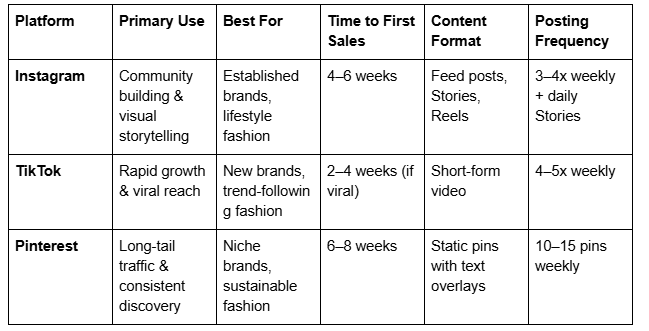
Pinterest offers the longest-lasting traffic (pins can drive sales for years), Instagram builds the strongest community, and TikTok delivers the fastest growth potential for emerging brands. Most successful fashion retailers use all three simultaneously.
Frequently Asked Questions
-
Yes. Squarespace offers a native Instagram feed block that displays your latest Instagram posts directly on your website. This works in two ways: first, it adds social proof by showing real customer engagement; second, it drives traffic back to your Instagram profile. To set it up, add an Instagram block to any Squarespace page, connect your Instagram account, and customise the feed's appearance.
This is particularly useful on your homepage or a dedicated "Community" page where you feature customer photos and testimonials from Instagram.
-
TikTok doesn't support direct product links in videos, so your strategy involves directing traffic through your bio. Create videos that spark curiosity or showcase your products, then mention in the video: "Link in bio to shop this collection." Use a unique discount code in each video (e.g., TIKTOK15) so you can track which TikTok videos drive sales. Create landing pages on Squarespace specific to TikTok traffic, with clear CTAs and that discount code prominently displayed.
-
Yes. When you enable Pinterest integration in Squarespace, your products appear in Pinterest's shopping features, including the "Shop" tab and product pins. Users can see prices and availability in real-time. To set this up, connect your Squarespace store to your Pinterest business account, then submit your product feed for approval.
-
For Instagram, aim for 3–4 posts per week plus daily Stories. For TikTok, post 4–5 times weekly when starting out; as your audience grows, maintain at least 3 posts weekly. For Pinterest, schedule 10–15 pins weekly. Consistency matters more than frequency—posting once daily is better than 10 times one day and then nothing for a week. Use scheduling tools (Squarespace integrates with Meta Business Suite for Instagram and Facebook scheduling) to batch-create content.
-
Use UTM parameters in your links. When you link to your Squarespace store from Instagram, add ?utm_source=instagram&utm_medium=social&utm_campaign=augustcollection. Squarespace and Google Analytics will track which traffic source led to purchases. Review your Squarespace analytics weekly under "Referral Sources" to see which platforms bring the most customers.
-
Engagement fluctuates, but a sustained drop often signals one of three issues: posting frequency has declined, content quality or relevance has shifted, or the algorithm is pushing less because of lower engagement. Address this by increasing posting frequency for one week to re-signal to the algorithm that you're active. Simultaneously, review your last 10 posts: which had the lowest engagement? Analyse why. Was the caption unclear? Was the image less compelling? Use these insights to improve future content. Finally, ask yourself: am I posting content my audience actually wants? If you've drifted from your core content pillars, return to them.
Call to Action
Growing a fashion brand on social media feels overwhelming when you're starting out. You're juggling Instagram captions, TikTok trends, Pinterest keywords, email campaigns, and website optimisation all at once.
That's where Squareko comes in. We've built Squarespace hosting and support specifically for small fashion entrepreneurs. Our platform includes done-for-you social media integrations, built-in email marketing, and monthly analytics reviews—so you can focus on creating beautiful products instead of wrestling with tech.
Ready to turn your Squarespace store into a customer acquisition machine? Squareko and get a personalised social media strategy for your fashion brand.

From custom website design to SEO strategy, we help businesses launch a site that looks professional and performs better.

About the Author
Walid | Founder, Squareko
I'm Walid Hasan, a Certified Squarespace Expert and Squarespace Circle Platinum Partner with over 12 years of hands-on experience designing and optimizing high-performing websites. Over the years, I've had the privilege of building more than 2,000 Squarespace websites for clients around the world, always focusing on clean design, strong user experience, and conversion-driven results.
