
How to Set Up B2B Lead Generation and Contact Forms for Technology Consulting on Squarespace
Key Takeaways Set Up B2B Lead Generation and Contact Forms for Technology Consulting
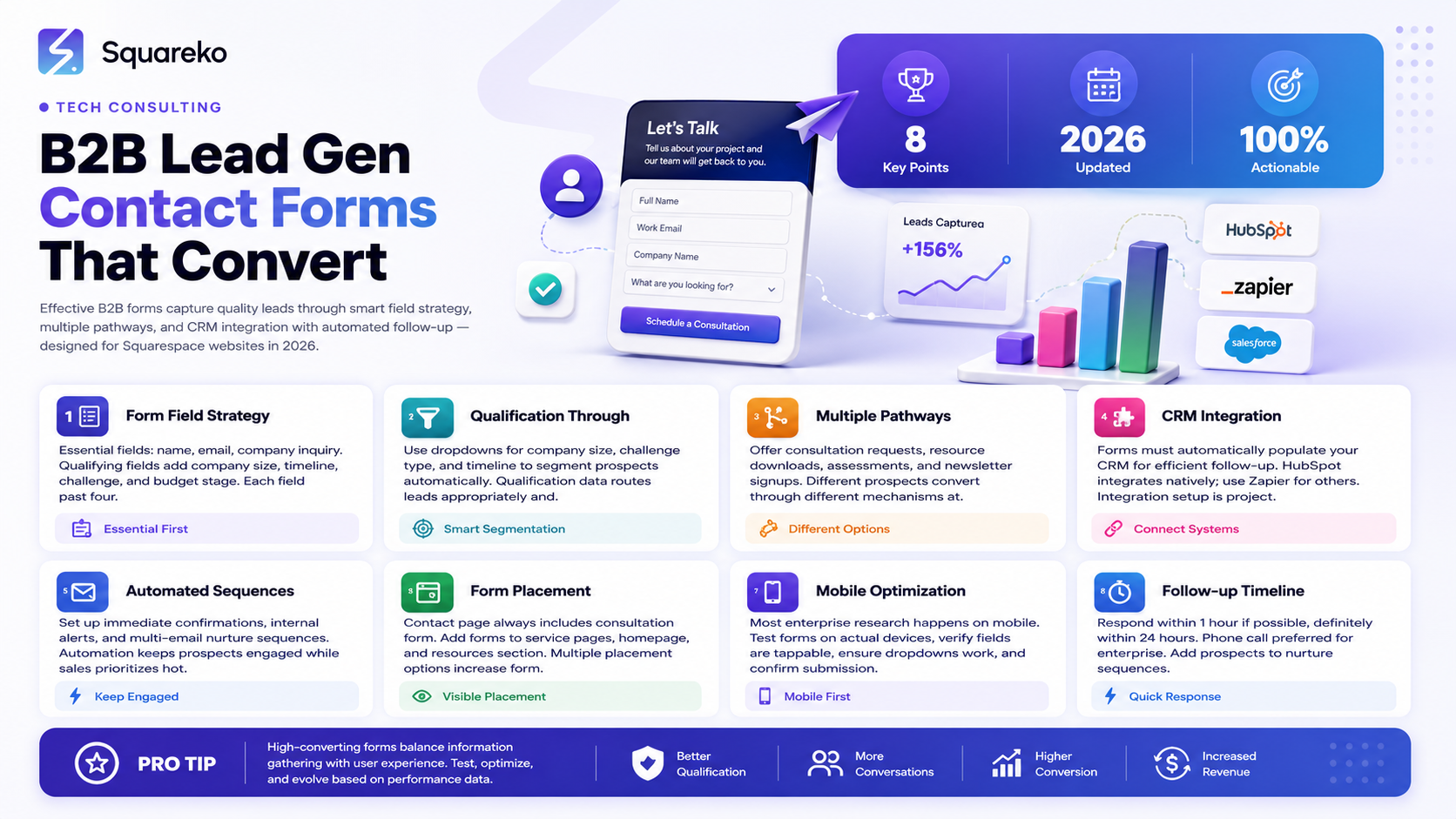
Multiple engagement pathways work better than single forms: Consultation requests, resource downloads, assessments, and newsletter signups serve different prospect stages
Form field strategy matters as much as form existence: Too many fields lose prospects; too few fail to qualify leads
Integration with CRM systems is essential infrastructure: Forms must automatically populate your CRM for efficient follow-up
Segmentation and qualification improve lead quality: Asking about company size, challenge, and timeline helps qualify prospects before manual engagement
Post-submission automation drives response speed and conversion: Automated confirmations, email sequences, and internal notifications matter
Your Squarespace website's forms are critical infrastructure. They're where interested prospects become actionable leads. Yet many consulting websites have poorly designed forms that lose prospects, don't capture useful information, or make the next step unclear.
Effective B2B lead generation for consulting requires more than a simple contact us form. Enterprise buyers expect multiple engagement pathways, clear next steps, and friction-free processes. This guide covers setting up B2B lead generation systems on Squarespace specifically designed for technology consulting, including form strategy, CRM integration, and follow-up optimization.
B2B Lead Generation Strategy for Consulting
Effective B2B lead generation for consulting requires understanding your conversion funnel.
Lead Generation Funnel for Consulting
Awareness stage: Prospects learning about your firm
Primary action: Visit your website
Conversion goal: Engage with content
Form type: Newsletter signup (low friction)
Consideration stage: Prospects evaluating your capabilities
Primary action: Read case studies, download resources
Conversion goal: Deepen relationship with firm
Form type: Resource download, assessment
Information needs: Understand your approach
Decision stage: Prospects actively evaluating you
Primary action: Request consultation, demo
Conversion goal: Schedule conversation
Form type: Consultation request, proposal request
Information needs: Qualify prospect, assess fit
Different prospects are at different stages. Your forms need to accommodate all three.
B2B vs. B2C Lead Generation
B2B consulting lead generation differs from B2C in critical ways:
Longer sales cycles: May take 3-6 months from initial interest to decision
Multiple decision-makers: Different stakeholders involved
Higher stakes: Significant budget and organizational impact
Relationship-driven: Personal relationship with consultant matters
Information-intensive: Prospects want extensive proof before engaging
Your forms and lead generation must account for these dynamics.
Contact Form Best Practices
The foundation of B2B lead generation is an effective contact form.
Contact Form Field Strategy
Essential fields (always include):
Name: Full name of prospect
Email: Email address for follow-up
Company: Company name (shows they're from an organization)
Your inquiry or challenge: What brings them to you (open text box)
These four fields capture essential information while remaining low-friction.
Qualifying fields (strategically add):
Job title: Helps identify decision-maker vs. implementer
Company size: Enterprise-level qualification
Current challenge (dropdown): Identify what problem they have
Timeline: When do they need a solution?
Budget stage: Are they in budget planning?
How did you hear about us?: Track marketing source
Optional fields (consider carefully):
Phone number: Useful for follow-up, but may deter submissions
Service area (dropdown): Identify if you serve their region
Additional context: Open text for specific situation
Form field rule: More fields reduce completion rates significantly. Test your form: each additional field after the first 4 reduces submissions by 5-10%. Balance data capture with conversion.
Form Field Labeling and Help Text
Clear labels:
Your Email not Email Address (for communications)
Company Size not Number of Employees or Revenue
Primary Challenge not Select the category matching your current situation
Help text for complex fields:
Company size (employees) - clarifies what metric
Timeline (when do you need this solved?) - explains purpose
Your specific challenge (describe your situation) - prompts better responses
Mobile-friendly labels:
Short labels on mobile devices
No acronyms or jargon
Clear, scannable text
Form Placement Strategy
Primary consultation form locations:
Contact page (always)
Service pages (bottom of each page)
Homepage (above the fold or end of page)
Resources/downloads (behind form)
Secondary forms:
Sidebar or pop-up for offers
Bottom of blog posts
Exit-intent pop-up (use cautiously)
Placement principles:
Primary CTA form should be on multiple pages
Don't hide contact form
Make CTAs clear and visible
Form Segmentation and Qualification
Smart form design segments prospects and qualifies leads before manual engagement.
Qualification Through Form Design
Company size segment:
Dropdown: Enterprise (1000+ employees) / Mid-Market (250-1000) / Small (under 250)
Different value propositions for different sizes
Helps prioritize follow-up
Challenge/need segment:
Dropdown of service areas: Digital Transformation / Cloud Migration / Enterprise Architecture
Route to relevant sales contact
Understand what they're buying
Timeline segment:
Dropdown: Immediate need (next 30 days) / Planning (3-6 months) / Exploratory
Prioritize hot prospects
Set follow-up timeline appropriately
Example qualification form:
Contact form fields:
1. Name (required)
2. Email (required)
3. Company (required)
4. Company size (dropdown) - for segmentation
5. Primary challenge (dropdown) - for routing
6. When do you need this? (dropdown) - for prioritization
7. Brief description of situation (text area)
This form collects essential information while qualifying the lead.
Conditional Form Fields
Use Squarespace form logic to show/hide fields:
Example: If prospect selects Enterprise (1000+), show additional field: Total IT budget (enterprise qualification metric)
Conditional logic benefits:
Show relevant fields only
Reduce form friction for some prospects
Capture more detail from qualified prospects
Personalize form experience
Multiple Engagement Pathways
Different prospects convert through different mechanisms. Offer multiple engagement options.
Pathway 1: Consultation Request
For: Prospects ready to evaluate your firm Goal: Schedule conversation Form elements:
Basic info (name, email, company)
Challenge/need
Timeline
Message/context CTA text: Schedule a Consultation or Request a Consultation Messaging: Position as 30-minute consultation (less commitment than undefined call)
Pathway 2: Resource Download (Lead Magnet)
For: Earlier-stage prospects not yet ready for conversation Goal: Capture contact, provide value, nurture relationship Form elements:
Basic info (name, email, company)
How they heard about you (for tracking) Resources to offer:
Guide/checklist: Digital Transformation Planning Checklist
Assessment tool: Cloud Readiness Assessment
Research report: 2024 Enterprise IT Spending Report
Template: Implementation Timeline TemplateCTA text: Download Guide or Get the Checklist
Pathway 3: Assessment or Quiz
For: Prospects wanting to evaluate their situation Goal: Engage, qualify, generate lead Form elements:
Basic info (name, email, company)
Series of assessment questions Assessment types:
Digital transformation readiness
Cloud migration maturity
Security posture assessment
ROI calculator Post-submission: Provide assessment results, offer consultation to discuss results
Pathway 4: Newsletter Signup
For: Prospects wanting ongoing engagement Goal: Build audience, nurture over time Form elements:
Email only (minimal friction)
Company (optional) Messaging: Get insights on [topic] delivered to your inbox Frequency: Monthly or quarterly (respect people's inboxes)
Pathway 5: Event or Webinar Registration
For: Prospects interested in specific event Goal: Attendee list, live engagement Form elements:
Name, email, company
Topic interest Follow-up: Event confirmation, reminder, post-event engagement
CRM Integration and Automation
Forms are only valuable if they populate your CRM and trigger automated follow-up.
Selecting a CRM for Consulting
Recommended CRM platforms:
HubSpot: Excellent for B2B consulting, integrates with Squarespace, free tier available
Pipedrive: Sales-focused, great for tracking deals
Salesforce: Enterprise CRM, steep learning curve
Zoho CRM: Affordable, comprehensive
Monday CRM: Visual CRM, good for small teams
Selection criteria:
Automation capabilities
Affordable for your size
Reporting and analytics
User-friendly interface
Setting Up Form-to-CRM Integration
HubSpot integration example (Squarespace has native integration):
Create form in Squarespace
Go to Marketing > Forms
Select your form
Enable HubSpot sync
Map fields to HubSpot properties
Forms now automatically populate HubSpot
For other CRMs (using Zapier):
Create form in Squarespace
Connect to Zapier
Create Zap: Squarespace form → [Your CRM]
Map fields
Turn on Zap
Automated Follow-Up Sequences
Setup automated sequences:
Immediate confirmation: Auto-response email confirming submission within 1 hour
Nurture sequence: Series of emails (3-5) delivered over 2-3 weeks
Lead scoring: Automatically score based on qualification level
Internal notification: Alert your sales team immediately for hot leads
Task creation: Auto-create task to follow up within 24 hours
Example automation:
1. Prospect submits Consultation Request form
↓
2. Immediate auto-response: Thanks for reaching out. We'll be in touch within 24 hours
↓
3. Internal notification: Alert sales team (immediate)
↓
4. Task created: Follow up with [Company] - Digital Transformation
↓
5. Nurture email 1: (Day 1) Here's what to expect from our consultation process
↓
6. Nurture email 2: (Day 3) Share relevant case study
↓
7. Nurture email 3: (Day 7) Share thought leadership article
This automated sequence keeps prospects engaged while sales team prioritizes follow-up.
Squarespace Form Setup
Implement B2B lead generation on Squarespace.
Creating Forms in Squarespace
Standard Squarespace form:
Go to page where you want form
Add form block
Configure form fields
Set form title and description
Customize CTA button text
Form customization:
Form title: Schedule a Consultation or Let's Talk About [Topic]
Form description: Brief sentence explaining why they should fill it out
Button text: Schedule Consultation (not just Submit)
Success message: Thanks! We'll be in touch within 24 hours
Field labels: Clear, concise labels
Advanced Form Options
Squarespace form settings:
Conditional fields: Show/hide fields based on other field values
Radio buttons vs. checkboxes: Choose appropriate field types
Success page redirect: Send to thank-you page after submission
Email notifications: Set who receives form notifications
Form Field Customization
Make forms more visually appealing:
Use form blocks with color backgrounds
Add description text above form
Include trustmarks below form (Your information is secure, etc.)
Add form image (screenshot of result, case study graphic, etc.)
Multiple Forms on Same Page
For service pages with multiple conversion options:
Service Page (Digital Transformation)
│
├─ Content about digital transformation service
│
├─ Form Option 1: Download Our Digital Transformation Guide
│ (lower friction lead magnet)
│
├─ More content and case studies
│
└─ Form Option 2: Schedule Consultation
(higher-intent consultation form)
Multiple options serve different prospect stages.
Follow-Up and Conversion Optimization
Form submissions are only the beginning. Follow-up determines whether leads convert to clients.
Follow-Up Timeline
Immediate (within 1 hour):
Auto-response confirming receipt
Alert sales team
Route to CRM
24 hours:
Personal follow-up from sales/consultant
Phone call preferred (enterprise preference)
Email if phone attempt unsuccessful
3-5 days:
If no response, follow-up email with helpful resource
1-2 weeks:
Additional nurture emails
Share relevant case studies
Offer alternative engagement options
Monthly:
Add to newsletter or regular outreach
Periodic check-ins
Invite to webinars or events
Qualification Conversation Framework
When following up with leads, qualify quickly:
Confirm needs: You mentioned you're looking for help with digital transformation. Can you tell me more about your specific situation?
Understand timeline: When are you hoping to start this project?
Identify decision-makers: Who else at your company is involved in this decision?
Assess fit: Based on what you've shared, I believe we could help. Would you be interested in a longer conversation with our team?
Next step: Let's schedule a 30-minute call for next week to explore fit further.
Converting Hot Leads
For prospects showing high engagement:
Offer video call (more personal than phone)
Invite to private webinar on their topic
Send specific case study matching their situation
Provide ROI calculator or assessment results
Offer brief assessment consultation
Mobile Form Optimization
Most enterprise buyers research on mobile. Mobile forms must work flawlessly.
Mobile Form Testing
Before publishing forms:
Test on actual mobile devices (not just browser emulation)
Verify form fields are easy to tap
Check that dropdown menus work
Ensure error messages are clear
Test form submission and success page
Mobile Form Best Practices
Larger form fields: Easier to tap on small screens
Single-column layout: Stack vertically (not side-by-side)
One field per line: Avoid cramped layouts
Large CTA button: Thumb-friendly size (at least 44px)
Progress indicator: For longer forms (show progress)
Clear labels: Above (not inside) form fields
Mobile number input: For phone fields on mobile
Mobile Conversion Optimization
Shorter forms on mobile: Don't ask for full address on mobile
Conditional questions: Hide optional fields on mobile
Auto-population: Use browser auto-complete for name, email
Submit after minimal scrolling: Don't make people scroll past form
Legal and Compliance Considerations
B2B lead generation has legal requirements you must follow.
GDPR Compliance (if serving EU contacts)
Required:
Clear privacy notice on form
Explicit consent checkbox: I consent to receive communications
Privacy policy linked from form
Way to opt-out of communications
Data retention policy
Example consent text: I consent to receive emails and communications about [Your Firm's] services. You can unsubscribe at any time. See our Privacy Policy for details.
CCPA Compliance (if serving California contacts)
Required:
Privacy notice explaining data use
Way to opt-out
Information about what data you collect
Way for people to request data deletion
CAN-SPAM Compliance (US email marketing)
Required for email follow-up:
Physical mailing address in email footer
Unsubscribe link in email
Clear subject lines (not deceptive)
Respond to unsubscribe requests quickly (48 hours)
Best Practice Recommendations
Privacy policy: Have clear, accessible privacy policy
Consent checkbox: Get explicit consent before email follow-up
Unsubscribe option: Easy way to opt-out of communications
Data retention: Clear policy on how long you keep lead data
Security: Ensure forms are on HTTPS (Squarespace does this automatically)
Frequently Asked Questions
-
Start with 4 essential fields (name, email, company, challenge). Test adding qualification fields one at a time and monitor completion rate. Generally, completion drops 5-10% per field after the first 4. Find the sweet spot between data capture and conversion.
-
Start with 4 essential fields (name, email, company, challenge). Test adding qualification fields one at a time and monitor completion rate. Generally, completion drops 5-10% per field after the first 4. Find the sweet spot between data capture and conversion.
-
For B2B consulting, phone is optional. Many prospects prefer email initially. Ask for phone if you'll actually call (most do), but make it optional. Mobile phone numbers especially should be optional since prospects often research on phones.
-
HubSpot free tier is excellent for small consulting firms (up to 5 users). It integrates natively with Squarespace and has sufficient automation for most needs. For very small teams, Google Sheets + email works initially, but CRM is better long-term.
-
Within 24 hours maximum. Phone call within business hours beats email. For hot leads (immediate need), follow up within a few hours. Delayed follow-up significantly reduces conversion rates.
-
Use cautiously. Exit-intent pop-ups (when users try to leave) can work, but excessive pop-ups hurt user experience. Better: strategically placed forms on relevant pages. One or two exit-intent pop-ups for lead magnets is okay; more creates friction.
-
Set expectations about follow-up: "Thanks! We'll reach out within 24 business hours" or "Thanks! Check your email for next steps." Clear expectations reduce follow-up friction.
-
Use both. Consultation forms for hot prospects actively evaluating. Resource download forms for early-stage prospects not yet ready for conversation. Different prospects need different entry points.
-
Yes, if you're moving to a new CRM. Most CRMs support bulk import. Be careful about email compliance—imported contacts need to have agreed to communications or consent to receive them.
Call to Action
Your website's forms are the bridge between interested prospects and your sales pipeline. Properly designed, integrated, and optimized forms dramatically improve your lead quantity and quality.
At Squareko, we help technology consulting firms set up high-converting forms, integrate with CRM systems, and optimize follow-up processes. From form design and field strategy to automation and lead nurturing, we ensure your forms work as hard as your sales team.
Ready to generate more qualified consulting leads from your website? Schedule a consultation to discuss your lead generation strategy.

From custom website design to SEO strategy, we help businesses launch a site that looks professional and performs better.

Author Bio
I'm Walid Hasan, a Certified Squarespace Expert and Squarespace Circle Platinum Partner with over 12 years of hands-on experience designing and optimizing high-performing websites. Over the years, I've had the privilege of building more than 2,000 Squarespace websites for clients around the world, always focusing on clean design, strong user experience, and conversion-driven results.
