
How to Set Up a SaaS Product Pricing Page on Squarespace That Maximises Conversions
Why Your Pricing Page Needs Serious Attention
The pricing page is the most commercially important page on your SaaS website. It's where visitors who are actively evaluating your product make the decision to sign up or leave. Unlike your homepage (which needs to attract and engage), your pricing page is serving a specific moment: someone ready to convert who just needs their final questions answered.
Most SaaS pricing pages fail not because the price is wrong, but because the page doesn't do its job of building confidence, handling objections, and making the right tier obvious. Price anxiety is real — visitors worry about being locked into the wrong plan, hidden charges, or not getting enough value. A well-designed pricing page addresses all of these concerns proactively.
The stakes: pricing page conversion rate is often the single most impactful metric for SaaS growth. A 1% improvement in pricing page conversion rate can double your trial volume from the same traffic.
Key Takeaways
Your SaaS pricing page is where trial intent converts to signup — every design and copy decision affects your conversion rate
Three tiers with a visually highlighted recommended option is the most conversion-effective pricing structure for most SaaS products
Annual billing options with clear savings displayed convert a meaningful percentage of monthly-intent visitors to annual plans
Pricing page FAQs address the objections that would otherwise kill conversions — include them on every pricing page
Squarespace's Fluid Engine handles professional pricing page builds without code for most standard structures
Pricing Psychology for SaaS
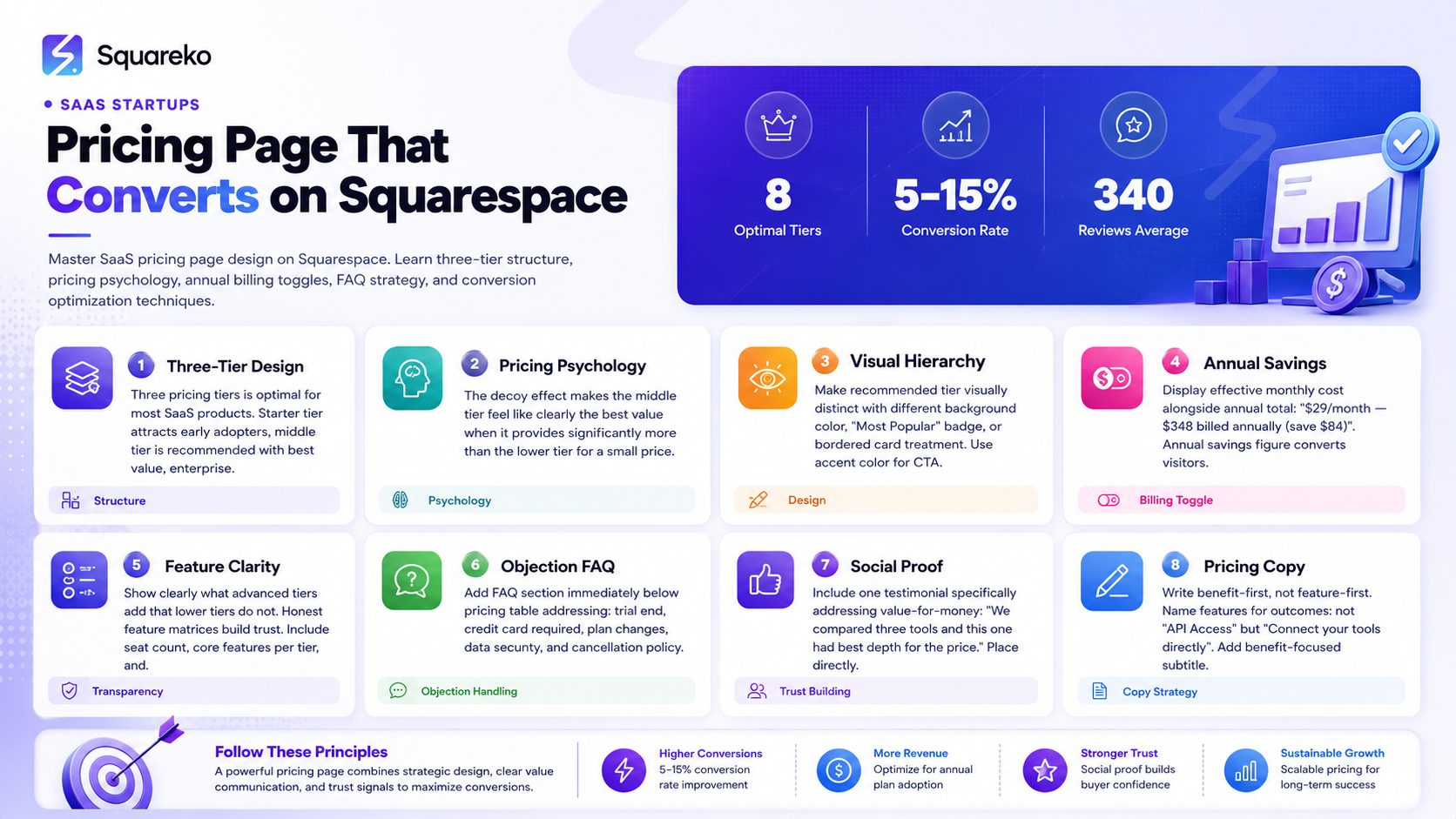
Understanding why people make pricing decisions helps you design a pricing page that works with human psychology, not against it.
The Paradox of Choice
Three options outperform two, four, or five for conversion. With two options, visitors can't anchor — they don't know which one is right for them. With four or five, they're overwhelmed. Three tiers hit the sweet spot: low (for small teams or individuals), medium (the recommended sweet spot), and high (for larger teams or more demanding use cases).
The Decoy Effect
Your middle tier should be priced and featured in a way that makes it feel like clearly the best value. If your middle tier provides significantly more value than the lower tier for a relatively small price increase, most rational buyers choose the middle tier. This is why the middle tier is typically your highest-volume plan.
Anchoring
The order of your tiers creates anchoring effects. Displaying your highest tier first makes the middle tier feel like a deal. Displaying lowest first makes the price feel like it escalates significantly. Most SaaS companies display tiers left-to-right from lowest to highest — this is the conventional pattern buyers expect.
Loss Aversion
Visitors who don't sign up are aware they're missing out on the value you've described. Your pricing page can use this: Start your 14-day free trial — cancel anytime frames the decision as low-risk. Join 5,000+ teams already using [product] frames non-action as being left behind.
The Three-Tier Pricing Structure
For most SaaS products targeting small-to-medium business customers, a three-tier structure is the optimal starting point:
Tier 1 (Starter): Designed for individuals or small teams with limited needs. Lower price, limited seats or features, sufficient to demonstrate product value but insufficient for growing teams. Function: attract early adopters and small users without undervaluing the full product.
Tier 2 (Professional / Growth): The recommended tier — designed for the ideal customer profile you're optimizing for. Best value, most features needed by your core audience, reasonable pricing. Function: this is where most of your revenue should come from.
Tier 3 (Business / Enterprise): For larger teams or higher volume usage. Higher price, highest limits, priority support, advanced features. Function: capture high-value customers and serve as the anchor that makes Tier 2 feel reasonable.
For enterprise SaaS products with custom pricing, Tier 3 becomes Contact Sales with a brief form, not a fixed price point.
Building Pricing Tables in Squarespace
Squarespace's Fluid Engine doesn't have a native pricing table component, but building one is straightforward with a structured column layout.
Standard approach:
Create a 3-column section in Fluid Engine. Within each column:
Tier name (H3 heading)
Price (large text block)
Billing period (per month, billed annually)
Feature list (simple bullet list)
CTA button (linked to the appropriate signup URL)
For visual differentiation of the recommended tier:
Apply a unique background color to the middle column via section or block settings
Add a Most Popular text label above the tier name (a simple text block positioned at the top)
Use your accent color for the CTA button (while the other tiers use a secondary button style)
Optionally: add a subtle box shadow effect via custom CSS to make the middle tier card appear elevated
This structure is achievable without code for the core layout, with optional CSS for the shadow and border effects.
Custom CSS for elevated tier effect:
.recommended-tier {
  box-shadow: 0 4px 24px rgba(0,0,0,0.12);
  border-radius: 8px;
  position: relative;
  top: -8px;
}
Add this via Squarespace's Custom CSS panel (Design → Custom CSS).
Annual vs Monthly Billing Toggle
The annual/monthly billing toggle is a significant revenue optimization — annual plans improve cash flow, reduce churn, and typically convert a meaningful portion of monthly-intent visitors when the savings are clearly communicated.
Native Squarespace Implementation
Squarespace doesn't have a native billing toggle component. The most practical approaches:
Option 1: Two pricing sections with a show/hide toggle. Build two separate pricing sections (one for monthly, one for annual). Use custom JavaScript to toggle visibility when the toggle is clicked. This is achievable with basic JavaScript code injection.
Option 2: Link to separate pages. Have a default pricing page showing annual pricing (with a note explaining Switch to monthly pricing as a link to a separate URL). Less elegant but requires no code.
Option 3: Accept the limitation. Show annual pricing as default with a billed annually notation. Include a text note: Monthly billing available — [see all pricing options] linking to a brief clarification.
For most early-stage SaaS companies, Option 3 is the most pragmatic starting point. The toggle is a conversion optimization worth implementing later when you have traffic data to measure its impact.
Displaying Annual Savings
When showing annual pricing, always display the effective monthly cost alongside the annual total:
$29/month — $348 billed annually (save $84)
The monthly equivalent makes the price feel familiar (people think monthly). The annual savings figure addresses the why would I commit annually? question proactively.
What to Include in Each Pricing Tier
Every pricing tier should communicate:
The price: Clearly. Monthly rate and annual total. For enterprise tiers: Custom pricing — Contact us.
Who it's for: A brief descriptor beneath the tier name — For individuals and small teams, For growing businesses, For scaling companies.
The seat count or usage limit: How many users, projects, or API calls are included? This is the most common feature gate between tiers.
Core features included: What does this tier get that defines its value? List 6-8 features per tier, using checkmarks or bullets. Don't list every feature — highlight the differentiators.
What's NOT in lower tiers: The most honest and effective feature matrix shows clearly what advanced tiers add. Priority support in Tier 3 only means something when Tier 1 shows Email support only.
The CTA: A clear button with consistent copy — Start Free Trial,Start Pro Trial, Contact Sales — each linking to the appropriate next step.
Pricing Page Copy That Converts
The words around your pricing table matter as much as the table itself.
The Page Headline
Don't use Pricing as your only heading. Add a benefit-focused subtitle: Simple pricing. No hidden fees. Cancel anytime. Start free. Upgrade when you're ready. Pricing designed to grow with you.
These simple phrases address three common pricing anxieties (complexity, surprise costs, commitment) in a single line.
Feature Naming
Name your features for the outcome, not the technical capability.
Not: API Access → Connect your tools directly
Not: Advanced Reporting → Reports that take minutes, not hours
Not: Priority Queue → Get help fast when it matters
This approach requires more thought but pays back in conversion rates.
The Guarantee or Safety Statement
Below the pricing table, add a trust statement: 14-day free trial. No credit card required. Cancel anytime. This addresses commitment anxiety for visitors who are almost convinced but need one final reassurance.
Pricing Page FAQs — Handling Objections
Every visitor who doesn't convert has an unresolved question. A well-crafted FAQ section on your pricing page converts a meaningful percentage of these hesitant visitors.
The most common pricing objections to address:
What happens when my trial ends? — Tell them exactly. At the end of your 14-day trial, you'll be asked to choose a plan. If you don't, your account becomes read-only. Your data is kept safe for 30 days.
Is my data secure? — Brief, specific answer with any relevant certifications (SOC 2, GDPR compliance, etc.).
Can I change plans later? — Yes. Upgrade, downgrade, or cancel at any time from your account settings. Upgrades take effect immediately; downgrades at the end of your billing period.
Do you offer discounts for startups or non-profits? — If yes, describe how to apply. If no, say so honestly.
What payment methods do you accept? — Cards, PayPal, etc.
Do I need a credit card to start a trial? — No credit card required to start your free trial.
Add these as a Q&A section immediately below the pricing table, formatted in accordion style for scannability. Add FAQPage schema markup via Squarespace's code injection to qualify for featured snippets.
Social Proof on the Pricing Page
The pricing page is not too late for social proof. Visitors who reach the pricing page are in active evaluation mode — a relevant testimonial here can be the final push to conversion.
What works on a pricing page:
One testimonial that specifically validates pricing value: We tried two other tools at similar price points. This was the only one where the whole team actually adopted it.
A customer count or notable customer logos below the pricing table: Join 8,000+ teams using [product].
G2 or Capterra rating badge if you have a strong rating: these immediately visible trust signals reduce decision friction.
What doesn't work: Repeating the same testimonials from your homepage. Pricing page visitors have already seen your homepage — the testimonials here should be new, and specifically relevant to the pricing decision.
Testing and Optimising Your Pricing Page
After launch, your pricing page should evolve based on data:
Track pricing page conversion rate: The percentage of pricing page visitors who complete a trial signup. This is your primary metric.
Track scroll depth: If visitors are leaving before they reach your FAQ, they're not getting to objection-handling content. Either move the FAQ higher or improve the pricing table itself.
A/B test the most important elements: Test one thing at a time — headline copy, CTA button text, tier names, annual vs monthly default display. Use Google Analytics 4 events to track button clicks.
Monitor chat/support questions from pricing page: Every question a visitor asks through your chat support about pricing is a question your pricing page should answer proactively. Systematically add FAQ entries for every recurring question.
Build Your SaaS Pricing Page With Squareko
A well-designed pricing page is one of the highest-ROI design investments a SaaS startup can make. Squareko designs Squarespace pricing pages for SaaS products that convert — built on pricing psychology and real conversion data.
FAQs
-
In Squarespace's Fluid Engine, create a 3-column section. Within each column, add a tier name (H3), price (large text), feature list (bullets), and CTA button. Visually differentiate the recommended tier with a different background color and "Most Popular" label. For a billing toggle, custom JavaScript is required — or use two separate pricing sections with a simple link to switch between them.
-
Three tiers is the optimal structure for most SaaS products. It provides the anchoring effect (highest tier makes the middle feel like a deal), the decoy effect (middle tier is clearly the best value), and the growth path (users can upgrade from Starter to Pro to Business). More than three tiers creates decision paralysis; fewer than three makes anchoring difficult.
-
Show annual pricing by default if your annual plans offer meaningful savings and you want to encourage annual subscriptions. Include a clear "monthly billing available" option. If monthly plans are significantly more popular with your target audience, default to monthly with annual as the highlighted upgrade. Track conversion rates for both approaches if possible.
-
At minimum: what happens when the trial ends, whether a credit card is required, how to change plans, data security and compliance, payment methods accepted, and refund or cancellation policy. Add any question that your sales or support team receives regularly from pricing page visitors.
-
Apply a unique background color to the recommended tier column. Add a "Most Popular" or "Recommended" label at the top of the column. Use your brand accent color for the CTA button (while other tiers use a secondary button style). Optionally, add a subtle box shadow and vertical offset via custom CSS to make the recommended card appear elevated above the others.
-
A well-optimized SaaS pricing page on organic search traffic typically converts 5-15% of visitors to trial signups. Visitors arriving from paid ads targeting pricing-related keywords often convert at 8-20%. If your pricing page conversion rate is below 3%, focus first on the FAQ section (unresolved objections are the most common cause of low pricing page conversion) and the clarity of your tier structure.
-
Replace the enterprise tier's price with "Custom pricing" and a "Contact Sales" CTA button linked to a brief contact form or calendar booking page. Include 3-5 enterprise-level features in the tier list to justify the "contact us" friction. Add a brief statement about what enterprise includes: "Dedicated support, custom SLA, advanced security controls, volume pricing."
-
A free tier (freemium) is appropriate if your product's free experience is genuinely valuable AND you have a clear upgrade trigger that converts free users to paid. If your free tier provides too much value without a natural upgrade moment, it can cannibalize paid conversions. If it provides too little value, it won't attract users worth upgrading. Freemium is a business model decision that should precede pricing page design.

From custom website design to SEO strategy, we help businesses launch a site that looks professional and performs better.

Author Bio
I'm Walid Hasan, a Certified Squarespace Expert and Squarespace Circle Platinum Partner with over 12 years of hands-on experience designing and optimizing high-performing websites. Over the years, I've had the privilege of building more than 2,000 Squarespace websites for clients around the world, always focusing on clean design, strong user experience, and conversion-driven results.
