
How to Build a SaaS Startup Website That Converts to Trial Users
The SaaS Trial Conversion Challenge
The standard SaaS website conversion goal is different from most businesses. You're not typically asking for a large purchasing commitment upfront — you're asking someone to start a trial. That sounds easier than it is.
Trial signups require trust. People won't hand over their email address, let alone start an actual free trial, unless they believe:
The product does what it claims to do
It's designed for people in their situation
The trial won't be a time trap or lead to aggressive sales calls
The product is serious enough to be worth their attention
Your website's job is to build all four of these beliefs before the visitor clicks Start Free Trial. Most SaaS websites build only the first one — they explain what the product does — and then wonder why trial conversion rates are low.
This guide is specifically about building all four beliefs, in the right order, using Squarespace's design capabilities to do it cleanly and professionally.
The SaaS Conversion Architecture Framework
Before touching Squarespace's design tools, map your visitor's psychological journey:
Stage 1 — Recognition: Does this product exist for people like me? Stage 2 — Understanding: Do I understand what it does specifically? Stage 3 — Credibility: Do I believe it does what they claim? Stage 4 — Fit: Is this the right solution for my specific situation? Stage 5 — Safety: Can I try this without risk or pressure? Stage 6 — Action: What exactly do I do next?
Most SaaS homepages address Stage 2 (understanding) adequately. They fall short on Stage 1 (recognition — does the headline speak directly to me?), Stage 3 (credibility — real social proof from people like me), and Stage 5 (safety — no credit card required, cancel anytime, 14-day trial).
Structure your homepage to hit all six stages in sequence.
Key Takeaways How to Build a SaaS Startup Website That Converts to Trial Users
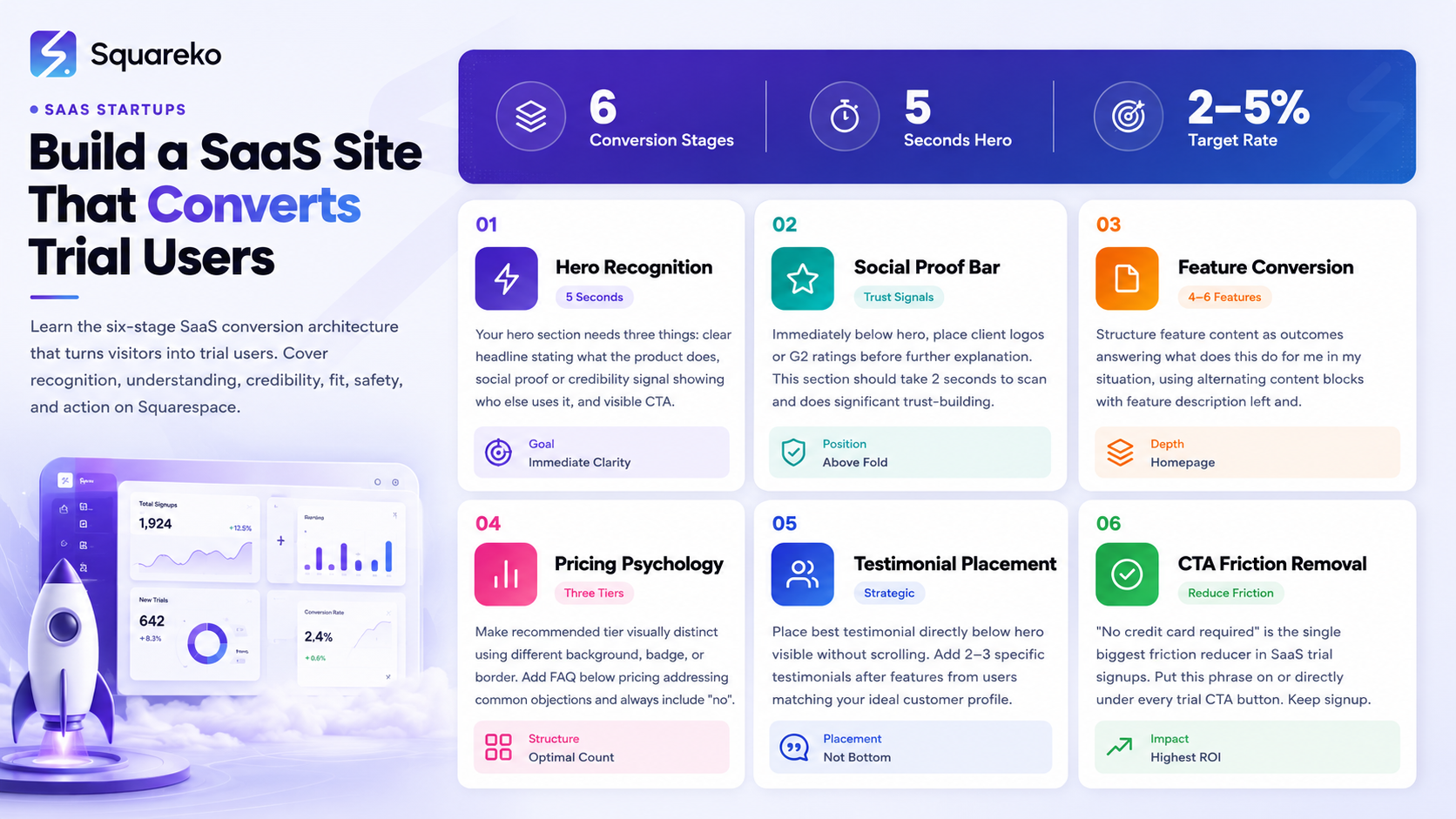
A SaaS website that converts to trial users requires a specific psychological sequence — not just good design
The hero section's job is to answer what does this do and who is it for in under 5 seconds
Reducing friction in the trial signup process is as important as the messaging before it
Social proof placed strategically (not just at the bottom) significantly increases trial conversion rates
Every page element should serve the conversion goal — if it doesn't help visitors understand or trust your product, it's slowing them down
Homepage Strategy for Trial Conversion
The Hero: 5 Seconds to Earn Attention
The hero section is where most visitors decide whether to continue or leave. You have approximately 5 seconds before a disengaged visitor moves on.
Your hero needs three things: a clear headline (what the product does), social proof or credibility signal (who else uses it), and a visible CTA (what to do next). All three should be visible without scrolling.
Headline framework for SaaS: [Outcome] for [specific user type]
Examples:
Client reporting that actually gets read — for marketing agencies
Project timelines your whole team uses — for remote-first companies
Invoicing that gets paid faster — for freelancers and small studios
Each example states the outcome first, then the target user. The order matters — leading with the outcome is more compelling than leading with the feature.
The subheadline adds the mechanism: Built-in automations send your reports on schedule. Clients receive a branded, mobile-friendly summary — not a PDF attachment they'll ignore.
The CTA button: Start Free Trial — No Credit Card Required. The no credit card required suffix removes the single biggest friction point in SaaS trial signups. Put it directly on or immediately below the button.
Social proof micro-element: Trusted by 1,200+ agencies in 40 countries or 4.8/5 on G2 — 340 reviews. Place it directly below the CTA — not at the bottom of the page.
The Product Screenshot
The hero visual for SaaS marketing sites is almost always a product screenshot or UI mockup. This is the right call — showing the actual product interface reduces uncertainty and builds immediate credibility. This is what it looks like. This is what you'll be using.
In Squarespace's Fluid Engine, use a media section alongside your hero text content. Use a device mockup frame (browser window, dashboard frame) to give the screenshot context. Avoid showing overwhelming UI — pick the most visually clean, most representative screen.
The Social Proof Bar
Immediately below the hero, before any further explanation: a social proof bar. Client logos, G2/Capterra ratings, or a trusted by X companies statement. This section should take 2 seconds to scan and does significant trust-building work with almost no reading effort required.
Feature Pages That Convert Hesitant Visitors
Your feature page (or features section on the homepage) is where you convert visitors who were interested by the hero but need more detail before committing to a trial.
Structure your feature content as outcomes, not capabilities:
Not: Advanced Automation Engine But: Stop manually chasing overdue invoices — our automation sends payment reminders so you don't have to.
Each feature should answer: what does this feature do for me, specifically, in a situation I recognize?
Feature section structure for Squarespace:
Use alternating content blocks — feature description on the left, product screenshot on the right, then swap for the next feature. This creates visual rhythm and gives each feature space to breathe. Four to six features is the right depth for a homepage features section. More than six starts to feel like a spec list rather than a value showcase.
Add a secondary CTA at the bottom of the features section: See all features or Start your trial depending on whether you have a separate dedicated features page.
The Pricing Page — Making the Decision Easy
For SaaS startups with a self-service model, the pricing page is often the highest-intent page on the site — visitors there are seriously evaluating whether to sign up. The design of this page has a direct impact on trial conversion rates.
Pricing page must-haves for SaaS:
A monthly/annual billing toggle with the annual savings clearly marked — Save 20% annually next to the toggle converts visitors to annual plans significantly. Annual plans are better for your cash flow and reduce churn; make them visually appealing.
A visual distinction for your recommended tier — different background color, Most Popular badge, or bordered card treatment. This reduces analysis paralysis when three options feel equivalent.
Feature comparison that's honest. Don't hide relevant limitations in the fine print — sophisticated SaaS buyers will find them and feel misled. Transparent feature matrices build trust and pre-qualify users appropriately.
A FAQ section directly below pricing. Address the most common trial objections: What happens when my trial ends?, Do you offer discounts for small teams?, Can I change my plan later?, Is my data safe?
A Need Enterprise? CTA at the bottom for high-growth SaaS products targeting multiple market segments.
Social Proof Strategy for SaaS
Social proof is one of the highest-leverage conversion elements for SaaS websites — yet most companies use it poorly (generic testimonials at the bottom of the page that no one reads).
Effective SaaS social proof placement:
In the hero: Numbers (users, ratings, countries) immediately after the CTA.
After the feature section: 2-3 specific testimonials from users who match your ideal customer profile. Specific testimonials — We reduced client report creation time from 4 hours to 20 minutes — outperform vague ones (Great tool, highly recommend) by a significant margin.
On the pricing page: One testimonial that specifically addresses the value-for-money question. Something like We compared three tools and this one had the best depth for the price. Our team actually adopted it.
As a dedicated social proof section: Logo bar of recognizable companies using your product (for B2B SaaS), or a reviews grid from G2/Capterra with specific review excerpts.
For SaaS startups early in their journey without many testimonials: get specific quotes from your beta users. Even 3 detailed quotes from real people beat 10 vague ones
Reducing Friction at the Trial Signup Point
You've built the case. The visitor wants to try the product. Now don't lose them with a clunky signup process.
Friction reducers that matter most:
No credit card required — this single phrase increases trial signup rates significantly. Put it on or directly under every trial CTA button, not buried in fine print.
Short signup form — name, email, and password is the maximum for a trial signup. Don't add company size, industry, team size, or how did you hear about us to the trial form. Collect that information during onboarding, not before.
Clear next step after signup — what does the trial look like? You'll get immediate access. No waiting for account approval. reduces uncertainty.
Social login options — Sign up with Google or Continue with GitHub (for developer tools) remove a significant authentication friction point.
In Squarespace, your trial signup form or CTA button links to your actual product's signup page (hosted on your app infrastructure). Keep the Squarespace CTA button copy accurate to what visitors will experience: Start Free Trial is better than Get Started (which is vague) or Try Now (which is slightly better but still imprecise).
Writing Copy That Converts SaaS Visitors
SaaS copy has a specific job: make the product's value unmistakably clear to someone who's never seen it before, in language they'd naturally use themselves.
What converts: Specific, outcome-focused, natural language written from the user's perspective. What doesn't convert: Feature-first, jargon-heavy, we-centric language.
We-centric (weak): Our platform provides a comprehensive suite of automation tools that enable marketing teams to... User-centric (strong): Your marketing team sets up the report once. After that, it runs itself — every week, on schedule, branded the way you want.
The second example uses you and your. It describes the experience in plain terms. It implies a specific outcome (automated reports, branded output). Any marketing professional reading it knows immediately whether it's relevant to them.
The one-sentence test: Can you describe what your product does for a specific user in one sentence? If not, your messaging is too complex. Keep refining until you can.
Mobile Conversion for SaaS Websites
SaaS research often starts on mobile — during a commute, between meetings, or from a recommendation in Slack. Visitors who discover your product on mobile may sign up on desktop later, but their first impression matters.
Mobile conversion checks specific to SaaS:
Hero text readable at 375px width without zooming
CTA button full width or at least 44px height minimum
Pricing table scrolls horizontally or stacks vertically — either works, but must be readable
Product screenshots display at a usable size (not so small the UI is unrecognizable)
Navigation doesn't obscure content on small screens
Trial signup CTA is accessible from every section on mobile (sticky header or floating button)
In Squarespace, use the mobile editor to adjust section-specific layouts. Some sections that work well on desktop need explicit mobile-specific adjustments — column stacking order, font size adjustments, image repositioning.
Build Your SaaS Website With Squareko
Squareko designs Squarespace websites for SaaS startups with trial conversion as the primary goal. Not just a website that looks good — a website that turns visitors into trial users.
FAQs
-
A typical SaaS website converts 2-5% of visitors to trial signups on organic traffic. Well-optimized SaaS landing pages targeting high-intent keywords can reach 5-10%. If you're below 2%, the issue is almost always in your hero messaging (it's not clear enough what the product does) or in friction at the signup point (form is too long, "no credit card required" isn't visible, or the benefit-to-effort ratio feels off).
-
Use the formula "[Outcome] for [specific user type]." State the primary outcome first, then identify who it's for. Avoid clever wordplay that sacrifices clarity — your visitor shouldn't need to think about what your product does. Test your headline with people outside your industry: if they can explain what your product does after reading the headline, it's clear enough.
-
Including a pricing section on your homepage is generally beneficial for self-serve SaaS products — it pre-qualifies visitors and reduces friction for those who are ready to evaluate seriously. For enterprise SaaS or products with custom pricing, a "Request a Demo" or "Contact Sales" flow replaces pricing on the homepage.
-
One primary CTA that appears multiple times throughout the page (hero, after features, after testimonials, final section). Having one consistent action reduces decision paralysis. Secondary CTAs ("Watch a demo," "See pricing") can appear as lower-commitment alternatives for visitors who aren't ready for the primary action.
-
Use Fluid Engine to create a multi-column section (typically 3 columns for 3 tiers). Add a monthly/annual billing toggle via a custom code block (requires simple JavaScript) or link to separate monthly/annual views. Visually distinguish the recommended tier. Add a FAQ block below pricing. Each tier should have a CTA button linked to the appropriate signup flow in your product.
-
The homepage and the pricing page together are the highest-impact pages. The homepage determines whether visitors become engaged; the pricing page determines whether engaged visitors become trial users. Optimizing these two pages — especially the hero section and the pricing section — will have more impact on trial conversion rates than any other single change.
-
Add it as a text line directly below your CTA button in Squarespace's Fluid Engine. Style it in a smaller, lighter font (14px, muted gray) to visually separate it from the button while keeping it immediately visible. This is one of the highest-ROI copy additions for SaaS trial conversion.
-
Yes — for long-term organic growth, a blog is essential. SaaS blogs that cover topics your ideal users search for (how to solve their problem, comparison guides, best practices in your category) build topical authority and attract pre-qualified organic traffic. This traffic converts to trials at much higher rates than cold paid traffic. Start with 2 posts per month and maintain consistency.

From custom website design to SEO strategy, we help businesses launch a site that looks professional and performs better.

Author Bio
I'm Walid Hasan, a Certified Squarespace Expert and Squarespace Circle Platinum Partner with over 12 years of hands-on experience designing and optimizing high-performing websites. Over the years, I've had the privilege of building more than 2,000 Squarespace websites for clients around the world, always focusing on clean design, strong user experience, and conversion-driven results.
