
How to Sell Coaching Programmes and Online Courses on Squarespace in 2026
Key Takeaways How to Sell Coaching Programmes and Online Courses on Squarespace in 2026
Squarespace Member Areas allow you to sell gated content, video courses, and membership access directly from your website
For simple 1–5 module courses, Squarespace is sufficient; for complex LMS needs, integrate with Kajabi or Teachable
Programme sales pages need specific structural elements to convert — problem, transformation, what's included, social proof, and a clear CTA
Squarespace Commerce handles payment processing natively via Stripe and PayPal — no third-party payment gateway required
A coach who combines 1:1 services with scalable digital products creates a more resilient, growing business
There's a significant difference between having a coaching website and having a coaching website that generates revenue while you sleep. Most coaches start with the former — a site that explains what they do and asks visitors to get in touch. But at some point, the goal becomes a more scalable business: programmes that run without constant 1:1 input, courses that sell around the clock, and income that isn't entirely dependent on how many hours you can book.
Squarespace, in 2026, is a genuinely capable platform for coaches who want to sell both live coaching programmes and pre-recorded online courses. It's not a dedicated course platform — Teachable and Kajabi exist for a reason — but for coaches who want an integrated, clean solution that doesn't require managing multiple platforms, Squarespace has become a serious option.
This guide covers how to set up everything: Member Areas for course delivery, payment processing, programme sales pages, and the integrations you might need if you eventually outgrow Squarespace's native tools.
Understanding Your Sales Options on Squarespace
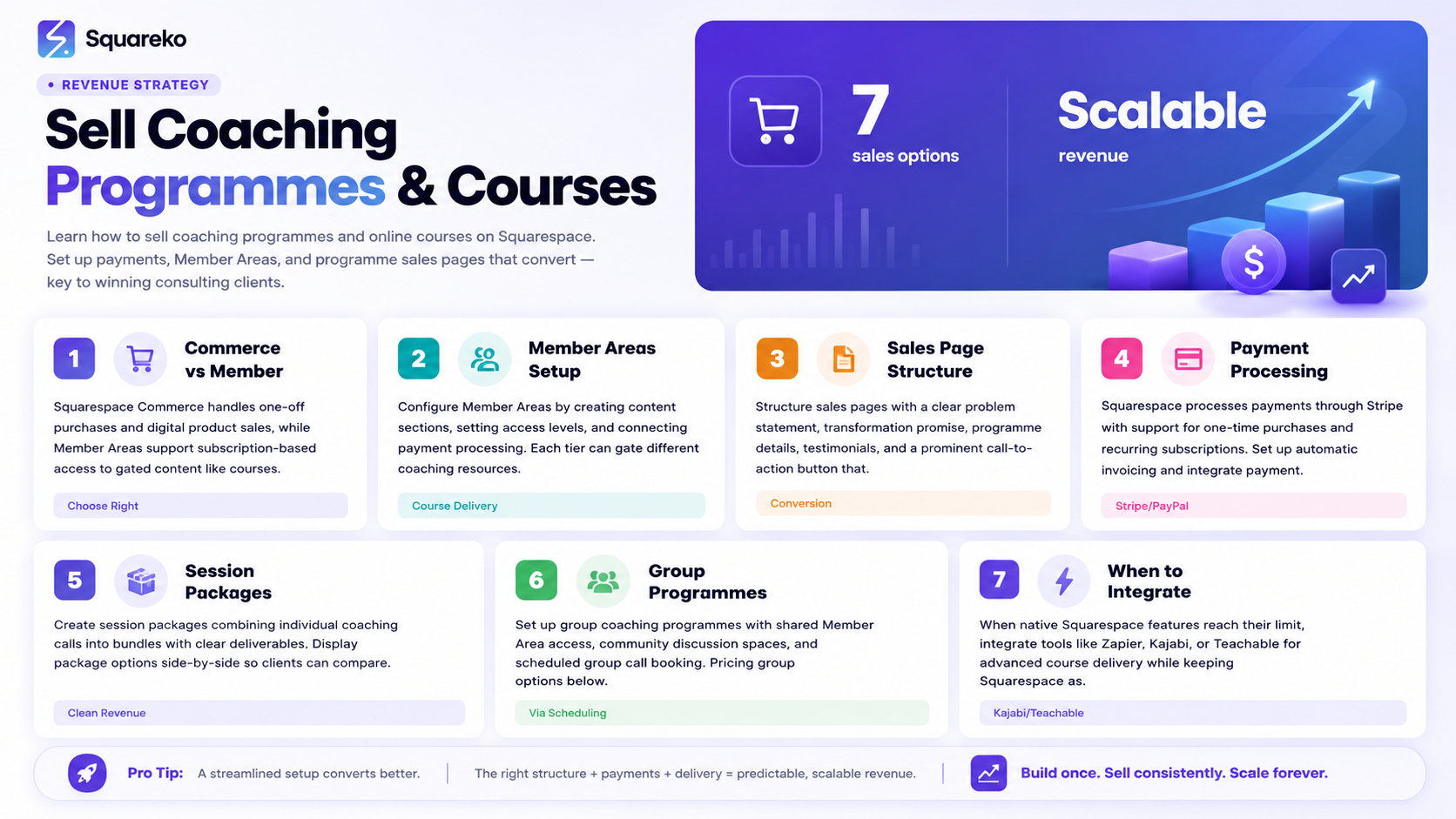
Squarespace gives coaches two primary ways to sell their work online: through Squarespace Commerce (for direct product and programme sales) and through Squarespace Member Areas (for ongoing access to gated content and courses). Many coaches use both — Commerce to handle payment, Member Areas to deliver the content.
Squarespace Commerce
Squarespace Commerce is the platform's built-in e-commerce system. It handles product listings, payment processing (via Stripe and PayPal), order management, and customer communication. For coaches, the most relevant product types are:
Service products — for coaching packages and programmes sold as a fixed price
Digital downloads — for worksheets, templates, and resource packs
Gift cards and vouchers — useful for corporate clients or gifting
You add products from your Commerce dashboard, set prices, connect your payment processor, and embed a buy button or product page on any page of your site. It's straightforward.
Squarespace Member Areas
Member Areas is Squarespace's native tool for selling access to gated content. You create a membership plan, set a price (one-time or recurring), and add pages to that membership. Only paying members can access those pages. This is how coaches deliver online courses, video libraries, resource vaults, and community content directly through their Squarespace site.
The key difference: Commerce sells a product. Member Areas sells access. For digital courses, you typically use Member Areas — clients pay, gain access, and then work through the content.
Setting Up Squarespace Member Areas for Courses
Creating Your First Member Area
From your Squarespace dashboard, navigate to Member Areas and create a new area. You'll give it a name (this becomes the membership product your clients purchase), set pricing, and choose which pages members can access.
Member Areas support three pricing models:
One-time payment — ideal for standalone courses with a fixed price
Recurring subscription — ideal for ongoing membership communities or monthly content
Free access — useful for lead magnets or community building
For a typical online course, a one-time payment model works best. Set your price, choose whether to offer a payment plan , and configure what members see after they sign up.
Building Your Course Content Pages
Inside your Member Area, create the pages that hold your course content. A typical course structure might look like:
Welcome and orientation page
Module 1: [Topic] — with video, written content, and downloadable resources
Module 2: [Topic]
Module 3: [Topic]
Bonus resources page
Community or Q&A page
Squarespace pages support video blocks (embed from YouTube, Vimeo, or upload directly), text content, image blocks, file downloads, and embedded forms. For most coaches building a 4–8 module course, this is sufficient.
Member Login and Account Management
When clients purchase access, Squarespace creates an account for them automatically and sends login credentials. Members log in via a portal on your site and access their content. You can customise the sign-in page to match your brand.
One limitation to know: Squarespace Member Areas doesn't support advanced course features like progress tracking, completion certificates, quizzes, or discussion forums. If those features matter for your course experience, a third-party platform is a better fit.
Building a High-Converting Programme Sales Page
The most common reason coaching programmes don't sell isn't the price — it's the sales page. A programme page that just lists what's included rarely converts. A page that leads with transformation and handles objections systematically does.
The Structure That Works
Headline — Lead with the outcome. Land Your First $10K Client in 90 Days beats 90-Day Business Coaching Programme.
The problem section — Describe where your ideal client is right now. The more specifically you articulate their frustration, the more they trust that you understand them.
The transformation — Paint the picture of where they'll be after working with you. Use specific, believable outcomes — not vague promises.
What's included — Now that they're emotionally invested in the outcome, explain the structure. Modules, sessions, formats, timelines. Be thorough but scannable.
Social proof — Testimonials from past clients, ideally from clients who were in the same situation your new visitor is in now. Outcome-based quotes, not generic praise.
About the coach — A brief section establishing why you're the right person to deliver this result. Credentials, experience, and a personal touch.
FAQs — Address the objections that are preventing people from clicking buy. Common ones: Is this right for me?, What if I can't commit to the time?, What's your refund policy?
Pricing and CTA — Be clear. State the price (or price range for flexible packages), explain what's included, and have a single, clear button. Enrol Now, Get Started, or Apply to Join — choose the one that matches the level of commitment required. How to Write a Compelling Coaching Sales Page That Converts on Squarespace.
Squarespace Commerce: Payments, Pricing, and Packages
Setting Up Payment Processing
Squarespace Commerce integrates with Stripe and PayPal. Connect either (or both) from your Commerce settings. Stripe is the recommended choice for most coaches — it handles card payments cleanly, supports payment plans, and has lower transaction fees than PayPal for most use cases.
Once connected, payments flow directly to your Stripe or PayPal account. Squarespace charges a transaction fee on its Business plan (3%) — upgrading to the Basic Commerce or above plan eliminates this fee, which quickly pays for itself if you're generating meaningful revenue.
Payment Plans and Instalments
Many coaches find that offering a payment plan increases conversion significantly. A programme priced at $2,000 might see 30–50% higher uptake when offered as four payments of $525. Squarespace supports payment plans natively — you can configure the number of instalments, the interval, and the total price from your product settings.
Coupons and Discounts
Squarespace Commerce supports coupon codes — useful for launch promotions, early-bird pricing, or referral rewards. Set percentage or fixed-amount discounts, expiry dates, and usage limits from your Commerce dashboard.
Selling Group Coaching Programmes via Scheduling
Group coaching programmes — cohort-based or ongoing — often work better through Squarespace Scheduling than through Member Areas. Here's why: group programmes have a live, time-based element (weekly calls, specific start dates) that scheduling tools handle better than static content pages.
Setting Up Group Sessions in Squarespace Scheduling
In Squarespace Scheduling, create a class appointment type for your group sessions. Set the maximum number of participants, the duration, and whether it's a standalone session or part of a package. You can sell session packages directly through Scheduling — clients pay upfront for a block of sessions.
For a cohort programme that runs for a fixed period 8 weeks, you can set up a series of group sessions in advance and allow clients to book the full series at once. Combine this with Member Areas for the content components, and you have a complete group programme infrastructure.
When to Integrate Third-Party Course Platforms
Squarespace Member Areas works well for simple course delivery. Here are the situations where you should consider integrating a dedicated platform instead.
Choose Kajabi If:
You want an all-in-one platform that handles marketing automation, email sequences, and course delivery in one place
You're building multiple courses or a course library
You want built-in community features (Kajabi has a native community tool)
Your course experience needs automated follow-up sequences based on member behaviour
Choose Teachable or Thinkific If:
You want a dedicated course platform with progress tracking and completion certificates
You're focused primarily on course revenue and want a polished course-taking experience
You need quizzes, assignments, and graded activities within your courses
How to Integrate with Your Squarespace Site
Even if you use Kajabi or Teachable for course delivery, your Squarespace site remains your marketing hub. Host your blog, services, about page, and sales pages on Squarespace. Link from your Squarespace sales page to your course platform for enrolment. This gives you the best of both worlds — Squarespace's design and SEO advantages, plus a dedicated course platform's learning experience.
Marketing Your Courses and Programmes From Your Squarespace Site
Building the course is the easy part. Getting people to buy it is the real work. Your Squarespace site plays a central role in that.
SEO for Course and Programme Pages
Each programme should have its own page with keyword-informed titles and descriptions. If you're a career coach selling a job search programme, your page title might target career change coaching programme or job search strategy coach. This gives each programme page the chance to rank independently for specific searches.
Email List Building via Squarespace
Use a lead magnet — a free guide, checklist, or mini-training — to build your email list through your Squarespace site. Squarespace's Form blocks integrate natively with Mailchimp, ConvertKit, and other email marketing tools. A warm email list is one of the most effective channels for selling coaching programmes.
Blog Content as Pre-Sale Education
A blog post that teaches the first step of your programme's methodology is one of the best ways to pre-sell it. Readers who get genuine value from your free content are far more likely to pay for the full programme. Each blog post about a topic adjacent to your course is an organic entry point that builds trust before the sales page ever appears.
Ready to Turn Your Squarespace Site Into a Revenue Engine?
Most coaching websites are set up to receive enquiries, not to sell. If you're ready to add scalable revenue — courses, programmes, memberships — to your coaching business, the foundation starts with your website.
Squareko builds Squarespace websites that are designed to sell from day one. Commerce setup, Member Areas configuration, sales page strategy, and SEO foundations — all handled. You focus on creating the programme. We build the vehicle that sells it.
FAQs
-
Yes. Squarespace Commerce allows you to sell coaching packages as service products with payment processing via Stripe or PayPal. For programmes with content delivery (video modules, resources, worksheets), Squarespace Member Areas lets clients access gated content after payment. You can combine Commerce for payment with Member Areas for delivery.
-
Squarespace Member Areas is a native feature that lets you create gated content accessible only to paying members. You set a price (one-time or recurring), and clients gain access after purchasing. It's used for online courses, resource libraries, membership communities, and group coaching programme content.
-
Yes. Squarespace Commerce supports instalment payments — you can configure a programme to be paid in multiple instalments over a set period. For example, a $1,800 programme could be sold as three payments of $600. This is managed through your product settings without needing third-party tools.
-
Squarespace Member Areas is a simpler, integrated tool for basic course and gated content delivery. Kajabi is a dedicated platform with advanced course features (progress tracking, automated email sequences, community, pipelines) and its own course player. Most coaches start with Squarespace Member Areas and move to Kajabi when their course business grows in complexity. Both can coexist — Squarespace as your marketing website, Kajabi as your course platform.
-
Squarespace charges a 3% transaction fee on its Business plan. Upgrading to the Basic Commerce plan ($27/month billed annually) removes this fee entirely. If you're generating more than about $900/month in revenue, the Commerce plan pays for itself in avoided fees.
-
Yes, using Member Areas. You can create a recurring subscription membership that gives clients ongoing access to content, resources, and community pages. The key limitation is that Squarespace doesn't have a native community or forum tool — for membership communities with discussion features, you'd need to integrate a tool like Circle or use a private Facebook Group alongside your Squarespace membership.
-
The most effective organic channels are SEO-optimised blog content (which brings in search traffic), an email list built via a lead magnet on your Squarespace site, and social media that drives traffic back to your website. For faster launches, paid ads (Google or Meta) directed to your Squarespace sales page can accelerate initial enrolments. A well-structured sales page is essential before any paid traffic.
-
You don't need a separate website. Squarespace is designed to handle both your marketing website and your course delivery in one platform (via Member Areas). If you use a third-party course platform like Kajabi or Teachable, you can still host your marketing pages, blog, and sales pages on your Squarespace site and link to the course platform for enrolment and delivery.

From custom website design to SEO strategy, we help businesses launch a site that looks professional and performs better.

Author Bio
I'm Walid Hasan, a Certified Squarespace Expert and Squarespace Circle Platinum Partner with over 12 years of hands-on experience designing and optimizing high-performing websites. Over the years, I've had the privilege of building more than 2,000 Squarespace websites for clients around the world, always focusing on clean design, strong user experience, and conversion-driven results.
