
How to Sell Beats, Music, and Merchandise on Squarespace
Key Takeaways For How to Sell Beats, Music, and Merchandise on Squarespace
Squarespace's built-in e-commerce features allow you to sell digital downloads (beats, tracks, albums) and physical merchandise directly to fans
Digital downloads are processed through Stripe or PayPal, with instant delivery to customers after purchase
You can set up multiple pricing tiers for exclusive vs. non-exclusive beat licensing, with different files delivered based on license type
Squarespace charges transaction fees on top of payment processing fees, making it more expensive than some alternatives for high-volume sellers
Strategic merchandise alongside digital products creates additional revenue streams and strengthens your brand
Introduction
If you're a music producer, beat maker, or musician wondering whether Squarespace can actually handle selling your beats and music, the answer is a resounding yes. Thousands of independent artists are already selling digital downloads, exclusive beats, albums, and merch through Squarespace stores every single day.
The question isn't whether you can sell beats and music on Squarespace—it's whether you're set up to do it the right way. There's a huge difference between slapping a music player on your site and actually creating a professional music store that converts listeners into paying customers. With the right approach, Squarespace becomes a powerful platform to sell beats online while maintaining complete control over your pricing, licensing, and brand.
In this guide, we'll walk you through everything you need to know to set up your Squarespace music store, from configuring digital downloads to selling physical merchandise and managing different licensing tiers. Whether you're selling exclusive beats to producers, offering non-exclusive licenses, or building a full merchandise operation, we've got you covered.
Can You Really Sell Music on Squarespace?
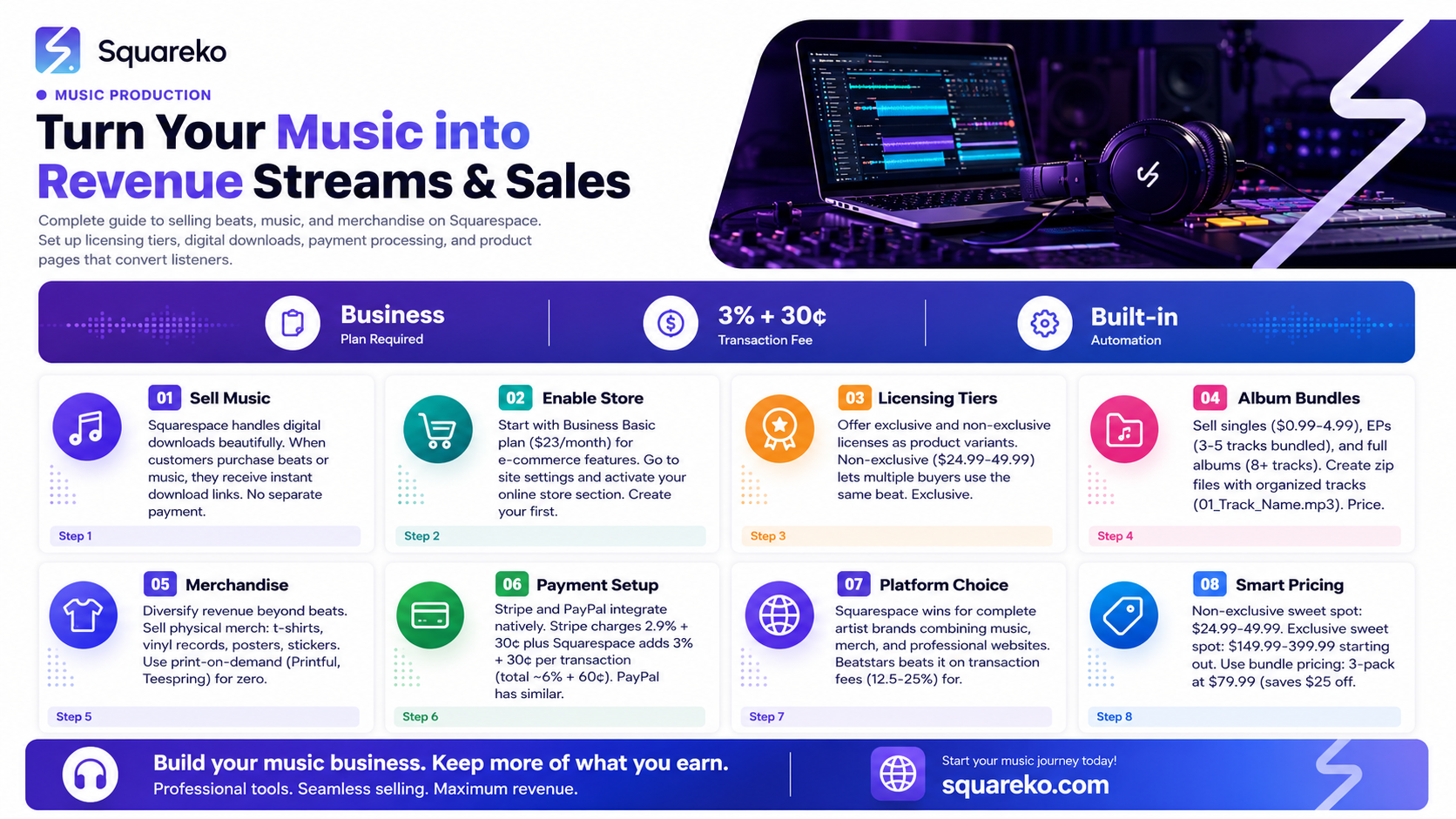
Yes, absolutely. Squarespace is built with e-commerce functionality that handles digital downloads beautifully. When a customer purchases a beat or music track from your store, they receive an instant download link. You don't need a separate payment processor or third-party service just to get started—everything integrates directly into your Squarespace site.
The platform supports:
Digital downloads (MP3, WAV, FLAC, or any file type)
Physical merchandise (merchandise tied to music releases, branded gear, vinyl)
Automatic file delivery after purchase (no manual fulfillment needed)
Inventory tracking for physical items
Payment processing through Stripe and PayPal
Customizable product pages with artist bios, sound samples, and licensing info
Here's what matters: Squarespace's e-commerce is genuinely functional for music sales. You won't be fighting the platform to make it work. The main tradeoff is that Squarespace charges transaction fees (3% + 30¢ per transaction) on top of payment processor fees, which increases your costs compared to some specialized platforms. But you get a beautiful, integrated storefront as part of your website.
Setting Up Your Squarespace Store for Digital Downloads
Step 1: Choose the Right Squarespace Plan
You need a plan that includes e-commerce functionality. The Business Basic plan ($23/month) is the minimum tier that includes e-commerce features. Business Basic gives you:
Unlimited products
Digital product downloads
Inventory management
Email campaigns
Basic analytics
If you're serious about scaling your music sales, consider Business Pro ($33/month) or higher for advanced analytics, custom inventory rules, and better reporting.
Step 2: Enable Your Online Store
Once you're on an e-commerce plan, go to your site settings and ensure your online store is active. You'll see the Store section in your Squarespace navigation panel.
Step 3: Create Your First Product
Click Add a Product in your store section. Here's what to configure:
Product Title: Be specific and keyword-rich. Instead of just Beat #47, use something like Trap Beat - 'Midnight Grind' (Exclusive License) or Lo-Fi Hip-Hop Album: Urban Nights.
Product Description: This is where you sell the vibe. Describe:
The genre and BPM
What makes this beat unique
Who it's best for (producers, rappers, TikTok creators)
Technical specs (key, scale, instrumentation)
Licensing terms clearly stated
Product Image: Use a compelling cover art. This is your first visual impression. Make sure it reflects the mood of the music.
Pricing: Set your initial price. We'll dive deeper into pricing strategy later, but start with research on what similar beats are selling for.
Step 4: Upload Your Digital File
This is crucial. In the product editor:
Go to the Digital Files section
Click Add File
Upload your beat file (MP3, WAV, FLAC, etc.)
Set the file to automatically deliver after purchase
One strategy: Create different files for different license types. For example, if you're selling exclusive vs. non-exclusive licenses, you might upload:
A stereo MP3 (128 kbps) for non-exclusive
A high-quality WAV file for exclusive
Squarespace allows you to attach different files to different product variations, which we'll cover next.
Step 5: Use Product Variants for Licensing Tiers
This is where Squarespace gets smart. Use variants to offer multiple license types at different price points. For example:
Variant 1: Non-Exclusive License - $24.99 (delivers MP3 file)
Variant 2: Exclusive License - $149.99 (delivers WAV + project file)
When a customer selects a variant, they receive the specific file associated with that option. This is a game-changer for beat makers who want to offer different licensing tiers from a single product page.
Selling Beats: Exclusive vs. Non-Exclusive Licensing Setup
Understanding licensing is essential to selling beats successfully on Squarespace. Most beat makers offer two tiers:
Non-Exclusive Licenses
Non-exclusive means multiple buyers can purchase and use the same beat. This is the volume play—lower price point, higher frequency of sales.
Typical pricing: $19.99 - $49.99 per beat
What you deliver: Usually an MP3 file (128 kbps stereo), sometimes a WAV file (high-quality uncompressed audio).
Usage rights: The buyer can use the beat to create, release, and monetize their song on streaming platforms. You retain ownership of the original beat.
Why it works: New producers and independent rappers want affordable beats. You can sell the same beat dozens of times, and each sale is revenue in your pocket.
Exclusive Licenses
Exclusive means only one buyer can use the beat. Once sold, you remove it from your catalog (or clearly mark it as sold). Exclusive licenses command premium prices because the buyer gets unique ownership.
Typical pricing: $99.99 - $500+ per beat (depends on your production quality and track record)
What you deliver: WAV file (uncompressed high-quality audio), often plus:
Project files (Ableton, Logic, FL Studio)
Stems (individual instrument tracks)
MIDI files
Unlimited commercial rights
Why it works: Serious artists and labels want beats no one else can use. They're willing to pay more for uniqueness and creative control.
Implementing This on Squarespace
Create a single product for your beat with two variants:
Variant A: Non-Exclusive License
Price: $34.99
File: high-quality_beat_mp3
Variant B: Exclusive License
Price: $249.99
File: exclusive_package_wav_stems.zip
When a customer purchases, they select which option they want, and Squarespace automatically delivers the corresponding file.
Pro tip: Include a PDF with your license terms in both downloads. This sets clear expectations and protects you legally.
Selling Albums, EPs, and Single Tracks as Digital Downloads
Beyond individual beats, many musicians sell full projects through Squarespace.
Single Tracks
A single track is just one song. Pricing typically ranges from $0.99 to $4.99, depending on your following and production quality.
Setup: Create a product for each track. Include:
A sample or preview (embedded player on the product page)
Track length
Genre and mood
High-quality cover art
EPs (Extended Plays)
An EP is typically 3-5 tracks bundled together. Price at a discount relative to buying individual tracks. If each track is $2.99, bundle them for $8.99.
Setup: Upload all tracks as a zipped file (all_tracks.zip). When downloaded, customers receive a folder with all tracks organized and labeled.
Full Albums
Albums (8+ tracks) offer the best perceived value. Price aggressively: if individual tracks are $2.99, consider bundling an 10-track album for $14.99. Customers feel they're getting a deal, and you move more volume.
Setup: Create a ZIP file containing:
All tracks labeled clearly (01_Track_Name.mp3, 02_Track_Name.mp3, etc.)
A README.txt with tracklist and credits
Optional: Album artwork as a high-res image file
Pre-Orders
Squarespace doesn't have a built-in pre-order feature, but you can work around it:
Create a product for the pre-order
Set it to manual fulfillment
When the album is ready, upload the file and Squarespace sends it to all buyers
Switch back to automatic delivery for future sales
Setting Up Music Merchandise (T-shirts, Vinyl, Posters)
Don't just sell music—sell the brand. Merchandise creates an emotional connection and additional revenue.
Print-on-Demand vs. Inventory
Print-on-Demand (POD): You design the merch, and a third party manufactures and ships on demand. You pay per item, customers pay retail price, and you pocket the margin. Zero upfront inventory cost.
Popular POD services:
Print-on-Demand Integration
Printful
Teespring
Redbubble
Traditional Inventory: You buy merch in bulk (t-shirts, vinyl, etc.) and store it. Higher upfront cost, but better margins and more control over quality.
Merch Ideas for Musicians
T-Shirts & Hoodies: Your album art becomes wearable. Price at $25-40 depending on quality.
Vinyl Records: If your music has gained traction, a vinyl pressing is a legitimate product. Price at $25-35 per record.
Posters: Album artwork or tour posters. Price at $15-25.
Stickers: Low-cost, high-profit merch. Price at $3-5.
Signed Physical Copies: If you're pressing CDs or vinyl, offer signed copies at a premium ($5-10 more than unsigned).
Setting Up Merch in Squarespace
Create a product page for each item
Upload product photos from multiple angles
Specify size options (S, M, L, XL) using variants
Link to your fulfillment service or manage inventory manually
Set pricing to include your production costs + margin
For physical merchandise, you're responsible for shipping. Squarespace has built-in shipping calculators where you can set rates by weight, location, or flat fee.
Payment Processors: Stripe and PayPal on Squarespace
Squarespace integrates natively with two payment processors: Stripe and PayPal. Understanding the fee structure matters, especially for digital products where margins are higher.
Stripe
Stripe is the default on Squarespace and handles the majority of e-commerce transactions.
Fee Structure:
2.9% + 30¢ per transaction (U.S. domestic cards)
3.9% + 30¢ for international cards
Squarespace adds 3% + 30¢ transaction fee on top
Total cost per sale: ~6% + 60¢ per transaction
Example: A $50 beat sale costs you:
Stripe: $1.45 + $0.30 = $1.75
Squarespace: $1.50 + $0.30 = $1.80
Total fees: $3.55 (7.1% of the sale)
PayPal
Some customers prefer PayPal, and Squarespace lets you accept it.
Fee Structure:
2.9% + 30¢ per transaction (standard)
Squarespace adds 3% + 30¢
Total cost: Similar to Stripe, around 6% + 60¢
Which Should You Use?
Most beat makers use Stripe (the default) because it's seamless. PayPal is good to enable as a backup option for customers who prefer it. You'll take the fee hit either way, but Stripe generally has better conversion rates.
Key insight: If you're selling high-volume, low-margin items, these fees add up. This is why some beat makers eventually migrate to specialized platforms like Beatstars (which has lower transaction fees) or their own payment system. But for starting out on Squarespace, Stripe works fine.
Squarespace vs. Beatstars vs. Bandcamp—Comparison Table
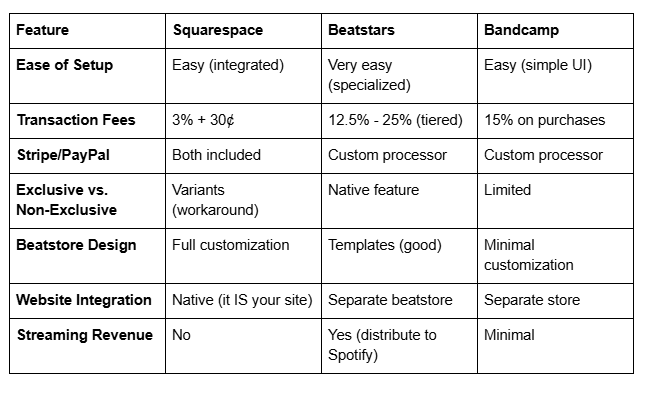
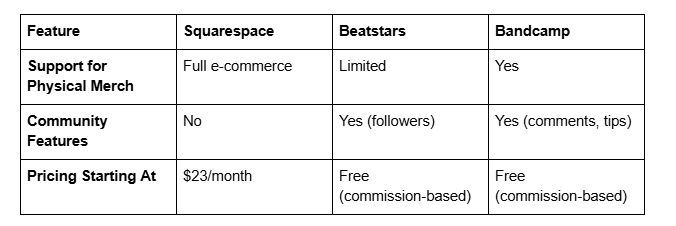
Let's be honest: Squarespace isn't the only option for selling beats online. Here's how it stacks up against two major competitors.
Verdict
Choose Squarespace if:
You want a complete website and store in one platform
You're selling both music and merch
You value design customization and brand control
You're willing to pay platform fees for integration
Choose Beatstars if:
You're focused solely on selling beats (no merch)
You want the lowest transaction fees for high volume
You want built-in features for exclusive licensing
You want community features and a followers system
Choose Bandcamp if:
You're an artist selling your own music (albums, singles)
You want to build a community around your work
You want direct fan support (tips)
You're okay with minimal customization
For a complete artist brand that includes music, merch, and a professional website, Squarespace wins. For beat makers focused purely on volume sales, Beatstars edges it out on fees.
Pricing Your Music: What Works on Squarespace Stores
Pricing is where many musicians leave money on the table. Here's what actually works:
Beats: Non-Exclusive
The sweet spot: $24.99 - $49.99
The reason: This price point feels legitimate (not too cheap, doesn't feel like a ripoff) but is low enough that impulse buyers will purchase. At $19.99, you're leaving money on the table. At $74.99, you're asking newer producers to take a bigger gamble on an unknown beat maker.
Psychological pricing: $24.99 converts better than $25.00 because it looks like a deal.
Beats: Exclusive
The sweet spot: $149.99 - $399.99
This depends entirely on your track record. If you have zero sales history, exclusive beats at $349.99 won't move. Start at $149.99 and raise prices as you build credibility. Once you've sold 50+ beats and have testimonials, you can justify $249.99+.
Albums & EPs
Pricing formula: (Number of tracks × average single price) × 0.7
If individual tracks are priced at $2.99, a 10-track album should be around $20.93 (say $19.99 or $21.99).
This gives customers a discount (30% off the bundle) while you move more volume.
Bundle Deals
Create bundle products where customers buy multiple beats together at a slight discount:
3-beat pack: Regular price ($34.99 × 3 = $104.97) → Bundle price ($79.99) = Save $25
10-beat pack: $199.99 instead of $349.90
Bundles are fantastic for moving inventory and increasing average order value.
Testing & Optimization
Start with moderate pricing, monitor your conversion rate, and adjust:
If beats aren't selling, lower the price by $5-10
If beats are selling consistently, raise the price by $5-10
Track what price point gives you the highest revenue (not just most sales)
Example: 10 sales at $49.99 ($499.90) beats 20 sales at $24.99 ($499.80)—and it requires less marketing effort.
Driving Traffic to Your Music Store
Setting up a beautiful store means nothing if no one visits. Here's how to get people to actually buy.
1. Leverage Your Existing Platform
If you have a TikTok, Instagram, YouTube, or Twitter following, these are your primary sales channels.
Share beat samples in TikTok videos with a link in bio
Post behind-the-scenes production clips on Instagram Reels with your Squarespace link in the bio
Create YouTube videos around beats (production tutorials, beat breakdowns, sample packs)
Tweet production tips with beat links
2. SEO Content
Create blog posts that rank for music production keywords and link to your beat store.
Examples:
Best Trap Beats Under $50 for Independent Rappers
How to Choose a Beat License: Exclusive vs. Non-Exclusive
Lo-Fi Hip-Hop Production: Tools, Techniques, and Where to Find Beats
For deep technical guidance on optimizing your beat store visibility, consult our Music Producer Website Design Tips resource.
Each blog post drives organic traffic and positions you as an authority.
3. Email List
Build an email list through:
A lead magnet (free beat sample pack)
Signup form on your homepage
Pop-up offering a discount code for first purchase
Email your list when you release new beats, have a sale, or drop merch. Email is high-converting because you're reaching people who already know you.
4. Paid Ads
If you have budget:
Facebook/Instagram Ads: Target producers, rappers, and beat enthusiasts. Show your best beat samples. Cost-per-click is usually $0.50-2.00.
Google Shopping Ads: Show beats directly in Google search results. High intent, but higher cost-per-click.
TikTok Ads: Relatively cheap. Show a beat sample with captions. Test different creative.
Start small ($5-10/day) and scale if you see positive ROI.
5. Collaborations
Partner with other producers, rappers, or beat makers:
Cross-promote on social media
Create beat packs together
Appear on each other's YouTube or podcasts
6. Free Samples
Offer 2-3 free beats as a loss leader. New customers will check out your paid catalog if they like the free ones.
Interested in distributing your music beyond your own store? See our Music Distribution Strategy for Independent Producers for expanding your reach.
Tips for a High-Converting Music Store Page
Even great music won't sell if your store page doesn't convert. Here's what moves the needle:
1. Product Page Design
High-quality cover art: This is the first thing potential buyers see. Invest in professional album artwork.
Embedded audio player: Let customers preview the beat before buying. Squarespace has a built-in player.
Technical specs: Include BPM, key, genre, instrumentation. Producers want this info.
License information: Clear, upfront language about what buyers can do with the beat.
Social proof: If you have testimonials or past sales, mention them (Over 500 beats sold builds trust).
2. Product Descriptions That Sell
Bad: Trap beat, good for rap.
Good: "Dark Trap Beat - 'Concrete Jungle' | 140 BPM, Dm Key. Moody strings, 808s, and snappy hats create an introspective vibe perfect for introspective rap about street life or overcoming adversity. Produced in Ableton. Non-exclusive MP3 download included."
Your description should:
Name the beat
State BPM and key
Describe the mood and instrumentation
Say who it's for (rappers, singers, producers, TikTok creators)
List what's included (MP3, WAV, stems, etc.)
Clarify licensing
3. Multiple Product Variants
Always offer exclusive and non-exclusive options on the same page. More choices = higher conversion. Some buyers will upgrade from non-exclusive to exclusive if the option is right there.
4. Trust Signals
Testimonials: This beat fit perfectly with my style. Will definitely buy again. - @Producer123
Track record: Over 1,000 beats sold
Clear refund/satisfaction policy: Not happy? Money-back guarantee within 7 days.
About the producer: A short bio builds credibility.
5. Call to Action (CTA)
Your Buy Now button should be prominent, contrasting in color, and placed early on the page. Don't make customers scroll forever to purchase.
6. Pricing Transparency
State all fees upfront if you're charging shipping (for merch). For digital downloads, there should be zero surprise charges—just the price you advertised.
7. Mobile Optimization
Most traffic comes from phones. Make sure your store page looks great and functions smoothly on mobile. Squarespace handles this automatically, but test it yourself.
8. Related Products
At the bottom of a product page, suggest related beats or bundles. Customers who bought this also enjoyed... drives additional sales.
-
Yes. Once you upload your music file to a product, Squarespace automatically sends a download link to the customer's email immediately after purchase. No manual work required. You can customize the email message customers receive.
-
Squarespace accepts any file format: MP3, WAV, FLAC, AIFF, ZIP files, PDFs, etc. There's no file size limit, though very large files (over 1 GB) may take longer to download. For most beats and music, WAV (typically 50-100 MB) and MP3 (5-15 MB) are standard.
-
Yes, using product variants. Create one product for your beat with multiple variants: "Non-Exclusive License" and "Exclusive License." Assign different files and prices to each variant. When a customer selects which license they want, they receive the corresponding file.
-
Squarespace handles it completely through Stripe or PayPal integration. You don't need a separate account or processor. Just connect your Stripe or PayPal account to Squarespace, and payments go directly to you.
-
Squarespace charges 3% + 30¢ per transaction, on top of payment processor fees (2.9% + 30¢ for Stripe). Total cost is roughly 6% + 60¢ per transaction. For a $50 beat, you'd pay about $3.55 in fees.
-
Absolutely. Squarespace has full e-commerce for physical products. You can manage inventory, set shipping rates, and integrate with print-on-demand services (Printful, Teespring) or handle fulfillment yourself.
-
Non-exclusive means multiple buyers can purchase and use the same beat. Exclusive means only one buyer can own and use that beat—once sold, it's removed from your catalog. Exclusive beats command premium prices ($150-500+) because of exclusivity; non-exclusive beats are lower-priced ($20-50) because you sell them multiple times.
-
Squarespace doesn't have a native pre-order feature, but you can work around it. Create a product, set it to manual fulfillment, and when your album/beat is ready, upload the file and Squarespace notifies all buyers. Switch to automatic delivery for ongoing sales.
Ready to Turn Your Music Into a Thriving Online Business?
The music industry has fundamentally shifted. You no longer need a record label, distributor, or middleman to sell your beats directly to fans and producers. A Squarespace store puts all of that power in your hands—and it's far easier to set up than you might think.
The key is approaching it strategically. That means understanding your licensing options (exclusive vs. non-exclusive), pricing competitively, and designing product pages that actually convert visitors into paying customers. When you get these elements right, you're not just selling beats—you're building a sustainable income stream from your art.
But here's the truth: setting up an e-commerce music store is one thing. Building it right, with proper branding, conversion optimization, and a marketing strategy that actually drives traffic, is another. Many beat makers and musicians launch a Squarespace store, add a few products, and then wonder why nothing sells. They're missing the bigger picture.
At Squareko.com, we specialize in helping music producers, beat makers, and independent artists design, build, and optimize Squarespace stores that generate real revenue. We understand the music industry, we understand Squarespace's capabilities and limitations, and we understand what it takes to convert music listeners into paying customers.
Whether you're just launching your first beat store or you're an established producer looking to revamp your online presence, we've helped dozens of musicians build Squarespace sites that don't just look incredible—they generate consistent sales.
Here's what we can do for you:
Custom Store Design: A beautiful, branded Squarespace store that reflects your music and stands out from generic beat-selling sites
E-commerce Optimization: Strategic pricing, product page copywriting, and conversion optimization that turns browsers into buyers
Marketing Strategy: A plan to drive targeted traffic to your store (SEO, social media, email, ads)
Technical Setup: Everything from payment processing to digital file delivery, so you can focus on making music
Ongoing Support: We don't just build and disappear—we help you scale and optimize as you grow
If you're serious about selling beats and music on Squarespace, let's talk. We offer a free discovery call where we listen to your goals, assess your current setup (if you have one), and show you exactly how we can help you build a profitable music store.
Book your free discovery call today. No sales pitch, no pressure—just a genuine conversation about your music business goals and how we can help you achieve them.

About the Author
Walid | Squareko.com
Walid is the founder of Squareko.com, a Squarespace web design agency specializing in e-commerce sites for creative professionals—musicians, beat makers, producers, and digital artists. With over a decade of experience in web design and e-commerce optimization, Walid has helped dozens of independent musicians build profitable online stores on Squarespace.
His expertise spans Squarespace's technical capabilities, music industry best practices, and conversion-focused design. When he's not building music stores, Walid stays actively involved in the music production community, regularly writing guides and tutorials for independent artists.
